# Text

## Specification

### tags

* Type: `String`
* Specifies how to treat HTML tags.

Allowed values:

<table><thead><tr><th width="193.5555419921875" valign="top">Value</th><th valign="top">Specification</th></tr></thead><tbody><tr><td valign="top"><strong>strip</strong></td><td valign="top">Removes HTML tags.</td></tr><tr><td valign="top"><strong>stripall</strong></td><td valign="top">Removes all HTML tags (including unclosed).</td></tr><tr><td valign="top"><strong>escape</strong></td><td valign="top">Converts <code>&#x3C;</code> , <code>></code> and <code>&#x26;</code> to HTML entities.</td></tr></tbody></table>

### validate

* Type: `Object`
* Specifies parameter validation.

Available parameters:

<table><thead><tr><th width="139.5555419921875" valign="top">Parameter</th><th width="126.4444580078125" valign="top">Type</th><th valign="top">Specification</th></tr></thead><tbody><tr><td valign="top"><strong>max</strong></td><td valign="top">number</td><td valign="top">Specifies the maximum length.</td></tr><tr><td valign="top"><strong>min</strong></td><td valign="top">nNumber</td><td valign="top">Specifies the minimum length.</td></tr><tr><td valign="top"><strong>pattern</strong></td><td valign="top">string</td><td valign="top"><p>Specifies a RegExp pattern that a text parameter should conform to.</p><p>In most cases, the pattern has to be wrapped in <code>^</code> and <code>$</code> e.g. <code>^[a-z]+$</code> in order to validate the whole input, not just a part.</p></td></tr></tbody></table>

### nested

Available types:

<table><thead><tr><th width="126.77777099609375" valign="top">Type</th><th valign="top">Specification</th></tr></thead><tbody><tr><td valign="top"><strong>array</strong></td><td valign="top">Provides an array of nested parameters that are shown when the value of the parameter is set (value is not empty).</td></tr><tr><td valign="top"><strong>string</strong></td><td valign="top">Provides the URL address of an RPC to load a list of nested parameters.</td></tr><tr><td valign="top"><strong>object</strong></td><td valign="top">Provides a detailed specification of nested parameters.</td></tr></tbody></table>

{% tabs %}
{% tab title="Use of nested fields" %}

```javascript
{
    "name": "myText",
    "type": "text",
    "label": "My Text",
    "nested": "rpc://getNestedFields"
}
```

{% endtab %}
{% endtabs %}

## Examples

### Basic text field

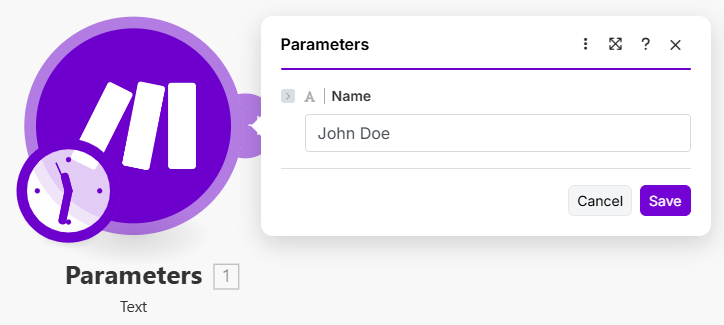
A basic text input.

{% tabs %}
{% tab title="Appearance" %}

<div align="left"><figure><img src="https://1562974717-files.gitbook.io/~/files/v0/b/gitbook-x-prod.appspot.com/o/spaces%2FNS0mCBwODiYtOVXjc6qf%2Fuploads%2Fgit-blob-b45c84a56c75f5245e986decd17908ce4187d054%2Ftext1a.png?alt=media" alt="" width="543"><figcaption></figcaption></figure></div>
{% endtab %}

{% tab title="Source" %}

```json
[
	{
		"type": "text",
		"label": "Name",
		"name": "name"
	}
]
```

{% endtab %}
{% endtabs %}

### Strip HTML tags

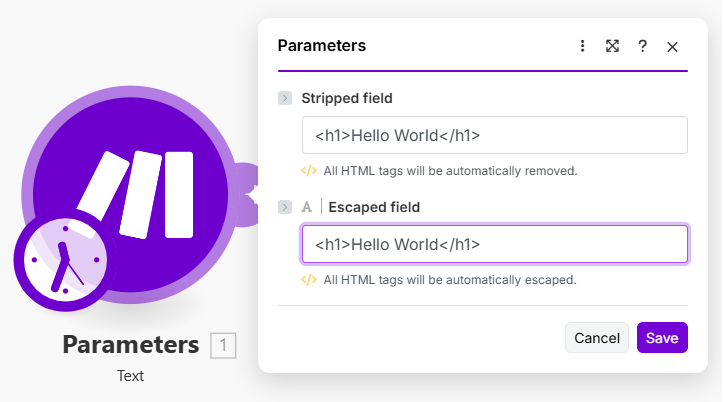
Enable HTML tags stripping or escaping using the `tags` option.

{% tabs %}
{% tab title="Appearance" %}

<div align="left"><figure><img src="https://1562974717-files.gitbook.io/~/files/v0/b/gitbook-x-prod.appspot.com/o/spaces%2FNS0mCBwODiYtOVXjc6qf%2Fuploads%2Fgit-blob-f739b7e2ab7c8e5ef2165210c5448b50be143cf1%2Ftext2a.png?alt=media" alt="" width="543"><figcaption></figcaption></figure></div>
{% endtab %}

{% tab title="Source" %}

```json
[
	{
		"type": "text",
		"label": "Stripped field",
		"name": "stripped",
		"tags": "strip"
	},
	{
		"type": "text",
		"label": "Escaped field",
		"name": "escaped",
		"tags": "escape"
	}
]
```

{% endtab %}

{% tab title="Output" %}
**Stripped field**

```
Hello world
```

**Escaped field**

```
&lt;h1&gt;Hello world&lt;/h1&gt;
```

{% endtab %}
{% endtabs %}

### Validate length

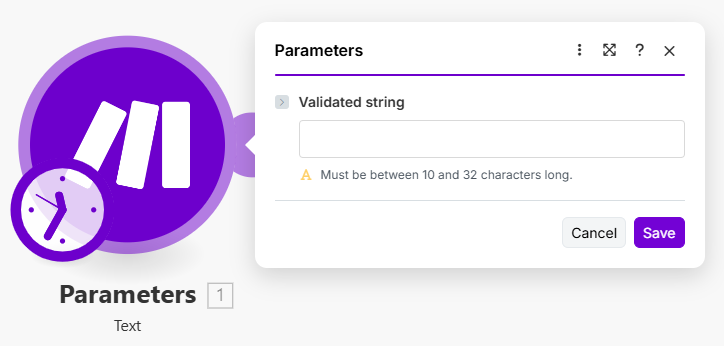
Control the length of the inserted string value by setting `validate.max` and `validate.min` .

{% tabs %}
{% tab title="Appearance" %}

<div align="left"><figure><img src="https://1562974717-files.gitbook.io/~/files/v0/b/gitbook-x-prod.appspot.com/o/spaces%2FNS0mCBwODiYtOVXjc6qf%2Fuploads%2Fgit-blob-b8d1e3db6aa2c5b50e8c0a234f9252822b431802%2Ftext3a.png?alt=media" alt="" width="543"><figcaption></figcaption></figure></div>
{% endtab %}

{% tab title="Source" %}

```json
[
	{
		"type": "text",
		"label": "Validated string",
		"name": "validated",
		"validate": {
			"max": 32,
			"min": 10
		}
	}
]
```

{% endtab %}
{% endtabs %}

### Validate pattern

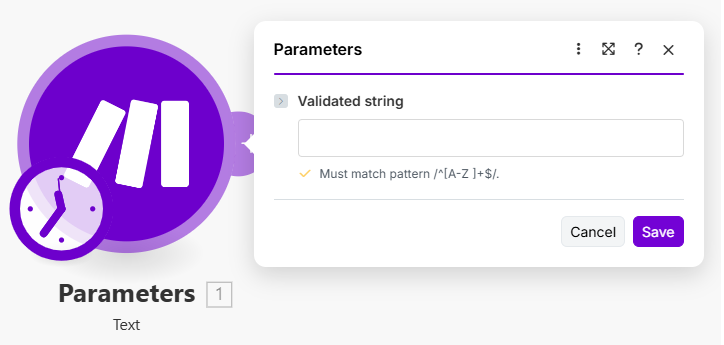
Use a regular expression to validate the text input.

{% tabs %}
{% tab title="Appearance" %}

<div align="left"><figure><img src="https://1562974717-files.gitbook.io/~/files/v0/b/gitbook-x-prod.appspot.com/o/spaces%2FNS0mCBwODiYtOVXjc6qf%2Fuploads%2Fgit-blob-cf79de4072bdea8a642caa92e0a4e2189cee4d5a%2Ftext4a.png?alt=media" alt="" width="543"><figcaption></figcaption></figure></div>
{% endtab %}

{% tab title="Source" %}

```json
[
	{
		"type": "text",
		"label": "Validated string",
		"name": "validated",
		"validate": {
			"pattern": "^[A-Z ]+$"
		}
	}
]
```

{% endtab %}
{% endtabs %}

### Search button

Add an [RPC button](https://developers.make.com/custom-apps-documentation/app-components/rpcs/dynamic-fields-rpc) (also called as a search button) to perform an RPC call inside the field. Usually used to find an ID of a specific item.