> For the complete documentation index, see [llms.txt](https://developers.make.com/llms.txt). Markdown versions of documentation pages are available by appending `.md` to page URLs; this page is available as [Markdown](https://developers.make.com/custom-apps-documentation/debug-your-app/debugging-of-pagination-in-list-search-modules.md).
# Pagination in list/search modules
Debug pagination issues in list and search modules by creating test records and results
If the API supports pagination, it should be implemented. To test that the pagination works as intended, we recommended you set the page size to a low number, if possible.
{% tabs %}
{% tab title="Example" %}
```javascript
{
"url": "/contacts/filters/{{parameters.filter_id}}",
"method": "GET",
"qs": {
//"per_page": 100
"per_page": 10 //set value for testing
},
"response": {
"output": "{{item.contact}}",
"iterate": "{{body.data.contacts}}",
"limit": "{{parameters.limit}}"
},
"pagination": {
"qs": {
"page": "{{pagination.page}}"
},
"condition": "{{body.data.max_page > body.data.page}}"
}
}
```
{% endtab %}
{% endtabs %}
## Create test records
Next, create as many records to equal one page and a few more.
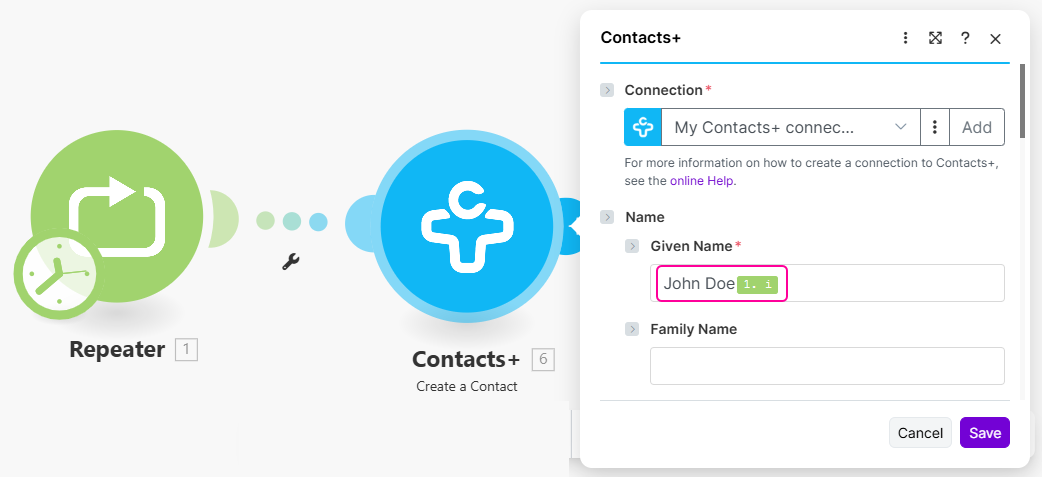
Use the **Flow Control > Repeater** module to do this, which also returns the ID of the repeat.
Map this ID in the following module to differentiate the records.
Once the test records are created, you can test your search module.
## Test search module
With the help of the ID from the repeater, you can see if the records are ordered and how, and whether the records are correctly retrieved (for example, they are not being duplicated).
Example of array output
In the console, you can also control every retrieved page and its size.
Example of paginated response
## Possible pagination issues:
* The stop condition `limit` set by the user doesn't work. Therefore all the records that exist in the account are retrieved (or only the first page if there is also the issue from the point below).
* The `next page` condition isn't set correctly so the next page isn't retrieved, even though it should according to the user's limit and the content of the account.
* The `next page` condition isn't set correctly so the next pages are retrieved, even though all records were already retrieved. They can either be duplicated or without any records. Without looking into the console, you will not see them.
* The pagination is not optimized so even though there is a parameter saying “there is no other page to retrieve”, it still retrieves the next page that is empty (developer implements the pagination for offset even though he/she could implement it using the cursor parameter).
* The value in the parameter `page` is too low so there are too many pages being retrieved (= too many calls).
* Uncommon: the records are duplicated because the pages are overlapped (1st page 1-100, 2nd page 100-199 instead of 1-100, 101-200).
---
# Agent Instructions
This documentation is published with GitBook. GitBook is the documentation platform designed so that both humans and AI agents can read, navigate, and reason over technical content effectively. Learn more at gitbook.com.
## Querying This Documentation
If you need additional information that is not directly available in this page, you can query the documentation dynamically by asking a question.
Perform an HTTP GET request on the current page URL with the `ask` query parameter, and the optional `goal` query parameter:
```
GET https://developers.make.com/custom-apps-documentation/debug-your-app/debugging-of-pagination-in-list-search-modules.md?ask=&goal=
```
`ask` is the immediate question: it should be specific, self-contained, and written in natural language.
`goal` is optional and describes the broader end goal you are ultimately trying to accomplish on behalf of the user. GitBook uses it to tailor the answer towards what is most useful for that goal.
The response will contain a direct answer to the question and relevant excerpts and sources from the documentation.
Use this mechanism when the answer is not explicitly present in the current page, you need clarification or additional context, or you want to retrieve related documentation sections.
.png?alt=media)
