# Make Developer Hub

Where you’ll find the latest developer solutions for building, automating, and innovating with Make.

## Explore developer resources

<table data-card-size="large" data-view="cards" data-full-width="false"><thead><tr><th></th><th></th><th><select><option value="EqokGDeZExvF" label="Early Access" color="blue"></option></select></th><th data-hidden data-card-cover data-type="image">Cover image</th><th data-hidden data-card-target data-type="content-ref"></th></tr></thead><tbody><tr><td><h3><strong>Make API</strong></h3></td><td>Dive into comprehensive guides and references to automate using our Make API.</td><td></td><td><a href="/files/ygDtMUwml2Yizp28RBak">/files/ygDtMUwml2Yizp28RBak</a></td><td><a href="/spaces/LXp8X1eBwkwrLIWrN9cg">/spaces/LXp8X1eBwkwrLIWrN9cg</a></td></tr><tr><td><h3><strong>Custom Apps</strong></h3></td><td>Learn how to create your own custom applications using our Apps Editor.</td><td></td><td><a href="/files/rad0oezSI8u9MMVCb4Gj">/files/rad0oezSI8u9MMVCb4Gj</a></td><td><a href="https://developers.make.com/custom-apps-documentation/get-started/overview">https://developers.make.com/custom-apps-documentation/get-started/overview</a></td></tr><tr><td><h3>MCP Server </h3></td><td>Allow AI systems to trigger and interact with your Make automation workflows.</td><td><span data-option="EqokGDeZExvF">Early Access</span></td><td><a href="/files/O4Dqat5BvkHD9hc3jOc5">/files/O4Dqat5BvkHD9hc3jOc5</a></td><td><a href="/spaces/yHSLDvK9bMDQI1lCXXt6">/spaces/yHSLDvK9bMDQI1lCXXt6</a></td></tr><tr><td><h3><strong>White Label Help Center</strong></h3></td><td>Explore how to navigate and administrate your White Label instance as an OEM customer.</td><td></td><td><a href="/files/bR2cfejQ3yA3xJcWielk">/files/bR2cfejQ3yA3xJcWielk</a></td><td><a href="/spaces/gXuLxcOr6J0dITP40dsF">/spaces/gXuLxcOr6J0dITP40dsF</a></td></tr><tr><td><h3>Make CLI</h3></td><td>Build, test, and manage your Make resources directly from the command line.</td><td></td><td><a href="/files/SUDUHNjjHTvkRiuKlgUq">/files/SUDUHNjjHTvkRiuKlgUq</a></td><td><a href="/spaces/1hrvjgtxJweadHEGZubd/pages/Lnb2R3KdoPXmKwbQA7Zy">/spaces/1hrvjgtxJweadHEGZubd/pages/Lnb2R3KdoPXmKwbQA7Zy</a></td></tr></tbody></table>

***

## More resources

<table data-view="cards"><thead><tr><th></th><th data-hidden data-card-cover data-type="files"></th><th data-hidden data-card-target data-type="content-ref"></th></tr></thead><tbody><tr><td><strong>Make Academy</strong></td><td><a href="/files/EdJqGmYrzIjumIC3RABI">/files/EdJqGmYrzIjumIC3RABI</a></td><td><a href="https://academy.make.com/">https://academy.make.com/</a></td></tr><tr><td><strong>Make Community</strong></td><td><a href="/files/lhoC9JHNET1kgMuTUQAO">/files/lhoC9JHNET1kgMuTUQAO</a></td><td><a href="https://community.make.com/">https://community.make.com/</a></td></tr><tr><td><strong>Make Help Center</strong></td><td><a href="/files/H7eOfkh4LDqzxi1OmH26">/files/H7eOfkh4LDqzxi1OmH26</a></td><td><a href="https://www.make.com/en/help/home">https://www.make.com/en/help/home</a></td></tr></tbody></table>


# Make API documentation

The Make API follows the REST API design. Make API is organized into resource-oriented URLs which also set the sections in the [API Reference](/api-documentation/api-reference) part of the documentation.

{% hint style="info" %}
Most Make API endpoints are reserved for our paid subscription plans and may not be accessible on the free tier.
{% endhint %}

To get yourself familiar with the basics of working with the Make API, continue reading to the [Getting started](/api-documentation/getting-started) section or jump directly into [making your first API request](/api-documentation/getting-started/making-your-first-api-request).

All requests to the Make API require authentication with the user authentication token with the relevant scopes enabled. To learn more about authentication in the Make API, go to the [Authentication](/api-documentation/authentication) section. You can also learn about the various API scopes in the [scopes overview](/api-documentation/authentication/api-scopes-overview).

If you are experiencing issues with the Make API, go to the [Troubleshooting](/api-documentation/troubleshooting) section for tips about what could go wrong and how to fix it.

{% hint style="info" %}
As a security best practice, make sure to use the correct case for your endpoints to work.
{% endhint %}


# Getting started

The Make REST API allows using HTTP requests to access Make data and control the Make platform without opening its graphical interface. This allows you to embed Make features into your software, add features on top of the platform, and automate your tasks that you perform in Make. To use the Make API, you need a Make account. Once logged in, you can [create an authentication token](/api-documentation/authentication/create-authentication-token) or [request an OAuth 2.0 client](https://developers.make.com/api-documentation/authentication/requesting-an-oauth-2.0-client) and start [making calls to the API](/api-documentation/getting-started/making-your-first-api-request).

The API allows you to interact with multiple [Make resources](/api-documentation/getting-started/resources).


# Make API structure

The URL of the Make API consists of three parts:

```
https://{zone_url}/api/{api_version}/{api_endpoint}
```

for example:

```
https://eu1.make.com/api/v2/users/me
```

### Base URL

Base URL is the core part of an API URL. API endpoint URLs are always relative to the base URL.

The `{zone_url}/api/{version}` form the base URL of the Make API. For example, the URL `https://eu1.make.com/api/v2` is a base URL for the Make API for organizations in the EU1 zone.

### **Zone URL**

The zone URL refers to the geological location of the region and environment of your Make organization. Typically, this URL is connected with the infrastructure region (for example, The United States or Europe) and the pricing plan your organization (the Enterprise pricing plans or others).

You can find out the base URL for your organization in the URL address bar of your Make organization dashboard:

<figure><img src="/files/aMvW0RLAqTJCZnmFwnuJ" alt=""><figcaption></figcaption></figure>

Example Make zone URLs:

* `https://eu1.make.com/`
* `https://eu2.make.com/`
* `https://eu1.make.celonis.com/`
* `https://us1.make.com/`
* `https://us2.make.com/`
* `https://us1.make.celonis.com/`

{% hint style="info" %}
Make sure to use the correct base URL when running API calls otherwise your API requests will fail.
{% endhint %}

### **API version**

The version of the API. The Make API is currently the second version.

### **API endpoint**

Each endpoint represents a resource you can work with. Endpoints may contain required or optional parameters. The resources are described in detail in [Make resources](/api-documentation/getting-started/resources).

{% hint style="info" %}
As a security best practice, make sure to use the correct case for your endpoints to work. You should review your scenarios to ensure that all API endpoints use the exact casing specified in the API documentation. Using incorrect casing, such as `/v2/Organizations` instead of `/v2/organizations`, or any other variation will cause the request to fail.
{% endhint %}


# HTTP methods

Make API uses standard HTTP methods to interact with endpoints. The following table lists the available HTTP methods and shows examples of endpoints these methods can be used with.

| **HTTP method**                           | **Description**                                                                                                                                                                                                                                                                                    |
| ----------------------------------------- | -------------------------------------------------------------------------------------------------------------------------------------------------------------------------------------------------------------------------------------------------------------------------------------------------- |
| <mark style="color:green;">`GET`</mark>   | <p>Retrieves a resource representation without modifying it.</p><p><em>Example:</em><br><a href="/pages/hhE636Wt3KslQ0VB4K9l"><code>/scenarios</code></a><br><em>returns all available Make scenarios</em></p>                                                                                     |
| <mark style="color:orange;">`POST`</mark> | <p>Creates a resource.</p><p><em>Example:</em><br><a href="/pages/eoNSNqV6D9Oxqx7GIPrZ"><code>/scenarios</code></a><br><em>creates a scenario</em></p>                                                                                                                                             |
| <mark style="color:blue;">`PUT`</mark>    | <p>Updates a resource. If the resource does not exist yet, this method creates it.</p><p><em>Example:</em><br><a href="/pages/nEKqXb40jZJUBO6XMI9n"><code>/scenarios/{scenarioId}/custom-properties</code></a><br><em>sets custom properties data for a scenario with the specified ID</em></p>    |
| `PATCH`                                   | <p>Makes a partial update on a resource. Does not replace the entire resource.</p><p><em>Example:</em><br><a href="/pages/ilvwkCOOasPx1reiIgiv"><code>/scenarios/{scenarioId}</code></a><br><em>updates properties (for example, scheduling or blueprint) of the scenario with a given ID</em></p> |
| <mark style="color:red;">`DELETE`</mark>  | <p>Removes a resource.</p><p><em>Example:</em><br><a href="/pages/GyN8HwyEEp5unDfhBISk"><code>/scenarios/{scenarioId}</code></a><br><em>deletes the scenario with a given ID</em></p>                                                                                                              |


# Making your first API request

This start guide will take you through making your first request to the Make API.

*Example:* *Let's imagine that you would like to list all data stores available in your team. Your team ID is 35. Returned data should be ordered in descending order.*

To make your first API call, you need to perform the following actions:

{% stepper %}
{% step %}
**Create an authentication token**. The token gives you access to Make API resources depending on your [Make role and assigned scopes](/api-documentation/authentication/api-scopes-overview). You must include the token in the **Authorization** header of all requests. Add the word **Token** and a space before the token itself:

```
'Authorization: Token {Your authentication token}'
```

{% endstep %}

{% step %}
**Choose the** [endpoint](/api-documentation/getting-started/resources) **that corresponds to the resource you want to interact with.** For this example, you need the `/data-stores` endpoint. The endpoint requires the `teamId` query parameter. Place the parameter after the question mark in the endpoint URL. To filter results, you also need the [parameter for ordering data](/api-documentation/pagination-sorting-filtering/pagination-and-sorting) - `pg[sortDir]`:

```
{zone_url}/api/v2/data-stores?teamId={teamId}&pg%5BsortDir%5D=asc
```

{% hint style="warning" %}
The `zone_url` refers to the Make zone you interact with. For example, `https://eu1.make.com.`
{% endhint %}
{% endstep %}

{% step %}
**Prepare the full request and send it.** In this case, use cURL to making the request. You want to retrieve data without modifying it - use the `GET` method. Let's put elements from the previous steps together.

{% hint style="warning" %}
The following request example contains a sample authentication token. Don't use it in your requests. [Generate your own token](/api-documentation/authentication/create-authentication-token).
{% endhint %}

Request:

```bash
curl --location \
--request GET 'https://eu1.make.com/api/v2/data-stores?teamId=35&pg%5BsortDir%5D=asc' \
--header 'Content-Type: application/json' \
--header 'Authorization: Token 93dc8837-2911-4711-a766-59c1167a974d'
```

Response:

```json
{
  "dataStores": [
    {
      "id": 15043,
      "name": "Old data store",
      "records": 10,
      "size": "620",
      "maxSize": "1048576",
      "teamId": 35
    },
    {
      "id": 13433,
      "name": "New data store",
      "records": 1,
      "size": "48",
      "maxSize": "1048576",
      "teamId": 35
    }
  ],
  "pg": {
    "sortBy": "name",
    "limit": 10000,
    "sortDir": "asc",
    "offset": 0
  }
}
```

Always include a request body in `POST`, `PUT`, or `PATCH` requests.
{% endstep %}

{% step %}
**Evaluate the response.** The API returns `200 OK` and a list of all data stores for the specified team. If your request failed, you receive an error code. Refer to [Troubleshooting and error handling](/api-documentation/troubleshooting) to troubleshoot the issue.
{% endstep %}
{% endstepper %}


# Rate limiting

Make API limits the number of requests you can send to the Make API. Make sets the rate limits based on your organization plan:

* **Core:** 60 per minute
* **Pro:** 120 per minute
* **Teams:** 240 per minute
* **Enterprise:** 1 000 per minute

If you exceed your rate limit, you get `error 429` with the message:

```
Requests limit for organization exceeded, please try again later.
```

{% hint style="info" %}
You can check your organization API rate limit with the API call `GET {base-url}/organizations/{organizationId}`. In the API call response, the `license` object contains the property `apiLimit` with your organization's rate limit.

Check the organization detail API endpoint [documentation](broken://pages/DZASZFejNa8nz1M5jCeY).
{% endhint %}

Read more about Make [pricing](https://www.make.com/en/help/general/pricing-parameters).


# Resources

API resources are grouped into sections corresponding with Make features and components.

Each endpoint resource contains the following details:

## Methods and endpoints

[Methods](/api-documentation/getting-started/http-methods) define the allowed interaction and endpoints define how to access the resource — what URI should be used to interact with a resource.

**Example:** `GET /data-stores`

## Required scopes

Defines what resources you are allowed to interact with based on scopes you selected when creating your [API access token](/api-documentation/authentication/create-authentication-token).

**Example:** `datastores:write`

## Resource description

Describes the expected outcome when using an endpoint, and what Make features the resource relates to.

## Parameters

These are options you can include with a request to modify the response. Each parameter specifies whether it is required or not. Parameters are divided into two main groups:

* **Path parameters** — path parameters are always required. They are used to identify or specify the resource (usually by indicating its ID) and they should be placed inside the endpoint URI.

  **Example:** `/data-stores/54`
* **Query parameters** — query parameters are often optional. They can be used to specify the resource but they are usually used as [parameters to sort or filter resources](/api-documentation/pagination-sorting-filtering). They are placed at the end of the endpoint URI, after a question mark. Separate multiple parameters with an ampersand symbol. If a parameter contains square brackets, encode them.

  **Example:** `/data-stores?teamId=123&pg%5Boffset%5D=10`
* **Request body** — for some endpoints (mainly connected with the POST, PUT, or PATCH HTTP methods), you can also see the Request body section in the endpoint details. This section contains the description of the payload properties that are needed to modify the resource.

**Example:**

```json
{
  "name": "Customers",
  "teamId": 123,
  "datastructureId": 178,
  "maxSizeMB": 1
}
```

## Request examples

These are request samples that show how to make a request to the endpoint. They consist of the request URL and authentication token (if needed) and other elements required to make a request in the selected language.

Example of request for creating a data store:

```bash
curl -X POST https://eu1.make.dev/api/v2/data-stores 
--header 'Content-Type: application/json' 
--header 'Authorization: Token 93dc8837-2911-4711-a766-59c1167a974d' 
-d '{"name":"Customers","teamId":123,"datastructureId":1234,"maxSizeMB":1}'
```

## Response examples

These are response samples you would receive when calling the request in real life. The outcome strictly depends on the request sample. The response schema contains all possible elements available in the response. Each response has its [status code](/api-documentation/troubleshooting/http-status-codes). Example of created data store:

```json
{
  "dataStore": {
    "id": 20024,
    "name": "Customers",
    "teamId": "123",
    "datastructureId": 1234,
    "records": 0,
    "size": "0",
    "maxSize": "1048576"
  }
}
```


# Authentication

The Make API requires authentication of the API requests with your API tokens or your OAuth 2.0 connection. If your requests are not authenticated, the Make API will return an authentication error.

## Authentication token

To authenticate your API request, send your API token in the following HTTP `header` parameter:

```http
Authorization: Token 12345678-12ef-abcd-1234-1234567890ab
```

The authentication token always contains information about the access to the API resources. The authentication token access is defined with API scopes. If you want to learn about Make API scopes, continue to the [Make API scopes overview](/api-documentation/authentication/api-scopes-overview).

To learn how to create and manage your API token, go to the [creating](/api-documentation/authentication/create-authentication-token) and [management](/api-documentation/authentication/authentication-managing) sections.

## OAuth 2.0 connection

As an alternative to using an authentication token, you can request an OAuth 2.0 connection to access resources on the Make platform. OAuth 2.0 access is defined with API scopes. To learn more about this connection type and to request access, continue to the [Requesting an OAuth 2.0 client](/api-documentation/authentication/requesting-an-oauth-2.0-client) section.


# Make roles and API scopes

Accessibility of Make API endpoints differs depending on the Make platform you use. On Make and our hosted cloud version, regular users cannot access the administration interface. Administration API resources are meant only for internal Make administrators.

In the on-premise version, any user with a platform administration role assigned can access the administration interface. These users can also access API endpoints that are meant for administrators.

Access to the Make API resources depends also on the scopes assigned to the authentication token. Some resources require more than one scope. There are two types of scopes - **read** and **write**.

**Read scope** `:read`

Allows you to use the `GET` method with endpoints, usually to get a list of resources or a resource detail. No modification is allowed.

**Write scope** `:write`

Allows you to use the `POST`, `PUT`, `PATCH`, or `DELETE` methods with endpoints to create, modify, or remove resources.

{% hint style="warning" %}
Even if you are not the administrator, you can assign to your token the scopes meant for administrators. However, if you try to access the admin resources as a regular user, you will receive the `403 Access denied` error in response.
{% endhint %}

## Administration scopes (only for administrators of Make White Label platforms)

<details>

<summary><strong>Administration</strong></summary>

`admin:read`

* Allows getting all resources and information available only to administrators -- all resources that are available in the administration interface, such as collections of all created users, templates, scenarios, and custom and native apps for the whole platform and all their details.

`admin:write`

* Allows performing all actions available only to administrators --- all actions that can be performed in the administration interface, such as creating organizations, deleting approved templates, reviewing custom apps, creating and deleting new users, overwriting scenarios and templates settings.

</details>

<details>

<summary><strong>Native apps</strong></summary>

`apps:read`

* Allows getting a collection of all native apps.
* Allows getting details of a native app.

`apps:write`

* Allows updating a native app.
* Allows deleting a native app.

</details>

<details>

<summary><strong>System settings</strong></summary>

`system:read`

* Allows reading the Make platform settings.

`system:write`

* Allows modifying the Make platform settings.

</details>

## Standard user scopes (for all users of Make platforms)

<details>

<summary><strong>Analytics</strong></summary>

`analytics:read`

* Allows retrieving analytics data for the specified organization.

</details>

<details>

<summary><strong>Connections</strong></summary>

`connections:read`

* Allows retrieving connections for a given team.
* Allows getting details of a connection.

`connections:write`

* Allows creating new connections.
* Allows updating connections.
* Allows deleting connections.
* Allows setting data for connections.
* Allows verifying connections.
* Allows checking if a connection scope is limited.

</details>

<details>

<summary><strong>Custom property structures</strong></summary>

`custom-property-structures:read`

* Allows retrieving the list of custom properties structures in the organization.
* Allows getting custom properties items.

`custom-property-structures:write`

* Allows creating custom properties structures.
* Allows creating custom property structure items.
* Allows updating custom property structure items.
* Allows deleting custom property structure items.

</details>

<details>

<summary><strong>Data stores</strong></summary>

`datastores:read`

* Allows getting all data stores for a given team.
* Allows getting records from a data store.

`datastores:write`

* Allows creating new data store.
* Allows updating data stores.
* Allows deleting data store.
* Allows modifying the records of a data store.

</details>

<details>

<summary><strong>Devices</strong></summary>

`devices:read`

* Allows retrieving all devices for a given team.
* Allows getting details of a device.

`devices:write`

* Allows creating new devices.
* Allows updating devices.
* Allows deleting devices.

</details>

<details>

<summary><strong>Incomplete executions</strong></summary>

`dlqs:read`

* Allows getting all incomplete executions of a given scenario.
* Allows getting details of an incomplete execution.
* Allows getting bundles, blueprints, and logs of an incomplete execution.

`dlqs:write`

* Allows updating incomplete executions.
* Allows deleting incomplete executions.

</details>

<details>

<summary><strong>Custom functions</strong></summary>

`functions:read`

* Allows getting data about the custom functions which belong to the team.
* Allows getting the history of updates to the custom functions.

`functions:write`

* Allows creating custom functions.
* Allows updating custom functions.
* Allows deleting custom functions.

</details>

<details>

<summary><strong>Hooks</strong></summary>

`hooks:read`

* Allows getting all hooks (mailhooks and webhooks) for a given team.
* Allows getting hook requests.
* Allows checking if a hook is active.

`hooks:write`

* Allows creating new hooks.
* Allows updating hooks.
* Allows deleting hooks.
* Allows enabling or disabling hooks.
* Allows starting or stopping the automatic determination of a data structure for a hook.
* Allows setting data for hooks.

</details>

<details>

<summary><strong>Keys</strong></summary>

`keys:read`

* Allows getting all keys for a given team.
* Allows getting key types.

`keys:write`

* Allows creating new keys.
* Allows updating keys.
* Allows deleting keys.

</details>

<details>

<summary><strong>Notifications</strong></summary>

`notifications:read`

* Allows getting all notifications for a given user.
* Allows getting details of a notification.

`notifications:write`

* Allows marking notifications as read.
* Allows deleting notifications.

</details>

<details>

<summary><strong>Organizations</strong></summary>

`organizations:read`

* Allows getting all organizations to which the authenticated user belongs.
* Allows getting installed apps, invitations, user roles, and basic details of organizations.

`organizations:write`

* Allows creating new organizations (only for admins).
* Allows updating organizations.
* Allows deleting organizations.
* Allows accepting invitations to organizations.
* Allows adding members to organizations.

`organizations-variables:read`

* Allows getting data of organization variables to which the authenticated user belongs.
* Allows getting the history of updates of custom organization variables.

`organizations-variables:write`

* Allows creating custom organization variables.
* Allows updating custom organization variables.
* Allows deleting custom organization variables.

</details>

<details>

<summary><strong>Scenarios</strong></summary>

`scenarios:read`

* Allows getting all scenarios for a given team or organization.
* Allows getting details of a scenario.
* Allows getting properties of triggers included in scenarios.
* Allows getting scenario blueprints.
* Allows getting blueprint versions.
* Allows getting scenario logs.
* Allows getting scenario folders.
* Allows inspecting scenario interface.
* Allows retrieving custom scenario properties data.

`scenarios:write`

* Allows creating new scenarios and scenario folders.
* Allows updating scenarios and scenario folder.
* Allows cloning scenarios.
* Allows verifying whether module settings are set or not.
* Allows activating and deactivating scenarios.
* Allows deleting scenarios and scenario folders.
* Allows updating scenario interface.
* Allows adding custom scenario properties data.
* Allows updating custom scenario properties data.
* Allows deleting custom scenario properties data.

`scenarios:run`

* Allows running scenarios with the API.

</details>

<details>

<summary><strong>Custom apps</strong></summary>

`sdk-apps:read`

* Allows getting all custom apps for the authenticated user.
* Allows getting information from specific configuration sections of a custom app.
* Allows getting invitation details for an app.

`sdk-apps:write`

* Allows creating custom apps.
* Allows managing configuration of custom apps.
* Allows cloning custom apps.
* Allows requesting review of custom apps.
* Allows rolling back changes made in custom apps.
* Allows uninstalling custom apps from organizations.
* Allows deleting custom apps.

</details>

<details>

<summary><strong>Teams</strong></summary>

`teams:read`

* Allows getting all teams that belong to a given organization.
* Allows getting details of a team.
* Allows getting all team roles.
* Allows getting details of a team role.

`teams:write`

* Allows creating new teams.
* Allows updating teams.
* Allows deleting teams.

`teams-variables:read`

* Allows getting data of team variables to which the authenticated user belongs.
* Allows getting the history of updates of custom team variables.

`team-variables:write`

* Allows creating custom team variables.
* Allows updating custom team variables.
* Allows deleting custom team variables.

</details>

<details>

<summary><strong>Templates</strong></summary>

`templates:read`

* Allows retrieving all private templates for a given team.
* Allows getting all public templates.
* Allows getting private or public template details.
* Allows getting private or public template blueprints.

`templates:write`

* Allows creating new templates.
* Allows updating templates.
* Allows deleting templates.
* Allows publishing private templates.
* Allows requesting approval of published templates.

</details>

<details>

<summary><strong>Data structures</strong></summary>

`udts:read`

* Allows retrieving all data structures for a given team.

`udts:write`

* Allows creating new data structures.
* Allows updating data structures.
* Allows deleting data structures.
* Allows cloning data structures.

</details>

<details>

<summary><strong>Users</strong></summary>

`user:read`

* Allows getting all users who belong to a given team or organization.
* Allows getting API authentication tokens assigned to the currently authenticated user.
* Allows getting organization invitations assigned to the currently authenticated user.
* Allows getting organization invitations assigned to a user.
* Allows getting organization and team roles that can be assigned to any user.
* Allows getting a number of unread notifications for the currently authenticated user.
* Allows getting organizations invitations for a user.
* Allows getting details of an invitation to an organization for a user.
* Allows getting details of a notification assigned to a user in a given team.
* Allows getting team roles of a user.

`user:write`

* Allows setting a user role for a given team.
* Allows setting a user role in a given organization.
* Allows transferring organization ownership to a user.
* Allows updating a notification for a user in a given team.
* Allows creating a new API authentication token for a currently authenticated user.
* Allows deleting an API authentication token identified by timestamp for a currently authenticated user.
* Allows deleting an account of a currently authenticated user.
* Allows updating details of a user.

</details>


# Creating API token

Make API uses authentication tokens to authenticate requests. You must include your authentication token in the headers of all requests that you send to the API.

Generate and manage API tokens from your profile in the Make interface.

{% hint style="warning" %}
If you have access to multiple Make zones, generate separate tokens for each of them.
{% endhint %}

{% stepper %}
{% step %}
Sign in to Make and click your avatar at the bottom-left corner of the page.
{% endstep %}

{% step %}
Click **Profile**.
{% endstep %}

{% step %}
Open the **API** tab.

![Choose API](/files/E3GcqArbExWY6G8o7kTL)
{% endstep %}

{% step %}
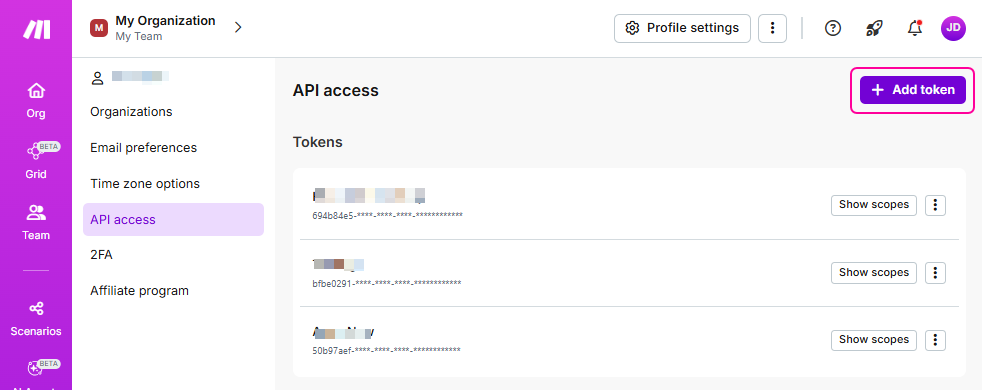
Click **Add token**.

![Add token](/files/W0xp9xzCCsNWfI2VGWgR)
{% endstep %}

{% step %}
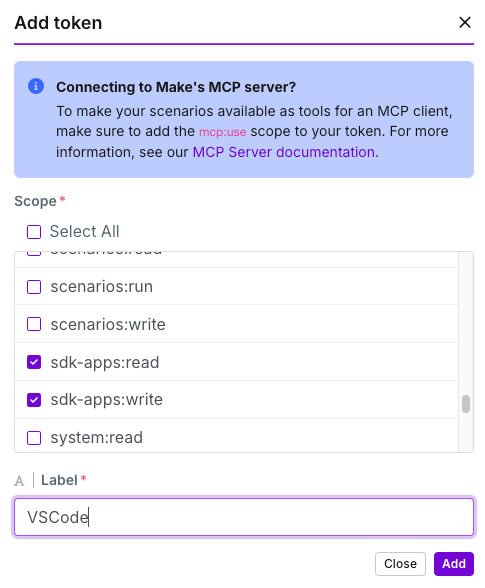
In the **Add token** dialog, do the following:

* **Label**: type a custom name for your token that will help you recognize what the token is used for
* **Scopes**: select the scopes you need for working with API resources. For more information about scopes, refer to [Make roles and API scopes](/api-documentation/authentication/api-scopes-overview).
  {% endstep %}

{% step %}
Click **Save**.
{% endstep %}
{% endstepper %}

Make generates your token. Copy it and store it in a safe place.

{% hint style="warning" %}
**Do not share your token with anyone!**

Once you leave the **Profile** section, parts of your token will be hidden for security reasons. You won't be able to see or copy your token again.
{% endhint %}

With an active token, you are ready to make API calls. For more details, refer to the [Getting started](/api-documentation/getting-started) section.


# Managing API token

After you [create your authentication token](/api-documentation/authentication/create-authentication-token) and open the API tab in your profile again, you can no longer change the token or the scopes assigned to the token. You can only view the initial part of the token value and view the scopes.

To manage your tokens:

{% stepper %}
{% step %}
**Sign in** to Make. Click your avatar at the bottom-left corner of the page.
{% endstep %}

{% step %}
Click **Profile**.
{% endstep %}

{% step %}
Open the **API** tab.
{% endstep %}

{% step %}
Click one of the following buttons:

* **Show scopes**: to see scopes that are assigned to the token.
* **Delete**: to permanently remove the token.
  {% endstep %}

{% step %}
Click **Save**.
{% endstep %}
{% endstepper %}

Since editing the token is not possible, you can always delete the old token and replace it with a new one. You will need to do this if you decide to add or remove scopes from your authentication token.


# Requesting an OAuth 2.0 client

Make's API uses OAuth 2.0 authorization protocol to enable secure third-party access. This standard security framework allows applications to interact with Make's resources while protecting sensitive credentials.

To be able to start using OAuth 2.0, your app has to request a client on our side.

## How to submit a registration request

{% stepper %}
{% step %}
Complete the [OAuth client registration form](https://f.make.com/oauth) with your application details.
{% endstep %}

{% step %}
Choose your required API scopes. For more information, refer to our [API scopes documentation](/api-documentation/authentication/api-scopes-overview).
{% endstep %}

{% step %}
Submit your registration request.
{% endstep %}
{% endstepper %}

Our team will review your request within 10 business days. Upon approval, you'll receive the necessary credentials to integrate your application with the Make platform.


# OAuth 2.0 flow in the Make API

This guide explains how to integrate Make into your application using OAuth 2.0 authorization. For general OAuth 2.0 concepts, refer to the [OAuth 2.0 protocol specification](https://oauth.net/2/).

Before implementing OAuth 2.0, you must [register your OAuth 2.0 client](https://developers.make.com/api-documentation/authentication/requesting-an-oauth-2.0-client) with Make's authorization server to obtain:

* **Client ID** (required for all clients)
* **Client Secret** (only for confidential clients)

#### Supported protocols

* **OIDC (OpenID Connect)**: Simplified user authentication
* **PKCE (Proof Key for Code Exchange)**: Enhanced security for public clients (**mandatory** for SPAs and mobile apps)

#### API Endpoints

<table><thead><tr><th width="161.43359375">Endpoint</th><th>URL</th></tr></thead><tbody><tr><td>Authorization</td><td><a href="https://www.make.com/oauth/v2/authorize">https://www.make.com/oauth/v2/authorize</a></td></tr><tr><td>Token</td><td><a href="https://www.make.com/oauth/v2/token">https://www.make.com/oauth/v2/token</a></td></tr><tr><td>JWKS URI</td><td><a href="https://www.make.com/oauth/v2/oidc/jwks">https://www.make.com/oauth/v2/oidc/jwks</a></td></tr><tr><td>User info</td><td><a href="https://www.make.com/oauth/v2/oidc/userinfo">https://www.make.com/oauth/v2/oidc/userinfo</a></td></tr><tr><td>Revocation</td><td><a href="https://www.make.com/oauth/v2/revoke">https://www.make.com/oauth/v2/revoke</a></td></tr><tr><td>OpenID discovery</td><td><a href="https://www.make.com/.well-known/openid-configuration">https://www.make.com/.well-known/openid-configuration</a></td></tr></tbody></table>


# Authorization code flow with refresh token (confidential clients)

**Use this flow when:** Your application can securely store a Client Secret (server-side applications).

**Benefits:** Provides both access tokens and refresh tokens for long-term access.

{% stepper %}
{% step %}
**Redirect user for authorization**

Redirect the user to the authorization endpoint:

```
GET https://www.make.com/oauth/v2/authorize
```

**Required parameters:**

* `client_id`: Your application's Client ID
* `response_type`: Set to `code`
* `redirect_uri`: Pre-registered callback URL
* `scope`: Requested permissions (include `openid` for OpenID Connect)
* `state`: Random string for CSRF protection (recommended)

**Example URL:**

```
https://www.make.com/oauth/v2/authorize?  client_id=your_client_id&  response_ty
```

{% endstep %}

{% step %}
**User authorization**

The user:

1. Logs into Make.com (if not already authenticated)
2. Reviews and approves the requested permissions
3. Gets redirected to your `redirect_uri` with an authorization code

**Callback URL format:**

```
https://yourapp.com/callback?code=authorization_code&state=random_state_strin
```

{% endstep %}

{% step %}
**Exchange code for tokens**

Make a server-side POST request to the token endpoint:

```
POST https://www.make.com/oauth/v2/token
```

**Required Parameters:**

* `client_id`: Your Client ID
* `client_secret`: Your Client Secret
* `grant_type`: Set to `authorization_code`
* `code`: Authorization code from Step 2

**Response:**

```json
json{  "access_token": "eyJ...",  "refresh_token": "eyJ...",  "id_token": "eyJ...",  "token_type": "Bearer",  "expires_in": 3600}
```

{% endstep %}

{% step %}
**Refresh access token**

When the access token expires, use the refresh token:

```
POST https://www.make.com/oauth/v2/token
```

**Required parameters:**

* `client_id`: Your Client ID
* `client_secret`: Your Client Secret
* `grant_type`: Set to `refresh_token`
* `refresh_token`: Refresh token from Step 3
  {% endstep %}
  {% endstepper %}


# Authorization code flow with PKCE (public clients)

**Use this flow when:** Your application cannot securely store secrets (SPAs, mobile apps).

**Note:** This flow typically does not provide refresh tokens for security reasons.

{% stepper %}
{% step %}
**Generate PKCE parameters**

Before starting authorization, generate:

1. **Code Verifier**: Random string (43-128 characters)
2. **Code Challenge**: SHA256 hash of code\_verifier, Base64url encoded (no padding)

**Example (JavaScript):**

```javascript
javascript// Generate code verifierconst codeVerifier = generateRandomString(128);// Generate code challengeconst codeChallenge = base64URLEncode(sha256(codeVerifier));
```

{% endstep %}

{% step %}
**Redirect user for authorization**

Redirect to the authorization endpoint with PKCE parameters:

```
GET https://www.make.com/oauth/v2/authorize
```

**Required parameters:**

* `client_id`: Your Client ID
* `response_type`: Set to `code`
* `redirect_uri`: Pre-registered callback URL
* `scope`: Requested permissions
* `state`: Random string for CSRF protection
* `code_challenge`: Generated in Step 1
* `code_challenge_method`: Set to `S256`
  {% endstep %}

{% step %}
**User authorization**

The user:

1. Logs into Make.com (if not already authenticated)
2. Reviews and approves the requested permissions
3. Gets redirected to your `redirect_uri` with an authorization code

**Callback URL format:**

```
https://yourapp.com/callback?code=authorization_code&state=random_state_strin
```

{% endstep %}

{% step %}
**Exchange code for tokens**

Make a POST request (can be from frontend or backend):

```
POST https://www.make.com/oauth/v2/token
```

**Required Parameters:**

* `client_id`: Your Client ID
* `grant_type`: Set to `authorization_code`
* `code`: Authorization code from Step 3
* `code_verifier`: Original code verifier from Step 1

**Response:**

```json
json{  "access_token": "eyJ...",  "id_token": "eyJ...",  "token_type": "Bearer",  "expires_in": 3600}
```

{% endstep %}
{% endstepper %}


# Token expiration

To ensure security and support proper token rotation, the tokens issued during the OAuth flow have the following defined expiration periods:

### **Access token: 5 minutes**

The Access token has a short lifespan and is intended for immediate use. It is recommended to refresh the token to obtain a new access token when the current one expires.

### **Refresh token: 6 months**

The Refresh token provides long-term access without requiring the user to re-authorize frequently. The Refresh token should be securely stored and used to acquire new access tokens. In case of a token leak or compromise, the Refresh token can be immediately revoked by from your user profile in the **API access** section.

### **Authorization code: 5 minutes**

The Authorization code is intended for single-use and must be exchanged for an Access token and Refresh token within it's expiration window.


# Best practices and error handling

### Security best practices

* Validate the `state` parameter to prevent CSRF attacks
* Store secrets securely (confidential clients only)
* Implement proper error handling for expired or invalid tokens

### Common scopes

* `openid`: Required for OpenID Connect authentication
* Add other Make-specific scopes as needed for your application

### Error handling

Common error responses from the token endpoint:

<table><thead><tr><th width="252.61328125">Error</th><th>Description</th></tr></thead><tbody><tr><td><code>invalid_request</code></td><td>Missing or invalid parameters</td></tr><tr><td><code>invalid_client</code></td><td>Invalid client credentials</td></tr><tr><td><code>invalid_grant</code></td><td>Invalid or expired authorization code</td></tr><tr><td><code>unsupported_grant_type</code></td><td>Grant type not supported</td></tr></tbody></table>

Always check the response status and handle errors appropriately in your application.


# Pagination, sorting and filtering

The majority of responses containing a collection of resources are paginated. Pagination limits the number of returned results per request to avoid delays in receiving a response and prevent overloading with results. Thanks to pagination, the API can run at its best performance.

You set pagination, sorting, and filtering parameters in query parameters. Separate multiple query parameters using the & symbol. The order of the parameters does not matter.

{% hint style="warning" %}
Pagination and filtering parameters contain square brackets -- `[` and `]`. Always encode them in URLs.
{% endhint %}


# Pagination and sorting

`pg[limit]`

Defines the maximum number of results to return. For example, `pg[limit]=100`. The default value varies with different resources.

`pg[offset]`

Defines the number of results you want to skip before getting the results you need. For example, `pg[offset]=10`. The default value for most endpoints is `0`.

`pg[sortBy]`

Defines the property by which to sort results. For example, `pg[sortBy]=id`. By default, results are usually sorted by `name` or `id`.

`pg[sortDir]`

Defines the sorting order. Use `asc` for ascending order, use `desc` for descending order. The default ordering direction is usually ascending.

**Example:**

Let’s say we want to retrieve data stores that belong to the team with ID 212.

{% stepper %}
{% step %}
The request URL with the default pagination settings looks as follows:

```
{zone_url}/api/v2/data-stores?teamId=212
```

Where `zone_url` is the URL of your Make zone. For example: `https://eu1.make.com`
{% endstep %}

{% step %}
Add the pagination parameters.

In this case, we want to skip the first 10 results, limit the results to 50 data stores and sort them in ascending order. Use the following query parameters:

```
&pg%5Boffset%5D=10&pg%5BsortDir%5D=asc&pg%5Blimit%5D=50
```

{% endstep %}

{% step %}
The full request URL looks like this:

```
{base_url}/data-stores?teamId=212&pg%5Boffset%5D=10&pg%5BsortDir%5D=asc&pg%5Blimit%5D=50
```

Where `base_url` is `https://eu1.make.com/api/v2`
{% endstep %}
{% endstepper %}


# Filtering

Use the `cols[]` parameter to select values you want in the response. You can also use the `cols[]` parameter to get values that the endpoint does not return by default. The set of available filtering values is different for each endpoint. Check the example API call responses to see what data you can get from the API call.

Specify the `cols[]` parameter multiple times in the API call to get multiple values from the endpoint. You can put numbers in the brackets to specify order in which you want to list the values in the API call response.

**Example:** Get only the `name`, `id` and `teams` in the specified organization. List the data in order: `name`, `id`, `teams`.

{% stepper %}
{% step %}
The request URL snippet to get the `name`, `id` and `teams` values of the specified organization, in the specified order, looks like this:

```
/organizations/{organizationId}?cols[1]=id&cols[2]=name&cols[3]=teams
```

{% endstep %}

{% step %}
After encoding the square brackets you get the following request URL. The `organizationId` in our test case is 8013:

```
/organizations/8013?cols%5B1%5D=id&cols%5B2%5D=name&cols%5B3%5D=teams
```

{% endstep %}

{% step %}
The full request looks like this:

```
GET {base-url}/organizations/8013?cols%5B1%5D=id&cols%5B2%5D=name&cols%5B3%5D=teams
```

{% endstep %}
{% endstepper %}

Some endpoints have specific filtering parameters. For example, in the `/templates` endpoint you can use the `usedApps[]` parameter. The `usedApps[]` parameter allows you to get only the templates containing specific apps.


# Troubleshooting and error handling

The Make API uses standard HTTP error codes in combination with custom Make error codes.

In general:

* a response status code `2xx` means succesfull request
* a response status code `4xx` means error on the client side
* a response status code `5xx` means error on the server side (internal error in Make)

For more information, check detailed overview of error types and their possible causes in the [dedicated section](/api-documentation/troubleshooting/http-status-codes).

For general troubleshooting tips, check out the [Troubleshooting](/api-documentation/troubleshooting/common-issues) section.


# HTTP status error codes

This article describes the most frequent error codes returned by the Make API. If you need help resolving common issues related to the Make API, refer to the [Troubleshooting](/api-documentation/troubleshooting/common-issues) section. If your request is incorrect, in the response, you can find the details of the error that should help you to troubleshoot. All Make API errors have the same schema. Below you can see the example of a response for the request with the incorrect parameter. This can happen, for example, when you request a resource you do not have access to:

**Example:**

```json
{
  "detail": "Access denied.",
  "message": "Permission denied",
  "code": "SC403",
}
```

## Standard HTTP error statuses

<table data-header-hidden><thead><tr><th width="172"></th><th width="576"></th></tr></thead><tbody><tr><td><strong>HTTP status</strong></td><td><strong>Explanation</strong></td></tr><tr><td><strong>400</strong><br>Bad request</td><td><p>The server could not understand the request due to invalid syntax. This could happen, for example, due to the invalid data type and prohibited data duplication. Below you can find examples of more specific error messages related to some features:</p><p><strong>Connections</strong></p><ul><li>Invalid connection type</li><li>Invalid scope</li><li>Common data must be a collection</li></ul><p><strong>Data stores and data structures</strong></p><ul><li><code>teamId</code> validation failed</li></ul><p><strong>Devices</strong></p><ul><li>Unknown identifier format</li><li>Some of the incoming messages could not be deleted because they are being processed right now</li><li>Some of the outgoing messages could not be deleted because they are being processed right now</li><li>Some of the executions could not be deleted because they are being processed right now</li></ul><p><strong>DLQs</strong></p><ul><li>Some of the executions could not be deleted because they are being processed right now</li></ul><p><strong>Hooks</strong></p><ul><li>Missing value of required parameter</li></ul><p><strong>Keys</strong></p><ul><li>Invalid input file</li><li>File is too big</li><li>File is not a valid primary key</li><li>File is not a valid certificate</li></ul><p><strong>Notifications</strong></p><ul><li>User has no organization in the zone</li></ul><p><strong>Scenarios</strong></p><ul><li><code>teamId</code> and <code>organizationId</code> cannot be used together</li><li>Missing required parameter <code>teamId</code> or <code>organizationId</code></li><li>Invalid key, not parsable to integer</li></ul><p><strong>Templates</strong></p><ul><li>Validation failed for templateUrl unknown format</li></ul><p><strong>Apps</strong></p><ul><li>Invalid response from the repository</li><li>Failed to attach to the pap installation</li><li>Failed to finish installation</li><li>App uninstallation failed</li><li>Invalid install specification</li><li>Install file of the pap is not valid</li></ul></td></tr><tr><td><strong>403</strong><br>Forbidden</td><td>You do not have access rights to the content which means that your request was unauthorized.</td></tr><tr><td><strong>404</strong><br>Not Found</td><td><p>The server cannot find the requested resource (probably it does not exist) even if the endpoint is valid. Servers may also send this response instead of 403 to hide the existence of a resource from an unauthorized client.</p><p>This code may appear, for example, when you try to get details of the nonexistent/removed scenario, team, template, user, organization or app.<br>Make API endpoints are case sensitive, you may see this error if you have used incorrect case for your endpoints.</p></td></tr><tr><td><strong>413</strong><br>Payload Too Large</td><td><p>The request entity exceeded the limits set on the server. Below you can find examples of more specific error messages related to the Apps feature:</p><p><strong>Apps</strong></p><ul><li>Failed to save image. Invalid upload</li><li>Failed to save image. Image is too big</li><li>Commit message is too big</li></ul></td></tr><tr><td><strong>424</strong><br>Failed Dependency</td><td><p>The request failed due to failure of a previous request. Below you can find examples of more specific error messages related to the Connections and Apps features:</p><p><strong>Connections</strong></p><ul><li>Connection action crashed</li><li>Connection action timed out</li></ul><p><strong>Apps</strong></p><ul><li>Failed to load manifest for app</li><li>Remote procedure crashed</li><li>Remote procedure timed out</li></ul></td></tr><tr><td><strong>429</strong><br>Too many requests</td><td>You have exceeded the rate limit of API requests for your organization. Wait for one minute for the limit period to reset. Check the <a href="/pages/VmDoybHsaROIe3AJkqKh">API rate limiting section</a> for more information.</td></tr><tr><td><strong>503</strong><br>Service Unavailable</td><td>A dependency is currently unavailable. This error code may appear, for example, in relation to unavailable dependencies for DLQs, scenarios or teams.</td></tr><tr><td><strong>304</strong><br>Account Does Not Exist</td><td>This error appears when the account does not exist or it was not found.</td></tr></tbody></table>

## Custom Make error codes

<table data-header-hidden><thead><tr><th width="177"></th><th></th></tr></thead><tbody><tr><td><strong>HTTP status</strong></td><td><strong>Explanation</strong></td></tr><tr><td><br><strong>IM001</strong><br>Access Denied</td><td><p>This error code indicates the lack of rights to perform specific actions. Below you can find examples of more specific error messages related to the Apps feature:</p><p><strong>Users</strong></p><ul><li>The user cannot change the password</li><li>The user cannot change the email</li></ul><p><strong>Apps</strong></p><ul><li>Cannot disapprove app</li></ul></td></tr><tr><td><strong>IM002</strong><br>Insufficient Rights</td><td>This error appears when you do not have sufficient rights to interact with the resource.</td></tr><tr><td><strong>IM003</strong><br>Storage Not Enough Space</td><td>This error appears when limit of data stores storage is exceeded.</td></tr><tr><td><strong>IM004</strong><br>Confirmation Required</td><td>This error appears when the removal process of the key in the data stores is not confirmed.</td></tr><tr><td><strong>IM005</strong><br>Invalid Input Parameters</td><td><p>This error appears when you use invalid parameters in a request. Below you can find examples of more specific error messages related to some features:</p><p><strong>Hooks</strong></p><ul><li>Invalid hook type</li></ul><p><strong>Connections</strong></p><ul><li>There is nothing to configure in this connection</li></ul><p><strong>Users</strong></p><ul><li>The user cannot be part of any organization</li></ul><p><strong>Custom functions</strong></p><ul><li>Your custom function's code has a syntax error or uses a JavaScript feature that Make doesn't support. Check the <a href="https://www.make.com/en/help/functions/custom-functions#limitations-of-custom-functions">custom functions limitations</a> in the Make Help center.</li><li>The custom function's name in the custom function's code and in the <code>name</code> field don't match.</li><li>The custom function's name is the same as a JavaScript reserved word. A custom function cannot have the same name as a JavaScript reserved word. Check the <a href="https://www.w3schools.com/js/js_reserved.asp">list of JavaScript reserved words.</a></li></ul></td></tr><tr><td><strong>IM011</strong><br>Entity Limit Exceeded</td><td>This error appears when you exceed the limit for password change attempts.</td></tr><tr><td><strong>IM016</strong><br>Action is not possible due to dependencies</td><td><p>This error appears when you don't fulfill requirements to execute the API call. For example:</p><p><strong>Scenario inputs</strong></p><ul><li>If you have required scenario inputs you have to set the scenario scheduling to <strong>On demand</strong>.</li></ul></td></tr><tr><td><strong>IM102</strong><br>Invalid Credentials</td><td>This error appears when you use the invalid password.</td></tr></tbody></table>


# Troubleshooting

This section describes most common mistakes that result in API-related problems, such as receiving `Access denied` or `Not found` errors. You can also refer to the [HTTP status error codes](/api-documentation/troubleshooting/http-status-codes) for more details.

* **Using HTTP instead of HTTPS in the URL**

  Use HTTPS at the beginning of the URL in your request. This is required for security reasons.
* **Using an incorrect environment**

  If you have access to more than one Make environment, ensure that you use the correct environment in the URL and that you use a valid authentication token generated for this specific environment.
* **Using an incorrect endpoint**

  Ensure there are no empty or white spaces in the endpoint URL and that there are no backslash symbols at the end of the URL after the endpoint name.
* **Missing authentication details or using incorrect authentication details**

  Ensure that you are using the correct authentication details. To make a successful request, you need to have the correct [authentication token](/api-documentation/authentication/authentication-managing) with the correct scopes assigned to it.

  <div data-gb-custom-block data-tag="hint" data-style="warning" class="hint hint-warning"><p>Note that you need a separate token for each Make environment.</p></div>
* **Missing access to the requested resource**

  Ensure that scopes assigned to your authentication token correspond to the requested resource.

{% hint style="warning" %}
Note that you cannot access administrator resources if you are a regular Make user.
{% endhint %}

* **Missing required parameters or using invalid or improperly formatted parameters**

  Many endpoints require at least one mandatory parameter. Often it is the **teamId** or an ID of the specific resource. Do not forget to add the required parameters to the request. Also, note that query, path, and pagination parameters need to be properly formatted. The first query parameter should start with a question mark. Separate parameters with the ampersand symbol. Some special characters, for example, in the [pagination](/api-documentation/pagination-sorting-filtering/pagination-and-sorting) parameters, need to be encoded when used in URLs.
* **Sending an invalid or improperly formatted request body**

  The structure of the API request body must conform to the JSON schema standard. You can use JSON validators available on the internet to validate your request body before sending it.

{% hint style="warning" %}
If your issue is not mentioned in the table above and the [error code message](/api-documentation/troubleshooting/http-status-codes) do not indicate how to resolve the issue, please contact us via the help form at [Make Help center](https://www.make.com/en/help). Include a detailed description of the problem, the full request, and the error code and error message that you received.
{% endhint %}


# Client libraries

[Make TypeScript SDK](https://github.com/integromat/make-typescript-sdk)

The Make Typescript SDK provides full support for type definitions and a majority of Make API endpoints, built-in error handling, and response typing. It is fully compatible with pure JavaScript projects.

TypeScript is a syntactic superset of JavaScript. It features additional capabilities like optional static typing, interfaces, and advanced OOP features like classes and inheritance. TypeScript allows for the specification of types of variables, function parameters, and return values, enabling the detection of type-related errors during development rather than at runtime.


# API Reference


# Affiliate

## Register partner

> Registers the user as a partner in the affiliate program.

```json
{"openapi":"3.0.0","info":{"title":"Web API v2 - Public ","version":"1.0.0"},"tags":[{"name":"Affiliate"}],"servers":[{"url":"https://eu1.make.com/api/v2","description":"EU1 production zone"},{"url":"https://eu2.make.com/api/v2","description":"EU2 production zone"},{"url":"https://us1.make.com/api/v2","description":"US1 production zone"},{"url":"https://us2.make.com/api/v2","description":"US2 production zone"},{"url":"https://eu1.make.celonis.com/api/v2","description":"Celonis EU1 production zone"},{"url":"https://us1.make.celonis.com/api/v2","description":"Celonis US1 production zone"}],"security":[{"token":["user:write"]}],"components":{"securitySchemes":{"token":{"type":"apiKey","name":"Authorization","in":"header","description":"Authorize the API call with your API token in the `Authorization` header with the value: `Token your-api-token`.\n\nIf you don't have an API token yet, please refer to the [\"Authentication\" section](/api-documentation/authentication) to learn how to create one.\n"}}},"paths":{"/affiliate/partner-register":{"post":{"tags":["Affiliate"],"summary":"Register partner","description":"Registers the user as a partner in the affiliate program.","requestBody":{"content":{"application/json":{"schema":{"type":"object","properties":{"partnerCode":{"type":"string"},"paypalMeLink":{"type":"string"},"termsAndConditions":{"type":"boolean"}},"required":["partnerCode","paypalMeLink","termsAndConditions"]}}}},"responses":{"200":{"description":"Successful response","content":{"application/json":{"schema":{"type":"object","properties":{"ok":{"type":"integer"}}}}}}}}}}}
```

## Get commission stats

> Retrieves graph data for commisions in the past year for the current user.

```json
{"openapi":"3.0.0","info":{"title":"Web API v2 - Public ","version":"1.0.0"},"tags":[{"name":"Affiliate"}],"servers":[{"url":"https://eu1.make.com/api/v2","description":"EU1 production zone"},{"url":"https://eu2.make.com/api/v2","description":"EU2 production zone"},{"url":"https://us1.make.com/api/v2","description":"US1 production zone"},{"url":"https://us2.make.com/api/v2","description":"US2 production zone"},{"url":"https://eu1.make.celonis.com/api/v2","description":"Celonis EU1 production zone"},{"url":"https://us1.make.celonis.com/api/v2","description":"Celonis US1 production zone"}],"security":[{"token":["user:read"]}],"components":{"securitySchemes":{"token":{"type":"apiKey","name":"Authorization","in":"header","description":"Authorize the API call with your API token in the `Authorization` header with the value: `Token your-api-token`.\n\nIf you don't have an API token yet, please refer to the [\"Authentication\" section](/api-documentation/authentication) to learn how to create one.\n"}}},"paths":{"/affiliate/stats":{"get":{"tags":["Affiliate"],"summary":"Get commission stats","description":"Retrieves graph data for commisions in the past year for the current user.","parameters":[{"name":"dateFrom","in":"query","schema":{"type":"string","format":"date"}},{"name":"dateTo","in":"query","schema":{"type":"string","format":"date"}}],"responses":{"200":{"description":"Successful response","content":{"application/json":{"schema":{"type":"object","properties":{"stats":{"type":"array","items":{"type":"object","properties":{"date":{"type":"string","format":"date"},"visits":{"type":"integer"},"registrations":{"type":"integer"},"commission":{"type":"number"}}}}}}}}}}}}}}
```

## Get commissions

> Retrieves detailed data about individual commisions of the current user.

```json
{"openapi":"3.0.0","info":{"title":"Web API v2 - Public ","version":"1.0.0"},"tags":[{"name":"Affiliate"}],"servers":[{"url":"https://eu1.make.com/api/v2","description":"EU1 production zone"},{"url":"https://eu2.make.com/api/v2","description":"EU2 production zone"},{"url":"https://us1.make.com/api/v2","description":"US1 production zone"},{"url":"https://us2.make.com/api/v2","description":"US2 production zone"},{"url":"https://eu1.make.celonis.com/api/v2","description":"Celonis EU1 production zone"},{"url":"https://us1.make.celonis.com/api/v2","description":"Celonis US1 production zone"}],"security":[{"token":["user:read"]}],"components":{"securitySchemes":{"token":{"type":"apiKey","name":"Authorization","in":"header","description":"Authorize the API call with your API token in the `Authorization` header with the value: `Token your-api-token`.\n\nIf you don't have an API token yet, please refer to the [\"Authentication\" section](/api-documentation/authentication) to learn how to create one.\n"}}},"paths":{"/affiliate/commissions":{"get":{"tags":["Affiliate"],"summary":"Get commissions","description":"Retrieves detailed data about individual commisions of the current user.","parameters":[{"name":"statusId","in":"query","schema":{"type":"integer"}},{"name":"dateFrom","in":"query","schema":{"type":"string","format":"date"}},{"name":"dateTo","in":"query","schema":{"type":"string","format":"date"}},{"schema":{"type":"string","enum":["id"]},"name":"pg[sortBy]","in":"query","description":"The value that will be used to sort returned entities by."},{"name":"pg[offset]","in":"query","schema":{"type":"integer"},"description":"The value of entities you want to skip before getting entities you need."},{"name":"pg[sortDir]","in":"query","schema":{"type":"string","enum":["asc","desc"]},"description":"The sorting order. It accepts the ascending and descending direction specifiers."},{"name":"pg[limit]","in":"query","schema":{"type":"integer"},"description":"Sets the maximum number of results per page in the API call response. For example, `pg[limit]=100`. The default number varies with different API endpoints."}],"responses":{"200":{"description":"Successful response","content":{"application/json":{"schema":{"type":"object","properties":{"commisions":{"type":"array","items":{"type":"object","properties":{"id":{"type":"integer"},"organization_id":{"type":"integer"},"created":{"type":"string","format":"date-time"},"type":{"type":"string"},"status":{"type":"string"},"commission":{"type":"number"},"source":{"type":"string"},"payout_requested":{"type":"string","format":"date-time"},"payout_approved":{"type":"string","format":"date-time"},"payout_realized":{"type":"string","format":"date-time"}}}}}}}}}}}}}}
```

## Get commission info

> Retrieves general info about accumulated commissions of the current user.

```json
{"openapi":"3.0.0","info":{"title":"Web API v2 - Public ","version":"1.0.0"},"tags":[{"name":"Affiliate"}],"servers":[{"url":"https://eu1.make.com/api/v2","description":"EU1 production zone"},{"url":"https://eu2.make.com/api/v2","description":"EU2 production zone"},{"url":"https://us1.make.com/api/v2","description":"US1 production zone"},{"url":"https://us2.make.com/api/v2","description":"US2 production zone"},{"url":"https://eu1.make.celonis.com/api/v2","description":"Celonis EU1 production zone"},{"url":"https://us1.make.celonis.com/api/v2","description":"Celonis US1 production zone"}],"security":[{"token":["user:read"]}],"components":{"securitySchemes":{"token":{"type":"apiKey","name":"Authorization","in":"header","description":"Authorize the API call with your API token in the `Authorization` header with the value: `Token your-api-token`.\n\nIf you don't have an API token yet, please refer to the [\"Authentication\" section](/api-documentation/authentication) to learn how to create one.\n"}}},"paths":{"/affiliate/commission-info":{"get":{"tags":["Affiliate"],"summary":"Get commission info","description":"Retrieves general info about accumulated commissions of the current user.","parameters":[{"name":"dateFrom","in":"query","schema":{"type":"string","format":"date"}},{"name":"dateTo","in":"query","schema":{"type":"string","format":"date"}}],"responses":{"200":{"description":"Successful response","content":{"application/json":{"schema":{"type":"object","properties":{"partnerCode":{"type":"string"},"availablePayout":{"type":"number"},"availablePayoutDistinctOrgs":{"type":"integer"},"isPayoutRequested":{"type":"boolean"},"isPayoutAvailable":{"type":"boolean"},"minimumPayout":{"type":"number"},"minimumOrganizations":{"type":"integer"},"earningsRange":{"type":"number"},"earningsTotal":{"type":"number"},"usersBroughtPayingRange":{"type":"integer"},"usersBroughtPayingTotal":{"type":"integer"},"usersBroughtAllRange":{"type":"integer"},"usersBroughtAllTotal":{"type":"integer"},"orgsBroughtPayingRange":{"type":"integer"},"orgsBroughtPayingTotal":{"type":"integer"},"orgsBroughtAllRange":{"type":"integer"},"orgsBroughtAllTotal":{"type":"integer"},"conversionRateUsersPayingRange":{"type":"number"},"conversionRateUsersPayingTotal":{"type":"number"},"conversionRateUsersAllRange":{"type":"number"},"conversionRateUsersAllTotal":{"type":"number"},"conversionRateOrgsPayingRange":{"type":"number"},"conversionRateOrgsPayingTotal":{"type":"number"},"conversionRateOrgsAllRange":{"type":"number"},"conversionRateOrgsAllTotal":{"type":"number"}}}}}}}}}}}
```

## Request payout

> Request a payout of available commissions.

```json
{"openapi":"3.0.0","info":{"title":"Web API v2 - Public ","version":"1.0.0"},"tags":[{"name":"Affiliate"}],"servers":[{"url":"https://eu1.make.com/api/v2","description":"EU1 production zone"},{"url":"https://eu2.make.com/api/v2","description":"EU2 production zone"},{"url":"https://us1.make.com/api/v2","description":"US1 production zone"},{"url":"https://us2.make.com/api/v2","description":"US2 production zone"},{"url":"https://eu1.make.celonis.com/api/v2","description":"Celonis EU1 production zone"},{"url":"https://us1.make.celonis.com/api/v2","description":"Celonis US1 production zone"}],"security":[{"token":["user:write"]}],"components":{"securitySchemes":{"token":{"type":"apiKey","name":"Authorization","in":"header","description":"Authorize the API call with your API token in the `Authorization` header with the value: `Token your-api-token`.\n\nIf you don't have an API token yet, please refer to the [\"Authentication\" section](/api-documentation/authentication) to learn how to create one.\n"}}},"paths":{"/affiliate/payout-request":{"post":{"tags":["Affiliate"],"summary":"Request payout","description":"Request a payout of available commissions.","responses":{"200":{"description":"Successful response","content":{"application/json":{"schema":{"type":"object","properties":{"ok":{"type":"integer"}}}}}}}}}}}
```


# On Prem Agents

## List on-prem agents

> Retrieves a collection of agents for a company with a given ID

```json
{"openapi":"3.0.0","info":{"title":"Web API v2 - Public ","version":"1.0.0"},"tags":[{"name":"On-prem agents"}],"servers":[{"url":"https://eu1.make.com/api/v2","description":"EU1 production zone"},{"url":"https://eu2.make.com/api/v2","description":"EU2 production zone"},{"url":"https://us1.make.com/api/v2","description":"US1 production zone"},{"url":"https://us2.make.com/api/v2","description":"US2 production zone"},{"url":"https://eu1.make.celonis.com/api/v2","description":"Celonis EU1 production zone"},{"url":"https://us1.make.celonis.com/api/v2","description":"Celonis US1 production zone"}],"security":[{"token":["agents:read"]}],"components":{"securitySchemes":{"token":{"type":"apiKey","name":"Authorization","in":"header","description":"Authorize the API call with your API token in the `Authorization` header with the value: `Token your-api-token`.\n\nIf you don't have an API token yet, please refer to the [\"Authentication\" section](/api-documentation/authentication) to learn how to create one.\n"}}},"paths":{"/agents":{"get":{"tags":["On-prem agents"],"summary":"List on-prem agents","description":"Retrieves a collection of agents for a company with a given ID","parameters":[{"name":"organizationId","in":"query","schema":{"type":"integer"}}],"responses":{"200":{"description":"Successful response","content":{"application/json":{"schema":{"type":"object","additionalProperties":false,"properties":{"agents":{"type":"array","items":{"type":"object","properties":{"id":{"type":"string"},"tenantId":{"type":"string"},"name":{"type":"string"},"clientSecret":{"type":"string"},"status":{"type":"string","enum":["ACTIVE","STOPPED","NOT_RESPONDING","REGISTERED"]},"alerted":{"type":"boolean"},"connected":{"type":"boolean"},"version":{"type":"string"},"createdDate":{"type":"string","format":"date-time"},"lastConnectionDate":{"type":"string","format":"date-time"},"systemConnectionsCount":{"type":"integer","format":"int32"}}}}}}}}}}}}}}
```

## Get on-prem agent details

> Retrieves an agents for a agent with given ID

```json
{"openapi":"3.0.0","info":{"title":"Web API v2 - Public ","version":"1.0.0"},"tags":[{"name":"On-prem agents"}],"servers":[{"url":"https://eu1.make.com/api/v2","description":"EU1 production zone"},{"url":"https://eu2.make.com/api/v2","description":"EU2 production zone"},{"url":"https://us1.make.com/api/v2","description":"US1 production zone"},{"url":"https://us2.make.com/api/v2","description":"US2 production zone"},{"url":"https://eu1.make.celonis.com/api/v2","description":"Celonis EU1 production zone"},{"url":"https://us1.make.celonis.com/api/v2","description":"Celonis US1 production zone"}],"security":[{"token":["agents:read"]}],"components":{"securitySchemes":{"token":{"type":"apiKey","name":"Authorization","in":"header","description":"Authorize the API call with your API token in the `Authorization` header with the value: `Token your-api-token`.\n\nIf you don't have an API token yet, please refer to the [\"Authentication\" section](/api-documentation/authentication) to learn how to create one.\n"}}},"paths":{"/agents/{agentId}":{"get":{"tags":["On-prem agents"],"summary":"Get on-prem agent details","description":"Retrieves an agents for a agent with given ID","parameters":[{"name":"organizationId","in":"query","schema":{"type":"integer"}},{"description":"The ID of the agent.","name":"agentId","in":"path","schema":{"type":"string","format":"uuid"},"required":true}],"responses":{"200":{"description":"Successful response","content":{"application/json":{"schema":{"type":"object","properties":{"agent":{"type":"object","properties":{"id":{"type":"string"},"tenantId":{"type":"string"},"name":{"type":"string"},"clientSecret":{"type":"string"},"status":{"type":"string","enum":["ACTIVE","STOPPED","NOT_RESPONDING","REGISTERED"]},"alerted":{"type":"boolean"},"connected":{"type":"boolean"},"version":{"type":"string"},"createdDate":{"type":"string","format":"date-time"},"lastConnectionDate":{"type":"string","format":"date-time"},"systemConnectionsCount":{"type":"integer","format":"int32"}}}}}}}}}}}}}
```

## Create on-prem agent

> Creates a new agent

```json
{"openapi":"3.0.0","info":{"title":"Web API v2 - Public ","version":"1.0.0"},"tags":[{"name":"On-prem agents"}],"servers":[{"url":"https://eu1.make.com/api/v2","description":"EU1 production zone"},{"url":"https://eu2.make.com/api/v2","description":"EU2 production zone"},{"url":"https://us1.make.com/api/v2","description":"US1 production zone"},{"url":"https://us2.make.com/api/v2","description":"US2 production zone"},{"url":"https://eu1.make.celonis.com/api/v2","description":"Celonis EU1 production zone"},{"url":"https://us1.make.celonis.com/api/v2","description":"Celonis US1 production zone"}],"security":[{"token":["agents:write"]}],"components":{"securitySchemes":{"token":{"type":"apiKey","name":"Authorization","in":"header","description":"Authorize the API call with your API token in the `Authorization` header with the value: `Token your-api-token`.\n\nIf you don't have an API token yet, please refer to the [\"Authentication\" section](/api-documentation/authentication) to learn how to create one.\n"}}},"paths":{"/agents/{agentId}":{"post":{"tags":["On-prem agents"],"summary":"Create on-prem agent","description":"Creates a new agent","parameters":[{"name":"organizationId","in":"query","schema":{"type":"integer"}},{"description":"The ID of the agent.","name":"agentId","in":"path","schema":{"type":"string","format":"uuid"},"required":true}],"requestBody":{"content":{"application/json":{"schema":{"required":["name"],"type":"object","properties":{"name":{"type":"string"}}}}}},"responses":{"200":{"description":"Successful response","content":{"application/json":{"schema":{"type":"object","properties":{"agent":{"type":"object","properties":{"id":{"type":"string"},"tenantId":{"type":"string"},"name":{"type":"string"},"clientSecret":{"type":"string"},"status":{"type":"string","enum":["ACTIVE","STOPPED","NOT_RESPONDING","REGISTERED"]},"alerted":{"type":"boolean"},"connected":{"type":"boolean"},"version":{"type":"string"},"createdDate":{"type":"string","format":"date-time"},"lastConnectionDate":{"type":"string","format":"date-time"},"systemConnectionsCount":{"type":"integer","format":"int32"}}}}}}}}}}}}}
```

## Delete on-prem agent

> Removes an agent with a given ID.

```json
{"openapi":"3.0.0","info":{"title":"Web API v2 - Public ","version":"1.0.0"},"tags":[{"name":"On-prem agents"}],"servers":[{"url":"https://eu1.make.com/api/v2","description":"EU1 production zone"},{"url":"https://eu2.make.com/api/v2","description":"EU2 production zone"},{"url":"https://us1.make.com/api/v2","description":"US1 production zone"},{"url":"https://us2.make.com/api/v2","description":"US2 production zone"},{"url":"https://eu1.make.celonis.com/api/v2","description":"Celonis EU1 production zone"},{"url":"https://us1.make.celonis.com/api/v2","description":"Celonis US1 production zone"}],"security":[{"token":["agents:write"]}],"components":{"securitySchemes":{"token":{"type":"apiKey","name":"Authorization","in":"header","description":"Authorize the API call with your API token in the `Authorization` header with the value: `Token your-api-token`.\n\nIf you don't have an API token yet, please refer to the [\"Authentication\" section](/api-documentation/authentication) to learn how to create one.\n"}}},"paths":{"/agents/{agentId}":{"delete":{"tags":["On-prem agents"],"summary":"Delete on-prem agent","description":"Removes an agent with a given ID.","parameters":[{"name":"organizationId","in":"query","schema":{"type":"integer"}},{"description":"The ID of the agent.","name":"agentId","in":"path","schema":{"type":"string","format":"uuid"},"required":true}],"responses":{"200":{"description":"Successful response","content":{"application/json":{"schema":{"type":"object","properties":{"agent":{"type":"string","format":"uuid"}}}}}}}}}}}
```

## Update on-prem agent

> Updates a new agent with given ID

```json
{"openapi":"3.0.0","info":{"title":"Web API v2 - Public ","version":"1.0.0"},"tags":[{"name":"On-prem agents"}],"servers":[{"url":"https://eu1.make.com/api/v2","description":"EU1 production zone"},{"url":"https://eu2.make.com/api/v2","description":"EU2 production zone"},{"url":"https://us1.make.com/api/v2","description":"US1 production zone"},{"url":"https://us2.make.com/api/v2","description":"US2 production zone"},{"url":"https://eu1.make.celonis.com/api/v2","description":"Celonis EU1 production zone"},{"url":"https://us1.make.celonis.com/api/v2","description":"Celonis US1 production zone"}],"security":[{"token":["agents:write"]}],"components":{"securitySchemes":{"token":{"type":"apiKey","name":"Authorization","in":"header","description":"Authorize the API call with your API token in the `Authorization` header with the value: `Token your-api-token`.\n\nIf you don't have an API token yet, please refer to the [\"Authentication\" section](/api-documentation/authentication) to learn how to create one.\n"}}},"paths":{"/agents/{agentId}":{"patch":{"tags":["On-prem agents"],"summary":"Update on-prem agent","description":"Updates a new agent with given ID","parameters":[{"name":"organizationId","in":"query","schema":{"type":"integer"}},{"description":"The ID of the agent.","name":"agentId","in":"path","schema":{"type":"string","format":"uuid"},"required":true}],"requestBody":{"content":{"application/json":{"schema":{"type":"object","properties":{"name":{"type":"string"}}}}}},"responses":{"200":{"description":"Successful response","content":{"application/json":{"schema":{"type":"object","properties":{"agent":{"type":"object","properties":{"id":{"type":"string"},"tenantId":{"type":"string"},"name":{"type":"string"},"clientSecret":{"type":"string"},"status":{"type":"string","enum":["ACTIVE","STOPPED","NOT_RESPONDING","REGISTERED"]},"alerted":{"type":"boolean"},"connected":{"type":"boolean"},"version":{"type":"string"},"createdDate":{"type":"string","format":"date-time"},"lastConnectionDate":{"type":"string","format":"date-time"},"systemConnectionsCount":{"type":"integer","format":"int32"}}}}}}}}}}}}}
```


# AI Agents

The following endpoints allow you to get, create, update, delete, and run AI Agents. These endpoints are available in **open beta** to all users. As beta endpoints, both functionality and availability may change.

## Get Agents

> Retrieve a list of all agents

```json
{"openapi":"3.0.0","info":{"title":"Web API v2 - Public ","version":"1.0.0"},"tags":[{"name":"AI Agents","description":"The following endpoints allow you to get, create, update, delete, and run AI Agents. These endpoints are available in **open beta** to all users. As beta endpoints, both functionality and availability may change."}],"servers":[{"url":"https://eu1.make.com/api/v2","description":"EU1 production zone"},{"url":"https://eu2.make.com/api/v2","description":"EU2 production zone"},{"url":"https://us1.make.com/api/v2","description":"US1 production zone"},{"url":"https://us2.make.com/api/v2","description":"US2 production zone"},{"url":"https://eu1.make.celonis.com/api/v2","description":"Celonis EU1 production zone"},{"url":"https://us1.make.celonis.com/api/v2","description":"Celonis US1 production zone"}],"security":[{"token":["ai-agents:read"]}],"components":{"securitySchemes":{"token":{"type":"apiKey","name":"Authorization","in":"header","description":"Authorize the API call with your API token in the `Authorization` header with the value: `Token your-api-token`.\n\nIf you don't have an API token yet, please refer to the [\"Authentication\" section](/api-documentation/authentication) to learn how to create one.\n"}}},"paths":{"/ai-agents/v1/agents":{"get":{"summary":"Get Agents","description":"Retrieve a list of all agents","tags":["AI Agents"],"parameters":[{"schema":{"type":"number","exclusiveMinimum":0},"required":true,"name":"teamId","in":"query"}],"responses":{"200":{"description":"List of agents retrieved successfully","content":{"application/json":{"schema":{"type":"object","required":["id","name","teamId","createdAt","systemPrompt","defaultModel","invocationConfig","scenarios","mcpConfigs","historyConfig","llmConfig","contexts"],"properties":{"id":{"type":"string","format":"uuid"},"name":{"type":"string"},"teamId":{"type":"integer"},"createdAt":{"type":"string","format":"date-time"},"systemPrompt":{"type":"string"},"defaultModel":{"type":"string"},"invocationConfig":{"type":"object","required":["recursionLimit"],"properties":{"recursionLimit":{"type":"integer"}}},"scenarios":{"type":"array","items":{"type":"object","required":["makeScenarioId"],"properties":{"makeScenarioId":{"type":"integer"},"approvalMode":{"type":"string"}}}},"mcpConfigs":{"type":"array","items":{"type":"object","required":["mcpConnectionId","toolIds","name"],"properties":{"mcpConnectionId":{"type":"integer"},"toolIds":{"type":"array","items":{"type":"string"}},"name":{"type":"string","description":"Name of the MCP connection. If the underlying MCP connection was deleted, or is otherwise corrupted, returns 'Invalid MCP Connection'."}}}},"historyConfig":{"type":"object","required":["iterationsFromHistoryCount"],"properties":{"iterationsFromHistoryCount":{"type":"integer"}}},"llmConfig":{"type":"object","required":["maxTokens"],"properties":{"maxTokens":{"type":"integer"}}},"contexts":{"type":"array","items":{"type":"object","required":["id","agentId","documentName","description","createdAt","metadata","isTemporary"],"properties":{"id":{"type":"string","format":"uuid"},"agentId":{"type":"string","format":"uuid"},"documentName":{"type":"string"},"description":{"type":"string"},"createdAt":{"type":"string","format":"date-time"},"metadata":{"type":"object","additionalProperties":true},"isTemporary":{"type":"boolean"}}}},"outputParser":{"type":"object","oneOf":[{"type":"object","properties":{"type":{"type":"string","enum":["text"]}},"required":["type"]},{"type":"object","properties":{"type":{"type":"string","enum":["make-schema"]},"schema":{"type":"array"},"items":{"type":"object","properties":{"name":{"type":"string","description":"The name of the field"},"type":{"type":"string","enum":["string","text","email","url","uuid","color","number","integer","uinteger","boolean","date","json","dynamicCollection","collection","array","select","any"],"description":"The type of the interface element"},"label":{"type":"string","description":"Optional label for the field"},"required":{"type":"boolean","default":false,"description":"Whether the field is required"},"spec":{"oneOf":[{"type":"object","properties":{"name":{"type":"string"},"type":{"type":"string"},"label":{"type":"string"},"required":{"type":"boolean","default":false}}},{"type":"array","maxItems":10,"items":{"type":"object","properties":{"name":{"type":"string"},"type":{"type":"string"},"label":{"type":"string"},"required":{"type":"boolean","default":false}}}}],"description":"Optional nested specification for complex fields"}},"minItems":1}},"required":["type","schema"]}]}}}}}}}}}}}
```

## Create Agent

> Create a new agent

```json
{"openapi":"3.0.0","info":{"title":"Web API v2 - Public ","version":"1.0.0"},"tags":[{"name":"AI Agents","description":"The following endpoints allow you to get, create, update, delete, and run AI Agents. These endpoints are available in **open beta** to all users. As beta endpoints, both functionality and availability may change."}],"servers":[{"url":"https://eu1.make.com/api/v2","description":"EU1 production zone"},{"url":"https://eu2.make.com/api/v2","description":"EU2 production zone"},{"url":"https://us1.make.com/api/v2","description":"US1 production zone"},{"url":"https://us2.make.com/api/v2","description":"US2 production zone"},{"url":"https://eu1.make.celonis.com/api/v2","description":"Celonis EU1 production zone"},{"url":"https://us1.make.celonis.com/api/v2","description":"Celonis US1 production zone"}],"security":[{"token":["ai-agents:write"]}],"components":{"securitySchemes":{"token":{"type":"apiKey","name":"Authorization","in":"header","description":"Authorize the API call with your API token in the `Authorization` header with the value: `Token your-api-token`.\n\nIf you don't have an API token yet, please refer to the [\"Authentication\" section](/api-documentation/authentication) to learn how to create one.\n"}}},"paths":{"/ai-agents/v1/agents":{"post":{"summary":"Create Agent","description":"Create a new agent","tags":["AI Agents"],"parameters":[{"schema":{"type":"number","exclusiveMinimum":0},"required":true,"name":"teamId","in":"query"}],"requestBody":{"description":"Request body for creating a new agent.","required":true,"content":{"application/json":{"schema":{"type":"object","properties":{"name":{"type":"string"},"teamId":{"type":"number","exclusiveMinimum":0},"makeConnectionId":{"type":"number"},"defaultModel":{"type":"string"},"systemPrompt":{"type":"string","minLength":1},"llmConfig":{"type":"object","properties":{"maxTokens":{"type":"number"}}},"scenarios":{"type":"array","items":{"type":"object","properties":{"makeScenarioId":{"type":"number","exclusiveMinimum":0},"approvalMode":{"type":"string","enum":["auto-run","approval-required"],"default":"auto-run"}},"required":["makeScenarioId"]}},"historyConfig":{"type":"object","nullable":true,"properties":{"iterationsFromHistoryCount":{"type":"integer"}}},"mcpConfigs":{"type":"array","items":{"type":"object","properties":{"mcpConnectionId":{"type":"integer"},"toolIds":{"type":"array","items":{"type":"string"}}}}},"contexts":{"type":"array","items":{"type":"object","properties":{"id":{"type":"string","format":"uuid"}}}},"outputParserFormat":{"type":"object","oneOf":[{"type":"object","properties":{"type":{"type":"string","enum":["text"]}},"required":["type"]},{"type":"object","properties":{"type":{"type":"string","enum":["make-schema"]},"schema":{"type":"array","items":{"type":"object","properties":{"name":{"type":"string","description":"The name of the field"},"type":{"type":"string","enum":["string","text","email","url","uuid","color","number","integer","uinteger","boolean","date","json","dynamicCollection","collection","array","select","any"],"description":"The type of the interface element"},"label":{"type":"string","description":"Optional label for the field"},"required":{"type":"boolean","default":false,"description":"Whether the field is required"},"spec":{"oneOf":[{"type":"object","properties":{"name":{"type":"string"},"type":{"type":"string"},"label":{"type":"string"},"required":{"type":"boolean","default":false}}},{"type":"array","maxItems":10,"items":{"type":"object","properties":{"name":{"type":"string"},"type":{"type":"string"},"label":{"type":"string"},"required":{"type":"boolean","default":false}}}}],"description":"Optional nested specification for complex fields"}},"required":["name","type"]},"minItems":1}},"required":["type","schema"]}]}},"required":["name","teamId","makeConnectionId","defaultModel","systemPrompt"],"description":"Request body for creating a new agent."}}}},"responses":{"201":{"description":"Agent created successfully","content":{"application/json":{"schema":{"type":"object","properties":{"name":{"type":"string"},"teamId":{"type":"number","exclusiveMinimum":0},"makeConnectionId":{"type":"number"},"defaultModel":{"type":"string"},"systemPrompt":{"type":"string","minLength":1},"agentId":{"type":"string","format":"uuid"}},"required":["name","teamId","makeConnectionId","defaultModel","systemPrompt","agentId"],"description":"Response body for creating a new agent."}}}}}}}}}
```

## Get Agent by ID

> Retrieve an agent by its ID

```json
{"openapi":"3.0.0","info":{"title":"Web API v2 - Public ","version":"1.0.0"},"tags":[{"name":"AI Agents","description":"The following endpoints allow you to get, create, update, delete, and run AI Agents. These endpoints are available in **open beta** to all users. As beta endpoints, both functionality and availability may change."}],"servers":[{"url":"https://eu1.make.com/api/v2","description":"EU1 production zone"},{"url":"https://eu2.make.com/api/v2","description":"EU2 production zone"},{"url":"https://us1.make.com/api/v2","description":"US1 production zone"},{"url":"https://us2.make.com/api/v2","description":"US2 production zone"},{"url":"https://eu1.make.celonis.com/api/v2","description":"Celonis EU1 production zone"},{"url":"https://us1.make.celonis.com/api/v2","description":"Celonis US1 production zone"}],"security":[{"token":["ai-agents:read"]}],"components":{"securitySchemes":{"token":{"type":"apiKey","name":"Authorization","in":"header","description":"Authorize the API call with your API token in the `Authorization` header with the value: `Token your-api-token`.\n\nIf you don't have an API token yet, please refer to the [\"Authentication\" section](/api-documentation/authentication) to learn how to create one.\n"}}},"paths":{"/ai-agents/v1/agents/{agentId}":{"get":{"summary":"Get Agent by ID","description":"Retrieve an agent by its ID","tags":["AI Agents"],"parameters":[{"schema":{"type":"string","format":"uuid"},"required":true,"name":"agentId","in":"path"},{"schema":{"type":"number","exclusiveMinimum":0},"required":true,"name":"teamId","in":"query"}],"responses":{"200":{"description":"Agent retrieved successfully","content":{"application/json":{"schema":{"type":"object","required":["id","name","teamId","createdAt","systemPrompt","defaultModel","invocationConfig","scenarios","mcpConfigs","historyConfig","llmConfig","contexts"],"properties":{"id":{"type":"string","format":"uuid"},"name":{"type":"string"},"teamId":{"type":"integer"},"createdAt":{"type":"string","format":"date-time"},"systemPrompt":{"type":"string"},"defaultModel":{"type":"string"},"invocationConfig":{"type":"object","required":["recursionLimit"],"properties":{"recursionLimit":{"type":"integer"}}},"makeConnectionId":{"type":"integer"},"makeConnectionType":{"type":"string","nullable":true},"pastConfigurations":{"type":"array","items":{"type":"object","required":["name","llmConfig","scenarios","mcpConfigs","defaultModel","systemPrompt","historyConfig","invocationConfig"],"properties":{"name":{"type":"string"},"llmConfig":{"type":"object","required":["maxTokens"],"properties":{"maxTokens":{"type":"integer"}}},"scenarios":{"type":"array","items":{"type":"object","properties":{"makeScenarioId":{"type":"integer","exclusiveMinimum":0},"approvalMode":{"type":"string","enum":["auto-run","approval-required"],"default":"auto-run"}},"required":["makeScenarioId"]}},"mcpConfigs":{"type":"array","items":{"type":"object","required":["toolIds","mcpConnectionId","name"],"properties":{"toolIds":{"type":"array","items":{"type":"string"}},"mcpConnectionId":{"type":"integer","description":"(Make) ID of the MCP connection."}}}},"defaultModel":{"type":"string"},"systemPrompt":{"type":"string"},"historyConfig":{"type":"object","required":["iterationsFromHistoryCount"],"properties":{"iterationsFromHistoryCount":{"type":"integer"}}},"invocationConfig":{"type":"object","required":["recursionLimit"],"properties":{"recursionLimit":{"type":"integer"}}}}}},"scenarios":{"type":"array","items":{"type":"object","required":["makeScenarioId"],"properties":{"makeScenarioId":{"type":"integer"},"approvalMode":{"type":"string"}}}},"mcpConfigs":{"type":"array","items":{"type":"object","required":["mcpConnectionId","tools","name"],"properties":{"mcpConnectionId":{"type":"integer"},"tools":{"type":"array","items":{"type":"object","required":["id","isDeprecated"],"properties":{"id":{"type":"string","description":"Name of the MCP tool (from the mcp server)"},"isDeprecated":{"type":"boolean","description":"If the user has a tool set up in his agent, that the MCP server no longer supports, it is marked as deprecated (=true)."}}}},"name":{"type":"string","description":"Name of the MCP connection. If the underlying MCP connection was deleted, or is otherwise corrupted, returns 'Invalid MCP Connection'."}}}},"historyConfig":{"type":"object","required":["iterationsFromHistoryCount"],"properties":{"iterationsFromHistoryCount":{"type":"integer"}}},"llmConfig":{"type":"object","required":["maxTokens"],"properties":{"maxTokens":{"type":"integer"}}},"llmProviderId":{"type":"integer"},"contexts":{"type":"array","items":{"type":"object","required":["id","agentId","documentName","description","createdAt","metadata","isTemporary"],"properties":{"id":{"type":"string","format":"uuid"},"agentId":{"type":"string","format":"uuid"},"documentName":{"type":"string"},"description":{"type":"string"},"createdAt":{"type":"string","format":"date-time"},"metadata":{"type":"object","additionalProperties":true},"isTemporary":{"type":"boolean"}}}},"outputParser":{"type":"object","oneOf":[{"type":"object","properties":{"type":{"type":"string","enum":["text"]}},"required":["type"]},{"type":"object","properties":{"type":{"type":"string","enum":["make-schema"]},"schema":{"type":"array","items":{"type":"object","properties":{"name":{"type":"string","description":"The name of the field"},"type":{"type":"string","enum":["string","text","email","url","uuid","color","number","integer","uinteger","boolean","date","json","dynamicCollection","collection","array","select","any"],"description":"The type of the interface element"},"label":{"type":"string","description":"Optional label for the field"},"required":{"type":"boolean","default":false,"description":"Whether the field is required"},"spec":{"oneOf":[{"type":"object","properties":{"name":{"type":"string"},"type":{"type":"string"},"label":{"type":"string"},"required":{"type":"boolean","default":false}}},{"type":"array","maxItems":10,"items":{"type":"object","properties":{"name":{"type":"string"},"type":{"type":"string"},"label":{"type":"string"},"required":{"type":"boolean","default":false}}}}],"description":"Optional nested specification for complex fields"}},"required":["name","type"]},"minItems":1}},"required":["type","schema"]}]}}}}}}}}}}}
```

## Delete Agent by ID

> Delete an agent by its ID

```json
{"openapi":"3.0.0","info":{"title":"Web API v2 - Public ","version":"1.0.0"},"tags":[{"name":"AI Agents","description":"The following endpoints allow you to get, create, update, delete, and run AI Agents. These endpoints are available in **open beta** to all users. As beta endpoints, both functionality and availability may change."}],"servers":[{"url":"https://eu1.make.com/api/v2","description":"EU1 production zone"},{"url":"https://eu2.make.com/api/v2","description":"EU2 production zone"},{"url":"https://us1.make.com/api/v2","description":"US1 production zone"},{"url":"https://us2.make.com/api/v2","description":"US2 production zone"},{"url":"https://eu1.make.celonis.com/api/v2","description":"Celonis EU1 production zone"},{"url":"https://us1.make.celonis.com/api/v2","description":"Celonis US1 production zone"}],"security":[{"token":["ai-agents:write"]}],"components":{"securitySchemes":{"token":{"type":"apiKey","name":"Authorization","in":"header","description":"Authorize the API call with your API token in the `Authorization` header with the value: `Token your-api-token`.\n\nIf you don't have an API token yet, please refer to the [\"Authentication\" section](/api-documentation/authentication) to learn how to create one.\n"}}},"paths":{"/ai-agents/v1/agents/{agentId}":{"delete":{"summary":"Delete Agent by ID","description":"Delete an agent by its ID","tags":["AI Agents"],"parameters":[{"schema":{"type":"string","format":"uuid"},"required":true,"name":"agentId","in":"path"},{"schema":{"type":"number","exclusiveMinimum":0},"required":true,"name":"teamId","in":"query"}],"responses":{"204":{"description":"Agent deleted successfully"}}}}}}
```

## Modify Agent by ID

> Modify an existing agent by its ID

```json
{"openapi":"3.0.0","info":{"title":"Web API v2 - Public ","version":"1.0.0"},"tags":[{"name":"AI Agents","description":"The following endpoints allow you to get, create, update, delete, and run AI Agents. These endpoints are available in **open beta** to all users. As beta endpoints, both functionality and availability may change."}],"servers":[{"url":"https://eu1.make.com/api/v2","description":"EU1 production zone"},{"url":"https://eu2.make.com/api/v2","description":"EU2 production zone"},{"url":"https://us1.make.com/api/v2","description":"US1 production zone"},{"url":"https://us2.make.com/api/v2","description":"US2 production zone"},{"url":"https://eu1.make.celonis.com/api/v2","description":"Celonis EU1 production zone"},{"url":"https://us1.make.celonis.com/api/v2","description":"Celonis US1 production zone"}],"security":[{"token":["ai-agents:write"]}],"components":{"securitySchemes":{"token":{"type":"apiKey","name":"Authorization","in":"header","description":"Authorize the API call with your API token in the `Authorization` header with the value: `Token your-api-token`.\n\nIf you don't have an API token yet, please refer to the [\"Authentication\" section](/api-documentation/authentication) to learn how to create one.\n"}}},"paths":{"/ai-agents/v1/agents/{agentId}":{"patch":{"summary":"Modify Agent by ID","description":"Modify an existing agent by its ID","tags":["AI Agents"],"parameters":[{"schema":{"type":"string","format":"uuid"},"required":true,"name":"agentId","in":"path"},{"schema":{"type":"number","exclusiveMinimum":0},"required":true,"name":"teamId","in":"query"}],"requestBody":{"description":"Request body for modifying an existing agent.","required":true,"content":{"application/json":{"schema":{"type":"object","properties":{"name":{"type":"string"},"systemPrompt":{"type":"string","minLength":1},"defaultModel":{"type":"string"},"llmConfig":{"type":"object","properties":{"maxTokens":{"type":"number"}}},"invocationConfig":{"type":"object","properties":{"recursionLimit":{"type":"integer"},"timeout":{"type":"integer"}}},"scenarios":{"type":"array","items":{"type":"object","properties":{"makeScenarioId":{"type":"number","exclusiveMinimum":0},"approvalMode":{"type":"string","enum":["auto-run","approval-required"],"default":"auto-run"}},"required":["makeScenarioId"]}},"historyConfig":{"type":"object","nullable":true,"properties":{"iterationsFromHistoryCount":{"type":"integer"}}},"mcpConfigs":{"type":"array","items":{"type":"object","properties":{"mcpConnectionId":{"type":"integer"},"toolIds":{"type":"array","items":{"type":"string"}}},"required":["mcpConnectionId","toolIds"]}},"outputParserFormat":{"type":"object","oneOf":[{"type":"object","properties":{"type":{"type":"string","enum":["text"]}},"required":["type"]},{"type":"object","properties":{"type":{"type":"string","enum":["make-schema"]},"schema":{"type":"array","items":{"type":"object","properties":{"name":{"type":"string","description":"The name of the field"},"type":{"type":"string","enum":["string","text","email","url","uuid","color","number","integer","uinteger","boolean","date","json","dynamicCollection","collection","array","select","any"],"description":"The type of the interface element"},"label":{"type":"string","description":"Optional label for the field"},"required":{"type":"boolean","default":false,"description":"Whether the field is required"},"spec":{"oneOf":[{"type":"object","properties":{"name":{"type":"string"},"type":{"type":"string"},"label":{"type":"string"},"required":{"type":"boolean","default":false}}},{"type":"array","maxItems":10,"items":{"type":"object","properties":{"name":{"type":"string"},"type":{"type":"string"},"label":{"type":"string"},"required":{"type":"boolean","default":false}}}}],"description":"Optional nested specification for complex fields"}}},"minItems":1}},"required":["type","schema"]}]}},"description":"Request body for modifying an existing agent."}}}},"responses":{"204":{"description":"Agent modified successfully"}}}}}}
```

## Run Agent

> Run an agent with the provided ID

```json
{"openapi":"3.0.0","info":{"title":"Web API v2 - Public ","version":"1.0.0"},"tags":[{"name":"AI Agents","description":"The following endpoints allow you to get, create, update, delete, and run AI Agents. These endpoints are available in **open beta** to all users. As beta endpoints, both functionality and availability may change."}],"servers":[{"url":"https://eu1.make.com/api/v2","description":"EU1 production zone"},{"url":"https://eu2.make.com/api/v2","description":"EU2 production zone"},{"url":"https://us1.make.com/api/v2","description":"US1 production zone"},{"url":"https://us2.make.com/api/v2","description":"US2 production zone"},{"url":"https://eu1.make.celonis.com/api/v2","description":"Celonis EU1 production zone"},{"url":"https://us1.make.celonis.com/api/v2","description":"Celonis US1 production zone"}],"security":[{"token":["ai-agents:write"]}],"components":{"securitySchemes":{"token":{"type":"apiKey","name":"Authorization","in":"header","description":"Authorize the API call with your API token in the `Authorization` header with the value: `Token your-api-token`.\n\nIf you don't have an API token yet, please refer to the [\"Authentication\" section](/api-documentation/authentication) to learn how to create one.\n"}}},"paths":{"/ai-agents/v1/agents/{agentId}/run":{"post":{"summary":"Run Agent","description":"Run an agent with the provided ID","tags":["AI Agents"],"parameters":[{"schema":{"type":"string","format":"uuid"},"required":true,"name":"agentId","in":"path"},{"schema":{"type":"number","exclusiveMinimum":0},"required":true,"name":"teamId","in":"query"}],"requestBody":{"description":"Request body for running an agent.","required":true,"content":{"application/json":{"schema":{"type":"object","properties":{"messages":{"type":"array","items":{"type":"object","properties":{"role":{"type":"string","enum":["assistant","user"]},"content":{"type":"string"}},"required":["role","content"]}},"threadId":{"type":"string","minLength":1,"default":"a64d23ed-2580-43e4-a898-e97193d7fd5e"},"callbackUrl":{"type":"string"},"config":{"type":"object","properties":{"systemPrompt":{"type":"string"},"additionalSystemPrompt":{"type":"string"},"scenarios":{"type":"array","items":{"type":"object","properties":{"makeScenarioId":{"type":"number","exclusiveMinimum":0},"approvalMode":{"type":"string","enum":["auto-run","approval-required"],"default":"auto-run"}},"required":["makeScenarioId"]}},"historyConfig":{"type":"object","properties":{"iterationsFromHistoryCount":{"type":"integer"}}},"llmConfig":{"type":"object","properties":{"llmModel":{"type":"string","enum":["gpt-4o","gpt-4o-mini","gpt-4.1","gpt-4.1-mini","gpt-4.1-nano","o1","o3","o3-mini","o4-mini","claude-3-7-sonnet-latest","claude-3-5-sonnet-latest","claude-3-5-haiku-latest","claude-3-opus-latest","claude-3-haiku-20240307","claude-3-sonnet-20240229","mistral-large-latest","open-mistral-nemo","mistral-small-latest","codestral-latest","command-r7b-12-2024","command-r-plus-08-2024","command-r-08-2024","llama-3.3-70b-versatile","llama-3.1-8b-instant","llama3-70b-8192","llama3-8b-8192","grok-3-latest","grok-3-fast-latest","grok-3-mini-latest","grok-3-mini-fast-latest","grok-2-latest","gemini-2.5-pro","gemini-2.5-flash","gemini-2.0-flash","gemini-2.0-flash-lite","gemini-1.5-flash","gemini-1.5-pro"]},"settings":{"type":"object","properties":{"maxTokens":{"type":"number"}}}}},"invocationConfig":{"type":"object","properties":{"recursionLimit":{"type":"integer"},"timeout":{"type":"integer"}}},"mcpConfigs":{"type":"array","items":{"type":"object","properties":{"mcpConnectionId":{"type":"integer"},"toolIds":{"type":"array","items":{"type":"string"}}},"required":["mcpConnectionId","toolIds"]}},"outputParser":{"type":"object","oneOf":[{"type":"object","properties":{"type":{"type":"string","enum":["text"]}},"required":["type"]},{"type":"object","properties":{"type":{"type":"string","enum":["make-schema"]},"schema":{"type":"array","items":{"type":"object","properties":{"name":{"type":"string","description":"The name of the field"},"type":{"type":"string","enum":["string","text","email","url","uuid","color","number","integer","uinteger","boolean","date","json","dynamicCollection","collection","array","select","any"],"description":"The type of the interface element"},"label":{"type":"string","description":"Optional label for the field"},"required":{"type":"boolean","default":false,"description":"Whether the field is required"},"spec":{"oneOf":[{"type":"object","properties":{"name":{"type":"string"},"type":{"type":"string"},"label":{"type":"string"},"required":{"type":"boolean","default":false}}},{"type":"array","maxItems":10,"items":{"type":"object","properties":{"name":{"type":"string"},"type":{"type":"string"},"label":{"type":"string"},"required":{"type":"boolean","default":false}}}}],"description":"Optional nested specification for complex fields"}},"required":["name","type"]},"minItems":1}},"required":["type","schema"]}]}}}},"required":["messages","config"],"description":"Request body for running an agent."}}}},"responses":{"200":{"description":"Agent run started successfully","content":{"application/json":{"schema":{"type":"object","properties":{"response":{"type":"string"},"jsonResponse":{"type":"object","additionalProperties":{"nullable":true}},"executionSteps":{"type":"array","items":{"type":"object","properties":{"id":{"type":"string"},"index":{"type":"number"},"role":{"type":"string","enum":["system","assistant","user","tool"]},"content":{"type":"string"},"executionTimeMs":{"type":"number"},"tokenUsage":{"nullable":true},"toolCalls":{"type":"array","items":{"type":"object","properties":{"id":{"type":"string"},"name":{"type":"string"},"toolType":{"type":"string","enum":["scenario","mcp","rag"]},"arguments":{"type":"object","additionalProperties":{"nullable":true}}},"required":["name","toolType","arguments"]}},"toolResponse":{"type":"object","properties":{"name":{"type":"string"},"result":{"nullable":true},"status":{"type":"string","enum":["ok","fail"]},"toolType":{"type":"string","enum":["scenario","mcp","rag"]},"executionLink":{"type":"string"}},"required":["status","toolType"]},"agentIterationId":{"type":"string"}},"required":["role","content"]}},"executionTimeMs":{"type":"integer"},"threadId":{"type":"string","format":"uuid"},"tokenUsageSummary":{"type":"object","properties":{"promptTokens":{"type":"integer"},"completionTokens":{"type":"integer"},"totalTokens":{"type":"integer"}}},"lastAgentIterationId":{"type":"string","format":"uuid"}},"required":["response","executionSteps","threadId","tokenUsageSummary"],"description":"Response body for running an agent."}}}}}}}}}
```

## Run Agent with Server Sent Events (SSE) Streaming

> Run an agent with the provided ID and stream the response using Server Sent Events (SSE)

```json
{"openapi":"3.0.0","info":{"title":"Web API v2 - Public ","version":"1.0.0"},"tags":[{"name":"AI Agents","description":"The following endpoints allow you to get, create, update, delete, and run AI Agents. These endpoints are available in **open beta** to all users. As beta endpoints, both functionality and availability may change."}],"servers":[{"url":"https://eu1.make.com/api/v2","description":"EU1 production zone"},{"url":"https://eu2.make.com/api/v2","description":"EU2 production zone"},{"url":"https://us1.make.com/api/v2","description":"US1 production zone"},{"url":"https://us2.make.com/api/v2","description":"US2 production zone"},{"url":"https://eu1.make.celonis.com/api/v2","description":"Celonis EU1 production zone"},{"url":"https://us1.make.celonis.com/api/v2","description":"Celonis US1 production zone"}],"security":[{"token":["ai-agents:write"]}],"components":{"securitySchemes":{"token":{"type":"apiKey","name":"Authorization","in":"header","description":"Authorize the API call with your API token in the `Authorization` header with the value: `Token your-api-token`.\n\nIf you don't have an API token yet, please refer to the [\"Authentication\" section](/api-documentation/authentication) to learn how to create one.\n"}}},"paths":{"/ai-agents/v1/agents/{agentId}/run/stream":{"post":{"summary":"Run Agent with Server Sent Events (SSE) Streaming","description":"Run an agent with the provided ID and stream the response using Server Sent Events (SSE)","tags":["AI Agents"],"parameters":[{"schema":{"type":"string","format":"uuid"},"required":true,"name":"agentId","in":"path"},{"schema":{"type":"number","exclusiveMinimum":0},"required":true,"name":"teamId","in":"query"}],"requestBody":{"description":"Request body for running an agent with streaming.","required":true,"content":{"application/json":{"schema":{"type":"object","properties":{"messages":{"type":"array","items":{"type":"object","properties":{"role":{"type":"string","enum":["assistant","user"]},"content":{"type":"string"}},"required":["role","content"]}},"threadId":{"type":"string","minLength":1,"default":"d7fbd183-6b53-4dba-9469-00ec3d047cef"},"callbackUrl":{"type":"string"},"config":{"type":"object","properties":{"systemPrompt":{"type":"string"},"additionalSystemPrompt":{"type":"string"},"scenarios":{"type":"array","items":{"type":"object","properties":{"makeScenarioId":{"type":"number","exclusiveMinimum":0},"approvalMode":{"type":"string","enum":["auto-run","approval-required"],"default":"auto-run"}},"required":["makeScenarioId"]}},"historyConfig":{"type":"object","properties":{"iterationsFromHistoryCount":{"type":"integer"}}},"llmConfig":{"type":"object","properties":{"llmModel":{"type":"string","enum":["gpt-4o","gpt-4o-mini","gpt-4.1","gpt-4.1-mini","gpt-4.1-nano","o1","o3","o3-mini","o4-mini","claude-sonnet-4-0","claude-opus-4-0","claude-3-7-sonnet-latest","claude-3-5-sonnet-latest","claude-3-5-haiku-latest","claude-3-opus-latest","claude-3-haiku-20240307","mistral-large-latest","open-mistral-nemo","mistral-small-latest","codestral-latest","command-r7b-12-2024","command-r-plus-08-2024","command-r-08-2024","llama-3.3-70b-versatile","llama-3.1-8b-instant","llama3-70b-8192","llama3-8b-8192","grok-3-latest","grok-3-fast-latest","grok-3-mini-latest","grok-3-mini-fast-latest","grok-2-latest","gemini-2.5-pro","gemini-2.5-flash","gemini-2.0-flash","gemini-2.0-flash-lite","gemini-1.5-flash","gemini-1.5-pro"]},"settings":{"type":"object","properties":{"maxTokens":{"type":"number"}}}}},"invocationConfig":{"type":"object","properties":{"recursionLimit":{"type":"integer"},"timeout":{"type":"integer"}}},"mcpConfigs":{"type":"array","items":{"type":"object","properties":{"mcpConnectionId":{"type":"integer"},"toolIds":{"type":"array","items":{"type":"string"}}},"required":["mcpConnectionId","toolIds"]}},"outputParser":{"type":"object","oneOf":[{"type":"object","properties":{"type":{"type":"string","enum":["text"]}},"required":["type"]},{"type":"object","properties":{"type":{"type":"string","enum":["make-schema"]},"schema":{"type":"array","items":{"type":"object","properties":{"name":{"type":"string","description":"The name of the field"},"type":{"type":"string","enum":["string","text","email","url","uuid","color","number","integer","uinteger","boolean","date","json","dynamicCollection","collection","array","select","any"],"description":"The type of the interface element"},"label":{"type":"string","description":"Optional label for the field"},"required":{"type":"boolean","default":false,"description":"Whether the field is required"},"spec":{"oneOf":[{"type":"object","properties":{"name":{"type":"string"},"type":{"type":"string"},"label":{"type":"string"},"required":{"type":"boolean","default":false}}},{"type":"array","maxItems":10,"items":{"type":"object","properties":{"name":{"type":"string"},"type":{"type":"string"},"label":{"type":"string"},"required":{"type":"boolean","default":false}}}}],"description":"Optional nested specification for complex fields"}},"required":["name","type"]},"minItems":1}},"required":["type","schema"]}]}}}},"required":["messages","config"],"description":"Request body for running an agent."}}}},"responses":{"200":{"description":"Agent run with streaming started successfully","content":{"text/event-stream":{"schema":{"nullable":true,"description":"Server-Sent Events stream (text/event-stream)"}}}}}}}}}
```


# Context

The following endpoints allow you to get, create, and delete Context for AI Agents. These endpoints are available in **open beta** to all users. As beta endpoints, both functionality and availability may change.

## List Context

> Retrieve a list of all context for an agent

```json
{"openapi":"3.0.0","info":{"title":"Web API v2 - Public ","version":"1.0.0"},"tags":[{"name":"AI Agents / Context","description":"The following endpoints allow you to get, create, and delete Context for AI Agents. These endpoints are available in **open beta** to all users. As beta endpoints, both functionality and availability may change."}],"servers":[{"url":"https://eu1.make.com/api/v2","description":"EU1 production zone"},{"url":"https://eu2.make.com/api/v2","description":"EU2 production zone"},{"url":"https://us1.make.com/api/v2","description":"US1 production zone"},{"url":"https://us2.make.com/api/v2","description":"US2 production zone"},{"url":"https://eu1.make.celonis.com/api/v2","description":"Celonis EU1 production zone"},{"url":"https://us1.make.celonis.com/api/v2","description":"Celonis US1 production zone"}],"security":[{"token":["ai-agents:read"]}],"components":{"securitySchemes":{"token":{"type":"apiKey","name":"Authorization","in":"header","description":"Authorize the API call with your API token in the `Authorization` header with the value: `Token your-api-token`.\n\nIf you don't have an API token yet, please refer to the [\"Authentication\" section](/api-documentation/authentication) to learn how to create one.\n"}}},"paths":{"/ai-agents/v1/contexts":{"get":{"summary":"List Context","description":"Retrieve a list of all context for an agent","tags":["AI Agents / Context"],"parameters":[{"schema":{"type":"string","format":"uuid"},"required":true,"name":"agentId","in":"query"},{"schema":{"type":"number","exclusiveMinimum":0},"required":true,"name":"teamId","in":"query"}],"responses":{"200":{"description":"List of context retrieved successfully","content":{}}}}}}}
```

## Create Context

> Create a new context with an optional file upload

```json
{"openapi":"3.0.0","info":{"title":"Web API v2 - Public ","version":"1.0.0"},"tags":[{"name":"AI Agents / Context","description":"The following endpoints allow you to get, create, and delete Context for AI Agents. These endpoints are available in **open beta** to all users. As beta endpoints, both functionality and availability may change."}],"servers":[{"url":"https://eu1.make.com/api/v2","description":"EU1 production zone"},{"url":"https://eu2.make.com/api/v2","description":"EU2 production zone"},{"url":"https://us1.make.com/api/v2","description":"US1 production zone"},{"url":"https://us2.make.com/api/v2","description":"US2 production zone"},{"url":"https://eu1.make.celonis.com/api/v2","description":"Celonis EU1 production zone"},{"url":"https://us1.make.celonis.com/api/v2","description":"Celonis US1 production zone"}],"security":[{"token":["ai-agents:write"]}],"components":{"securitySchemes":{"token":{"type":"apiKey","name":"Authorization","in":"header","description":"Authorize the API call with your API token in the `Authorization` header with the value: `Token your-api-token`.\n\nIf you don't have an API token yet, please refer to the [\"Authentication\" section](/api-documentation/authentication) to learn how to create one.\n"}}},"paths":{"/ai-agents/v1/contexts":{"post":{"summary":"Create Context","description":"Create a new context with an optional file upload","tags":["AI Agents / Context"],"parameters":[{"schema":{"type":"number","exclusiveMinimum":0},"required":true,"name":"teamId","in":"query"}],"requestBody":{"description":"Request body for creating a new context.","required":true,"content":{"multipart/form-data":{"schema":{"type":"object","properties":{"agentId":{"type":"string","format":"uuid"},"file":{"nullable":true}},"required":["agentId"],"description":"Schema for uploading a file."}},"application/json":{"schema":{"type":"object","properties":{"agentId":{"type":"string","format":"uuid"},"content":{"type":"string"},"name":{"type":"string","maxLength":120,"pattern":"^[\\p{L}\\p{N}\\s\\-_.()]*$"},"autosave":{"type":"string","default":"true"}},"required":["agentId"],"description":"Request body for creating a new context."}}}},"responses":{"201":{"description":"Context created successfully","content":{}}}}}}}
```

## Delete Context

> Delete a context by its ID

```json
{"openapi":"3.0.0","info":{"title":"Web API v2 - Public ","version":"1.0.0"},"tags":[{"name":"AI Agents / Context","description":"The following endpoints allow you to get, create, and delete Context for AI Agents. These endpoints are available in **open beta** to all users. As beta endpoints, both functionality and availability may change."}],"servers":[{"url":"https://eu1.make.com/api/v2","description":"EU1 production zone"},{"url":"https://eu2.make.com/api/v2","description":"EU2 production zone"},{"url":"https://us1.make.com/api/v2","description":"US1 production zone"},{"url":"https://us2.make.com/api/v2","description":"US2 production zone"},{"url":"https://eu1.make.celonis.com/api/v2","description":"Celonis EU1 production zone"},{"url":"https://us1.make.celonis.com/api/v2","description":"Celonis US1 production zone"}],"security":[{"token":["ai-agents:write"]}],"components":{"securitySchemes":{"token":{"type":"apiKey","name":"Authorization","in":"header","description":"Authorize the API call with your API token in the `Authorization` header with the value: `Token your-api-token`.\n\nIf you don't have an API token yet, please refer to the [\"Authentication\" section](/api-documentation/authentication) to learn how to create one.\n"}}},"paths":{"/ai-agents/v1/contexts/{contextId}":{"delete":{"summary":"Delete Context","description":"Delete a context by its ID","tags":["AI Agents / Context"],"parameters":[{"schema":{"type":"string","format":"uuid"},"required":true,"name":"contextId","in":"path"},{"schema":{"type":"number","exclusiveMinimum":0},"required":true,"name":"teamId","in":"query"}],"responses":{"204":{"description":"Context deleted successfully"}}}}}}
```


# LLM Providers

The following endpoints allow you to inspect supported AI Providers connections and retrieve the list of supported models. These endpoints are available in **open beta** to all users. As beta endpoints, both functionality and availability may change.

## List LLM Providers

> Retrieve a list of all LLM providers

```json
{"openapi":"3.0.0","info":{"title":"Web API v2 - Public ","version":"1.0.0"},"tags":[{"name":"AI Agents / LLM Providers","description":"The following endpoints allow you to inspect supported AI Providers connections and retrieve the list of supported models. These endpoints are available in **open beta** to all users. As beta endpoints, both functionality and availability may change."}],"servers":[{"url":"https://eu1.make.com/api/v2","description":"EU1 production zone"},{"url":"https://eu2.make.com/api/v2","description":"EU2 production zone"},{"url":"https://us1.make.com/api/v2","description":"US1 production zone"},{"url":"https://us2.make.com/api/v2","description":"US2 production zone"},{"url":"https://eu1.make.celonis.com/api/v2","description":"Celonis EU1 production zone"},{"url":"https://us1.make.celonis.com/api/v2","description":"Celonis US1 production zone"}],"security":[{"token":["ai-agents:read"]}],"components":{"securitySchemes":{"token":{"type":"apiKey","name":"Authorization","in":"header","description":"Authorize the API call with your API token in the `Authorization` header with the value: `Token your-api-token`.\n\nIf you don't have an API token yet, please refer to the [\"Authentication\" section](/api-documentation/authentication) to learn how to create one.\n"}}},"paths":{"/ai-agents/v1/llm-providers":{"get":{"summary":"List LLM Providers","description":"Retrieve a list of all LLM providers","tags":["AI Agents / LLM Providers"],"parameters":[{"schema":{"type":"number","exclusiveMinimum":0},"required":true,"name":"teamId","in":"query"}],"responses":{"200":{"description":"LLM providers listed successfully","content":{"application/json":{"schema":{"type":"array","items":{"type":"object","properties":{"id":{"type":"integer"},"provider":{"type":"string","enum":["openAi","anthropic","mistral","ai-agent-foundry-openai","ai-agent-foundry-non-openai","cohere","groq","xai","gemini","amazon-bedrock","openai-api-spec-compatible"]},"accountName":{"type":"string","description":"Name of the account (Make connection) associated with the LLM provider"}},"required":["id","provider","accountName"]},"description":"Response body containing a list of available LLM providers."}}}}}}}}}
```

## Get LLM Provider

> Retrieve details of a specific LLM provider by ID

```json
{"openapi":"3.0.0","info":{"title":"Web API v2 - Public ","version":"1.0.0"},"tags":[{"name":"AI Agents / LLM Providers","description":"The following endpoints allow you to inspect supported AI Providers connections and retrieve the list of supported models. These endpoints are available in **open beta** to all users. As beta endpoints, both functionality and availability may change."}],"servers":[{"url":"https://eu1.make.com/api/v2","description":"EU1 production zone"},{"url":"https://eu2.make.com/api/v2","description":"EU2 production zone"},{"url":"https://us1.make.com/api/v2","description":"US1 production zone"},{"url":"https://us2.make.com/api/v2","description":"US2 production zone"},{"url":"https://eu1.make.celonis.com/api/v2","description":"Celonis EU1 production zone"},{"url":"https://us1.make.celonis.com/api/v2","description":"Celonis US1 production zone"}],"security":[{"token":["ai-agents:read"]}],"components":{"securitySchemes":{"token":{"type":"apiKey","name":"Authorization","in":"header","description":"Authorize the API call with your API token in the `Authorization` header with the value: `Token your-api-token`.\n\nIf you don't have an API token yet, please refer to the [\"Authentication\" section](/api-documentation/authentication) to learn how to create one.\n"}}},"paths":{"/ai-agents/v1/llm-providers/{providerId}":{"get":{"summary":"Get LLM Provider","description":"Retrieve details of a specific LLM provider by ID","tags":["AI Agents / LLM Providers"],"parameters":[{"schema":{"type":"number"},"required":true,"name":"providerId","in":"path"},{"schema":{"type":"number","exclusiveMinimum":0},"required":true,"name":"teamId","in":"query"}],"responses":{"200":{"description":"LLM provider details retrieved successfully","content":{"application/json":{"schema":{"type":"array","items":{"type":"object","properties":{"id":{"type":"integer"},"provider":{"type":"string","enum":["openAi","anthropic","mistral","ai-agent-foundry-openai","ai-agent-foundry-non-openai","cohere","groq","xai","gemini","amazon-bedrock","openai-api-spec-compatible"]}},"required":["id","provider"]},"description":"Detailed information about a specific LLM provider."}}}}}}}}}
```

## List Models for LLM Provider

> Retrieve a list of models for a specific LLM provider by ID

```json
{"openapi":"3.0.0","info":{"title":"Web API v2 - Public ","version":"1.0.0"},"tags":[{"name":"AI Agents / LLM Providers","description":"The following endpoints allow you to inspect supported AI Providers connections and retrieve the list of supported models. These endpoints are available in **open beta** to all users. As beta endpoints, both functionality and availability may change."}],"servers":[{"url":"https://eu1.make.com/api/v2","description":"EU1 production zone"},{"url":"https://eu2.make.com/api/v2","description":"EU2 production zone"},{"url":"https://us1.make.com/api/v2","description":"US1 production zone"},{"url":"https://us2.make.com/api/v2","description":"US2 production zone"},{"url":"https://eu1.make.celonis.com/api/v2","description":"Celonis EU1 production zone"},{"url":"https://us1.make.celonis.com/api/v2","description":"Celonis US1 production zone"}],"security":[{"token":["ai-agents:read"]}],"components":{"securitySchemes":{"token":{"type":"apiKey","name":"Authorization","in":"header","description":"Authorize the API call with your API token in the `Authorization` header with the value: `Token your-api-token`.\n\nIf you don't have an API token yet, please refer to the [\"Authentication\" section](/api-documentation/authentication) to learn how to create one.\n"}}},"paths":{"/ai-agents/v1/llm-providers/{providerId}/models":{"get":{"summary":"List Models for LLM Provider","description":"Retrieve a list of models for a specific LLM provider by ID","tags":["AI Agents / LLM Providers"],"parameters":[{"schema":{"type":"number"},"required":true,"name":"providerId","in":"path"},{"schema":{"type":"number","exclusiveMinimum":0},"required":true,"name":"teamId","in":"query"}],"responses":{"200":{"description":"List of models for the LLM provider retrieved successfully","content":{"application/json":{"schema":{"type":"array","items":{"type":"object","properties":{"model":{"type":"string","enum":["gpt-4o","gpt-4o-mini","gpt-4.1","gpt-4.1-mini","gpt-4.1-nano","o1","o3","o3-mini","o4-mini","claude-3-7-sonnet-latest","claude-3-5-sonnet-latest","claude-3-5-haiku-latest","claude-3-opus-latest","claude-3-haiku-20240307","claude-3-sonnet-20240229","mistral-large-latest","open-mistral-nemo","mistral-small-latest","codestral-latest","command-r7b-12-2024","command-r-plus-08-2024","command-r-08-2024","llama-3.3-70b-versatile","llama-3.1-8b-instant","llama3-70b-8192","llama3-8b-8192","grok-3-latest","grok-3-fast-latest","grok-3-mini-latest","grok-3-mini-fast-latest","grok-2-latest","gemini-2.5-pro","gemini-2.5-flash","gemini-2.0-flash","gemini-2.0-flash-lite","gemini-1.5-flash","gemini-1.5-pro"]},"provider":{"type":"string","enum":["openAi","anthropic","mistral","ai-agent-foundry-openai","ai-agent-foundry-non-openai","cohere","groq","xai","gemini","amazon-bedrock","openai-api-spec-compatible"]},"tokenLimit":{"type":"integer"},"settings":{"type":"object","properties":{"maxTokens":{"type":"integer"}}}},"required":["model","provider","tokenLimit","settings"]},"description":"Response body containing a list of models for a specific LLM provider."}}}}}}}}}
```


# Analytics

The following endpoints allow you to get analytics data for your organization. Make uses the analytics data to create [analytics dashboards](https://www.make.com/en/help/general/analytics-dashboard).

## Get organization analytics

> Gets analytics data for the specified organization. This feature is available only for organizations with the Enterprise plan. You can get analytics data only for organizations where you have the "Owner" organization role. Otherwise, you get the 403 error.\
> \
> The data entries in the response are sorted by the amount of operations used by a scenario in ascending order. Specify different sorting with the \`sortBy\` parameter. You can use query parameters (like \`timeframe\[dateFrom]\`, \`timeframe\[dateTo]\` or \`teamId\`) to refine the results and pagination to navigate through a large number of entries.\
> \
> Make keeps the analytics data for a maximum of 30 days for non-Enterprise plans and 60 days for Enterprise plans. The default time frame reflects the maximum available for your plan.<br>

```json
{"openapi":"3.0.0","info":{"title":"Web API v2 - Public ","version":"1.0.0"},"tags":[{"name":"Analytics","description":"The following endpoints allow you to get analytics data for your organization. Make uses the analytics data to create [analytics dashboards](https://www.make.com/en/help/general/analytics-dashboard)."}],"servers":[{"url":"https://eu1.make.com/api/v2","description":"EU1 production zone"},{"url":"https://eu2.make.com/api/v2","description":"EU2 production zone"},{"url":"https://us1.make.com/api/v2","description":"US1 production zone"},{"url":"https://us2.make.com/api/v2","description":"US2 production zone"},{"url":"https://eu1.make.celonis.com/api/v2","description":"Celonis EU1 production zone"},{"url":"https://us1.make.celonis.com/api/v2","description":"Celonis US1 production zone"}],"security":[{"token":["analytics:read"]}],"components":{"securitySchemes":{"token":{"type":"apiKey","name":"Authorization","in":"header","description":"Authorize the API call with your API token in the `Authorization` header with the value: `Token your-api-token`.\n\nIf you don't have an API token yet, please refer to the [\"Authentication\" section](/api-documentation/authentication) to learn how to create one.\n"}}},"paths":{"/analytics/{organizationId}":{"get":{"tags":["Analytics"],"summary":"Get organization analytics","description":"Gets analytics data for the specified organization. This feature is available only for organizations with the Enterprise plan. You can get analytics data only for organizations where you have the \"Owner\" organization role. Otherwise, you get the 403 error.\n\nThe data entries in the response are sorted by the amount of operations used by a scenario in ascending order. Specify different sorting with the `sortBy` parameter. You can use query parameters (like `timeframe[dateFrom]`, `timeframe[dateTo]` or `teamId`) to refine the results and pagination to navigate through a large number of entries.\n\nMake keeps the analytics data for a maximum of 30 days for non-Enterprise plans and 60 days for Enterprise plans. The default time frame reflects the maximum available for your plan.\n","parameters":[{"name":"organizationId","in":"path","schema":{"type":"integer"},"required":true,"description":"The ID of the organization."},{"name":"teamId","in":"query","description":"IDs of the teams for which you want to get the analytics data.\n","schema":{"oneOf":[{"type":"integer"},{"type":"array","items":{"type":"integer"}}]}},{"name":"folderId","in":"query","description":"IDs of the scenario folders for which you want to get the analytics data.\n","schema":{"oneOf":[{"type":"integer"},{"type":"array","items":{"type":"integer"}}]}},{"name":"status","in":"query","description":"You can use the `status` parameter to get analytics data about scenarios with specific scenario statuses. The available scenario statuses are:\n\n- `active`: scenario is enabled\n- `inactive`: scenario is disabled\n- `invalid`: scenario is disabled due to errors\n","schema":{"oneOf":[{"type":"string","enum":["active","invalid","inactive"]},{"type":"array","items":{"type":"string","enum":["active","invalid","inactive"]}}]}},{"name":"timeframe[dateFrom]","in":"query","description":"Use the `timeframe[dateFrom]` parameter to get analytics data from the specified date. Specify the date and time in the ISO 8601 compliant format.\n\nThe default is the date since one year from today. You can't use a date older than a year from today.\n","schema":{"type":"string","format":"date-time"}},{"name":"timeframe[dateTo]","in":"query","description":"Use the `timeframe[dateTo]` parameter to get analytics data until the specified date. Specify the date and time in the ISO 8601 compliant format.\n\nThe default is to get data until today.\n","schema":{"type":"string","format":"date-time"}},{"name":"pg[offset]","in":"query","schema":{"type":"integer"},"description":"The number of entities you want to skip before getting entities you want."},{"name":"pg[limit]","in":"query","schema":{"type":"integer"},"description":"The maximum number of entities you want to get in the response."},{"name":"pg[last]","in":"query","schema":{"type":"integer"},"description":"The last retrieved key. In response, you get only entries that follow after the key."},{"schema":{"type":"string","enum":["name","teamName","status","operations","executions","errors","errorRate","executionsChange","operationsChange","errorsChange","errorRateChange"]},"description":"Specify which property Make will use to sort the analytics entries in the response. The default is `operations`.","name":"pg[sortBy]","in":"query"},{"name":"pg[sortDir]","in":"query","schema":{"type":"string","enum":["asc","desc"]},"description":"The sorting order. It accepts the ascending and descending direction specifiers."},{"name":"pg[returnTotalCount]","in":"query","schema":{"type":"boolean"},"description":"Set to `true` to get also the total number of analytics entries in the response."}],"responses":{"200":{"description":"Analytics entries for the specified organization.","content":{"application/json":{"schema":{"type":"object","properties":{"total":{"type":"object","properties":{"executions":{"type":"integer","minimum":0},"operations":{"type":"integer","minimum":0},"centicredits":{"type":"string","description":"Bigint number as a string to avoid precision issues in JavaScript.","minimum":0},"errors":{"type":"integer","minimum":0},"errorRate":{"type":"number","description":"Percentage. Available only when it can be calculated."},"executionsChange":{"type":"number","description":"Percentage. Available only when it can be calculated."},"operationsChange":{"type":"number","description":"Percentage. Available only when it can be calculated."},"centicreditsChange":{"type":"number","description":"Percentage. Available only when it can be calculated."},"errorsChange":{"type":"number","description":"Percentage. Available only when it can be calculated."},"errorRateChange":{"type":"number","description":"Percentage. Available only when it can be calculated."}}},"analytics":{"type":"array","items":{"allOf":[{"type":"object","properties":{"executions":{"type":"integer","minimum":0},"operations":{"type":"integer","minimum":0},"centicredits":{"type":"string","description":"Bigint number as a string to avoid precision issues in JavaScript.","minimum":0},"errors":{"type":"integer","minimum":0},"errorRate":{"type":"number","description":"Percentage. Available only when it can be calculated."},"executionsChange":{"type":"number","description":"Percentage. Available only when it can be calculated."},"operationsChange":{"type":"number","description":"Percentage. Available only when it can be calculated."},"centicreditsChange":{"type":"number","description":"Percentage. Available only when it can be calculated."},"errorsChange":{"type":"number","description":"Percentage. Available only when it can be calculated."},"errorRateChange":{"type":"number","description":"Percentage. Available only when it can be calculated."}}},{"type":"object","properties":{"imtId":{"type":"string"},"id":{"type":"number"},"name":{"type":"string"},"status":{"type":"string","enum":["active","invalid","inactive"]},"teamId":{"type":"number"},"teamName":{"type":"string"}}}]}},"pg":{"allOf":[{"type":"object","properties":{"last":{"type":"string","description":"Shown only when using the `last` based pagination."},"showLast":{"type":"boolean","description":"Shown only when using the `last` based pagination."},"sortBy":{"type":"string"},"sortDir":{"type":"string"},"limit":{"type":"integer"},"offset":{"type":"integer","description":"Shown only when using the `offset` based pagination."}}},{"type":"object","properties":{"totalCount":{"type":"integer","description":"The number of analytics entries for the given query."}}}]}}}}}}}}}}}
```


# Audit Logs

The following endpoints allow you to get the organization and team audit logs and their details.

You can read more about audit logs in our [Help Center](https://www.make.com/en/help/access-management/audit-logs).

## List organization audit logs

> Gets a list of all audit log entries for the specified organization.\
> \
> The audit log entries in the response are sorted by the \`triggeredAt\` property in descending order by default. You can use pagination to navigate through a large number of entries.\
> \
> You can get the audit log entries only for organizations in which you have the "Admin" or "Owner" roles. Otherwise, you get the 403 error.<br>

```json
{"openapi":"3.0.0","info":{"title":"Web API v2 - Public ","version":"1.0.0"},"tags":[{"name":"Audit logs","description":"The following endpoints allow you to get the organization and team audit logs and their details.\n\nYou can read more about audit logs in our [Help Center](https://www.make.com/en/help/access-management/audit-logs).\n"}],"servers":[{"url":"https://eu1.make.com/api/v2","description":"EU1 production zone"},{"url":"https://eu2.make.com/api/v2","description":"EU2 production zone"},{"url":"https://us1.make.com/api/v2","description":"US1 production zone"},{"url":"https://us2.make.com/api/v2","description":"US2 production zone"},{"url":"https://eu1.make.celonis.com/api/v2","description":"Celonis EU1 production zone"},{"url":"https://us1.make.celonis.com/api/v2","description":"Celonis US1 production zone"}],"security":[{"token":["organizations:read"]}],"components":{"securitySchemes":{"token":{"type":"apiKey","name":"Authorization","in":"header","description":"Authorize the API call with your API token in the `Authorization` header with the value: `Token your-api-token`.\n\nIf you don't have an API token yet, please refer to the [\"Authentication\" section](/api-documentation/authentication) to learn how to create one.\n"}}},"paths":{"/audit-logs/organization/{organizationId}":{"get":{"operationId":"getOrganizationAuditLogs","tags":["Audit logs"],"summary":"List organization audit logs","description":"Gets a list of all audit log entries for the specified organization.\n\nThe audit log entries in the response are sorted by the `triggeredAt` property in descending order by default. You can use pagination to navigate through a large number of entries.\n\nYou can get the audit log entries only for organizations in which you have the \"Admin\" or \"Owner\" roles. Otherwise, you get the 403 error.\n","parameters":[{"name":"organizationId","in":"path","schema":{"type":"integer"},"required":true,"description":"The ID of the organization."},{"name":"team","in":"query","description":"The identification of the teams for which you want to get the audit log entries. You can use either team IDs or team names.\n\nThe team name can contain any valid UTF8 symbols and spaces.\n","schema":{"oneOf":[{"type":"string"},{"type":"integer"},{"type":"array","items":{"type":"string"}},{"type":"array","items":{"type":"integer"}}]}},{"name":"dateFrom","in":"query","description":"Use the `dateFrom` parameter to get audit log entries from the specified date or newer. Specify the date in the YYYY-MM-DD format.","schema":{"type":"string","format":"date"}},{"name":"dateTo","in":"query","description":"Use the `dateTo` parameter to get audit log entries until the specified date or older. Specify the date in the YYYY-MM-DD format.","schema":{"type":"string","format":"date"}},{"description":"The list of events for which you want to get audit log entries. To specify multiple events, use the array notation like: `GET /audit-logs/organization/{organizationId}?event[0]=key_created&event[1]=connection_created`.\n\nYou can check the list of supported events with the API call `GET /audit-logs/organization/{organizationId}/filters` in the `events` array in the response.\n","name":"event","in":"query","schema":{"oneOf":[{"type":"string"},{"type":"array","items":{"type":"string"}}]}},{"name":"author","in":"query","description":"The identification of the users for whose actions you want to get the audit log entries. You can use either user IDs or user names.\n\nThe user name can contain any valid UTF8 symbols and spaces.\n","schema":{"oneOf":[{"type":"string"},{"type":"integer"},{"type":"array","items":{"type":"string"}},{"type":"array","items":{"type":"integer"}}]}},{"name":"pg[offset]","in":"query","schema":{"type":"integer"},"description":"The number of entities you want to skip before getting entities you want."},{"name":"pg[limit]","in":"query","schema":{"type":"integer"},"description":"The maximum number of entities you want to get in the response."},{"name":"pg[last]","in":"query","schema":{"type":"integer"},"description":"The last retrieved key. In response, you get only entries that follow after the key."},{"schema":{"type":"string","enum":["createdAt","triggeredAt","eventName","organization","team","actor","targetId"]},"description":"Specify the response property values that Make will use to sort the audit log entries in the response. The default is `triggeredAt`.","name":"pg[sortBy]","in":"query"},{"schema":{"type":"string","enum":["asc","desc"]},"name":"pg[sortDir]","in":"query","description":"The sorting order. It accepts the ascending and descending direction specifiers."},{"name":"pg[returnTotalCount]","in":"query","schema":{"type":"boolean"},"description":"Set to `true` to get also the total number of audit log entries in the response."}],"responses":{"200":{"description":"Audit log entries for the specified organization.","content":{"application/json":{"schema":{"type":"object","properties":{"auditLogs":{"type":"array","items":{"type":"object","additionalProperties":false,"properties":{"uuid":{"type":"string"},"createdAt":{"type":"string"},"triggeredAt":{"type":"integer"},"organizationId":{"type":"integer"},"organization":{"type":"object","properties":{"id":{"type":"integer"},"name":{"type":"string"}}},"eventName":{"type":"string"},"team":{"type":"object","properties":{"id":{"type":"integer"},"name":{"type":"string"}}},"actor":{"type":"object","properties":{"id":{"type":"integer"},"name":{"type":"string"},"email":{"type":"string","format":"email"}}},"targetId":{"type":"string"},"version":{"type":"object","properties":{"from":{"type":"string"},"to":{"type":"string"}}}}}},"pg":{"allOf":[{"type":"object","properties":{"last":{"type":"string","description":"Shown only when using the `last` based pagination."},"showLast":{"type":"boolean","description":"Shown only when using the `last` based pagination."},"sortBy":{"type":"string"},"sortDir":{"type":"string"},"limit":{"type":"integer"},"offset":{"type":"integer","description":"Shown only when using the `offset` based pagination."}}},{"type":"object","properties":{"totalCount":{"type":"integer","description":"The number of audit log entries for the organization."}}}]}}}}}}}}}}}
```

## Get organization audit log filters

> Gets available audit logs filters for the organization.\
> \
> You can use the data in the response to filter audit log entries you get from the \`GET /audit-logs/organization/{organizationId}\` endpoint.<br>

```json
{"openapi":"3.0.0","info":{"title":"Web API v2 - Public ","version":"1.0.0"},"tags":[{"name":"Audit logs","description":"The following endpoints allow you to get the organization and team audit logs and their details.\n\nYou can read more about audit logs in our [Help Center](https://www.make.com/en/help/access-management/audit-logs).\n"}],"servers":[{"url":"https://eu1.make.com/api/v2","description":"EU1 production zone"},{"url":"https://eu2.make.com/api/v2","description":"EU2 production zone"},{"url":"https://us1.make.com/api/v2","description":"US1 production zone"},{"url":"https://us2.make.com/api/v2","description":"US2 production zone"},{"url":"https://eu1.make.celonis.com/api/v2","description":"Celonis EU1 production zone"},{"url":"https://us1.make.celonis.com/api/v2","description":"Celonis US1 production zone"}],"security":[{"token":["organizations:read"]}],"components":{"securitySchemes":{"token":{"type":"apiKey","name":"Authorization","in":"header","description":"Authorize the API call with your API token in the `Authorization` header with the value: `Token your-api-token`.\n\nIf you don't have an API token yet, please refer to the [\"Authentication\" section](/api-documentation/authentication) to learn how to create one.\n"}}},"paths":{"/audit-logs/organization/{organizationId}/filters":{"get":{"operationId":"getOrganizationAuditLogsFilters","tags":["Audit logs"],"summary":"Get organization audit log filters","description":"Gets available audit logs filters for the organization.\n\nYou can use the data in the response to filter audit log entries you get from the `GET /audit-logs/organization/{organizationId}` endpoint.\n","parameters":[{"name":"organizationId","in":"path","schema":{"type":"integer"},"required":true,"description":"The ID of the organization."}],"responses":{"200":{"description":"Successfully retrieve of available audit logs filters for the organization","content":{"application/json":{"schema":{"type":"object","properties":{"users":{"type":"array","items":{"type":"object","properties":{"id":{"type":"integer"},"name":{"type":"string"},"email":{"type":"string","format":"email"}}}},"teams":{"type":"array","items":{"type":"object","properties":{"id":{"type":"integer"},"name":{"type":"string"}}}},"events":{"type":"array","items":{"type":"object","properties":{"header":{"type":"string"},"items":{"type":"array","items":{"type":"object","properties":{"label":{"type":"string"},"value":{"type":"string"}}}}}}}}}}}}}}}}}
```

## List team audit logs

> Gets a list of all audit log entries for the specified team.\
> \
> The audit log entries in the response are sorted by the \`triggeredAt\` property in descending order by default. You can use pagination to navigate through a large number of entries.\
> \
> You can get the audit log entries only for teams in which you have the "Team Admin" role. Otherwise, you get the 403 error.<br>

```json
{"openapi":"3.0.0","info":{"title":"Web API v2 - Public ","version":"1.0.0"},"tags":[{"name":"Audit logs","description":"The following endpoints allow you to get the organization and team audit logs and their details.\n\nYou can read more about audit logs in our [Help Center](https://www.make.com/en/help/access-management/audit-logs).\n"}],"servers":[{"url":"https://eu1.make.com/api/v2","description":"EU1 production zone"},{"url":"https://eu2.make.com/api/v2","description":"EU2 production zone"},{"url":"https://us1.make.com/api/v2","description":"US1 production zone"},{"url":"https://us2.make.com/api/v2","description":"US2 production zone"},{"url":"https://eu1.make.celonis.com/api/v2","description":"Celonis EU1 production zone"},{"url":"https://us1.make.celonis.com/api/v2","description":"Celonis US1 production zone"}],"security":[{"token":["organizations:read"]}],"components":{"securitySchemes":{"token":{"type":"apiKey","name":"Authorization","in":"header","description":"Authorize the API call with your API token in the `Authorization` header with the value: `Token your-api-token`.\n\nIf you don't have an API token yet, please refer to the [\"Authentication\" section](/api-documentation/authentication) to learn how to create one.\n"}}},"paths":{"/audit-logs/team/{teamId}":{"get":{"operationId":"getTeamAuditLogs","tags":["Audit logs"],"summary":"List team audit logs","description":"Gets a list of all audit log entries for the specified team.\n\nThe audit log entries in the response are sorted by the `triggeredAt` property in descending order by default. You can use pagination to navigate through a large number of entries.\n\nYou can get the audit log entries only for teams in which you have the \"Team Admin\" role. Otherwise, you get the 403 error.\n","parameters":[{"name":"teamId","in":"path","schema":{"type":"integer"},"required":true,"description":"The ID of the team."},{"name":"dateFrom","in":"query","description":"Use the `dateFrom` parameter to get audit log entries from the specified date or newer. Specify the date in the YYYY-MM-DD format.","schema":{"type":"string","format":"date"}},{"name":"dateTo","in":"query","description":"Use the `dateTo` parameter to get audit log entries until the specified date or older. Specify the date in the YYYY-MM-DD format.","schema":{"type":"string","format":"date"}},{"description":"The list of events for which you want to get audit log entries. To specify multiple events, use the array notation like: `GET /audit-logs/team/{teamId}?event[0]=key_created&event[1]=connection_created`.\n\nYou can check the list of supported events with the API call `GET /audit-logs/team/{teamId}/filters` in the `events` array in the response.\n","name":"event","in":"query","schema":{"oneOf":[{"type":"string"},{"type":"array","items":{"type":"string"}}]}},{"name":"author","in":"query","description":"The identification of the users for whose actions you want to get the audit log entries. You can use either user IDs or user names.\n\nThe user name can contain any valid UTF8 symbols and spaces.\n","schema":{"oneOf":[{"type":"string"},{"type":"integer"},{"type":"array","items":{"type":"string"}},{"type":"array","items":{"type":"integer"}}]}},{"name":"pg[offset]","in":"query","schema":{"type":"integer"},"description":"The number of entities you want to skip before getting entities you want."},{"name":"pg[limit]","in":"query","schema":{"type":"integer"},"description":"The maximum number of entities you want to get in the response."},{"name":"pg[last]","in":"query","schema":{"type":"integer"},"description":"The last retrieved key. In response, you get only entries that follow after the key."},{"schema":{"type":"string","enum":["createdAt","triggeredAt","eventName","organization","team","actor","targetId"]},"description":"Specify the response property values that Make will use to sort the audit log entries in the response. The default is `triggeredAt`.","name":"pg[sortBy]","in":"query"},{"schema":{"type":"string","enum":["asc","desc"]},"name":"pg[sortDir]","in":"query","description":"The sorting order. It accepts the ascending and descending direction specifiers."},{"name":"pg[returnTotalCount]","in":"query","schema":{"type":"boolean"},"description":"Set to `true` to get also the total number of audit log entries in the response."}],"responses":{"200":{"description":"Audit log entries for the specified team.","content":{"application/json":{"schema":{"type":"object","properties":{"auditLogs":{"type":"array","items":{"type":"object","additionalProperties":false,"properties":{"uuid":{"type":"string"},"createdAt":{"type":"string"},"triggeredAt":{"type":"integer"},"organizationId":{"type":"integer"},"organization":{"type":"object","properties":{"id":{"type":"integer"},"name":{"type":"string"}}},"eventName":{"type":"string"},"team":{"type":"object","properties":{"id":{"type":"integer"},"name":{"type":"string"}}},"actor":{"type":"object","properties":{"id":{"type":"integer"},"name":{"type":"string"},"email":{"type":"string","format":"email"}}},"targetId":{"type":"string"},"version":{"type":"object","properties":{"from":{"type":"string"},"to":{"type":"string"}}}}}},"pg":{"allOf":[{"type":"object","properties":{"last":{"type":"string","description":"Shown only when using the `last` based pagination."},"showLast":{"type":"boolean","description":"Shown only when using the `last` based pagination."},"sortBy":{"type":"string"},"sortDir":{"type":"string"},"limit":{"type":"integer"},"offset":{"type":"integer","description":"Shown only when using the `offset` based pagination."}}},{"type":"object","properties":{"totalCount":{"type":"integer","description":"The number of audit log entries for the organization."}}}]}}}}}}}}}}}
```

## Get organization audit log filters

> Gets available audit logs filters for the team.\
> \
> You can use the data in the response to filter audit log entries you get from the \`GET /audit-logs/team/{teamId}\` endpoint.<br>

```json
{"openapi":"3.0.0","info":{"title":"Web API v2 - Public ","version":"1.0.0"},"tags":[{"name":"Audit logs","description":"The following endpoints allow you to get the organization and team audit logs and their details.\n\nYou can read more about audit logs in our [Help Center](https://www.make.com/en/help/access-management/audit-logs).\n"}],"servers":[{"url":"https://eu1.make.com/api/v2","description":"EU1 production zone"},{"url":"https://eu2.make.com/api/v2","description":"EU2 production zone"},{"url":"https://us1.make.com/api/v2","description":"US1 production zone"},{"url":"https://us2.make.com/api/v2","description":"US2 production zone"},{"url":"https://eu1.make.celonis.com/api/v2","description":"Celonis EU1 production zone"},{"url":"https://us1.make.celonis.com/api/v2","description":"Celonis US1 production zone"}],"security":[{"token":["organizations:read"]}],"components":{"securitySchemes":{"token":{"type":"apiKey","name":"Authorization","in":"header","description":"Authorize the API call with your API token in the `Authorization` header with the value: `Token your-api-token`.\n\nIf you don't have an API token yet, please refer to the [\"Authentication\" section](/api-documentation/authentication) to learn how to create one.\n"}}},"paths":{"/audit-logs/team/{teamId}/filters":{"get":{"operationId":"getTeamAuditLogsFilters","tags":["Audit logs"],"summary":"Get organization audit log filters","description":"Gets available audit logs filters for the team.\n\nYou can use the data in the response to filter audit log entries you get from the `GET /audit-logs/team/{teamId}` endpoint.\n","parameters":[{"name":"teamId","in":"path","schema":{"type":"integer"},"required":true,"description":"The ID of the team."}],"responses":{"200":{"description":"Successfully retried available audit logs filters for the team","content":{"application/json":{"schema":{"type":"object","properties":{"users":{"type":"array","items":{"type":"object","properties":{"id":{"type":"integer"},"name":{"type":"string"},"email":{"type":"string","format":"email"}}}},"events":{"type":"array","items":{"type":"object","properties":{"header":{"type":"string"},"items":{"type":"array","items":{"type":"object","properties":{"label":{"type":"string"},"value":{"type":"string"}}}}}}}}}}}}}}}}}
```

## Get audit log detail

> Gets details of the audit log entry with the specified UUID.<br>

```json
{"openapi":"3.0.0","info":{"title":"Web API v2 - Public ","version":"1.0.0"},"tags":[{"name":"Audit logs","description":"The following endpoints allow you to get the organization and team audit logs and their details.\n\nYou can read more about audit logs in our [Help Center](https://www.make.com/en/help/access-management/audit-logs).\n"}],"servers":[{"url":"https://eu1.make.com/api/v2","description":"EU1 production zone"},{"url":"https://eu2.make.com/api/v2","description":"EU2 production zone"},{"url":"https://us1.make.com/api/v2","description":"US1 production zone"},{"url":"https://us2.make.com/api/v2","description":"US2 production zone"},{"url":"https://eu1.make.celonis.com/api/v2","description":"Celonis EU1 production zone"},{"url":"https://us1.make.celonis.com/api/v2","description":"Celonis US1 production zone"}],"security":[{"token":["organizations:read"]}],"components":{"securitySchemes":{"token":{"type":"apiKey","name":"Authorization","in":"header","description":"Authorize the API call with your API token in the `Authorization` header with the value: `Token your-api-token`.\n\nIf you don't have an API token yet, please refer to the [\"Authentication\" section](/api-documentation/authentication) to learn how to create one.\n"}}},"paths":{"/audit-logs/{organizationId}/{uuid}":{"get":{"operationId":"getAuditLogDetail","tags":["Audit logs"],"summary":"Get audit log detail","description":"Gets details of the audit log entry with the specified UUID.\n","parameters":[{"name":"uuid","in":"path","schema":{"type":"string"},"description":"The UUID of the audit log entry.","required":true}],"responses":{"200":{"description":"Successful response","content":{"application/json":{"schema":{"allOf":[{"type":"object","additionalProperties":false,"properties":{"uuid":{"type":"string"},"createdAt":{"type":"string"},"triggeredAt":{"type":"integer"},"organizationId":{"type":"integer"},"organization":{"type":"object","properties":{"id":{"type":"integer"},"name":{"type":"string"}}},"eventName":{"type":"string"},"team":{"type":"object","properties":{"id":{"type":"integer"},"name":{"type":"string"}}},"actor":{"type":"object","properties":{"id":{"type":"integer"},"name":{"type":"string"},"email":{"type":"string","format":"email"}}},"targetId":{"type":"string"},"version":{"type":"object","properties":{"from":{"type":"string"},"to":{"type":"string"}}}}},{"type":"object","properties":{"details":{"type":"object","additionalProperties":true}}}]}}}}}}}}}
```


# Cashier

## GET /cashier/products

> Get list of cashier products

```json
{"openapi":"3.0.0","info":{"title":"Web API v2 - Public ","version":"1.0.0"},"tags":[{"name":"Cashier"}],"servers":[{"url":"https://eu1.make.com/api/v2","description":"EU1 production zone"},{"url":"https://eu2.make.com/api/v2","description":"EU2 production zone"},{"url":"https://us1.make.com/api/v2","description":"US1 production zone"},{"url":"https://us2.make.com/api/v2","description":"US2 production zone"},{"url":"https://eu1.make.celonis.com/api/v2","description":"Celonis EU1 production zone"},{"url":"https://us1.make.celonis.com/api/v2","description":"Celonis US1 production zone"}],"security":[{"token":["organizations:read"]}],"components":{"securitySchemes":{"token":{"type":"apiKey","name":"Authorization","in":"header","description":"Authorize the API call with your API token in the `Authorization` header with the value: `Token your-api-token`.\n\nIf you don't have an API token yet, please refer to the [\"Authentication\" section](/api-documentation/authentication) to learn how to create one.\n"}}},"paths":{"/cashier/products":{"get":{"tags":["Cashier"],"summary":"Get list of cashier products","parameters":[{"name":"type","in":"query","schema":{"type":"string","enum":["PLAN","EXTRA"]},"required":false},{"name":"includeInvisible","in":"query","schema":{"type":"boolean"}},{"name":"relatedPriceId","in":"query","schema":{"type":"integer"}},{"name":"organizationId","in":"query","schema":{"type":"integer"},"required":false}],"responses":{"200":{"description":"Successful response","content":{"application/json":{"schema":{"type":"object","properties":{"products":{"type":"array","items":{"type":"object"}}}}}}}}}}}}
```

## GET /cashier/prices/{priceId}

> Get price detail

```json
{"openapi":"3.0.0","info":{"title":"Web API v2 - Public ","version":"1.0.0"},"tags":[{"name":"Cashier"}],"servers":[{"url":"https://eu1.make.com/api/v2","description":"EU1 production zone"},{"url":"https://eu2.make.com/api/v2","description":"EU2 production zone"},{"url":"https://us1.make.com/api/v2","description":"US1 production zone"},{"url":"https://us2.make.com/api/v2","description":"US2 production zone"},{"url":"https://eu1.make.celonis.com/api/v2","description":"Celonis EU1 production zone"},{"url":"https://us1.make.celonis.com/api/v2","description":"Celonis US1 production zone"}],"security":[{"token":["organizations:read"]}],"components":{"securitySchemes":{"token":{"type":"apiKey","name":"Authorization","in":"header","description":"Authorize the API call with your API token in the `Authorization` header with the value: `Token your-api-token`.\n\nIf you don't have an API token yet, please refer to the [\"Authentication\" section](/api-documentation/authentication) to learn how to create one.\n"}}},"paths":{"/cashier/prices/{priceId}":{"get":{"tags":["Cashier"],"summary":"Get price detail","parameters":[{"name":"priceId","in":"path","required":true,"schema":{"type":"number"}}],"responses":{"200":{"description":"Successful response","content":{"application/json":{"schema":{"type":"object","properties":{"id":{"type":"number"},"productId":{"type":"number"},"price":{"type":"number"},"currencyCode":{"type":"string"},"period":{"type":"string"},"priority":{"type":"number"},"visible":{"type":"boolean"},"default":{"type":"boolean"},"config":{"type":"object","properties":{"dslimit":{"type":"number"},"iolimit":{"type":"number"},"dsslimit":{"type":"number"},"transfer":{"type":"number"},"dlqStorage":{"type":"number"},"operations":{"type":"number"},"restartPeriod":{"type":"string"}}}}}}}}}}}}}
```

## Get VAT ID format patterns

> Proxies imt-cashier's VAT-ID format patterns (EU + Northern Ireland). Each entry is keyed by ISO 3166-1 alpha-2 country code (Northern Ireland is keyed under \`GB\`, Greece under \`GR\`) and contains: \`prefix\` — the VAT-ID prefix used in the full ID (equals the ISO code except \`GB\` → \`XI\` and \`GR\` → \`EL\`); \`regex\` — an anchored (\`^…$\`) regex matching the \*\*full\*\* VAT ID including the optional prefix, safe to use directly via \`new RegExp(regex)\`; \`description\` — a human-readable format hint; and \`example\` — an example VAT ID suitable as a placeholder. Intended for client-side VAT ID format validation.<br>

```json
{"openapi":"3.0.0","info":{"title":"Web API v2 - Public ","version":"1.0.0"},"tags":[{"name":"Cashier"}],"servers":[{"url":"https://eu1.make.com/api/v2","description":"EU1 production zone"},{"url":"https://eu2.make.com/api/v2","description":"EU2 production zone"},{"url":"https://us1.make.com/api/v2","description":"US1 production zone"},{"url":"https://us2.make.com/api/v2","description":"US2 production zone"},{"url":"https://eu1.make.celonis.com/api/v2","description":"Celonis EU1 production zone"},{"url":"https://us1.make.celonis.com/api/v2","description":"Celonis US1 production zone"}],"security":[{"token":["organizations:read"]}],"components":{"securitySchemes":{"token":{"type":"apiKey","name":"Authorization","in":"header","description":"Authorize the API call with your API token in the `Authorization` header with the value: `Token your-api-token`.\n\nIf you don't have an API token yet, please refer to the [\"Authentication\" section](/api-documentation/authentication) to learn how to create one.\n"}}},"paths":{"/cashier/vat-validation/patterns":{"get":{"tags":["Cashier"],"summary":"Get VAT ID format patterns","description":"Proxies imt-cashier's VAT-ID format patterns (EU + Northern Ireland). Each entry is keyed by ISO 3166-1 alpha-2 country code (Northern Ireland is keyed under `GB`, Greece under `GR`) and contains: `prefix` — the VAT-ID prefix used in the full ID (equals the ISO code except `GB` → `XI` and `GR` → `EL`); `regex` — an anchored (`^…$`) regex matching the **full** VAT ID including the optional prefix, safe to use directly via `new RegExp(regex)`; `description` — a human-readable format hint; and `example` — an example VAT ID suitable as a placeholder. Intended for client-side VAT ID format validation.\n","responses":{"200":{"description":"Successful response","content":{"application/json":{"schema":{"type":"object","properties":{"patterns":{"type":"object","additionalProperties":{"type":"object","properties":{"prefix":{"type":"string"},"regex":{"type":"string"},"description":{"type":"string"}},"required":["prefix","regex","description","example"]}}}}}}}}}}}}
```


# Connections

In Make, you need to create a connection for most apps. Make then uses this connection to communicate with the third-party service and to authenticate your requests to the third-party service. The following endpoints allow you to create and manage connections.

## List connections

> Retrieves a collection of all connections for a team with a given ID. Returned connections are sorted by name in ascending order.

```json
{"openapi":"3.0.0","info":{"title":"Web API v2 - Public ","version":"1.0.0"},"tags":[{"name":"Connections","description":"In Make, you need to create a connection for most apps. Make then uses this connection to communicate with the third-party service and to authenticate your requests to the third-party service. The following endpoints allow you to create and manage connections."}],"servers":[{"url":"https://eu1.make.com/api/v2","description":"EU1 production zone"},{"url":"https://eu2.make.com/api/v2","description":"EU2 production zone"},{"url":"https://us1.make.com/api/v2","description":"US1 production zone"},{"url":"https://us2.make.com/api/v2","description":"US2 production zone"},{"url":"https://eu1.make.celonis.com/api/v2","description":"Celonis EU1 production zone"},{"url":"https://us1.make.celonis.com/api/v2","description":"Celonis US1 production zone"}],"security":[{"token":["connections:read"]}],"components":{"securitySchemes":{"token":{"type":"apiKey","name":"Authorization","in":"header","description":"Authorize the API call with your API token in the `Authorization` header with the value: `Token your-api-token`.\n\nIf you don't have an API token yet, please refer to the [\"Authentication\" section](/api-documentation/authentication) to learn how to create one.\n"}}},"paths":{"/connections":{"get":{"tags":["Connections"],"summary":"List connections","description":"Retrieves a collection of all connections for a team with a given ID. Returned connections are sorted by name in ascending order.","parameters":[{"name":"teamId","in":"query","schema":{"type":"integer"},"required":true,"description":"The unique ID of the team whose connections will be retrieved."},{"name":"type[]","in":"query","schema":{"type":"array","items":{"type":"string"}},"description":"Specifies the type of the connections to return details for. The connection type is defined in the `accountName` property and you can get it from the [Get connection details](./get--connections--connectionid.md) endpoint."},{"name":"<connectionType>[]","in":"query","schema":{"type":"array","items":{"type":"string"}},"description":"Allows utilizing the scopes check. The particular connection type (`<connectionType>`) should be one of the types specified in the `type[]` parameter. The values are the scopes to check for the given connection type. You can send multiple `<connectionType>` values with corresponding arrays to check multiple connection types scopes at once. The result of the check is reflected in the `scoped` property of the returned connection object."},{"name":"cols[]","in":"query","schema":{"type":"array","items":{"type":"string","enum":["id","name","accountName","accountLabel","packageName","expire","metadata","teamId","theme","upgradeable","scopesCnt","scoped","accountType","editable","uid","connectedSystemId","organizationId"]}},"description":"Specifies the group of values to return. For example, you may want to check which returned connections can be upgraded."}],"responses":{"200":{"description":"Successful response","content":{"application/json":{"schema":{"type":"object","properties":{"connections":{"type":"array","items":{"type":"object","properties":{"id":{"type":"integer"},"name":{"type":"string"},"accountName":{"type":"string"},"accountLabel":{"type":"string"},"packageName":{"type":"string"},"expire":{"type":"string","format":"date-time"},"metadata":{"type":"object","properties":{"value":{"type":"string"},"type":{"type":"string","enum":["string","email"]}}},"teamId":{"type":"integer"},"theme":{"type":"string","format":"color"},"upgradeable":{"type":"boolean"},"scopesCnt":{"type":"integer"},"scoped":{"type":"boolean"},"accountType":{"type":"string"},"editable":{"type":"boolean"},"uid":{"type":"string"},"connectedSystemId":{"type":"string"},"organizationId":{"type":"integer"}}}}}}}}}}}}}}
```

## Create connection

> Creates a new connection with data passed in the request body. In the response, it returns all details of the created connection.

```json
{"openapi":"3.0.0","info":{"title":"Web API v2 - Public ","version":"1.0.0"},"tags":[{"name":"Connections","description":"In Make, you need to create a connection for most apps. Make then uses this connection to communicate with the third-party service and to authenticate your requests to the third-party service. The following endpoints allow you to create and manage connections."}],"servers":[{"url":"https://eu1.make.com/api/v2","description":"EU1 production zone"},{"url":"https://eu2.make.com/api/v2","description":"EU2 production zone"},{"url":"https://us1.make.com/api/v2","description":"US1 production zone"},{"url":"https://us2.make.com/api/v2","description":"US2 production zone"},{"url":"https://eu1.make.celonis.com/api/v2","description":"Celonis EU1 production zone"},{"url":"https://us1.make.celonis.com/api/v2","description":"Celonis US1 production zone"}],"security":[{"token":["connections:write"]}],"components":{"securitySchemes":{"token":{"type":"apiKey","name":"Authorization","in":"header","description":"Authorize the API call with your API token in the `Authorization` header with the value: `Token your-api-token`.\n\nIf you don't have an API token yet, please refer to the [\"Authentication\" section](/api-documentation/authentication) to learn how to create one.\n"}}},"paths":{"/connections":{"post":{"tags":["Connections"],"summary":"Create connection","description":"Creates a new connection with data passed in the request body. In the response, it returns all details of the created connection.","requestBody":{"content":{"application/json":{"schema":{"type":"object","properties":{"accountName":{"type":"string","description":"The connection name. The name must be at most 128 characters long and does not need to be unique."},"accountType":{"type":"string","description":"The connection type corresponding to the connected app. For some connection types, this property may require providing additional properties in the request body,  such as `clientId` and `clientSecret`, in order to authorize the connection and make it functional."},"scopes":{"type":"array","description":"The connection scope determining the module use. The format and number of available scopes vary depending on the `accountType` parameter.","items":{"type":"string"}}},"additionalProperties":{}}}}},"parameters":[{"name":"teamId","in":"query","schema":{"type":"integer"},"required":true,"description":"The unique ID of the team whose connections will be retrieved."}],"responses":{"200":{"description":"Successful response","content":{"application/json":{"schema":{"type":"object","properties":{"connection":{"type":"object","properties":{"id":{"type":"integer"},"name":{"type":"string"},"accountName":{"type":"string"},"accountLabel":{"type":"string"},"packageName":{"type":"string"},"expire":{"type":"string","format":"date-time"},"metadata":{"type":"object","properties":{"value":{"type":"string"},"type":{"type":"string","enum":["string","email"]}}},"teamId":{"type":"integer"},"theme":{"type":"string","format":"color"},"upgradeable":{"type":"boolean"},"scopesCnt":{"type":"integer"},"scoped":{"type":"boolean"},"accountType":{"type":"string"},"editable":{"type":"boolean"},"uid":{"type":"string"},"connectedSystemId":{"type":"string"},"organizationId":{"type":"integer"}}}}}}}}}}}}}
```

## List updatable connection parameters

> Gets a list of connection parameters that can be updated. You can update a connection with the API call \`POST /connections/{connectionId}/set-data\`.\
> \
> If the connection cannot be updated then the API call returns the error message "Cannot edit this connection." When this happens, create a new connection instead.<br>

```json
{"openapi":"3.0.0","info":{"title":"Web API v2 - Public ","version":"1.0.0"},"tags":[{"name":"Connections","description":"In Make, you need to create a connection for most apps. Make then uses this connection to communicate with the third-party service and to authenticate your requests to the third-party service. The following endpoints allow you to create and manage connections."}],"servers":[{"url":"https://eu1.make.com/api/v2","description":"EU1 production zone"},{"url":"https://eu2.make.com/api/v2","description":"EU2 production zone"},{"url":"https://us1.make.com/api/v2","description":"US1 production zone"},{"url":"https://us2.make.com/api/v2","description":"US2 production zone"},{"url":"https://eu1.make.celonis.com/api/v2","description":"Celonis EU1 production zone"},{"url":"https://us1.make.celonis.com/api/v2","description":"Celonis US1 production zone"}],"security":[{"token":["connections:read"]}],"components":{"securitySchemes":{"token":{"type":"apiKey","name":"Authorization","in":"header","description":"Authorize the API call with your API token in the `Authorization` header with the value: `Token your-api-token`.\n\nIf you don't have an API token yet, please refer to the [\"Authentication\" section](/api-documentation/authentication) to learn how to create one.\n"}}},"paths":{"/connections/{connectionId}/editable-data-schema":{"get":{"tags":["Connections"],"summary":"List updatable connection parameters","description":"Gets a list of connection parameters that can be updated. You can update a connection with the API call `POST /connections/{connectionId}/set-data`.\n\nIf the connection cannot be updated then the API call returns the error message \"Cannot edit this connection.\" When this happens, create a new connection instead.\n","parameters":[{"name":"connectionId","in":"path","schema":{"type":"integer"},"required":true,"description":"The ID of the connection. You can get connection ID's of all your connections with the the [List connections](./get--connections.md) endpoint."}],"responses":{"200":{"description":"Successful response","content":{"application/json":{"schema":{"type":"object","properties":{"editableParameters":{"type":"array","items":{"type":"string"}}}}}}}}}}}}
```

## Update a connection

> Updates the specified connection with data in the request body. Check which data you need to send to update the connection with the API call \`GET /connections/{connectionId}/editable-data-schema\`. The data might be different for each app and connection type.\
> \
> The new connection data replace the original connection data. Make sure to provide all relevant data. If a field is missing in the request body, Make replaces the field in the new connection with an empty value.\
> \
> For OAuth connections, you need to log in to Make and confirm the changes with the \*\*Reauthorize\*\* button. For the rest of the connection types, Make starts using the new connection data immediately.\
> \
> If the connection cannot be updated then the API call returns the error message "Cannot edit this connection." When this happens, create a new connection instead.<br>

```json
{"openapi":"3.0.0","info":{"title":"Web API v2 - Public ","version":"1.0.0"},"tags":[{"name":"Connections","description":"In Make, you need to create a connection for most apps. Make then uses this connection to communicate with the third-party service and to authenticate your requests to the third-party service. The following endpoints allow you to create and manage connections."}],"servers":[{"url":"https://eu1.make.com/api/v2","description":"EU1 production zone"},{"url":"https://eu2.make.com/api/v2","description":"EU2 production zone"},{"url":"https://us1.make.com/api/v2","description":"US1 production zone"},{"url":"https://us2.make.com/api/v2","description":"US2 production zone"},{"url":"https://eu1.make.celonis.com/api/v2","description":"Celonis EU1 production zone"},{"url":"https://us1.make.celonis.com/api/v2","description":"Celonis US1 production zone"}],"security":[{"token":["connections:write"]}],"components":{"securitySchemes":{"token":{"type":"apiKey","name":"Authorization","in":"header","description":"Authorize the API call with your API token in the `Authorization` header with the value: `Token your-api-token`.\n\nIf you don't have an API token yet, please refer to the [\"Authentication\" section](/api-documentation/authentication) to learn how to create one.\n"}}},"paths":{"/connections/{connectionId}/set-data":{"post":{"tags":["Connections"],"summary":"Update a connection","description":"Updates the specified connection with data in the request body. Check which data you need to send to update the connection with the API call `GET /connections/{connectionId}/editable-data-schema`. The data might be different for each app and connection type.\n\nThe new connection data replace the original connection data. Make sure to provide all relevant data. If a field is missing in the request body, Make replaces the field in the new connection with an empty value.\n\nFor OAuth connections, you need to log in to Make and confirm the changes with the **Reauthorize** button. For the rest of the connection types, Make starts using the new connection data immediately.\n\nIf the connection cannot be updated then the API call returns the error message \"Cannot edit this connection.\" When this happens, create a new connection instead.\n","parameters":[{"name":"connectionId","in":"path","schema":{"type":"integer"},"required":true,"description":"The ID of the connection. You can get connection ID's of all your connections with the the [List connections](./get--connections.md) endpoint."}],"requestBody":{"content":{"application/json":{"schema":{"type":"object","description":"The request body has to contain the parameters listed in the response from the API call `GET /connections/{connectionId}/editable-data-schema` and the new values associated with them.\n","additionalProperties":{}}}}},"responses":{"200":{"description":"Successful response","content":{"application/json":{"schema":{"type":"object","properties":{"changed":{"type":"boolean"}}}}}}}}}}}
```

## Get connection details

> Retrieves details of a connection with a given ID.

```json
{"openapi":"3.0.0","info":{"title":"Web API v2 - Public ","version":"1.0.0"},"tags":[{"name":"Connections","description":"In Make, you need to create a connection for most apps. Make then uses this connection to communicate with the third-party service and to authenticate your requests to the third-party service. The following endpoints allow you to create and manage connections."}],"servers":[{"url":"https://eu1.make.com/api/v2","description":"EU1 production zone"},{"url":"https://eu2.make.com/api/v2","description":"EU2 production zone"},{"url":"https://us1.make.com/api/v2","description":"US1 production zone"},{"url":"https://us2.make.com/api/v2","description":"US2 production zone"},{"url":"https://eu1.make.celonis.com/api/v2","description":"Celonis EU1 production zone"},{"url":"https://us1.make.celonis.com/api/v2","description":"Celonis US1 production zone"}],"security":[{"token":["connections:read"]}],"components":{"securitySchemes":{"token":{"type":"apiKey","name":"Authorization","in":"header","description":"Authorize the API call with your API token in the `Authorization` header with the value: `Token your-api-token`.\n\nIf you don't have an API token yet, please refer to the [\"Authentication\" section](/api-documentation/authentication) to learn how to create one.\n"}}},"paths":{"/connections/{connectionId}":{"get":{"tags":["Connections"],"summary":"Get connection details","description":"Retrieves details of a connection with a given ID.","parameters":[{"name":"connectionId","in":"path","schema":{"type":"integer"},"required":true,"description":"The ID of the connection. You can get connection ID's of all your connections with the the [List connections](./get--connections.md) endpoint."},{"name":"cols[]","in":"query","schema":{"type":"array","items":{"type":"string","enum":["id","name","accountName","accountLabel","packageName","expire","metadata","teamId","theme","upgradeable","scopesCnt","scoped","accountType","editable","uid","scopes","connectedSystemId","organizationId"]}},"description":"Specifies the group of values to return. For example, you may want to retrieve only the name and scope for a given connection."}],"responses":{"200":{"description":"Successful response","content":{"application/json":{"schema":{"type":"object","properties":{"connection":{"allOf":[{"type":"object","properties":{"id":{"type":"integer"},"name":{"type":"string"},"accountName":{"type":"string"},"accountLabel":{"type":"string"},"packageName":{"type":"string"},"expire":{"type":"string","format":"date-time"},"metadata":{"type":"object","properties":{"value":{"type":"string"},"type":{"type":"string","enum":["string","email"]}}},"teamId":{"type":"integer"},"theme":{"type":"string","format":"color"},"upgradeable":{"type":"boolean"},"scopesCnt":{"type":"integer"},"scoped":{"type":"boolean"},"accountType":{"type":"string"},"editable":{"type":"boolean"},"uid":{"type":"string"},"connectedSystemId":{"type":"string"},"organizationId":{"type":"integer"}}},{"type":"object","properties":{"scopes":{"type":"array","items":{"type":"object","properties":{"id":{"type":"string"},"name":{"type":"string"},"account":{"type":"string"}}}}}}]}}}}}}}}}}}
```

## Delete connection

> Deletes a connection with a given ID and returns the ID in the response.

```json
{"openapi":"3.0.0","info":{"title":"Web API v2 - Public ","version":"1.0.0"},"tags":[{"name":"Connections","description":"In Make, you need to create a connection for most apps. Make then uses this connection to communicate with the third-party service and to authenticate your requests to the third-party service. The following endpoints allow you to create and manage connections."}],"servers":[{"url":"https://eu1.make.com/api/v2","description":"EU1 production zone"},{"url":"https://eu2.make.com/api/v2","description":"EU2 production zone"},{"url":"https://us1.make.com/api/v2","description":"US1 production zone"},{"url":"https://us2.make.com/api/v2","description":"US2 production zone"},{"url":"https://eu1.make.celonis.com/api/v2","description":"Celonis EU1 production zone"},{"url":"https://us1.make.celonis.com/api/v2","description":"Celonis US1 production zone"}],"security":[{"token":["connections:write"]}],"components":{"securitySchemes":{"token":{"type":"apiKey","name":"Authorization","in":"header","description":"Authorize the API call with your API token in the `Authorization` header with the value: `Token your-api-token`.\n\nIf you don't have an API token yet, please refer to the [\"Authentication\" section](/api-documentation/authentication) to learn how to create one.\n"}}},"paths":{"/connections/{connectionId}":{"delete":{"tags":["Connections"],"summary":"Delete connection","description":"Deletes a connection with a given ID and returns the ID in the response.","parameters":[{"name":"connectionId","in":"path","schema":{"type":"integer"},"required":true,"description":"The ID of the connection. You can get connection ID's of all your connections with the the [List connections](./get--connections.md) endpoint."},{"name":"confirmed","in":"query","schema":{"type":"boolean"},"description":"Confirms the deletion if the connection is included in at least one scenario. Confirmation is required because the scenario will stop working without the connection. If the parameter is missing or it is set to `false` an error code is returned and the resource is not deleted."}],"responses":{"200":{"description":"Successful response","content":{"application/json":{"schema":{"type":"object","properties":{"connection":{"type":"integer"}}}}}}}}}}}
```

## Rename a connection

> Updates the specified connection's name. The response contains all information about the updated connection.

```json
{"openapi":"3.0.0","info":{"title":"Web API v2 - Public ","version":"1.0.0"},"tags":[{"name":"Connections","description":"In Make, you need to create a connection for most apps. Make then uses this connection to communicate with the third-party service and to authenticate your requests to the third-party service. The following endpoints allow you to create and manage connections."}],"servers":[{"url":"https://eu1.make.com/api/v2","description":"EU1 production zone"},{"url":"https://eu2.make.com/api/v2","description":"EU2 production zone"},{"url":"https://us1.make.com/api/v2","description":"US1 production zone"},{"url":"https://us2.make.com/api/v2","description":"US2 production zone"},{"url":"https://eu1.make.celonis.com/api/v2","description":"Celonis EU1 production zone"},{"url":"https://us1.make.celonis.com/api/v2","description":"Celonis US1 production zone"}],"security":[{"token":["connections:write"]}],"components":{"securitySchemes":{"token":{"type":"apiKey","name":"Authorization","in":"header","description":"Authorize the API call with your API token in the `Authorization` header with the value: `Token your-api-token`.\n\nIf you don't have an API token yet, please refer to the [\"Authentication\" section](/api-documentation/authentication) to learn how to create one.\n"}}},"paths":{"/connections/{connectionId}":{"patch":{"tags":["Connections"],"summary":"Rename a connection","description":"Updates the specified connection's name. The response contains all information about the updated connection.","requestBody":{"content":{"application/json":{"schema":{"type":"object","properties":{"name":{"type":"string","description":"The updated connection name. The name must be at most 128 characters long and does not need to be unique."}},"additionalProperties":false}}}},"parameters":[{"name":"connectionId","in":"path","schema":{"type":"integer"},"required":true,"description":"The ID of the connection. You can get connection ID's of all your connections with the the [List connections](./get--connections.md) endpoint."},{"name":"cols[]","in":"query","schema":{"type":"array","items":{"type":"string","enum":["id","name","accountName","accountLabel","packageName","expire","metadata","teamId","theme","upgradeable","scopesCnt","scoped","accountType","editable","uid"]}},"description":"Specifies the group of values to return. For example, you may want to retrieve only the expiration of the updated connection."}],"responses":{"200":{"description":"Successful response","content":{"application/json":{"schema":{"type":"object","properties":{"connection":{"type":"object","properties":{"id":{"type":"integer"},"name":{"type":"string"},"accountName":{"type":"string"},"accountLabel":{"type":"string"},"packageName":{"type":"string"},"expire":{"type":"string","format":"date-time"},"metadata":{"type":"object","properties":{"value":{"type":"string"},"type":{"type":"string","enum":["string","email"]}}},"teamId":{"type":"integer"},"theme":{"type":"string","format":"color"},"upgradeable":{"type":"boolean"},"scopesCnt":{"type":"integer"},"scoped":{"type":"boolean"},"accountType":{"type":"string"},"editable":{"type":"boolean"},"uid":{"type":"string"},"connectedSystemId":{"type":"string"},"organizationId":{"type":"integer"}}}}}}}}}}}}}
```

## Verify connection

> Verifies the connection status. This endpoint usually communicates with the API of the app that includes the given connection and verifies if credentials saved in Make are still valid. It returns the confirmation if the connection is verified (\`true\`) or not (\`false\`).

```json
{"openapi":"3.0.0","info":{"title":"Web API v2 - Public ","version":"1.0.0"},"tags":[{"name":"Connections","description":"In Make, you need to create a connection for most apps. Make then uses this connection to communicate with the third-party service and to authenticate your requests to the third-party service. The following endpoints allow you to create and manage connections."}],"servers":[{"url":"https://eu1.make.com/api/v2","description":"EU1 production zone"},{"url":"https://eu2.make.com/api/v2","description":"EU2 production zone"},{"url":"https://us1.make.com/api/v2","description":"US1 production zone"},{"url":"https://us2.make.com/api/v2","description":"US2 production zone"},{"url":"https://eu1.make.celonis.com/api/v2","description":"Celonis EU1 production zone"},{"url":"https://us1.make.celonis.com/api/v2","description":"Celonis US1 production zone"}],"security":[{"token":["connections:write"]}],"components":{"securitySchemes":{"token":{"type":"apiKey","name":"Authorization","in":"header","description":"Authorize the API call with your API token in the `Authorization` header with the value: `Token your-api-token`.\n\nIf you don't have an API token yet, please refer to the [\"Authentication\" section](/api-documentation/authentication) to learn how to create one.\n"}}},"paths":{"/connections/{connectionId}/test":{"post":{"tags":["Connections"],"summary":"Verify connection","description":"Verifies the connection status. This endpoint usually communicates with the API of the app that includes the given connection and verifies if credentials saved in Make are still valid. It returns the confirmation if the connection is verified (`true`) or not (`false`).","parameters":[{"name":"connectionId","in":"path","schema":{"type":"integer"},"required":true,"description":"The ID of the connection. You can get connection ID's of all your connections with the the [List connections](./get--connections.md) endpoint."}],"responses":{"200":{"description":"Successful response","content":{"application/json":{"schema":{"type":"object","properties":{"verified":{"type":"boolean"}}}}}}}}}}}
```

## Verify if connection is scoped

> Verifies if a scope for a given connection is set. This endpoint returns the information if the connection is scoped (\`true\`) or not (\`false\`).

```json
{"openapi":"3.0.0","info":{"title":"Web API v2 - Public ","version":"1.0.0"},"tags":[{"name":"Connections","description":"In Make, you need to create a connection for most apps. Make then uses this connection to communicate with the third-party service and to authenticate your requests to the third-party service. The following endpoints allow you to create and manage connections."}],"servers":[{"url":"https://eu1.make.com/api/v2","description":"EU1 production zone"},{"url":"https://eu2.make.com/api/v2","description":"EU2 production zone"},{"url":"https://us1.make.com/api/v2","description":"US1 production zone"},{"url":"https://us2.make.com/api/v2","description":"US2 production zone"},{"url":"https://eu1.make.celonis.com/api/v2","description":"Celonis EU1 production zone"},{"url":"https://us1.make.celonis.com/api/v2","description":"Celonis US1 production zone"}],"security":[{"token":["connections:write"]}],"components":{"securitySchemes":{"token":{"type":"apiKey","name":"Authorization","in":"header","description":"Authorize the API call with your API token in the `Authorization` header with the value: `Token your-api-token`.\n\nIf you don't have an API token yet, please refer to the [\"Authentication\" section](/api-documentation/authentication) to learn how to create one.\n"}}},"paths":{"/connections/{connectionId}/scoped":{"post":{"tags":["Connections"],"summary":"Verify if connection is scoped","description":"Verifies if a scope for a given connection is set. This endpoint returns the information if the connection is scoped (`true`) or not (`false`).","requestBody":{"content":{"application/json":{"schema":{"type":"object","properties":{"scope":{"type":"array","description":"The array with IDs of the scopes for a given connection. The scope ID of a specific connection can be retrieved from the [Get connection details](./get--connections--connectionid.md) endpoint.","items":{"type":"string"},"required":["items"]}}}}}},"parameters":[{"name":"connectionId","in":"path","schema":{"type":"integer"},"required":true,"description":"The ID of the connection. You can get connection ID's of all your connections with the the [List connections](./get--connections.md) endpoint."}],"responses":{"200":{"description":"Successful response","content":{"application/json":{"schema":{"type":"object","properties":{"connection":{"type":"object","properties":{"scoped":{"type":"boolean"}}}}}}}}}}}}}
```


# Credential Requests

The following endpoints allow you to manage credential requests for connections and keys. You can create requests, list them, view details, and manage individual credentials within requests.

## List Credential Requests

> Retrieves a list of Credential Requests.

```json
{"openapi":"3.0.0","info":{"title":"Web API v2 - Public ","version":"1.0.0"},"tags":[{"name":"Credential Requests","description":"The following endpoints allow you to manage credential requests for connections and keys. You can create requests, list them, view details, and manage individual credentials within requests."}],"servers":[{"url":"https://eu1.make.com/api/v2","description":"EU1 production zone"},{"url":"https://eu2.make.com/api/v2","description":"EU2 production zone"},{"url":"https://us1.make.com/api/v2","description":"US1 production zone"},{"url":"https://us2.make.com/api/v2","description":"US2 production zone"},{"url":"https://eu1.make.celonis.com/api/v2","description":"Celonis EU1 production zone"},{"url":"https://us1.make.celonis.com/api/v2","description":"Celonis US1 production zone"}],"security":[{"token":["credential-requests:read"]}],"components":{"securitySchemes":{"token":{"type":"apiKey","name":"Authorization","in":"header","description":"Authorize the API call with your API token in the `Authorization` header with the value: `Token your-api-token`.\n\nIf you don't have an API token yet, please refer to the [\"Authentication\" section](/api-documentation/authentication) to learn how to create one.\n"}}},"paths":{"/credential-requests/requests":{"get":{"tags":["Credential Requests"],"summary":"List Credential Requests","description":"Retrieves a list of Credential Requests.","parameters":[{"name":"teamId","in":"query","required":true,"description":"Team ID to filter credential requests.","schema":{"type":"integer"}},{"name":"cols","in":"query","required":false,"description":"Not all properties of the Entity may be returned by default, for example because of their size. Using the Column Filter parameter, you can ask the Server to provide additional properties when needed.","style":"form","explode":true,"schema":{"type":"array","items":{"type":"string","enum":["id","organizationId","teamId","name","description","externalProviderId","createdAt","updatedAt","expiresAt","status","shouldSendEmail","emailSentAt","appNames","makeProvider","userId","makeProviderId"]}}},{"name":"userId","in":"query","required":false,"description":"User ID to filter credential requests.","schema":{"type":"number"}},{"name":"makeProviderId","in":"query","required":false,"description":"Make Provider ID to filter credential requests.","schema":{"type":"number"}},{"name":"status","in":"query","required":false,"description":"Status to filter credential requests.","schema":{"type":"string","enum":["authorized","declined","incomplete","invalid","partially_authorized","pending"]}},{"name":"name","in":"query","required":false,"description":"Name to filter credential requests.","schema":{"type":"string","minLength":0,"maxLength":255}}],"responses":{"200":{"description":"List of Credential Requests.","content":{"application/json":{"schema":{"type":"object","properties":{"requests":{"type":"array","items":{"type":"object","description":"A credential request list item with optional provider information.","allOf":[{"type":"object","description":"A credential request object.","properties":{"id":{"type":"string","format":"uuid","description":"Unique identifier of the credential request."},"organizationId":{"type":"integer","description":"ID of the organization the request belongs to."},"teamId":{"type":"integer","description":"ID of the team the request belongs to."},"userId":{"type":"integer","description":"ID of the user who created the request."},"name":{"type":"string","description":"Name of the credential request."},"description":{"type":"string","description":"Description of the credential request."},"externalProviderId":{"type":"number","nullable":true,"description":"External provider identifier."},"makeProviderId":{"type":"number","nullable":true,"description":"Make provider identifier."},"createdAt":{"type":"string","format":"date-time","description":"Timestamp when the request was created."},"updatedAt":{"type":"string","format":"date-time","description":"Timestamp when the request was last updated."},"expiresAt":{"type":"string","format":"date-time","description":"Timestamp when the request expires."},"status":{"type":"string","description":"Status of the credential request.","enum":["authorized","declined","incomplete","invalid","partially_authorized","pending"]},"shouldSendEmail":{"type":"boolean","description":"Whether an email should be sent for this request."},"emailSentAt":{"type":"string","format":"date-time","nullable":true,"description":"Timestamp when the email was sent."}}},{"type":"object","properties":{"appNames":{"type":"array","items":{"type":"string"},"description":"Names of apps associated with this request."},"makeProvider":{"type":"object","nullable":true,"description":"Make provider information.","properties":{"id":{"type":"integer","description":"Provider user ID."},"email":{"type":"string","description":"Provider email address."},"name":{"type":"string","description":"Provider name."}}}}}]}}}}}}}}}}}}
```

## Create new Credential Request - deprecated

> Creates a new request for Credentials. Supports two flows: 1) Flow for new Make users, 2) Flow for existing Make users.

```json
{"openapi":"3.0.0","info":{"title":"Web API v2 - Public ","version":"1.0.0"},"tags":[{"name":"Credential Requests","description":"The following endpoints allow you to manage credential requests for connections and keys. You can create requests, list them, view details, and manage individual credentials within requests."}],"servers":[{"url":"https://eu1.make.com/api/v2","description":"EU1 production zone"},{"url":"https://eu2.make.com/api/v2","description":"EU2 production zone"},{"url":"https://us1.make.com/api/v2","description":"US1 production zone"},{"url":"https://us2.make.com/api/v2","description":"US2 production zone"},{"url":"https://eu1.make.celonis.com/api/v2","description":"Celonis EU1 production zone"},{"url":"https://us1.make.celonis.com/api/v2","description":"Celonis US1 production zone"}],"security":[{"token":["credential-requests:write"]}],"components":{"securitySchemes":{"token":{"type":"apiKey","name":"Authorization","in":"header","description":"Authorize the API call with your API token in the `Authorization` header with the value: `Token your-api-token`.\n\nIf you don't have an API token yet, please refer to the [\"Authentication\" section](/api-documentation/authentication) to learn how to create one.\n"}}},"paths":{"/credential-requests/requests":{"post":{"tags":["Credential Requests"],"summary":"Create new Credential Request - deprecated","deprecated":true,"description":"Creates a new request for Credentials. Supports two flows: 1) Flow for new Make users, 2) Flow for existing Make users.","requestBody":{"required":true,"description":"Request body for creating a new Credential Request. Supports two provider flows - inviting a new user or referencing an existing Make user.","content":{"application/json":{"schema":{"type":"object","additionalProperties":false,"description":"Request body for creating a new Credential Request. Supports two provider flows - inviting a new user or referencing an existing Make user.","required":["name","teamId","provider"],"properties":{"name":{"type":"string","maxLength":255,"description":"Name of the Request which will be displayed to the End Users who open it."},"teamId":{"type":"number","description":"ID of the Team the Credential Request should be bound to."},"description":{"type":"string","maxLength":512,"description":"Description of the Request which will be displayed to the End Users who open it."},"connections":{"type":"array","maxItems":32,"description":"Array of connections to include in the request.","items":{"type":"object","additionalProperties":false,"required":["type","appName","appModules","appVersion"],"properties":{"type":{"type":"string","maxLength":64,"description":"Type of the Connection to be included in the Request."},"label":{"type":"string","maxLength":128,"description":"Label of the Connection to be used instead of the default generated one."},"description":{"type":"string","maxLength":512,"description":"Description of the particular Connection to be displayed in the Request view."},"scope":{"type":"array","items":{"type":"string","maxLength":128},"description":"Array of Scopes that the Connection should ask for."},"nameOverride":{"type":"string","maxLength":255,"minLength":1,"description":"An optional name to use for the credential when created in the platform, overriding the default generated name."},"appName":{"type":"string","maxLength":255,"description":"Name of the application that this credential is associated with."},"appModules":{"type":"array","items":{"type":"string","maxLength":255},"description":"Array of modules/components within the application that will use this credential."},"appVersion":{"type":"string","maxLength":64,"description":"Version of the application at the time the credential was created."}}}},"keys":{"type":"array","maxItems":32,"description":"Array of keys to include in the request.","items":{"type":"object","additionalProperties":false,"required":["type","appName","appModules","appVersion"],"properties":{"type":{"type":"string","maxLength":64,"description":"Type of the Key to be included in the Request."},"label":{"type":"string","maxLength":128,"description":"Label of the Key to be used instead of the default generated one."},"description":{"type":"string","maxLength":512,"description":"Description of the particular Key to be displayed in the Request view."},"nameOverride":{"type":"string","maxLength":255,"minLength":1,"description":"An optional name to use for the credential when created in the platform, overriding the default generated name."},"appName":{"type":"string","maxLength":255,"description":"Name of the application that this credential is associated with."},"appModules":{"type":"array","items":{"type":"string","maxLength":255},"description":"Array of modules/components within the application that will use this credential."},"appVersion":{"type":"string","maxLength":64,"description":"Version of the application at the time the credential was created."}}}},"provider":{"description":"Provider information. Either an existing Make user ID or a new user to invite (name & email).","oneOf":[{"type":"object","additionalProperties":false,"required":["providerMakeUserId"],"description":"Existing Make user as provider. The user will be added to the team if not already a member.","properties":{"providerMakeUserId":{"type":"number","description":"ID of the Provider's Make User. The user will be added to the team that owns the credential request."}}},{"type":"object","required":["newUser"],"description":"New user to invite to the organization and add to the team.","properties":{"newUser":{"type":"object","additionalProperties":false,"description":"New user to invite to the organization and add to the team.","required":["name","email"],"properties":{"name":{"type":"string","maxLength":255,"description":"Name of the new user to invite."},"email":{"type":"string","maxLength":256,"description":"Email address of the new user to invite."}}}}}]}}}}}},"responses":{"200":{"description":"Credential Request has been created successfully.","content":{"application/json":{"schema":{"type":"object","required":["request","publicUri"],"properties":{"request":{"type":"object","description":"A credential request object.","properties":{"id":{"type":"string","format":"uuid","description":"Unique identifier of the credential request."},"organizationId":{"type":"integer","description":"ID of the organization the request belongs to."},"teamId":{"type":"integer","description":"ID of the team the request belongs to."},"userId":{"type":"integer","description":"ID of the user who created the request."},"name":{"type":"string","description":"Name of the credential request."},"description":{"type":"string","description":"Description of the credential request."},"externalProviderId":{"type":"number","nullable":true,"description":"External provider identifier."},"makeProviderId":{"type":"number","nullable":true,"description":"Make provider identifier."},"createdAt":{"type":"string","format":"date-time","description":"Timestamp when the request was created."},"updatedAt":{"type":"string","format":"date-time","description":"Timestamp when the request was last updated."},"expiresAt":{"type":"string","format":"date-time","description":"Timestamp when the request expires."},"status":{"type":"string","description":"Status of the credential request.","enum":["authorized","declined","incomplete","invalid","partially_authorized","pending"]},"shouldSendEmail":{"type":"boolean","description":"Whether an email should be sent for this request."},"emailSentAt":{"type":"string","format":"date-time","nullable":true,"description":"Timestamp when the email was sent."}}},"publicUri":{"type":"string","format":"uri","description":"Public URI where the provider can access the credential request."}}}}}}}}}}}
```

## Create new Credential Request (V2)

> Creates a new request for Credentials using app and module selections.\
> Credentials (connections/keys) are automatically derived from the selected modules using the modules-with-credentials API.\
> \
> Supports two provider flows:\
> 1\. \*\*Existing Make user\*\* - Reference an existing Make user by their ID. The user will be added to the team if not already a member.\
> 2\. \*\*New user invitation\*\* - Invite a new user by providing their name and email.<br>

```json
{"openapi":"3.0.0","info":{"title":"Web API v2 - Public ","version":"1.0.0"},"tags":[{"name":"Credential Requests","description":"The following endpoints allow you to manage credential requests for connections and keys. You can create requests, list them, view details, and manage individual credentials within requests."}],"servers":[{"url":"https://eu1.make.com/api/v2","description":"EU1 production zone"},{"url":"https://eu2.make.com/api/v2","description":"EU2 production zone"},{"url":"https://us1.make.com/api/v2","description":"US1 production zone"},{"url":"https://us2.make.com/api/v2","description":"US2 production zone"},{"url":"https://eu1.make.celonis.com/api/v2","description":"Celonis EU1 production zone"},{"url":"https://us1.make.celonis.com/api/v2","description":"Celonis US1 production zone"}],"security":[{"token":["credential-requests:write"]}],"components":{"securitySchemes":{"token":{"type":"apiKey","name":"Authorization","in":"header","description":"Authorize the API call with your API token in the `Authorization` header with the value: `Token your-api-token`.\n\nIf you don't have an API token yet, please refer to the [\"Authentication\" section](/api-documentation/authentication) to learn how to create one.\n"}}},"paths":{"/credential-requests/requests/v2":{"post":{"tags":["Credential Requests"],"summary":"Create new Credential Request (V2)","description":"Creates a new request for Credentials using app and module selections.\nCredentials (connections/keys) are automatically derived from the selected modules using the modules-with-credentials API.\n\nSupports two provider flows:\n1. **Existing Make user** - Reference an existing Make user by their ID. The user will be added to the team if not already a member.\n2. **New user invitation** - Invite a new user by providing their name and email.\n","requestBody":{"required":true,"description":"V2 Request body for creating a Credential Request. Credentials are derived from app and module selections.","content":{"application/json":{"schema":{"type":"object","description":"V2 Request body for creating a Credential Request. Credentials are derived from app and module selections.","additionalProperties":false,"required":["name","teamId","credentials","provider"],"properties":{"name":{"type":"string","maxLength":255,"description":"Name of the Request which will be displayed to the End Users who open it."},"teamId":{"type":"integer","minimum":1,"description":"ID of the Team the Credential Request should be bound to."},"description":{"type":"string","maxLength":512,"description":"Description of the Request which will be displayed to the End Users who open it."},"credentials":{"type":"array","minItems":1,"maxItems":64,"description":"Array of app/module selections to derive credentials from.","items":{"type":"object","description":"App and module selection for credential derivation.","additionalProperties":false,"required":["appName","appModules"],"properties":{"appName":{"type":"string","maxLength":255,"description":"Name of the application to request credentials for."},"appModules":{"type":"array","minItems":1,"description":"Array of module IDs to include. Use [\"*\"] to select all modules with credentials.","items":{"type":"string","maxLength":255,"description":"Module ID within the application. Use \"*\" to select all modules."}},"appVersion":{"type":"integer","minimum":0,"description":"Version of the application. If not provided, it defaults to the latest available version."},"nameOverride":{"type":"string","minLength":1,"maxLength":255,"description":"An optional name to use for the credential when created in the platform, overriding the default generated name."},"description":{"type":"string","maxLength":512,"description":"Description for this credential to be displayed in the Request view."}}}},"provider":{"description":"Provider information. Either an existing Make user ID or a new user to invite (name & email).","oneOf":[{"type":"object","additionalProperties":false,"required":["providerMakeUserId"],"description":"Existing Make user as provider. The user will be added to the team if not already a member.","properties":{"providerMakeUserId":{"type":"number","description":"ID of the Provider's Make User. The user will be added to the team that owns the credential request."}}},{"type":"object","required":["newUser"],"description":"New user to invite to the organization and add to the team.","properties":{"newUser":{"type":"object","additionalProperties":false,"description":"New user to invite to the organization and add to the team.","required":["name","email"],"properties":{"name":{"type":"string","maxLength":255,"description":"Name of the new user to invite."},"email":{"type":"string","maxLength":256,"description":"Email address of the new user to invite."}}}}}]}}}}}},"responses":{"200":{"description":"Credential Request has been created successfully.","content":{"application/json":{"schema":{"type":"object","description":"Response for V2 Credential Request creation.","required":["request","publicUri"],"properties":{"request":{"type":"object","description":"A credential request object.","properties":{"id":{"type":"string","format":"uuid","description":"Unique identifier of the credential request."},"organizationId":{"type":"integer","description":"ID of the organization the request belongs to."},"teamId":{"type":"integer","description":"ID of the team the request belongs to."},"userId":{"type":"integer","description":"ID of the user who created the request."},"name":{"type":"string","description":"Name of the credential request."},"description":{"type":"string","description":"Description of the credential request."},"externalProviderId":{"type":"number","nullable":true,"description":"External provider identifier."},"makeProviderId":{"type":"number","nullable":true,"description":"Make provider identifier."},"createdAt":{"type":"string","format":"date-time","description":"Timestamp when the request was created."},"updatedAt":{"type":"string","format":"date-time","description":"Timestamp when the request was last updated."},"expiresAt":{"type":"string","format":"date-time","description":"Timestamp when the request expires."},"status":{"type":"string","description":"Status of the credential request.","enum":["authorized","declined","incomplete","invalid","partially_authorized","pending"]},"shouldSendEmail":{"type":"boolean","description":"Whether an email should be sent for this request."},"emailSentAt":{"type":"string","format":"date-time","nullable":true,"description":"Timestamp when the email was sent."}}},"publicUri":{"type":"string","format":"uri","description":"Public URI for accessing the credential request."}}}}}}}}}}}
```

## Get Credential Request

> Retrieves a single Credential Request.

```json
{"openapi":"3.0.0","info":{"title":"Web API v2 - Public ","version":"1.0.0"},"tags":[{"name":"Credential Requests","description":"The following endpoints allow you to manage credential requests for connections and keys. You can create requests, list them, view details, and manage individual credentials within requests."}],"servers":[{"url":"https://eu1.make.com/api/v2","description":"EU1 production zone"},{"url":"https://eu2.make.com/api/v2","description":"EU2 production zone"},{"url":"https://us1.make.com/api/v2","description":"US1 production zone"},{"url":"https://us2.make.com/api/v2","description":"US2 production zone"},{"url":"https://eu1.make.celonis.com/api/v2","description":"Celonis EU1 production zone"},{"url":"https://us1.make.celonis.com/api/v2","description":"Celonis US1 production zone"}],"security":[{"token":["credential-requests:read"]}],"components":{"securitySchemes":{"token":{"type":"apiKey","name":"Authorization","in":"header","description":"Authorize the API call with your API token in the `Authorization` header with the value: `Token your-api-token`.\n\nIf you don't have an API token yet, please refer to the [\"Authentication\" section](/api-documentation/authentication) to learn how to create one.\n"}}},"paths":{"/credential-requests/requests/{requestId}":{"get":{"tags":["Credential Requests"],"summary":"Get Credential Request","description":"Retrieves a single Credential Request.","parameters":[{"name":"requestId","in":"path","required":true,"description":"ID of the Credential Request.","schema":{"type":"string","format":"uuid"}},{"name":"cols","in":"query","required":false,"description":"Not all properties of the Entity may be returned by default, for example because of their size. Using the Column Filter parameter, you can ask the Server to provide additional properties when needed.","style":"form","explode":true,"schema":{"type":"array","items":{"type":"string","enum":["id","organizationId","teamId","name","description","externalProviderId","createdAt","updatedAt","expiresAt","status","shouldSendEmail","emailSentAt","appNames","makeProvider","userId","makeProviderId"]}}}],"responses":{"200":{"description":"Credential Request.","content":{"application/json":{"schema":{"type":"object","properties":{"request":{"type":"object","description":"A credential request with detailed provider information.","allOf":[{"type":"object","description":"A credential request object.","properties":{"id":{"type":"string","format":"uuid","description":"Unique identifier of the credential request."},"organizationId":{"type":"integer","description":"ID of the organization the request belongs to."},"teamId":{"type":"integer","description":"ID of the team the request belongs to."},"userId":{"type":"integer","description":"ID of the user who created the request."},"name":{"type":"string","description":"Name of the credential request."},"description":{"type":"string","description":"Description of the credential request."},"externalProviderId":{"type":"number","nullable":true,"description":"External provider identifier."},"makeProviderId":{"type":"number","nullable":true,"description":"Make provider identifier."},"createdAt":{"type":"string","format":"date-time","description":"Timestamp when the request was created."},"updatedAt":{"type":"string","format":"date-time","description":"Timestamp when the request was last updated."},"expiresAt":{"type":"string","format":"date-time","description":"Timestamp when the request expires."},"status":{"type":"string","description":"Status of the credential request.","enum":["authorized","declined","incomplete","invalid","partially_authorized","pending"]},"shouldSendEmail":{"type":"boolean","description":"Whether an email should be sent for this request."},"emailSentAt":{"type":"string","format":"date-time","nullable":true,"description":"Timestamp when the email was sent."}}},{"type":"object","properties":{"makeProvider":{"type":"object","nullable":true,"description":"Make provider information.","properties":{"id":{"type":"integer"},"email":{"type":"string"},"name":{"type":"string"}}}}}]}}}}}}}}}}}
```

## Delete Credential Request

> Deletes the given Credential Request.

```json
{"openapi":"3.0.0","info":{"title":"Web API v2 - Public ","version":"1.0.0"},"tags":[{"name":"Credential Requests","description":"The following endpoints allow you to manage credential requests for connections and keys. You can create requests, list them, view details, and manage individual credentials within requests."}],"servers":[{"url":"https://eu1.make.com/api/v2","description":"EU1 production zone"},{"url":"https://eu2.make.com/api/v2","description":"EU2 production zone"},{"url":"https://us1.make.com/api/v2","description":"US1 production zone"},{"url":"https://us2.make.com/api/v2","description":"US2 production zone"},{"url":"https://eu1.make.celonis.com/api/v2","description":"Celonis EU1 production zone"},{"url":"https://us1.make.celonis.com/api/v2","description":"Celonis US1 production zone"}],"security":[{"token":["credential-requests:write"]}],"components":{"securitySchemes":{"token":{"type":"apiKey","name":"Authorization","in":"header","description":"Authorize the API call with your API token in the `Authorization` header with the value: `Token your-api-token`.\n\nIf you don't have an API token yet, please refer to the [\"Authentication\" section](/api-documentation/authentication) to learn how to create one.\n"}}},"paths":{"/credential-requests/requests/{requestId}":{"delete":{"tags":["Credential Requests"],"summary":"Delete Credential Request","description":"Deletes the given Credential Request.","parameters":[{"name":"requestId","in":"path","required":true,"description":"ID of the Credential Request.","schema":{"type":"string","format":"uuid"}},{"name":"confirmed","in":"query","required":false,"description":"When true, also deletes credentials (connections and keys) associated with the credential request. When false or omitted the API will return an error if there are any associated credentials, preventing accidental deletion of credentials.","schema":{"type":"boolean"}}],"responses":{"200":{"description":"Credential Request has been deleted successfully.","content":{"application/json":{"schema":{"type":"object","properties":{"deleted":{"type":"boolean","description":"Indicates if the request was deleted."}}}}}}}}}}}
```

## Get Credential Request Detail

> Retrieves detail of a single Credential Request with associated credentials.\
> This endpoint has been enhanced to include all credentials associated with the request in a single response,\
> eliminating the need for additional API calls.<br>

```json
{"openapi":"3.0.0","info":{"title":"Web API v2 - Public ","version":"1.0.0"},"tags":[{"name":"Credential Requests","description":"The following endpoints allow you to manage credential requests for connections and keys. You can create requests, list them, view details, and manage individual credentials within requests."}],"servers":[{"url":"https://eu1.make.com/api/v2","description":"EU1 production zone"},{"url":"https://eu2.make.com/api/v2","description":"EU2 production zone"},{"url":"https://us1.make.com/api/v2","description":"US1 production zone"},{"url":"https://us2.make.com/api/v2","description":"US2 production zone"},{"url":"https://eu1.make.celonis.com/api/v2","description":"Celonis EU1 production zone"},{"url":"https://us1.make.celonis.com/api/v2","description":"Celonis US1 production zone"}],"security":[{"token":["credential-requests:read"]}],"components":{"securitySchemes":{"token":{"type":"apiKey","name":"Authorization","in":"header","description":"Authorize the API call with your API token in the `Authorization` header with the value: `Token your-api-token`.\n\nIf you don't have an API token yet, please refer to the [\"Authentication\" section](/api-documentation/authentication) to learn how to create one.\n"}}},"paths":{"/credential-requests/requests/{requestId}/detail":{"get":{"tags":["Credential Requests"],"summary":"Get Credential Request Detail","description":"Retrieves detail of a single Credential Request with associated credentials.\nThis endpoint has been enhanced to include all credentials associated with the request in a single response,\neliminating the need for additional API calls.\n","parameters":[{"name":"requestId","in":"path","required":true,"description":"ID of the Credential Request.","schema":{"type":"string","format":"uuid"}}],"responses":{"200":{"description":"Detail of the Credential Request with associated credentials.","content":{"application/json":{"schema":{"type":"object","properties":{"requestDetail":{"type":"object","description":"Detailed credential request including associated credentials, provider, and requester information.","allOf":[{"type":"object","description":"A credential request object.","properties":{"id":{"type":"string","format":"uuid","description":"Unique identifier of the credential request."},"organizationId":{"type":"integer","description":"ID of the organization the request belongs to."},"teamId":{"type":"integer","description":"ID of the team the request belongs to."},"userId":{"type":"integer","description":"ID of the user who created the request."},"name":{"type":"string","description":"Name of the credential request."},"description":{"type":"string","description":"Description of the credential request."},"externalProviderId":{"type":"number","nullable":true,"description":"External provider identifier."},"makeProviderId":{"type":"number","nullable":true,"description":"Make provider identifier."},"createdAt":{"type":"string","format":"date-time","description":"Timestamp when the request was created."},"updatedAt":{"type":"string","format":"date-time","description":"Timestamp when the request was last updated."},"expiresAt":{"type":"string","format":"date-time","description":"Timestamp when the request expires."},"status":{"type":"string","description":"Status of the credential request.","enum":["authorized","declined","incomplete","invalid","partially_authorized","pending"]},"shouldSendEmail":{"type":"boolean","description":"Whether an email should be sent for this request."},"emailSentAt":{"type":"string","format":"date-time","nullable":true,"description":"Timestamp when the email was sent."}}},{"type":"object","properties":{"makeProvider":{"type":"object","nullable":true,"description":"Make provider information.","properties":{"id":{"type":"integer","description":"Provider user ID."},"email":{"type":"string","description":"Provider email address."},"name":{"type":"string","description":"Provider name."}}},"user":{"type":"object","description":"User who created the request.","properties":{"id":{"type":"integer","description":"User ID."},"email":{"type":"string","description":"User email address."},"name":{"type":"string","description":"User name."}}},"credentials":{"type":"array","description":"List of credentials associated with this request.","items":{"type":"object","description":"A credential object (connection or key).","properties":{"id":{"type":"string","format":"uuid","description":"Unique identifier of the credential."},"requestId":{"type":"string","format":"uuid","description":"ID of the parent credential request."},"component":{"type":"string","description":"Component type of the credential.","enum":["account","keychain"]},"type":{"type":"string","description":"Type of the credential.","enum":["oauth","basic","key"]},"name":{"type":"string","description":"Internal name of the credential."},"label":{"type":"string","description":"Display label for the credential."},"description":{"type":"string","description":"Description of the credential."},"scope":{"type":"array","items":{"type":"string"},"description":"Requested scopes for the credential."},"remoteId":{"type":"string","description":"Remote identifier after creation."},"remoteScope":{"type":"array","items":{"type":"string"},"description":"Scopes granted by the remote service."},"tokenId":{"type":"string","format":"uuid","description":"Associated token ID."},"createdAt":{"type":"string","format":"date-time","description":"Timestamp when the credential was created."},"updatedAt":{"type":"string","format":"date-time","description":"Timestamp when the credential was last updated."},"state":{"type":"string","description":"State of an individual credential.","enum":["authorized","declined","incomplete","invalid","pending","reauthorizing"]},"declineReason":{"type":"string","description":"Reason for declining the credential."},"appName":{"type":"string","description":"Name of the application associated with this credential."},"appModules":{"type":"array","items":{"type":"string"},"description":"Modules within the application that use this credential."},"appVersion":{"type":"string","description":"Version of the application."},"nameOverride":{"type":"string","description":"Custom name override for the credential."}}}}}}]}}}}}}}}}}}
```

## Decline Credential

> Declines a credential by setting its state to declined and recording the reason. This endpoint is idempotent and can be used to update the decline reason of an already declined credential.

```json
{"openapi":"3.0.0","info":{"title":"Web API v2 - Public ","version":"1.0.0"},"tags":[{"name":"Credential Requests","description":"The following endpoints allow you to manage credential requests for connections and keys. You can create requests, list them, view details, and manage individual credentials within requests."}],"servers":[{"url":"https://eu1.make.com/api/v2","description":"EU1 production zone"},{"url":"https://eu2.make.com/api/v2","description":"EU2 production zone"},{"url":"https://us1.make.com/api/v2","description":"US1 production zone"},{"url":"https://us2.make.com/api/v2","description":"US2 production zone"},{"url":"https://eu1.make.celonis.com/api/v2","description":"Celonis EU1 production zone"},{"url":"https://us1.make.celonis.com/api/v2","description":"Celonis US1 production zone"}],"security":[{"token":["credential-requests:write"]}],"components":{"securitySchemes":{"token":{"type":"apiKey","name":"Authorization","in":"header","description":"Authorize the API call with your API token in the `Authorization` header with the value: `Token your-api-token`.\n\nIf you don't have an API token yet, please refer to the [\"Authentication\" section](/api-documentation/authentication) to learn how to create one.\n"}}},"paths":{"/credential-requests/credentials/{credentialId}/decline":{"post":{"tags":["Credential Requests"],"summary":"Decline Credential","description":"Declines a credential by setting its state to declined and recording the reason. This endpoint is idempotent and can be used to update the decline reason of an already declined credential.","parameters":[{"name":"credentialId","in":"path","required":true,"description":"ID of the Credential.","schema":{"type":"string","format":"uuid"}},{"name":"cols","in":"query","required":false,"description":"Not all properties of the Entity may be returned by default, for example because of their size. Using the Column Filter parameter, you can ask the Server to provide additional properties when needed.","style":"form","explode":true,"schema":{"type":"array","items":{"type":"string","enum":["id","requestId","component","type","name","label","description","scope","remoteId","remoteScope","tokenId","createdAt","updatedAt","state","declineReason","appName","appModules","appVersion"]}}}],"requestBody":{"content":{"application/json":{"schema":{"type":"object","properties":{"reason":{"type":"string","minLength":1,"maxLength":2048,"description":"The reason why the credential was declined. This will be visible to support teams and helps with troubleshooting."}}}}}},"responses":{"200":{"description":"Credential has been declined successfully.","content":{"application/json":{"schema":{"type":"object","properties":{"credential":{"type":"object","description":"A credential object (connection or key).","properties":{"id":{"type":"string","format":"uuid","description":"Unique identifier of the credential."},"requestId":{"type":"string","format":"uuid","description":"ID of the parent credential request."},"component":{"type":"string","description":"Component type of the credential.","enum":["account","keychain"]},"type":{"type":"string","description":"Type of the credential.","enum":["oauth","basic","key"]},"name":{"type":"string","description":"Internal name of the credential."},"label":{"type":"string","description":"Display label for the credential."},"description":{"type":"string","description":"Description of the credential."},"scope":{"type":"array","items":{"type":"string"},"description":"Requested scopes for the credential."},"remoteId":{"type":"string","description":"Remote identifier after creation."},"remoteScope":{"type":"array","items":{"type":"string"},"description":"Scopes granted by the remote service."},"tokenId":{"type":"string","format":"uuid","description":"Associated token ID."},"createdAt":{"type":"string","format":"date-time","description":"Timestamp when the credential was created."},"updatedAt":{"type":"string","format":"date-time","description":"Timestamp when the credential was last updated."},"state":{"type":"string","description":"State of an individual credential.","enum":["authorized","declined","incomplete","invalid","pending","reauthorizing"]},"declineReason":{"type":"string","description":"Reason for declining the credential."},"appName":{"type":"string","description":"Name of the application associated with this credential."},"appModules":{"type":"array","items":{"type":"string"},"description":"Modules within the application that use this credential."},"appVersion":{"type":"string","description":"Version of the application."},"nameOverride":{"type":"string","description":"Custom name override for the credential."}}}}}}}}}}}}}
```

## Delete Remote Credential

> Deletes a credential from the remote platform (Make Web API) and resets its state to pending. The credential can then be re-created through the normal creation flow.

```json
{"openapi":"3.0.0","info":{"title":"Web API v2 - Public ","version":"1.0.0"},"tags":[{"name":"Credential Requests","description":"The following endpoints allow you to manage credential requests for connections and keys. You can create requests, list them, view details, and manage individual credentials within requests."}],"servers":[{"url":"https://eu1.make.com/api/v2","description":"EU1 production zone"},{"url":"https://eu2.make.com/api/v2","description":"EU2 production zone"},{"url":"https://us1.make.com/api/v2","description":"US1 production zone"},{"url":"https://us2.make.com/api/v2","description":"US2 production zone"},{"url":"https://eu1.make.celonis.com/api/v2","description":"Celonis EU1 production zone"},{"url":"https://us1.make.celonis.com/api/v2","description":"Celonis US1 production zone"}],"security":[{"token":["credential-requests:write"]}],"components":{"securitySchemes":{"token":{"type":"apiKey","name":"Authorization","in":"header","description":"Authorize the API call with your API token in the `Authorization` header with the value: `Token your-api-token`.\n\nIf you don't have an API token yet, please refer to the [\"Authentication\" section](/api-documentation/authentication) to learn how to create one.\n"}}},"paths":{"/credential-requests/credentials/{credentialId}/delete-remote":{"post":{"tags":["Credential Requests"],"summary":"Delete Remote Credential","description":"Deletes a credential from the remote platform (Make Web API) and resets its state to pending. The credential can then be re-created through the normal creation flow.","parameters":[{"name":"credentialId","in":"path","required":true,"description":"ID of the Credential.","schema":{"type":"string","format":"uuid"}},{"name":"cols","in":"query","required":false,"description":"Not all properties of the Entity may be returned by default, for example because of their size. Using the Column Filter parameter, you can ask the Server to provide additional properties when needed.","style":"form","explode":true,"schema":{"type":"array","items":{"type":"string","enum":["id","requestId","component","type","name","label","description","scope","remoteId","remoteScope","tokenId","createdAt","updatedAt","state","declineReason","appName","appModules","appVersion"]}}}],"responses":{"200":{"description":"Credential has been deleted from remote and reset to pending.","content":{"application/json":{"schema":{"type":"object","properties":{"credential":{"type":"object","description":"A credential object (connection or key).","properties":{"id":{"type":"string","format":"uuid","description":"Unique identifier of the credential."},"requestId":{"type":"string","format":"uuid","description":"ID of the parent credential request."},"component":{"type":"string","description":"Component type of the credential.","enum":["account","keychain"]},"type":{"type":"string","description":"Type of the credential.","enum":["oauth","basic","key"]},"name":{"type":"string","description":"Internal name of the credential."},"label":{"type":"string","description":"Display label for the credential."},"description":{"type":"string","description":"Description of the credential."},"scope":{"type":"array","items":{"type":"string"},"description":"Requested scopes for the credential."},"remoteId":{"type":"string","description":"Remote identifier after creation."},"remoteScope":{"type":"array","items":{"type":"string"},"description":"Scopes granted by the remote service."},"tokenId":{"type":"string","format":"uuid","description":"Associated token ID."},"createdAt":{"type":"string","format":"date-time","description":"Timestamp when the credential was created."},"updatedAt":{"type":"string","format":"date-time","description":"Timestamp when the credential was last updated."},"state":{"type":"string","description":"State of an individual credential.","enum":["authorized","declined","incomplete","invalid","pending","reauthorizing"]},"declineReason":{"type":"string","description":"Reason for declining the credential."},"appName":{"type":"string","description":"Name of the application associated with this credential."},"appModules":{"type":"array","items":{"type":"string"},"description":"Modules within the application that use this credential."},"appVersion":{"type":"string","description":"Version of the application."},"nameOverride":{"type":"string","description":"Custom name override for the credential."}}}}}}}}}}}}}
```

## Request Credential Reauthorization

> Tests the OAuth connection and transitions to reauthorizing state if invalid. Returns an error if the connection is still valid.

```json
{"openapi":"3.0.0","info":{"title":"Web API v2 - Public ","version":"1.0.0"},"tags":[{"name":"Credential Requests","description":"The following endpoints allow you to manage credential requests for connections and keys. You can create requests, list them, view details, and manage individual credentials within requests."}],"servers":[{"url":"https://eu1.make.com/api/v2","description":"EU1 production zone"},{"url":"https://eu2.make.com/api/v2","description":"EU2 production zone"},{"url":"https://us1.make.com/api/v2","description":"US1 production zone"},{"url":"https://us2.make.com/api/v2","description":"US2 production zone"},{"url":"https://eu1.make.celonis.com/api/v2","description":"Celonis EU1 production zone"},{"url":"https://us1.make.celonis.com/api/v2","description":"Celonis US1 production zone"}],"security":[{"token":["credential-requests:write"]}],"components":{"securitySchemes":{"token":{"type":"apiKey","name":"Authorization","in":"header","description":"Authorize the API call with your API token in the `Authorization` header with the value: `Token your-api-token`.\n\nIf you don't have an API token yet, please refer to the [\"Authentication\" section](/api-documentation/authentication) to learn how to create one.\n"}}},"paths":{"/credential-requests/credentials/{credentialId}/request-reauthorize":{"post":{"tags":["Credential Requests"],"summary":"Request Credential Reauthorization","description":"Tests the OAuth connection and transitions to reauthorizing state if invalid. Returns an error if the connection is still valid.","parameters":[{"name":"credentialId","in":"path","required":true,"description":"ID of the Credential.","schema":{"type":"string","format":"uuid"}},{"name":"cols","in":"query","required":false,"description":"Not all properties of the Entity may be returned by default, for example because of their size. Using the Column Filter parameter, you can ask the Server to provide additional properties when needed.","style":"form","explode":true,"schema":{"type":"array","items":{"type":"string","enum":["id","requestId","component","type","name","label","description","scope","remoteId","remoteScope","tokenId","createdAt","updatedAt","state","declineReason","appName","appModules","appVersion"]}}}],"responses":{"200":{"description":"Credential transitioned to reauthorizing state.","content":{"application/json":{"schema":{"type":"object","properties":{"credential":{"type":"object","description":"A credential object (connection or key).","properties":{"id":{"type":"string","format":"uuid","description":"Unique identifier of the credential."},"requestId":{"type":"string","format":"uuid","description":"ID of the parent credential request."},"component":{"type":"string","description":"Component type of the credential.","enum":["account","keychain"]},"type":{"type":"string","description":"Type of the credential.","enum":["oauth","basic","key"]},"name":{"type":"string","description":"Internal name of the credential."},"label":{"type":"string","description":"Display label for the credential."},"description":{"type":"string","description":"Description of the credential."},"scope":{"type":"array","items":{"type":"string"},"description":"Requested scopes for the credential."},"remoteId":{"type":"string","description":"Remote identifier after creation."},"remoteScope":{"type":"array","items":{"type":"string"},"description":"Scopes granted by the remote service."},"tokenId":{"type":"string","format":"uuid","description":"Associated token ID."},"createdAt":{"type":"string","format":"date-time","description":"Timestamp when the credential was created."},"updatedAt":{"type":"string","format":"date-time","description":"Timestamp when the credential was last updated."},"state":{"type":"string","description":"State of an individual credential.","enum":["authorized","declined","incomplete","invalid","pending","reauthorizing"]},"declineReason":{"type":"string","description":"Reason for declining the credential."},"appName":{"type":"string","description":"Name of the application associated with this credential."},"appModules":{"type":"array","items":{"type":"string"},"description":"Modules within the application that use this credential."},"appVersion":{"type":"string","description":"Version of the application."},"nameOverride":{"type":"string","description":"Custom name override for the credential."}}}}}}}}}}}}}
```

## Create Action

> Creates a new Action for a Credential Creation. Either 'connection' or 'key' must be provided in the request body, but not both.

```json
{"openapi":"3.0.0","info":{"title":"Web API v2 - Public ","version":"1.0.0"},"tags":[{"name":"Credential Requests","description":"The following endpoints allow you to manage credential requests for connections and keys. You can create requests, list them, view details, and manage individual credentials within requests."}],"servers":[{"url":"https://eu1.make.com/api/v2","description":"EU1 production zone"},{"url":"https://eu2.make.com/api/v2","description":"EU2 production zone"},{"url":"https://us1.make.com/api/v2","description":"US1 production zone"},{"url":"https://us2.make.com/api/v2","description":"US2 production zone"},{"url":"https://eu1.make.celonis.com/api/v2","description":"Celonis EU1 production zone"},{"url":"https://us1.make.celonis.com/api/v2","description":"Celonis US1 production zone"}],"security":[{"token":["credential-requests:write"]}],"components":{"securitySchemes":{"token":{"type":"apiKey","name":"Authorization","in":"header","description":"Authorize the API call with your API token in the `Authorization` header with the value: `Token your-api-token`.\n\nIf you don't have an API token yet, please refer to the [\"Authentication\" section](/api-documentation/authentication) to learn how to create one.\n"}}},"paths":{"/credential-requests/actions/create":{"post":{"tags":["Credential Requests"],"summary":"Create Action","description":"Creates a new Action for a Credential Creation. Either 'connection' or 'key' must be provided in the request body, but not both.","requestBody":{"required":true,"content":{"application/json":{"schema":{"type":"object","description":"Request body for creating a new action for credential creation.","properties":{"name":{"type":"string","maxLength":255,"description":"Name of the Request which will be displayed to the End Users who open it."},"description":{"type":"string","maxLength":512,"description":"Description of the Request which will be displayed to the End Users who open it."},"connection":{"type":"object","required":["teamId","accountName"],"description":"Connection creation parameters for action.","properties":{"teamId":{"type":"integer","minimum":1,"description":"ID of the Team to which the Connection will belong."},"accountName":{"type":"string","minLength":1,"description":"Name of the Connection account type to be created via the Action."},"name":{"type":"string","minLength":1,"description":"Human-readable name for the Connection to be created via the Action."},"scopes":{"type":"array","minItems":1,"items":{"type":"string","maxLength":128},"description":"Array of Scopes to be added."},"appName":{"type":"string","maxLength":255,"description":"Name of the application that this credential is associated with."},"appModules":{"type":"array","items":{"type":"string","maxLength":255},"description":"Array of modules/components within the application that will use this credential."},"appVersion":{"type":"string","maxLength":64,"description":"Version of the application at the time the credential was created."}}},"key":{"type":"object","required":["teamId","type"],"description":"Key creation parameters for action.","properties":{"teamId":{"type":"integer","minimum":1,"description":"ID of the Team to which the Key will belong."},"type":{"type":"string","minLength":1,"description":"Type identifier for the Key to be created via the Action."},"name":{"type":"string","minLength":1,"description":"Human-readable name for the Key to be created via the Action."},"appName":{"type":"string","maxLength":255,"description":"Name of the application that this credential is associated with."},"appModules":{"type":"array","items":{"type":"string","maxLength":255},"description":"Array of modules/components within the application that will use this credential."},"appVersion":{"type":"string","maxLength":64,"description":"Version of the application at the time the credential was created."}}}}}}}},"responses":{"200":{"description":"Credential Request to be used for completing the Action.","content":{"application/json":{"schema":{"type":"object","required":["request","publicUri"],"properties":{"request":{"type":"object","description":"A credential request object.","properties":{"id":{"type":"string","format":"uuid","description":"Unique identifier of the credential request."},"organizationId":{"type":"integer","description":"ID of the organization the request belongs to."},"teamId":{"type":"integer","description":"ID of the team the request belongs to."},"userId":{"type":"integer","description":"ID of the user who created the request."},"name":{"type":"string","description":"Name of the credential request."},"description":{"type":"string","description":"Description of the credential request."},"externalProviderId":{"type":"number","nullable":true,"description":"External provider identifier."},"makeProviderId":{"type":"number","nullable":true,"description":"Make provider identifier."},"createdAt":{"type":"string","format":"date-time","description":"Timestamp when the request was created."},"updatedAt":{"type":"string","format":"date-time","description":"Timestamp when the request was last updated."},"expiresAt":{"type":"string","format":"date-time","description":"Timestamp when the request expires."},"status":{"type":"string","description":"Status of the credential request.","enum":["authorized","declined","incomplete","invalid","partially_authorized","pending"]},"shouldSendEmail":{"type":"boolean","description":"Whether an email should be sent for this request."},"emailSentAt":{"type":"string","format":"date-time","nullable":true,"description":"Timestamp when the email was sent."}}},"publicUri":{"type":"string","format":"uri","description":"Public URI for completing the action."}}}}}}}}}}}
```

## List App Modules with Credentials

> Retrieves all modules with credential requirements for a specific app and version.\
> \
> For each module, this endpoint returns:\
> \- Module identification (\`id\`, \`name\`, \`label\`)\
> \- Required credential type (e.g., \`account:slack2\`)\
> \- OAuth scopes required by the module\
> \- Whether the module is a hook-based trigger\
> \
> \*\*Custom/SDK Apps\*\*: To query custom (SDK) apps, prefix the app name with \`app#\` (URL-encoded as \`app%23\`).\
> For example: \`/credential-requests/apps/app%23my-custom-app/1/modules-with-credentials\`<br>

```json
{"openapi":"3.0.0","info":{"title":"Web API v2 - Public ","version":"1.0.0"},"tags":[{"name":"Credential Requests","description":"The following endpoints allow you to manage credential requests for connections and keys. You can create requests, list them, view details, and manage individual credentials within requests."}],"servers":[{"url":"https://eu1.make.com/api/v2","description":"EU1 production zone"},{"url":"https://eu2.make.com/api/v2","description":"EU2 production zone"},{"url":"https://us1.make.com/api/v2","description":"US1 production zone"},{"url":"https://us2.make.com/api/v2","description":"US2 production zone"},{"url":"https://eu1.make.celonis.com/api/v2","description":"Celonis EU1 production zone"},{"url":"https://us1.make.celonis.com/api/v2","description":"Celonis US1 production zone"}],"security":[{"token":["apps:read"]}],"components":{"securitySchemes":{"token":{"type":"apiKey","name":"Authorization","in":"header","description":"Authorize the API call with your API token in the `Authorization` header with the value: `Token your-api-token`.\n\nIf you don't have an API token yet, please refer to the [\"Authentication\" section](/api-documentation/authentication) to learn how to create one.\n"}}},"paths":{"/credential-requests/apps/{name}/{version}/modules-with-credentials":{"get":{"tags":["Credential Requests"],"summary":"List App Modules with Credentials","description":"Retrieves all modules with credential requirements for a specific app and version.\n\nFor each module, this endpoint returns:\n- Module identification (`id`, `name`, `label`)\n- Required credential type (e.g., `account:slack2`)\n- OAuth scopes required by the module\n- Whether the module is a hook-based trigger\n\n**Custom/SDK Apps**: To query custom (SDK) apps, prefix the app name with `app#` (URL-encoded as `app%23`).\nFor example: `/credential-requests/apps/app%23my-custom-app/1/modules-with-credentials`\n","parameters":[{"name":"name","in":"path","required":true,"schema":{"type":"string","pattern":"^(app#)?[a-z][0-9a-z-]+[0-9a-z]$","minLength":3,"maxLength":135},"description":"The name of the app. Must start with a lowercase letter, contain only lowercase letters, numbers, and hyphens, and end with a letter or number. Minimum 3 characters (e.g., `a-b`, `abc`).\n\nFor SDK/custom apps, use the `app#` prefix (URL-encoded as `app%23`).\n"},{"name":"version","in":"path","required":true,"schema":{"oneOf":[{"type":"integer","minimum":1},{"type":"string","enum":["latest"]}]},"description":"The major version of the app. Use a specific version number (e.g., `1`, `2`, `4`) or `latest` to get the most recent version.\n"}],"responses":{"200":{"description":"Successful response with list of app modules and their credential requirements.","headers":{},"content":{"application/json":{"schema":{"type":"object","properties":{"appModules":{"type":"array","description":"List of modules with their credential requirements.","items":{"type":"object","properties":{"id":{"type":"string","description":"Unique identifier for the module credential configuration.\nFor modules with a single credential, this matches the module name.\nFor modules with multiple credentials, includes additional context (e.g., `moduleName:paramName`).\n"},"name":{"type":"string","description":"The technical name of the module."},"label":{"type":"string","description":"Human-readable display name of the module."},"type":{"type":"string","description":"The credential type required by the module.\nFormat is typically `account:<app-name>` or `keychain:<app-name>`.\nMultiple types may be comma-separated (e.g., `account:slack2,slack3`).\n"},"scope":{"type":"array","description":"List of OAuth scopes required by this module.","items":{"type":"string"}},"hook":{"type":"boolean","description":"Indicates whether this module is a hook-based trigger."}}}}}}}}},"404":{"description":"App or package not found.","content":{"application/json":{"schema":{"type":"object","properties":{"code":{"type":"string","description":"Error code."},"message":{"type":"string","description":"Error message."}}}}}}}}}}}
```


# Custom Properties

The following endpoints allow you to create and list custom property structures.

To use custom properties, you have to:

1. Create a custom properties structure.
2. Create custom properties structure items.
3. Fill the items with data.

Read more about custom properties in the [custom properties feature documentation](https://help.make.com/custom-scenario-properties).

## List custom property structures

> Gets a list of custom properties structures in the organization.

```json
{"openapi":"3.0.0","info":{"title":"Web API v2 - Public ","version":"1.0.0"},"tags":[{"name":"Custom properties","description":"The following endpoints allow you to create and list custom property structures.\n\nTo use custom properties, you have to:\n\n1. [Create a custom properties structure](./post--custom-property-structures.md).\n2. [Create custom properties structure items](./structure-items/post--custom-property-structures--custompropertystructureid--custom-property-structure-items.md).\n3. [Fill the items with data](../scenarios/custom-properties-data/post--scenarios--scenarioid--custom-properties.md).\n\nRead more about custom properties in the [custom properties feature documentation](https://help.make.com/custom-scenario-properties).\n"}],"servers":[{"url":"https://eu1.make.com/api/v2","description":"EU1 production zone"},{"url":"https://eu2.make.com/api/v2","description":"EU2 production zone"},{"url":"https://us1.make.com/api/v2","description":"US1 production zone"},{"url":"https://us2.make.com/api/v2","description":"US2 production zone"},{"url":"https://eu1.make.celonis.com/api/v2","description":"Celonis EU1 production zone"},{"url":"https://us1.make.celonis.com/api/v2","description":"Celonis US1 production zone"}],"security":[{"token":["custom-property-structures:read"]}],"components":{"securitySchemes":{"token":{"type":"apiKey","name":"Authorization","in":"header","description":"Authorize the API call with your API token in the `Authorization` header with the value: `Token your-api-token`.\n\nIf you don't have an API token yet, please refer to the [\"Authentication\" section](/api-documentation/authentication) to learn how to create one.\n"}}},"paths":{"/custom-property-structures":{"get":{"tags":["Custom properties"],"summary":"List custom property structures","description":"Gets a list of custom properties structures in the organization.","parameters":[{"name":"organizationId","in":"query","schema":{"type":"integer"},"required":true,"description":"The ID of the organization."}],"responses":{"200":{"description":"Successful response","content":{"application/json":{"schema":{"type":"object","properties":{"customPropertyStructures":{"type":"array","items":{"type":"object","properties":{"id":{"type":"integer"},"created":{"type":"string","format":"date-time"},"belongers":{"type":"array","items":{"type":"object","properties":{"belongerId":{"type":"integer"},"belongerType":{"type":"string"},"associatedTypes":{"type":"array","items":{"type":"string"}}}}}}}}}}}}}}}}}}
```

## Create a custom property structure

> Creates a custom properties structure. You can have only one custom properties structure for each combination of \`associatedType\`, \`belongerType\`and \`belongerId\` values.\
> \
> For example, you can create only one custom properties structure for scenarios in a specific organization.\
> \
> To create a structure for custom scenario properties, fill in the request body:\
> \
> \- \`associatedType\`: \`scenario\`\
> \- \`belongerType\`: \`organization\`\
> \
> Check out the example API call.\
> \
> To define the custom properties structure items, use the API call \[to create custom properties structure item]\(./structure-items/post--custom-property-structures--custompropertystructureid--custom-property-structure-items.md).<br>

```json
{"openapi":"3.0.0","info":{"title":"Web API v2 - Public ","version":"1.0.0"},"tags":[{"name":"Custom properties","description":"The following endpoints allow you to create and list custom property structures.\n\nTo use custom properties, you have to:\n\n1. [Create a custom properties structure](./post--custom-property-structures.md).\n2. [Create custom properties structure items](./structure-items/post--custom-property-structures--custompropertystructureid--custom-property-structure-items.md).\n3. [Fill the items with data](../scenarios/custom-properties-data/post--scenarios--scenarioid--custom-properties.md).\n\nRead more about custom properties in the [custom properties feature documentation](https://help.make.com/custom-scenario-properties).\n"}],"servers":[{"url":"https://eu1.make.com/api/v2","description":"EU1 production zone"},{"url":"https://eu2.make.com/api/v2","description":"EU2 production zone"},{"url":"https://us1.make.com/api/v2","description":"US1 production zone"},{"url":"https://us2.make.com/api/v2","description":"US2 production zone"},{"url":"https://eu1.make.celonis.com/api/v2","description":"Celonis EU1 production zone"},{"url":"https://us1.make.celonis.com/api/v2","description":"Celonis US1 production zone"}],"security":[{"token":["custom-property-structures:write"]}],"components":{"securitySchemes":{"token":{"type":"apiKey","name":"Authorization","in":"header","description":"Authorize the API call with your API token in the `Authorization` header with the value: `Token your-api-token`.\n\nIf you don't have an API token yet, please refer to the [\"Authentication\" section](/api-documentation/authentication) to learn how to create one.\n"}}},"paths":{"/custom-property-structures":{"post":{"tags":["Custom properties"],"summary":"Create a custom property structure","description":"Creates a custom properties structure. You can have only one custom properties structure for each combination of `associatedType`, `belongerType`and `belongerId` values.\n\nFor example, you can create only one custom properties structure for scenarios in a specific organization.\n\nTo create a structure for custom scenario properties, fill in the request body:\n\n- `associatedType`: `scenario`\n- `belongerType`: `organization`\n\nCheck out the example API call.\n\nTo define the custom properties structure items, use the API call [to create custom properties structure item](./structure-items/post--custom-property-structures--custompropertystructureid--custom-property-structure-items.md).\n","requestBody":{"content":{"application/json":{"schema":{"type":"object","properties":{"associatedType":{"description":"The type of the entity which uses the custom properties structure. Fill in `scenario` to create custom scenario properties structure.","type":"string"},"belongerType":{"description":"The type of the entity that owns the custom properties structure. Fill in `organization` to create custom scenario properties structure.","type":"string"},"belongerId":{"description":"The ID of the entity that owns the custom properties structure.","type":"integer"}},"required":["associatedType","belongerType","belongerId"]}}}},"responses":{"200":{"description":"Successful response","content":{"application/json":{"schema":{"type":"object","properties":{"id":{"type":"integer"},"created":{"type":"string","format":"date-time"},"belongers":{"type":"array","items":{"type":"object","properties":{"belongerId":{"type":"integer"},"belongerType":{"type":"string"},"associatedTypes":{"type":"array","items":{"type":"string"}}}}}}}}}}}}}}}
```


# Structure items

The following endpoints allow you to manage items in a custom property structure.

To use custom properties, you have to:

1. Create a custom properties structure.
2. Create custom properties structure items.
3. Fill the items with data.

Read more about custom properties in the [custom properties feature documentation](https://help.make.com/custom-scenario-properties)."

## List custom property structure items

> Gets the list of structure items in the specified custom properties structure.\
> \
> Use the API call \`GET /custom-property-structures?{organizationId}\` to get the ID of the custom property structure.<br>

```json
{"openapi":"3.0.0","info":{"title":"Web API v2 - Public ","version":"1.0.0"},"tags":[{"name":"Custom properties / Structure items","description":"The following endpoints allow you to manage items in a custom property structure.\n\nTo use custom properties, you have to:\n\n1. [Create a custom properties structure](../post--custom-property-structures.md).\n2. [Create custom properties structure items](./post--custom-property-structures--custompropertystructureid--custom-property-structure-items.md).\n3. [Fill the items with data](../../scenarios/custom-properties-data/post--scenarios--scenarioid--custom-properties.md).\n\nRead more about custom properties in the [custom properties feature documentation](https://help.make.com/custom-scenario-properties).\"\n"}],"servers":[{"url":"https://eu1.make.com/api/v2","description":"EU1 production zone"},{"url":"https://eu2.make.com/api/v2","description":"EU2 production zone"},{"url":"https://us1.make.com/api/v2","description":"US1 production zone"},{"url":"https://us2.make.com/api/v2","description":"US2 production zone"},{"url":"https://eu1.make.celonis.com/api/v2","description":"Celonis EU1 production zone"},{"url":"https://us1.make.celonis.com/api/v2","description":"Celonis US1 production zone"}],"security":[{"token":["custom-property-structures:read"]}],"components":{"securitySchemes":{"token":{"type":"apiKey","name":"Authorization","in":"header","description":"Authorize the API call with your API token in the `Authorization` header with the value: `Token your-api-token`.\n\nIf you don't have an API token yet, please refer to the [\"Authentication\" section](/api-documentation/authentication) to learn how to create one.\n"}}},"paths":{"/custom-property-structures/{customPropertyStructureId}/custom-property-structure-items":{"get":{"tags":["Custom properties / Structure items"],"summary":"List custom property structure items","description":"Gets the list of structure items in the specified custom properties structure.\n\nUse the API call `GET /custom-property-structures?{organizationId}` to get the ID of the custom property structure.\n","parameters":[{"name":"customPropertyStructureId","in":"path","schema":{"type":"integer"},"required":true,"description":"The ID of the custom property structure.\nUse the API call `GET /custom-property-structures?organizationId={organizationId}` to get the ID of a custom property structure."},{"name":"cols[]","in":"query","schema":{"type":"array","items":{"type":"string","enum":["id","name","label","description","type","options","required"]}},"description":"Specifies columns that are returned in the response. Use the `cols[]` parameter for every column that you want to return in the response. For example `GET /endpoint?cols[]=key1&cols[]=key2` to get both `key1` and `key2` columns in the response.\n\n[Check the \"Filtering\" section for a full example.](/api-documentation/pagination-sorting-filtering/filtering)\n"},{"name":"pg[sortBy]","in":"query","schema":{"type":"string","enum":["id","name","label","description","type","required"]},"description":"Specify the custom property item attribute. The custom property items in the response are sorted by the value of the attribute."},{"name":"pg[offset]","in":"query","schema":{"type":"integer"},"description":"The value of entities you want to skip before getting entities you need."},{"name":"pg[sortDir]","in":"query","schema":{"type":"string","enum":["asc","desc"]},"description":"The sorting order. It accepts the ascending and descending direction specifiers."},{"name":"pg[limit]","in":"query","schema":{"type":"integer"},"description":"Sets the maximum number of results per page in the API call response. For example, `pg[limit]=100`. The default number varies with different API endpoints."}],"responses":{"200":{"description":"Successful response","content":{"application/json":{"schema":{"type":"object","properties":{"customPropertyStructureItems":{"type":"array","items":{"type":"object","properties":{"id":{"type":"integer"},"created":{"type":"string","format":"date-time"},"belongers":{"type":"array","items":{"type":"object","properties":{"belongerId":{"type":"integer"},"belongerType":{"type":"string"},"associatedTypes":{"type":"array","items":{"type":"string"}}}}}}}},"pg":{"type":"object","properties":{"last":{"type":"string"},"showLast":{"type":"boolean"},"sortBy":{"type":"string"},"sortDir":{"type":"string"},"limit":{"type":"integer"},"offset":{"type":"integer"}}}}}}}}}}}}}
```

## Create a custom property structure item

> Creates custom properties structure items.\
> \
> After creating a structure item, you cannot change its \`name\` and \`type\`.\
> \
> To add data to the custom properties, use the API call to \[fill in custom properties data]\(../../scenarios/custom-properties-data/post--scenarios--scenarioid--custom-properties.md).<br>

```json
{"openapi":"3.0.0","info":{"title":"Web API v2 - Public ","version":"1.0.0"},"tags":[{"name":"Custom properties / Structure items","description":"The following endpoints allow you to manage items in a custom property structure.\n\nTo use custom properties, you have to:\n\n1. [Create a custom properties structure](../post--custom-property-structures.md).\n2. [Create custom properties structure items](./post--custom-property-structures--custompropertystructureid--custom-property-structure-items.md).\n3. [Fill the items with data](../../scenarios/custom-properties-data/post--scenarios--scenarioid--custom-properties.md).\n\nRead more about custom properties in the [custom properties feature documentation](https://help.make.com/custom-scenario-properties).\"\n"}],"servers":[{"url":"https://eu1.make.com/api/v2","description":"EU1 production zone"},{"url":"https://eu2.make.com/api/v2","description":"EU2 production zone"},{"url":"https://us1.make.com/api/v2","description":"US1 production zone"},{"url":"https://us2.make.com/api/v2","description":"US2 production zone"},{"url":"https://eu1.make.celonis.com/api/v2","description":"Celonis EU1 production zone"},{"url":"https://us1.make.celonis.com/api/v2","description":"Celonis US1 production zone"}],"security":[{"token":["custom-property-structures:write"]}],"components":{"securitySchemes":{"token":{"type":"apiKey","name":"Authorization","in":"header","description":"Authorize the API call with your API token in the `Authorization` header with the value: `Token your-api-token`.\n\nIf you don't have an API token yet, please refer to the [\"Authentication\" section](/api-documentation/authentication) to learn how to create one.\n"}}},"paths":{"/custom-property-structures/{customPropertyStructureId}/custom-property-structure-items":{"post":{"tags":["Custom properties / Structure items"],"summary":"Create a custom property structure item","description":"Creates custom properties structure items.\n\nAfter creating a structure item, you cannot change its `name` and `type`.\n\nTo add data to the custom properties, use the API call to [fill in custom properties data](../../scenarios/custom-properties-data/post--scenarios--scenarioid--custom-properties.md).\n","parameters":[{"name":"customPropertyStructureId","in":"path","schema":{"type":"integer"},"required":true,"description":"The ID of the custom property structure.\nUse the API call `GET /custom-property-structures?organizationId={organizationId}` to get the ID of a custom property structure."}],"requestBody":{"content":{"application/json":{"schema":{"type":"object","properties":{"name":{"description":"The ID of the structure item. The `name` has to be unique in the custom properties structure.","type":"string"},"label":{"description":"Make displays the item label to users in the scenario table header.","type":"string"},"description":{"description":"The description of the custom property structure item. You can review the item description in the **Scenario properties** tab in the Organization dashboard.","type":"string"},"type":{"description":"The data type of the custom property structure item. The data types `dropdown` and `multiselect` allow you to specify available options for the item data.","type":"string","enum":["boolean","number","shortText","longText","date","dropdown","multiselect"]},"options":{"description":"The options available to users when filling in the item data. For the data types `dropdown` and `multiselect`, fill in an object like `{\"options\":[{\"value\": \"Marketing\"}, {\"value\": \"Sales\"}]}`.\nYou can omit the `options` parameter for the rest of the data types. "},"required":{"description":"Set to `true` in order to make a structure item required when adding custom property data. Default value is `false`.","type":"boolean"}},"required":["name","label","type"]}}}},"responses":{"200":{"description":"Successful response","content":{"application/json":{"schema":{"type":"object","properties":{"customPropertyStructureItem":{"type":"object","properties":{"id":{"type":"integer"},"created":{"type":"string","format":"date-time"},"belongers":{"type":"array","items":{"type":"object","properties":{"belongerId":{"type":"integer"},"belongerType":{"type":"string"},"associatedTypes":{"type":"array","items":{"type":"string"}}}}}}}}}}}}}}}}}
```

## Delete custom property structure item

> Deletes the specified custom property structure item. Use the \`confirmed\` parameter to confirm deleting the structure item.\
> When you delete a custom property item, Make deletes the data filled in the item as well. Deleting custom property item data is irreversible.

```json
{"openapi":"3.0.0","info":{"title":"Web API v2 - Public ","version":"1.0.0"},"tags":[{"name":"Custom properties / Structure items","description":"The following endpoints allow you to manage items in a custom property structure.\n\nTo use custom properties, you have to:\n\n1. [Create a custom properties structure](../post--custom-property-structures.md).\n2. [Create custom properties structure items](./post--custom-property-structures--custompropertystructureid--custom-property-structure-items.md).\n3. [Fill the items with data](../../scenarios/custom-properties-data/post--scenarios--scenarioid--custom-properties.md).\n\nRead more about custom properties in the [custom properties feature documentation](https://help.make.com/custom-scenario-properties).\"\n"}],"servers":[{"url":"https://eu1.make.com/api/v2","description":"EU1 production zone"},{"url":"https://eu2.make.com/api/v2","description":"EU2 production zone"},{"url":"https://us1.make.com/api/v2","description":"US1 production zone"},{"url":"https://us2.make.com/api/v2","description":"US2 production zone"},{"url":"https://eu1.make.celonis.com/api/v2","description":"Celonis EU1 production zone"},{"url":"https://us1.make.celonis.com/api/v2","description":"Celonis US1 production zone"}],"security":[{"token":["custom-property-structures:write"]}],"components":{"securitySchemes":{"token":{"type":"apiKey","name":"Authorization","in":"header","description":"Authorize the API call with your API token in the `Authorization` header with the value: `Token your-api-token`.\n\nIf you don't have an API token yet, please refer to the [\"Authentication\" section](/api-documentation/authentication) to learn how to create one.\n"}}},"paths":{"/custom-property-structures/custom-property-structure-items/{customPropertyStructureItemId}":{"delete":{"tags":["Custom properties / Structure items"],"summary":"Delete custom property structure item","description":"Deletes the specified custom property structure item. Use the `confirmed` parameter to confirm deleting the structure item.\nWhen you delete a custom property item, Make deletes the data filled in the item as well. Deleting custom property item data is irreversible.","parameters":[{"name":"customPropertyStructureItemId","in":"path","schema":{"type":"integer"},"required":true,"description":"The ID of the custom property structure item. Get the item ID with the API call to [list custom property structure items](/api-reference/custom-properties/structure-items/get--custom-properties--custompropertystructureid--custom-property-structure-items.md)."},{"name":"confirmed","in":"query","schema":{"type":"boolean"}}],"responses":{"200":{"description":"Successful response","content":{"application/json":{"schema":{"type":"object","properties":{"customPropertyStructureItem":{"type":"number"}}}}}}}}}}}
```

## Update custom property structure item

> Updates the specified item of a custom property structure. Specify the attributes you want to update in the request body.\
> \
> You cannot update the item \`name\` and \`type\`.\
> \
> You can get the item ID with an API call to \[list custom property structure items]\(./get--custom-property-structures--custompropertystructureid--custom-property-structure-items.md).\
> \
> When you want to update the \`options\` of a \`multiselect\` or \`dropdown\` item, specify all the options for the property. The new set of options replaces the current options.<br>

```json
{"openapi":"3.0.0","info":{"title":"Web API v2 - Public ","version":"1.0.0"},"tags":[{"name":"Custom properties / Structure items","description":"The following endpoints allow you to manage items in a custom property structure.\n\nTo use custom properties, you have to:\n\n1. [Create a custom properties structure](../post--custom-property-structures.md).\n2. [Create custom properties structure items](./post--custom-property-structures--custompropertystructureid--custom-property-structure-items.md).\n3. [Fill the items with data](../../scenarios/custom-properties-data/post--scenarios--scenarioid--custom-properties.md).\n\nRead more about custom properties in the [custom properties feature documentation](https://help.make.com/custom-scenario-properties).\"\n"}],"servers":[{"url":"https://eu1.make.com/api/v2","description":"EU1 production zone"},{"url":"https://eu2.make.com/api/v2","description":"EU2 production zone"},{"url":"https://us1.make.com/api/v2","description":"US1 production zone"},{"url":"https://us2.make.com/api/v2","description":"US2 production zone"},{"url":"https://eu1.make.celonis.com/api/v2","description":"Celonis EU1 production zone"},{"url":"https://us1.make.celonis.com/api/v2","description":"Celonis US1 production zone"}],"security":[{"token":["custom-property-structures:write"]}],"components":{"securitySchemes":{"token":{"type":"apiKey","name":"Authorization","in":"header","description":"Authorize the API call with your API token in the `Authorization` header with the value: `Token your-api-token`.\n\nIf you don't have an API token yet, please refer to the [\"Authentication\" section](/api-documentation/authentication) to learn how to create one.\n"}}},"paths":{"/custom-property-structures/custom-property-structure-items/{customPropertyStructureItemId}":{"patch":{"tags":["Custom properties / Structure items"],"summary":"Update custom property structure item","description":"Updates the specified item of a custom property structure. Specify the attributes you want to update in the request body.\n\nYou cannot update the item `name` and `type`.\n\nYou can get the item ID with an API call to [list custom property structure items](./get--custom-property-structures--custompropertystructureid--custom-property-structure-items.md).\n\nWhen you want to update the `options` of a `multiselect` or `dropdown` item, specify all the options for the property. The new set of options replaces the current options.\n","parameters":[{"name":"customPropertyStructureItemId","in":"path","schema":{"type":"integer"},"required":true,"description":"The ID of the custom property structure item. Get the item ID with the API call to [list custom property structure items](/api-reference/custom-properties/structure-items/get--custom-properties--custompropertystructureid--custom-property-structure-items.md)."}],"requestBody":{"content":{"application/json":{"schema":{"type":"object","properties":{"label":{"description":"Make displays the item label to users in the scenario table header.","type":"string"},"description":{"description":"The description of the custom property structure item. You can review the item description in the **Scenario properties** tab in the Organization dashboard.","type":"string"},"options":{"description":"The options available to users when filling in the item data. For the data types `dropdown` and `multiselect`, fill in an object like `{\"options\":[{\"value\": \"Marketing\"}, {\"value\": \"Sales\"}]}`.\nYou can omit the `options` parameter for the rest of the data types. "},"required":{"description":"Set to `true` if you require to fill in data to the structure item when adding custom property data. Default value is `false`.","type":"boolean"}}}}}},"responses":{"200":{"description":"Successful response","content":{"application/json":{"schema":{"type":"object","properties":{"customPropertyStructureItem":{"type":"object","properties":{"id":{"type":"integer"},"created":{"type":"string","format":"date-time"},"belongers":{"type":"array","items":{"type":"object","properties":{"belongerId":{"type":"integer"},"belongerType":{"type":"string"},"associatedTypes":{"type":"array","items":{"type":"string"}}}}}}}}}}}}}}}}}
```


# Data Stores

Data stores are used to store data from scenarios or for transferring data in between individual scenarios or scenario runs. The following endpoints allow you to create and manage data stores.

## List data stores

> Retrieves a collection of all data stores for a team with a given ID. Returned data stores are sorted by name in ascending order.

```json
{"openapi":"3.0.0","info":{"title":"Web API v2 - Public ","version":"1.0.0"},"tags":[{"name":"Data stores","description":"Data stores are used to store data from scenarios or for transferring data in between individual scenarios or scenario runs. The following endpoints allow you to create and manage data stores."}],"servers":[{"url":"https://eu1.make.com/api/v2","description":"EU1 production zone"},{"url":"https://eu2.make.com/api/v2","description":"EU2 production zone"},{"url":"https://us1.make.com/api/v2","description":"US1 production zone"},{"url":"https://us2.make.com/api/v2","description":"US2 production zone"},{"url":"https://eu1.make.celonis.com/api/v2","description":"Celonis EU1 production zone"},{"url":"https://us1.make.celonis.com/api/v2","description":"Celonis US1 production zone"}],"security":[{"token":["datastores:read"]}],"components":{"securitySchemes":{"token":{"type":"apiKey","name":"Authorization","in":"header","description":"Authorize the API call with your API token in the `Authorization` header with the value: `Token your-api-token`.\n\nIf you don't have an API token yet, please refer to the [\"Authentication\" section](/api-documentation/authentication) to learn how to create one.\n"}}},"paths":{"/data-stores":{"get":{"tags":["Data stores"],"summary":"List data stores","description":"Retrieves a collection of all data stores for a team with a given ID. Returned data stores are sorted by name in ascending order.","parameters":[{"required":true,"description":"The unique ID of the team whose data stores will be retrieved.","name":"teamId","in":"query","schema":{"type":"integer"}},{"name":"cols[]","in":"query","schema":{"type":"array","items":{"type":"string","enum":["id","name","teamId","records","size","maxSize","datastructureId"]}},"description":"Specifies the group of values to return. For example, you can retrieve only names and IDs of data stores for a team with a given ID."},{"description":"The value that will be used to sort returned entities by. Data stores can be currently sorted only by name.","name":"pg[sortBy]","in":"query","schema":{"type":"string","enum":["name"]}},{"name":"pg[offset]","in":"query","schema":{"type":"integer"},"description":"The number of entities you want to skip before getting entities you want."},{"name":"pg[sortDir]","in":"query","schema":{"type":"string","enum":["asc","desc"]},"description":"The sorting order. It accepts the ascending and descending direction specifiers."},{"name":"pg[limit]","in":"query","schema":{"type":"integer"},"description":"The maximum number of entities you want to get in the response."}],"responses":{"200":{"description":"Successful response","content":{"application/json":{"schema":{"type":"object","properties":{"dataStores":{"type":"array","items":{"type":"object","additionalProperties":false,"properties":{"id":{"type":"integer"},"name":{"type":"string"},"records":{"type":"integer"},"size":{"type":"string"},"maxSize":{"type":"string"},"teamId":{"type":"integer"},"datastructureId":{"type":"integer"}}}},"pg":{"type":"object","properties":{"last":{"type":"string","description":"Shown only when using the `last` based pagination."},"showLast":{"type":"boolean","description":"Shown only when using the `last` based pagination."},"sortBy":{"type":"string"},"sortDir":{"type":"string"},"limit":{"type":"integer"},"offset":{"type":"integer","description":"Shown only when using the `offset` based pagination."}}}}}}}}}}}}}
```

## Create data store

> Creates a new data store with data passed in the request body. In the response, it returns all details of the created data store.

```json
{"openapi":"3.0.0","info":{"title":"Web API v2 - Public ","version":"1.0.0"},"tags":[{"name":"Data stores","description":"Data stores are used to store data from scenarios or for transferring data in between individual scenarios or scenario runs. The following endpoints allow you to create and manage data stores."}],"servers":[{"url":"https://eu1.make.com/api/v2","description":"EU1 production zone"},{"url":"https://eu2.make.com/api/v2","description":"EU2 production zone"},{"url":"https://us1.make.com/api/v2","description":"US1 production zone"},{"url":"https://us2.make.com/api/v2","description":"US2 production zone"},{"url":"https://eu1.make.celonis.com/api/v2","description":"Celonis EU1 production zone"},{"url":"https://us1.make.celonis.com/api/v2","description":"Celonis US1 production zone"}],"security":[{"token":["datastores:write"]}],"components":{"securitySchemes":{"token":{"type":"apiKey","name":"Authorization","in":"header","description":"Authorize the API call with your API token in the `Authorization` header with the value: `Token your-api-token`.\n\nIf you don't have an API token yet, please refer to the [\"Authentication\" section](/api-documentation/authentication) to learn how to create one.\n"}}},"paths":{"/data-stores":{"post":{"tags":["Data stores"],"summary":"Create data store","description":"Creates a new data store with data passed in the request body. In the response, it returns all details of the created data store.","requestBody":{"content":{"application/json":{"schema":{"type":"object","properties":{"name":{"type":"string","description":"The data store name. The name must be at most 128 characters long and does not need to be unique."},"teamId":{"type":"integer","description":"The unique ID of the team in which the data store will be created."},"datastructureId":{"type":"integer","description":"The unique ID of the data structure that will be included in the data store. All data structures IDs for a given team can be retrieved from the [List data structures](/api-reference/data-structures/get--data-structures.md) endpoint."},"maxSizeMB":{"type":"integer","description":"The maximum size of the data store (defined in MB)."}},"required":["name","teamId","datastructureId","maxSizeMB"]}}}},"responses":{"200":{"description":"Successful response","content":{"application/json":{"schema":{"type":"object","properties":{"dataStore":{"type":"object","additionalProperties":false,"properties":{"id":{"type":"integer"},"name":{"type":"string"},"records":{"type":"integer"},"size":{"type":"string"},"maxSize":{"type":"string"},"teamId":{"type":"integer"},"datastructureId":{"type":"integer"}}}}}}}}}}}}}
```

## Delete data stores

> Deletes data stores with given IDs and returns their IDs in the response. This endpoint allows deleting one or more data stores at once.

```json
{"openapi":"3.0.0","info":{"title":"Web API v2 - Public ","version":"1.0.0"},"tags":[{"name":"Data stores","description":"Data stores are used to store data from scenarios or for transferring data in between individual scenarios or scenario runs. The following endpoints allow you to create and manage data stores."}],"servers":[{"url":"https://eu1.make.com/api/v2","description":"EU1 production zone"},{"url":"https://eu2.make.com/api/v2","description":"EU2 production zone"},{"url":"https://us1.make.com/api/v2","description":"US1 production zone"},{"url":"https://us2.make.com/api/v2","description":"US2 production zone"},{"url":"https://eu1.make.celonis.com/api/v2","description":"Celonis EU1 production zone"},{"url":"https://us1.make.celonis.com/api/v2","description":"Celonis US1 production zone"}],"security":[{"token":["datastores:write"]}],"components":{"securitySchemes":{"token":{"type":"apiKey","name":"Authorization","in":"header","description":"Authorize the API call with your API token in the `Authorization` header with the value: `Token your-api-token`.\n\nIf you don't have an API token yet, please refer to the [\"Authentication\" section](/api-documentation/authentication) to learn how to create one.\n"}}},"paths":{"/data-stores":{"delete":{"tags":["Data stores"],"summary":"Delete data stores","description":"Deletes data stores with given IDs and returns their IDs in the response. This endpoint allows deleting one or more data stores at once.","parameters":[{"description":"Confirms the deletion if a data store is included in at least one scenario. Confirmation is required because the scenario will stop working without the data store. If the parameter is missing or it is set to `false` an error code is returned and the resource is not deleted.","name":"confirmed","in":"query","schema":{"type":"boolean"}},{"description":"The unique ID of the team from which the data store will be deleted.","name":"teamId","in":"query","schema":{"type":"integer"},"required":true}],"requestBody":{"content":{"application/json":{"schema":{"oneOf":[{"type":"object","properties":{"ids":{"type":"array","description":"The IDs of data stores to delete. You can either use only this parameter alone or use the `all` parameter, or the `all` parameter together with the `exceptIds` parameter.","items":{"type":"integer"}}},"required":["ids"]},{"type":"object","properties":{"exceptIds":{"type":"array","description":"The IDs of data stores to be excluded from deleting. It can be only used together with the `all` parameter set to `true`.","items":{"type":"integer"}},"all":{"type":"boolean","description":"If set to `true`, all data stores will be deleted. It can be used alone or together with the `exceptIds` parameter."}},"required":["all"]}]}}}},"responses":{"200":{"description":"Successful response","content":{"application/json":{"schema":{"type":"object","properties":{"dataStores":{"type":"array","items":{"type":"integer"}}}}}}}}}}}}
```

## Get data store details

> Retrieves details of a data store with a given ID.

```json
{"openapi":"3.0.0","info":{"title":"Web API v2 - Public ","version":"1.0.0"},"tags":[{"name":"Data stores","description":"Data stores are used to store data from scenarios or for transferring data in between individual scenarios or scenario runs. The following endpoints allow you to create and manage data stores."}],"servers":[{"url":"https://eu1.make.com/api/v2","description":"EU1 production zone"},{"url":"https://eu2.make.com/api/v2","description":"EU2 production zone"},{"url":"https://us1.make.com/api/v2","description":"US1 production zone"},{"url":"https://us2.make.com/api/v2","description":"US2 production zone"},{"url":"https://eu1.make.celonis.com/api/v2","description":"Celonis EU1 production zone"},{"url":"https://us1.make.celonis.com/api/v2","description":"Celonis US1 production zone"}],"security":[{"token":["organizations:read"]}],"components":{"securitySchemes":{"token":{"type":"apiKey","name":"Authorization","in":"header","description":"Authorize the API call with your API token in the `Authorization` header with the value: `Token your-api-token`.\n\nIf you don't have an API token yet, please refer to the [\"Authentication\" section](/api-documentation/authentication) to learn how to create one.\n"}}},"paths":{"/data-stores/{dataStoreId}":{"get":{"tags":["Data stores"],"summary":"Get data store details","description":"Retrieves details of a data store with a given ID.","parameters":[{"name":"dataStoreId","in":"path","schema":{"type":"integer"},"required":true,"description":"The ID of the data store. Get the `dataStoreId` from the [List data stores](/api-reference/data-stores/get--data-stores.md) endpoint."},{"name":"cols[]","in":"query","schema":{"type":"array","items":{"type":"string","enum":["id","name","teamId","records","size","maxSize","datastructureId"]}},"description":"Specifies the group of values to return. For example, you can retrieve only names and IDs of data stores for a team with a given ID."}],"responses":{"200":{"description":"Successful response","content":{"application/json":{"schema":{"type":"object","properties":{"dataStore":{"type":"object","additionalProperties":false,"properties":{"id":{"type":"integer"},"name":{"type":"string"},"records":{"type":"integer"},"size":{"type":"string"},"maxSize":{"type":"string"},"teamId":{"type":"integer"},"datastructureId":{"type":"integer"}}}}}}}}}}}}}
```

## Update data store

> Updates properties of a data store with a given ID in a team with a given ID by passing new values in the request body. In the response, it returns all details of the updated data store including properties that were not changed. Any property that is not provided will be left unchanged. This endpoint cannot be used to update data included in the data store - for this use the \[endpoints for managing data stores data]\(./data/get--data-stores--datastoreid--data.md).

```json
{"openapi":"3.0.0","info":{"title":"Web API v2 - Public ","version":"1.0.0"},"tags":[{"name":"Data stores","description":"Data stores are used to store data from scenarios or for transferring data in between individual scenarios or scenario runs. The following endpoints allow you to create and manage data stores."}],"servers":[{"url":"https://eu1.make.com/api/v2","description":"EU1 production zone"},{"url":"https://eu2.make.com/api/v2","description":"EU2 production zone"},{"url":"https://us1.make.com/api/v2","description":"US1 production zone"},{"url":"https://us2.make.com/api/v2","description":"US2 production zone"},{"url":"https://eu1.make.celonis.com/api/v2","description":"Celonis EU1 production zone"},{"url":"https://us1.make.celonis.com/api/v2","description":"Celonis US1 production zone"}],"security":[{"token":["datastores:write"]}],"components":{"securitySchemes":{"token":{"type":"apiKey","name":"Authorization","in":"header","description":"Authorize the API call with your API token in the `Authorization` header with the value: `Token your-api-token`.\n\nIf you don't have an API token yet, please refer to the [\"Authentication\" section](/api-documentation/authentication) to learn how to create one.\n"}}},"paths":{"/data-stores/{dataStoreId}":{"patch":{"tags":["Data stores"],"summary":"Update data store","description":"Updates properties of a data store with a given ID in a team with a given ID by passing new values in the request body. In the response, it returns all details of the updated data store including properties that were not changed. Any property that is not provided will be left unchanged. This endpoint cannot be used to update data included in the data store - for this use the [endpoints for managing data stores data](./data/get--data-stores--datastoreid--data.md).","requestBody":{"content":{"application/json":{"schema":{"type":"object","properties":{"name":{"type":"string","description":"The data store name. The name must be at most 128 characters long and does not need to be unique."},"datastructureId":{"type":"integer","description":"The unique ID of the data structure included in the data store. All data structures IDs for a given team can be retrieved from the [List data structures](/api-reference/data-structures/get--data-structures.md) endpoint."},"maxSizeMB":{"type":"integer","description":"The maximum size of the data store (defined in MB)."}}}}}},"parameters":[{"name":"dataStoreId","in":"path","schema":{"type":"integer"},"required":true,"description":"The ID of the data store. Get the `dataStoreId` from the [List data stores](/api-reference/data-stores/get--data-stores.md) endpoint."}],"responses":{"200":{"description":"Successful response","content":{"application/json":{"schema":{"type":"object","properties":{"dataStore":{"type":"object","additionalProperties":false,"properties":{"id":{"type":"integer"},"name":{"type":"string"},"records":{"type":"integer"},"size":{"type":"string"},"maxSize":{"type":"string"},"teamId":{"type":"integer"},"datastructureId":{"type":"integer"}}}}}}}}}}}}}
```


# Data

The following endpoints allow you to create and manage records in data stores.

## List data store records

> Retrieves a collection of all records from a data store with a given ID. Each returned record consists of the \`key\` (custom or automatically generated) and \`data\`.

```json
{"openapi":"3.0.0","info":{"title":"Web API v2 - Public ","version":"1.0.0"},"tags":[{"name":"Data stores / Data","description":"The following endpoints allow you to create and manage records in data stores."}],"servers":[{"url":"https://eu1.make.com/api/v2","description":"EU1 production zone"},{"url":"https://eu2.make.com/api/v2","description":"EU2 production zone"},{"url":"https://us1.make.com/api/v2","description":"US1 production zone"},{"url":"https://us2.make.com/api/v2","description":"US2 production zone"},{"url":"https://eu1.make.celonis.com/api/v2","description":"Celonis EU1 production zone"},{"url":"https://us1.make.celonis.com/api/v2","description":"Celonis US1 production zone"}],"security":[{"token":["datastores:read"]}],"components":{"securitySchemes":{"token":{"type":"apiKey","name":"Authorization","in":"header","description":"Authorize the API call with your API token in the `Authorization` header with the value: `Token your-api-token`.\n\nIf you don't have an API token yet, please refer to the [\"Authentication\" section](/api-documentation/authentication) to learn how to create one.\n"}}},"paths":{"/data-stores/{dataStoreId}/data":{"get":{"tags":["Data stores / Data"],"summary":"List data store records","description":"Retrieves a collection of all records from a data store with a given ID. Each returned record consists of the `key` (custom or automatically generated) and `data`.","parameters":[{"name":"dataStoreId","in":"path","schema":{"type":"integer"},"required":true,"description":"The ID of the data store. Get the `dataStoreId` from the [List data stores](/api-reference/data-stores/get--data-stores.md) endpoint."},{"name":"pg[limit]","in":"query","schema":{"type":"integer"},"description":"The maximum number of entities you want to get in the response."},{"name":"pg[offset]","in":"query","schema":{"type":"integer"},"description":"The number of entities you want to skip before getting entities you want."}],"responses":{"200":{"description":"Successful response","content":{"application/json":{"schema":{"type":"object","properties":{"records":{"type":"array","items":{"type":"object","properties":{"key":{"type":"string","description":"The unique key of the data store record. If no key is provided, it will be automatically generated."},"data":{"type":"object","description":"The data of the data store record. The structure strictly depends on the included data structure. If no data is provided, in response the values will be set to null."}}}},"spec":{"type":"array","items":{"type":"object"}},"strict":{"type":"boolean"},"count":{"type":"integer"},"pg":{"type":"object","properties":{"last":{"type":"string","description":"Shown only when using the `last` based pagination."},"showLast":{"type":"boolean","description":"Shown only when using the `last` based pagination."},"sortBy":{"type":"string"},"sortDir":{"type":"string"},"limit":{"type":"integer"},"offset":{"type":"integer","description":"Shown only when using the `offset` based pagination."}}}}}}}}}}}}}
```

## Create data store record

> Creates a new record in a data store with a given ID and returns all record details.

```json
{"openapi":"3.0.0","info":{"title":"Web API v2 - Public ","version":"1.0.0"},"tags":[{"name":"Data stores / Data","description":"The following endpoints allow you to create and manage records in data stores."}],"servers":[{"url":"https://eu1.make.com/api/v2","description":"EU1 production zone"},{"url":"https://eu2.make.com/api/v2","description":"EU2 production zone"},{"url":"https://us1.make.com/api/v2","description":"US1 production zone"},{"url":"https://us2.make.com/api/v2","description":"US2 production zone"},{"url":"https://eu1.make.celonis.com/api/v2","description":"Celonis EU1 production zone"},{"url":"https://us1.make.celonis.com/api/v2","description":"Celonis US1 production zone"}],"security":[{"token":["datastores:write"]}],"components":{"securitySchemes":{"token":{"type":"apiKey","name":"Authorization","in":"header","description":"Authorize the API call with your API token in the `Authorization` header with the value: `Token your-api-token`.\n\nIf you don't have an API token yet, please refer to the [\"Authentication\" section](/api-documentation/authentication) to learn how to create one.\n"}}},"paths":{"/data-stores/{dataStoreId}/data":{"post":{"tags":["Data stores / Data"],"summary":"Create data store record","description":"Creates a new record in a data store with a given ID and returns all record details.","parameters":[{"name":"dataStoreId","in":"path","schema":{"type":"integer"},"required":true,"description":"The ID of the data store. Get the `dataStoreId` from the [List data stores](/api-reference/data-stores/get--data-stores.md) endpoint."}],"requestBody":{"content":{"application/json":{"schema":{"type":"object","properties":{"key":{"type":"string","description":"The unique key of the data store record. If no key is provided, it will be automatically generated."},"data":{"type":"object","description":"The data of the data store record. The structure strictly depends on the included data structure. If no data is provided, in response the values will be set to null."}}}}}},"responses":{"200":{"description":"Successful response","content":{"application/json":{"schema":{"type":"object","properties":{"key":{"type":"string","description":"The unique key of the data store record. If no key is provided, it will be automatically generated."},"data":{"type":"object","description":"The data of the data store record. The structure strictly depends on the included data structure. If no data is provided, in response the values will be set to null."}}}}}}}}}}}
```

## Delete data store records

> Deletes records from the specified data store.\
> \
> Specify the \`keys\` of the records you want to delete in the \`keys\` array in the request body.\
> \
> Use the \`all\` parameter in the request body to delete all records from the data store. You have to add the \`confirmed\` parameter in the API call query to confirm deleting the data, otherwise you get an error.\
> \
> When you are deleting all records, you can use the \`exceptKeys\` parameter to specify keys of the records which you want to keep.\
> \
> The response contains keys of the deleted records.

```json
{"openapi":"3.0.0","info":{"title":"Web API v2 - Public ","version":"1.0.0"},"tags":[{"name":"Data stores / Data","description":"The following endpoints allow you to create and manage records in data stores."}],"servers":[{"url":"https://eu1.make.com/api/v2","description":"EU1 production zone"},{"url":"https://eu2.make.com/api/v2","description":"EU2 production zone"},{"url":"https://us1.make.com/api/v2","description":"US1 production zone"},{"url":"https://us2.make.com/api/v2","description":"US2 production zone"},{"url":"https://eu1.make.celonis.com/api/v2","description":"Celonis EU1 production zone"},{"url":"https://us1.make.celonis.com/api/v2","description":"Celonis US1 production zone"}],"security":[{"token":["datastores:write"]}],"components":{"securitySchemes":{"token":{"type":"apiKey","name":"Authorization","in":"header","description":"Authorize the API call with your API token in the `Authorization` header with the value: `Token your-api-token`.\n\nIf you don't have an API token yet, please refer to the [\"Authentication\" section](/api-documentation/authentication) to learn how to create one.\n"}}},"paths":{"/data-stores/{dataStoreId}/data":{"delete":{"tags":["Data stores / Data"],"summary":"Delete data store records","description":"Deletes records from the specified data store.\n\nSpecify the `keys` of the records you want to delete in the `keys` array in the request body.\n\nUse the `all` parameter in the request body to delete all records from the data store. You have to add the `confirmed` parameter in the API call query to confirm deleting the data, otherwise you get an error.\n\nWhen you are deleting all records, you can use the `exceptKeys` parameter to specify keys of the records which you want to keep.\n\nThe response contains keys of the deleted records.","parameters":[{"name":"dataStoreId","in":"path","schema":{"type":"integer"},"required":true,"description":"The ID of the data store. Get the `dataStoreId` from the [List data stores](/api-reference/data-stores/get--data-stores.md) endpoint."},{"description":"Set to `true` to confirm deleting of the data store records. Otherwise, you get an error and Make won't delete the data store records.","name":"confirmed","in":"query","schema":{"type":"boolean"}}],"requestBody":{"content":{"application/json":{"schema":{"type":"object","properties":{"keys":{"type":"array","description":"The keys of data store records you want to delete. Use the `all` and `confirmed` parameters if you want to delete all records in the data store.","items":{"type":"string"}},"all":{"type":"boolean","description":"Set to `true` to delete all records in the data store. Use the `confirmed` parameter to confirm the deletion. You can also use the `exceptKeys` parameter to specify keys of the records that you want to keep in the data store."},"exceptKeys":{"type":"array","description":"Specify the keys of the data store records you want to keep when deleting all records from the data store.","items":{"type":"string"}}}}}}},"responses":{"200":{"description":"Successful response","content":{"application/json":{"schema":{"type":"object","properties":{"keys":{"type":"array","items":{"type":"string"}}}}}}}}}}}}
```

## Update entire data store record

> Updates a data store record with a given key by passing new data in the request body. It replaces the entire resource with the new values. In the response, this endpoint returns all details of the updated data.

```json
{"openapi":"3.0.0","info":{"title":"Web API v2 - Public ","version":"1.0.0"},"tags":[{"name":"Data stores / Data","description":"The following endpoints allow you to create and manage records in data stores."}],"servers":[{"url":"https://eu1.make.com/api/v2","description":"EU1 production zone"},{"url":"https://eu2.make.com/api/v2","description":"EU2 production zone"},{"url":"https://us1.make.com/api/v2","description":"US1 production zone"},{"url":"https://us2.make.com/api/v2","description":"US2 production zone"},{"url":"https://eu1.make.celonis.com/api/v2","description":"Celonis EU1 production zone"},{"url":"https://us1.make.celonis.com/api/v2","description":"Celonis US1 production zone"}],"security":[{"token":["datastores:write"]}],"components":{"securitySchemes":{"token":{"type":"apiKey","name":"Authorization","in":"header","description":"Authorize the API call with your API token in the `Authorization` header with the value: `Token your-api-token`.\n\nIf you don't have an API token yet, please refer to the [\"Authentication\" section](/api-documentation/authentication) to learn how to create one.\n"}}},"paths":{"/data-stores/{dataStoreId}/data/{dataStoreKeyRecord}":{"put":{"tags":["Data stores / Data"],"summary":"Update entire data store record","description":"Updates a data store record with a given key by passing new data in the request body. It replaces the entire resource with the new values. In the response, this endpoint returns all details of the updated data.","parameters":[{"name":"dataStoreId","in":"path","schema":{"type":"integer"},"required":true,"description":"The ID of the data store. Get the `dataStoreId` from the [List data stores](/api-reference/data-stores/get--data-stores.md) endpoint."},{"name":"dataStoreKeyRecord","in":"path","schema":{"type":"string"},"required":true,"description":"The key of the data store record. It can be retrieved from the [List data store records](/api-reference/data-stores/data/get--data-stores--datastoreid--data.md) endpoint."}],"requestBody":{"content":{"application/json":{"schema":{"type":"object","description":"The data is different for each data store so there are no predefined body properties to use. Please see the request example for more details."}}}},"responses":{"200":{"description":"Successful response","content":{"application/json":{"schema":{"type":"object","properties":{"key":{"type":"string","description":"The unique key of the data store record. If no key is provided, it will be automatically generated."},"data":{"type":"object","description":"The data of the data store record. The structure strictly depends on the included data structure. If no data is provided, in response the values will be set to null."}}}}}}}}}}}
```

## Update data store record details

> Updates a data store record with a given key by passing new data in the request body. Any property that is not provided will be left unchanged. In the response, it returns all details of the updated data including properties that were not changed.

```json
{"openapi":"3.0.0","info":{"title":"Web API v2 - Public ","version":"1.0.0"},"tags":[{"name":"Data stores / Data","description":"The following endpoints allow you to create and manage records in data stores."}],"servers":[{"url":"https://eu1.make.com/api/v2","description":"EU1 production zone"},{"url":"https://eu2.make.com/api/v2","description":"EU2 production zone"},{"url":"https://us1.make.com/api/v2","description":"US1 production zone"},{"url":"https://us2.make.com/api/v2","description":"US2 production zone"},{"url":"https://eu1.make.celonis.com/api/v2","description":"Celonis EU1 production zone"},{"url":"https://us1.make.celonis.com/api/v2","description":"Celonis US1 production zone"}],"security":[{"token":["datastores:write"]}],"components":{"securitySchemes":{"token":{"type":"apiKey","name":"Authorization","in":"header","description":"Authorize the API call with your API token in the `Authorization` header with the value: `Token your-api-token`.\n\nIf you don't have an API token yet, please refer to the [\"Authentication\" section](/api-documentation/authentication) to learn how to create one.\n"}}},"paths":{"/data-stores/{dataStoreId}/data/{dataStoreKeyRecord}":{"patch":{"tags":["Data stores / Data"],"summary":"Update data store record details","description":"Updates a data store record with a given key by passing new data in the request body. Any property that is not provided will be left unchanged. In the response, it returns all details of the updated data including properties that were not changed.","parameters":[{"name":"dataStoreId","in":"path","schema":{"type":"integer"},"required":true,"description":"The ID of the data store. Get the `dataStoreId` from the [List data stores](/api-reference/data-stores/get--data-stores.md) endpoint."},{"name":"dataStoreKeyRecord","in":"path","schema":{"type":"string"},"required":true,"description":"The key of the data store record. It can be retrieved from the [List data store records](/api-reference/data-stores/data/get--data-stores--datastoreid--data.md) endpoint."}],"requestBody":{"content":{"application/json":{"schema":{"type":"object","description":"The data is different for each data store so there are no predefined body properties to use. Please see the request example for more details."}}}},"responses":{"200":{"description":"Successful response","content":{"application/json":{"schema":{"type":"object","properties":{"key":{"type":"string","description":"The unique key of the data store record. If no key is provided, it will be automatically generated."},"data":{"type":"object","description":"The data of the data store record. The structure strictly depends on the included data structure. If no data is provided, in response the values will be set to null."}}}}}}}}}}}
```


# Data Structures

Data structures define the format of the data being transferred to the Make platform. For example, they are widely used by the Data stores component. The following endpoints allow you to create and manage data structures.

## List data structures

> Retrieves a collection of all data structures for a team with a given ID. Returned data structures are sorted by name in ascending order.

```json
{"openapi":"3.0.0","info":{"title":"Web API v2 - Public ","version":"1.0.0"},"tags":[{"name":"Data structures","description":"Data structures define the format of the data being transferred to the Make platform. For example, they are widely used by the Data stores component. The following endpoints allow you to create and manage data structures."}],"servers":[{"url":"https://eu1.make.com/api/v2","description":"EU1 production zone"},{"url":"https://eu2.make.com/api/v2","description":"EU2 production zone"},{"url":"https://us1.make.com/api/v2","description":"US1 production zone"},{"url":"https://us2.make.com/api/v2","description":"US2 production zone"},{"url":"https://eu1.make.celonis.com/api/v2","description":"Celonis EU1 production zone"},{"url":"https://us1.make.celonis.com/api/v2","description":"Celonis US1 production zone"}],"security":[{"token":["udts:read"]}],"components":{"securitySchemes":{"token":{"type":"apiKey","name":"Authorization","in":"header","description":"Authorize the API call with your API token in the `Authorization` header with the value: `Token your-api-token`.\n\nIf you don't have an API token yet, please refer to the [\"Authentication\" section](/api-documentation/authentication) to learn how to create one.\n"}}},"paths":{"/data-structures":{"get":{"tags":["Data structures"],"summary":"List data structures","description":"Retrieves a collection of all data structures for a team with a given ID. Returned data structures are sorted by name in ascending order.","parameters":[{"name":"teamId","in":"query","schema":{"type":"integer"},"required":true,"description":"The unique ID of the team whose data structures will be retrieved."},{"name":"cols[]","in":"query","schema":{"type":"array","items":{"type":"string","enum":["id","name","teamId","spec","strict"]}},"description":"Specifies the group of values to return. For example, you can retrieve only names of data structures for a team with a given ID."},{"description":"The value that will be used to sort returned entities by. Data structures can be currently sorted only by name.","name":"pg[sortBy]","in":"query","schema":{"type":"string","enum":["name"]}},{"name":"pg[offset]","in":"query","schema":{"type":"integer"},"description":"The value of entities you want to skip before getting entities you need."},{"name":"pg[sortDir]","in":"query","schema":{"type":"string","enum":["asc","desc"]},"description":"The sorting order. It accepts the ascending and descending direction specifiers."},{"name":"pg[limit]","in":"query","schema":{"type":"integer"},"description":"Sets the maximum number of results per page in the API call response. For example, `pg[limit]=100`. The default number varies with different API endpoints."}],"responses":{"200":{"description":"Successful response","content":{"application/json":{"schema":{"type":"object","properties":{"dataStructures":{"type":"array","items":{"type":"object","properties":{"id":{"type":"integer"},"teamId":{"type":"integer"},"name":{"type":"string","minLength":1,"maxLength":128},"strict":{"type":"boolean"},"spec":{"type":"array","items":{"oneOf":[{"type":"object","properties":{"type":{"type":"string","enum":["boolean"]},"name":{"type":"string"},"label":{"type":"string"},"required":{"type":"boolean"},"default":{"type":"boolean"}},"required":["name","type"]},{"type":"object","properties":{"type":{"type":"string","enum":["text"]},"name":{"type":"string"},"label":{"type":"string"},"required":{"type":"boolean"},"default":{"type":"string"},"multiline":{"type":"boolean"}},"required":["name","type"]},{"type":"object","properties":{"type":{"type":"string","enum":["number"]},"name":{"type":"string"},"label":{"type":"string"},"required":{"type":"boolean"},"default":{"type":"number"}},"required":["name","type"]},{"type":"object","properties":{"type":{"type":"string","enum":["date"]},"name":{"type":"string"},"label":{"type":"string"}},"required":["name","type"]},{"type":"object","properties":{"type":{"type":"string","enum":["buffer"]},"name":{"type":"string"},"label":{"type":"string"},"required":{"type":"boolean"},"codepage":{"type":"string","enum":["binary","utf8"]}},"required":["name","type"]},{"type":"object","properties":{"type":{"type":"string","enum":["collection"]},"name":{"type":"string"},"label":{"type":"string"},"spec":{"type":"array","items":{"type":"object"}},"sequence":{"type":"boolean"}},"required":["name","type"]},{"type":"object","properties":{"type":{"type":"string","enum":["array"]},"name":{"type":"string"},"label":{"type":"string"},"spec":{"type":"object"},"sequence":{"type":"boolean"}},"required":["name","type"]}]}}},"required":["id","teamId","name","strict","spec"]}},"pg":{"type":"object","properties":{"last":{"type":"string"},"showLast":{"type":"boolean"},"sortBy":{"type":"string"},"sortDir":{"type":"string"},"limit":{"type":"integer"},"offset":{"type":"integer"}}}}}}}}}}}}}
```

## Create data structure

> Creates a new data structure with data passed in the request body. In the response, it returns all details of the created data structure including its full specification.

```json
{"openapi":"3.0.0","info":{"title":"Web API v2 - Public ","version":"1.0.0"},"tags":[{"name":"Data structures","description":"Data structures define the format of the data being transferred to the Make platform. For example, they are widely used by the Data stores component. The following endpoints allow you to create and manage data structures."}],"servers":[{"url":"https://eu1.make.com/api/v2","description":"EU1 production zone"},{"url":"https://eu2.make.com/api/v2","description":"EU2 production zone"},{"url":"https://us1.make.com/api/v2","description":"US1 production zone"},{"url":"https://us2.make.com/api/v2","description":"US2 production zone"},{"url":"https://eu1.make.celonis.com/api/v2","description":"Celonis EU1 production zone"},{"url":"https://us1.make.celonis.com/api/v2","description":"Celonis US1 production zone"}],"security":[{"token":["udts:write"]}],"components":{"securitySchemes":{"token":{"type":"apiKey","name":"Authorization","in":"header","description":"Authorize the API call with your API token in the `Authorization` header with the value: `Token your-api-token`.\n\nIf you don't have an API token yet, please refer to the [\"Authentication\" section](/api-documentation/authentication) to learn how to create one.\n"}}},"paths":{"/data-structures":{"post":{"tags":["Data structures"],"summary":"Create data structure","description":"Creates a new data structure with data passed in the request body. In the response, it returns all details of the created data structure including its full specification.","requestBody":{"content":{"application/json":{"schema":{"type":"object","properties":{"teamId":{"type":"integer","description":"The unique ID of the team in which the data structure will be created."},"name":{"type":"string","description":"The name of the data structure. The maximum length of the name is 128 characters.","minLength":1,"maxLength":128},"strict":{"type":"boolean","description":"Set to `true` to enforce strict validation of the data put in the data structure. With the strict validation enabled, the data structure won't store data that don't fit into the structure and the storing module will return an error.\n\nThe default value of this parameter is `false`. With the default setting, the modules using the data structure will process data that don't conform to the data structure.\n"},"spec":{"type":"array","description":"Sets the data structure specification.","items":{"oneOf":[{"type":"object","properties":{"type":{"type":"string","enum":["boolean"]},"name":{"type":"string"},"label":{"type":"string"},"required":{"type":"boolean"},"default":{"type":"boolean"}},"required":["name","type"]},{"type":"object","properties":{"type":{"type":"string","enum":["text"]},"name":{"type":"string"},"label":{"type":"string"},"required":{"type":"boolean"},"default":{"type":"string"},"multiline":{"type":"boolean"}},"required":["name","type"]},{"type":"object","properties":{"type":{"type":"string","enum":["number"]},"name":{"type":"string"},"label":{"type":"string"},"required":{"type":"boolean"},"default":{"type":"number"}},"required":["name","type"]},{"type":"object","properties":{"type":{"type":"string","enum":["date"]},"name":{"type":"string"},"label":{"type":"string"}},"required":["name","type"]},{"type":"object","properties":{"type":{"type":"string","enum":["buffer"]},"name":{"type":"string"},"label":{"type":"string"},"required":{"type":"boolean"},"codepage":{"type":"string","enum":["binary","utf8"]}},"required":["name","type"]},{"type":"object","properties":{"type":{"type":"string","enum":["collection"]},"name":{"type":"string"},"label":{"type":"string"},"spec":{"type":"array","items":{"type":"object"}},"sequence":{"type":"boolean"}},"required":["name","type"]},{"type":"object","properties":{"type":{"type":"string","enum":["array"]},"name":{"type":"string"},"label":{"type":"string"},"spec":{"type":"object"},"sequence":{"type":"boolean"}},"required":["name","type"]}]}}},"required":["teamId","name","strict","spec"]}}}},"responses":{"200":{"description":"Successful response","content":{"application/json":{"schema":{"type":"object","properties":{"dataStructure":{"type":"object","properties":{"id":{"type":"integer"},"teamId":{"type":"integer"},"name":{"type":"string","minLength":1,"maxLength":128},"strict":{"type":"boolean"},"spec":{"type":"array","items":{"oneOf":[{"type":"object","properties":{"type":{"type":"string","enum":["boolean"]},"name":{"type":"string"},"label":{"type":"string"},"required":{"type":"boolean"},"default":{"type":"boolean"}},"required":["name","type"]},{"type":"object","properties":{"type":{"type":"string","enum":["text"]},"name":{"type":"string"},"label":{"type":"string"},"required":{"type":"boolean"},"default":{"type":"string"},"multiline":{"type":"boolean"}},"required":["name","type"]},{"type":"object","properties":{"type":{"type":"string","enum":["number"]},"name":{"type":"string"},"label":{"type":"string"},"required":{"type":"boolean"},"default":{"type":"number"}},"required":["name","type"]},{"type":"object","properties":{"type":{"type":"string","enum":["date"]},"name":{"type":"string"},"label":{"type":"string"}},"required":["name","type"]},{"type":"object","properties":{"type":{"type":"string","enum":["buffer"]},"name":{"type":"string"},"label":{"type":"string"},"required":{"type":"boolean"},"codepage":{"type":"string","enum":["binary","utf8"]}},"required":["name","type"]},{"type":"object","properties":{"type":{"type":"string","enum":["collection"]},"name":{"type":"string"},"label":{"type":"string"},"spec":{"type":"array","items":{"type":"object"}},"sequence":{"type":"boolean"}},"required":["name","type"]},{"type":"object","properties":{"type":{"type":"string","enum":["array"]},"name":{"type":"string"},"label":{"type":"string"},"spec":{"type":"object"},"sequence":{"type":"boolean"}},"required":["name","type"]}]}}},"required":["id","teamId","name","strict","spec"]}}}}}}}}}}}
```

## Get data structure

> Retrieves a data structure with a given ID

```json
{"openapi":"3.0.0","info":{"title":"Web API v2 - Public ","version":"1.0.0"},"tags":[{"name":"Data structures","description":"Data structures define the format of the data being transferred to the Make platform. For example, they are widely used by the Data stores component. The following endpoints allow you to create and manage data structures."}],"servers":[{"url":"https://eu1.make.com/api/v2","description":"EU1 production zone"},{"url":"https://eu2.make.com/api/v2","description":"EU2 production zone"},{"url":"https://us1.make.com/api/v2","description":"US1 production zone"},{"url":"https://us2.make.com/api/v2","description":"US2 production zone"},{"url":"https://eu1.make.celonis.com/api/v2","description":"Celonis EU1 production zone"},{"url":"https://us1.make.celonis.com/api/v2","description":"Celonis US1 production zone"}],"security":[{"token":["udts:read"]}],"components":{"securitySchemes":{"token":{"type":"apiKey","name":"Authorization","in":"header","description":"Authorize the API call with your API token in the `Authorization` header with the value: `Token your-api-token`.\n\nIf you don't have an API token yet, please refer to the [\"Authentication\" section](/api-documentation/authentication) to learn how to create one.\n"}}},"paths":{"/data-structures/{dataStructureId}":{"get":{"tags":["Data structures"],"summary":"Get data structure","description":"Retrieves a data structure with a given ID","parameters":[{"name":"dataStructureId","in":"path","schema":{"type":"integer"},"required":true,"description":"The data structure ID. Get the `dataStructureId` with the [list data structures](/api-reference/data-structures/get--data-structures.md) endpoint."},{"name":"cols[]","in":"query","schema":{"type":"array","items":{"type":"string","enum":["id","name","teamId","spec","strict"]}},"description":"Specifies the group of values to return. For example, you can retrieve only name of a data structure."}],"responses":{"200":{"description":"Successful response","content":{"application/json":{"schema":{"type":"object","properties":{"dataStructure":{"type":"object","properties":{"id":{"type":"integer"},"teamId":{"type":"integer"},"name":{"type":"string","minLength":1,"maxLength":128},"strict":{"type":"boolean"},"spec":{"type":"array","items":{"oneOf":[{"type":"object","properties":{"type":{"type":"string","enum":["boolean"]},"name":{"type":"string"},"label":{"type":"string"},"required":{"type":"boolean"},"default":{"type":"boolean"}},"required":["name","type"]},{"type":"object","properties":{"type":{"type":"string","enum":["text"]},"name":{"type":"string"},"label":{"type":"string"},"required":{"type":"boolean"},"default":{"type":"string"},"multiline":{"type":"boolean"}},"required":["name","type"]},{"type":"object","properties":{"type":{"type":"string","enum":["number"]},"name":{"type":"string"},"label":{"type":"string"},"required":{"type":"boolean"},"default":{"type":"number"}},"required":["name","type"]},{"type":"object","properties":{"type":{"type":"string","enum":["date"]},"name":{"type":"string"},"label":{"type":"string"}},"required":["name","type"]},{"type":"object","properties":{"type":{"type":"string","enum":["buffer"]},"name":{"type":"string"},"label":{"type":"string"},"required":{"type":"boolean"},"codepage":{"type":"string","enum":["binary","utf8"]}},"required":["name","type"]},{"type":"object","properties":{"type":{"type":"string","enum":["collection"]},"name":{"type":"string"},"label":{"type":"string"},"spec":{"type":"array","items":{"type":"object"}},"sequence":{"type":"boolean"}},"required":["name","type"]},{"type":"object","properties":{"type":{"type":"string","enum":["array"]},"name":{"type":"string"},"label":{"type":"string"},"spec":{"type":"object"},"sequence":{"type":"boolean"}},"required":["name","type"]}]}}},"required":["id","teamId","name","strict","spec"]}}}}}}}}}}}
```

## Delete data structure

> Deletes a data structure with a given ID and returns the ID in the response.

```json
{"openapi":"3.0.0","info":{"title":"Web API v2 - Public ","version":"1.0.0"},"tags":[{"name":"Data structures","description":"Data structures define the format of the data being transferred to the Make platform. For example, they are widely used by the Data stores component. The following endpoints allow you to create and manage data structures."}],"servers":[{"url":"https://eu1.make.com/api/v2","description":"EU1 production zone"},{"url":"https://eu2.make.com/api/v2","description":"EU2 production zone"},{"url":"https://us1.make.com/api/v2","description":"US1 production zone"},{"url":"https://us2.make.com/api/v2","description":"US2 production zone"},{"url":"https://eu1.make.celonis.com/api/v2","description":"Celonis EU1 production zone"},{"url":"https://us1.make.celonis.com/api/v2","description":"Celonis US1 production zone"}],"security":[{"token":["udts:write"]}],"components":{"securitySchemes":{"token":{"type":"apiKey","name":"Authorization","in":"header","description":"Authorize the API call with your API token in the `Authorization` header with the value: `Token your-api-token`.\n\nIf you don't have an API token yet, please refer to the [\"Authentication\" section](/api-documentation/authentication) to learn how to create one.\n"}}},"paths":{"/data-structures/{dataStructureId}":{"delete":{"tags":["Data structures"],"summary":"Delete data structure","description":"Deletes a data structure with a given ID and returns the ID in the response.","parameters":[{"name":"dataStructureId","in":"path","schema":{"type":"integer"},"required":true,"description":"The data structure ID. Get the `dataStructureId` with the [list data structures](/api-reference/data-structures/get--data-structures.md) endpoint."},{"name":"confirmed","in":"query","schema":{"type":"boolean"},"description":"Confirms the deletion if a data structure is included in at least one scenario. Confirmation is required because the scenario will stop working without the data structure. If the parameter is missing or it is set to `false` an error code is returned and the resource is not deleted."}],"responses":{"200":{"description":"Successful response","content":{"application/json":{"schema":{"type":"object","properties":{"dataStructure":{"type":"integer"}}}}}}}}}}}
```

## Update data structure

> Updates the specified data structure. Make updates only parameters you send in the request body.\
> Note that when you update the data structure specification with the \`spec\` parameter, you have to provide all structure fields you want to use. Make replaces the old structure specification with the new one.\
> The response contains all details about the updated data structure.

```json
{"openapi":"3.0.0","info":{"title":"Web API v2 - Public ","version":"1.0.0"},"tags":[{"name":"Data structures","description":"Data structures define the format of the data being transferred to the Make platform. For example, they are widely used by the Data stores component. The following endpoints allow you to create and manage data structures."}],"servers":[{"url":"https://eu1.make.com/api/v2","description":"EU1 production zone"},{"url":"https://eu2.make.com/api/v2","description":"EU2 production zone"},{"url":"https://us1.make.com/api/v2","description":"US1 production zone"},{"url":"https://us2.make.com/api/v2","description":"US2 production zone"},{"url":"https://eu1.make.celonis.com/api/v2","description":"Celonis EU1 production zone"},{"url":"https://us1.make.celonis.com/api/v2","description":"Celonis US1 production zone"}],"security":[{"token":["udts:write"]}],"components":{"securitySchemes":{"token":{"type":"apiKey","name":"Authorization","in":"header","description":"Authorize the API call with your API token in the `Authorization` header with the value: `Token your-api-token`.\n\nIf you don't have an API token yet, please refer to the [\"Authentication\" section](/api-documentation/authentication) to learn how to create one.\n"}}},"paths":{"/data-structures/{dataStructureId}":{"patch":{"tags":["Data structures"],"summary":"Update data structure","description":"Updates the specified data structure. Make updates only parameters you send in the request body.\nNote that when you update the data structure specification with the `spec` parameter, you have to provide all structure fields you want to use. Make replaces the old structure specification with the new one.\nThe response contains all details about the updated data structure.","requestBody":{"content":{"application/json":{"schema":{"type":"object","properties":{"name":{"type":"string","description":"The name of the data structure. The maximum length of the name is 128 characters.","minLength":1,"maxLength":128},"strict":{"type":"boolean","description":"Set to `true` to enforce strict validation of the data put in the data structure. With the strict validation enabled, the data structure won't store data that don't fit into the structure and the storing module will return an error.\n\nThe default value of this parameter is `false`. With the default setting, the modules using the data structure will process data that don't conform to the data structure.\n"},"spec":{"type":"array","description":"Sets the data structure specification.\n \nNote that when you update the data structure specification with the `spec` parameter, you have to provide all structure fields you want to use. Make replaces the old structure specification with the new one.\"\n","items":{"oneOf":[{"type":"object","properties":{"type":{"type":"string","enum":["boolean"]},"name":{"type":"string"},"label":{"type":"string"},"required":{"type":"boolean"},"default":{"type":"boolean"}},"required":["name","type"]},{"type":"object","properties":{"type":{"type":"string","enum":["text"]},"name":{"type":"string"},"label":{"type":"string"},"required":{"type":"boolean"},"default":{"type":"string"},"multiline":{"type":"boolean"}},"required":["name","type"]},{"type":"object","properties":{"type":{"type":"string","enum":["number"]},"name":{"type":"string"},"label":{"type":"string"},"required":{"type":"boolean"},"default":{"type":"number"}},"required":["name","type"]},{"type":"object","properties":{"type":{"type":"string","enum":["date"]},"name":{"type":"string"},"label":{"type":"string"}},"required":["name","type"]},{"type":"object","properties":{"type":{"type":"string","enum":["buffer"]},"name":{"type":"string"},"label":{"type":"string"},"required":{"type":"boolean"},"codepage":{"type":"string","enum":["binary","utf8"]}},"required":["name","type"]},{"type":"object","properties":{"type":{"type":"string","enum":["collection"]},"name":{"type":"string"},"label":{"type":"string"},"spec":{"type":"array","items":{"type":"object"}},"sequence":{"type":"boolean"}},"required":["name","type"]},{"type":"object","properties":{"type":{"type":"string","enum":["array"]},"name":{"type":"string"},"label":{"type":"string"},"spec":{"type":"object"},"sequence":{"type":"boolean"}},"required":["name","type"]}]}}}}}}},"parameters":[{"name":"dataStructureId","in":"path","schema":{"type":"integer"},"required":true,"description":"The data structure ID. Get the `dataStructureId` with the [list data structures](/api-reference/data-structures/get--data-structures.md) endpoint."}],"responses":{"200":{"description":"Successful response","content":{"application/json":{"schema":{"type":"object","properties":{"dataStructure":{"type":"object","properties":{"id":{"type":"integer"},"teamId":{"type":"integer"},"name":{"type":"string","minLength":1,"maxLength":128},"strict":{"type":"boolean"},"spec":{"type":"array","items":{"oneOf":[{"type":"object","properties":{"type":{"type":"string","enum":["boolean"]},"name":{"type":"string"},"label":{"type":"string"},"required":{"type":"boolean"},"default":{"type":"boolean"}},"required":["name","type"]},{"type":"object","properties":{"type":{"type":"string","enum":["text"]},"name":{"type":"string"},"label":{"type":"string"},"required":{"type":"boolean"},"default":{"type":"string"},"multiline":{"type":"boolean"}},"required":["name","type"]},{"type":"object","properties":{"type":{"type":"string","enum":["number"]},"name":{"type":"string"},"label":{"type":"string"},"required":{"type":"boolean"},"default":{"type":"number"}},"required":["name","type"]},{"type":"object","properties":{"type":{"type":"string","enum":["date"]},"name":{"type":"string"},"label":{"type":"string"}},"required":["name","type"]},{"type":"object","properties":{"type":{"type":"string","enum":["buffer"]},"name":{"type":"string"},"label":{"type":"string"},"required":{"type":"boolean"},"codepage":{"type":"string","enum":["binary","utf8"]}},"required":["name","type"]},{"type":"object","properties":{"type":{"type":"string","enum":["collection"]},"name":{"type":"string"},"label":{"type":"string"},"spec":{"type":"array","items":{"type":"object"}},"sequence":{"type":"boolean"}},"required":["name","type"]},{"type":"object","properties":{"type":{"type":"string","enum":["array"]},"name":{"type":"string"},"label":{"type":"string"},"spec":{"type":"object"},"sequence":{"type":"boolean"}},"required":["name","type"]}]}}},"required":["id","teamId","name","strict","spec"]}}}}}}}}}}}
```

## Clone data structure

> Clones the specified data structure. Use the \`targetTeamId\` to clone the data structure to the specified team.\
> \
> The response contains all details of the data structure clone with data structure full specification.

```json
{"openapi":"3.0.0","info":{"title":"Web API v2 - Public ","version":"1.0.0"},"tags":[{"name":"Data structures","description":"Data structures define the format of the data being transferred to the Make platform. For example, they are widely used by the Data stores component. The following endpoints allow you to create and manage data structures."}],"servers":[{"url":"https://eu1.make.com/api/v2","description":"EU1 production zone"},{"url":"https://eu2.make.com/api/v2","description":"EU2 production zone"},{"url":"https://us1.make.com/api/v2","description":"US1 production zone"},{"url":"https://us2.make.com/api/v2","description":"US2 production zone"},{"url":"https://eu1.make.celonis.com/api/v2","description":"Celonis EU1 production zone"},{"url":"https://us1.make.celonis.com/api/v2","description":"Celonis US1 production zone"}],"security":[{"token":["udts:write"]}],"components":{"securitySchemes":{"token":{"type":"apiKey","name":"Authorization","in":"header","description":"Authorize the API call with your API token in the `Authorization` header with the value: `Token your-api-token`.\n\nIf you don't have an API token yet, please refer to the [\"Authentication\" section](/api-documentation/authentication) to learn how to create one.\n"}}},"paths":{"/data-structures/{dataStructureId}/clone":{"post":{"tags":["Data structures"],"summary":"Clone data structure","description":"Clones the specified data structure. Use the `targetTeamId` to clone the data structure to the specified team.\n\nThe response contains all details of the data structure clone with data structure full specification.","parameters":[{"name":"dataStructureId","in":"path","schema":{"type":"integer"},"required":true,"description":"The data structure ID. Get the `dataStructureId` with the [list data structures](/api-reference/data-structures/get--data-structures.md) endpoint."}],"requestBody":{"content":{"application/json":{"schema":{"type":"object","properties":{"name":{"type":"string","description":"The name of the data structure clone. The maximum length of the name is 128 characters.","minLength":1,"maxLength":128},"targetTeamId":{"type":"integer","description":"The ID of the team that should use the data structure clone. If you don't specify the `targetTeamId` Make clones the data structure in the original team."}},"required":["name"]}}}},"responses":{"200":{"description":"Successful response","content":{"application/json":{"schema":{"type":"object","properties":{"dataStructure":{"type":"object","properties":{"id":{"type":"integer"},"teamId":{"type":"integer"},"name":{"type":"string","minLength":1,"maxLength":128},"strict":{"type":"boolean"},"spec":{"type":"array","items":{"oneOf":[{"type":"object","properties":{"type":{"type":"string","enum":["boolean"]},"name":{"type":"string"},"label":{"type":"string"},"required":{"type":"boolean"},"default":{"type":"boolean"}},"required":["name","type"]},{"type":"object","properties":{"type":{"type":"string","enum":["text"]},"name":{"type":"string"},"label":{"type":"string"},"required":{"type":"boolean"},"default":{"type":"string"},"multiline":{"type":"boolean"}},"required":["name","type"]},{"type":"object","properties":{"type":{"type":"string","enum":["number"]},"name":{"type":"string"},"label":{"type":"string"},"required":{"type":"boolean"},"default":{"type":"number"}},"required":["name","type"]},{"type":"object","properties":{"type":{"type":"string","enum":["date"]},"name":{"type":"string"},"label":{"type":"string"}},"required":["name","type"]},{"type":"object","properties":{"type":{"type":"string","enum":["buffer"]},"name":{"type":"string"},"label":{"type":"string"},"required":{"type":"boolean"},"codepage":{"type":"string","enum":["binary","utf8"]}},"required":["name","type"]},{"type":"object","properties":{"type":{"type":"string","enum":["collection"]},"name":{"type":"string"},"label":{"type":"string"},"spec":{"type":"array","items":{"type":"object"}},"sequence":{"type":"boolean"}},"required":["name","type"]},{"type":"object","properties":{"type":{"type":"string","enum":["array"]},"name":{"type":"string"},"label":{"type":"string"},"spec":{"type":"object"},"sequence":{"type":"boolean"}},"required":["name","type"]}]}}},"required":["id","teamId","name","strict","spec"]},"differentTeam":{"type":"boolean"}}}}}}}}}}}
```


# Devices

## List

> Get a list of devices of a given team.

```json
{"openapi":"3.0.0","info":{"title":"Web API v2 - Public ","version":"1.0.0"},"tags":[{"name":"Devices"}],"servers":[{"url":"https://eu1.make.com/api/v2","description":"EU1 production zone"},{"url":"https://eu2.make.com/api/v2","description":"EU2 production zone"},{"url":"https://us1.make.com/api/v2","description":"US1 production zone"},{"url":"https://us2.make.com/api/v2","description":"US2 production zone"},{"url":"https://eu1.make.celonis.com/api/v2","description":"Celonis EU1 production zone"},{"url":"https://us1.make.celonis.com/api/v2","description":"Celonis US1 production zone"}],"security":[{"token":["devices:read"]}],"components":{"securitySchemes":{"token":{"type":"apiKey","name":"Authorization","in":"header","description":"Authorize the API call with your API token in the `Authorization` header with the value: `Token your-api-token`.\n\nIf you don't have an API token yet, please refer to the [\"Authentication\" section](/api-documentation/authentication) to learn how to create one.\n"}}},"paths":{"/devices":{"get":{"tags":["Devices"],"summary":"List","description":"Get a list of devices of a given team.","parameters":[{"name":"teamId","in":"query","schema":{"type":"integer"},"required":true},{"name":"assigned","in":"query","schema":{"type":"boolean"},"description":"true = devices with scenarioId; false = devices without scenarioId - this filter only affects the trigger scope"},{"name":"viewForScenarioId","in":"query","schema":{"type":"integer"},"description":"Devices assigned to the scenario and not assigned devices. If this parameter is set assigned parameter is ignored."},{"name":"scope[]","in":"query","schema":{"type":"array","items":{"type":"string","enum":["call","scanner"]}}},{"name":"cols[]","in":"query","schema":{"type":"array","items":{"type":"string","enum":["id","name","teamId","udid","scope","info","queueCount","queueLimit","scenarioId"]}}}],"responses":{"200":{"description":"Successful response","content":{"application/json":{"schema":{"type":"object","properties":{"devices":{"type":"array","items":{"type":"object","properties":{"id":{"type":"integer"},"name":{"type":"string"},"teamId":{"type":"integer"},"udid":{"type":"string"},"scope":{"type":"array","items":{"type":"string"}},"info":{"type":"object"},"queueCount":{"type":"integer"},"queueLimit":{"type":"integer"},"scenarioId":{"type":"integer"}}}}}}}}}}}}}}
```

## Detail

> The ID can be id or udid.

```json
{"openapi":"3.0.0","info":{"title":"Web API v2 - Public ","version":"1.0.0"},"tags":[{"name":"Devices"}],"servers":[{"url":"https://eu1.make.com/api/v2","description":"EU1 production zone"},{"url":"https://eu2.make.com/api/v2","description":"EU2 production zone"},{"url":"https://us1.make.com/api/v2","description":"US1 production zone"},{"url":"https://us2.make.com/api/v2","description":"US2 production zone"},{"url":"https://eu1.make.celonis.com/api/v2","description":"Celonis EU1 production zone"},{"url":"https://us1.make.celonis.com/api/v2","description":"Celonis US1 production zone"}],"security":[{"token":["devices:read"]}],"components":{"securitySchemes":{"token":{"type":"apiKey","name":"Authorization","in":"header","description":"Authorize the API call with your API token in the `Authorization` header with the value: `Token your-api-token`.\n\nIf you don't have an API token yet, please refer to the [\"Authentication\" section](/api-documentation/authentication) to learn how to create one.\n"}}},"paths":{"/devices/{deviceId}":{"get":{"tags":["Devices"],"summary":"Detail","description":"The ID can be id or udid.","parameters":[{"name":"deviceId","in":"path","schema":{"type":"integer"},"required":true},{"name":"inspector","in":"query","schema":{"type":"integer"}},{"name":"cols[]","in":"query","schema":{"type":"array","items":{"type":"string","enum":["id","name","teamId","udid","scope","info","queueCount","queueLimit","scenarioId"]}}}],"responses":{"200":{"description":"Successful response","content":{"application/json":{"schema":{"type":"object","properties":{"device":{"type":"object","properties":{"id":{"type":"integer"},"name":{"type":"string"},"teamId":{"type":"integer"},"udid":{"type":"string"},"scope":{"type":"array","items":{"type":"string"}},"info":{"type":"object"},"queueCount":{"type":"integer"},"queueLimit":{"type":"integer"},"scenarioId":{"type":"integer"}}}}}}}}}}}}}
```

## Delete

> Errors:\<br />> \
> IM004 - Confirmation required (error with metadata) - needs confirmation\<br />> \
> IM405 - Device can't be deleted because it contains messages in queue (error with metadata) - needs confirmation\<br />> \
> IM005 - Device is locked by a running scenario and thus can't be deleted

```json
{"openapi":"3.0.0","info":{"title":"Web API v2 - Public ","version":"1.0.0"},"tags":[{"name":"Devices"}],"servers":[{"url":"https://eu1.make.com/api/v2","description":"EU1 production zone"},{"url":"https://eu2.make.com/api/v2","description":"EU2 production zone"},{"url":"https://us1.make.com/api/v2","description":"US1 production zone"},{"url":"https://us2.make.com/api/v2","description":"US2 production zone"},{"url":"https://eu1.make.celonis.com/api/v2","description":"Celonis EU1 production zone"},{"url":"https://us1.make.celonis.com/api/v2","description":"Celonis US1 production zone"}],"security":[{"token":["devices:write"]}],"components":{"securitySchemes":{"token":{"type":"apiKey","name":"Authorization","in":"header","description":"Authorize the API call with your API token in the `Authorization` header with the value: `Token your-api-token`.\n\nIf you don't have an API token yet, please refer to the [\"Authentication\" section](/api-documentation/authentication) to learn how to create one.\n"}}},"paths":{"/devices/{deviceId}":{"delete":{"tags":["Devices"],"summary":"Delete","description":"Errors:<br />\r\nIM004 - Confirmation required (error with metadata) - needs confirmation<br />\r\nIM405 - Device can't be deleted because it contains messages in queue (error with metadata) - needs confirmation<br />\r\nIM005 - Device is locked by a running scenario and thus can't be deleted","parameters":[{"name":"deviceId","in":"path","schema":{"type":"string"},"required":true},{"name":"confirmed","in":"query","schema":{"type":"boolean"}}],"responses":{"200":{"description":"Successful response","content":{"application/json":{"schema":{"type":"object","properties":{"device":{"type":"integer"}}}}}}}}}}}
```

## Partial update

> Update a device

```json
{"openapi":"3.0.0","info":{"title":"Web API v2 - Public ","version":"1.0.0"},"tags":[{"name":"Devices"}],"servers":[{"url":"https://eu1.make.com/api/v2","description":"EU1 production zone"},{"url":"https://eu2.make.com/api/v2","description":"EU2 production zone"},{"url":"https://us1.make.com/api/v2","description":"US1 production zone"},{"url":"https://us2.make.com/api/v2","description":"US2 production zone"},{"url":"https://eu1.make.celonis.com/api/v2","description":"Celonis EU1 production zone"},{"url":"https://us1.make.celonis.com/api/v2","description":"Celonis US1 production zone"}],"security":[{"token":["devices:write"]}],"components":{"securitySchemes":{"token":{"type":"apiKey","name":"Authorization","in":"header","description":"Authorize the API call with your API token in the `Authorization` header with the value: `Token your-api-token`.\n\nIf you don't have an API token yet, please refer to the [\"Authentication\" section](/api-documentation/authentication) to learn how to create one.\n"}}},"paths":{"/devices/{deviceId}":{"patch":{"tags":["Devices"],"summary":"Partial update","description":"Update a device","requestBody":{"content":{"application/json":{"schema":{"type":"object"}}}},"parameters":[{"name":"deviceId","in":"path","schema":{"type":"string"},"required":true},{"name":"cols[]","in":"query","schema":{"type":"array","items":{"type":"string","enum":["id","name","teamId","udid","scope","info","queueCount","queueLimit","scenarioId"]}}}],"responses":{"200":{"description":"Successful response","content":{"application/json":{"schema":{"type":"object","properties":{"device":{"type":"object","properties":{"id":{"type":"integer"},"name":{"type":"string"},"teamId":{"type":"integer"},"udid":{"type":"string"},"scope":{"type":"array","items":{"type":"string"}},"info":{"type":"object"},"queueCount":{"type":"integer"},"queueLimit":{"type":"integer"},"scenarioId":{"type":"integer"}}}}}}}}}}}}}
```

## Create request

> Required scope: devices:write

```json
{"openapi":"3.0.0","info":{"title":"Web API v2 - Public ","version":"1.0.0"},"tags":[{"name":"Devices"}],"servers":[{"url":"https://eu1.make.com/api/v2","description":"EU1 production zone"},{"url":"https://eu2.make.com/api/v2","description":"EU2 production zone"},{"url":"https://us1.make.com/api/v2","description":"US1 production zone"},{"url":"https://us2.make.com/api/v2","description":"US2 production zone"},{"url":"https://eu1.make.celonis.com/api/v2","description":"Celonis EU1 production zone"},{"url":"https://us1.make.celonis.com/api/v2","description":"Celonis US1 production zone"}],"security":[{"token":["devices:write"]}],"components":{"securitySchemes":{"token":{"type":"apiKey","name":"Authorization","in":"header","description":"Authorize the API call with your API token in the `Authorization` header with the value: `Token your-api-token`.\n\nIf you don't have an API token yet, please refer to the [\"Authentication\" section](/api-documentation/authentication) to learn how to create one.\n"}}},"paths":{"/devices/request":{"post":{"tags":["Devices"],"summary":"Create request","description":"Required scope: devices:write","requestBody":{"content":{"application/json":{"schema":{"type":"object","properties":{"name":{"type":"string"},"teamId":{"type":"integer"}}}}}},"parameters":[{"name":"inspector","in":"query","schema":{"type":"integer"}}],"responses":{"200":{"description":"Successful response","content":{"application/json":{"schema":{"type":"object","properties":{"createDeviceRequest":{"type":"object","properties":{"udid":{"type":"string"},"inspector":{"type":"boolean"}}}}}}}}}}}}}
```


# Incomings

## List

> Required scope: devices:read

```json
{"openapi":"3.0.0","info":{"title":"Web API v2 - Public ","version":"1.0.0"},"tags":[{"name":"Devices / Incomings"}],"servers":[{"url":"https://eu1.make.com/api/v2","description":"EU1 production zone"},{"url":"https://eu2.make.com/api/v2","description":"EU2 production zone"},{"url":"https://us1.make.com/api/v2","description":"US1 production zone"},{"url":"https://us2.make.com/api/v2","description":"US2 production zone"},{"url":"https://eu1.make.celonis.com/api/v2","description":"Celonis EU1 production zone"},{"url":"https://us1.make.celonis.com/api/v2","description":"Celonis US1 production zone"}],"security":[{"token":["devices:read"]}],"components":{"securitySchemes":{"token":{"type":"apiKey","name":"Authorization","in":"header","description":"Authorize the API call with your API token in the `Authorization` header with the value: `Token your-api-token`.\n\nIf you don't have an API token yet, please refer to the [\"Authentication\" section](/api-documentation/authentication) to learn how to create one.\n"}}},"paths":{"/devices/{deviceId}/incomings":{"get":{"tags":["Devices / Incomings"],"summary":"List","description":"Required scope: devices:read","parameters":[{"name":"deviceId","in":"path","schema":{"type":"string"},"required":true},{"name":"scope","in":"query","schema":{"type":"string"}},{"name":"pg[sortBy]","in":"query","schema":{"type":"string"},"description":"The value that will be used to sort returned entities by."},{"name":"pg[offset]","in":"query","schema":{"type":"integer"},"description":"The value of entities you want to skip before getting entities you need."},{"name":"pg[sortDir]","in":"query","schema":{"type":"string","enum":["asc","desc"]},"description":"The sorting order. It accepts the ascending and descending direction specifiers."},{"name":"pg[limit]","in":"query","schema":{"type":"integer"},"description":"Sets the maximum number of results per page in the API call response. For example, `pg[limit]=100`. The default number varies with different API endpoints."}],"responses":{"200":{"description":"Successful response","content":{"application/json":{"schema":{"type":"object","properties":{"incomings":{"type":"array","items":{"type":"object","properties":{"id":{"type":"string"},"scope":{"type":"string"},"size":{"type":"integer"},"created":{"type":"string","format":"date-time"}}}},"pg":{"type":"object","properties":{"last":{"type":"string"},"showLast":{"type":"boolean"},"sortBy":{"type":"string"},"sortDir":{"type":"string"},"limit":{"type":"integer"},"offset":{"type":"integer"}}}}}}}}}}}}}
```

## Delete

> "ids" and "all" can no be used together\<br />> \
> "ids" or "all" has to be set\<br />> \
> "exceptIds" is possible to use only with "all"\<br />> \
> It could happen, that some incoming messages are deleted and others not. In this case, the API returns a successful status code, and the response additionally contains an error object with a error description.

```json
{"openapi":"3.0.0","info":{"title":"Web API v2 - Public ","version":"1.0.0"},"tags":[{"name":"Devices / Incomings"}],"servers":[{"url":"https://eu1.make.com/api/v2","description":"EU1 production zone"},{"url":"https://eu2.make.com/api/v2","description":"EU2 production zone"},{"url":"https://us1.make.com/api/v2","description":"US1 production zone"},{"url":"https://us2.make.com/api/v2","description":"US2 production zone"},{"url":"https://eu1.make.celonis.com/api/v2","description":"Celonis EU1 production zone"},{"url":"https://us1.make.celonis.com/api/v2","description":"Celonis US1 production zone"}],"security":[{"token":["devices:write"]}],"components":{"securitySchemes":{"token":{"type":"apiKey","name":"Authorization","in":"header","description":"Authorize the API call with your API token in the `Authorization` header with the value: `Token your-api-token`.\n\nIf you don't have an API token yet, please refer to the [\"Authentication\" section](/api-documentation/authentication) to learn how to create one.\n"}}},"paths":{"/devices/{deviceId}/incomings":{"delete":{"tags":["Devices / Incomings"],"summary":"Delete","description":"\"ids\" and \"all\" can no be used together<br />\r\n\"ids\" or \"all\" has to be set<br />\r\n\"exceptIds\" is possible to use only with \"all\"<br />\r\nIt could happen, that some incoming messages are deleted and others not. In this case, the API returns a successful status code, and the response additionally contains an error object with a error description.","requestBody":{"content":{"application/json":{"schema":{"type":"object","properties":{"ids":{"type":"array","items":{"type":"string"}},"exceptIds":{"type":"array","items":{"type":"string"}},"all":{"type":"boolean"}}}}}},"parameters":[{"name":"deviceId","in":"path","schema":{"type":"string"},"required":true},{"name":"confirmed","in":"query","schema":{"type":"boolean"}}],"responses":{"200":{"description":"Successful response","content":{"application/json":{"schema":{"type":"object","properties":{"incomings":{"type":"array","items":{"type":"string"}},"error":{"type":"object","properties":{"name":{"type":"string"},"message":{"type":"string"}}}}}}}}}}}}}
```

## Detail

> Required scope: devices:read

```json
{"openapi":"3.0.0","info":{"title":"Web API v2 - Public ","version":"1.0.0"},"tags":[{"name":"Devices / Incomings"}],"servers":[{"url":"https://eu1.make.com/api/v2","description":"EU1 production zone"},{"url":"https://eu2.make.com/api/v2","description":"EU2 production zone"},{"url":"https://us1.make.com/api/v2","description":"US1 production zone"},{"url":"https://us2.make.com/api/v2","description":"US2 production zone"},{"url":"https://eu1.make.celonis.com/api/v2","description":"Celonis EU1 production zone"},{"url":"https://us1.make.celonis.com/api/v2","description":"Celonis US1 production zone"}],"security":[{"token":["devices:read"]}],"components":{"securitySchemes":{"token":{"type":"apiKey","name":"Authorization","in":"header","description":"Authorize the API call with your API token in the `Authorization` header with the value: `Token your-api-token`.\n\nIf you don't have an API token yet, please refer to the [\"Authentication\" section](/api-documentation/authentication) to learn how to create one.\n"}}},"paths":{"/devices/{deviceId}/incomings/{incomingId}":{"get":{"tags":["Devices / Incomings"],"summary":"Detail","description":"Required scope: devices:read","responses":{"200":{"description":"Successful response","content":{"application/json":{"schema":{"type":"object","properties":{"id":{"type":"integer"},"scope":{"type":"string"},"size":{"type":"integer"},"created":{"type":"string","format":"date-time"},"data":{"type":"string"}}}}}}},"parameters":[{"name":"deviceId","in":"path","schema":{"type":"string"},"required":true},{"name":"incomingId","in":"path","schema":{"type":"string"},"required":true}]}}}}
```

## Stats

> Required scope: devices:read

```json
{"openapi":"3.0.0","info":{"title":"Web API v2 - Public ","version":"1.0.0"},"tags":[{"name":"Devices / Incomings"}],"servers":[{"url":"https://eu1.make.com/api/v2","description":"EU1 production zone"},{"url":"https://eu2.make.com/api/v2","description":"EU2 production zone"},{"url":"https://us1.make.com/api/v2","description":"US1 production zone"},{"url":"https://us2.make.com/api/v2","description":"US2 production zone"},{"url":"https://eu1.make.celonis.com/api/v2","description":"Celonis EU1 production zone"},{"url":"https://us1.make.celonis.com/api/v2","description":"Celonis US1 production zone"}],"security":[{"token":["devices:read"]}],"components":{"securitySchemes":{"token":{"type":"apiKey","name":"Authorization","in":"header","description":"Authorize the API call with your API token in the `Authorization` header with the value: `Token your-api-token`.\n\nIf you don't have an API token yet, please refer to the [\"Authentication\" section](/api-documentation/authentication) to learn how to create one.\n"}}},"paths":{"/devices/{deviceId}/incomings/stats":{"get":{"tags":["Devices / Incomings"],"summary":"Stats","description":"Required scope: devices:read","parameters":[{"name":"deviceId","in":"path","schema":{"type":"string"},"required":true},{"name":"scope","in":"query","schema":{"type":"string"}}],"responses":{"200":{"description":"Successful response","content":{"application/json":{"schema":{"type":"object","properties":{"incomingStat":{"type":"object","properties":{"queue":{"type":"integer"},"limit":{"type":"integer"},"enabled":{"type":"boolean"}}}}}}}}}}}}}
```


# Outgoings

## List

> Required scope: devices:read

```json
{"openapi":"3.0.0","info":{"title":"Web API v2 - Public ","version":"1.0.0"},"tags":[{"name":"Devices / Outgoing"}],"servers":[{"url":"https://eu1.make.com/api/v2","description":"EU1 production zone"},{"url":"https://eu2.make.com/api/v2","description":"EU2 production zone"},{"url":"https://us1.make.com/api/v2","description":"US1 production zone"},{"url":"https://us2.make.com/api/v2","description":"US2 production zone"},{"url":"https://eu1.make.celonis.com/api/v2","description":"Celonis EU1 production zone"},{"url":"https://us1.make.celonis.com/api/v2","description":"Celonis US1 production zone"}],"security":[{"token":["devices:read"]}],"components":{"securitySchemes":{"token":{"type":"apiKey","name":"Authorization","in":"header","description":"Authorize the API call with your API token in the `Authorization` header with the value: `Token your-api-token`.\n\nIf you don't have an API token yet, please refer to the [\"Authentication\" section](/api-documentation/authentication) to learn how to create one.\n"}}},"paths":{"/devices/{deviceId}/outgoings":{"get":{"tags":["Devices / Outgoing"],"summary":"List","description":"Required scope: devices:read","parameters":[{"name":"deviceId","in":"path","schema":{"type":"string"},"required":true},{"name":"scope","in":"query","schema":{"type":"string"}},{"name":"pg[sortBy]","in":"query","schema":{"type":"string"},"description":"The value that will be used to sort returned entities by."},{"name":"pg[offset]","in":"query","schema":{"type":"integer"},"description":"The value of entities you want to skip before getting entities you need."},{"name":"pg[sortDir]","in":"query","schema":{"type":"string","enum":["asc","desc"]},"description":"The sorting order. It accepts the ascending and descending direction specifiers."},{"name":"pg[limit]","in":"query","schema":{"type":"integer"},"description":"Sets the maximum number of results per page in the API call response. For example, `pg[limit]=100`. The default number varies with different API endpoints."}],"responses":{"200":{"description":"Successful response","content":{"application/json":{"schema":{"type":"object","properties":{"outgoings":{"type":"array","items":{"type":"object","properties":{"id":{"type":"string"},"scope":{"type":"string"},"size":{"type":"integer"},"created":{"type":"string","format":"date-time"}}}},"pg":{"type":"object","properties":{"last":{"type":"string"},"showLast":{"type":"boolean"},"sortBy":{"type":"string"},"sortDir":{"type":"string"},"limit":{"type":"integer"},"offset":{"type":"integer"}}}}}}}}}}}}}
```

## Delete

> "ids" and "all" can no be used together\<br />> \
> "ids" or "all" has to be set\<br />> \
> "exceptIds" is possible to use only with "all"\<br />> \
> It could happen, that some incoming messages are deleted and others not. In this case, the API returns a successful status code, and the response additionally contains an error object with a error description.

```json
{"openapi":"3.0.0","info":{"title":"Web API v2 - Public ","version":"1.0.0"},"tags":[{"name":"Devices / Outgoing"}],"servers":[{"url":"https://eu1.make.com/api/v2","description":"EU1 production zone"},{"url":"https://eu2.make.com/api/v2","description":"EU2 production zone"},{"url":"https://us1.make.com/api/v2","description":"US1 production zone"},{"url":"https://us2.make.com/api/v2","description":"US2 production zone"},{"url":"https://eu1.make.celonis.com/api/v2","description":"Celonis EU1 production zone"},{"url":"https://us1.make.celonis.com/api/v2","description":"Celonis US1 production zone"}],"security":[{"token":["devices:write"]}],"components":{"securitySchemes":{"token":{"type":"apiKey","name":"Authorization","in":"header","description":"Authorize the API call with your API token in the `Authorization` header with the value: `Token your-api-token`.\n\nIf you don't have an API token yet, please refer to the [\"Authentication\" section](/api-documentation/authentication) to learn how to create one.\n"}}},"paths":{"/devices/{deviceId}/outgoings":{"delete":{"tags":["Devices / Outgoing"],"summary":"Delete","description":"\"ids\" and \"all\" can no be used together<br />\r\n\"ids\" or \"all\" has to be set<br />\r\n\"exceptIds\" is possible to use only with \"all\"<br />\r\nIt could happen, that some incoming messages are deleted and others not. In this case, the API returns a successful status code, and the response additionally contains an error object with a error description.","requestBody":{"content":{"application/json":{"schema":{"type":"object","properties":{"ids":{"type":"array","items":{"type":"string"}},"exceptIds":{"type":"array","items":{"type":"string"}},"all":{"type":"boolean"}}}}}},"parameters":[{"name":"deviceId","in":"path","schema":{"type":"string"},"required":true},{"name":"confirmed","in":"query","schema":{"type":"boolean"}}],"responses":{"200":{"description":"Successful response","content":{"application/json":{"schema":{"type":"object","properties":{"outgoings":{"type":"array","items":{"type":"string"}},"error":{"type":"object","properties":{"name":{"type":"string"},"message":{"type":"string"}}}}}}}}}}}}}
```

## Detail

> Required scope: devices:read

```json
{"openapi":"3.0.0","info":{"title":"Web API v2 - Public ","version":"1.0.0"},"tags":[{"name":"Devices / Outgoing"}],"servers":[{"url":"https://eu1.make.com/api/v2","description":"EU1 production zone"},{"url":"https://eu2.make.com/api/v2","description":"EU2 production zone"},{"url":"https://us1.make.com/api/v2","description":"US1 production zone"},{"url":"https://us2.make.com/api/v2","description":"US2 production zone"},{"url":"https://eu1.make.celonis.com/api/v2","description":"Celonis EU1 production zone"},{"url":"https://us1.make.celonis.com/api/v2","description":"Celonis US1 production zone"}],"security":[{"token":["devices:read"]}],"components":{"securitySchemes":{"token":{"type":"apiKey","name":"Authorization","in":"header","description":"Authorize the API call with your API token in the `Authorization` header with the value: `Token your-api-token`.\n\nIf you don't have an API token yet, please refer to the [\"Authentication\" section](/api-documentation/authentication) to learn how to create one.\n"}}},"paths":{"/devices/{deviceId}/outgoings/{outgoingId}":{"get":{"tags":["Devices / Outgoing"],"summary":"Detail","description":"Required scope: devices:read","responses":{"200":{"description":"Successful response","content":{"application/json":{"schema":{"type":"object","properties":{"id":{"type":"integer"},"scope":{"type":"string"},"size":{"type":"integer"},"created":{"type":"string","format":"date-time"},"data":{"type":"string"}}}}}}},"parameters":[{"name":"deviceId","in":"path","schema":{"type":"string"},"required":true},{"name":"outgoingId","in":"path","schema":{"type":"string"},"required":true}]}}}}
```


# Incomplete Executions

If a scenario terminates unexpectedly because of an error, then the scenario run is discarded. You can set the scenario to store the failed scenario run as an incomplete execution. With that, if an error occurs in your scenario, you can resolve it manually and avoid losing data.

Read more about the [incomplete executions](https://www.make.com/en/help/scenarios/incomplete-executions).

## List scenario incomplete executions

> Retrieves the list of incomplete executions of the specified scenario.

```json
{"openapi":"3.0.0","info":{"title":"Web API v2 - Public ","version":"1.0.0"},"tags":[{"name":"Incomplete executions","description":"If a scenario terminates unexpectedly because of an error, then the scenario run is discarded. You can set the scenario to store the failed scenario run as an incomplete execution. With that, if an error occurs in your scenario, you can resolve it manually and avoid losing data.\n\nRead more about the [incomplete executions](https://www.make.com/en/help/scenarios/incomplete-executions)."}],"servers":[{"url":"https://eu1.make.com/api/v2","description":"EU1 production zone"},{"url":"https://eu2.make.com/api/v2","description":"EU2 production zone"},{"url":"https://us1.make.com/api/v2","description":"US1 production zone"},{"url":"https://us2.make.com/api/v2","description":"US2 production zone"},{"url":"https://eu1.make.celonis.com/api/v2","description":"Celonis EU1 production zone"},{"url":"https://us1.make.celonis.com/api/v2","description":"Celonis US1 production zone"}],"security":[{"token":["dlqs:read"]}],"components":{"securitySchemes":{"token":{"type":"apiKey","name":"Authorization","in":"header","description":"Authorize the API call with your API token in the `Authorization` header with the value: `Token your-api-token`.\n\nIf you don't have an API token yet, please refer to the [\"Authentication\" section](/api-documentation/authentication) to learn how to create one.\n"}}},"paths":{"/dlqs":{"get":{"tags":["Incomplete executions"],"summary":"List scenario incomplete executions","description":"Retrieves the list of incomplete executions of the specified scenario.","parameters":[{"name":"scenarioId","in":"query","schema":{"type":"integer"},"required":true,"description":"The ID value of the scenario. Use the API call `GET /scenarios` to get the ID of the scenario. If your scenario is placed in a folder, use the API call `GET /scenarios-folders?teamId={teamId}` first."}],"responses":{"200":{"description":"Successful response","content":{"application/json":{"schema":{"type":"object","properties":{"dlqs":{"type":"array","items":{"type":"object","properties":{"id":{"type":"string"},"reason":{"type":"string"},"created":{"type":"string","format":"date-time"},"size":{"type":"integer"},"resolved":{"type":"boolean"},"retry":{"type":"boolean"},"attempts":{"type":"integer"}}}}}}}}}}}}}}
```

## Delete scenario incomplete executions

> Deletes incomplete executions of the specified scenario. Specify the incomplete execution ID values in the \`ids\` array in the request body to delete the specified incomplete executions.\
> \
> You can set the \`"all": true\` pair to delete all incomplete executions of the specified scenario. If you use the \`"all": true\` parameter, you have to specify the \`confirmed=true\` query parameter to confirm the deletion. Otherwise, the API call returns the error IM004 (406).\
> \
> Add the \`exceptIds\` array to the request body to specify items you don't want to delete.\
> \
> You get an error if you try to delete incomplete executions which are being processed. The rest of the specified items is still deleted.

```json
{"openapi":"3.0.0","info":{"title":"Web API v2 - Public ","version":"1.0.0"},"tags":[{"name":"Incomplete executions","description":"If a scenario terminates unexpectedly because of an error, then the scenario run is discarded. You can set the scenario to store the failed scenario run as an incomplete execution. With that, if an error occurs in your scenario, you can resolve it manually and avoid losing data.\n\nRead more about the [incomplete executions](https://www.make.com/en/help/scenarios/incomplete-executions)."}],"servers":[{"url":"https://eu1.make.com/api/v2","description":"EU1 production zone"},{"url":"https://eu2.make.com/api/v2","description":"EU2 production zone"},{"url":"https://us1.make.com/api/v2","description":"US1 production zone"},{"url":"https://us2.make.com/api/v2","description":"US2 production zone"},{"url":"https://eu1.make.celonis.com/api/v2","description":"Celonis EU1 production zone"},{"url":"https://us1.make.celonis.com/api/v2","description":"Celonis US1 production zone"}],"security":[{"token":["dlqs:write"]}],"components":{"securitySchemes":{"token":{"type":"apiKey","name":"Authorization","in":"header","description":"Authorize the API call with your API token in the `Authorization` header with the value: `Token your-api-token`.\n\nIf you don't have an API token yet, please refer to the [\"Authentication\" section](/api-documentation/authentication) to learn how to create one.\n"}}},"paths":{"/dlqs":{"delete":{"tags":["Incomplete executions"],"summary":"Delete scenario incomplete executions","description":"Deletes incomplete executions of the specified scenario. Specify the incomplete execution ID values in the `ids` array in the request body to delete the specified incomplete executions.\n\nYou can set the `\"all\": true` pair to delete all incomplete executions of the specified scenario. If you use the `\"all\": true` parameter, you have to specify the `confirmed=true` query parameter to confirm the deletion. Otherwise, the API call returns the error IM004 (406).\n\nAdd the `exceptIds` array to the request body to specify items you don't want to delete.\n\nYou get an error if you try to delete incomplete executions which are being processed. The rest of the specified items is still deleted.","parameters":[{"name":"scenarioId","in":"query","schema":{"type":"integer"},"required":true,"description":"The ID value of the scenario. Use the API call `GET /scenarios` to get the ID of the scenario. If your scenario is placed in a folder, use the API call `GET /scenarios-folders?teamId={teamId}` first."},{"name":"confirmed","in":"query","schema":{"type":"boolean"},"description":"Set to `true` to confirm deleting the incomplete executions. Otherwise the API call fails with the error IM004 (406)."}],"requestBody":{"content":{"application/json":{"schema":{"type":"object","properties":{"ids":{"type":"array","items":{"type":"string"},"description":"The ID values of the scenario incomplete executions that you want to delete. Use the API call `GET /dlqs/?scenarioId={scenarioId}` to get the ID values of the webhook processing queue items."},"exceptIds":{"type":"array","items":{"type":"string"},"description":"If you are deleting all of the incomplete executions with the `all:true` parameter, you can specify the ID values of the incomplete executions that you want to keep. Use the API call `GET /dlqs?scenarioId={scenarioId}` to get the ID values of the incomplete executions."},"all":{"type":"boolean","description":"Set to `true` to delete all incomplete executions of the specified scenario."}}}}}},"responses":{"200":{"description":"Successful response","content":{"application/json":{"schema":{"type":"object","properties":{"dlqs":{"type":"array","items":{"type":"string"}}}}}}}}}}}}
```

## Incomplete execution detail

> Gets detail of the specified incomplete execution.

```json
{"openapi":"3.0.0","info":{"title":"Web API v2 - Public ","version":"1.0.0"},"tags":[{"name":"Incomplete executions","description":"If a scenario terminates unexpectedly because of an error, then the scenario run is discarded. You can set the scenario to store the failed scenario run as an incomplete execution. With that, if an error occurs in your scenario, you can resolve it manually and avoid losing data.\n\nRead more about the [incomplete executions](https://www.make.com/en/help/scenarios/incomplete-executions)."}],"servers":[{"url":"https://eu1.make.com/api/v2","description":"EU1 production zone"},{"url":"https://eu2.make.com/api/v2","description":"EU2 production zone"},{"url":"https://us1.make.com/api/v2","description":"US1 production zone"},{"url":"https://us2.make.com/api/v2","description":"US2 production zone"},{"url":"https://eu1.make.celonis.com/api/v2","description":"Celonis EU1 production zone"},{"url":"https://us1.make.celonis.com/api/v2","description":"Celonis US1 production zone"}],"security":[{"token":["dlqs:read"]}],"components":{"securitySchemes":{"token":{"type":"apiKey","name":"Authorization","in":"header","description":"Authorize the API call with your API token in the `Authorization` header with the value: `Token your-api-token`.\n\nIf you don't have an API token yet, please refer to the [\"Authentication\" section](/api-documentation/authentication) to learn how to create one.\n"}}},"paths":{"/dlqs/{dlqId}":{"get":{"tags":["Incomplete executions"],"summary":"Incomplete execution detail","description":"Gets detail of the specified incomplete execution.","parameters":[{"name":"dlqId","in":"path","schema":{"type":"string"},"required":true,"description":"The ID of the incomplete execution. Get the ID values of the incomplete executions of a scenario with the API call `GET /dlqs?scenarioId={scenarioId}`."}],"responses":{"200":{"description":"Successful response","content":{"application/json":{"schema":{"type":"object","properties":{"dlq":{"type":"object","properties":{"id":{"type":"string"},"scenarioId":{"type":"integer"},"scenarioName":{"type":"string"},"companyId":{"type":"integer"},"companyName":{"type":"string"},"resolved":{"type":"boolean"},"deleted":{"type":"boolean"},"index":{"type":"integer"},"created":{"type":"string","format":"date-time"},"executionId":{"type":"string"},"retry":{"type":"boolean"},"attempts":{"type":"integer"},"size":{"type":"integer"}}}}}}}}}}}}}
```

## Delete - deprecated

> Required scope: datastores:write

```json
{"openapi":"3.0.0","info":{"title":"Web API v2 - Public ","version":"1.0.0"},"tags":[{"name":"Incomplete executions","description":"If a scenario terminates unexpectedly because of an error, then the scenario run is discarded. You can set the scenario to store the failed scenario run as an incomplete execution. With that, if an error occurs in your scenario, you can resolve it manually and avoid losing data.\n\nRead more about the [incomplete executions](https://www.make.com/en/help/scenarios/incomplete-executions)."}],"servers":[{"url":"https://eu1.make.com/api/v2","description":"EU1 production zone"},{"url":"https://eu2.make.com/api/v2","description":"EU2 production zone"},{"url":"https://us1.make.com/api/v2","description":"US1 production zone"},{"url":"https://us2.make.com/api/v2","description":"US2 production zone"},{"url":"https://eu1.make.celonis.com/api/v2","description":"Celonis EU1 production zone"},{"url":"https://us1.make.celonis.com/api/v2","description":"Celonis US1 production zone"}],"security":[{"token":["dlqs:write"]}],"components":{"securitySchemes":{"token":{"type":"apiKey","name":"Authorization","in":"header","description":"Authorize the API call with your API token in the `Authorization` header with the value: `Token your-api-token`.\n\nIf you don't have an API token yet, please refer to the [\"Authentication\" section](/api-documentation/authentication) to learn how to create one.\n"}}},"paths":{"/dlqs/{dlqId}":{"delete":{"tags":["Incomplete executions"],"summary":"Delete - deprecated","deprecated":true,"description":"Required scope: datastores:write","parameters":[{"name":"dlqId","in":"path","schema":{"type":"string"},"required":true}],"responses":{"200":{"description":"Successful response","content":{"application/json":{"schema":{"type":"object","properties":{"dlq":{"type":"string"}}}}}}}}}}}
```

## Update incomplete execution

> Updates the specified incomplete execution.

```json
{"openapi":"3.0.0","info":{"title":"Web API v2 - Public ","version":"1.0.0"},"tags":[{"name":"Incomplete executions","description":"If a scenario terminates unexpectedly because of an error, then the scenario run is discarded. You can set the scenario to store the failed scenario run as an incomplete execution. With that, if an error occurs in your scenario, you can resolve it manually and avoid losing data.\n\nRead more about the [incomplete executions](https://www.make.com/en/help/scenarios/incomplete-executions)."}],"servers":[{"url":"https://eu1.make.com/api/v2","description":"EU1 production zone"},{"url":"https://eu2.make.com/api/v2","description":"EU2 production zone"},{"url":"https://us1.make.com/api/v2","description":"US1 production zone"},{"url":"https://us2.make.com/api/v2","description":"US2 production zone"},{"url":"https://eu1.make.celonis.com/api/v2","description":"Celonis EU1 production zone"},{"url":"https://us1.make.celonis.com/api/v2","description":"Celonis US1 production zone"}],"security":[{"token":["dlqs:write"]}],"components":{"securitySchemes":{"token":{"type":"apiKey","name":"Authorization","in":"header","description":"Authorize the API call with your API token in the `Authorization` header with the value: `Token your-api-token`.\n\nIf you don't have an API token yet, please refer to the [\"Authentication\" section](/api-documentation/authentication) to learn how to create one.\n"}}},"paths":{"/dlqs/{dlqId}":{"patch":{"tags":["Incomplete executions"],"summary":"Update incomplete execution","description":"Updates the specified incomplete execution.","parameters":[{"name":"dlqId","in":"path","schema":{"type":"string"},"required":true,"description":"The ID of the incomplete execution. Get the ID values of the incomplete executions of a scenario with the API call `GET /dlqs?scenarioId={scenarioId}`."}],"requestBody":{"content":{"application/json":{"schema":{"type":"object","properties":{"blueprint":{"type":"string","description":"The blueprint you want to use to resolve the incomplete execution. If you download the blueprint from a Make scenario as a JSON object, you have to escape the blueprint contents to be able to send it as a string."},"failer":{"type":"integer","description":"The module ID which caused the incomplete execution of the scenario."}}}}}},"responses":{"200":{"description":"Successful response","content":{"application/json":{"schema":{"type":"object","properties":{"dlq":{"type":"object","properties":{"failer":{"type":"integer"},"blueprint":{"type":"object","properties":{"flow":{"type":"array","items":{"type":"object","properties":{"id":{"type":"integer"},"mapper":{"type":"object","properties":{"ca":{"type":"string"},"qs":{"type":"array","items":{}},"url":{"type":"string","format":"uri"},"gzip":{"type":"boolean"},"method":{"type":"string"},"headers":{"type":"array","items":{}},"timeout":{"type":"string"},"authPass":{"type":"string"},"authUser":{"type":"string"},"bodyType":{"type":"string"},"shareCookies":{"type":"boolean"},"parseResponse":{"type":"boolean"},"followRedirect":{"type":"boolean"},"useQuerystring":{"type":"boolean"},"rejectUnauthorized":{"type":"boolean"}}},"module":{"type":"string","format":"uri"},"onerror":{"type":"array","items":{"type":"object","properties":{"id":{"type":"integer"},"mapper":{"type":"object","properties":{"count":{"type":"string","format":"utc-millisec"},"retry":{"type":"boolean"},"interval":{"type":"string","format":"utc-millisec"}}},"module":{"type":"string","format":"uri"},"version":{"type":"integer"},"metadata":{"type":"object","properties":{"expect":{"type":"array","items":{"type":"object","properties":{"name":{"type":"string"},"type":{"type":"string"},"label":{"type":"string"},"required":{"type":"boolean"}}}},"restore":{"type":"object","properties":{"retry":{"type":"object","properties":{"mode":{"type":"string"}}}}},"designer":{"type":"object","properties":{"x":{"type":"integer"},"y":{"type":"integer"}}}}},"parameters":{"type":"object"}}}},"version":{"type":"integer"},"metadata":{"type":"object","properties":{"expect":{"type":"array","items":{"type":"object"}},"restore":{"type":"object","properties":{"qs":{"type":"object","properties":{"mode":{"type":"string"},"items":{"type":"array","items":{}}}},"method":{"type":"object","properties":{"mode":{"type":"string"},"label":{"type":"string"}}},"headers":{"type":"object","properties":{"mode":{"type":"string"},"items":{"type":"array","items":{}}}},"bodyType":{"type":"object","properties":{"label":{"type":"string"}}}}},"designer":{"type":"object","properties":{"x":{"type":"integer"},"y":{"type":"integer"}}},"parameters":{"type":"array","items":{"type":"object","properties":{"name":{"type":"string"},"type":{"type":"string"},"label":{"type":"string"},"required":{"type":"boolean"}}}}}},"parameters":{"type":"object","properties":{"handleErrors":{"type":"boolean"}}}}}},"name":{"type":"string"},"metadata":{"type":"object","properties":{"version":{"type":"integer"},"scenario":{"type":"object","properties":{"maxErrors":{"type":"integer"},"autoCommit":{"type":"boolean"},"roundtrips":{"type":"integer"}}}}}}}}}}}}}}}}}}}
```

## Get failed scenario blueprint

> Gets the blueprint of the scenario that caused the incomplete execution.

```json
{"openapi":"3.0.0","info":{"title":"Web API v2 - Public ","version":"1.0.0"},"tags":[{"name":"Incomplete executions","description":"If a scenario terminates unexpectedly because of an error, then the scenario run is discarded. You can set the scenario to store the failed scenario run as an incomplete execution. With that, if an error occurs in your scenario, you can resolve it manually and avoid losing data.\n\nRead more about the [incomplete executions](https://www.make.com/en/help/scenarios/incomplete-executions)."}],"servers":[{"url":"https://eu1.make.com/api/v2","description":"EU1 production zone"},{"url":"https://eu2.make.com/api/v2","description":"EU2 production zone"},{"url":"https://us1.make.com/api/v2","description":"US1 production zone"},{"url":"https://us2.make.com/api/v2","description":"US2 production zone"},{"url":"https://eu1.make.celonis.com/api/v2","description":"Celonis EU1 production zone"},{"url":"https://us1.make.celonis.com/api/v2","description":"Celonis US1 production zone"}],"security":[{"token":["dlqs:read"]}],"components":{"securitySchemes":{"token":{"type":"apiKey","name":"Authorization","in":"header","description":"Authorize the API call with your API token in the `Authorization` header with the value: `Token your-api-token`.\n\nIf you don't have an API token yet, please refer to the [\"Authentication\" section](/api-documentation/authentication) to learn how to create one.\n"}}},"paths":{"/dlqs/{dlqId}/blueprint":{"get":{"tags":["Incomplete executions"],"summary":"Get failed scenario blueprint","description":"Gets the blueprint of the scenario that caused the incomplete execution.","parameters":[{"name":"dlqId","in":"path","schema":{"type":"string"},"required":true,"description":"The ID of the incomplete execution. Get the ID values of the incomplete executions of a scenario with the API call `GET /dlqs?scenarioId={scenarioId}`."}],"responses":{"200":{"description":"Successful response","content":{"application/json":{"schema":{"type":"object","properties":{"code":{"type":"string"},"response":{"type":"object","properties":{"blueprint":{"type":"object","properties":{"flow":{"type":"array","items":{"type":"object","properties":{"id":{"type":"integer"},"mapper":{"type":"object","properties":{"ca":{"type":"string"},"qs":{"type":"array","items":{}},"url":{"type":"string","format":"uri"},"gzip":{"type":"boolean"},"method":{"type":"string"},"headers":{"type":"array","items":{}},"timeout":{"type":"string"},"authPass":{"type":"string"},"authUser":{"type":"string"},"bodyType":{"type":"string"},"shareCookies":{"type":"boolean"},"parseResponse":{"type":"boolean"},"followRedirect":{"type":"boolean"},"useQuerystring":{"type":"boolean"},"rejectUnauthorized":{"type":"boolean"}}},"module":{"type":"string","format":"uri"},"onerror":{"type":"array","items":{"type":"object","properties":{"id":{"type":"integer"},"mapper":{"type":"object","properties":{"count":{"type":"string","format":"utc-millisec"},"retry":{"type":"boolean"},"interval":{"type":"string","format":"utc-millisec"}}},"module":{"type":"string","format":"uri"},"version":{"type":"integer"},"metadata":{"type":"object","properties":{"expect":{"type":"array","items":{"type":"object","properties":{"name":{"type":"string"},"type":{"type":"string"},"label":{"type":"string"},"required":{"type":"boolean"}}}},"restore":{"type":"object","properties":{"retry":{"type":"object","properties":{"mode":{"type":"string"}}}}},"designer":{"type":"object","properties":{"x":{"type":"integer"},"y":{"type":"integer"}}}}},"parameters":{"type":"object"}}}},"version":{"type":"integer"},"metadata":{"type":"object","properties":{"expect":{"type":"array","items":{"type":"object"}},"restore":{"type":"object","properties":{"qs":{"type":"object","properties":{"mode":{"type":"string"},"items":{"type":"array","items":{}}}},"method":{"type":"object","properties":{"mode":{"type":"string"},"label":{"type":"string"}}},"headers":{"type":"object","properties":{"mode":{"type":"string"},"items":{"type":"array","items":{}}}},"bodyType":{"type":"object","properties":{"label":{"type":"string"}}}}},"designer":{"type":"object","properties":{"x":{"type":"integer"},"y":{"type":"integer"}}},"parameters":{"type":"array","items":{"type":"object","properties":{"name":{"type":"string"},"type":{"type":"string"},"label":{"type":"string"},"required":{"type":"boolean"}}}}}},"parameters":{"type":"object","properties":{"handleErrors":{"type":"boolean"}}}}}},"name":{"type":"string"},"metadata":{"type":"object","properties":{"version":{"type":"integer"},"scenario":{"type":"object","properties":{"maxErrors":{"type":"integer"},"autoCommit":{"type":"boolean"},"roundtrips":{"type":"integer"}}}}}}},"company":{"type":"integer"},"idSequence":{"type":"integer"},"reason":{"type":"string"}}}}}}}}}}}}}
```

## Get incomplete execution bundles

> Gets bundles that caused the incomplete execution.

```json
{"openapi":"3.0.0","info":{"title":"Web API v2 - Public ","version":"1.0.0"},"tags":[{"name":"Incomplete executions","description":"If a scenario terminates unexpectedly because of an error, then the scenario run is discarded. You can set the scenario to store the failed scenario run as an incomplete execution. With that, if an error occurs in your scenario, you can resolve it manually and avoid losing data.\n\nRead more about the [incomplete executions](https://www.make.com/en/help/scenarios/incomplete-executions)."}],"servers":[{"url":"https://eu1.make.com/api/v2","description":"EU1 production zone"},{"url":"https://eu2.make.com/api/v2","description":"EU2 production zone"},{"url":"https://us1.make.com/api/v2","description":"US1 production zone"},{"url":"https://us2.make.com/api/v2","description":"US2 production zone"},{"url":"https://eu1.make.celonis.com/api/v2","description":"Celonis EU1 production zone"},{"url":"https://us1.make.celonis.com/api/v2","description":"Celonis US1 production zone"}],"security":[{"token":["dlqs:read"]}],"components":{"securitySchemes":{"token":{"type":"apiKey","name":"Authorization","in":"header","description":"Authorize the API call with your API token in the `Authorization` header with the value: `Token your-api-token`.\n\nIf you don't have an API token yet, please refer to the [\"Authentication\" section](/api-documentation/authentication) to learn how to create one.\n"}}},"paths":{"/dlqs/{dlqId}/bundle":{"get":{"tags":["Incomplete executions"],"summary":"Get incomplete execution bundles","description":"Gets bundles that caused the incomplete execution.","parameters":[{"name":"dlqId","in":"path","schema":{"type":"string"},"required":true,"description":"The ID of the incomplete execution. Get the ID values of the incomplete executions of a scenario with the API call `GET /dlqs?scenarioId={scenarioId}`."}],"responses":{"200":{"description":"Successful response","content":{"application/json":{"schema":{"type":"object","properties":{"code":{"type":"string"},"response":{"type":"object"}}}}}}}}}}}
```

## List incomplete executions logs

> Gets data about attempts to resolve an incomplete execution.

```json
{"openapi":"3.0.0","info":{"title":"Web API v2 - Public ","version":"1.0.0"},"tags":[{"name":"Incomplete executions","description":"If a scenario terminates unexpectedly because of an error, then the scenario run is discarded. You can set the scenario to store the failed scenario run as an incomplete execution. With that, if an error occurs in your scenario, you can resolve it manually and avoid losing data.\n\nRead more about the [incomplete executions](https://www.make.com/en/help/scenarios/incomplete-executions)."}],"servers":[{"url":"https://eu1.make.com/api/v2","description":"EU1 production zone"},{"url":"https://eu2.make.com/api/v2","description":"EU2 production zone"},{"url":"https://us1.make.com/api/v2","description":"US1 production zone"},{"url":"https://us2.make.com/api/v2","description":"US2 production zone"},{"url":"https://eu1.make.celonis.com/api/v2","description":"Celonis EU1 production zone"},{"url":"https://us1.make.celonis.com/api/v2","description":"Celonis US1 production zone"}],"security":[{"token":["dlqs:read"]}],"components":{"securitySchemes":{"token":{"type":"apiKey","name":"Authorization","in":"header","description":"Authorize the API call with your API token in the `Authorization` header with the value: `Token your-api-token`.\n\nIf you don't have an API token yet, please refer to the [\"Authentication\" section](/api-documentation/authentication) to learn how to create one.\n"}}},"paths":{"/dlqs/{dlqId}/logs":{"get":{"tags":["Incomplete executions"],"summary":"List incomplete executions logs","description":"Gets data about attempts to resolve an incomplete execution.","parameters":[{"name":"dlqId","in":"path","schema":{"type":"string"},"required":true,"description":"The ID of the incomplete execution. Get the ID values of the incomplete executions of a scenario with the API call `GET /dlqs?scenarioId={scenarioId}`."},{"name":"status","in":"query","schema":{"type":"integer","enum":[1,2,3]},"description":"The status number of the incomplete execution. The status numbers correspond to the following statuses:\n\n- 1: success,\n - 2: warning,\n - 3: error."},{"name":"from","in":"query","schema":{"type":"integer","format":"timestamp"},"description":"The moment from which you want to list the incomplete execution logs. The timestamp is in the [UNIX timestamp](https://en.wikipedia.org/wiki/Unix_time) format."},{"name":"to","in":"query","schema":{"type":"integer","format":"timestamp"},"description":"Limits the returned incomplete execution logs to those that were created before the specified moment. The timestamp is in the [UNIX timestamp](https://en.wikipedia.org/wiki/Unix_time) format."}],"responses":{"200":{"description":"Successful response","content":{"application/json":{"schema":{"type":"object","properties":{"dlqLogs":{"type":"array","items":{"type":"object","properties":{"imtId":{"type":"string"},"duration":{"type":"integer"},"transfer":{"type":"integer"},"operations":{"type":"integer"},"centicredits":{"type":"bigint"},"teamId":{"type":"integer"},"id":{"type":"string"},"type":{"type":"string"},"authorId":{"type":"string"},"timestamp":{"type":"string","format":"date-time"},"status":{"type":"integer"},"instant":{"type":"boolean"},"organizationId":{"type":"integer"}}}},"pg":{"type":"object","properties":{"last":{"type":"string"},"showLast":{"type":"boolean"},"sortBy":{"type":"string"},"sortDir":{"type":"string"},"limit":{"type":"integer"},"offset":{"type":"integer"}}}}}}}}}}}}}
```

## Incomplete execution log detail

> Gets detail of the specified incomplete execution log.

```json
{"openapi":"3.0.0","info":{"title":"Web API v2 - Public ","version":"1.0.0"},"tags":[{"name":"Incomplete executions","description":"If a scenario terminates unexpectedly because of an error, then the scenario run is discarded. You can set the scenario to store the failed scenario run as an incomplete execution. With that, if an error occurs in your scenario, you can resolve it manually and avoid losing data.\n\nRead more about the [incomplete executions](https://www.make.com/en/help/scenarios/incomplete-executions)."}],"servers":[{"url":"https://eu1.make.com/api/v2","description":"EU1 production zone"},{"url":"https://eu2.make.com/api/v2","description":"EU2 production zone"},{"url":"https://us1.make.com/api/v2","description":"US1 production zone"},{"url":"https://us2.make.com/api/v2","description":"US2 production zone"},{"url":"https://eu1.make.celonis.com/api/v2","description":"Celonis EU1 production zone"},{"url":"https://us1.make.celonis.com/api/v2","description":"Celonis US1 production zone"}],"security":[{"token":["dlqs:read"]}],"components":{"securitySchemes":{"token":{"type":"apiKey","name":"Authorization","in":"header","description":"Authorize the API call with your API token in the `Authorization` header with the value: `Token your-api-token`.\n\nIf you don't have an API token yet, please refer to the [\"Authentication\" section](/api-documentation/authentication) to learn how to create one.\n"}}},"paths":{"/dlqs/{dlqId}/logs/{executionDlqId}":{"get":{"tags":["Incomplete executions"],"summary":"Incomplete execution log detail","description":"Gets detail of the specified incomplete execution log.","parameters":[{"name":"dlqId","in":"path","schema":{"type":"string"},"required":true,"description":"The ID of the incomplete execution. Get the ID values of the incomplete executions of a scenario with the API call `GET /dlqs?scenarioId={scenarioId}`."},{"name":"executionDlqId","in":"path","schema":{"type":"string"},"required":true,"description":"The ID of the incomplete execution log. Get the ID values of the incomplete execution logs with the API call `GET /dlqs/{dlqId}/logs`."}],"responses":{"200":{"description":"Successful response","content":{"application/json":{"schema":{"type":"object","properties":{"dlqLog":{"type":"object","properties":{"imtId":{"type":"string"},"duration":{"type":"integer"},"transfer":{"type":"integer"},"operations":{"type":"integer"},"centicredits":{"type":"bigint"},"teamId":{"type":"integer"},"id":{"type":"string"},"type":{"type":"string"},"authorId":{"type":"string"},"timestamp":{"type":"string","format":"date-time"},"status":{"type":"integer"},"instant":{"type":"boolean"},"organizationId":{"type":"integer"}}}}}}}}}}}}}
```

## Retry incomplete execution

> Triggers a retry of the specified incomplete execution. The incomplete execution runs with the blueprint from when the error happened.\
> \
> If you need to update the blueprint first, use the endpoint \`PATCH /dlqs/{dlqId}\`.<br>

```json
{"openapi":"3.0.0","info":{"title":"Web API v2 - Public ","version":"1.0.0"},"tags":[{"name":"Incomplete executions","description":"If a scenario terminates unexpectedly because of an error, then the scenario run is discarded. You can set the scenario to store the failed scenario run as an incomplete execution. With that, if an error occurs in your scenario, you can resolve it manually and avoid losing data.\n\nRead more about the [incomplete executions](https://www.make.com/en/help/scenarios/incomplete-executions)."}],"servers":[{"url":"https://eu1.make.com/api/v2","description":"EU1 production zone"},{"url":"https://eu2.make.com/api/v2","description":"EU2 production zone"},{"url":"https://us1.make.com/api/v2","description":"US1 production zone"},{"url":"https://us2.make.com/api/v2","description":"US2 production zone"},{"url":"https://eu1.make.celonis.com/api/v2","description":"Celonis EU1 production zone"},{"url":"https://us1.make.celonis.com/api/v2","description":"Celonis US1 production zone"}],"security":[{"token":["dlqs:write"]}],"components":{"securitySchemes":{"token":{"type":"apiKey","name":"Authorization","in":"header","description":"Authorize the API call with your API token in the `Authorization` header with the value: `Token your-api-token`.\n\nIf you don't have an API token yet, please refer to the [\"Authentication\" section](/api-documentation/authentication) to learn how to create one.\n"}}},"paths":{"/dlqs/{dlqId}/retry":{"post":{"tags":["Incomplete executions"],"summary":"Retry incomplete execution","description":"Triggers a retry of the specified incomplete execution. The incomplete execution runs with the blueprint from when the error happened.\n\nIf you need to update the blueprint first, use the endpoint `PATCH /dlqs/{dlqId}`.\n","parameters":[{"name":"dlqId","in":"path","schema":{"type":"string"},"required":true,"description":"The ID of the incomplete execution. Get the ID values of the incomplete executions of a scenario with the API call `GET /dlqs?scenarioId={scenarioId}`."}],"responses":{"200":{"description":"Successful response","content":{"application/json":{"schema":{"type":"object","properties":{"dlq":{"type":"string"}}}}}}}}}}}
```

## Retry multiple incomplete executions

> Triggers a retry of the specified incomplete executions. You can either use the \`all\` parameter to retry all incomplete executions of the scenario, or specify a list of incomplete execution IDs in the \`ids\` property.\
> \
> You can use the \`exceptIds\` parameter to exclude incomplete executions from retrying.\
> \
> The incomplete executions run with the blueprint from when the error happened. If you need to update the blueprint first, use the endpoint \`PATCH /dlqs/{dlqId}\`.\
> \
> Make puts the incomplete executions in a queue. If you are retrying a large number of incomplete executions, there might be a delay between receiving the response and Make retrying the incomplete execution.<br>

```json
{"openapi":"3.0.0","info":{"title":"Web API v2 - Public ","version":"1.0.0"},"tags":[{"name":"Incomplete executions","description":"If a scenario terminates unexpectedly because of an error, then the scenario run is discarded. You can set the scenario to store the failed scenario run as an incomplete execution. With that, if an error occurs in your scenario, you can resolve it manually and avoid losing data.\n\nRead more about the [incomplete executions](https://www.make.com/en/help/scenarios/incomplete-executions)."}],"servers":[{"url":"https://eu1.make.com/api/v2","description":"EU1 production zone"},{"url":"https://eu2.make.com/api/v2","description":"EU2 production zone"},{"url":"https://us1.make.com/api/v2","description":"US1 production zone"},{"url":"https://us2.make.com/api/v2","description":"US2 production zone"},{"url":"https://eu1.make.celonis.com/api/v2","description":"Celonis EU1 production zone"},{"url":"https://us1.make.celonis.com/api/v2","description":"Celonis US1 production zone"}],"security":[{"token":["dlqs:write"]}],"components":{"securitySchemes":{"token":{"type":"apiKey","name":"Authorization","in":"header","description":"Authorize the API call with your API token in the `Authorization` header with the value: `Token your-api-token`.\n\nIf you don't have an API token yet, please refer to the [\"Authentication\" section](/api-documentation/authentication) to learn how to create one.\n"}}},"paths":{"/dlqs/retry":{"post":{"tags":["Incomplete executions"],"summary":"Retry multiple incomplete executions","description":"Triggers a retry of the specified incomplete executions. You can either use the `all` parameter to retry all incomplete executions of the scenario, or specify a list of incomplete execution IDs in the `ids` property.\n\nYou can use the `exceptIds` parameter to exclude incomplete executions from retrying.\n\nThe incomplete executions run with the blueprint from when the error happened. If you need to update the blueprint first, use the endpoint `PATCH /dlqs/{dlqId}`.\n\nMake puts the incomplete executions in a queue. If you are retrying a large number of incomplete executions, there might be a delay between receiving the response and Make retrying the incomplete execution.\n","parameters":[{"name":"scenarioId","in":"query","schema":{"type":"integer"},"required":true,"description":"The ID of the scenario. You can get the `scenarioId` with the [List scenarios](/scenarios-get) API call."}],"requestBody":{"content":{"application/json":{"schema":{"type":"object","properties":{"ids":{"type":"array","items":{"type":"string"},"description":"The list of incomplete execution IDs you want to retry. All of the IDs have to belong to the same scenario."},"all":{"type":"boolean","description":"Set to `true` to retry all incomplete executions of the scenario."},"exceptIds":{"type":"array","items":{"type":"string"},"description":"You can use this parameter together with the `all` parameter to specify incomplete execution IDs which shouldn't be retried."}}}}}},"responses":{"200":{"description":"Successful response","content":{"application/json":{"schema":{"type":"object","properties":{"dlqs":{"type":"array","items":{"type":"string"}}}}}}}}}}}}
```


# Enums

The parameters with a predefined set of values are called "enums." The enums endpoints list the mappings of a possible parameter values and the IDs of those values. For example, the endpoint `/enums/timezones` lists the timezone `name` and `code`, such as `Europe/Berlin`, and the `timezoneId`.

## List module types

> Gets the list of module types.

```json
{"openapi":"3.0.0","info":{"title":"Web API v2 - Public ","version":"1.0.0"},"tags":[{"name":"Enums","description":"The parameters with a predefined set of values are called \\\"enums.\\\" The enums endpoints list the mappings of a possible parameter values and the IDs of those values. For example, the endpoint `/enums/timezones` lists the timezone `name` and `code`, such as `Europe/Berlin`, and the `timezoneId`."}],"servers":[{"url":"https://eu1.make.com/api/v2","description":"EU1 production zone"},{"url":"https://eu2.make.com/api/v2","description":"EU2 production zone"},{"url":"https://us1.make.com/api/v2","description":"US1 production zone"},{"url":"https://us2.make.com/api/v2","description":"US2 production zone"},{"url":"https://eu1.make.celonis.com/api/v2","description":"Celonis EU1 production zone"},{"url":"https://us1.make.celonis.com/api/v2","description":"Celonis US1 production zone"}],"security":[{"token":["organizations:read"]}],"components":{"securitySchemes":{"token":{"type":"apiKey","name":"Authorization","in":"header","description":"Authorize the API call with your API token in the `Authorization` header with the value: `Token your-api-token`.\n\nIf you don't have an API token yet, please refer to the [\"Authentication\" section](/api-documentation/authentication) to learn how to create one.\n"}}},"paths":{"/enums/module-types":{"get":{"tags":["Enums"],"summary":"List module types","description":"Gets the list of module types.","responses":{"200":{"description":"Successful response","content":{"application/json":{"schema":{"type":"object","properties":{"moduleTypes":{"type":"array","items":{"type":"object","properties":{"id":{"type":"integer"},"name":{"type":"string"}}}}}}}}}}}}}}
```

## List timezones

> Gets the list of timezones and their \`timezoneId\` values.

```json
{"openapi":"3.0.0","info":{"title":"Web API v2 - Public ","version":"1.0.0"},"tags":[{"name":"Enums","description":"The parameters with a predefined set of values are called \\\"enums.\\\" The enums endpoints list the mappings of a possible parameter values and the IDs of those values. For example, the endpoint `/enums/timezones` lists the timezone `name` and `code`, such as `Europe/Berlin`, and the `timezoneId`."}],"servers":[{"url":"https://eu1.make.com/api/v2","description":"EU1 production zone"},{"url":"https://eu2.make.com/api/v2","description":"EU2 production zone"},{"url":"https://us1.make.com/api/v2","description":"US1 production zone"},{"url":"https://us2.make.com/api/v2","description":"US2 production zone"},{"url":"https://eu1.make.celonis.com/api/v2","description":"Celonis EU1 production zone"},{"url":"https://us1.make.celonis.com/api/v2","description":"Celonis US1 production zone"}],"security":[{"token":["organizations:read"]}],"components":{"securitySchemes":{"token":{"type":"apiKey","name":"Authorization","in":"header","description":"Authorize the API call with your API token in the `Authorization` header with the value: `Token your-api-token`.\n\nIf you don't have an API token yet, please refer to the [\"Authentication\" section](/api-documentation/authentication) to learn how to create one.\n"}}},"paths":{"/enums/timezones":{"get":{"tags":["Enums"],"summary":"List timezones","description":"Gets the list of timezones and their `timezoneId` values.","responses":{"200":{"description":"Successful response","content":{"application/json":{"schema":{"type":"object","properties":{"timezones":{"type":"array","items":{"type":"object","properties":{"id":{"type":"integer"},"name":{"type":"string"},"code":{"type":"string"},"offset":{"type":"string"}}}}}}}}}}}}}}
```

## List countries

> Gets the list of countries and their \`countryId\` values in the \`id\` column. The \`countryId\` is a required parameter when you create a new organization with the API call \`POST /organizations\`.

```json
{"openapi":"3.0.0","info":{"title":"Web API v2 - Public ","version":"1.0.0"},"tags":[{"name":"Enums","description":"The parameters with a predefined set of values are called \\\"enums.\\\" The enums endpoints list the mappings of a possible parameter values and the IDs of those values. For example, the endpoint `/enums/timezones` lists the timezone `name` and `code`, such as `Europe/Berlin`, and the `timezoneId`."}],"servers":[{"url":"https://eu1.make.com/api/v2","description":"EU1 production zone"},{"url":"https://eu2.make.com/api/v2","description":"EU2 production zone"},{"url":"https://us1.make.com/api/v2","description":"US1 production zone"},{"url":"https://us2.make.com/api/v2","description":"US2 production zone"},{"url":"https://eu1.make.celonis.com/api/v2","description":"Celonis EU1 production zone"},{"url":"https://us1.make.celonis.com/api/v2","description":"Celonis US1 production zone"}],"security":[{"token":["organizations:read"]}],"components":{"securitySchemes":{"token":{"type":"apiKey","name":"Authorization","in":"header","description":"Authorize the API call with your API token in the `Authorization` header with the value: `Token your-api-token`.\n\nIf you don't have an API token yet, please refer to the [\"Authentication\" section](/api-documentation/authentication) to learn how to create one.\n"}}},"paths":{"/enums/countries":{"get":{"tags":["Enums"],"summary":"List countries","description":"Gets the list of countries and their `countryId` values in the `id` column. The `countryId` is a required parameter when you create a new organization with the API call `POST /organizations`.","responses":{"200":{"description":"Successful response","content":{"application/json":{"schema":{"type":"object","properties":{"countries":{"type":"array","items":{"type":"object","properties":{"id":{"type":"integer"},"name":{"type":"string"},"code":{"type":"string"},"code2":{"type":"string"},"stripeRegion":{"type":"string"}}}}}}}}}}}}}}
```

## List US states

> Gets the list of US states and their \`id\` values along with the two-letter state \`code\`.

```json
{"openapi":"3.0.0","info":{"title":"Web API v2 - Public ","version":"1.0.0"},"tags":[{"name":"Enums","description":"The parameters with a predefined set of values are called \\\"enums.\\\" The enums endpoints list the mappings of a possible parameter values and the IDs of those values. For example, the endpoint `/enums/timezones` lists the timezone `name` and `code`, such as `Europe/Berlin`, and the `timezoneId`."}],"servers":[{"url":"https://eu1.make.com/api/v2","description":"EU1 production zone"},{"url":"https://eu2.make.com/api/v2","description":"EU2 production zone"},{"url":"https://us1.make.com/api/v2","description":"US1 production zone"},{"url":"https://us2.make.com/api/v2","description":"US2 production zone"},{"url":"https://eu1.make.celonis.com/api/v2","description":"Celonis EU1 production zone"},{"url":"https://us1.make.celonis.com/api/v2","description":"Celonis US1 production zone"}],"security":[{"token":["organizations:read"]}],"components":{"securitySchemes":{"token":{"type":"apiKey","name":"Authorization","in":"header","description":"Authorize the API call with your API token in the `Authorization` header with the value: `Token your-api-token`.\n\nIf you don't have an API token yet, please refer to the [\"Authentication\" section](/api-documentation/authentication) to learn how to create one.\n"}}},"paths":{"/enums/us-states":{"get":{"tags":["Enums"],"summary":"List US states","description":"Gets the list of US states and their `id` values along with the two-letter state `code`.","responses":{"200":{"description":"Successful response","content":{"application/json":{"schema":{"type":"object","properties":{"usStates":{"type":"array","items":{"type":"object","properties":{"id":{"type":"integer"},"name":{"type":"string"},"code":{"type":"string"}}}}}}}}}}}}}}
```

## List locales

> Gets the list of locales and their \`localeId\` values and locale codes.

```json
{"openapi":"3.0.0","info":{"title":"Web API v2 - Public ","version":"1.0.0"},"tags":[{"name":"Enums","description":"The parameters with a predefined set of values are called \\\"enums.\\\" The enums endpoints list the mappings of a possible parameter values and the IDs of those values. For example, the endpoint `/enums/timezones` lists the timezone `name` and `code`, such as `Europe/Berlin`, and the `timezoneId`."}],"servers":[{"url":"https://eu1.make.com/api/v2","description":"EU1 production zone"},{"url":"https://eu2.make.com/api/v2","description":"EU2 production zone"},{"url":"https://us1.make.com/api/v2","description":"US1 production zone"},{"url":"https://us2.make.com/api/v2","description":"US2 production zone"},{"url":"https://eu1.make.celonis.com/api/v2","description":"Celonis EU1 production zone"},{"url":"https://us1.make.celonis.com/api/v2","description":"Celonis US1 production zone"}],"security":[{"token":["organizations:read"]}],"components":{"securitySchemes":{"token":{"type":"apiKey","name":"Authorization","in":"header","description":"Authorize the API call with your API token in the `Authorization` header with the value: `Token your-api-token`.\n\nIf you don't have an API token yet, please refer to the [\"Authentication\" section](/api-documentation/authentication) to learn how to create one.\n"}}},"paths":{"/enums/locales":{"get":{"tags":["Enums"],"summary":"List locales","description":"Gets the list of locales and their `localeId` values and locale codes.","responses":{"200":{"description":"Successful response","content":{"application/json":{"schema":{"type":"object","properties":{"locales":{"type":"array","items":{"type":"object","properties":{"id":{"type":"integer"},"name":{"type":"string"},"code":{"type":"string"},"angularCode":{"type":"string"}}}}}}}}}}}}}}
```

## List languages

> Gets the list of languages and their language codes.

```json
{"openapi":"3.0.0","info":{"title":"Web API v2 - Public ","version":"1.0.0"},"tags":[{"name":"Enums","description":"The parameters with a predefined set of values are called \\\"enums.\\\" The enums endpoints list the mappings of a possible parameter values and the IDs of those values. For example, the endpoint `/enums/timezones` lists the timezone `name` and `code`, such as `Europe/Berlin`, and the `timezoneId`."}],"servers":[{"url":"https://eu1.make.com/api/v2","description":"EU1 production zone"},{"url":"https://eu2.make.com/api/v2","description":"EU2 production zone"},{"url":"https://us1.make.com/api/v2","description":"US1 production zone"},{"url":"https://us2.make.com/api/v2","description":"US2 production zone"},{"url":"https://eu1.make.celonis.com/api/v2","description":"Celonis EU1 production zone"},{"url":"https://us1.make.celonis.com/api/v2","description":"Celonis US1 production zone"}],"security":[{"token":["organizations:read"]}],"components":{"securitySchemes":{"token":{"type":"apiKey","name":"Authorization","in":"header","description":"Authorize the API call with your API token in the `Authorization` header with the value: `Token your-api-token`.\n\nIf you don't have an API token yet, please refer to the [\"Authentication\" section](/api-documentation/authentication) to learn how to create one.\n"}}},"paths":{"/enums/languages":{"get":{"tags":["Enums"],"summary":"List languages","description":"Gets the list of languages and their language codes.","parameters":[{"name":"localized","in":"query","schema":{"type":"boolean"},"description":"When set to true, the response contains localized language names, for example --  German: Deutch or Czech: Čeština. This setting limits the number of returned languages to those that have defined their localized name. The default value is `false`."}],"responses":{"200":{"description":"Successful response","content":{"application/json":{"schema":{"type":"object","properties":{"languages":{"type":"array","items":{"type":"object","properties":{"code":{"type":"string"},"name":{"type":"string"}}}}}}}}}}}}}}
```

## List user features

> Gets the list of all existing user features and their descriptions.

```json
{"openapi":"3.0.0","info":{"title":"Web API v2 - Public ","version":"1.0.0"},"tags":[{"name":"Enums","description":"The parameters with a predefined set of values are called \\\"enums.\\\" The enums endpoints list the mappings of a possible parameter values and the IDs of those values. For example, the endpoint `/enums/timezones` lists the timezone `name` and `code`, such as `Europe/Berlin`, and the `timezoneId`."}],"servers":[{"url":"https://eu1.make.com/api/v2","description":"EU1 production zone"},{"url":"https://eu2.make.com/api/v2","description":"EU2 production zone"},{"url":"https://us1.make.com/api/v2","description":"US1 production zone"},{"url":"https://us2.make.com/api/v2","description":"US2 production zone"},{"url":"https://eu1.make.celonis.com/api/v2","description":"Celonis EU1 production zone"},{"url":"https://us1.make.celonis.com/api/v2","description":"Celonis US1 production zone"}],"security":[{"token":["organizations:read"]}],"components":{"securitySchemes":{"token":{"type":"apiKey","name":"Authorization","in":"header","description":"Authorize the API call with your API token in the `Authorization` header with the value: `Token your-api-token`.\n\nIf you don't have an API token yet, please refer to the [\"Authentication\" section](/api-documentation/authentication) to learn how to create one.\n"}}},"paths":{"/enums/user-features":{"get":{"tags":["Enums"],"summary":"List user features","description":"Gets the list of all existing user features and their descriptions.","responses":{"200":{"description":"Successful response","content":{"application/json":{"schema":{"type":"object","properties":{"userFeatures":{"type":"array","items":{"type":"object","properties":{"title":{"type":"string"},"name":{"type":"string"}}}}}}}}}}}}}}
```

## List organization features

> Gets the list of all existing organization features and their descriptions.

```json
{"openapi":"3.0.0","info":{"title":"Web API v2 - Public ","version":"1.0.0"},"tags":[{"name":"Enums","description":"The parameters with a predefined set of values are called \\\"enums.\\\" The enums endpoints list the mappings of a possible parameter values and the IDs of those values. For example, the endpoint `/enums/timezones` lists the timezone `name` and `code`, such as `Europe/Berlin`, and the `timezoneId`."}],"servers":[{"url":"https://eu1.make.com/api/v2","description":"EU1 production zone"},{"url":"https://eu2.make.com/api/v2","description":"EU2 production zone"},{"url":"https://us1.make.com/api/v2","description":"US1 production zone"},{"url":"https://us2.make.com/api/v2","description":"US2 production zone"},{"url":"https://eu1.make.celonis.com/api/v2","description":"Celonis EU1 production zone"},{"url":"https://us1.make.celonis.com/api/v2","description":"Celonis US1 production zone"}],"security":[{"token":["organizations:read"]}],"components":{"securitySchemes":{"token":{"type":"apiKey","name":"Authorization","in":"header","description":"Authorize the API call with your API token in the `Authorization` header with the value: `Token your-api-token`.\n\nIf you don't have an API token yet, please refer to the [\"Authentication\" section](/api-documentation/authentication) to learn how to create one.\n"}}},"paths":{"/enums/organization-features":{"get":{"tags":["Enums"],"summary":"List organization features","description":"Gets the list of all existing organization features and their descriptions.","responses":{"200":{"description":"Successful response","content":{"application/json":{"schema":{"type":"object","properties":{"organizationFeatures":{"type":"array","items":{"type":"object","properties":{"title":{"type":"string"},"name":{"type":"string"}}}}}}}}}}}}}}
```

## List email notification settings

> Gets the list of available email notification settings and their \`notificationId\` values. The language of the notification settings descriptions is set according to user language settings by default. You can specify a different language for the notification settings descriptions with the \`language\` parameter.

```json
{"openapi":"3.0.0","info":{"title":"Web API v2 - Public ","version":"1.0.0"},"tags":[{"name":"Enums","description":"The parameters with a predefined set of values are called \\\"enums.\\\" The enums endpoints list the mappings of a possible parameter values and the IDs of those values. For example, the endpoint `/enums/timezones` lists the timezone `name` and `code`, such as `Europe/Berlin`, and the `timezoneId`."}],"servers":[{"url":"https://eu1.make.com/api/v2","description":"EU1 production zone"},{"url":"https://eu2.make.com/api/v2","description":"EU2 production zone"},{"url":"https://us1.make.com/api/v2","description":"US1 production zone"},{"url":"https://us2.make.com/api/v2","description":"US2 production zone"},{"url":"https://eu1.make.celonis.com/api/v2","description":"Celonis EU1 production zone"},{"url":"https://us1.make.celonis.com/api/v2","description":"Celonis US1 production zone"}],"security":[{"token":["organizations:read"]}],"components":{"securitySchemes":{"token":{"type":"apiKey","name":"Authorization","in":"header","description":"Authorize the API call with your API token in the `Authorization` header with the value: `Token your-api-token`.\n\nIf you don't have an API token yet, please refer to the [\"Authentication\" section](/api-documentation/authentication) to learn how to create one.\n"}}},"paths":{"/enums/user-email-notifications":{"get":{"tags":["Enums"],"summary":"List email notification settings","description":"Gets the list of available email notification settings and their `notificationId` values. The language of the notification settings descriptions is set according to user language settings by default. You can specify a different language for the notification settings descriptions with the `language` parameter.","parameters":[{"name":"language","in":"query","schema":{"type":"string"},"description":"Language code in the ISO 639-1 code standard. Only `en` (English) language is supported."}],"responses":{"200":{"description":"Successful response","content":{"application/json":{"schema":{"type":"object","properties":{"userEmailNotifications":{"type":"array","items":{"type":"object","required":["id","translationKey","name","description"],"properties":{"id":{"type":"integer"},"translationKey":{"type":"string","description":"Internal translation key for the notification type."},"name":{"type":"string"},"description":{"type":"string"}}}}}}}}}}}}}}
```

## List API token scopes

> Gets the list of all of the existing user API token scopes. For more information about the user API scopes refer to the \[Authentication section]\(../../authentication/api-scopes-overview\.md).

```json
{"openapi":"3.0.0","info":{"title":"Web API v2 - Public ","version":"1.0.0"},"tags":[{"name":"Enums","description":"The parameters with a predefined set of values are called \\\"enums.\\\" The enums endpoints list the mappings of a possible parameter values and the IDs of those values. For example, the endpoint `/enums/timezones` lists the timezone `name` and `code`, such as `Europe/Berlin`, and the `timezoneId`."}],"servers":[{"url":"https://eu1.make.com/api/v2","description":"EU1 production zone"},{"url":"https://eu2.make.com/api/v2","description":"EU2 production zone"},{"url":"https://us1.make.com/api/v2","description":"US1 production zone"},{"url":"https://us2.make.com/api/v2","description":"US2 production zone"},{"url":"https://eu1.make.celonis.com/api/v2","description":"Celonis EU1 production zone"},{"url":"https://us1.make.celonis.com/api/v2","description":"Celonis US1 production zone"}],"security":[{"token":["organizations:read"]}],"components":{"securitySchemes":{"token":{"type":"apiKey","name":"Authorization","in":"header","description":"Authorize the API call with your API token in the `Authorization` header with the value: `Token your-api-token`.\n\nIf you don't have an API token yet, please refer to the [\"Authentication\" section](/api-documentation/authentication) to learn how to create one.\n"}}},"paths":{"/enums/user-api-token-scopes":{"get":{"tags":["Enums"],"summary":"List API token scopes","description":"Gets the list of all of the existing user API token scopes. For more information about the user API scopes refer to the [Authentication section](../../authentication/api-scopes-overview.md).","responses":{"200":{"description":"Successful response","content":{"application/json":{"schema":{"type":"object","properties":{"userApiTokenScopes":{"type":"array","items":{"type":"object","properties":{"name":{"type":"string"}}}}}}}}}}}}}}
```

## List Make regions

> Gets the list of Make regions and their \`regionId\` values in the \`id\` column. The \`regionId\` is a required parameter when you create a new organization with the API call \`POST /organizations\`.

```json
{"openapi":"3.0.0","info":{"title":"Web API v2 - Public ","version":"1.0.0"},"tags":[{"name":"Enums","description":"The parameters with a predefined set of values are called \\\"enums.\\\" The enums endpoints list the mappings of a possible parameter values and the IDs of those values. For example, the endpoint `/enums/timezones` lists the timezone `name` and `code`, such as `Europe/Berlin`, and the `timezoneId`."}],"servers":[{"url":"https://eu1.make.com/api/v2","description":"EU1 production zone"},{"url":"https://eu2.make.com/api/v2","description":"EU2 production zone"},{"url":"https://us1.make.com/api/v2","description":"US1 production zone"},{"url":"https://us2.make.com/api/v2","description":"US2 production zone"},{"url":"https://eu1.make.celonis.com/api/v2","description":"Celonis EU1 production zone"},{"url":"https://us1.make.celonis.com/api/v2","description":"Celonis US1 production zone"}],"security":[{"token":["organizations:read"]}],"components":{"securitySchemes":{"token":{"type":"apiKey","name":"Authorization","in":"header","description":"Authorize the API call with your API token in the `Authorization` header with the value: `Token your-api-token`.\n\nIf you don't have an API token yet, please refer to the [\"Authentication\" section](/api-documentation/authentication) to learn how to create one.\n"}}},"paths":{"/enums/imt-regions":{"get":{"tags":["Enums"],"summary":"List Make regions","description":"Gets the list of Make regions and their `regionId` values in the `id` column. The `regionId` is a required parameter when you create a new organization with the API call `POST /organizations`.","responses":{"200":{"description":"Successful response","content":{"application/json":{"schema":{"type":"object","properties":{"imtRegions":{"type":"array","items":{"type":"object","properties":{"id":{"type":"integer"},"name":{"type":"string"}}}}}}}}}}}}}}
```

## List Make zones

> Gets the list of Make zones and their \`zoneId\` values in the \`id\` column. The \`zoneId\` is a required parameter when you create a new organization with the API call \`POST /organizations\`.

```json
{"openapi":"3.0.0","info":{"title":"Web API v2 - Public ","version":"1.0.0"},"tags":[{"name":"Enums","description":"The parameters with a predefined set of values are called \\\"enums.\\\" The enums endpoints list the mappings of a possible parameter values and the IDs of those values. For example, the endpoint `/enums/timezones` lists the timezone `name` and `code`, such as `Europe/Berlin`, and the `timezoneId`."}],"servers":[{"url":"https://eu1.make.com/api/v2","description":"EU1 production zone"},{"url":"https://eu2.make.com/api/v2","description":"EU2 production zone"},{"url":"https://us1.make.com/api/v2","description":"US1 production zone"},{"url":"https://us2.make.com/api/v2","description":"US2 production zone"},{"url":"https://eu1.make.celonis.com/api/v2","description":"Celonis EU1 production zone"},{"url":"https://us1.make.celonis.com/api/v2","description":"Celonis US1 production zone"}],"security":[{"token":["organizations:read"]}],"components":{"securitySchemes":{"token":{"type":"apiKey","name":"Authorization","in":"header","description":"Authorize the API call with your API token in the `Authorization` header with the value: `Token your-api-token`.\n\nIf you don't have an API token yet, please refer to the [\"Authentication\" section](/api-documentation/authentication) to learn how to create one.\n"}}},"paths":{"/enums/imt-zones":{"get":{"tags":["Enums"],"summary":"List Make zones","description":"Gets the list of Make zones and their `zoneId` values in the `id` column. The `zoneId` is a required parameter when you create a new organization with the API call `POST /organizations`.","responses":{"200":{"description":"Successful response","content":{"application/json":{"schema":{"type":"object","properties":{"imtZones":{"type":"array","items":{"type":"object","properties":{"id":{"type":"integer"},"domain":{"type":"string"},"name":{"type":"string"}}}}}}}}}}}}}}
```

## List apps review status

> Gets the list of statuses that Make assigns to custom apps. \
> &#x20;\- \`requestAccepted\`: Make has received the request for a custom app review.\
> &#x20;\- \`inProgress\`: The custom app review is in progress.\
> &#x20;\- \`feedbackSent\`: The Make app developers have sent their feedback to the developer of the custom app.\
> &#x20;\- \`completed\`:\
> &#x20;\- \`waitingForRelease\`:\
> &#x20;\- \`declined\`: The custom app publishing has been declined by Make. The reasons for that could be:&#x20;

```json
{"openapi":"3.0.0","info":{"title":"Web API v2 - Public ","version":"1.0.0"},"tags":[{"name":"Enums","description":"The parameters with a predefined set of values are called \\\"enums.\\\" The enums endpoints list the mappings of a possible parameter values and the IDs of those values. For example, the endpoint `/enums/timezones` lists the timezone `name` and `code`, such as `Europe/Berlin`, and the `timezoneId`."}],"servers":[{"url":"https://eu1.make.com/api/v2","description":"EU1 production zone"},{"url":"https://eu2.make.com/api/v2","description":"EU2 production zone"},{"url":"https://us1.make.com/api/v2","description":"US1 production zone"},{"url":"https://us2.make.com/api/v2","description":"US2 production zone"},{"url":"https://eu1.make.celonis.com/api/v2","description":"Celonis EU1 production zone"},{"url":"https://us1.make.celonis.com/api/v2","description":"Celonis US1 production zone"}],"security":[{"token":["organizations:read"]}],"components":{"securitySchemes":{"token":{"type":"apiKey","name":"Authorization","in":"header","description":"Authorize the API call with your API token in the `Authorization` header with the value: `Token your-api-token`.\n\nIf you don't have an API token yet, please refer to the [\"Authentication\" section](/api-documentation/authentication) to learn how to create one.\n"}}},"paths":{"/enums/apps-review-statuses":{"get":{"tags":["Enums"],"summary":"List apps review status","description":"Gets the list of statuses that Make assigns to custom apps. \n - `requestAccepted`: Make has received the request for a custom app review.\n - `inProgress`: The custom app review is in progress.\n - `feedbackSent`: The Make app developers have sent their feedback to the developer of the custom app.\n - `completed`:\n - `waitingForRelease`:\n - `declined`: The custom app publishing has been declined by Make. The reasons for that could be: ","responses":{"200":{"description":"Successful response","content":{"application/json":{"schema":{"type":"object","properties":{"reviewStatuses":{"type":"array","items":{"type":"object","properties":{"value":{"type":"integer"},"label":{"type":"string"}}}}}}}}}}}}}}
```

## List variable types

> Retrieves the mapping of custom variable types and their \`typeId\` values.

```json
{"openapi":"3.0.0","info":{"title":"Web API v2 - Public ","version":"1.0.0"},"tags":[{"name":"Enums","description":"The parameters with a predefined set of values are called \\\"enums.\\\" The enums endpoints list the mappings of a possible parameter values and the IDs of those values. For example, the endpoint `/enums/timezones` lists the timezone `name` and `code`, such as `Europe/Berlin`, and the `timezoneId`."}],"servers":[{"url":"https://eu1.make.com/api/v2","description":"EU1 production zone"},{"url":"https://eu2.make.com/api/v2","description":"EU2 production zone"},{"url":"https://us1.make.com/api/v2","description":"US1 production zone"},{"url":"https://us2.make.com/api/v2","description":"US2 production zone"},{"url":"https://eu1.make.celonis.com/api/v2","description":"Celonis EU1 production zone"},{"url":"https://us1.make.celonis.com/api/v2","description":"Celonis US1 production zone"}],"security":[{"token":["organizations:read"]}],"components":{"securitySchemes":{"token":{"type":"apiKey","name":"Authorization","in":"header","description":"Authorize the API call with your API token in the `Authorization` header with the value: `Token your-api-token`.\n\nIf you don't have an API token yet, please refer to the [\"Authentication\" section](/api-documentation/authentication) to learn how to create one.\n"}}},"paths":{"/enums/variable-types":{"get":{"tags":["Enums"],"summary":"List variable types","description":"Retrieves the mapping of custom variable types and their `typeId` values.","responses":{"200":{"description":"Successful response","content":{"application/json":{"schema":{"type":"object","properties":{"variableTypes":{"type":"array","items":{"type":"object","properties":{"id":{"type":"integer"},"name":{"type":"string"},"teamOnly":{"type":"boolean"}}}}}}}}}}}}}}
```

## List LLM models

> Gets the list of available Large Language Models (LLM) with their provider information and display priorities. These models can be used for AI mapping and AI toolkit configurations.

```json
{"openapi":"3.0.0","info":{"title":"Web API v2 - Public ","version":"1.0.0"},"tags":[{"name":"Enums","description":"The parameters with a predefined set of values are called \\\"enums.\\\" The enums endpoints list the mappings of a possible parameter values and the IDs of those values. For example, the endpoint `/enums/timezones` lists the timezone `name` and `code`, such as `Europe/Berlin`, and the `timezoneId`."}],"servers":[{"url":"https://eu1.make.com/api/v2","description":"EU1 production zone"},{"url":"https://eu2.make.com/api/v2","description":"EU2 production zone"},{"url":"https://us1.make.com/api/v2","description":"US1 production zone"},{"url":"https://us2.make.com/api/v2","description":"US2 production zone"},{"url":"https://eu1.make.celonis.com/api/v2","description":"Celonis EU1 production zone"},{"url":"https://us1.make.celonis.com/api/v2","description":"Celonis US1 production zone"}],"security":[{"token":["organizations:read"]}],"components":{"securitySchemes":{"token":{"type":"apiKey","name":"Authorization","in":"header","description":"Authorize the API call with your API token in the `Authorization` header with the value: `Token your-api-token`.\n\nIf you don't have an API token yet, please refer to the [\"Authentication\" section](/api-documentation/authentication) to learn how to create one.\n"}}},"paths":{"/enums/llm-models":{"get":{"tags":["Enums"],"summary":"List LLM models","description":"Gets the list of available Large Language Models (LLM) with their provider information and display priorities. These models can be used for AI mapping and AI toolkit configurations.","responses":{"200":{"description":"Successful response","content":{"application/json":{"schema":{"type":"object","properties":{"llmModels":{"type":"array","items":{"type":"object","properties":{"modelName":{"type":"string","description":"The technical name of the LLM model"},"providerName":{"type":"string","description":"The provider identifier (e.g., openai, groq, anthropic)"},"modelDisplayName":{"type":"string","description":"The human-readable display name of the model"},"modelDisplayPriority":{"type":"integer","description":"Priority for ordering models in UI (lower numbers first)"},"providerDisplayName":{"type":"string","description":"The human-readable provider name"}}}}}}}}}}}}}}
```

## List LLM builtin tiers

> Gets the list of predefined LLM tiers (small, medium, large) with their associated models, providers, and pricing coefficients. These tiers provide standardized AI model configurations for different use cases and billing rates.

```json
{"openapi":"3.0.0","info":{"title":"Web API v2 - Public ","version":"1.0.0"},"tags":[{"name":"Enums","description":"The parameters with a predefined set of values are called \\\"enums.\\\" The enums endpoints list the mappings of a possible parameter values and the IDs of those values. For example, the endpoint `/enums/timezones` lists the timezone `name` and `code`, such as `Europe/Berlin`, and the `timezoneId`."}],"servers":[{"url":"https://eu1.make.com/api/v2","description":"EU1 production zone"},{"url":"https://eu2.make.com/api/v2","description":"EU2 production zone"},{"url":"https://us1.make.com/api/v2","description":"US1 production zone"},{"url":"https://us2.make.com/api/v2","description":"US2 production zone"},{"url":"https://eu1.make.celonis.com/api/v2","description":"Celonis EU1 production zone"},{"url":"https://us1.make.celonis.com/api/v2","description":"Celonis US1 production zone"}],"security":[{"token":["organizations:read"]}],"components":{"securitySchemes":{"token":{"type":"apiKey","name":"Authorization","in":"header","description":"Authorize the API call with your API token in the `Authorization` header with the value: `Token your-api-token`.\n\nIf you don't have an API token yet, please refer to the [\"Authentication\" section](/api-documentation/authentication) to learn how to create one.\n"}}},"paths":{"/enums/llm-builtin-tiers":{"get":{"tags":["Enums"],"summary":"List LLM builtin tiers","description":"Gets the list of predefined LLM tiers (small, medium, large) with their associated models, providers, and pricing coefficients. These tiers provide standardized AI model configurations for different use cases and billing rates.","responses":{"200":{"description":"Successful response","content":{"application/json":{"schema":{"type":"object","properties":{"llmBuiltinTiers":{"type":"array","items":{"type":"object","properties":{"tierName":{"type":"string","description":"The tier identifier (small, medium, large)"},"modelName":{"type":"string","description":"The technical name of the associated LLM model"},"providerName":{"type":"string","description":"The provider identifier (e.g., openai, groq)"},"centicreditsCoefficient":{"type":"number","format":"float","description":"The cost coefficient in centicredits per token"},"modelDisplayName":{"type":"string","description":"The human-readable display name of the model"},"providerDisplayName":{"type":"string","description":"The human-readable provider name"}}}}}}}}}}}}}}
```


# Custom Functions

Custom functions are functions you or your team members create that you can use in a scenario. The following API endpoints allow you to:

* list
* evaluate
* create
* update
* delete
* check version history

of your custom functions.

Check the custom functions feature [documentation in the Make Help center](https://www.make.com/en/help/functions/custom-functions).

## List custom functions

> Retrieves a list of custom functions available in the team. The response contains \`id\`, \`name\`, \`description\` and a brief updates history of all custom functions available in the team.\
> \
> Check availability of the custom functions feature with the API call \`GET /organizations/{organizationId}\` for the organization to which the team belongs. If the response contains \`"customFunctions": true\` pair in the \`license\` object then you have access to the custom functions feature.\
> \
> Refer to the \[Make pricing page]\(<https://www.make.com/en/help/general/pricing-parameters>) for Make pricing plans overview.

```json
{"openapi":"3.0.0","info":{"title":"Web API v2 - Public ","version":"1.0.0"},"tags":[{"name":"Custom functions","description":"Custom functions are functions you or your team members create that you can use in a scenario. The following API endpoints allow you to:\n\n- list\n - evaluate\n - create\n - update\n - delete\n - check version history\n\nof your custom functions.\n\nCheck the custom functions feature [documentation in the Make Help center](https://www.make.com/en/help/functions/custom-functions)."}],"servers":[{"url":"https://eu1.make.com/api/v2","description":"EU1 production zone"},{"url":"https://eu2.make.com/api/v2","description":"EU2 production zone"},{"url":"https://us1.make.com/api/v2","description":"US1 production zone"},{"url":"https://us2.make.com/api/v2","description":"US2 production zone"},{"url":"https://eu1.make.celonis.com/api/v2","description":"Celonis EU1 production zone"},{"url":"https://us1.make.celonis.com/api/v2","description":"Celonis US1 production zone"}],"security":[{"token":["function:read"]}],"components":{"securitySchemes":{"token":{"type":"apiKey","name":"Authorization","in":"header","description":"Authorize the API call with your API token in the `Authorization` header with the value: `Token your-api-token`.\n\nIf you don't have an API token yet, please refer to the [\"Authentication\" section](/api-documentation/authentication) to learn how to create one.\n"}}},"paths":{"/functions":{"get":{"tags":["Custom functions"],"summary":"List custom functions","description":"Retrieves a list of custom functions available in the team. The response contains `id`, `name`, `description` and a brief updates history of all custom functions available in the team.\n\nCheck availability of the custom functions feature with the API call `GET /organizations/{organizationId}` for the organization to which the team belongs. If the response contains `\"customFunctions\": true` pair in the `license` object then you have access to the custom functions feature.\n\nRefer to the [Make pricing page](https://www.make.com/en/help/general/pricing-parameters) for Make pricing plans overview.","parameters":[{"name":"teamId","in":"query","schema":{"type":"integer"},"required":true,"description":"The ID of the team."},{"name":"cols[]","in":"query","schema":{"type":"array","items":{"type":"string","enum":["id","name","description","args","updatedAt","createdAt","createdByUser"]}},"description":"Specifies columns that are returned in the response. Use the `cols[]` parameter for every column that you want to return in the response. For example `GET /endpoint?cols[]=key1&cols[]=key2` to get both `key1` and `key2` columns in the response.\n\n[Check the \"Filtering\" section for a full example.](/api-documentation/pagination-sorting-filtering/filtering)\n"}],"responses":{"200":{"description":"Successful response","content":{"application/json":{"schema":{"type":"object","properties":{"functions":{"type":"array","items":{"type":"object","properties":{"id":{"type":"integer"},"name":{"type":"string"},"args":{"type":"string"},"description":{"type":"string"},"updatedAt":{"type":"string","format":"date-time"},"createdByUser":{"type":"object","properties":{"id":{"type":"integer"},"name":{"type":"string"},"email":{"type":"string"}}},"createdAt":{"type":"string","format":"date-time"}}}}}}}}}}}}}}
```

## Create a custom function

> Creates a custom function. Specify function \`name\`, \`description\` and \`code\` in the request body.\
> \
> You cannot use a JavaScript reserved word for the function \`name\`. Check the \[list of JavaScript reserved words]\(<https://www.w3schools.com/js/js\\_reserved.asp).\\>
> \
> Make sure to use the same function name in the \`name\` field and in the function's \`code\`. Otherwise, you get the IM005 error.\
> \
> Make validates the custom function's code first. You get an IM005 error if the code validation fails. The validation might fail because of a syntax error in the function's code or when the code uses a JavaScript feature that Make doesn't support. Check the \[custom functions limitations]\(<https://www.make.com/en/help/functions/custom-functions#limitations-of-custom-functions>) in the Make Help center.\
> \
> Check availability of the custom functions feature with the API call \`GET /organizations/{organizationId}\` for the organization to which the team belongs. If the response contains \`"customFunctions": true\` pair in the \`license\` object then you have access to the custom functions feature.\
> \
> Refer to the \[Make pricing page]\(<https://www.make.com/en/help/general/pricing-parameters>) for Make pricing plans overview.

```json
{"openapi":"3.0.0","info":{"title":"Web API v2 - Public ","version":"1.0.0"},"tags":[{"name":"Custom functions","description":"Custom functions are functions you or your team members create that you can use in a scenario. The following API endpoints allow you to:\n\n- list\n - evaluate\n - create\n - update\n - delete\n - check version history\n\nof your custom functions.\n\nCheck the custom functions feature [documentation in the Make Help center](https://www.make.com/en/help/functions/custom-functions)."}],"servers":[{"url":"https://eu1.make.com/api/v2","description":"EU1 production zone"},{"url":"https://eu2.make.com/api/v2","description":"EU2 production zone"},{"url":"https://us1.make.com/api/v2","description":"US1 production zone"},{"url":"https://us2.make.com/api/v2","description":"US2 production zone"},{"url":"https://eu1.make.celonis.com/api/v2","description":"Celonis EU1 production zone"},{"url":"https://us1.make.celonis.com/api/v2","description":"Celonis US1 production zone"}],"security":[{"token":["functions:write"]}],"components":{"securitySchemes":{"token":{"type":"apiKey","name":"Authorization","in":"header","description":"Authorize the API call with your API token in the `Authorization` header with the value: `Token your-api-token`.\n\nIf you don't have an API token yet, please refer to the [\"Authentication\" section](/api-documentation/authentication) to learn how to create one.\n"}}},"paths":{"/functions":{"post":{"tags":["Custom functions"],"summary":"Create a custom function","description":"Creates a custom function. Specify function `name`, `description` and `code` in the request body.\n\nYou cannot use a JavaScript reserved word for the function `name`. Check the [list of JavaScript reserved words](https://www.w3schools.com/js/js_reserved.asp).\n\nMake sure to use the same function name in the `name` field and in the function's `code`. Otherwise, you get the IM005 error.\n\nMake validates the custom function's code first. You get an IM005 error if the code validation fails. The validation might fail because of a syntax error in the function's code or when the code uses a JavaScript feature that Make doesn't support. Check the [custom functions limitations](https://www.make.com/en/help/functions/custom-functions#limitations-of-custom-functions) in the Make Help center.\n\nCheck availability of the custom functions feature with the API call `GET /organizations/{organizationId}` for the organization to which the team belongs. If the response contains `\"customFunctions\": true` pair in the `license` object then you have access to the custom functions feature.\n\nRefer to the [Make pricing page](https://www.make.com/en/help/general/pricing-parameters) for Make pricing plans overview.","parameters":[{"name":"teamId","in":"query","schema":{"type":"integer"},"required":true,"description":"The ID of the team."}],"requestBody":{"content":{"application/json":{"schema":{"type":"object","properties":{"name":{"type":"string","description":"The name of the custom function."},"description":{"type":"string","description":"The description of the custom function."},"code":{"type":"string","description":"The code of the custom function."}},"required":["name","description"]}}}},"responses":{"200":{"description":"Successful response","content":{"application/json":{"schema":{"type":"object","properties":{"function":{"type":"object","properties":{"id":{"type":"integer"},"name":{"type":"string"},"description":{"type":"string"},"code":{"type":"string"},"args":{"type":"string"},"updatedAt":{"type":"string","format":"date-time"},"createdByUser":{"type":"object","properties":{"id":{"type":"integer"},"name":{"type":"string"},"email":{"type":"string"}}},"createdAt":{"type":"string","format":"date-time"}}}}}}}}}}}}}
```

## Check custom function code

> Checks the custom functions code. The response contains information whether Make validated the custom functions code successfully or whether there was an error.\
> \
> The code validation might fail because of an syntax error in the function's code or when the code uses a JavaScript feature that Make doesn't support. Check the \[custom functions limitations]\(<https://www.make.com/en/help/functions/custom-functions#limitations-of-custom-functions>) in the Make Help center.\
> \
> Check availability of the custom functions feature with the API call \`GET /organizations/{organizationId}\` for the organization to which the team belongs. If the response contains \`"customFunctions": true\` pair in the \`license\` object then you have access to the custom functions feature.\
> \
> Refer to the \[Make pricing page]\(<https://www.make.com/en/help/general/pricing-parameters>) for Make pricing plans overview.

```json
{"openapi":"3.0.0","info":{"title":"Web API v2 - Public ","version":"1.0.0"},"tags":[{"name":"Custom functions","description":"Custom functions are functions you or your team members create that you can use in a scenario. The following API endpoints allow you to:\n\n- list\n - evaluate\n - create\n - update\n - delete\n - check version history\n\nof your custom functions.\n\nCheck the custom functions feature [documentation in the Make Help center](https://www.make.com/en/help/functions/custom-functions)."}],"servers":[{"url":"https://eu1.make.com/api/v2","description":"EU1 production zone"},{"url":"https://eu2.make.com/api/v2","description":"EU2 production zone"},{"url":"https://us1.make.com/api/v2","description":"US1 production zone"},{"url":"https://us2.make.com/api/v2","description":"US2 production zone"},{"url":"https://eu1.make.celonis.com/api/v2","description":"Celonis EU1 production zone"},{"url":"https://us1.make.celonis.com/api/v2","description":"Celonis US1 production zone"}],"security":[{"token":["functions:write"]}],"components":{"securitySchemes":{"token":{"type":"apiKey","name":"Authorization","in":"header","description":"Authorize the API call with your API token in the `Authorization` header with the value: `Token your-api-token`.\n\nIf you don't have an API token yet, please refer to the [\"Authentication\" section](/api-documentation/authentication) to learn how to create one.\n"}}},"paths":{"/functions/eval":{"post":{"tags":["Custom functions"],"summary":"Check custom function code","description":"Checks the custom functions code. The response contains information whether Make validated the custom functions code successfully or whether there was an error.\n\nThe code validation might fail because of an syntax error in the function's code or when the code uses a JavaScript feature that Make doesn't support. Check the [custom functions limitations](https://www.make.com/en/help/functions/custom-functions#limitations-of-custom-functions) in the Make Help center.\n\nCheck availability of the custom functions feature with the API call `GET /organizations/{organizationId}` for the organization to which the team belongs. If the response contains `\"customFunctions\": true` pair in the `license` object then you have access to the custom functions feature.\n\nRefer to the [Make pricing page](https://www.make.com/en/help/general/pricing-parameters) for Make pricing plans overview.","parameters":[{"name":"teamId","in":"query","schema":{"type":"integer"},"required":true,"description":"The ID of the team."}],"requestBody":{"content":{"application/json":{"schema":{"type":"object","properties":{"code":{"type":"string","description":"The code of the custom function."}},"required":["code"]}}}},"responses":{"200":{"description":"Successful response","content":{"application/json":{"schema":{"type":"object","properties":{"success":{"type":"boolean"},"error":{"type":"string"}}}}}}}}}}}
```

## Custom function detail

> Gets detailed information about a custom function. The response contains function \`name\`, \`code\`,  a list of scenarios which use the custom function and the custom function's history of updates.

```json
{"openapi":"3.0.0","info":{"title":"Web API v2 - Public ","version":"1.0.0"},"tags":[{"name":"Custom functions","description":"Custom functions are functions you or your team members create that you can use in a scenario. The following API endpoints allow you to:\n\n- list\n - evaluate\n - create\n - update\n - delete\n - check version history\n\nof your custom functions.\n\nCheck the custom functions feature [documentation in the Make Help center](https://www.make.com/en/help/functions/custom-functions)."}],"servers":[{"url":"https://eu1.make.com/api/v2","description":"EU1 production zone"},{"url":"https://eu2.make.com/api/v2","description":"EU2 production zone"},{"url":"https://us1.make.com/api/v2","description":"US1 production zone"},{"url":"https://us2.make.com/api/v2","description":"US2 production zone"},{"url":"https://eu1.make.celonis.com/api/v2","description":"Celonis EU1 production zone"},{"url":"https://us1.make.celonis.com/api/v2","description":"Celonis US1 production zone"}],"security":[{"token":["functions:read"]}],"components":{"securitySchemes":{"token":{"type":"apiKey","name":"Authorization","in":"header","description":"Authorize the API call with your API token in the `Authorization` header with the value: `Token your-api-token`.\n\nIf you don't have an API token yet, please refer to the [\"Authentication\" section](/api-documentation/authentication) to learn how to create one.\n"}}},"paths":{"/functions/{functionId}":{"get":{"tags":["Custom functions"],"summary":"Custom function detail","description":"Gets detailed information about a custom function. The response contains function `name`, `code`,  a list of scenarios which use the custom function and the custom function's history of updates.","parameters":[{"name":"functionId","in":"path","schema":{"type":"integer"},"description":"The ID of the custom function.","required":true},{"name":"cols[]","in":"query","schema":{"type":"array","items":{"type":"string","enum":["id","name","args","code","scenarios","description","updatedAt","createdByUser","createdAt"]}},"description":"Specifies columns that are returned in the response. Use the `cols[]` parameter for every column that you want to return in the response. For example `GET /endpoint?cols[]=key1&cols[]=key2` to get both `key1` and `key2` columns in the response.\n\n[Check the \"Filtering\" section for a full example.](/api-documentation/pagination-sorting-filtering/filtering)\n"}],"responses":{"200":{"description":"Successful response","content":{"application/json":{"schema":{"type":"object","properties":{"function":{"type":"object","properties":{"id":{"type":"integer"},"name":{"type":"string"},"description":{"type":"string"},"code":{"type":"string"},"args":{"type":"string"},"scenarios":{"type":"array","items":{"type":"object","properties":{"id":{"type":"integer"},"name":{"type":"string"}}}},"updatedAt":{"type":"string","format":"date-time"},"createdByUser":{"type":"object","properties":{"id":{"type":"integer"},"name":{"type":"string"},"email":{"type":"string"}}},"createdAt":{"type":"string","format":"date-time"}}}}}}}}}}}}}
```

## Delete custom function

> Deletes the custom function. The response contains information whether the custom function is deleted or not.\
> \
> If you or any of your team members use the custom function in a scenario you have to use the \`confirmed\` parameter to confirm the custom function deletion. Otherwise, you get an error with a list of scenarios that use the custom function.

```json
{"openapi":"3.0.0","info":{"title":"Web API v2 - Public ","version":"1.0.0"},"tags":[{"name":"Custom functions","description":"Custom functions are functions you or your team members create that you can use in a scenario. The following API endpoints allow you to:\n\n- list\n - evaluate\n - create\n - update\n - delete\n - check version history\n\nof your custom functions.\n\nCheck the custom functions feature [documentation in the Make Help center](https://www.make.com/en/help/functions/custom-functions)."}],"servers":[{"url":"https://eu1.make.com/api/v2","description":"EU1 production zone"},{"url":"https://eu2.make.com/api/v2","description":"EU2 production zone"},{"url":"https://us1.make.com/api/v2","description":"US1 production zone"},{"url":"https://us2.make.com/api/v2","description":"US2 production zone"},{"url":"https://eu1.make.celonis.com/api/v2","description":"Celonis EU1 production zone"},{"url":"https://us1.make.celonis.com/api/v2","description":"Celonis US1 production zone"}],"security":[{"token":["functions:write"]}],"components":{"securitySchemes":{"token":{"type":"apiKey","name":"Authorization","in":"header","description":"Authorize the API call with your API token in the `Authorization` header with the value: `Token your-api-token`.\n\nIf you don't have an API token yet, please refer to the [\"Authentication\" section](/api-documentation/authentication) to learn how to create one.\n"}}},"paths":{"/functions/{functionId}":{"delete":{"tags":["Custom functions"],"summary":"Delete custom function","description":"Deletes the custom function. The response contains information whether the custom function is deleted or not.\n\nIf you or any of your team members use the custom function in a scenario you have to use the `confirmed` parameter to confirm the custom function deletion. Otherwise, you get an error with a list of scenarios that use the custom function.","parameters":[{"name":"functionId","in":"path","required":true,"schema":{"type":"integer"},"description":"The ID of the custom function."},{"description":"Confirms deleting of the custom function. If you are using the custom function in a scenario Make requires the confirmation.","name":"confirmed","in":"query","schema":{"type":"boolean"}}],"responses":{"200":{"description":"Successful response","content":{"application/json":{"schema":{"type":"object","properties":{"success":{"type":"boolean"}}}}}}}}}}}
```

## Update a custom function

> Updates custom functions \`description\` or \`code\`. You cannot change the \`name\` of the custom function.\
> \
> Make sure to use the same function name in the function's \`code\`. Otherwise, you get an IM005 error.\
> \
> Make validates the custom function's code first. You get an IM005 error if the code validation fails. The validation might fail because of a syntax error in the function's code or when the code uses a JavaScript feature that Make doesn't support. Check the \[custom functions limitations]\(<https://www.make.com/en/help/functions/custom-functions#limitations-of-custom-functions>) in the Make Help center.<br>

```json
{"openapi":"3.0.0","info":{"title":"Web API v2 - Public ","version":"1.0.0"},"tags":[{"name":"Custom functions","description":"Custom functions are functions you or your team members create that you can use in a scenario. The following API endpoints allow you to:\n\n- list\n - evaluate\n - create\n - update\n - delete\n - check version history\n\nof your custom functions.\n\nCheck the custom functions feature [documentation in the Make Help center](https://www.make.com/en/help/functions/custom-functions)."}],"servers":[{"url":"https://eu1.make.com/api/v2","description":"EU1 production zone"},{"url":"https://eu2.make.com/api/v2","description":"EU2 production zone"},{"url":"https://us1.make.com/api/v2","description":"US1 production zone"},{"url":"https://us2.make.com/api/v2","description":"US2 production zone"},{"url":"https://eu1.make.celonis.com/api/v2","description":"Celonis EU1 production zone"},{"url":"https://us1.make.celonis.com/api/v2","description":"Celonis US1 production zone"}],"security":[{"token":["functions:write"]}],"components":{"securitySchemes":{"token":{"type":"apiKey","name":"Authorization","in":"header","description":"Authorize the API call with your API token in the `Authorization` header with the value: `Token your-api-token`.\n\nIf you don't have an API token yet, please refer to the [\"Authentication\" section](/api-documentation/authentication) to learn how to create one.\n"}}},"paths":{"/functions/{functionId}":{"patch":{"tags":["Custom functions"],"summary":"Update a custom function","description":"Updates custom functions `description` or `code`. You cannot change the `name` of the custom function.\n\nMake sure to use the same function name in the function's `code`. Otherwise, you get an IM005 error.\n\nMake validates the custom function's code first. You get an IM005 error if the code validation fails. The validation might fail because of a syntax error in the function's code or when the code uses a JavaScript feature that Make doesn't support. Check the [custom functions limitations](https://www.make.com/en/help/functions/custom-functions#limitations-of-custom-functions) in the Make Help center.\n","parameters":[{"name":"functionId","in":"path","schema":{"type":"integer"},"description":"The ID of the custom function.","required":true}],"requestBody":{"content":{"application/json":{"schema":{"type":"object","properties":{"description":{"type":"string","description":"The description of the custom function. You can use maximum of 128 characters."},"code":{"type":"string","description":"The code of the custom function."}}}}}},"responses":{"200":{"description":"Successful response","content":{"application/json":{"schema":{"type":"object","properties":{"function":{"type":"object","properties":{"id":{"type":"number"},"name":{"type":"string"},"description":{"type":"string"},"code":{"type":"string"},"args":{"type":"string"},"updatedAt":{"type":"string","format":"date-time"},"createdByUser":{"type":"object","properties":{"id":{"type":"integer"},"name":{"type":"string"},"email":{"type":"string"}}},"createdAt":{"type":"string","format":"date-time"}}}}}}}}}}}}}
```

## Custom function updates history

> Gets history of updates of the specified custom function. The response contains a list of code changes, the change author and date when the author made the change.

```json
{"openapi":"3.0.0","info":{"title":"Web API v2 - Public ","version":"1.0.0"},"tags":[{"name":"Custom functions","description":"Custom functions are functions you or your team members create that you can use in a scenario. The following API endpoints allow you to:\n\n- list\n - evaluate\n - create\n - update\n - delete\n - check version history\n\nof your custom functions.\n\nCheck the custom functions feature [documentation in the Make Help center](https://www.make.com/en/help/functions/custom-functions)."}],"servers":[{"url":"https://eu1.make.com/api/v2","description":"EU1 production zone"},{"url":"https://eu2.make.com/api/v2","description":"EU2 production zone"},{"url":"https://us1.make.com/api/v2","description":"US1 production zone"},{"url":"https://us2.make.com/api/v2","description":"US2 production zone"},{"url":"https://eu1.make.celonis.com/api/v2","description":"Celonis EU1 production zone"},{"url":"https://us1.make.celonis.com/api/v2","description":"Celonis US1 production zone"}],"security":[{"token":["functions:read"]}],"components":{"securitySchemes":{"token":{"type":"apiKey","name":"Authorization","in":"header","description":"Authorize the API call with your API token in the `Authorization` header with the value: `Token your-api-token`.\n\nIf you don't have an API token yet, please refer to the [\"Authentication\" section](/api-documentation/authentication) to learn how to create one.\n"}}},"paths":{"/functions/{functionId}/history":{"get":{"tags":["Custom functions"],"summary":"Custom function updates history","description":"Gets history of updates of the specified custom function. The response contains a list of code changes, the change author and date when the author made the change.","parameters":[{"name":"functionId","in":"path","required":true,"schema":{"type":"integer"},"description":"The ID of the custom function."},{"name":"teamId","in":"query","schema":{"type":"integer"},"required":true,"description":"The ID of the team."}],"responses":{"200":{"description":"Successful response","content":{"application/json":{"schema":{"type":"object","properties":{"functionHistory":{"type":"array","items":{"type":"object","properties":{"id":{"type":"integer"},"previousCode":{"type":"string"},"updatedAt":{"type":"string","format":"date-time"},"updatedBy":{"type":"string"}}}}}}}}}}}}}}
```


# General

This section contains endpoints that provide general functionality for the Make API.

## Ping

> Pings the Make API service. Successful response contains plain text.

```json
{"openapi":"3.0.0","info":{"title":"Web API v2 - Public ","version":"1.0.0"},"tags":[{"name":"General","description":"This section contains endpoints that provide general functionality for the Make API."}],"servers":[{"url":"https://eu1.make.com/api/v2","description":"EU1 production zone"},{"url":"https://eu2.make.com/api/v2","description":"EU2 production zone"},{"url":"https://us1.make.com/api/v2","description":"US1 production zone"},{"url":"https://us2.make.com/api/v2","description":"US2 production zone"},{"url":"https://eu1.make.celonis.com/api/v2","description":"Celonis EU1 production zone"},{"url":"https://us1.make.celonis.com/api/v2","description":"Celonis US1 production zone"}],"security":[{"token":["organizations:read"]}],"components":{"securitySchemes":{"token":{"type":"apiKey","name":"Authorization","in":"header","description":"Authorize the API call with your API token in the `Authorization` header with the value: `Token your-api-token`.\n\nIf you don't have an API token yet, please refer to the [\"Authentication\" section](/api-documentation/authentication) to learn how to create one.\n"}}},"paths":{"/ping":{"get":{"tags":["General"],"summary":"Ping","description":"Pings the Make API service. Successful response contains plain text.","responses":{"200":{"description":"Successful response","content":{"text/plain":{"schema":{"type":"string"}}}}}}}}}
```


# Hooks

Hooks refer to the webhooks and mailhooks available in the various apps in the Make interface. They notify you whenever a certain change occurs in the connected app or service, such as sending an HTTP request or an email. The following endpoints allow you to create and manage hooks.

## List hooks

> Retrieves a collection of all hooks for a team with a given ID. Returned hooks are sorted by ID in ascending order by default. Use \`pg\[sortBy]\` to sort by \`name\` or \`hookName\`.

```json
{"openapi":"3.0.0","info":{"title":"Web API v2 - Public ","version":"1.0.0"},"tags":[{"name":"Hooks","description":"Hooks refer to the webhooks and mailhooks available in the various apps in the Make interface. They notify you whenever a certain change occurs in the connected app or service, such as sending an HTTP request or an email. The following endpoints allow you to create and manage hooks."}],"servers":[{"url":"https://eu1.make.com/api/v2","description":"EU1 production zone"},{"url":"https://eu2.make.com/api/v2","description":"EU2 production zone"},{"url":"https://us1.make.com/api/v2","description":"US1 production zone"},{"url":"https://us2.make.com/api/v2","description":"US2 production zone"},{"url":"https://eu1.make.celonis.com/api/v2","description":"Celonis EU1 production zone"},{"url":"https://us1.make.celonis.com/api/v2","description":"Celonis US1 production zone"}],"security":[{"token":["hooks:read"]}],"components":{"securitySchemes":{"token":{"type":"apiKey","name":"Authorization","in":"header","description":"Authorize the API call with your API token in the `Authorization` header with the value: `Token your-api-token`.\n\nIf you don't have an API token yet, please refer to the [\"Authentication\" section](/api-documentation/authentication) to learn how to create one.\n"}}},"paths":{"/hooks":{"get":{"tags":["Hooks"],"summary":"List hooks","description":"Retrieves a collection of all hooks for a team with a given ID. Returned hooks are sorted by ID in ascending order by default. Use `pg[sortBy]` to sort by `name` or `hookName`.","parameters":[{"name":"teamId","in":"query","schema":{"type":"string"},"required":true,"description":"The unique ID of the team whose hooks will be retrieved."},{"name":"typeName","in":"query","schema":{"type":"string"},"description":"The hook type. Two native Make hook types are `gateway-webhook` and `gateway-mailhook`."},{"name":"assigned","in":"query","schema":{"type":"boolean"},"description":"Specifies if the hook is assigned to a scenario. If set to `true`, the request will return only the hooks which the `scenarioId` value is not set to null."},{"name":"viewForScenarioId","in":"query","schema":{"type":"integer"},"description":"This parameter shows only the hooks that can be used by a scenario with a specific ID, which means hooks that are not assigned to another scenario yet and the hook that is already assigned to this scenario. This can be useful because Make allows assigning any hook to only one scenario. If this parameter is set the `assigned` parameter is ignored."}],"responses":{"200":{"description":"Successful response","content":{"application/json":{"schema":{"type":"object","properties":{"hooks":{"type":"array","items":{"type":"object","properties":{"id":{"type":"integer"},"name":{"type":"string"},"teamId":{"type":"integer"},"udid":{"type":"string"},"type":{"type":"string"},"packageName":{"type":"string"},"theme":{"type":"string","format":"color"},"flags":{"type":"object","properties":{"form":{"type":"boolean"}}},"editable":{"type":"boolean"},"queueCount":{"type":"integer"},"queueLimit":{"type":"integer"},"enabled":{"type":"boolean"},"gone":{"type":"boolean"},"typeName":{"type":"string"},"data":{"type":"object","additionalProperties":true,"properties":{"headers":{"type":"boolean"},"method":{"type":"boolean"},"stringify":{"type":"boolean"},"teamId":{"type":"integer"},"ip":{"type":"string","format":"ipv6"},"udt":{"type":"integer"}}},"scenarioId":{"type":"integer"},"url":{"type":"string","format":"uri"}}}}}}}}}}}}}}
```

## Create hook

> Creates a new hook with data passed in the request body. In the response, it returns all details of the created hook.

```json
{"openapi":"3.0.0","info":{"title":"Web API v2 - Public ","version":"1.0.0"},"tags":[{"name":"Hooks","description":"Hooks refer to the webhooks and mailhooks available in the various apps in the Make interface. They notify you whenever a certain change occurs in the connected app or service, such as sending an HTTP request or an email. The following endpoints allow you to create and manage hooks."}],"servers":[{"url":"https://eu1.make.com/api/v2","description":"EU1 production zone"},{"url":"https://eu2.make.com/api/v2","description":"EU2 production zone"},{"url":"https://us1.make.com/api/v2","description":"US1 production zone"},{"url":"https://us2.make.com/api/v2","description":"US2 production zone"},{"url":"https://eu1.make.celonis.com/api/v2","description":"Celonis EU1 production zone"},{"url":"https://us1.make.celonis.com/api/v2","description":"Celonis US1 production zone"}],"security":[{"token":["hooks:write"]}],"components":{"securitySchemes":{"token":{"type":"apiKey","name":"Authorization","in":"header","description":"Authorize the API call with your API token in the `Authorization` header with the value: `Token your-api-token`.\n\nIf you don't have an API token yet, please refer to the [\"Authentication\" section](/api-documentation/authentication) to learn how to create one.\n"}}},"paths":{"/hooks":{"post":{"tags":["Hooks"],"summary":"Create hook","description":"Creates a new hook with data passed in the request body. In the response, it returns all details of the created hook.","requestBody":{"content":{"application/json":{"schema":{"type":"object","properties":{"name":{"type":"string","description":"The name of the hook. The name must be at most 128 characters long and does not need to be unique."},"teamId":{"type":"string","description":"The unique ID of the team in which a hook will be created."},"typeName":{"type":"string","description":"The hook type strictly related to the app for which the hook was created."},"method":{"type":"boolean","description":"Set the `method` parameter to `true` to add the HTTP method to the request body."},"headers":{"type":"boolean","description":"Set the `headers` parameter to `true` to add headers to the request body."},"stringify":{"type":"boolean","description":"Set the `stringify` parameter to `true` to return JSON payloads as strings."},"__IMTCONN__":{"type":"integer","description":"The unique ID of the connection that will be included in the created hook."},"formId":{"description":"The unique ID of the form that will be included in the created hook.","type":"string"}},"required":["name","teamId","typeName","method","headers","stringify"]}}}},"responses":{"200":{"description":"Successful response","content":{"application/json":{"schema":{"type":"object","properties":{"hook":{"type":"object","properties":{"id":{"type":"integer"},"name":{"type":"string"},"teamId":{"type":"integer"},"udid":{"type":"string"},"type":{"type":"string"},"packageName":{"type":"string"},"theme":{"type":"string","format":"color"},"flags":{"type":"object","properties":{"form":{"type":"boolean"}}},"editable":{"type":"boolean"},"queueCount":{"type":"integer"},"queueLimit":{"type":"integer"},"enabled":{"type":"boolean"},"gone":{"type":"boolean"},"typeName":{"type":"string"},"data":{"type":"object","additionalProperties":true,"properties":{"headers":{"type":"boolean"},"method":{"type":"boolean"},"stringify":{"type":"boolean"},"teamId":{"type":"integer"},"ip":{"type":"string","format":"ipv6"},"udt":{"type":"integer"}}},"scenarioId":{"type":"integer"},"url":{"type":"string","format":"uri"}}},"formula":{"type":"object","properties":{"success":{"type":"array","items":{}}}}}}}}}}}}}}
```

## Get hook details

> Retrieves details of a hook with a given ID including hooks data.

```json
{"openapi":"3.0.0","info":{"title":"Web API v2 - Public ","version":"1.0.0"},"tags":[{"name":"Hooks","description":"Hooks refer to the webhooks and mailhooks available in the various apps in the Make interface. They notify you whenever a certain change occurs in the connected app or service, such as sending an HTTP request or an email. The following endpoints allow you to create and manage hooks."}],"servers":[{"url":"https://eu1.make.com/api/v2","description":"EU1 production zone"},{"url":"https://eu2.make.com/api/v2","description":"EU2 production zone"},{"url":"https://us1.make.com/api/v2","description":"US1 production zone"},{"url":"https://us2.make.com/api/v2","description":"US2 production zone"},{"url":"https://eu1.make.celonis.com/api/v2","description":"Celonis EU1 production zone"},{"url":"https://us1.make.celonis.com/api/v2","description":"Celonis US1 production zone"}],"security":[{"token":["hooks:read"]}],"components":{"securitySchemes":{"token":{"type":"apiKey","name":"Authorization","in":"header","description":"Authorize the API call with your API token in the `Authorization` header with the value: `Token your-api-token`.\n\nIf you don't have an API token yet, please refer to the [\"Authentication\" section](/api-documentation/authentication) to learn how to create one.\n"}}},"paths":{"/hooks/{hookId}":{"get":{"tags":["Hooks"],"summary":"Get hook details","description":"Retrieves details of a hook with a given ID including hooks data.","parameters":[{"name":"hookId","in":"path","schema":{"type":"integer"},"required":true,"description":"The ID of the webhook. Use the `GET /hooks` API call to get the ID values of your webhooks."}],"responses":{"200":{"description":"Successful response","content":{"application/json":{"schema":{"type":"object","properties":{"hook":{"type":"object","properties":{"id":{"type":"integer"},"name":{"type":"string"},"teamId":{"type":"integer"},"udid":{"type":"string"},"type":{"type":"string"},"packageName":{"type":"string"},"theme":{"type":"string","format":"color"},"flags":{"type":"object","properties":{"form":{"type":"boolean"}}},"editable":{"type":"boolean"},"queueCount":{"type":"integer"},"queueLimit":{"type":"integer"},"enabled":{"type":"boolean"},"gone":{"type":"boolean"},"typeName":{"type":"string"},"data":{"type":"object","additionalProperties":true,"properties":{"headers":{"type":"boolean"},"method":{"type":"boolean"},"stringify":{"type":"boolean"},"teamId":{"type":"integer"},"ip":{"type":"string","format":"ipv6"},"udt":{"type":"integer"}}},"scenarioId":{"type":"integer"},"url":{"type":"string","format":"uri"}}}}}}}}}}}}}
```

## Delete hook

> Deletes a hook with a given ID and returns the ID in the response.

```json
{"openapi":"3.0.0","info":{"title":"Web API v2 - Public ","version":"1.0.0"},"tags":[{"name":"Hooks","description":"Hooks refer to the webhooks and mailhooks available in the various apps in the Make interface. They notify you whenever a certain change occurs in the connected app or service, such as sending an HTTP request or an email. The following endpoints allow you to create and manage hooks."}],"servers":[{"url":"https://eu1.make.com/api/v2","description":"EU1 production zone"},{"url":"https://eu2.make.com/api/v2","description":"EU2 production zone"},{"url":"https://us1.make.com/api/v2","description":"US1 production zone"},{"url":"https://us2.make.com/api/v2","description":"US2 production zone"},{"url":"https://eu1.make.celonis.com/api/v2","description":"Celonis EU1 production zone"},{"url":"https://us1.make.celonis.com/api/v2","description":"Celonis US1 production zone"}],"security":[{"token":["hooks:write"]}],"components":{"securitySchemes":{"token":{"type":"apiKey","name":"Authorization","in":"header","description":"Authorize the API call with your API token in the `Authorization` header with the value: `Token your-api-token`.\n\nIf you don't have an API token yet, please refer to the [\"Authentication\" section](/api-documentation/authentication) to learn how to create one.\n"}}},"paths":{"/hooks/{hookId}":{"delete":{"tags":["Hooks"],"summary":"Delete hook","description":"Deletes a hook with a given ID and returns the ID in the response.","parameters":[{"name":"hookId","in":"path","schema":{"type":"integer"},"required":true,"description":"The ID of the webhook. Use the `GET /hooks` API call to get the ID values of your webhooks."},{"name":"confirmed","in":"query","schema":{"type":"boolean"},"description":"Confirms the deletion if a hook is included in the scenario. Confirmation is required because the scenario will stop working without the hook. If the parameter is missing or it is set to `false` an error code is returned and the resource is not deleted."}],"responses":{"200":{"description":"Successful response","content":{"application/json":{"schema":{"type":"object","properties":{"hook":{"type":"integer"}}}}}}}}}}}
```

## Update hook

> Updates a hook with a given ID by passing new values in the request body. Any property that is not provided will be left unchanged. In the response, it returns all details of the updated hook including properties that were not changed.

```json
{"openapi":"3.0.0","info":{"title":"Web API v2 - Public ","version":"1.0.0"},"tags":[{"name":"Hooks","description":"Hooks refer to the webhooks and mailhooks available in the various apps in the Make interface. They notify you whenever a certain change occurs in the connected app or service, such as sending an HTTP request or an email. The following endpoints allow you to create and manage hooks."}],"servers":[{"url":"https://eu1.make.com/api/v2","description":"EU1 production zone"},{"url":"https://eu2.make.com/api/v2","description":"EU2 production zone"},{"url":"https://us1.make.com/api/v2","description":"US1 production zone"},{"url":"https://us2.make.com/api/v2","description":"US2 production zone"},{"url":"https://eu1.make.celonis.com/api/v2","description":"Celonis EU1 production zone"},{"url":"https://us1.make.celonis.com/api/v2","description":"Celonis US1 production zone"}],"security":[{"token":["hooks:write"]}],"components":{"securitySchemes":{"token":{"type":"apiKey","name":"Authorization","in":"header","description":"Authorize the API call with your API token in the `Authorization` header with the value: `Token your-api-token`.\n\nIf you don't have an API token yet, please refer to the [\"Authentication\" section](/api-documentation/authentication) to learn how to create one.\n"}}},"paths":{"/hooks/{hookId}":{"patch":{"tags":["Hooks"],"summary":"Update hook","description":"Updates a hook with a given ID by passing new values in the request body. Any property that is not provided will be left unchanged. In the response, it returns all details of the updated hook including properties that were not changed.","requestBody":{"content":{"application/json":{"schema":{"type":"object","properties":{"name":{"type":"string","description":"The name of the updated hook. The name must be at most 128 characters long and does not need to be unique."}}}}}},"parameters":[{"name":"hookId","in":"path","schema":{"type":"integer"},"required":true,"description":"The ID of the webhook. Use the `GET /hooks` API call to get the ID values of your webhooks."}],"responses":{"200":{"description":"Successful response","content":{"application/json":{"schema":{"type":"object","properties":{"hook":{"type":"object","properties":{"id":{"type":"integer"},"name":{"type":"string"},"teamId":{"type":"integer"},"udid":{"type":"string"},"type":{"type":"string"},"packageName":{"type":"string"},"theme":{"type":"string","format":"color"},"flags":{"type":"object","properties":{"form":{"type":"boolean"}}},"editable":{"type":"boolean"},"queueCount":{"type":"integer"},"queueLimit":{"type":"integer"},"enabled":{"type":"boolean"},"gone":{"type":"boolean"},"typeName":{"type":"string"},"data":{"type":"object","additionalProperties":true,"properties":{"headers":{"type":"boolean"},"method":{"type":"boolean"},"stringify":{"type":"boolean"},"teamId":{"type":"integer"},"ip":{"type":"string","format":"ipv6"},"udt":{"type":"integer"}}},"scenarioId":{"type":"integer"},"url":{"type":"string","format":"uri"}}}}}}}}}}}}}
```

## Ping hook

> Determines if a hook with a given ID is active and retrieves its properties that provide you with the address of the hook and inform if the hook is attached, what is its learning status, and if it was not used for a long time.

```json
{"openapi":"3.0.0","info":{"title":"Web API v2 - Public ","version":"1.0.0"},"tags":[{"name":"Hooks","description":"Hooks refer to the webhooks and mailhooks available in the various apps in the Make interface. They notify you whenever a certain change occurs in the connected app or service, such as sending an HTTP request or an email. The following endpoints allow you to create and manage hooks."}],"servers":[{"url":"https://eu1.make.com/api/v2","description":"EU1 production zone"},{"url":"https://eu2.make.com/api/v2","description":"EU2 production zone"},{"url":"https://us1.make.com/api/v2","description":"US1 production zone"},{"url":"https://us2.make.com/api/v2","description":"US2 production zone"},{"url":"https://eu1.make.celonis.com/api/v2","description":"Celonis EU1 production zone"},{"url":"https://us1.make.celonis.com/api/v2","description":"Celonis US1 production zone"}],"security":[{"token":["hooks:read"]}],"components":{"securitySchemes":{"token":{"type":"apiKey","name":"Authorization","in":"header","description":"Authorize the API call with your API token in the `Authorization` header with the value: `Token your-api-token`.\n\nIf you don't have an API token yet, please refer to the [\"Authentication\" section](/api-documentation/authentication) to learn how to create one.\n"}}},"paths":{"/hooks/{hookId}/ping":{"get":{"tags":["Hooks"],"summary":"Ping hook","description":"Determines if a hook with a given ID is active and retrieves its properties that provide you with the address of the hook and inform if the hook is attached, what is its learning status, and if it was not used for a long time.","parameters":[{"name":"hookId","in":"path","schema":{"type":"integer"},"required":true,"description":"The ID of the webhook. Use the `GET /hooks` API call to get the ID values of your webhooks."}],"responses":{"200":{"description":"Successful response","content":{"application/json":{"schema":{"type":"object","properties":{"address":{"type":"string","format":"uri"},"attached":{"type":"boolean"},"learning":{"type":"boolean"},"gone":{"type":"boolean"},"dataStructure":{"nullable":true,"type":"array","description":"List of fields parsed from the last received sample. Null if the payload is not yet determined or if the hook is currently in learning mode.","items":{"type":"object","properties":{"name":{"type":"string"},"type":{"type":"string"}}}}}}}}}}}}}}
```

## Learn start

> Starts the process of learning the request body structure by a hook with a given ID. When you send to the hook address a request with data in its body, you can use this endpoint to force the hook to start determining the payload data structure which will later be suggested in the scenario as the output of the hook. The data structure learning process also starts automatically when a new hook is created and stops once the data structure is determined. If you want to stop this process, you can use the \[Learn stop]\(./post--hooks--hookid--learn-stop.md) endpoint.

```json
{"openapi":"3.0.0","info":{"title":"Web API v2 - Public ","version":"1.0.0"},"tags":[{"name":"Hooks","description":"Hooks refer to the webhooks and mailhooks available in the various apps in the Make interface. They notify you whenever a certain change occurs in the connected app or service, such as sending an HTTP request or an email. The following endpoints allow you to create and manage hooks."}],"servers":[{"url":"https://eu1.make.com/api/v2","description":"EU1 production zone"},{"url":"https://eu2.make.com/api/v2","description":"EU2 production zone"},{"url":"https://us1.make.com/api/v2","description":"US1 production zone"},{"url":"https://us2.make.com/api/v2","description":"US2 production zone"},{"url":"https://eu1.make.celonis.com/api/v2","description":"Celonis EU1 production zone"},{"url":"https://us1.make.celonis.com/api/v2","description":"Celonis US1 production zone"}],"security":[{"token":["hooks:write"]}],"components":{"securitySchemes":{"token":{"type":"apiKey","name":"Authorization","in":"header","description":"Authorize the API call with your API token in the `Authorization` header with the value: `Token your-api-token`.\n\nIf you don't have an API token yet, please refer to the [\"Authentication\" section](/api-documentation/authentication) to learn how to create one.\n"}}},"paths":{"/hooks/{hookId}/learn-start":{"post":{"tags":["Hooks"],"summary":"Learn start","description":"Starts the process of learning the request body structure by a hook with a given ID. When you send to the hook address a request with data in its body, you can use this endpoint to force the hook to start determining the payload data structure which will later be suggested in the scenario as the output of the hook. The data structure learning process also starts automatically when a new hook is created and stops once the data structure is determined. If you want to stop this process, you can use the [Learn stop](./post--hooks--hookid--learn-stop.md) endpoint.","parameters":[{"name":"hookId","in":"path","schema":{"type":"integer"},"required":true,"description":"The ID of the webhook. Use the `GET /hooks` API call to get the ID values of your webhooks."}],"responses":{"200":{"description":"Successful response","content":{"application/json":{"schema":{"type":"object","properties":{"success":{"type":"boolean"}}}}}}}}}}}
```

## Learn stop

> Stops the process of learning the request body structure by a hook with a given ID. When you send to the hook address a request with data in its body, you can use the \[Learn start]\(./post--hooks--hookid--learn-start.md) endpoint to force the hook to start determining the payload data structure which will later be suggested in the scenario as the output of the hook. The data structure learning process also starts automatically when a new hook is created and stops once the data structure is determined. You can use this endpoint to stop the learning process at any time.

```json
{"openapi":"3.0.0","info":{"title":"Web API v2 - Public ","version":"1.0.0"},"tags":[{"name":"Hooks","description":"Hooks refer to the webhooks and mailhooks available in the various apps in the Make interface. They notify you whenever a certain change occurs in the connected app or service, such as sending an HTTP request or an email. The following endpoints allow you to create and manage hooks."}],"servers":[{"url":"https://eu1.make.com/api/v2","description":"EU1 production zone"},{"url":"https://eu2.make.com/api/v2","description":"EU2 production zone"},{"url":"https://us1.make.com/api/v2","description":"US1 production zone"},{"url":"https://us2.make.com/api/v2","description":"US2 production zone"},{"url":"https://eu1.make.celonis.com/api/v2","description":"Celonis EU1 production zone"},{"url":"https://us1.make.celonis.com/api/v2","description":"Celonis US1 production zone"}],"security":[{"token":["hooks:write"]}],"components":{"securitySchemes":{"token":{"type":"apiKey","name":"Authorization","in":"header","description":"Authorize the API call with your API token in the `Authorization` header with the value: `Token your-api-token`.\n\nIf you don't have an API token yet, please refer to the [\"Authentication\" section](/api-documentation/authentication) to learn how to create one.\n"}}},"paths":{"/hooks/{hookId}/learn-stop":{"post":{"tags":["Hooks"],"summary":"Learn stop","description":"Stops the process of learning the request body structure by a hook with a given ID. When you send to the hook address a request with data in its body, you can use the [Learn start](./post--hooks--hookid--learn-start.md) endpoint to force the hook to start determining the payload data structure which will later be suggested in the scenario as the output of the hook. The data structure learning process also starts automatically when a new hook is created and stops once the data structure is determined. You can use this endpoint to stop the learning process at any time.","parameters":[{"name":"hookId","in":"path","schema":{"type":"integer"},"required":true,"description":"The ID of the webhook. Use the `GET /hooks` API call to get the ID values of your webhooks."}],"responses":{"200":{"description":"Successful response","content":{"application/json":{"schema":{"type":"object","properties":{"success":{"type":"boolean"}}}}}}}}}}}
```

## Enable hook

> Enables a disabled hook with a given ID. Newly created hooks are enabled by default which means they are ready to accept data. In response, this endpoint returns the confirmation that the hook was successfully enabled.

```json
{"openapi":"3.0.0","info":{"title":"Web API v2 - Public ","version":"1.0.0"},"tags":[{"name":"Hooks","description":"Hooks refer to the webhooks and mailhooks available in the various apps in the Make interface. They notify you whenever a certain change occurs in the connected app or service, such as sending an HTTP request or an email. The following endpoints allow you to create and manage hooks."}],"servers":[{"url":"https://eu1.make.com/api/v2","description":"EU1 production zone"},{"url":"https://eu2.make.com/api/v2","description":"EU2 production zone"},{"url":"https://us1.make.com/api/v2","description":"US1 production zone"},{"url":"https://us2.make.com/api/v2","description":"US2 production zone"},{"url":"https://eu1.make.celonis.com/api/v2","description":"Celonis EU1 production zone"},{"url":"https://us1.make.celonis.com/api/v2","description":"Celonis US1 production zone"}],"security":[{"token":["hooks:write"]}],"components":{"securitySchemes":{"token":{"type":"apiKey","name":"Authorization","in":"header","description":"Authorize the API call with your API token in the `Authorization` header with the value: `Token your-api-token`.\n\nIf you don't have an API token yet, please refer to the [\"Authentication\" section](/api-documentation/authentication) to learn how to create one.\n"}}},"paths":{"/hooks/{hookId}/enable":{"post":{"tags":["Hooks"],"summary":"Enable hook","description":"Enables a disabled hook with a given ID. Newly created hooks are enabled by default which means they are ready to accept data. In response, this endpoint returns the confirmation that the hook was successfully enabled.","parameters":[{"name":"hookId","in":"path","schema":{"type":"integer"},"required":true,"description":"The ID of the webhook. Use the `GET /hooks` API call to get the ID values of your webhooks."}],"responses":{"200":{"description":"Successful response","content":{"application/json":{"schema":{"type":"object","properties":{"success":{"type":"boolean"}}}}}}}}}}}
```

## Disable hook

> Disables a hook with a given ID. Newly created hooks are enabled by default which means they are ready to accept data. The disabled hook does not accept any data. This endpoint can be useful when you want to debug the scenario functionality. In response, this endpoint returns the confirmation that the hook was successfully disabled.

```json
{"openapi":"3.0.0","info":{"title":"Web API v2 - Public ","version":"1.0.0"},"tags":[{"name":"Hooks","description":"Hooks refer to the webhooks and mailhooks available in the various apps in the Make interface. They notify you whenever a certain change occurs in the connected app or service, such as sending an HTTP request or an email. The following endpoints allow you to create and manage hooks."}],"servers":[{"url":"https://eu1.make.com/api/v2","description":"EU1 production zone"},{"url":"https://eu2.make.com/api/v2","description":"EU2 production zone"},{"url":"https://us1.make.com/api/v2","description":"US1 production zone"},{"url":"https://us2.make.com/api/v2","description":"US2 production zone"},{"url":"https://eu1.make.celonis.com/api/v2","description":"Celonis EU1 production zone"},{"url":"https://us1.make.celonis.com/api/v2","description":"Celonis US1 production zone"}],"security":[{"token":["hooks:write"]}],"components":{"securitySchemes":{"token":{"type":"apiKey","name":"Authorization","in":"header","description":"Authorize the API call with your API token in the `Authorization` header with the value: `Token your-api-token`.\n\nIf you don't have an API token yet, please refer to the [\"Authentication\" section](/api-documentation/authentication) to learn how to create one.\n"}}},"paths":{"/hooks/{hookId}/disable":{"post":{"tags":["Hooks"],"summary":"Disable hook","description":"Disables a hook with a given ID. Newly created hooks are enabled by default which means they are ready to accept data. The disabled hook does not accept any data. This endpoint can be useful when you want to debug the scenario functionality. In response, this endpoint returns the confirmation that the hook was successfully disabled.","parameters":[{"name":"hookId","in":"path","schema":{"type":"integer"},"required":true,"description":"The ID of the webhook. Use the `GET /hooks` API call to get the ID values of your webhooks."}],"responses":{"200":{"description":"Successful response","content":{"application/json":{"schema":{"type":"object","properties":{"success":{"type":"boolean"}}}}}}}}}}}
```

## Set hook details

> Sets data for a hook with a given ID. Data differ depending on the hook type. It returns the confirmation if the hook data was changed (\`true\`) or not (\`false\`).

```json
{"openapi":"3.0.0","info":{"title":"Web API v2 - Public ","version":"1.0.0"},"tags":[{"name":"Hooks","description":"Hooks refer to the webhooks and mailhooks available in the various apps in the Make interface. They notify you whenever a certain change occurs in the connected app or service, such as sending an HTTP request or an email. The following endpoints allow you to create and manage hooks."}],"servers":[{"url":"https://eu1.make.com/api/v2","description":"EU1 production zone"},{"url":"https://eu2.make.com/api/v2","description":"EU2 production zone"},{"url":"https://us1.make.com/api/v2","description":"US1 production zone"},{"url":"https://us2.make.com/api/v2","description":"US2 production zone"},{"url":"https://eu1.make.celonis.com/api/v2","description":"Celonis EU1 production zone"},{"url":"https://us1.make.celonis.com/api/v2","description":"Celonis US1 production zone"}],"security":[{"token":["hooks:write"]}],"components":{"securitySchemes":{"token":{"type":"apiKey","name":"Authorization","in":"header","description":"Authorize the API call with your API token in the `Authorization` header with the value: `Token your-api-token`.\n\nIf you don't have an API token yet, please refer to the [\"Authentication\" section](/api-documentation/authentication) to learn how to create one.\n"}}},"paths":{"/hooks/{hookId}/set-data":{"post":{"tags":["Hooks"],"summary":"Set hook details","description":"Sets data for a hook with a given ID. Data differ depending on the hook type. It returns the confirmation if the hook data was changed (`true`) or not (`false`).","requestBody":{"content":{"application/json":{"schema":{"type":"object"}}}},"parameters":[{"name":"hookId","in":"path","schema":{"type":"integer"},"required":true,"description":"The ID of the webhook. Use the `GET /hooks` API call to get the ID values of your webhooks."}],"responses":{"200":{"description":"Successful response","content":{"application/json":{"schema":{"type":"object","properties":{"changed":{"type":"boolean"}}}}}}}}}}}
```


# Incomings

When data arrive to a scheduled webhook, Make places the data in the webhook processing queue. Webhooks process data in the same order as they arrive. The following endpoints allow you to inspect and update the webhook processing queue.

## Get webhook queue

> Retrieves a list of webhook queue items waiting for processing with the specified webhook. The request response contains:\
> \
> \- the incoming payload hash\
> &#x20;\- incoming data scope\
> &#x20;\- the size of the data in bytes\
> &#x20;\- timestamp of the moment when the data were placed in the processing queue

```json
{"openapi":"3.0.0","info":{"title":"Web API v2 - Public ","version":"1.0.0"},"tags":[{"name":"Hooks / Incomings","description":"When data arrive to a scheduled webhook, Make places the data in the webhook processing queue. Webhooks process data in the same order as they arrive. The following endpoints allow you to inspect and update the webhook processing queue."}],"servers":[{"url":"https://eu1.make.com/api/v2","description":"EU1 production zone"},{"url":"https://eu2.make.com/api/v2","description":"EU2 production zone"},{"url":"https://us1.make.com/api/v2","description":"US1 production zone"},{"url":"https://us2.make.com/api/v2","description":"US2 production zone"},{"url":"https://eu1.make.celonis.com/api/v2","description":"Celonis EU1 production zone"},{"url":"https://us1.make.celonis.com/api/v2","description":"Celonis US1 production zone"}],"security":[{"token":["hooks:read"]}],"components":{"securitySchemes":{"token":{"type":"apiKey","name":"Authorization","in":"header","description":"Authorize the API call with your API token in the `Authorization` header with the value: `Token your-api-token`.\n\nIf you don't have an API token yet, please refer to the [\"Authentication\" section](/api-documentation/authentication) to learn how to create one.\n"}}},"paths":{"/hooks/{hookId}/incomings":{"get":{"tags":["Hooks / Incomings"],"summary":"Get webhook queue","description":"Retrieves a list of webhook queue items waiting for processing with the specified webhook. The request response contains:\n\n- the incoming payload hash\n - incoming data scope\n - the size of the data in bytes\n - timestamp of the moment when the data were placed in the processing queue","parameters":[{"name":"hookId","in":"path","schema":{"type":"integer"},"required":true,"description":"The ID of the webhook. Use the `GET /hooks` API call to get the ID values of your webhooks."},{"name":"pg[sortBy]","in":"query","schema":{"type":"string"},"description":"The value that will be used to sort returned entities by."},{"name":"pg[offset]","in":"query","schema":{"type":"integer"},"description":"The value of entities you want to skip before getting entities you need."},{"name":"pg[sortDir]","in":"query","schema":{"type":"string","enum":["asc","desc"]},"description":"The sorting order. It accepts the ascending and descending direction specifiers."},{"name":"pg[limit]","in":"query","schema":{"type":"integer"},"description":"Sets the maximum number of results per page in the API call response. For example, `pg[limit]=100`. The default number varies with different API endpoints."}],"responses":{"200":{"description":"Successful response","content":{"application/json":{"schema":{"type":"object","properties":{"incomings":{"type":"array","items":{"type":"object","properties":{"id":{"type":"string"},"scope":{"type":"string"},"size":{"type":"integer"},"created":{"type":"string","format":"date-time"},"data":{"type":"object"}}}},"pg":{"type":"object","properties":{"last":{"type":"string"},"showLast":{"type":"boolean"},"sortBy":{"type":"string"},"sortDir":{"type":"string"},"limit":{"type":"integer"},"offset":{"type":"integer"}}}}}}}}}}}}}
```

## Delete items from webhook queue

> Deletes items from the processing queue of the specified webhook. Specify the payload ID values that you want to delete in the request body in the \`ids\` array.\
> \
> You can set the \`"all": true\` pair to delete all items from the webhook processing queue. If you use the \`"all": true\` parameter, you have to specify the \`confirmed=true\` query parameter to confirm the deletion. Otherwise the API call returns the error IM004 (406).\
> \
> Add the \`exceptIds\` array to the request body to specify items you don't want to delete.\
> \
> The API call response will contain an error message if some of the specified queue items cannot be deleted. The rest of the specified items will be deleted. Deleting a webhook queue item is not allowed when the item is already being processed by the webhook.

```json
{"openapi":"3.0.0","info":{"title":"Web API v2 - Public ","version":"1.0.0"},"tags":[{"name":"Hooks / Incomings","description":"When data arrive to a scheduled webhook, Make places the data in the webhook processing queue. Webhooks process data in the same order as they arrive. The following endpoints allow you to inspect and update the webhook processing queue."}],"servers":[{"url":"https://eu1.make.com/api/v2","description":"EU1 production zone"},{"url":"https://eu2.make.com/api/v2","description":"EU2 production zone"},{"url":"https://us1.make.com/api/v2","description":"US1 production zone"},{"url":"https://us2.make.com/api/v2","description":"US2 production zone"},{"url":"https://eu1.make.celonis.com/api/v2","description":"Celonis EU1 production zone"},{"url":"https://us1.make.celonis.com/api/v2","description":"Celonis US1 production zone"}],"security":[{"token":["hooks:write"]}],"components":{"securitySchemes":{"token":{"type":"apiKey","name":"Authorization","in":"header","description":"Authorize the API call with your API token in the `Authorization` header with the value: `Token your-api-token`.\n\nIf you don't have an API token yet, please refer to the [\"Authentication\" section](/api-documentation/authentication) to learn how to create one.\n"}}},"paths":{"/hooks/{hookId}/incomings":{"delete":{"tags":["Hooks / Incomings"],"summary":"Delete items from webhook queue","description":"Deletes items from the processing queue of the specified webhook. Specify the payload ID values that you want to delete in the request body in the `ids` array.\n\nYou can set the `\"all\": true` pair to delete all items from the webhook processing queue. If you use the `\"all\": true` parameter, you have to specify the `confirmed=true` query parameter to confirm the deletion. Otherwise the API call returns the error IM004 (406).\n\nAdd the `exceptIds` array to the request body to specify items you don't want to delete.\n\nThe API call response will contain an error message if some of the specified queue items cannot be deleted. The rest of the specified items will be deleted. Deleting a webhook queue item is not allowed when the item is already being processed by the webhook.","parameters":[{"name":"hookId","in":"path","schema":{"type":"integer"},"required":true,"description":"The ID of the webhook. Use the `GET /hooks` API call to get the ID values of your webhooks."},{"description":"Set to `true` to confirm deleting the webhook queue items. Otherwise the API call fails with the error IM004 (406).","name":"confirmed","in":"query","schema":{"type":"boolean"}}],"requestBody":{"content":{"application/json":{"schema":{"type":"object","properties":{"ids":{"type":"array","items":{"type":"string"},"description":"The ID values of the webhook processing queue items that you want to delete. Use the API call `GET /hooks/{hookId}/incomings` to get the ID values of the webhook processing queue items."},"exceptIds":{"type":"array","items":{"type":"string"},"description":"If you are deleting all of the incomplete executions with the `all:true` parameter, you can specify the ID values of the webhook queue items that you want to keep. Use the API call `GET /hooks/{hookId}/incomings` to get the ID values of the webhook queue items."},"all":{"type":"boolean","description":"Set to `true` to delete all items in the webhook processing queue."}}}}}},"responses":{"200":{"description":"Successful response","content":{"application/json":{"schema":{"type":"object","properties":{"incomings":{"type":"array","items":{"type":"string"}},"error":{"type":"object","properties":{"name":{"type":"string"},"message":{"type":"string"}}}}}}}}}}}}}
```

## Get webhook queue item detail

> Retrieves detail information about the specified webhook queue item. You can get the webhook queue item ID value with the API call \`GET /hooks/{hookId}/incomings\`.

```json
{"openapi":"3.0.0","info":{"title":"Web API v2 - Public ","version":"1.0.0"},"tags":[{"name":"Hooks / Incomings","description":"When data arrive to a scheduled webhook, Make places the data in the webhook processing queue. Webhooks process data in the same order as they arrive. The following endpoints allow you to inspect and update the webhook processing queue."}],"servers":[{"url":"https://eu1.make.com/api/v2","description":"EU1 production zone"},{"url":"https://eu2.make.com/api/v2","description":"EU2 production zone"},{"url":"https://us1.make.com/api/v2","description":"US1 production zone"},{"url":"https://us2.make.com/api/v2","description":"US2 production zone"},{"url":"https://eu1.make.celonis.com/api/v2","description":"Celonis EU1 production zone"},{"url":"https://us1.make.celonis.com/api/v2","description":"Celonis US1 production zone"}],"security":[{"token":["hooks:read"]}],"components":{"securitySchemes":{"token":{"type":"apiKey","name":"Authorization","in":"header","description":"Authorize the API call with your API token in the `Authorization` header with the value: `Token your-api-token`.\n\nIf you don't have an API token yet, please refer to the [\"Authentication\" section](/api-documentation/authentication) to learn how to create one.\n"}}},"paths":{"/hooks/{hookId}/incomings/{incomingId}":{"get":{"tags":["Hooks / Incomings"],"summary":"Get webhook queue item detail","description":"Retrieves detail information about the specified webhook queue item. You can get the webhook queue item ID value with the API call `GET /hooks/{hookId}/incomings`.","parameters":[{"name":"hookId","in":"path","schema":{"type":"integer"},"required":true,"description":"The ID of the webhook. Use the `GET /hooks` API call to get the ID values of your webhooks."},{"name":"incomingId","in":"path","schema":{"type":"string"},"required":true,"description":"The ID value of the webhook queue item. Get the list of webhook queue items with the API call `GET /hooks/{hookId}/incomings`."}],"responses":{"200":{"description":"Successful response","content":{"application/json":{"schema":{"type":"object","properties":{"incoming":{"type":"object","properties":{"id":{"type":"string"},"scope":{"type":"string"},"size":{"type":"integer"},"created":{"type":"string","format":"date-time"},"data":{"type":"object"}}}}}}}}}}}}}
```

## Get webhook queue stats

> Gets webhook processing queue stats. The response contains the number of items in the webhook queue and the webhook queue limit.

```json
{"openapi":"3.0.0","info":{"title":"Web API v2 - Public ","version":"1.0.0"},"tags":[{"name":"Hooks / Incomings","description":"When data arrive to a scheduled webhook, Make places the data in the webhook processing queue. Webhooks process data in the same order as they arrive. The following endpoints allow you to inspect and update the webhook processing queue."}],"servers":[{"url":"https://eu1.make.com/api/v2","description":"EU1 production zone"},{"url":"https://eu2.make.com/api/v2","description":"EU2 production zone"},{"url":"https://us1.make.com/api/v2","description":"US1 production zone"},{"url":"https://us2.make.com/api/v2","description":"US2 production zone"},{"url":"https://eu1.make.celonis.com/api/v2","description":"Celonis EU1 production zone"},{"url":"https://us1.make.celonis.com/api/v2","description":"Celonis US1 production zone"}],"security":[{"token":["hooks:read"]}],"components":{"securitySchemes":{"token":{"type":"apiKey","name":"Authorization","in":"header","description":"Authorize the API call with your API token in the `Authorization` header with the value: `Token your-api-token`.\n\nIf you don't have an API token yet, please refer to the [\"Authentication\" section](/api-documentation/authentication) to learn how to create one.\n"}}},"paths":{"/hooks/{hookId}/incomings/stats":{"get":{"tags":["Hooks / Incomings"],"summary":"Get webhook queue stats","description":"Gets webhook processing queue stats. The response contains the number of items in the webhook queue and the webhook queue limit.","parameters":[{"name":"hookId","in":"path","schema":{"type":"integer"},"required":true,"description":"The ID of the webhook. Use the `GET /hooks` API call to get the ID values of your webhooks."}],"responses":{"200":{"description":"Successful response","content":{"application/json":{"schema":{"type":"object","properties":{"incomingStat":{"type":"object","properties":{"queue":{"type":"integer"},"limit":{"type":"integer"},"enabled":{"type":"boolean"}}}}}}}}}}}}}
```


# Logs

Make stores a log of every webhook execution. Make stores webhook logs for 3 days. The webhook logs for organizations with the Enterprise plan are stored for 30 days. [Read more about webhook logs](https://www.make.com/en/help/tools/webhooks#webhook-logs).

The following endpoints allow you to retrieve webhook logs.

## Get webhook logs

> Retrieves a list of the specified webhook execution logs. Use the \`to\` and \`from\` parameters to filter the returned logs. The response contains:\
> \
> \- \`statusId\`: the status of the webhook execution; \`1\` means successful execution, \`3\` means failed execution\
> &#x20;\- \`loggedAt\`: the moment when Make created the log\
> &#x20;\- \`id\`: the ID of the webhook execution log

```json
{"openapi":"3.0.0","info":{"title":"Web API v2 - Public ","version":"1.0.0"},"tags":[{"name":"Hooks / Logs","description":"Make stores a log of every webhook execution. Make stores webhook logs for 3 days. The webhook logs for organizations with the Enterprise plan are stored for 30 days.  [Read more about webhook logs](https://www.make.com/en/help/tools/webhooks#webhook-logs).\n\nThe following endpoints allow you to retrieve webhook logs."}],"servers":[{"url":"https://eu1.make.com/api/v2","description":"EU1 production zone"},{"url":"https://eu2.make.com/api/v2","description":"EU2 production zone"},{"url":"https://us1.make.com/api/v2","description":"US1 production zone"},{"url":"https://us2.make.com/api/v2","description":"US2 production zone"},{"url":"https://eu1.make.celonis.com/api/v2","description":"Celonis EU1 production zone"},{"url":"https://us1.make.celonis.com/api/v2","description":"Celonis US1 production zone"}],"security":[{"token":["hooks:read"]}],"components":{"securitySchemes":{"token":{"type":"apiKey","name":"Authorization","in":"header","description":"Authorize the API call with your API token in the `Authorization` header with the value: `Token your-api-token`.\n\nIf you don't have an API token yet, please refer to the [\"Authentication\" section](/api-documentation/authentication) to learn how to create one.\n"}}},"paths":{"/hooks/{hookId}/logs":{"get":{"tags":["Hooks / Logs"],"summary":"Get webhook logs","description":"Retrieves a list of the specified webhook execution logs. Use the `to` and `from` parameters to filter the returned logs. The response contains:\n\n- `statusId`: the status of the webhook execution; `1` means successful execution, `3` means failed execution\n - `loggedAt`: the moment when Make created the log\n - `id`: the ID of the webhook execution log","parameters":[{"name":"hookId","in":"path","schema":{"type":"integer"},"required":true,"description":"The ID of the webhook. Use the `GET /hooks` API call to get the ID values of your webhooks."},{"name":"to","in":"query","schema":{"type":"integer"},"description":"Limits data in the response to entries older than the specified timestamp. Use the [UNIX timestamp](https://en.wikipedia.org/wiki/Unix_time) format in milliseconds."},{"name":"from","in":"query","schema":{"type":"integer"},"description":"Limits data in the response to entries newer than the specified timestamp. Use the [UNIX timestamp](https://en.wikipedia.org/wiki/Unix_time) format in milliseconds."},{"name":"pg[sortBy]","in":"query","schema":{"type":"string"},"description":"The value that will be used to sort returned entities by."},{"name":"pg[offset]","in":"query","schema":{"type":"integer"},"description":"The value of entities you want to skip before getting entities you need."},{"name":"pg[sortDir]","in":"query","schema":{"type":"string","enum":["asc","desc"]},"description":"The sorting order. It accepts the ascending and descending direction specifiers."},{"name":"pg[limit]","in":"query","schema":{"type":"integer"},"description":"Sets the maximum number of results per page in the API call response. For example, `pg[limit]=100`. The default number varies with different API endpoints."}],"responses":{"200":{"description":"Successful response","content":{"application/json":{"schema":{"type":"object","properties":{"hookLogs":{"type":"array","items":{"type":"object","properties":{"statusId":{"type":"integer"},"parser":{"type":"string"},"replayable":{"type":"boolean"},"sizes":{"type":"object","properties":{"before":{"type":"integer"},"after":{"type":"integer"}}},"loggedAt":{"type":"string","format":"date-time"},"udids":{"type":"array","items":{"type":"string"}},"typeId":{"type":"integer"},"id":{"type":"integer"},"appParser":{"type":"string"},"imtId":{"type":"string"}}}},"pg":{"type":"object","properties":{"last":{"type":"string"},"showLast":{"type":"boolean"},"sortBy":{"type":"string"},"sortDir":{"type":"string"},"limit":{"type":"integer"},"offset":{"type":"integer"}}}}}}}}}}}}}
```

## Get webhook execution detail

> Retrieves the specified webhook execution log. The response contains:\
> \
> \- \`statusId\`: the status of the webhook execution; \`1\` means successful execution, \`3\` means failed execution\
> &#x20;\- \`loggedAt\`: the moment when Make created the log\
> &#x20;\- \`id\`: the ID of the webhook execution log\
> &#x20;\- \`data\`: information about the request, header, and payload sent to the webhook.\
> \
> Some webhooks don't return the \`data\` object due to their implementation. Most common examples include instant triggers for Slack, Zoom, Intercom and Facebook lead ads apps.

```json
{"openapi":"3.0.0","info":{"title":"Web API v2 - Public ","version":"1.0.0"},"tags":[{"name":"Hooks / Logs","description":"Make stores a log of every webhook execution. Make stores webhook logs for 3 days. The webhook logs for organizations with the Enterprise plan are stored for 30 days.  [Read more about webhook logs](https://www.make.com/en/help/tools/webhooks#webhook-logs).\n\nThe following endpoints allow you to retrieve webhook logs."}],"servers":[{"url":"https://eu1.make.com/api/v2","description":"EU1 production zone"},{"url":"https://eu2.make.com/api/v2","description":"EU2 production zone"},{"url":"https://us1.make.com/api/v2","description":"US1 production zone"},{"url":"https://us2.make.com/api/v2","description":"US2 production zone"},{"url":"https://eu1.make.celonis.com/api/v2","description":"Celonis EU1 production zone"},{"url":"https://us1.make.celonis.com/api/v2","description":"Celonis US1 production zone"}],"security":[{"token":["hooks:read"]}],"components":{"securitySchemes":{"token":{"type":"apiKey","name":"Authorization","in":"header","description":"Authorize the API call with your API token in the `Authorization` header with the value: `Token your-api-token`.\n\nIf you don't have an API token yet, please refer to the [\"Authentication\" section](/api-documentation/authentication) to learn how to create one.\n"}}},"paths":{"/hooks/{hookId}/logs/{logId}":{"get":{"tags":["Hooks / Logs"],"summary":"Get webhook execution detail","description":"Retrieves the specified webhook execution log. The response contains:\n\n- `statusId`: the status of the webhook execution; `1` means successful execution, `3` means failed execution\n - `loggedAt`: the moment when Make created the log\n - `id`: the ID of the webhook execution log\n - `data`: information about the request, header, and payload sent to the webhook.\n\nSome webhooks don't return the `data` object due to their implementation. Most common examples include instant triggers for Slack, Zoom, Intercom and Facebook lead ads apps.","parameters":[{"name":"hookId","in":"path","schema":{"type":"integer"},"required":true,"description":"The ID of the webhook. Use the `GET /hooks` API call to get the ID values of your webhooks."},{"name":"logId","in":"path","schema":{"type":"string"},"required":true,"description":"The ID of the webhook execution log. Use the `GET /hooks/{hookId}/logs` API call to get the ID values of your webhook execution logs."},{"name":"pg[sortBy]","in":"query","schema":{"type":"string"},"description":"The value that will be used to sort returned entities by."},{"name":"pg[offset]","in":"query","schema":{"type":"integer"},"description":"The value of entities you want to skip before getting entities you need."},{"name":"pg[sortDir]","in":"query","schema":{"type":"string","enum":["asc","desc"]},"description":"The sorting order. It accepts the ascending and descending direction specifiers."},{"name":"pg[limit]","in":"query","schema":{"type":"integer"},"description":"Sets the maximum number of results per page in the API call response. For example, `pg[limit]=100`. The default number varies with different API endpoints."}],"responses":{"200":{"description":"Successful response","content":{"application/json":{"schema":{"type":"object","properties":{"hookLog":{"type":"object","properties":{"statusId":{"type":"integer"},"parser":{"type":"string"},"replayable":{"type":"boolean"},"data":{"type":"object","properties":{"request":{"type":"object","properties":{"headers":{"type":"object","additionalProperties":{}},"method":{"type":"string"},"query":{"type":"object","additionalProperties":{}},"ip":{"type":"string"},"parsed":{"type":"string"},"body":{"oneOf":[{"type":"string"},{"type":"object","additionalProperties":{}}]},"url":{"type":"string"}}},"response":{"type":"object","properties":{"headers":{"type":"array","items":{"type":"string"}},"body":{"type":"string"},"status":{"type":"integer"}}}}},"sizes":{"type":"object","properties":{"before":{"type":"integer"},"after":{"type":"integer"}}},"loggedAt":{"type":"string","format":"date-time"},"udids":{"type":"array","items":{"type":"string"}},"typeId":{"type":"integer"},"id":{"type":"integer"},"appParser":{"type":"string"},"imtId":{"type":"string"}}}}}}}}}}}}}
```


# Keys

The following endpoints allow you to manage and retrieve metadata for authentication keys in your custom keychain. You can use these keys to manage your authentication in the HTTP or encryptor apps similarly to other connections.

## List keys

> Gets the list of keys in your custom keychain. You can use the \`typeName\` query parameter to filter your keys based on their type. Run the \[list of key types]\(./get--keys--types.md) API call to get a list of available key types.<br>

```json
{"openapi":"3.0.0","info":{"title":"Web API v2 - Public ","version":"1.0.0"},"tags":[{"name":"Keys","description":"The following endpoints allow you to manage and retrieve metadata for authentication keys in your custom keychain. You can use these keys to manage your authentication in the HTTP or encryptor apps similarly to other connections."}],"servers":[{"url":"https://eu1.make.com/api/v2","description":"EU1 production zone"},{"url":"https://eu2.make.com/api/v2","description":"EU2 production zone"},{"url":"https://us1.make.com/api/v2","description":"US1 production zone"},{"url":"https://us2.make.com/api/v2","description":"US2 production zone"},{"url":"https://eu1.make.celonis.com/api/v2","description":"Celonis EU1 production zone"},{"url":"https://us1.make.celonis.com/api/v2","description":"Celonis US1 production zone"}],"security":[{"token":["keys:read"]}],"components":{"securitySchemes":{"token":{"type":"apiKey","name":"Authorization","in":"header","description":"Authorize the API call with your API token in the `Authorization` header with the value: `Token your-api-token`.\n\nIf you don't have an API token yet, please refer to the [\"Authentication\" section](/api-documentation/authentication) to learn how to create one.\n"}}},"paths":{"/keys":{"get":{"tags":["Keys"],"summary":"List keys","description":"Gets the list of keys in your custom keychain. You can use the `typeName` query parameter to filter your keys based on their type. Run the [list of key types](./get--keys--types.md) API call to get a list of available key types.\n","parameters":[{"name":"teamId","description":"The ID of the team.","in":"query","schema":{"type":"integer"},"required":true},{"name":"typeName","in":"query","description":"Use the key type to get only keys with the specified type. You can use the API call `GET /keys/types` to list available key types.","schema":{"type":"string","enum":["aes-key","apikeyauth","apn","basicauth","clientcertauth","eet","gpg-private","gpg-public","webpay"]}},{"name":"cols[]","in":"query","description":"Specifies columns that are returned in the response. Use the `cols[]` parameter for each column that you want included. For example `GET /endpoint?cols[]=key1&cols[]=key2` to get both `key1` and `key2` columns in the response.\n\n[Check the \"Filtering\" section for a full example.](/api-documentation/pagination-sorting-filtering/filtering)\n","schema":{"type":"array","items":{"type":"string","enum":["id","name","typeName","teamId","packageName","theme"]}}}],"responses":{"200":{"description":"Successful response","content":{"application/json":{"schema":{"type":"object","properties":{"keys":{"type":"array","items":{"type":"object","properties":{"id":{"type":"integer"},"name":{"type":"string"},"typeName":{"type":"string"},"teamId":{"type":"integer"},"packageName":{"type":"string"},"theme":{"type":"string","format":"color"}}}}}}}}}}}}}}
```

## Create a key

> Creates a key in your keychain.\
> \
> &#x20;Use the \[list of key types]\(./get--keys--types.md) API call to get a list of available key types for the \`typeName\` parameter. Specify additional parameters in the \`parameters\` object based on the key type.<br>

```json
{"openapi":"3.0.0","info":{"title":"Web API v2 - Public ","version":"1.0.0"},"tags":[{"name":"Keys","description":"The following endpoints allow you to manage and retrieve metadata for authentication keys in your custom keychain. You can use these keys to manage your authentication in the HTTP or encryptor apps similarly to other connections."}],"servers":[{"url":"https://eu1.make.com/api/v2","description":"EU1 production zone"},{"url":"https://eu2.make.com/api/v2","description":"EU2 production zone"},{"url":"https://us1.make.com/api/v2","description":"US1 production zone"},{"url":"https://us2.make.com/api/v2","description":"US2 production zone"},{"url":"https://eu1.make.celonis.com/api/v2","description":"Celonis EU1 production zone"},{"url":"https://us1.make.celonis.com/api/v2","description":"Celonis US1 production zone"}],"security":[{"token":["keys:write"]}],"components":{"securitySchemes":{"token":{"type":"apiKey","name":"Authorization","in":"header","description":"Authorize the API call with your API token in the `Authorization` header with the value: `Token your-api-token`.\n\nIf you don't have an API token yet, please refer to the [\"Authentication\" section](/api-documentation/authentication) to learn how to create one.\n"}}},"paths":{"/keys":{"post":{"tags":["Keys"],"summary":"Create a key","description":"Creates a key in your keychain.\n\n Use the [list of key types](./get--keys--types.md) API call to get a list of available key types for the `typeName` parameter. Specify additional parameters in the `parameters` object based on the key type.\n","requestBody":{"content":{"application/json":{"schema":{"type":"object","properties":{"teamId":{"type":"integer","description":"The ID of the team."},"name":{"type":"string","description":"The name of the key."},"typeName":{"type":"string","description":"Use the key type to get only keys with the specified type. You can use the API call `GET /keys/types` to list available key types."},"parameters":{"type":"object","description":"Additional parameters required to create the key.\n\nCheck the [list of key types](./get--keys--types.md) API call for the parameters you need to specify.\n"}},"required":["teamId","name","typeName","parameters"]}}}},"responses":{"200":{"description":"Successful response","content":{"application/json":{"schema":{"type":"object","properties":{"key":{"type":"object","properties":{"id":{"type":"integer"},"name":{"type":"string"},"typeName":{"type":"string"},"teamId":{"type":"integer"},"packageName":{"type":"string"},"theme":{"type":"string","format":"color"}}}}}}}}}}}}}
```

## List key types

> Gets the list of available key types.

```json
{"openapi":"3.0.0","info":{"title":"Web API v2 - Public ","version":"1.0.0"},"tags":[{"name":"Keys","description":"The following endpoints allow you to manage and retrieve metadata for authentication keys in your custom keychain. You can use these keys to manage your authentication in the HTTP or encryptor apps similarly to other connections."}],"servers":[{"url":"https://eu1.make.com/api/v2","description":"EU1 production zone"},{"url":"https://eu2.make.com/api/v2","description":"EU2 production zone"},{"url":"https://us1.make.com/api/v2","description":"US1 production zone"},{"url":"https://us2.make.com/api/v2","description":"US2 production zone"},{"url":"https://eu1.make.celonis.com/api/v2","description":"Celonis EU1 production zone"},{"url":"https://us1.make.celonis.com/api/v2","description":"Celonis US1 production zone"}],"security":[{"token":["keys:read"]}],"components":{"securitySchemes":{"token":{"type":"apiKey","name":"Authorization","in":"header","description":"Authorize the API call with your API token in the `Authorization` header with the value: `Token your-api-token`.\n\nIf you don't have an API token yet, please refer to the [\"Authentication\" section](/api-documentation/authentication) to learn how to create one.\n"}}},"paths":{"/keys/types":{"get":{"tags":["Keys"],"summary":"List key types","description":"Gets the list of available key types.","responses":{"200":{"description":"Successful response","content":{"application/json":{"schema":{"type":"object","properties":{"keysTypes":{"type":"array","items":{"type":"object","properties":{"name":{"type":"string"},"label":{"type":"string"},"parameters":{"type":"array","items":{"type":"object","properties":{"name":{"type":"string"},"label":{"type":"string"},"type":{"type":"string"}}}},"componentType":{"type":"string"},"author":{"type":"string"},"version":{"type":"string"},"theme":{"type":"string","format":"color"},"icon":{"type":"string"}}}}}}}}}}}}}}
```

## Get key details

> Gets details of the specified key.

```json
{"openapi":"3.0.0","info":{"title":"Web API v2 - Public ","version":"1.0.0"},"tags":[{"name":"Keys","description":"The following endpoints allow you to manage and retrieve metadata for authentication keys in your custom keychain. You can use these keys to manage your authentication in the HTTP or encryptor apps similarly to other connections."}],"servers":[{"url":"https://eu1.make.com/api/v2","description":"EU1 production zone"},{"url":"https://eu2.make.com/api/v2","description":"EU2 production zone"},{"url":"https://us1.make.com/api/v2","description":"US1 production zone"},{"url":"https://us2.make.com/api/v2","description":"US2 production zone"},{"url":"https://eu1.make.celonis.com/api/v2","description":"Celonis EU1 production zone"},{"url":"https://us1.make.celonis.com/api/v2","description":"Celonis US1 production zone"}],"security":[{"token":["keys:read"]}],"components":{"securitySchemes":{"token":{"type":"apiKey","name":"Authorization","in":"header","description":"Authorize the API call with your API token in the `Authorization` header with the value: `Token your-api-token`.\n\nIf you don't have an API token yet, please refer to the [\"Authentication\" section](/api-documentation/authentication) to learn how to create one.\n"}}},"paths":{"/keys/{keyId}":{"get":{"tags":["Keys"],"summary":"Get key details","description":"Gets details of the specified key.","parameters":[{"name":"keyId","in":"path","schema":{"type":"integer"},"required":true,"description":"The ID of the key."},{"name":"cols[]","in":"query","description":"Specifies columns that are returned in the response. Use the `cols[]` parameter for every column that you want to return in the response. For example `GET /endpoint?cols[]=key1&cols[]=key2` to get both `key1` and `key2` columns in the response.\n\n[Check the \\\"Filtering\\\" section for a full example.](/api-documentation/pagination-sorting-filtering/filtering)\n","schema":{"type":"array","items":{"type":"string","enum":["id","name","typeName","teamId","packageName","theme"]}}}],"responses":{"200":{"description":"Successful response","content":{"application/json":{"schema":{"type":"object","properties":{"key":{"type":"object","properties":{"id":{"type":"integer"},"name":{"type":"string"},"typeName":{"type":"string"},"teamId":{"type":"integer"},"packageName":{"type":"string"},"theme":{"type":"string","format":"color"}}}}}}}}}}}}}
```

## Delete a key

> Deletes the specified key. Use the \`confirmed\` parameter to confirm deleting the key. Otherwise, you get an error and the key is not deleted.

```json
{"openapi":"3.0.0","info":{"title":"Web API v2 - Public ","version":"1.0.0"},"tags":[{"name":"Keys","description":"The following endpoints allow you to manage and retrieve metadata for authentication keys in your custom keychain. You can use these keys to manage your authentication in the HTTP or encryptor apps similarly to other connections."}],"servers":[{"url":"https://eu1.make.com/api/v2","description":"EU1 production zone"},{"url":"https://eu2.make.com/api/v2","description":"EU2 production zone"},{"url":"https://us1.make.com/api/v2","description":"US1 production zone"},{"url":"https://us2.make.com/api/v2","description":"US2 production zone"},{"url":"https://eu1.make.celonis.com/api/v2","description":"Celonis EU1 production zone"},{"url":"https://us1.make.celonis.com/api/v2","description":"Celonis US1 production zone"}],"security":[{"token":["keys:write"]}],"components":{"securitySchemes":{"token":{"type":"apiKey","name":"Authorization","in":"header","description":"Authorize the API call with your API token in the `Authorization` header with the value: `Token your-api-token`.\n\nIf you don't have an API token yet, please refer to the [\"Authentication\" section](/api-documentation/authentication) to learn how to create one.\n"}}},"paths":{"/keys/{keyId}":{"delete":{"tags":["Keys"],"summary":"Delete a key","description":"Deletes the specified key. Use the `confirmed` parameter to confirm deleting the key. Otherwise, you get an error and the key is not deleted.","parameters":[{"name":"keyId","in":"path","schema":{"type":"integer"},"required":true,"description":"The ID of the key."},{"description":"Set this parameter to `true` to confirm deleting the key. Otherwise, you get an error and the key is not deleted.","name":"confirmed","in":"query","schema":{"type":"boolean"}}],"responses":{"200":{"description":"Successful response","content":{"application/json":{"schema":{"type":"object","properties":{"key":{"type":"integer"}}}}}}}}}}}
```

## Update a key

> Updates a key \`name\`, connection parameters, or both with the data specified in the request body. If you don't specify a parameter, Make keeps the original value.\
> \
> Use the \`GET /key-types\` API call to find out which parameters you need to specify in the \`parameters\` object based on the key type.<br>

```json
{"openapi":"3.0.0","info":{"title":"Web API v2 - Public ","version":"1.0.0"},"tags":[{"name":"Keys","description":"The following endpoints allow you to manage and retrieve metadata for authentication keys in your custom keychain. You can use these keys to manage your authentication in the HTTP or encryptor apps similarly to other connections."}],"servers":[{"url":"https://eu1.make.com/api/v2","description":"EU1 production zone"},{"url":"https://eu2.make.com/api/v2","description":"EU2 production zone"},{"url":"https://us1.make.com/api/v2","description":"US1 production zone"},{"url":"https://us2.make.com/api/v2","description":"US2 production zone"},{"url":"https://eu1.make.celonis.com/api/v2","description":"Celonis EU1 production zone"},{"url":"https://us1.make.celonis.com/api/v2","description":"Celonis US1 production zone"}],"security":[{"token":["keys:write"]}],"components":{"securitySchemes":{"token":{"type":"apiKey","name":"Authorization","in":"header","description":"Authorize the API call with your API token in the `Authorization` header with the value: `Token your-api-token`.\n\nIf you don't have an API token yet, please refer to the [\"Authentication\" section](/api-documentation/authentication) to learn how to create one.\n"}}},"paths":{"/keys/{keyId}":{"patch":{"tags":["Keys"],"summary":"Update a key","description":"Updates a key `name`, connection parameters, or both with the data specified in the request body. If you don't specify a parameter, Make keeps the original value.\n\nUse the `GET /key-types` API call to find out which parameters you need to specify in the `parameters` object based on the key type.\n","parameters":[{"name":"keyId","in":"path","schema":{"type":"integer"},"required":true,"description":"The ID of the key."}],"requestBody":{"content":{"application/json":{"schema":{"type":"object"}}}},"responses":{"200":{"description":"Successful response","content":{"application/json":{"schema":{"type":"object","properties":{"key":{"type":"object","properties":{"id":{"type":"integer"},"name":{"type":"string"},"typeName":{"type":"string"},"teamId":{"type":"integer"},"packageName":{"type":"string"},"theme":{"type":"string","format":"color"}}}}}}}}}}}}}
```


# Notifications

The **Notifications** feature keeps you informed about problems in your scenarios and keep you up to date when it comes to the new features and improvements in Make. The following endpoints allow you to manage the notifications.

## List notifications

> Retrieves a collection of all notifications for the authenticated user. Returned notifications are sorted by ID in descending order.

```json
{"openapi":"3.0.0","info":{"title":"Web API v2 - Public ","version":"1.0.0"},"tags":[{"name":"Notifications","description":"The **Notifications** feature keeps you informed about problems in your scenarios and keep you up to date when it comes to the new features and improvements in Make. The following endpoints allow you to manage the notifications."}],"servers":[{"url":"https://eu1.make.com/api/v2","description":"EU1 production zone"},{"url":"https://eu2.make.com/api/v2","description":"EU2 production zone"},{"url":"https://us1.make.com/api/v2","description":"US1 production zone"},{"url":"https://us2.make.com/api/v2","description":"US2 production zone"},{"url":"https://eu1.make.celonis.com/api/v2","description":"Celonis EU1 production zone"},{"url":"https://us1.make.celonis.com/api/v2","description":"Celonis US1 production zone"}],"security":[{"token":["notifications:read"]}],"components":{"securitySchemes":{"token":{"type":"apiKey","name":"Authorization","in":"header","description":"Authorize the API call with your API token in the `Authorization` header with the value: `Token your-api-token`.\n\nIf you don't have an API token yet, please refer to the [\"Authentication\" section](/api-documentation/authentication) to learn how to create one.\n"}}},"paths":{"/notifications":{"get":{"tags":["Notifications"],"summary":"List notifications","description":"Retrieves a collection of all notifications for the authenticated user. Returned notifications are sorted by ID in descending order.","parameters":[{"name":"unreadOnly","in":"query","schema":{"type":"boolean"},"description":"If set to `true`, this parameter returns only the unread notifications."},{"name":"imtZoneId","in":"query","schema":{"type":"integer"},"description":"The unique ID of the Make zone. This parameter is required to retrieve notifications from the Make version. For other Make platforms, it can be ignored. The IDs of the zones can be obtained from the `/enums/imt-zones` endpoint."},{"description":"The value that will be used to sort returned entities by. Notifications can be currently sorted only by ID.","name":"pg[sortBy]","in":"query","schema":{"type":"string","enum":["id"]}},{"name":"pg[offset]","in":"query","schema":{"type":"integer"},"description":"The value of entities you want to skip before getting entities you need."},{"name":"pg[sortDir]","in":"query","schema":{"type":"string","enum":["asc","desc"]},"description":"The sorting order. It accepts the ascending and descending direction specifiers."},{"name":"pg[limit]","in":"query","schema":{"type":"integer"},"description":"Sets the maximum number of results per page in the API call response. For example, `pg[limit]=100`. The default number varies with different API endpoints."}],"responses":{"200":{"description":"Successful response","content":{"application/json":{"schema":{"type":"object","properties":{"notifications":{"type":"array","items":{"type":"object","properties":{"id":{"type":"string"},"subject":{"type":"string"},"read":{"type":"string","format":"date-time"},"created":{"type":"string","format":"date-time"},"type":{"type":"integer"}}}},"userUnreadNotifications":{"type":"integer"},"userZoneNotifications":{"type":"array","items":{"type":"object","properties":{"imtZoneId":{"type":"integer"},"unreadNotifications":{"type":"integer"}}}},"pg":{"type":"object","properties":{"last":{"type":"string"},"showLast":{"type":"boolean"},"sortBy":{"type":"string"},"sortDir":{"type":"string"},"limit":{"type":"integer"},"offset":{"type":"integer"}}}}}}}}}}}}}
```

## Delete notifications

> Deletes notifications with given IDs and returns their IDs in the response. This endpoint allows deleting one or more notifications at once.

```json
{"openapi":"3.0.0","info":{"title":"Web API v2 - Public ","version":"1.0.0"},"tags":[{"name":"Notifications","description":"The **Notifications** feature keeps you informed about problems in your scenarios and keep you up to date when it comes to the new features and improvements in Make. The following endpoints allow you to manage the notifications."}],"servers":[{"url":"https://eu1.make.com/api/v2","description":"EU1 production zone"},{"url":"https://eu2.make.com/api/v2","description":"EU2 production zone"},{"url":"https://us1.make.com/api/v2","description":"US1 production zone"},{"url":"https://us2.make.com/api/v2","description":"US2 production zone"},{"url":"https://eu1.make.celonis.com/api/v2","description":"Celonis EU1 production zone"},{"url":"https://us1.make.celonis.com/api/v2","description":"Celonis US1 production zone"}],"security":[{"token":["notifications:write"]}],"components":{"securitySchemes":{"token":{"type":"apiKey","name":"Authorization","in":"header","description":"Authorize the API call with your API token in the `Authorization` header with the value: `Token your-api-token`.\n\nIf you don't have an API token yet, please refer to the [\"Authentication\" section](/api-documentation/authentication) to learn how to create one.\n"}}},"paths":{"/notifications":{"delete":{"tags":["Notifications"],"summary":"Delete notifications","description":"Deletes notifications with given IDs and returns their IDs in the response. This endpoint allows deleting one or more notifications at once.","requestBody":{"content":{"application/json":{"schema":{"type":"object","properties":{"ids":{"type":"array","description":"The array with IDs of the notifications to delete. Since the number of notifications can reach a `BigInt` and because of the limitations of the Open API format, the IDs need to be strings.","items":{"type":"string"}}},"required":["ids"]}}}},"parameters":[{"name":"imtZoneId","in":"query","schema":{"type":"integer"},"description":"The unique ID of the Make zone. This parameter is required to retrieve notifications from the Make version. For other Make platforms, it can be ignored. The IDs of the zones can be obtained from the `/enums/imt-zones` endpoint."}],"responses":{"200":{"description":"Successful response","content":{"application/json":{"schema":{"type":"object","properties":{"notifications":{"type":"array","items":{"type":"object","properties":{"id":{"type":"string"}}}}}}}}}}}}}}
```

## Get notification detail

> Retrieves details and full content of a notification with a given ID.

```json
{"openapi":"3.0.0","info":{"title":"Web API v2 - Public ","version":"1.0.0"},"tags":[{"name":"Notifications","description":"The **Notifications** feature keeps you informed about problems in your scenarios and keep you up to date when it comes to the new features and improvements in Make. The following endpoints allow you to manage the notifications."}],"servers":[{"url":"https://eu1.make.com/api/v2","description":"EU1 production zone"},{"url":"https://eu2.make.com/api/v2","description":"EU2 production zone"},{"url":"https://us1.make.com/api/v2","description":"US1 production zone"},{"url":"https://us2.make.com/api/v2","description":"US2 production zone"},{"url":"https://eu1.make.celonis.com/api/v2","description":"Celonis EU1 production zone"},{"url":"https://us1.make.celonis.com/api/v2","description":"Celonis US1 production zone"}],"security":[{"token":["notifications:read"]}],"components":{"securitySchemes":{"token":{"type":"apiKey","name":"Authorization","in":"header","description":"Authorize the API call with your API token in the `Authorization` header with the value: `Token your-api-token`.\n\nIf you don't have an API token yet, please refer to the [\"Authentication\" section](/api-documentation/authentication) to learn how to create one.\n"}}},"paths":{"/notifications/{notificationId}":{"get":{"tags":["Notifications"],"summary":"Get notification detail","description":"Retrieves details and full content of a notification with a given ID.","parameters":[{"name":"notificationId","in":"path","schema":{"type":"string"},"description":"The unique ID of the notification. It can be retrieved from the [List notifications](./get--notifications.md) endpoint. Since the number of notifications can reach a `BigInt` and because of the limitations of the Open API format, the IDs need to be strings.","required":true},{"name":"imtZoneId","in":"query","schema":{"type":"integer"},"description":"The unique ID of the Make zone. This parameter is required to retrieve notifications from the Make version. For other Make platforms, it can be ignored. The IDs of the zones can be obtained from the `/enums/imt-zones` endpoint."}],"responses":{"200":{"description":"Successful response","content":{"application/json":{"schema":{"type":"object","properties":{"notification":{"allOf":[{"type":"object","properties":{"id":{"type":"string"},"subject":{"type":"string"},"read":{"type":"string","format":"date-time"},"created":{"type":"string","format":"date-time"},"type":{"type":"integer"}}},{"type":"object","properties":{"body":{"type":"string"}}}]}}}}}}}}}}}
```

## Mark all notifications as read

> Marks all notifications as read and returns the IDs of the updated notifications in the response.

```json
{"openapi":"3.0.0","info":{"title":"Web API v2 - Public ","version":"1.0.0"},"tags":[{"name":"Notifications","description":"The **Notifications** feature keeps you informed about problems in your scenarios and keep you up to date when it comes to the new features and improvements in Make. The following endpoints allow you to manage the notifications."}],"servers":[{"url":"https://eu1.make.com/api/v2","description":"EU1 production zone"},{"url":"https://eu2.make.com/api/v2","description":"EU2 production zone"},{"url":"https://us1.make.com/api/v2","description":"US1 production zone"},{"url":"https://us2.make.com/api/v2","description":"US2 production zone"},{"url":"https://eu1.make.celonis.com/api/v2","description":"Celonis EU1 production zone"},{"url":"https://us1.make.celonis.com/api/v2","description":"Celonis US1 production zone"}],"security":[{"token":["notifications:write"]}],"components":{"securitySchemes":{"token":{"type":"apiKey","name":"Authorization","in":"header","description":"Authorize the API call with your API token in the `Authorization` header with the value: `Token your-api-token`.\n\nIf you don't have an API token yet, please refer to the [\"Authentication\" section](/api-documentation/authentication) to learn how to create one.\n"}}},"paths":{"/notifications/mark-as-read":{"post":{"tags":["Notifications"],"summary":"Mark all notifications as read","description":"Marks all notifications as read and returns the IDs of the updated notifications in the response.","parameters":[{"name":"ids","in":"query","schema":{"type":"string"},"description":"Forces the request to mark all notifications as read. This parameter can only have the `all` value."},{"name":"imtZoneId","in":"query","schema":{"type":"integer"},"description":"The unique ID of the Make zone. This parameter is required to retrieve notifications from the Make version. For other Make platforms, it can be ignored. The IDs of the zones can be obtained from the `/enums/imt-zones` endpoint."}],"responses":{"200":{"description":"Successful response","content":{"application/json":{"schema":{"type":"object","properties":{"notifications":{"type":"array","items":{"type":"object","properties":{"id":{"type":"string"}}}}}}}}}}}}}}
```


# Organizations

Organizations are main containers that contain all teams, scenarios, and users. The API endpoints discussed further allow you to manage organizations. [Read more about organizations](https://www.make.com/en/help/access-management/organizations).

## List user organizations

> Retrieves a collection of all organizations, in which the user has membership. The response contains information about the organization \`name\`, \`organizationId\` and \`timezoneId\`. You can get more data about the user organizations with specifying the \`cols\[]\` query parameter.\
> \
> However, the values for parameters \`license\`, \`serviceName\` and \`isPaused\` are returned only for organizations in your current Make zone.\
> \
> Returned organizations are sorted by the organization name in ascending order by default. You can specify sorting order with the query parameter \`pg\[sortBy].\`

```json
{"openapi":"3.0.0","info":{"title":"Web API v2 - Public ","version":"1.0.0"},"tags":[{"name":"Organizations","description":"Organizations are main containers that contain all teams, scenarios, and users. The API endpoints discussed further allow you to manage organizations. [Read more about organizations](https://www.make.com/en/help/access-management/organizations)."}],"servers":[{"url":"https://eu1.make.com/api/v2","description":"EU1 production zone"},{"url":"https://eu2.make.com/api/v2","description":"EU2 production zone"},{"url":"https://us1.make.com/api/v2","description":"US1 production zone"},{"url":"https://us2.make.com/api/v2","description":"US2 production zone"},{"url":"https://eu1.make.celonis.com/api/v2","description":"Celonis EU1 production zone"},{"url":"https://us1.make.celonis.com/api/v2","description":"Celonis US1 production zone"}],"security":[{"token":["organizations:read"]}],"components":{"securitySchemes":{"token":{"type":"apiKey","name":"Authorization","in":"header","description":"Authorize the API call with your API token in the `Authorization` header with the value: `Token your-api-token`.\n\nIf you don't have an API token yet, please refer to the [\"Authentication\" section](/api-documentation/authentication) to learn how to create one.\n"}}},"paths":{"/organizations":{"get":{"tags":["Organizations"],"summary":"List user organizations","description":"Retrieves a collection of all organizations, in which the user has membership. The response contains information about the organization `name`, `organizationId` and `timezoneId`. You can get more data about the user organizations with specifying the `cols[]` query parameter.\n\nHowever, the values for parameters `license`, `serviceName` and `isPaused` are returned only for organizations in your current Make zone.\n\nReturned organizations are sorted by the organization name in ascending order by default. You can specify sorting order with the query parameter `pg[sortBy].`","parameters":[{"name":"zone","in":"query","description":"The URL of your Make instance domain.","schema":{"type":"string"}},{"name":"externalId","in":"query","description":"Make White Label product instances use the `externalId` parameter for security reasons. This parameter has `null` value in the public Make Cloud instance.","schema":{"type":"string"}},{"name":"cols[]","in":"query","schema":{"type":"array","items":{"type":"string","enum":["id","name","countryId","timezoneId","license","zone","serviceName","teams","isPaused","externalId","productName","tfaEnforced"]}},"description":"Specifies columns that are returned in the response. Use the `cols[]` parameter for every column that you want to return in the response. For example `GET /endpoint?cols[]=key1&cols[]=key2` to get both `key1` and `key2` columns in the response.\n\n[Check the \"Filtering\" section for a full example.](/api-documentation/pagination-sorting-filtering/filtering)\n"},{"name":"pg[sortBy]","in":"query","schema":{"type":"string"},"description":"The value that will be used to sort returned entities by."},{"name":"pg[offset]","in":"query","schema":{"type":"integer"},"description":"The value of entities you want to skip before getting entities you need."},{"name":"pg[sortDir]","in":"query","schema":{"type":"string","enum":["asc","desc"]},"description":"The sorting order. It accepts the ascending and descending direction specifiers."},{"name":"pg[limit]","in":"query","schema":{"type":"integer"},"description":"Sets the maximum number of results per page in the API call response. For example, `pg[limit]=100`. The default number varies with different API endpoints."}],"responses":{"200":{"description":"Successful response","content":{"application/json":{"schema":{"type":"object","properties":{"organizations":{"type":"array","items":{"type":"object","properties":{"id":{"type":"integer"},"name":{"type":"string"},"createdAt":{"type":"string","format":"date-time"},"serviceName":{"type":"string"},"nextReset":{"type":"string","format":"date-time"},"lastReset":{"type":"string","format":"date-time"},"isPaused":{"type":"boolean"},"countryId":{"type":"integer"},"timezoneId":{"type":"integer"},"deleted":{"type":"boolean"},"license":{"type":"object","additionalProperties":{}},"zone":{"type":"string"},"teams":{"type":"array","items":{"type":"object","properties":{"id":{"type":"integer"},"name":{"type":"string"}}}},"productName":{"type":"string"},"ssoType":{"type":"string","nullable":true,"description":"The SSO authentication type configured for the organization. Possible values: 'oauth2', 'saml2', 'none', or null if not configured."},"scenarios":{"type":"integer"},"activeScenarios":{"type":"integer"},"tfaEnforced":{"type":"boolean","description":"Whether TFA is enforced for the organization."},"featureControls":{"type":"array","items":{"type":"object","properties":{"name":{"type":"string"},"enabled":{"type":"boolean"}}}}}}},"pg":{"type":"object","properties":{"last":{"type":"string"},"showLast":{"type":"boolean"},"sortBy":{"type":"string"},"sortDir":{"type":"string"},"limit":{"type":"integer"},"offset":{"type":"integer"}}}}}}}}}}}}}
```

## Create an organization

> Create a new organization using the data sent in the request body. Successful response contains all information about the created organization.

```json
{"openapi":"3.0.0","info":{"title":"Web API v2 - Public ","version":"1.0.0"},"tags":[{"name":"Organizations","description":"Organizations are main containers that contain all teams, scenarios, and users. The API endpoints discussed further allow you to manage organizations. [Read more about organizations](https://www.make.com/en/help/access-management/organizations)."}],"servers":[{"url":"https://eu1.make.com/api/v2","description":"EU1 production zone"},{"url":"https://eu2.make.com/api/v2","description":"EU2 production zone"},{"url":"https://us1.make.com/api/v2","description":"US1 production zone"},{"url":"https://us2.make.com/api/v2","description":"US2 production zone"},{"url":"https://eu1.make.celonis.com/api/v2","description":"Celonis EU1 production zone"},{"url":"https://us1.make.celonis.com/api/v2","description":"Celonis US1 production zone"}],"security":[{"token":["admin:write","organizations:write"]}],"components":{"securitySchemes":{"token":{"type":"apiKey","name":"Authorization","in":"header","description":"Authorize the API call with your API token in the `Authorization` header with the value: `Token your-api-token`.\n\nIf you don't have an API token yet, please refer to the [\"Authentication\" section](/api-documentation/authentication) to learn how to create one.\n"}}},"paths":{"/organizations":{"post":{"tags":["Organizations"],"summary":"Create an organization","description":"Create a new organization using the data sent in the request body. Successful response contains all information about the created organization.","requestBody":{"content":{"application/json":{"schema":{"type":"object","properties":{"name":{"type":"string","description":"The name of the organization. The name may contain only letters, numbers, spaces, and the following special characters: `'`, `-`, `.`, `(`, `)`, `*`, `+`, `,`, `@`, `_`, `/`. The name must not start or end with a space."},"regionId":{"type":"integer","description":"ID of the Make region instance associated with the organization. Get the list of Make regions with the API call `GET /enums/imt-regions`."},"timezoneId":{"type":"integer","description":"The ID of the timezone associated with the organization. Get the list of the timezone IDs with the API call `GET /enums/timezones`."},"countryId":{"type":"integer","description":"The ID of the country associated with the organization. Get the list of the country IDs with the API call `GET /enums/countries`."}},"required":["name","regionId","timezoneId","countryId"]}}}},"responses":{"200":{"description":"Successful response","content":{"application/json":{"schema":{"type":"object","properties":{"organization":{"type":"object","properties":{"id":{"type":"integer"},"name":{"type":"string"},"createdAt":{"type":"string","format":"date-time"},"serviceName":{"type":"string"},"nextReset":{"type":"string","format":"date-time"},"lastReset":{"type":"string","format":"date-time"},"isPaused":{"type":"boolean"},"countryId":{"type":"integer"},"timezoneId":{"type":"integer"},"deleted":{"type":"boolean"},"license":{"type":"object","additionalProperties":{}},"zone":{"type":"string"},"teams":{"type":"array","items":{"type":"object","properties":{"id":{"type":"integer"},"name":{"type":"string"}}}},"productName":{"type":"string"},"ssoType":{"type":"string","nullable":true,"description":"The SSO authentication type configured for the organization. Possible values: 'oauth2', 'saml2', 'none', or null if not configured."},"scenarios":{"type":"integer"},"activeScenarios":{"type":"integer"},"tfaEnforced":{"type":"boolean","description":"Whether TFA is enforced for the organization."},"featureControls":{"type":"array","items":{"type":"object","properties":{"name":{"type":"string"},"enabled":{"type":"boolean"}}}}}}}}}}}}}}}}
```

## GET /organizations/invitation

> Invitation detail

```json
{"openapi":"3.0.0","info":{"title":"Web API v2 - Public ","version":"1.0.0"},"tags":[{"name":"Organizations","description":"Organizations are main containers that contain all teams, scenarios, and users. The API endpoints discussed further allow you to manage organizations. [Read more about organizations](https://www.make.com/en/help/access-management/organizations)."}],"servers":[{"url":"https://eu1.make.com/api/v2","description":"EU1 production zone"},{"url":"https://eu2.make.com/api/v2","description":"EU2 production zone"},{"url":"https://us1.make.com/api/v2","description":"US1 production zone"},{"url":"https://us2.make.com/api/v2","description":"US2 production zone"},{"url":"https://eu1.make.celonis.com/api/v2","description":"Celonis EU1 production zone"},{"url":"https://us1.make.celonis.com/api/v2","description":"Celonis US1 production zone"}],"security":[{"token":["organizations:read"]}],"components":{"securitySchemes":{"token":{"type":"apiKey","name":"Authorization","in":"header","description":"Authorize the API call with your API token in the `Authorization` header with the value: `Token your-api-token`.\n\nIf you don't have an API token yet, please refer to the [\"Authentication\" section](/api-documentation/authentication) to learn how to create one.\n"}}},"paths":{"/organizations/invitation":{"get":{"tags":["Organizations"],"summary":"Invitation detail","parameters":[{"name":"hash","in":"query","schema":{"type":"string"},"required":true}],"responses":{"200":{"description":"Successful response","content":{"application/json":{"schema":{"type":"object","properties":{"organization":{"type":"object","properties":{"id":{"type":"integer"},"name":{"type":"string"}}},"user":{"type":"object","properties":{"id":{"type":"integer"},"name":{"type":"string"},"email":{"type":"string","format":"email"},"language":{"type":"string"},"timezoneId":{"type":"integer"},"localeId":{"type":"integer"},"countryId":{"type":"integer"},"features":{"type":"object","properties":{"allow_apps":{"type":"boolean"}}},"avatar":{"type":"string","format":"uri"},"lastLogin":{"type":"string","format":"date-time"},"tfaStatus":{"type":"integer","nullable":true,"enum":[0,1,2],"description":"Two-factor authentication status:\n- 0: No TFA set\n- 1: TFA active (authenticator app)\n- 2: External authentication (Social SSO)\n\nIt is only supported on Make's public cloud instances.\n"},"supportEligible":{"type":"boolean","description":"Whether the user is eligible for contact support. False if all user's organizations are on Free plan and account is older than 90 days."},"userTeamIds":{"type":"array","nullable":true,"description":"IDs of teams the user belongs to within the organization. Only returned when explicitly requested via cols[]=userTeamIds and organizationId is provided.","items":{"type":"integer"}},"privateSpace":{"nullable":true,"description":"The user's personal private space in the organization. Only returned when explicitly requested via cols[]=privateSpace with organizationId on a public instance.","type":"object","properties":{"id":{"type":"integer"},"name":{"type":"string"},"globalAgentsEnabled":{"type":"boolean"},"type":{"type":"string","enum":["personal"]},"operationsLimit":{"type":"integer","nullable":true},"transferLimit":{"type":"bigint","nullable":true},"consumedOperations":{"type":"integer","nullable":true},"consumedTransfer":{"type":"bigint","nullable":true},"isPaused":{"type":"boolean","nullable":true},"consumedCenticredits":{"type":"integer","nullable":true}}}}},"userOrganizationRole":{"type":"object","properties":{"userId":{"type":"integer"},"organizationId":{"type":"integer"},"usersRoleId":{"type":"integer"},"invitation":{"type":"string"}}}}}}}}}}}}}
```

## POST /organizations/accept-invitation

> Accept invitation

```json
{"openapi":"3.0.0","info":{"title":"Web API v2 - Public ","version":"1.0.0"},"tags":[{"name":"Organizations","description":"Organizations are main containers that contain all teams, scenarios, and users. The API endpoints discussed further allow you to manage organizations. [Read more about organizations](https://www.make.com/en/help/access-management/organizations)."}],"servers":[{"url":"https://eu1.make.com/api/v2","description":"EU1 production zone"},{"url":"https://eu2.make.com/api/v2","description":"EU2 production zone"},{"url":"https://us1.make.com/api/v2","description":"US1 production zone"},{"url":"https://us2.make.com/api/v2","description":"US2 production zone"},{"url":"https://eu1.make.celonis.com/api/v2","description":"Celonis EU1 production zone"},{"url":"https://us1.make.celonis.com/api/v2","description":"Celonis US1 production zone"}],"security":[{"token":["organizations:write"]}],"components":{"securitySchemes":{"token":{"type":"apiKey","name":"Authorization","in":"header","description":"Authorize the API call with your API token in the `Authorization` header with the value: `Token your-api-token`.\n\nIf you don't have an API token yet, please refer to the [\"Authentication\" section](/api-documentation/authentication) to learn how to create one.\n"}}},"paths":{"/organizations/accept-invitation":{"post":{"tags":["Organizations"],"summary":"Accept invitation","requestBody":{"content":{"application/json":{"schema":{"type":"object","properties":{"hash":{"type":"string"}},"required":["hash"]}}}},"responses":{"200":{"description":"Successful response","content":{"application/json":{"schema":{"type":"object","properties":{"user":{"type":"object","properties":{"id":{"type":"integer"},"name":{"type":"string"},"email":{"type":"string","format":"email"},"language":{"type":"string"},"timezoneId":{"type":"integer"},"localeId":{"type":"integer"},"countryId":{"type":"integer"},"features":{"type":"object","properties":{"allow_apps":{"type":"boolean"}}},"avatar":{"type":"string","format":"uri"},"lastLogin":{"type":"string","format":"date-time"},"tfaStatus":{"type":"integer","nullable":true,"enum":[0,1,2],"description":"Two-factor authentication status:\n- 0: No TFA set\n- 1: TFA active (authenticator app)\n- 2: External authentication (Social SSO)\n\nIt is only supported on Make's public cloud instances.\n"},"supportEligible":{"type":"boolean","description":"Whether the user is eligible for contact support. False if all user's organizations are on Free plan and account is older than 90 days."},"userTeamIds":{"type":"array","nullable":true,"description":"IDs of teams the user belongs to within the organization. Only returned when explicitly requested via cols[]=userTeamIds and organizationId is provided.","items":{"type":"integer"}},"privateSpace":{"nullable":true,"description":"The user's personal private space in the organization. Only returned when explicitly requested via cols[]=privateSpace with organizationId on a public instance.","type":"object","properties":{"id":{"type":"integer"},"name":{"type":"string"},"globalAgentsEnabled":{"type":"boolean"},"type":{"type":"string","enum":["personal"]},"operationsLimit":{"type":"integer","nullable":true},"transferLimit":{"type":"bigint","nullable":true},"consumedOperations":{"type":"integer","nullable":true},"consumedTransfer":{"type":"bigint","nullable":true},"isPaused":{"type":"boolean","nullable":true},"consumedCenticredits":{"type":"integer","nullable":true}}}}},"userOrganizationRole":{"type":"object","properties":{"userId":{"type":"integer"},"organizationId":{"type":"integer"},"usersRoleId":{"type":"integer"},"invitation":{"type":"string"}}}}}}}}}}}}}
```

## Get organization details

> Retrieves detail information of the organization with the specified \`organizationId\`.

```json
{"openapi":"3.0.0","info":{"title":"Web API v2 - Public ","version":"1.0.0"},"tags":[{"name":"Organizations","description":"Organizations are main containers that contain all teams, scenarios, and users. The API endpoints discussed further allow you to manage organizations. [Read more about organizations](https://www.make.com/en/help/access-management/organizations)."}],"servers":[{"url":"https://eu1.make.com/api/v2","description":"EU1 production zone"},{"url":"https://eu2.make.com/api/v2","description":"EU2 production zone"},{"url":"https://us1.make.com/api/v2","description":"US1 production zone"},{"url":"https://us2.make.com/api/v2","description":"US2 production zone"},{"url":"https://eu1.make.celonis.com/api/v2","description":"Celonis EU1 production zone"},{"url":"https://us1.make.celonis.com/api/v2","description":"Celonis US1 production zone"}],"security":[{"token":["organizations:read"]}],"components":{"securitySchemes":{"token":{"type":"apiKey","name":"Authorization","in":"header","description":"Authorize the API call with your API token in the `Authorization` header with the value: `Token your-api-token`.\n\nIf you don't have an API token yet, please refer to the [\"Authentication\" section](/api-documentation/authentication) to learn how to create one.\n"}}},"paths":{"/organizations/{organizationId}":{"get":{"tags":["Organizations"],"summary":"Get organization details","description":"Retrieves detail information of the organization with the specified `organizationId`.","parameters":[{"name":"organizationId","in":"path","schema":{"type":"integer"},"required":true,"description":"The ID of the organization."},{"name":"wait","in":"query","schema":{"type":"boolean"},"description":"Set this parameter to `true` if you are using the API call `GET /organizations/{organizationId}` shortly after creating the organization. The API call will first check synchronization of the Make backend and your Make zone data. If you don't use this argument, the API call might fail with an error due to unfinished data synchronization. The default value of this argument is `false`."}],"responses":{"200":{"description":"Successful response","content":{"application/json":{"schema":{"type":"object","properties":{"organization":{"type":"object","properties":{"id":{"type":"integer"},"name":{"type":"string"},"createdAt":{"type":"string","format":"date-time"},"serviceName":{"type":"string"},"nextReset":{"type":"string","format":"date-time"},"lastReset":{"type":"string","format":"date-time"},"isPaused":{"type":"boolean"},"countryId":{"type":"integer"},"timezoneId":{"type":"integer"},"deleted":{"type":"boolean"},"license":{"type":"object","additionalProperties":{}},"zone":{"type":"string"},"teams":{"type":"array","items":{"type":"object","properties":{"id":{"type":"integer"},"name":{"type":"string"}}}},"productName":{"type":"string"},"ssoType":{"type":"string","nullable":true,"description":"The SSO authentication type configured for the organization. Possible values: 'oauth2', 'saml2', 'none', or null if not configured."},"scenarios":{"type":"integer"},"activeScenarios":{"type":"integer"},"tfaEnforced":{"type":"boolean","description":"Whether TFA is enforced for the organization."},"featureControls":{"type":"array","items":{"type":"object","properties":{"name":{"type":"string"},"enabled":{"type":"boolean"}}}}}}}}}}}}}}}}
```

## Delete an organization

> Deletes the organization with the specified \`organizationId\`. Make also deletes all the teams in the organization. \
> &#x20;You can only delete organizations that are associated with your current Make zone. Your current Make zone is specified in the API call URL. Currently, it is either: \
> &#x20;\- \`eu1.make.com\` \
> &#x20;\- \`us1.make.com\`

```json
{"openapi":"3.0.0","info":{"title":"Web API v2 - Public ","version":"1.0.0"},"tags":[{"name":"Organizations","description":"Organizations are main containers that contain all teams, scenarios, and users. The API endpoints discussed further allow you to manage organizations. [Read more about organizations](https://www.make.com/en/help/access-management/organizations)."}],"servers":[{"url":"https://eu1.make.com/api/v2","description":"EU1 production zone"},{"url":"https://eu2.make.com/api/v2","description":"EU2 production zone"},{"url":"https://us1.make.com/api/v2","description":"US1 production zone"},{"url":"https://us2.make.com/api/v2","description":"US2 production zone"},{"url":"https://eu1.make.celonis.com/api/v2","description":"Celonis EU1 production zone"},{"url":"https://us1.make.celonis.com/api/v2","description":"Celonis US1 production zone"}],"security":[{"token":["organizations:write"]}],"components":{"securitySchemes":{"token":{"type":"apiKey","name":"Authorization","in":"header","description":"Authorize the API call with your API token in the `Authorization` header with the value: `Token your-api-token`.\n\nIf you don't have an API token yet, please refer to the [\"Authentication\" section](/api-documentation/authentication) to learn how to create one.\n"}}},"paths":{"/organizations/{organizationId}":{"delete":{"tags":["Organizations"],"summary":"Delete an organization","description":"Deletes the organization with the specified `organizationId`. Make also deletes all the teams in the organization. \n You can only delete organizations that are associated with your current Make zone. Your current Make zone is specified in the API call URL. Currently, it is either: \n - `eu1.make.com` \n - `us1.make.com`","parameters":[{"name":"organizationId","in":"path","schema":{"type":"integer"},"required":true,"description":"The ID of the organization."},{"description":"Set to `true` to confirm the organization deletion. Otherwise, if the organization has active scenarios, Make won't delete the organization and the API call returns an error.","name":"confirmed","in":"query","schema":{"type":"boolean"}}],"responses":{"200":{"description":"Successful response","content":{"application/json":{"schema":{"type":"object","properties":{"organization":{"type":"integer"}}}}}}}}}}}
```

## Update organization information

> Updates the organization data with the values in the request body. If you don't use a parameter in the request body, Make won't change its value. You can update organization name, timezone, and country with the \`name\`, \`timezoneId\`, and \`countryId\` parameters.\
> \
> Check the available values for the \`timezoneId\` and \`countryId\` parameters with the API calls \`GET /enums/timezones\` and \`GET /enums/countries\`.\
> \
> The request response returns all organization data.

```json
{"openapi":"3.0.0","info":{"title":"Web API v2 - Public ","version":"1.0.0"},"tags":[{"name":"Organizations","description":"Organizations are main containers that contain all teams, scenarios, and users. The API endpoints discussed further allow you to manage organizations. [Read more about organizations](https://www.make.com/en/help/access-management/organizations)."}],"servers":[{"url":"https://eu1.make.com/api/v2","description":"EU1 production zone"},{"url":"https://eu2.make.com/api/v2","description":"EU2 production zone"},{"url":"https://us1.make.com/api/v2","description":"US1 production zone"},{"url":"https://us2.make.com/api/v2","description":"US2 production zone"},{"url":"https://eu1.make.celonis.com/api/v2","description":"Celonis EU1 production zone"},{"url":"https://us1.make.celonis.com/api/v2","description":"Celonis US1 production zone"}],"security":[{"token":["organizations:write"]}],"components":{"securitySchemes":{"token":{"type":"apiKey","name":"Authorization","in":"header","description":"Authorize the API call with your API token in the `Authorization` header with the value: `Token your-api-token`.\n\nIf you don't have an API token yet, please refer to the [\"Authentication\" section](/api-documentation/authentication) to learn how to create one.\n"}}},"paths":{"/organizations/{organizationId}":{"patch":{"tags":["Organizations"],"summary":"Update organization information","description":"Updates the organization data with the values in the request body. If you don't use a parameter in the request body, Make won't change its value. You can update organization name, timezone, and country with the `name`, `timezoneId`, and `countryId` parameters.\n\nCheck the available values for the `timezoneId` and `countryId` parameters with the API calls `GET /enums/timezones` and `GET /enums/countries`.\n\nThe request response returns all organization data.","parameters":[{"name":"organizationId","in":"path","schema":{"type":"integer"},"required":true,"description":"The ID of the organization."}],"requestBody":{"content":{"application/json":{"schema":{"type":"object","properties":{"name":{"type":"string","description":"The new name of the organization. The name may contain only letters, numbers, spaces, and the following special characters: `'`, `-`, `.`, `(`, `)`, `*`, `+`, `,`, `@`, `_`, `/`. The name must not start or end with a space."},"countryId":{"type":"integer","description":"The ID of the country associated with the organization. Get the list of the country IDs with the API call `GET /enums/countries`."},"timezoneId":{"type":"integer","description":"The ID of the timezone associated with the organization. Get the `timezoneId` values with the API call `GET /enums/timezones`."}}}}}},"responses":{"200":{"description":"Successful response","content":{"application/json":{"schema":{"type":"object","properties":{"organization":{"type":"object","properties":{"id":{"type":"integer"},"name":{"type":"string"},"createdAt":{"type":"string","format":"date-time"},"serviceName":{"type":"string"},"nextReset":{"type":"string","format":"date-time"},"lastReset":{"type":"string","format":"date-time"},"isPaused":{"type":"boolean"},"countryId":{"type":"integer"},"timezoneId":{"type":"integer"},"deleted":{"type":"boolean"},"license":{"type":"object","additionalProperties":{}},"zone":{"type":"string"},"teams":{"type":"array","items":{"type":"object","properties":{"id":{"type":"integer"},"name":{"type":"string"}}}},"productName":{"type":"string"},"ssoType":{"type":"string","nullable":true,"description":"The SSO authentication type configured for the organization. Possible values: 'oauth2', 'saml2', 'none', or null if not configured."},"scenarios":{"type":"integer"},"activeScenarios":{"type":"integer"},"tfaEnforced":{"type":"boolean","description":"Whether TFA is enforced for the organization."},"featureControls":{"type":"array","items":{"type":"object","properties":{"name":{"type":"string"},"enabled":{"type":"boolean"}}}}}}}}}}}}}}}}
```

## Get a list of custom apps

> Get list of custom apps associated with the users in the organization. The request response contains information of both published and unpublished custom apps. The custom app name is suffixed with a random text string.

```json
{"openapi":"3.0.0","info":{"title":"Web API v2 - Public ","version":"1.0.0"},"tags":[{"name":"Organizations","description":"Organizations are main containers that contain all teams, scenarios, and users. The API endpoints discussed further allow you to manage organizations. [Read more about organizations](https://www.make.com/en/help/access-management/organizations)."}],"servers":[{"url":"https://eu1.make.com/api/v2","description":"EU1 production zone"},{"url":"https://eu2.make.com/api/v2","description":"EU2 production zone"},{"url":"https://us1.make.com/api/v2","description":"US1 production zone"},{"url":"https://us2.make.com/api/v2","description":"US2 production zone"},{"url":"https://eu1.make.celonis.com/api/v2","description":"Celonis EU1 production zone"},{"url":"https://us1.make.celonis.com/api/v2","description":"Celonis US1 production zone"}],"security":[{"token":["organizations:read"]}],"components":{"securitySchemes":{"token":{"type":"apiKey","name":"Authorization","in":"header","description":"Authorize the API call with your API token in the `Authorization` header with the value: `Token your-api-token`.\n\nIf you don't have an API token yet, please refer to the [\"Authentication\" section](/api-documentation/authentication) to learn how to create one.\n"}}},"paths":{"/organizations/{organizationId}/apps":{"get":{"tags":["Organizations"],"summary":"Get a list of custom apps","description":"Get list of custom apps associated with the users in the organization. The request response contains information of both published and unpublished custom apps. The custom app name is suffixed with a random text string.","parameters":[{"name":"organizationId","in":"path","schema":{"type":"integer"},"required":true,"description":"The ID of the organization."}],"responses":{"200":{"description":"Successful response","content":{"application/json":{"schema":{"type":"object","properties":{"installedApps":{"type":"array","items":{"type":"object","properties":{"appName":{"type":"string"},"appVersion":{"type":"integer"},"organizationId":{"type":"integer"},"installedAt":{"type":"string","format":"date-time"},"installedBy":{"type":"integer"}}}}}}}}}}}}}}
```

## GET /organizations/{organizationId}/payments

> Get list of past payments

```json
{"openapi":"3.0.0","info":{"title":"Web API v2 - Public ","version":"1.0.0"},"tags":[{"name":"Organizations","description":"Organizations are main containers that contain all teams, scenarios, and users. The API endpoints discussed further allow you to manage organizations. [Read more about organizations](https://www.make.com/en/help/access-management/organizations)."}],"servers":[{"url":"https://eu1.make.com/api/v2","description":"EU1 production zone"},{"url":"https://eu2.make.com/api/v2","description":"EU2 production zone"},{"url":"https://us1.make.com/api/v2","description":"US1 production zone"},{"url":"https://us2.make.com/api/v2","description":"US2 production zone"},{"url":"https://eu1.make.celonis.com/api/v2","description":"Celonis EU1 production zone"},{"url":"https://us1.make.celonis.com/api/v2","description":"Celonis US1 production zone"}],"security":[{"token":["organizations:read"]}],"components":{"securitySchemes":{"token":{"type":"apiKey","name":"Authorization","in":"header","description":"Authorize the API call with your API token in the `Authorization` header with the value: `Token your-api-token`.\n\nIf you don't have an API token yet, please refer to the [\"Authentication\" section](/api-documentation/authentication) to learn how to create one.\n"}}},"paths":{"/organizations/{organizationId}/payments":{"get":{"tags":["Organizations"],"summary":"Get list of past payments","parameters":[{"name":"organizationId","in":"path","schema":{"type":"integer"},"required":true},{"name":"pg[sortBy]","in":"query","schema":{"type":"string"},"description":"The value that will be used to sort returned entities by."},{"name":"pg[offset]","in":"query","schema":{"type":"integer"},"description":"The value of entities you want to skip before getting entities you need."},{"name":"pg[sortDir]","in":"query","schema":{"type":"string","enum":["asc","desc"]},"description":"The sorting order. It accepts the ascending and descending direction specifiers."},{"name":"pg[limit]","in":"query","schema":{"type":"integer"},"description":"Sets the maximum number of results per page in the API call response. For example, `pg[limit]=100`. The default number varies with different API endpoints."}],"responses":{"200":{"description":"Successful response","content":{"application/json":{"schema":{"type":"object","properties":{"payments":{"type":"array","items":{"type":"object","properties":{"id":{"type":"string"},"invoice_number":{"type":"integer"},"created":{"type":"string","format":"date-time"},"type_name":{"type":"string"},"status_name":{"type":"string"},"product_name":{"type":"object"},"payment_method":{"type":"object","properties":{"type":{"type":"string"},"card":{"type":"object","properties":{"brand":{"type":"string"},"last4":{"type":"string"},"country":{"type":"string"},"network":{"type":"string"},"exp_year":{"type":"integer"},"exp_month":{"type":"integer"},"fingerprint":{"type":"string"}}}}},"amount_total":{"type":"number"},"currency_code":{"type":"string"},"invoice_url":{"type":"string"},"hosted_invoice_url":{"type":"string"},"period_from":{"type":"string","format":"date"},"period_to":{"type":"string","format":"date"}}}}}}}}}}}}}}
```

## GET /organizations/{organizationId}/subscription

> Get detail of an active subscription

```json
{"openapi":"3.0.0","info":{"title":"Web API v2 - Public ","version":"1.0.0"},"tags":[{"name":"Organizations","description":"Organizations are main containers that contain all teams, scenarios, and users. The API endpoints discussed further allow you to manage organizations. [Read more about organizations](https://www.make.com/en/help/access-management/organizations)."}],"servers":[{"url":"https://eu1.make.com/api/v2","description":"EU1 production zone"},{"url":"https://eu2.make.com/api/v2","description":"EU2 production zone"},{"url":"https://us1.make.com/api/v2","description":"US1 production zone"},{"url":"https://us2.make.com/api/v2","description":"US2 production zone"},{"url":"https://eu1.make.celonis.com/api/v2","description":"Celonis EU1 production zone"},{"url":"https://us1.make.celonis.com/api/v2","description":"Celonis US1 production zone"}],"security":[{"token":["organizations:read"]}],"components":{"securitySchemes":{"token":{"type":"apiKey","name":"Authorization","in":"header","description":"Authorize the API call with your API token in the `Authorization` header with the value: `Token your-api-token`.\n\nIf you don't have an API token yet, please refer to the [\"Authentication\" section](/api-documentation/authentication) to learn how to create one.\n"}}},"paths":{"/organizations/{organizationId}/subscription":{"get":{"tags":["Organizations"],"summary":"Get detail of an active subscription","parameters":[{"name":"organizationId","in":"path","schema":{"type":"integer"},"required":true}],"responses":{"200":{"description":"Successful response","content":{"application/json":{"schema":{"type":"object","properties":{"product":{"type":"object","properties":{"id":{"type":"number"},"name":{"type":"string"},"nextBill":{"type":"string","format":"datetime"},"price":{"type":"object","properties":{"id":{"type":"number"},"price":{"type":"number"},"currencyCode":{"type":"string"},"period":{"type":"string"}}},"coupon":{"type":"object","properties":{"validFrom":{"type":"string","format":"datetime"},"validTo":{"type":"string","format":"datetime"},"price":{"type":"number"},"currencyCode":{"type":"string"},"productId":{"type":"number"},"productName":{"type":"string"}}}}},"pauseStartsAt":{"type":"string","format":"date-time","nullable":true,"description":"When the pause becomes effective (end of the current paid period). Null when not paused."},"pauseEndsAt":{"type":"string","format":"date-time","nullable":true,"description":"Scheduled auto-resume date. Null when not paused."},"isSubscriptionPaused":{"type":"boolean","description":"True while the pause is in effect (subscription.pause_applied is true)."}}}}}}}}}}}
```

## POST /organizations/{organizationId}/subscription

> Create a new subscription

```json
{"openapi":"3.0.0","info":{"title":"Web API v2 - Public ","version":"1.0.0"},"tags":[{"name":"Organizations","description":"Organizations are main containers that contain all teams, scenarios, and users. The API endpoints discussed further allow you to manage organizations. [Read more about organizations](https://www.make.com/en/help/access-management/organizations)."}],"servers":[{"url":"https://eu1.make.com/api/v2","description":"EU1 production zone"},{"url":"https://eu2.make.com/api/v2","description":"EU2 production zone"},{"url":"https://us1.make.com/api/v2","description":"US1 production zone"},{"url":"https://us2.make.com/api/v2","description":"US2 production zone"},{"url":"https://eu1.make.celonis.com/api/v2","description":"Celonis EU1 production zone"},{"url":"https://us1.make.celonis.com/api/v2","description":"Celonis US1 production zone"}],"security":[{"token":["organizations:write"]}],"components":{"securitySchemes":{"token":{"type":"apiKey","name":"Authorization","in":"header","description":"Authorize the API call with your API token in the `Authorization` header with the value: `Token your-api-token`.\n\nIf you don't have an API token yet, please refer to the [\"Authentication\" section](/api-documentation/authentication) to learn how to create one.\n"}}},"paths":{"/organizations/{organizationId}/subscription":{"post":{"tags":["Organizations"],"summary":"Create a new subscription","parameters":[{"name":"organizationId","in":"path","schema":{"type":"integer"},"required":true}],"requestBody":{"content":{"application/json":{"schema":{"type":"object","properties":{"priceId":{"type":"number"},"couponCode":{"type":"string"},"customer":{"type":"object","properties":{"email":{"type":"string","format":"email"},"name":{"type":"string"},"isBusiness":{"type":"boolean"},"companyName":{"type":"string"},"taxId":{"type":"string"},"countryId":{"type":"number"},"city":{"type":"string"},"line1":{"type":"string"},"line2":{"type":"string"},"postalCode":{"type":"string"},"state":{"type":"string"}},"required":["email","name","isBusiness","countryId"]}},"required":["priceId"]}}}},"responses":{"200":{"description":"Successful response","content":{"application/json":{"schema":{"type":"object","properties":{"sessionId":{"type":"number"},"url":{"type":"string"},"subscriptionId":{"type":"number"}}}}}}}}}}}
```

## DELETE /organizations/{organizationId}/subscription

> Cancel the active subscription

```json
{"openapi":"3.0.0","info":{"title":"Web API v2 - Public ","version":"1.0.0"},"tags":[{"name":"Organizations","description":"Organizations are main containers that contain all teams, scenarios, and users. The API endpoints discussed further allow you to manage organizations. [Read more about organizations](https://www.make.com/en/help/access-management/organizations)."}],"servers":[{"url":"https://eu1.make.com/api/v2","description":"EU1 production zone"},{"url":"https://eu2.make.com/api/v2","description":"EU2 production zone"},{"url":"https://us1.make.com/api/v2","description":"US1 production zone"},{"url":"https://us2.make.com/api/v2","description":"US2 production zone"},{"url":"https://eu1.make.celonis.com/api/v2","description":"Celonis EU1 production zone"},{"url":"https://us1.make.celonis.com/api/v2","description":"Celonis US1 production zone"}],"security":[{"token":["organizations:write"]}],"components":{"securitySchemes":{"token":{"type":"apiKey","name":"Authorization","in":"header","description":"Authorize the API call with your API token in the `Authorization` header with the value: `Token your-api-token`.\n\nIf you don't have an API token yet, please refer to the [\"Authentication\" section](/api-documentation/authentication) to learn how to create one.\n"}}},"paths":{"/organizations/{organizationId}/subscription":{"delete":{"tags":["Organizations"],"summary":"Cancel the active subscription","parameters":[{"name":"organizationId","in":"path","schema":{"type":"integer"},"required":true}],"responses":{"200":{"description":"Successful response","content":{"application/json":{"schema":{"type":"object","properties":{"ok":{"type":"integer"}}}}}}}}}}}
```

## PATCH /organizations/{organizationId}/subscription

> Change subscription

```json
{"openapi":"3.0.0","info":{"title":"Web API v2 - Public ","version":"1.0.0"},"tags":[{"name":"Organizations","description":"Organizations are main containers that contain all teams, scenarios, and users. The API endpoints discussed further allow you to manage organizations. [Read more about organizations](https://www.make.com/en/help/access-management/organizations)."}],"servers":[{"url":"https://eu1.make.com/api/v2","description":"EU1 production zone"},{"url":"https://eu2.make.com/api/v2","description":"EU2 production zone"},{"url":"https://us1.make.com/api/v2","description":"US1 production zone"},{"url":"https://us2.make.com/api/v2","description":"US2 production zone"},{"url":"https://eu1.make.celonis.com/api/v2","description":"Celonis EU1 production zone"},{"url":"https://us1.make.celonis.com/api/v2","description":"Celonis US1 production zone"}],"security":[{"token":["organizations:write"]}],"components":{"securitySchemes":{"token":{"type":"apiKey","name":"Authorization","in":"header","description":"Authorize the API call with your API token in the `Authorization` header with the value: `Token your-api-token`.\n\nIf you don't have an API token yet, please refer to the [\"Authentication\" section](/api-documentation/authentication) to learn how to create one.\n"}}},"paths":{"/organizations/{organizationId}/subscription":{"patch":{"tags":["Organizations"],"summary":"Change subscription","parameters":[{"name":"organizationId","in":"path","schema":{"type":"integer"},"required":true}],"requestBody":{"content":{"application/json":{"schema":{"type":"object","properties":{"priceId":{"type":"number"},"customer":{"type":"object","properties":{"email":{"type":"string","format":"email"},"name":{"type":"string"},"isBusiness":{"type":"boolean"},"companyName":{"type":"string"},"taxId":{"type":"string"},"countryId":{"type":"number"},"city":{"type":"string"},"line1":{"type":"string"},"line2":{"type":"string"},"postalCode":{"type":"string"},"state":{"type":"string"}},"required":["email","name","isBusiness","countryId"]}},"required":["priceId"]}}}},"responses":{"200":{"description":"Successful response","content":{"application/json":{"schema":{"type":"object","properties":{"ok":{"type":"integer"}}}}}}}}}}}
```

## Pause the active subscription

> Schedules a pause for the active monthly self-service subscription.\
> The pause becomes effective at the end of the current paid period and\
> is automatically resumed on \`resumeAt\`. While paused the organization\
> is treated as unlicensed (0 credits) and Stripe collection is suspended.<br>

```json
{"openapi":"3.0.0","info":{"title":"Web API v2 - Public ","version":"1.0.0"},"tags":[{"name":"Organizations","description":"Organizations are main containers that contain all teams, scenarios, and users. The API endpoints discussed further allow you to manage organizations. [Read more about organizations](https://www.make.com/en/help/access-management/organizations)."}],"servers":[{"url":"https://eu1.make.com/api/v2","description":"EU1 production zone"},{"url":"https://eu2.make.com/api/v2","description":"EU2 production zone"},{"url":"https://us1.make.com/api/v2","description":"US1 production zone"},{"url":"https://us2.make.com/api/v2","description":"US2 production zone"},{"url":"https://eu1.make.celonis.com/api/v2","description":"Celonis EU1 production zone"},{"url":"https://us1.make.celonis.com/api/v2","description":"Celonis US1 production zone"}],"security":[{"token":["organizations:write"]}],"components":{"securitySchemes":{"token":{"type":"apiKey","name":"Authorization","in":"header","description":"Authorize the API call with your API token in the `Authorization` header with the value: `Token your-api-token`.\n\nIf you don't have an API token yet, please refer to the [\"Authentication\" section](/api-documentation/authentication) to learn how to create one.\n"}}},"paths":{"/organizations/{organizationId}/subscription/pause":{"post":{"tags":["Organizations"],"summary":"Pause the active subscription","description":"Schedules a pause for the active monthly self-service subscription.\nThe pause becomes effective at the end of the current paid period and\nis automatically resumed on `resumeAt`. While paused the organization\nis treated as unlicensed (0 credits) and Stripe collection is suspended.\n","parameters":[{"name":"organizationId","in":"path","schema":{"type":"integer"},"required":true}],"requestBody":{"required":true,"content":{"application/json":{"schema":{"type":"object","properties":{"resumeAt":{"type":"string","format":"date-time","description":"Date when the subscription should automatically resume. Must be after the current period end and within 12 months."}},"required":["resumeAt"]}}}},"responses":{"200":{"description":"Successful response","content":{"application/json":{"schema":{"type":"object","properties":{"ok":{"type":"integer"}}}}}}}}}}}
```

## Resume the subscription (cancel scheduled pause or resume now)

> Ends the pause for the subscription. If the pause is still scheduled\
> (current period not yet ended) it is simply cancelled — no charge,\
> no billing reset. If the pause is in effect, the subscription is\
> resumed immediately, billing anchor is reset to now and a fresh\
> period is charged.<br>

```json
{"openapi":"3.0.0","info":{"title":"Web API v2 - Public ","version":"1.0.0"},"tags":[{"name":"Organizations","description":"Organizations are main containers that contain all teams, scenarios, and users. The API endpoints discussed further allow you to manage organizations. [Read more about organizations](https://www.make.com/en/help/access-management/organizations)."}],"servers":[{"url":"https://eu1.make.com/api/v2","description":"EU1 production zone"},{"url":"https://eu2.make.com/api/v2","description":"EU2 production zone"},{"url":"https://us1.make.com/api/v2","description":"US1 production zone"},{"url":"https://us2.make.com/api/v2","description":"US2 production zone"},{"url":"https://eu1.make.celonis.com/api/v2","description":"Celonis EU1 production zone"},{"url":"https://us1.make.celonis.com/api/v2","description":"Celonis US1 production zone"}],"security":[{"token":["organizations:write"]}],"components":{"securitySchemes":{"token":{"type":"apiKey","name":"Authorization","in":"header","description":"Authorize the API call with your API token in the `Authorization` header with the value: `Token your-api-token`.\n\nIf you don't have an API token yet, please refer to the [\"Authentication\" section](/api-documentation/authentication) to learn how to create one.\n"}}},"paths":{"/organizations/{organizationId}/subscription/unpause":{"post":{"tags":["Organizations"],"summary":"Resume the subscription (cancel scheduled pause or resume now)","description":"Ends the pause for the subscription. If the pause is still scheduled\n(current period not yet ended) it is simply cancelled — no charge,\nno billing reset. If the pause is in effect, the subscription is\nresumed immediately, billing anchor is reset to now and a fresh\nperiod is charged.\n","parameters":[{"name":"organizationId","in":"path","schema":{"type":"integer"},"required":true}],"responses":{"200":{"description":"Successful response","content":{"application/json":{"schema":{"type":"object","properties":{"ok":{"type":"integer"}}}}}}}}}}}
```

## List payment method types

> Returns a list of available payment method types for the organization's subscription.

```json
{"openapi":"3.0.0","info":{"title":"Web API v2 - Public ","version":"1.0.0"},"tags":[{"name":"Organizations","description":"Organizations are main containers that contain all teams, scenarios, and users. The API endpoints discussed further allow you to manage organizations. [Read more about organizations](https://www.make.com/en/help/access-management/organizations)."}],"servers":[{"url":"https://eu1.make.com/api/v2","description":"EU1 production zone"},{"url":"https://eu2.make.com/api/v2","description":"EU2 production zone"},{"url":"https://us1.make.com/api/v2","description":"US1 production zone"},{"url":"https://us2.make.com/api/v2","description":"US2 production zone"},{"url":"https://eu1.make.celonis.com/api/v2","description":"Celonis EU1 production zone"},{"url":"https://us1.make.celonis.com/api/v2","description":"Celonis US1 production zone"}],"security":[{"token":["organizations:read"]}],"components":{"securitySchemes":{"token":{"type":"apiKey","name":"Authorization","in":"header","description":"Authorize the API call with your API token in the `Authorization` header with the value: `Token your-api-token`.\n\nIf you don't have an API token yet, please refer to the [\"Authentication\" section](/api-documentation/authentication) to learn how to create one.\n"}}},"paths":{"/organizations/{organizationId}/subscription/payment-method-types":{"get":{"tags":["Organizations"],"summary":"List payment method types","description":"Returns a list of available payment method types for the organization's subscription.","parameters":[{"name":"organizationId","in":"path","schema":{"type":"integer"},"required":true,"description":"The ID of the organization."}],"responses":{"200":{"description":"Successful response","content":{"application/json":{"schema":{"type":"object","properties":{"paymentMethodTypes":{"type":"array","items":{"type":"object","properties":{"value":{"type":"string"},"label":{"type":"string"},"canBeDefaultForSubscription":{"type":"boolean"},"canBeDefaultForExtras":{"type":"boolean"}}}}}}}}}}}}}}
```

## List payment methods

> Returns a list of payment methods for the organization's subscription.

```json
{"openapi":"3.0.0","info":{"title":"Web API v2 - Public ","version":"1.0.0"},"tags":[{"name":"Organizations","description":"Organizations are main containers that contain all teams, scenarios, and users. The API endpoints discussed further allow you to manage organizations. [Read more about organizations](https://www.make.com/en/help/access-management/organizations)."}],"servers":[{"url":"https://eu1.make.com/api/v2","description":"EU1 production zone"},{"url":"https://eu2.make.com/api/v2","description":"EU2 production zone"},{"url":"https://us1.make.com/api/v2","description":"US1 production zone"},{"url":"https://us2.make.com/api/v2","description":"US2 production zone"},{"url":"https://eu1.make.celonis.com/api/v2","description":"Celonis EU1 production zone"},{"url":"https://us1.make.celonis.com/api/v2","description":"Celonis US1 production zone"}],"security":[{"token":["organizations:read"]}],"components":{"securitySchemes":{"token":{"type":"apiKey","name":"Authorization","in":"header","description":"Authorize the API call with your API token in the `Authorization` header with the value: `Token your-api-token`.\n\nIf you don't have an API token yet, please refer to the [\"Authentication\" section](/api-documentation/authentication) to learn how to create one.\n"}}},"paths":{"/organizations/{organizationId}/subscription/payment-methods":{"get":{"tags":["Organizations"],"summary":"List payment methods","description":"Returns a list of payment methods for the organization's subscription.","parameters":[{"name":"organizationId","in":"path","schema":{"type":"integer"},"required":true,"description":"The ID of the organization."}],"responses":{"200":{"description":"Successful response","content":{"application/json":{"schema":{"type":"object","properties":{"paymentMethods":{"type":"array","items":{"type":"object","properties":{"id":{"type":"string"},"type":{"type":"string"},"valid":{"type":"boolean"},"customerDefaultMethod":{"type":"boolean"},"customerDefaultExtrasMethod":{"type":"boolean"},"isImmediate":{"type":"boolean"},"created":{"type":"string","format":"date-time"},"methodDetails":{"type":"object","properties":{"brand":{"type":"string"},"display_brand":{"type":"string"},"last4":{"type":"string"}}}}}},"pg":{"type":"object","properties":{"last":{"type":"string"},"showLast":{"type":"boolean"},"sortBy":{"type":"string"},"sortDir":{"type":"string"},"limit":{"type":"integer"},"offset":{"type":"integer"}}}}}}}}}}}}}
```

## Delete a payment method

> Deletes a payment method from the organization's subscription.

```json
{"openapi":"3.0.0","info":{"title":"Web API v2 - Public ","version":"1.0.0"},"tags":[{"name":"Organizations","description":"Organizations are main containers that contain all teams, scenarios, and users. The API endpoints discussed further allow you to manage organizations. [Read more about organizations](https://www.make.com/en/help/access-management/organizations)."}],"servers":[{"url":"https://eu1.make.com/api/v2","description":"EU1 production zone"},{"url":"https://eu2.make.com/api/v2","description":"EU2 production zone"},{"url":"https://us1.make.com/api/v2","description":"US1 production zone"},{"url":"https://us2.make.com/api/v2","description":"US2 production zone"},{"url":"https://eu1.make.celonis.com/api/v2","description":"Celonis EU1 production zone"},{"url":"https://us1.make.celonis.com/api/v2","description":"Celonis US1 production zone"}],"security":[{"token":["organizations:write"]}],"components":{"securitySchemes":{"token":{"type":"apiKey","name":"Authorization","in":"header","description":"Authorize the API call with your API token in the `Authorization` header with the value: `Token your-api-token`.\n\nIf you don't have an API token yet, please refer to the [\"Authentication\" section](/api-documentation/authentication) to learn how to create one.\n"}}},"paths":{"/organizations/{organizationId}/subscription/payment-methods/{paymentMethodId}":{"delete":{"tags":["Organizations"],"summary":"Delete a payment method","description":"Deletes a payment method from the organization's subscription.","parameters":[{"name":"organizationId","in":"path","schema":{"type":"integer"},"required":true,"description":"The ID of the organization."},{"name":"paymentMethodId","in":"path","schema":{"type":"string"},"required":true,"description":"The ID of the payment method."}],"responses":{"200":{"description":"Successful response","content":{"application/json":{"schema":{"type":"object","properties":{"ok":{"type":"integer"}}}}}}}}}}}
```

## Set default payment method

> Sets a payment method as the default for the organization's subscription.

```json
{"openapi":"3.0.0","info":{"title":"Web API v2 - Public ","version":"1.0.0"},"tags":[{"name":"Organizations","description":"Organizations are main containers that contain all teams, scenarios, and users. The API endpoints discussed further allow you to manage organizations. [Read more about organizations](https://www.make.com/en/help/access-management/organizations)."}],"servers":[{"url":"https://eu1.make.com/api/v2","description":"EU1 production zone"},{"url":"https://eu2.make.com/api/v2","description":"EU2 production zone"},{"url":"https://us1.make.com/api/v2","description":"US1 production zone"},{"url":"https://us2.make.com/api/v2","description":"US2 production zone"},{"url":"https://eu1.make.celonis.com/api/v2","description":"Celonis EU1 production zone"},{"url":"https://us1.make.celonis.com/api/v2","description":"Celonis US1 production zone"}],"security":[{"token":["organizations:write"]}],"components":{"securitySchemes":{"token":{"type":"apiKey","name":"Authorization","in":"header","description":"Authorize the API call with your API token in the `Authorization` header with the value: `Token your-api-token`.\n\nIf you don't have an API token yet, please refer to the [\"Authentication\" section](/api-documentation/authentication) to learn how to create one.\n"}}},"paths":{"/organizations/{organizationId}/subscription/payment-methods/{paymentMethodId}/default":{"patch":{"tags":["Organizations"],"summary":"Set default payment method","description":"Sets a payment method as the default for the organization's subscription.","parameters":[{"name":"organizationId","in":"path","schema":{"type":"integer"},"required":true,"description":"The ID of the organization."},{"name":"paymentMethodId","in":"path","schema":{"type":"string"},"required":true,"description":"The ID of the payment method."}],"requestBody":{"content":{"application/json":{"schema":{"type":"object","properties":{"target":{"type":"string","enum":["extras","both","subscription"],"description":"What to set as default. Defaults to 'both'. 'extras' and 'both' throw 400 if the payment method is not immediate. 'subscription' sets default for subscription only."}}}}}},"responses":{"200":{"description":"Successful response","content":{"application/json":{"schema":{"type":"object","properties":{"paymentMethodId":{"type":"string"},"paymentMethodType":{"type":"string"},"isDefaultForSubscription":{"type":"boolean"},"isDefaultForExtras":{"type":"boolean"}}}}}}}}}}}
```

## POST /organizations/{organizationId}/subscription-free

> Sets Free plan subscription

```json
{"openapi":"3.0.0","info":{"title":"Web API v2 - Public ","version":"1.0.0"},"tags":[{"name":"Organizations","description":"Organizations are main containers that contain all teams, scenarios, and users. The API endpoints discussed further allow you to manage organizations. [Read more about organizations](https://www.make.com/en/help/access-management/organizations)."}],"servers":[{"url":"https://eu1.make.com/api/v2","description":"EU1 production zone"},{"url":"https://eu2.make.com/api/v2","description":"EU2 production zone"},{"url":"https://us1.make.com/api/v2","description":"US1 production zone"},{"url":"https://us2.make.com/api/v2","description":"US2 production zone"},{"url":"https://eu1.make.celonis.com/api/v2","description":"Celonis EU1 production zone"},{"url":"https://us1.make.celonis.com/api/v2","description":"Celonis US1 production zone"}],"security":[{"token":["organizations:write"]}],"components":{"securitySchemes":{"token":{"type":"apiKey","name":"Authorization","in":"header","description":"Authorize the API call with your API token in the `Authorization` header with the value: `Token your-api-token`.\n\nIf you don't have an API token yet, please refer to the [\"Authentication\" section](/api-documentation/authentication) to learn how to create one.\n"}}},"paths":{"/organizations/{organizationId}/subscription-free":{"post":{"tags":["Organizations"],"summary":"Sets Free plan subscription","parameters":[{"name":"organizationId","in":"path","schema":{"type":"integer"},"required":true},{"name":"confirmed","in":"query","schema":{"type":"boolean"},"required":false}],"responses":{"200":{"description":"Successful response","content":{"application/json":{"schema":{"type":"object","properties":{"customerId":{"type":"integer"},"subscriptionId":{"type":"integer"}}}}}}}}}}}
```

## Get universal discount

> Returns the current universal discount (active or dormant) for the organization. The user must have the 'payment edit' organization permission or the 'organization view' admin permission.

```json
{"openapi":"3.0.0","info":{"title":"Web API v2 - Public ","version":"1.0.0"},"tags":[{"name":"Organizations","description":"Organizations are main containers that contain all teams, scenarios, and users. The API endpoints discussed further allow you to manage organizations. [Read more about organizations](https://www.make.com/en/help/access-management/organizations)."}],"servers":[{"url":"https://eu1.make.com/api/v2","description":"EU1 production zone"},{"url":"https://eu2.make.com/api/v2","description":"EU2 production zone"},{"url":"https://us1.make.com/api/v2","description":"US1 production zone"},{"url":"https://us2.make.com/api/v2","description":"US2 production zone"},{"url":"https://eu1.make.celonis.com/api/v2","description":"Celonis EU1 production zone"},{"url":"https://us1.make.celonis.com/api/v2","description":"Celonis US1 production zone"}],"security":[{"token":["organizations:read"]}],"components":{"securitySchemes":{"token":{"type":"apiKey","name":"Authorization","in":"header","description":"Authorize the API call with your API token in the `Authorization` header with the value: `Token your-api-token`.\n\nIf you don't have an API token yet, please refer to the [\"Authentication\" section](/api-documentation/authentication) to learn how to create one.\n"}}},"paths":{"/organizations/{organizationId}/universal-discount":{"get":{"tags":["Organizations"],"summary":"Get universal discount","description":"Returns the current universal discount (active or dormant) for the organization. The user must have the 'payment edit' organization permission or the 'organization view' admin permission.","parameters":[{"name":"organizationId","in":"path","description":"The ID of the organization.","schema":{"type":"integer"},"required":true}],"responses":{"200":{"description":"Successful response","content":{"application/json":{"schema":{"type":"object","properties":{"universalDiscount":{"type":"object","nullable":true,"properties":{"id":{"type":"integer"},"type":{"type":"string"},"percentOff":{"type":"number"},"validTo":{"type":"string","format":"date-time","nullable":true},"rules":{"type":"object","properties":{"lost_on_cancel":{"type":"boolean"},"lost_on_price_downgrade":{"type":"boolean"},"lost_on_price_upgrade":{"type":"boolean"},"lost_on_product_downgrade":{"type":"boolean"},"lost_on_product_upgrade":{"type":"boolean"},"lost_on_other_discount":{"type":"boolean"},"applies_to_extras":{"type":"boolean"},"redeemable_by_admin":{"type":"boolean"},"redeemable_by_user":{"type":"boolean"}}},"isActive":{"type":"boolean"},"bannerText":{"type":"string","nullable":true},"redeemUntil":{"type":"string","format":"date-time","nullable":true},"canRedeemOnCurrentPlan":{"type":"boolean"}}}}}}}}}}}}}
```

## Claim cancellation offer

> Claims a cancellation offer discount for the organization. The user must have the 'payment edit' permission on the organization. The organization must be eligible (no existing universal discount, no active coupon/promo).

```json
{"openapi":"3.0.0","info":{"title":"Web API v2 - Public ","version":"1.0.0"},"tags":[{"name":"Organizations","description":"Organizations are main containers that contain all teams, scenarios, and users. The API endpoints discussed further allow you to manage organizations. [Read more about organizations](https://www.make.com/en/help/access-management/organizations)."}],"servers":[{"url":"https://eu1.make.com/api/v2","description":"EU1 production zone"},{"url":"https://eu2.make.com/api/v2","description":"EU2 production zone"},{"url":"https://us1.make.com/api/v2","description":"US1 production zone"},{"url":"https://us2.make.com/api/v2","description":"US2 production zone"},{"url":"https://eu1.make.celonis.com/api/v2","description":"Celonis EU1 production zone"},{"url":"https://us1.make.celonis.com/api/v2","description":"Celonis US1 production zone"}],"security":[{"token":["organizations:write"]}],"components":{"securitySchemes":{"token":{"type":"apiKey","name":"Authorization","in":"header","description":"Authorize the API call with your API token in the `Authorization` header with the value: `Token your-api-token`.\n\nIf you don't have an API token yet, please refer to the [\"Authentication\" section](/api-documentation/authentication) to learn how to create one.\n"}}},"paths":{"/organizations/{organizationId}/universal-discount/claim-cancellation-offer":{"post":{"tags":["Organizations"],"summary":"Claim cancellation offer","description":"Claims a cancellation offer discount for the organization. The user must have the 'payment edit' permission on the organization. The organization must be eligible (no existing universal discount, no active coupon/promo).","parameters":[{"name":"organizationId","in":"path","description":"The ID of the organization.","schema":{"type":"integer","minimum":1},"required":true}],"responses":{"200":{"description":"Successful response","content":{"application/json":{"schema":{"type":"object","properties":{"ok":{"type":"integer"}}}}}}}}}}}
```

## Redeem universal discount on current plan

> Activates a dormant universal discount on the user's current subscription. The current price must be eligible and no other discount can be active.

```json
{"openapi":"3.0.0","info":{"title":"Web API v2 - Public ","version":"1.0.0"},"tags":[{"name":"Organizations","description":"Organizations are main containers that contain all teams, scenarios, and users. The API endpoints discussed further allow you to manage organizations. [Read more about organizations](https://www.make.com/en/help/access-management/organizations)."}],"servers":[{"url":"https://eu1.make.com/api/v2","description":"EU1 production zone"},{"url":"https://eu2.make.com/api/v2","description":"EU2 production zone"},{"url":"https://us1.make.com/api/v2","description":"US1 production zone"},{"url":"https://us2.make.com/api/v2","description":"US2 production zone"},{"url":"https://eu1.make.celonis.com/api/v2","description":"Celonis EU1 production zone"},{"url":"https://us1.make.celonis.com/api/v2","description":"Celonis US1 production zone"}],"security":[{"token":["organizations:write"]}],"components":{"securitySchemes":{"token":{"type":"apiKey","name":"Authorization","in":"header","description":"Authorize the API call with your API token in the `Authorization` header with the value: `Token your-api-token`.\n\nIf you don't have an API token yet, please refer to the [\"Authentication\" section](/api-documentation/authentication) to learn how to create one.\n"}}},"paths":{"/organizations/{organizationId}/universal-discount/redeem":{"post":{"tags":["Organizations"],"summary":"Redeem universal discount on current plan","description":"Activates a dormant universal discount on the user's current subscription. The current price must be eligible and no other discount can be active.","parameters":[{"name":"organizationId","in":"path","description":"The ID of the organization.","schema":{"type":"integer"},"required":true}],"requestBody":{"required":true,"content":{"application/json":{"schema":{"type":"object","properties":{"universalDiscountId":{"type":"integer","description":"The ID of the dormant universal discount to redeem"}},"required":["universalDiscountId"]}}}},"responses":{"200":{"description":"Successful response","content":{"application/json":{"schema":{"type":"object","properties":{"ok":{"type":"integer"}}}}}}}}}}}
```

## Invite a user to the organization

> Invite a user to the organization. To automatically add the user to teams, specify IDs of the teams. The user gets the team role \*\*member\*\*. You can change the user team role with the API call \`POST /users/{userId}/user-team-roles/{teamId}\`.

```json
{"openapi":"3.0.0","info":{"title":"Web API v2 - Public ","version":"1.0.0"},"tags":[{"name":"Organizations","description":"Organizations are main containers that contain all teams, scenarios, and users. The API endpoints discussed further allow you to manage organizations. [Read more about organizations](https://www.make.com/en/help/access-management/organizations)."}],"servers":[{"url":"https://eu1.make.com/api/v2","description":"EU1 production zone"},{"url":"https://eu2.make.com/api/v2","description":"EU2 production zone"},{"url":"https://us1.make.com/api/v2","description":"US1 production zone"},{"url":"https://us2.make.com/api/v2","description":"US2 production zone"},{"url":"https://eu1.make.celonis.com/api/v2","description":"Celonis EU1 production zone"},{"url":"https://us1.make.celonis.com/api/v2","description":"Celonis US1 production zone"}],"security":[{"token":["organizations:write"]}],"components":{"securitySchemes":{"token":{"type":"apiKey","name":"Authorization","in":"header","description":"Authorize the API call with your API token in the `Authorization` header with the value: `Token your-api-token`.\n\nIf you don't have an API token yet, please refer to the [\"Authentication\" section](/api-documentation/authentication) to learn how to create one.\n"}}},"paths":{"/organizations/{organizationId}/invite":{"post":{"tags":["Organizations"],"summary":"Invite a user to the organization","description":"Invite a user to the organization. To automatically add the user to teams, specify IDs of the teams. The user gets the team role **member**. You can change the user team role with the API call `POST /users/{userId}/user-team-roles/{teamId}`.","parameters":[{"name":"organizationId","in":"path","description":"The ID of the organization.","schema":{"type":"integer"},"required":true}],"requestBody":{"content":{"application/json":{"schema":{"type":"object","properties":{"usersRoleId":{"type":"integer","description":"The ID of the user organization role assigned to the invited user. Get list of user role IDs from the API call `GET /users/roles`."},"email":{"type":"string","description":"The user registration email.","format":"email"},"name":{"type":"string","description":"The user name visible in the team and organization interface. The name may contain only letters, numbers, spaces, and the following special characters: `'`, `-`, `.`, `(`, `)`, `*`, `+`, `,`, `@`, `_`, `/`. The name must not start or end with a space."},"note":{"type":"string","description":"Note added to the invitation."},"teamsId":{"type":"array","description":"The list of team IDs to which the invited user will be assigned. The invited user will receive the team role **member**.","items":{"type":"integer"}}},"required":["name","email","usersRoleId"]}}}},"responses":{"200":{"description":"Successful response","content":{"application/json":{"schema":{"type":"object","properties":{"user":{"type":"object","properties":{"id":{"type":"integer"},"name":{"type":"string"},"email":{"type":"string","format":"email"},"language":{"type":"string"},"timezoneId":{"type":"integer"},"localeId":{"type":"integer"},"countryId":{"type":"integer"},"features":{"type":"object","properties":{"allow_apps":{"type":"boolean"}}},"avatar":{"type":"string","format":"uri"},"lastLogin":{"type":"string","format":"date-time"},"tfaStatus":{"type":"integer","nullable":true,"enum":[0,1,2],"description":"Two-factor authentication status:\n- 0: No TFA set\n- 1: TFA active (authenticator app)\n- 2: External authentication (Social SSO)\n\nIt is only supported on Make's public cloud instances.\n"},"supportEligible":{"type":"boolean","description":"Whether the user is eligible for contact support. False if all user's organizations are on Free plan and account is older than 90 days."},"userTeamIds":{"type":"array","nullable":true,"description":"IDs of teams the user belongs to within the organization. Only returned when explicitly requested via cols[]=userTeamIds and organizationId is provided.","items":{"type":"integer"}},"privateSpace":{"nullable":true,"description":"The user's personal private space in the organization. Only returned when explicitly requested via cols[]=privateSpace with organizationId on a public instance.","type":"object","properties":{"id":{"type":"integer"},"name":{"type":"string"},"globalAgentsEnabled":{"type":"boolean"},"type":{"type":"string","enum":["personal"]},"operationsLimit":{"type":"integer","nullable":true},"transferLimit":{"type":"bigint","nullable":true},"consumedOperations":{"type":"integer","nullable":true},"consumedTransfer":{"type":"bigint","nullable":true},"isPaused":{"type":"boolean","nullable":true},"consumedCenticredits":{"type":"integer","nullable":true}}}}},"userOrganizationRole":{"type":"object","properties":{"userId":{"type":"integer"},"organizationId":{"type":"integer"},"usersRoleId":{"type":"integer"},"invitation":{"type":"string"}}}}}}}}}}}}}
```

## List organization variables

> Retrieves the collection of organization variables. The response contains all organization variables if your account has the custom variables feature available. Otherwise, the response contains only Make system variables.\
> \
> Check availability of the custom variables feature with the API call \`GET /organizations/{organizationId}\`. If the response contains \`"customVariables": true\` pair in the \`license\` object then you have access to the custom variables feature.\
> \
> Refer to the \[Make pricing page]\(<https://www.make.com/en/help/general/pricing-parameters>) for Make pricing plans overview.

```json
{"openapi":"3.0.0","info":{"title":"Web API v2 - Public ","version":"1.0.0"},"tags":[{"name":"Organizations","description":"Organizations are main containers that contain all teams, scenarios, and users. The API endpoints discussed further allow you to manage organizations. [Read more about organizations](https://www.make.com/en/help/access-management/organizations)."}],"servers":[{"url":"https://eu1.make.com/api/v2","description":"EU1 production zone"},{"url":"https://eu2.make.com/api/v2","description":"EU2 production zone"},{"url":"https://us1.make.com/api/v2","description":"US1 production zone"},{"url":"https://us2.make.com/api/v2","description":"US2 production zone"},{"url":"https://eu1.make.celonis.com/api/v2","description":"Celonis EU1 production zone"},{"url":"https://us1.make.celonis.com/api/v2","description":"Celonis US1 production zone"}],"security":[{"token":["organization-variables:read"]}],"components":{"securitySchemes":{"token":{"type":"apiKey","name":"Authorization","in":"header","description":"Authorize the API call with your API token in the `Authorization` header with the value: `Token your-api-token`.\n\nIf you don't have an API token yet, please refer to the [\"Authentication\" section](/api-documentation/authentication) to learn how to create one.\n"}}},"paths":{"/organizations/{organizationId}/variables":{"get":{"tags":["Organizations"],"summary":"List organization variables","description":"Retrieves the collection of organization variables. The response contains all organization variables if your account has the custom variables feature available. Otherwise, the response contains only Make system variables.\n\nCheck availability of the custom variables feature with the API call `GET /organizations/{organizationId}`. If the response contains `\"customVariables\": true` pair in the `license` object then you have access to the custom variables feature.\n\nRefer to the [Make pricing page](https://www.make.com/en/help/general/pricing-parameters) for Make pricing plans overview.","parameters":[{"name":"organizationId","in":"path","schema":{"type":"integer"},"required":true,"description":"The ID of the organization."}],"responses":{"200":{"description":"Successful response","content":{"application/json":{"schema":{"type":"object","properties":{"organizationVariables":{"type":"object","properties":{"typeId":{"type":"integer"},"name":{"type":"string"},"value":{"oneOf":[{"type":"string"},{"type":"boolean"},{"type":"number"},{"type":"object","additionalProperties":{}},{"type":"array","items":{}}]},"isSystem":{"type":"boolean"}}}}}}}}}}}}}
```

## Create organization variable

> Creates new organization variable. You can check the availability of the custom variables feature with the API call \`GET /organizations/{organizationId}\`. If the response contains \`"customVariables": true\` pair in the \`license\` object then you have access to the custom variables feature.\
> \
> A successful response contains all information about the new variable. If you don't have the custom variables feature available then the API call returns the error 404.\
> \
> Refer to the \[Make pricing page]\(<https://www.make.com/en/help/general/pricing-parameters>) for Make pricing plans overview.

```json
{"openapi":"3.0.0","info":{"title":"Web API v2 - Public ","version":"1.0.0"},"tags":[{"name":"Organizations","description":"Organizations are main containers that contain all teams, scenarios, and users. The API endpoints discussed further allow you to manage organizations. [Read more about organizations](https://www.make.com/en/help/access-management/organizations)."}],"servers":[{"url":"https://eu1.make.com/api/v2","description":"EU1 production zone"},{"url":"https://eu2.make.com/api/v2","description":"EU2 production zone"},{"url":"https://us1.make.com/api/v2","description":"US1 production zone"},{"url":"https://us2.make.com/api/v2","description":"US2 production zone"},{"url":"https://eu1.make.celonis.com/api/v2","description":"Celonis EU1 production zone"},{"url":"https://us1.make.celonis.com/api/v2","description":"Celonis US1 production zone"}],"security":[{"token":["organization-variables:write"]}],"components":{"securitySchemes":{"token":{"type":"apiKey","name":"Authorization","in":"header","description":"Authorize the API call with your API token in the `Authorization` header with the value: `Token your-api-token`.\n\nIf you don't have an API token yet, please refer to the [\"Authentication\" section](/api-documentation/authentication) to learn how to create one.\n"}}},"paths":{"/organizations/{organizationId}/variables":{"post":{"tags":["Organizations"],"summary":"Create organization variable","description":"Creates new organization variable. You can check the availability of the custom variables feature with the API call `GET /organizations/{organizationId}`. If the response contains `\"customVariables\": true` pair in the `license` object then you have access to the custom variables feature.\n\nA successful response contains all information about the new variable. If you don't have the custom variables feature available then the API call returns the error 404.\n\nRefer to the [Make pricing page](https://www.make.com/en/help/general/pricing-parameters) for Make pricing plans overview.","parameters":[{"name":"organizationId","in":"path","schema":{"type":"integer"},"required":true,"description":"The ID of the organization."}],"requestBody":{"content":{"application/json":{"schema":{"type":"object","properties":{"typeId":{"type":"number","description":"Number representing the type of the custom variable. The mapping of `typeId` and variable types is as follows:\n\n- 1: `number`,\n - 2: `string`,\n - 3: `boolean`,\n - 4: `date`in ISO 8601 compliant format `YYYY-MM-DDTHH:mm:ss.sssZ`. For example: `1998-03-06T12:31:00.000Z`."},"value":{"oneOf":[{"type":"string"},{"type":"boolean"},{"type":"number"},{"type":"object","additionalProperties":{}},{"type":"array","items":{}}],"description":"Value assigned to the custom variable."},"name":{"type":"string","description":"The name of the variable. You can use letters, digits, `$` and `_` characters in the custom variable name."}}}}}},"responses":{"200":{"description":"Successful response","content":{"application/json":{"schema":{"type":"object","properties":{"organizationVariable":{"type":"object","properties":{"typeId":{"type":"integer"},"name":{"type":"string"},"value":{"oneOf":[{"type":"string"},{"type":"boolean"},{"type":"number"},{"type":"object","additionalProperties":{}},{"type":"array","items":{}}]},"isSystem":{"type":"boolean"}}}}}}}}}}}}}
```

## Delete organization variable

> Deletes organization variable.\
> \
> If you don't have the custom variables feature available then the API call returns the error 404. Check the availability of the custom variables feature with the API call \`GET /organizations/{organizationId}\`. If the response contains \`"customVariables": true\` pair in the \`license\` object then you have access to the custom variables feature.\
> \
> Refer to the \[Make pricing page]\(<https://www.make.com/en/help/general/pricing-parameters>) for Make pricing plans overview.

```json
{"openapi":"3.0.0","info":{"title":"Web API v2 - Public ","version":"1.0.0"},"tags":[{"name":"Organizations","description":"Organizations are main containers that contain all teams, scenarios, and users. The API endpoints discussed further allow you to manage organizations. [Read more about organizations](https://www.make.com/en/help/access-management/organizations)."}],"servers":[{"url":"https://eu1.make.com/api/v2","description":"EU1 production zone"},{"url":"https://eu2.make.com/api/v2","description":"EU2 production zone"},{"url":"https://us1.make.com/api/v2","description":"US1 production zone"},{"url":"https://us2.make.com/api/v2","description":"US2 production zone"},{"url":"https://eu1.make.celonis.com/api/v2","description":"Celonis EU1 production zone"},{"url":"https://us1.make.celonis.com/api/v2","description":"Celonis US1 production zone"}],"security":[{"token":["organization-variables:write"]}],"components":{"securitySchemes":{"token":{"type":"apiKey","name":"Authorization","in":"header","description":"Authorize the API call with your API token in the `Authorization` header with the value: `Token your-api-token`.\n\nIf you don't have an API token yet, please refer to the [\"Authentication\" section](/api-documentation/authentication) to learn how to create one.\n"}}},"paths":{"/organizations/{organizationId}/variables/{variableName}":{"delete":{"tags":["Organizations"],"summary":"Delete organization variable","description":"Deletes organization variable.\n\nIf you don't have the custom variables feature available then the API call returns the error 404. Check the availability of the custom variables feature with the API call `GET /organizations/{organizationId}`. If the response contains `\"customVariables\": true` pair in the `license` object then you have access to the custom variables feature.\n\nRefer to the [Make pricing page](https://www.make.com/en/help/general/pricing-parameters) for Make pricing plans overview.","parameters":[{"name":"organizationId","in":"path","schema":{"type":"integer"},"required":true,"description":"The ID of the organization."},{"name":"variableName","in":"path","schema":{"type":"string"},"required":true,"description":"The name of the custom variable."},{"name":"confirmed","in":"query","schema":{"type":"boolean"},"description":"Set to `true` to confirm deleting the custom variable. Otherwise the API call fails with the error IM004 (406)."}],"responses":{"200":{"description":"Successful response","content":{"application/json":{"schema":{"type":"object","properties":{"ok":{"type":"integer"}}}}}}}}}}}
```

## Update organization variable

> Updates custom organization variable with the specified variable \`name\`. Only parameters specified in the request body are updated.\
> \
> You can check the availability of the custom variables feature with the API call \`GET /organizations/{organizationId}\`. If the response contains \`"customVariables": true\` pair in the \`license\` object then you have access to the custom variables feature.\
> \
> A successful response contains all information about the updated variable. If you don't have the custom variables feature available then the API call returns the error 404.\
> \
> Refer to the \[Make pricing page]\(<https://www.make.com/en/help/general/pricing-parameters>) for the Make pricing plans overview.\
> \
> Update the variable \`typeId\` accordingly when you are updating the variable \`value\`. Make checks whether the variable type and value match in the request body. There is no check for incorrect variable type when you update only variable value and \_vice versa\_.

```json
{"openapi":"3.0.0","info":{"title":"Web API v2 - Public ","version":"1.0.0"},"tags":[{"name":"Organizations","description":"Organizations are main containers that contain all teams, scenarios, and users. The API endpoints discussed further allow you to manage organizations. [Read more about organizations](https://www.make.com/en/help/access-management/organizations)."}],"servers":[{"url":"https://eu1.make.com/api/v2","description":"EU1 production zone"},{"url":"https://eu2.make.com/api/v2","description":"EU2 production zone"},{"url":"https://us1.make.com/api/v2","description":"US1 production zone"},{"url":"https://us2.make.com/api/v2","description":"US2 production zone"},{"url":"https://eu1.make.celonis.com/api/v2","description":"Celonis EU1 production zone"},{"url":"https://us1.make.celonis.com/api/v2","description":"Celonis US1 production zone"}],"security":[{"token":["organization-variables:write"]}],"components":{"securitySchemes":{"token":{"type":"apiKey","name":"Authorization","in":"header","description":"Authorize the API call with your API token in the `Authorization` header with the value: `Token your-api-token`.\n\nIf you don't have an API token yet, please refer to the [\"Authentication\" section](/api-documentation/authentication) to learn how to create one.\n"}}},"paths":{"/organizations/{organizationId}/variables/{variableName}":{"patch":{"tags":["Organizations"],"summary":"Update organization variable","description":"Updates custom organization variable with the specified variable `name`. Only parameters specified in the request body are updated.\n\nYou can check the availability of the custom variables feature with the API call `GET /organizations/{organizationId}`. If the response contains `\"customVariables\": true` pair in the `license` object then you have access to the custom variables feature.\n\nA successful response contains all information about the updated variable. If you don't have the custom variables feature available then the API call returns the error 404.\n\nRefer to the [Make pricing page](https://www.make.com/en/help/general/pricing-parameters) for the Make pricing plans overview.\n\nUpdate the variable `typeId` accordingly when you are updating the variable `value`. Make checks whether the variable type and value match in the request body. There is no check for incorrect variable type when you update only variable value and _vice versa_.","parameters":[{"name":"organizationId","in":"path","schema":{"type":"integer"},"required":true,"description":"The ID of the organization."},{"name":"variableName","in":"path","schema":{"type":"string"},"required":true,"description":"The name of the custom variable."}],"requestBody":{"content":{"application/json":{"schema":{"type":"object","properties":{"typeId":{"type":"number","description":"Number representing the type of the custom variable. The mapping of `typeId` and variable types is as follows:\n\n- 1: `number`,\n - 2: `string`,\n - 3: `boolean`,\n - 4: `date`in ISO 8601 compliant format `YYYY-MM-DDTHH:mm:ss.sssZ`. For example: `1998-03-06T12:31:00.000Z`."},"value":{"oneOf":[{"type":"string"},{"type":"boolean"},{"type":"number"},{"type":"object","additionalProperties":{}},{"type":"array","items":{}}],"description":"Value assigned to the custom variable."}}}}}},"responses":{"200":{"description":"Successful response","content":{"application/json":{"schema":{"type":"object","properties":{"organizationVariable":{"type":"object","properties":{"typeId":{"type":"integer"},"name":{"type":"string"},"value":{"oneOf":[{"type":"string"},{"type":"boolean"},{"type":"number"},{"type":"object","additionalProperties":{}},{"type":"array","items":{}}]},"isSystem":{"type":"boolean"}}}}}}}}}}}}}
```

## History of custom variable updates

> Gets the history of updates of the specified custom variable. The response contains the ID value of the variable history entry and a \`diffObject\`. The \`diffObject\` contains:\
> \
> \- the original value,\
> &#x20;\- the new value,\
> &#x20;\- the timestamp of the update,\
> &#x20;\- the author of the update.\
> \
> If the variable doesn't have any updates, the \`diffObject\` contains the current value of the variable instead of the original and new values.\
> \
> The update history entries are sorted from newest to latest.

```json
{"openapi":"3.0.0","info":{"title":"Web API v2 - Public ","version":"1.0.0"},"tags":[{"name":"Organizations","description":"Organizations are main containers that contain all teams, scenarios, and users. The API endpoints discussed further allow you to manage organizations. [Read more about organizations](https://www.make.com/en/help/access-management/organizations)."}],"servers":[{"url":"https://eu1.make.com/api/v2","description":"EU1 production zone"},{"url":"https://eu2.make.com/api/v2","description":"EU2 production zone"},{"url":"https://us1.make.com/api/v2","description":"US1 production zone"},{"url":"https://us2.make.com/api/v2","description":"US2 production zone"},{"url":"https://eu1.make.celonis.com/api/v2","description":"Celonis EU1 production zone"},{"url":"https://us1.make.celonis.com/api/v2","description":"Celonis US1 production zone"}],"security":[{"token":["organization-variables:read"]}],"components":{"securitySchemes":{"token":{"type":"apiKey","name":"Authorization","in":"header","description":"Authorize the API call with your API token in the `Authorization` header with the value: `Token your-api-token`.\n\nIf you don't have an API token yet, please refer to the [\"Authentication\" section](/api-documentation/authentication) to learn how to create one.\n"}}},"paths":{"/organizations/{organizationId}/variables/{variableName}/history":{"get":{"tags":["Organizations"],"summary":"History of custom variable updates","description":"Gets the history of updates of the specified custom variable. The response contains the ID value of the variable history entry and a `diffObject`. The `diffObject` contains:\n\n- the original value,\n - the new value,\n - the timestamp of the update,\n - the author of the update.\n\nIf the variable doesn't have any updates, the `diffObject` contains the current value of the variable instead of the original and new values.\n\nThe update history entries are sorted from newest to latest.","parameters":[{"name":"organizationId","in":"path","schema":{"type":"integer"},"required":true,"description":"The ID of the organization."},{"name":"variableName","in":"path","schema":{"type":"string"},"required":true,"description":"The name of the custom variable."}],"responses":{"200":{"description":"Successful response","content":{"application/json":{"schema":{"type":"object","properties":{"organizationVariableHistory":{"type":"array","items":{"oneOf":[{"type":"object","properties":{"id":{"type":"integer"},"diffObject":{"type":"object","properties":{"name":{"type":"string"},"value":{"type":"string"},"typeId":{"type":"integer"}}},"changed":{"type":"string","format":"date"},"action":{"type":"string","description":"organization_variable_created or organization_variable_edited or team_variable_created or team_variable_edited"},"author":{"type":"string"}}},{"type":"object","properties":{"id":{"type":"integer"},"diffObject":{"type":"object","properties":{"name":{"type":"string"},"value":{"type":"string"},"typeId":{"type":"integer"}}},"changed":{"type":"string","format":"date"},"action":{"type":"string"},"author":{"type":"string"}}}]}}}}}}}}}}}}
```

## Get organization usage

> Retrieves a list of daily centicredits, operations, and data transfer usage across all scenarios within all teams in the specified organization for the past 30 days.\
> \
> By default, the endpoint uses the timezone of the user making the API call to define the start and end of each day in the 30-day timeframe.\
> \
> To use the organization's timezone instead, set the \`organizationTimezone\` parameter to \`true\`. This ensures that the daily aggregates align with the organization's operational hours. This is especially useful for scenarios where aggregated data needs to align with the organization's operational hours.\
> \
> For instance, a remote data analyst in India working for a Czech company can set \`organizationTimezone=true\` to ensure the usage data reflects the company's timezone, providing more relevant and accurate insights for organizational reporting and analysis.\
> \
> For more information on timezones in Make, please refer to our \[Help Center article]\(<https://www.make.com/en/help/general/manage-time-zones>).<br>

```json
{"openapi":"3.0.0","info":{"title":"Web API v2 - Public ","version":"1.0.0"},"tags":[{"name":"Organizations","description":"Organizations are main containers that contain all teams, scenarios, and users. The API endpoints discussed further allow you to manage organizations. [Read more about organizations](https://www.make.com/en/help/access-management/organizations)."}],"servers":[{"url":"https://eu1.make.com/api/v2","description":"EU1 production zone"},{"url":"https://eu2.make.com/api/v2","description":"EU2 production zone"},{"url":"https://us1.make.com/api/v2","description":"US1 production zone"},{"url":"https://us2.make.com/api/v2","description":"US2 production zone"},{"url":"https://eu1.make.celonis.com/api/v2","description":"Celonis EU1 production zone"},{"url":"https://us1.make.celonis.com/api/v2","description":"Celonis US1 production zone"}],"security":[{"token":["organizations:read"]}],"components":{"securitySchemes":{"token":{"type":"apiKey","name":"Authorization","in":"header","description":"Authorize the API call with your API token in the `Authorization` header with the value: `Token your-api-token`.\n\nIf you don't have an API token yet, please refer to the [\"Authentication\" section](/api-documentation/authentication) to learn how to create one.\n"}}},"paths":{"/organizations/{organizationId}/usage":{"get":{"tags":["Organizations"],"summary":"Get organization usage","description":"Retrieves a list of daily centicredits, operations, and data transfer usage across all scenarios within all teams in the specified organization for the past 30 days.\n\nBy default, the endpoint uses the timezone of the user making the API call to define the start and end of each day in the 30-day timeframe.\n\nTo use the organization's timezone instead, set the `organizationTimezone` parameter to `true`. This ensures that the daily aggregates align with the organization's operational hours. This is especially useful for scenarios where aggregated data needs to align with the organization's operational hours.\n\nFor instance, a remote data analyst in India working for a Czech company can set `organizationTimezone=true` to ensure the usage data reflects the company's timezone, providing more relevant and accurate insights for organizational reporting and analysis.\n\nFor more information on timezones in Make, please refer to our [Help Center article](https://www.make.com/en/help/general/manage-time-zones).\n","parameters":[{"name":"organizationId","in":"path","description":"The ID of the organization.","schema":{"type":"integer"},"required":true},{"name":"organizationTimezone","in":"query","schema":{"type":"boolean"},"required":false,"description":"When set to `true`, the endpoint will calculate and return usage data based on the organization's timezone instead of the user's local timezone."}],"responses":{"200":{"description":"Successfully retrieved usage data","content":{"application/json":{"schema":{"type":"object","properties":{"data":{"type":"array","items":{"type":"object","properties":{"date":{"type":"string","format":"date"},"operations":{"type":"integer"},"dataTransfer":{"type":"integer"},"centicredits":{"type":"bigint"}}}}}}}}}}}}}}
```

## Get organization feature controls

> Retrieves all feature controls for the specified organization. Response order of the feature controls is by descending ID.<br>

```json
{"openapi":"3.0.0","info":{"title":"Web API v2 - Public ","version":"1.0.0"},"tags":[{"name":"Organizations","description":"Organizations are main containers that contain all teams, scenarios, and users. The API endpoints discussed further allow you to manage organizations. [Read more about organizations](https://www.make.com/en/help/access-management/organizations)."}],"servers":[{"url":"https://eu1.make.com/api/v2","description":"EU1 production zone"},{"url":"https://eu2.make.com/api/v2","description":"EU2 production zone"},{"url":"https://us1.make.com/api/v2","description":"US1 production zone"},{"url":"https://us2.make.com/api/v2","description":"US2 production zone"},{"url":"https://eu1.make.celonis.com/api/v2","description":"Celonis EU1 production zone"},{"url":"https://us1.make.celonis.com/api/v2","description":"Celonis US1 production zone"}],"security":[{"token":["organizations:read"]}],"components":{"securitySchemes":{"token":{"type":"apiKey","name":"Authorization","in":"header","description":"Authorize the API call with your API token in the `Authorization` header with the value: `Token your-api-token`.\n\nIf you don't have an API token yet, please refer to the [\"Authentication\" section](/api-documentation/authentication) to learn how to create one.\n"}}},"paths":{"/organizations/{organizationId}/feature-controls":{"get":{"tags":["Organizations"],"summary":"Get organization feature controls","description":"Retrieves all feature controls for the specified organization. Response order of the feature controls is by descending ID.\n","parameters":[{"name":"organizationId","in":"path","description":"The ID of the organization.","schema":{"type":"integer"},"required":true},{"name":"featureControlName","in":"query","description":"The feature control name.","schema":{"type":"string"},"required":false},{"name":"cols[]","in":"query","required":false,"schema":{"type":"array","items":{"type":"string","enum":["id","name","label","description","tags","warning_message","enabled"]}},"description":"Specifies columns that are returned in the response. Use the `cols[]` parameter for every column that you want to return in the response. For example `GET /endpoint?cols[]=key1&cols[]=key2` to get both `key1` and `key2` columns in the response.\n\n[Check the \"Filtering\" section for a full example.](/api-documentation/pagination-sorting-filtering/filtering)\n"}],"responses":{"200":{"description":"Successfully retrieved feature controls","content":{"application/json":{"schema":{"type":"object","properties":{"enableAllControlFeatures":{"type":"boolean"},"featureControls":{"type":"array","items":{"type":"object","properties":{"id":{"type":"integer"},"name":{"type":"string"},"label":{"type":"object"},"description":{"type":"object"},"tags":{"type":"array","items":{"type":"string"}},"warning_message":{"type":"object"},"enabled":{"type":"boolean"}}}}}}}}}}}}}}
```

## Patch organization feature controls

> Enable or disable feature control for the specified organization.<br>

```json
{"openapi":"3.0.0","info":{"title":"Web API v2 - Public ","version":"1.0.0"},"tags":[{"name":"Organizations","description":"Organizations are main containers that contain all teams, scenarios, and users. The API endpoints discussed further allow you to manage organizations. [Read more about organizations](https://www.make.com/en/help/access-management/organizations)."}],"servers":[{"url":"https://eu1.make.com/api/v2","description":"EU1 production zone"},{"url":"https://eu2.make.com/api/v2","description":"EU2 production zone"},{"url":"https://us1.make.com/api/v2","description":"US1 production zone"},{"url":"https://us2.make.com/api/v2","description":"US2 production zone"},{"url":"https://eu1.make.celonis.com/api/v2","description":"Celonis EU1 production zone"},{"url":"https://us1.make.celonis.com/api/v2","description":"Celonis US1 production zone"}],"security":[{"token":["organizations:read"]}],"components":{"securitySchemes":{"token":{"type":"apiKey","name":"Authorization","in":"header","description":"Authorize the API call with your API token in the `Authorization` header with the value: `Token your-api-token`.\n\nIf you don't have an API token yet, please refer to the [\"Authentication\" section](/api-documentation/authentication) to learn how to create one.\n"}}},"paths":{"/organizations/{organizationId}/feature-controls":{"patch":{"tags":["Organizations"],"summary":"Patch organization feature controls","description":"Enable or disable feature control for the specified organization.\n","parameters":[{"name":"organizationId","in":"path","description":"The ID of the organization.","schema":{"type":"integer"},"required":true}],"requestBody":{"content":{"application/json":{"schema":{"type":"object","properties":{"id":{"type":"integer","description":"The ID of the feature control."},"enabled":{"type":"boolean","description":"Indicates whether the feature control is enabled (true) or disabled (false)."}}}}}},"responses":{"200":{"description":"Successful response","content":{"application/json":{"schema":{"type":"object","properties":{"featureControls":{"type":"object","properties":{"id":{"type":"integer"},"enabled":{"type":"boolean"}}}}}}}}}}}}}
```

## Set TFA enforcement for an organization

> Enables or disables two-factor authentication (TFA) enforcement for the specified organization.\
> \
> When TFA enforcement is enabled, all users in the organization are required to have two-factor authentication configured.\
> Users who do. not have TFA enabled will be automatically logged out.\
> \
> \*\*Note:\*\* This endpoint is available only for organizations with a plan that supports TFA enforcement.<br>

```json
{"openapi":"3.0.0","info":{"title":"Web API v2 - Public ","version":"1.0.0"},"tags":[{"name":"Organizations","description":"Organizations are main containers that contain all teams, scenarios, and users. The API endpoints discussed further allow you to manage organizations. [Read more about organizations](https://www.make.com/en/help/access-management/organizations)."}],"servers":[{"url":"https://eu1.make.com/api/v2","description":"EU1 production zone"},{"url":"https://eu2.make.com/api/v2","description":"EU2 production zone"},{"url":"https://us1.make.com/api/v2","description":"US1 production zone"},{"url":"https://us2.make.com/api/v2","description":"US2 production zone"},{"url":"https://eu1.make.celonis.com/api/v2","description":"Celonis EU1 production zone"},{"url":"https://us1.make.celonis.com/api/v2","description":"Celonis US1 production zone"}],"security":[{"token":["organizations:write"]}],"components":{"securitySchemes":{"token":{"type":"apiKey","name":"Authorization","in":"header","description":"Authorize the API call with your API token in the `Authorization` header with the value: `Token your-api-token`.\n\nIf you don't have an API token yet, please refer to the [\"Authentication\" section](/api-documentation/authentication) to learn how to create one.\n"}}},"paths":{"/organizations/{organizationId}/tfa-enforcement":{"patch":{"tags":["Organizations"],"summary":"Set TFA enforcement for an organization","description":"Enables or disables two-factor authentication (TFA) enforcement for the specified organization.\n\nWhen TFA enforcement is enabled, all users in the organization are required to have two-factor authentication configured.\nUsers who do. not have TFA enabled will be automatically logged out.\n\n**Note:** This endpoint is available only for organizations with a plan that supports TFA enforcement.\n","parameters":[{"name":"organizationId","in":"path","description":"The ID of the organization.","schema":{"type":"integer"},"required":true}],"requestBody":{"required":true,"content":{"application/json":{"schema":{"type":"object","required":["enable"],"properties":{"enable":{"type":"boolean","description":"Set to `true` to enable TFA enforcement for the organization, or `false` to disable it."}}}}}},"responses":{"200":{"description":"Successful response","content":{"application/json":{"schema":{"type":"object","properties":{"organization":{"type":"object","description":"Partial organization object containing the updated TFA enforcement status","properties":{"tfaEnforced":{"type":"boolean","description":"Indicates whether TFA enforcement is enabled for the organization"}}}}}}}},"400":{"description":"Bad request - TFA enforcement feature is not available","content":{"application/json":{"schema":{"type":"object","properties":{"message":{"type":"string"},"code":{"type":"string"}}}}}},"402":{"description":"Payment required - Upgrade your plan to use TFA enforcement feature","content":{"application/json":{"schema":{"type":"object","properties":{"message":{"type":"string"},"code":{"type":"string"}}}}}},"403":{"description":"Forbidden - Insufficient rights to modify organization settings","content":{"application/json":{"schema":{"type":"object","properties":{"message":{"type":"string"},"code":{"type":"string"}}}}}}}}}}}
```

## Get the organization's private-spaces settings

> Returns the private-spaces settings for the organization.\
> \
> When the organization has no private-spaces settings configured yet, defaults are returned:\
> \- \`privateSpacesAutoCreationEnabled\` defaults to \`false\`\
> \- \`defaultOperationsLimit\` defaults to \`1000\`\
> \- \`addAdminsAsObservers\` defaults to \`false\`\
> \
> Once configured, the stored value is returned as-is — including an explicit \`null\`, which means \*\*unlimited\*\* operations (distinct from the never-configured default of \`1000\`).<br>

```json
{"openapi":"3.0.0","info":{"title":"Web API v2 - Public ","version":"1.0.0"},"tags":[{"name":"Organizations","description":"Organizations are main containers that contain all teams, scenarios, and users. The API endpoints discussed further allow you to manage organizations. [Read more about organizations](https://www.make.com/en/help/access-management/organizations)."}],"servers":[{"url":"https://eu1.make.com/api/v2","description":"EU1 production zone"},{"url":"https://eu2.make.com/api/v2","description":"EU2 production zone"},{"url":"https://us1.make.com/api/v2","description":"US1 production zone"},{"url":"https://us2.make.com/api/v2","description":"US2 production zone"},{"url":"https://eu1.make.celonis.com/api/v2","description":"Celonis EU1 production zone"},{"url":"https://us1.make.celonis.com/api/v2","description":"Celonis US1 production zone"}],"security":[{"token":["organizations:read"]}],"components":{"securitySchemes":{"token":{"type":"apiKey","name":"Authorization","in":"header","description":"Authorize the API call with your API token in the `Authorization` header with the value: `Token your-api-token`.\n\nIf you don't have an API token yet, please refer to the [\"Authentication\" section](/api-documentation/authentication) to learn how to create one.\n"}}},"paths":{"/organizations/{organizationId}/private-spaces-settings":{"get":{"tags":["Organizations"],"summary":"Get the organization's private-spaces settings","description":"Returns the private-spaces settings for the organization.\n\nWhen the organization has no private-spaces settings configured yet, defaults are returned:\n- `privateSpacesAutoCreationEnabled` defaults to `false`\n- `defaultOperationsLimit` defaults to `1000`\n- `addAdminsAsObservers` defaults to `false`\n\nOnce configured, the stored value is returned as-is — including an explicit `null`, which means **unlimited** operations (distinct from the never-configured default of `1000`).\n","parameters":[{"name":"organizationId","in":"path","description":"The ID of the organization.","schema":{"type":"integer"},"required":true}],"responses":{"200":{"description":"Successful response","content":{"application/json":{"schema":{"type":"object","properties":{"privateSpacesSettings":{"type":"object","properties":{"privateSpacesAutoCreationEnabled":{"type":"boolean","description":"When `true`, a private space is automatically created for each new member of the organization."},"defaultOperationsLimit":{"type":"integer","nullable":true,"description":"Default operations limit applied when a private space is auto-created. `null` means unlimited. Defaults to `1000` when never configured."},"addAdminsAsObservers":{"type":"boolean","description":"When `true`, organization admins and the owner are added as `Team Observer` to private spaces. Defaults to `false`."}}}}}}}},"403":{"description":"Forbidden - Insufficient rights to view organization settings","content":{"application/json":{"schema":{"type":"object","properties":{"message":{"type":"string"},"code":{"type":"string"}}}}}},"404":{"description":"Organization not found","content":{"application/json":{"schema":{"type":"object","properties":{"message":{"type":"string"},"code":{"type":"string"}}}}}}}}}}}
```

## Update the organization's private-spaces settings

> Updates the organization's private-spaces settings. All body fields are optional — only the keys provided are written.\
> \
> \### Confirmation requirement\
> The \`?confirmed=true\` query parameter is required when the request includes any of these bulk operations, otherwise the endpoint responds with \`IM004\`:\
> \- \`privateSpacesAutoCreationEnabled: true\` — \*\*bulk-creates a private space for every eligible organization member\*\* (those holding the \`personal team own view\` permission) that does not already own one.\
> \- \`privateSpacesAutoCreationEnabled: false\` — \*\*also deletes every existing private-space team in the organization.\*\*\
> \- \`addAdminsAsObservers: true\` / \`false\` — \*\*reconciles every existing private-space team\*\*: enabling adds org admins/owner as \`Team Observer\`; disabling removes those implicit observers.\
> \- \`bulkUpdateExistingLimits: true\` — overwrites \`limits.operations\` on every existing private-space team in the organization to match the \`defaultOperationsLimit\`, and re-evaluates each team's pause state. \`defaultOperationsLimit\` \*\*must be provided in the same request\*\* when \`bulkUpdateExistingLimits\` is \`true\` (a number, or \`null\` for unlimited), otherwise the request is rejected with \`IM005\`. This ensures the value applied org-wide is stated explicitly rather than implicitly inherited from the org's currently stored setting.\
> \
> Changing \`defaultOperationsLimit\` alone (to any value, including \`null\` / \`0\` / lower) only affects future creations and does NOT require confirmation.\
> \
> \### License requirement\
> Enabling \`addAdminsAsObservers\` requires the organization to hold the \`privateSpacesObservability\` license parameter. Without it, the request is rejected with \`SC402\`.\
> \
> \### Owner-only field\
> \`addAdminsAsObservers\` can be changed \*\*only by the organization owner\*\*. Other organization admins may update the remaining settings on this endpoint, but a request that includes \`addAdminsAsObservers\` (either \`true\` or \`false\`) from a non-owner is rejected with \`IM002\`.<br>

```json
{"openapi":"3.0.0","info":{"title":"Web API v2 - Public ","version":"1.0.0"},"tags":[{"name":"Organizations","description":"Organizations are main containers that contain all teams, scenarios, and users. The API endpoints discussed further allow you to manage organizations. [Read more about organizations](https://www.make.com/en/help/access-management/organizations)."}],"servers":[{"url":"https://eu1.make.com/api/v2","description":"EU1 production zone"},{"url":"https://eu2.make.com/api/v2","description":"EU2 production zone"},{"url":"https://us1.make.com/api/v2","description":"US1 production zone"},{"url":"https://us2.make.com/api/v2","description":"US2 production zone"},{"url":"https://eu1.make.celonis.com/api/v2","description":"Celonis EU1 production zone"},{"url":"https://us1.make.celonis.com/api/v2","description":"Celonis US1 production zone"}],"security":[{"token":["organizations:write"]}],"components":{"securitySchemes":{"token":{"type":"apiKey","name":"Authorization","in":"header","description":"Authorize the API call with your API token in the `Authorization` header with the value: `Token your-api-token`.\n\nIf you don't have an API token yet, please refer to the [\"Authentication\" section](/api-documentation/authentication) to learn how to create one.\n"}}},"paths":{"/organizations/{organizationId}/private-spaces-settings":{"patch":{"tags":["Organizations"],"summary":"Update the organization's private-spaces settings","description":"Updates the organization's private-spaces settings. All body fields are optional — only the keys provided are written.\n\n### Confirmation requirement\nThe `?confirmed=true` query parameter is required when the request includes any of these bulk operations, otherwise the endpoint responds with `IM004`:\n- `privateSpacesAutoCreationEnabled: true` — **bulk-creates a private space for every eligible organization member** (those holding the `personal team own view` permission) that does not already own one.\n- `privateSpacesAutoCreationEnabled: false` — **also deletes every existing private-space team in the organization.**\n- `addAdminsAsObservers: true` / `false` — **reconciles every existing private-space team**: enabling adds org admins/owner as `Team Observer`; disabling removes those implicit observers.\n- `bulkUpdateExistingLimits: true` — overwrites `limits.operations` on every existing private-space team in the organization to match the `defaultOperationsLimit`, and re-evaluates each team's pause state. `defaultOperationsLimit` **must be provided in the same request** when `bulkUpdateExistingLimits` is `true` (a number, or `null` for unlimited), otherwise the request is rejected with `IM005`. This ensures the value applied org-wide is stated explicitly rather than implicitly inherited from the org's currently stored setting.\n\nChanging `defaultOperationsLimit` alone (to any value, including `null` / `0` / lower) only affects future creations and does NOT require confirmation.\n\n### License requirement\nEnabling `addAdminsAsObservers` requires the organization to hold the `privateSpacesObservability` license parameter. Without it, the request is rejected with `SC402`.\n\n### Owner-only field\n`addAdminsAsObservers` can be changed **only by the organization owner**. Other organization admins may update the remaining settings on this endpoint, but a request that includes `addAdminsAsObservers` (either `true` or `false`) from a non-owner is rejected with `IM002`.\n","parameters":[{"name":"organizationId","in":"path","description":"The ID of the organization.","schema":{"type":"integer"},"required":true},{"name":"confirmed","in":"query","description":"Required when enabling/disabling auto-creation, toggling admin observers, or bulk-updating existing limits.","schema":{"type":"boolean"},"required":false}],"requestBody":{"required":true,"content":{"application/json":{"schema":{"type":"object","properties":{"privateSpacesAutoCreationEnabled":{"type":"boolean","description":"When `true`, new members of the organization automatically get a private space."},"defaultOperationsLimit":{"type":"integer","nullable":true,"minimum":0,"description":"Default operations limit applied when a private space is auto-created. Pass `null` to set unlimited operations."},"bulkUpdateExistingLimits":{"type":"boolean","description":"When `true`, applies `defaultOperationsLimit` to every existing private-space team in the organization. Requires `defaultOperationsLimit` to be provided in the same request (rejected with `IM005` otherwise)."},"addAdminsAsObservers":{"type":"boolean","description":"When `true`, organization admins/owner are added as `Team Observer` to private spaces (and to all existing ones); when `false`, those implicit observers are removed. **Settable by the organization owner only** — a non-owner request including this field is rejected with `IM002`. Enabling requires the `privateSpacesObservability` license (rejected with `SC402` otherwise)."}}}}}},"responses":{"200":{"description":"Successful response","content":{"application/json":{"schema":{"type":"object","properties":{"privateSpacesSettings":{"type":"object","properties":{"privateSpacesAutoCreationEnabled":{"type":"boolean"},"defaultOperationsLimit":{"type":"integer","nullable":true},"addAdminsAsObservers":{"type":"boolean"}}},"bulkCreatedTeamIds":{"type":"array","items":{"type":"integer"},"description":"IDs of private-space teams created by enabling auto-creation. Empty unless `privateSpacesAutoCreationEnabled` was set to `true`."},"bulkUpdatedTeamIds":{"type":"array","items":{"type":"integer"},"description":"IDs of private-space teams whose limits were overwritten by the bulk update. Empty unless `bulkUpdateExistingLimits` was set."},"bulkDeletedTeamIds":{"type":"array","items":{"type":"integer"},"description":"IDs of private-space teams that were deleted as part of disabling auto-creation. Empty unless `privateSpacesAutoCreationEnabled` was set to `false`."},"observersAddedTeamIds":{"type":"array","items":{"type":"integer"},"description":"IDs of private-space teams that gained admin `Team Observer` memberships. Empty unless `addAdminsAsObservers` was set to `true`."},"observersRemovedTeamIds":{"type":"array","items":{"type":"integer"},"description":"IDs of private-space teams that had admin `Team Observer` memberships removed. Empty unless `addAdminsAsObservers` was set to `false`."}}}}}},"400":{"description":"Bad request - Invalid body","content":{"application/json":{"schema":{"type":"object","properties":{"message":{"type":"string"},"code":{"type":"string"}}}}}},"402":{"description":"Payment required - The organization lacks the `privateSpacesObservability` license needed to enable admin observers","content":{"application/json":{"schema":{"type":"object","properties":{"message":{"type":"string"},"code":{"type":"string"}}}}}},"403":{"description":"Forbidden - Insufficient rights to modify organization settings, or a non-owner attempted to change `addAdminsAsObservers`","content":{"application/json":{"schema":{"type":"object","properties":{"message":{"type":"string","description":"Generic, localized message for the error code."},"code":{"type":"string"},"detail":{"type":"string","description":"Specific reason for the rejection."}}}}}},"406":{"description":"Confirmation required for a bulk change","content":{"application/json":{"schema":{"type":"object","properties":{"message":{"type":"string"},"code":{"type":"string"},"detail":{"type":"string"}}}}}}}}}}}
```

## Check team permission within organization

> Checks if the current user has a specific team (company) permission on any team within the specified organization.\
> Returns \`hasPermission: true\` if the user has the permission on at least one team in the organization,\
> otherwise returns \`hasPermission: false\`.<br>

```json
{"openapi":"3.0.0","info":{"title":"Web API v2 - Public ","version":"1.0.0"},"tags":[{"name":"Organizations","description":"Organizations are main containers that contain all teams, scenarios, and users. The API endpoints discussed further allow you to manage organizations. [Read more about organizations](https://www.make.com/en/help/access-management/organizations)."}],"servers":[{"url":"https://eu1.make.com/api/v2","description":"EU1 production zone"},{"url":"https://eu2.make.com/api/v2","description":"EU2 production zone"},{"url":"https://us1.make.com/api/v2","description":"US1 production zone"},{"url":"https://us2.make.com/api/v2","description":"US2 production zone"},{"url":"https://eu1.make.celonis.com/api/v2","description":"Celonis EU1 production zone"},{"url":"https://us1.make.celonis.com/api/v2","description":"Celonis US1 production zone"}],"security":[{"token":["organizations:read"]}],"components":{"securitySchemes":{"token":{"type":"apiKey","name":"Authorization","in":"header","description":"Authorize the API call with your API token in the `Authorization` header with the value: `Token your-api-token`.\n\nIf you don't have an API token yet, please refer to the [\"Authentication\" section](/api-documentation/authentication) to learn how to create one.\n"}}},"paths":{"/organizations/{organizationId}/check-team-permission":{"get":{"tags":["Organizations"],"summary":"Check team permission within organization","description":"Checks if the current user has a specific team (company) permission on any team within the specified organization.\nReturns `hasPermission: true` if the user has the permission on at least one team in the organization,\notherwise returns `hasPermission: false`.\n","parameters":[{"name":"organizationId","in":"path","description":"The ID of the organization to check permissions within.","schema":{"type":"integer"},"required":true},{"name":"teamPermission","in":"query","description":"The name of the team permission to check. This should be a valid company/team permission name\n(e.g., 'scenario add', 'scenario view', 'team view', 'connection add').\n","schema":{"type":"string"},"required":true}],"responses":{"200":{"description":"Successfully checked permission","content":{"application/json":{"schema":{"type":"object","properties":{"hasPermission":{"type":"boolean","description":"Indicates whether the user has the specified permission on at least one team\nwithin the organization.\n"}}}}}},"400":{"description":"Bad request - missing or invalid teamPermission parameter","content":{"application/json":{"schema":{"type":"object","properties":{"message":{"type":"string"},"code":{"type":"string"}}}}}},"401":{"description":"User is not logged in","content":{"application/json":{"schema":{"type":"object","properties":{"message":{"type":"string"},"code":{"type":"string"}}}}}},"403":{"description":"Access denied - user does not have access to the organization","content":{"application/json":{"schema":{"type":"object","properties":{"message":{"type":"string"},"code":{"type":"string"}}}}}}}}}}}
```


# User organization roles

User organization roles define user permissions in the organization. The endpoints discussed further retrieve information about user roles in the organization. Use the `/users/{userId}/user-organization-roles/{organizationIdId}` to manage user organization roles. Check out the [overview of user organization roles and the associated user permissions](https://www.make.com/en/help/access-management/organizations#organization-roles).

## List user roles

> Retrieves information about all users and their roles in the organization with the specified \`organizationId\`.

```json
{"openapi":"3.0.0","info":{"title":"Web API v2 - Public ","version":"1.0.0"},"tags":[{"name":"Organizations / User organization roles","description":"User organization roles define user permissions in the organization. The endpoints discussed further retrieve information about user roles in the organization. Use the `/users/{userId}/user-organization-roles/{organizationIdId}` to manage user organization roles. Check out the [overview of user organization roles and the associated user permissions](https://www.make.com/en/help/access-management/organizations#organization-roles)."}],"servers":[{"url":"https://eu1.make.com/api/v2","description":"EU1 production zone"},{"url":"https://eu2.make.com/api/v2","description":"EU2 production zone"},{"url":"https://us1.make.com/api/v2","description":"US1 production zone"},{"url":"https://us2.make.com/api/v2","description":"US2 production zone"},{"url":"https://eu1.make.celonis.com/api/v2","description":"Celonis EU1 production zone"},{"url":"https://us1.make.celonis.com/api/v2","description":"Celonis US1 production zone"}],"security":[{"token":["organizations:read"]}],"components":{"securitySchemes":{"token":{"type":"apiKey","name":"Authorization","in":"header","description":"Authorize the API call with your API token in the `Authorization` header with the value: `Token your-api-token`.\n\nIf you don't have an API token yet, please refer to the [\"Authentication\" section](/api-documentation/authentication) to learn how to create one.\n"}}},"paths":{"/organizations/{organizationId}/user-organization-roles":{"get":{"tags":["Organizations / User organization roles"],"summary":"List user roles","description":"Retrieves information about all users and their roles in the organization with the specified `organizationId`.","parameters":[{"name":"organizationId","in":"path","description":"The ID of the organization.","schema":{"type":"integer"},"required":true},{"name":"cols[]","in":"query","schema":{"type":"array","items":{"type":"string","enum":["userId","organizationId","userRoleId","invitation","organizationTeamsCount","joinedTeamsCount"]}},"description":"Specifies columns that are returned in the response. Use the `cols[]` parameter for every column that you want to return in the response. For example `GET /endpoint?cols[]=key1&cols[]=key2` to get both `key1` and `key2` columns in the response.\n\n[Check the \"Filtering\" section for a full example.](/api-documentation/pagination-sorting-filtering/filtering)\n"}],"responses":{"200":{"description":"Successful response","content":{"application/json":{"schema":{"type":"object","properties":{"userOrganizationRoles":{"type":"array","items":{"allOf":[{"type":"object","properties":{"userId":{"type":"integer"},"organizationId":{"type":"integer"},"usersRoleId":{"type":"integer"},"invitation":{"type":"string"}}},{"type":"object","properties":{"organizationTeamsCount":{"type":"integer"},"joinedTeamsCount":{"type":"integer"}}}]}}}}}}}}}}}}
```

## Get user organization role details

> Retrieves information about a user role in an organization with the specified \`userId\` and \`organizationId\`. Get all user role IDs with the API call \`GET users/roles\`.

```json
{"openapi":"3.0.0","info":{"title":"Web API v2 - Public ","version":"1.0.0"},"tags":[{"name":"Organizations / User organization roles","description":"User organization roles define user permissions in the organization. The endpoints discussed further retrieve information about user roles in the organization. Use the `/users/{userId}/user-organization-roles/{organizationIdId}` to manage user organization roles. Check out the [overview of user organization roles and the associated user permissions](https://www.make.com/en/help/access-management/organizations#organization-roles)."}],"servers":[{"url":"https://eu1.make.com/api/v2","description":"EU1 production zone"},{"url":"https://eu2.make.com/api/v2","description":"EU2 production zone"},{"url":"https://us1.make.com/api/v2","description":"US1 production zone"},{"url":"https://us2.make.com/api/v2","description":"US2 production zone"},{"url":"https://eu1.make.celonis.com/api/v2","description":"Celonis EU1 production zone"},{"url":"https://us1.make.celonis.com/api/v2","description":"Celonis US1 production zone"}],"security":[{"token":["organizations:read"]}],"components":{"securitySchemes":{"token":{"type":"apiKey","name":"Authorization","in":"header","description":"Authorize the API call with your API token in the `Authorization` header with the value: `Token your-api-token`.\n\nIf you don't have an API token yet, please refer to the [\"Authentication\" section](/api-documentation/authentication) to learn how to create one.\n"}}},"paths":{"/organizations/{organizationId}/user-organization-roles/{userId}":{"get":{"tags":["Organizations / User organization roles"],"summary":"Get user organization role details","description":"Retrieves information about a user role in an organization with the specified `userId` and `organizationId`. Get all user role IDs with the API call `GET users/roles`.","parameters":[{"name":"organizationId","in":"path","schema":{"type":"integer"},"required":true,"description":"The ID of the organization."},{"name":"userId","in":"path","schema":{"type":"integer"},"required":true,"description":"The ID of the user."},{"name":"cols[]","in":"query","schema":{"type":"array","items":{"type":"string","enum":["userId","organizationId","userRoleId","invitation","organizationTeamsCount","joinedTeamsCount"]}},"description":"Specifies columns that are returned in the response. Use the `cols[]` parameter for every column that you want to return in the response. For example `GET /endpoint?cols[]=key1&cols[]=key2` to get both `key1` and `key2` columns in the response.\n\n[Check the \"Filtering\" section for a full example.](/api-documentation/pagination-sorting-filtering/filtering)\n"}],"responses":{"200":{"description":"Successful response","content":{"application/json":{"schema":{"type":"object","properties":{"userOrganizationRole":{"allOf":[{"type":"object","properties":{"userId":{"type":"integer"},"organizationId":{"type":"integer"},"usersRoleId":{"type":"integer"},"invitation":{"type":"string"}}},{"type":"object","properties":{"organizationTeamsCount":{"type":"integer"},"joinedTeamsCount":{"type":"integer"}}}]}}}}}}}}}}}
```

## Transfer organization ownership

> Transfer organization ownership to the specified user. Only the user that has the user role "Owner" in the organization can transfer ownership.

```json
{"openapi":"3.0.0","info":{"title":"Web API v2 - Public ","version":"1.0.0"},"tags":[{"name":"Organizations / User organization roles","description":"User organization roles define user permissions in the organization. The endpoints discussed further retrieve information about user roles in the organization. Use the `/users/{userId}/user-organization-roles/{organizationIdId}` to manage user organization roles. Check out the [overview of user organization roles and the associated user permissions](https://www.make.com/en/help/access-management/organizations#organization-roles)."}],"servers":[{"url":"https://eu1.make.com/api/v2","description":"EU1 production zone"},{"url":"https://eu2.make.com/api/v2","description":"EU2 production zone"},{"url":"https://us1.make.com/api/v2","description":"US1 production zone"},{"url":"https://us2.make.com/api/v2","description":"US2 production zone"},{"url":"https://eu1.make.celonis.com/api/v2","description":"Celonis EU1 production zone"},{"url":"https://us1.make.celonis.com/api/v2","description":"Celonis US1 production zone"}],"security":[{"token":["organizations:read"]}],"components":{"securitySchemes":{"token":{"type":"apiKey","name":"Authorization","in":"header","description":"Authorize the API call with your API token in the `Authorization` header with the value: `Token your-api-token`.\n\nIf you don't have an API token yet, please refer to the [\"Authentication\" section](/api-documentation/authentication) to learn how to create one.\n"}}},"paths":{"/organizations/{organizationId}/user-organization-roles/transfer":{"post":{"tags":["Organizations / User organization roles"],"summary":"Transfer organization ownership","description":"Transfer organization ownership to the specified user. Only the user that has the user role \"Owner\" in the organization can transfer ownership.","parameters":[{"name":"organizationId","in":"path","schema":{"type":"integer"},"required":true,"description":"The ID of the organization."}],"requestBody":{"content":{"application/json":{"schema":{"type":"object","properties":{"userId":{"type":"integer","description":"The ID of the user."}},"required":["userId"]}}}},"responses":{"200":{"description":"Successful response","content":{"application/json":{"schema":{"type":"object","properties":{"userOrganizationRoles":{"type":"array","items":{"type":"object","properties":{"userId":{"type":"integer"},"organizationId":{"type":"integer"},"usersRoleId":{"type":"integer"},"invitation":{"type":"string"}}}}}}}}}}}}}}
```


# MMS

The following endpoints allow you to manage child organizations.

## List of child organizations

> Retrieves the collection of child organizations. If no organization found response will contain empty array in \`managedOrganizations\` variable.\
> \
> Refer to the \[MMS page]\(<https://help.make.com/make-managed-services-mms>) for Make Managed Services (MMS) overview.

```json
{"openapi":"3.0.0","info":{"title":"Web API v2 - Public ","version":"1.0.0"},"tags":[{"name":"MMS","description":"The following endpoints allow you to manage child organizations."}],"servers":[{"url":"https://eu1.make.com/api/v2","description":"EU1 production zone"},{"url":"https://eu2.make.com/api/v2","description":"EU2 production zone"},{"url":"https://us1.make.com/api/v2","description":"US1 production zone"},{"url":"https://us2.make.com/api/v2","description":"US2 production zone"},{"url":"https://eu1.make.celonis.com/api/v2","description":"Celonis EU1 production zone"},{"url":"https://us1.make.celonis.com/api/v2","description":"Celonis US1 production zone"}],"security":[{"token":["managed-organizations:read"]}],"components":{"securitySchemes":{"token":{"type":"apiKey","name":"Authorization","in":"header","description":"Authorize the API call with your API token in the `Authorization` header with the value: `Token your-api-token`.\n\nIf you don't have an API token yet, please refer to the [\"Authentication\" section](/api-documentation/authentication) to learn how to create one.\n"}}},"paths":{"/organizations/{organizationId}/managed-organizations":{"get":{"tags":["MMS"],"summary":"List of child organizations","description":"Retrieves the collection of child organizations. If no organization found response will contain empty array in `managedOrganizations` variable.\n\nRefer to the [MMS page](https://help.make.com/make-managed-services-mms) for Make Managed Services (MMS) overview.","parameters":[{"name":"organizationId","in":"path","schema":{"type":"integer"},"required":true,"description":"The ID of the organization."}],"responses":{"200":{"description":"Successful response","content":{"application/json":{"schema":{"type":"object","properties":{"managedOrganizations":{"type":"array","items":{"type":"object","properties":{"organizationId":{"type":"integer"},"organizationName":{"type":"string"},"operationsAllocated":{"type":"integer"},"countryId":{"type":"integer"},"timezoneId":{"type":"integer"},"zoneId":{"type":"integer"},"zoneDomain":{"type":"string"},"zoneName":{"type":"string"}}}},"pg":{"type":"object","properties":{"last":{"type":"string"},"showLast":{"type":"boolean"},"sortBy":{"type":"string"},"sortDir":{"type":"string"},"limit":{"type":"integer"},"offset":{"type":"integer"}}}}}}}}}}}}}
```

## Create child organization

> A successful response contains information about the new organization and user.\
> \
> The endpoint requires \`regionId\` and \`countryId\` in the request body. The \`regionId\` can be retrieved from the GET \`/enums/imt-regions\` endpoint, and the \`countryId\` can be found in GET \`/enums/countries\`.\
> \
> The \`operations\` parameter must be a multiple of 10000. The user name can be an existing user or an external contact without a Make account yet.\
> \
> Refer to the \[MMS page]\(<https://help.make.com/make-managed-services-mms>) for Make Managed Services (MMS) overview.

```json
{"openapi":"3.0.0","info":{"title":"Web API v2 - Public ","version":"1.0.0"},"tags":[{"name":"MMS","description":"The following endpoints allow you to manage child organizations."}],"servers":[{"url":"https://eu1.make.com/api/v2","description":"EU1 production zone"},{"url":"https://eu2.make.com/api/v2","description":"EU2 production zone"},{"url":"https://us1.make.com/api/v2","description":"US1 production zone"},{"url":"https://us2.make.com/api/v2","description":"US2 production zone"},{"url":"https://eu1.make.celonis.com/api/v2","description":"Celonis EU1 production zone"},{"url":"https://us1.make.celonis.com/api/v2","description":"Celonis US1 production zone"}],"security":[{"token":["managed-organizations:write"]}],"components":{"securitySchemes":{"token":{"type":"apiKey","name":"Authorization","in":"header","description":"Authorize the API call with your API token in the `Authorization` header with the value: `Token your-api-token`.\n\nIf you don't have an API token yet, please refer to the [\"Authentication\" section](/api-documentation/authentication) to learn how to create one.\n"}}},"paths":{"/organizations/{organizationId}/managed-organizations":{"post":{"tags":["MMS"],"summary":"Create child organization","description":"A successful response contains information about the new organization and user.\n\nThe endpoint requires `regionId` and `countryId` in the request body. The `regionId` can be retrieved from the GET `/enums/imt-regions` endpoint, and the `countryId` can be found in GET `/enums/countries`.\n\nThe `operations` parameter must be a multiple of 10000. The user name can be an existing user or an external contact without a Make account yet.\n\nRefer to the [MMS page](https://help.make.com/make-managed-services-mms) for Make Managed Services (MMS) overview.","parameters":[{"name":"organizationId","in":"path","schema":{"type":"integer"},"required":true,"description":"The ID of the organization."}],"requestBody":{"content":{"application/json":{"schema":{"type":"object","properties":{"userEmail":{"type":"string","format":"email"},"userName":{"type":"string"},"organizationName":{"type":"string"},"regionId":{"type":"integer"},"countryId":{"type":"integer"},"operations":{"type":"integer"}}}}}},"responses":{"200":{"description":"Successful response","content":{"application/json":{"schema":{"type":"object","properties":{"userId":{"type":"integer"},"userEmail":{"type":"string","format":"email"},"userName":{"type":"string"},"userLanguage":{"type":"string"},"userExisted":{"type":"integer"},"childOrganizationId":{"type":"integer"},"newParentOperations":{"type":"integer"},"domain":{"type":"string"}}}}}}}}}}}
```

## List of child organizations consumption

> Retrieves the collection of child organizations with consumption of opertaions/credits. If no organization found response will contain empty array in \`managedOrganizationsConsumption\` variable.\
> \
> Refer to the \[MMS page]\(<https://help.make.com/make-managed-services-mms>) for Make Managed Services (MMS) overview.

```json
{"openapi":"3.0.0","info":{"title":"Web API v2 - Public ","version":"1.0.0"},"tags":[{"name":"MMS","description":"The following endpoints allow you to manage child organizations."}],"servers":[{"url":"https://eu1.make.com/api/v2","description":"EU1 production zone"},{"url":"https://eu2.make.com/api/v2","description":"EU2 production zone"},{"url":"https://us1.make.com/api/v2","description":"US1 production zone"},{"url":"https://us2.make.com/api/v2","description":"US2 production zone"},{"url":"https://eu1.make.celonis.com/api/v2","description":"Celonis EU1 production zone"},{"url":"https://us1.make.celonis.com/api/v2","description":"Celonis US1 production zone"}],"security":[{"token":["managed-organizations:read"]}],"components":{"securitySchemes":{"token":{"type":"apiKey","name":"Authorization","in":"header","description":"Authorize the API call with your API token in the `Authorization` header with the value: `Token your-api-token`.\n\nIf you don't have an API token yet, please refer to the [\"Authentication\" section](/api-documentation/authentication) to learn how to create one.\n"}}},"paths":{"/organizations/{organizationId}/managed-organizations-consumption":{"get":{"tags":["MMS"],"summary":"List of child organizations consumption","description":"Retrieves the collection of child organizations with consumption of opertaions/credits. If no organization found response will contain empty array in `managedOrganizationsConsumption` variable.\n\nRefer to the [MMS page](https://help.make.com/make-managed-services-mms) for Make Managed Services (MMS) overview.","parameters":[{"name":"organizationId","in":"path","schema":{"type":"integer"},"required":true,"description":"The ID of the organization."}],"responses":{"200":{"description":"Successful response","content":{"application/json":{"schema":{"type":"object","properties":{"managedOrganizationsConsumption":{"type":"array","items":{"type":"object","properties":{"organizationId":{"type":"integer"},"centicreditsConsumed":{"type":"string"},"centicreditsExtra":{"type":"string"},"operationsConsumed":{"type":"number"},"operationsExtra":{"type":"number"},"transferConsumed":{"type":"number"},"transferExtra":{"type":"number"},"lastReset":{"type":"string","format":"date-time"}}}}}}}}}}}}}}
```

## Update allocation of a child organization operations

> A successful response contains summary of new operation limits for parent and child organization.\
> \
> The \`operations\` parameter must be a multiple of 10000.\
> \
> Refer to the \[MMS page]\(<https://help.make.com/make-managed-services-mms>) for Make Managed Services (MMS) overview.

```json
{"openapi":"3.0.0","info":{"title":"Web API v2 - Public ","version":"1.0.0"},"tags":[{"name":"MMS","description":"The following endpoints allow you to manage child organizations."}],"servers":[{"url":"https://eu1.make.com/api/v2","description":"EU1 production zone"},{"url":"https://eu2.make.com/api/v2","description":"EU2 production zone"},{"url":"https://us1.make.com/api/v2","description":"US1 production zone"},{"url":"https://us2.make.com/api/v2","description":"US2 production zone"},{"url":"https://eu1.make.celonis.com/api/v2","description":"Celonis EU1 production zone"},{"url":"https://us1.make.celonis.com/api/v2","description":"Celonis US1 production zone"}],"security":[{"token":["managed-organizations:write"]}],"components":{"securitySchemes":{"token":{"type":"apiKey","name":"Authorization","in":"header","description":"Authorize the API call with your API token in the `Authorization` header with the value: `Token your-api-token`.\n\nIf you don't have an API token yet, please refer to the [\"Authentication\" section](/api-documentation/authentication) to learn how to create one.\n"}}},"paths":{"/organizations/{organizationId}/managed-organizations/{childOrganizationId}":{"patch":{"tags":["MMS"],"summary":"Update allocation of a child organization operations","description":"A successful response contains summary of new operation limits for parent and child organization.\n\nThe `operations` parameter must be a multiple of 10000.\n\nRefer to the [MMS page](https://help.make.com/make-managed-services-mms) for Make Managed Services (MMS) overview.","parameters":[{"name":"organizationId","in":"path","schema":{"type":"integer"},"required":true,"description":"The ID of the organization."},{"name":"childOrganizationId","in":"path","schema":{"type":"integer"},"required":true,"description":"The ID of the child organization."}],"requestBody":{"content":{"application/json":{"schema":{"type":"object","properties":{"operations":{"type":"integer"}}}}}},"responses":{"200":{"description":"Successful response","content":{"application/json":{"schema":{"type":"object","properties":{"newParentOperations":{"type":"integer"},"newChildOperations":{"type":"integer"},"operationsDiff":{"type":"integer"},"limitIncreased":{"type":"boolean"}}}}}}}}}}}
```


# Remote Procedures

## POST /rpcs/{appName}/{appVersion}/{rpcName}

> Call RPC

```json
{"openapi":"3.0.0","info":{"title":"Web API v2 - Public ","version":"1.0.0"},"tags":[{"name":"Remote procedures"}],"servers":[{"url":"https://eu1.make.com/api/v2","description":"EU1 production zone"},{"url":"https://eu2.make.com/api/v2","description":"EU2 production zone"},{"url":"https://us1.make.com/api/v2","description":"US1 production zone"},{"url":"https://us2.make.com/api/v2","description":"US2 production zone"},{"url":"https://eu1.make.celonis.com/api/v2","description":"Celonis EU1 production zone"},{"url":"https://us1.make.celonis.com/api/v2","description":"Celonis US1 production zone"}],"security":[{"token":["organizations:read"]}],"components":{"securitySchemes":{"token":{"type":"apiKey","name":"Authorization","in":"header","description":"Authorize the API call with your API token in the `Authorization` header with the value: `Token your-api-token`.\n\nIf you don't have an API token yet, please refer to the [\"Authentication\" section](/api-documentation/authentication) to learn how to create one.\n"}}},"paths":{"/rpcs/{appName}/{appVersion}/{rpcName}":{"post":{"tags":["Remote procedures"],"summary":"Call RPC","requestBody":{"content":{"application/json":{"schema":{"type":"object","properties":{"data":{"type":"object"},"schema":{"type":"array","items":{"type":"object","properties":{"name":{"type":"string"},"type":{"type":"string"},"required":{"type":"boolean"}}}}}}}}},"responses":{"200":{"description":"Successful response"}},"parameters":[{"name":"appName","in":"path","schema":{"type":"string"},"required":true},{"name":"appVersion","in":"path","schema":{"type":"string"},"required":true},{"name":"rpcName","in":"path","schema":{"type":"string"},"required":true},{"name":"imt-remote-formula","in":"header","schema":{"type":"integer"}},{"name":"imt-ignore-required","in":"header","schema":{"type":"string"}},{"name":"imt-validate-schema","in":"header","schema":{"type":"string"}}]}}}}
```

## OPTIONS /rpcs/{appName}/{appVersion}/{rpcName}

> Process action

```json
{"openapi":"3.0.0","info":{"title":"Web API v2 - Public ","version":"1.0.0"},"tags":[{"name":"Remote procedures"}],"servers":[{"url":"https://eu1.make.com/api/v2","description":"EU1 production zone"},{"url":"https://eu2.make.com/api/v2","description":"EU2 production zone"},{"url":"https://us1.make.com/api/v2","description":"US1 production zone"},{"url":"https://us2.make.com/api/v2","description":"US2 production zone"},{"url":"https://eu1.make.celonis.com/api/v2","description":"Celonis EU1 production zone"},{"url":"https://us1.make.celonis.com/api/v2","description":"Celonis US1 production zone"}],"security":[{"token":["organizations:read"]}],"components":{"securitySchemes":{"token":{"type":"apiKey","name":"Authorization","in":"header","description":"Authorize the API call with your API token in the `Authorization` header with the value: `Token your-api-token`.\n\nIf you don't have an API token yet, please refer to the [\"Authentication\" section](/api-documentation/authentication) to learn how to create one.\n"}}},"paths":{"/rpcs/{appName}/{appVersion}/{rpcName}":{"options":{"tags":["Remote procedures"],"summary":"Process action","parameters":[{"name":"appName","in":"path","schema":{"type":"string"},"required":true},{"name":"appVersion","in":"path","schema":{"type":"string"},"required":true},{"name":"rpcName","in":"path","schema":{"type":"string"},"required":true},{"name":"imt-remote-formula","in":"header","schema":{"type":"integer"}},{"name":"imt-ignore-required","in":"header","schema":{"type":"string"}},{"name":"imt-validate-schema","in":"header","schema":{"type":"string"}}],"responses":{"200":{"description":"Successful response","content":{"application/json":{"schema":{"type":"object","properties":{"config":{"type":"array","items":{}}}}}}}}}}}}
```


# Scenarios

**Scenarios** allow you to create and run automation tasks. A scenario consists of a series of modules that indicate how data should be transferred and transformed between apps or services. The following endpoints allow you to create, manage and execute scenarios and also inspect and manage [scenario inputs](https://www.make.com/en/help/scenarios/scenario-inputs).

## List scenarios

> Retrieves a collection of all scenarios for a team or an organization with a given ID. Returned scenarios are sorted by proprietary setting in descending order.

```json
{"openapi":"3.0.0","info":{"title":"Web API v2 - Public ","version":"1.0.0"},"tags":[{"name":"Scenarios","description":"**Scenarios** allow you to create and run automation tasks. A scenario consists of a series of modules that indicate how data should be transferred and transformed between apps or services. The following endpoints allow you to create, manage and execute scenarios and also inspect and manage [scenario inputs](https://www.make.com/en/help/scenarios/scenario-inputs)."}],"servers":[{"url":"https://eu1.make.com/api/v2","description":"EU1 production zone"},{"url":"https://eu2.make.com/api/v2","description":"EU2 production zone"},{"url":"https://us1.make.com/api/v2","description":"US1 production zone"},{"url":"https://us2.make.com/api/v2","description":"US2 production zone"},{"url":"https://eu1.make.celonis.com/api/v2","description":"Celonis EU1 production zone"},{"url":"https://us1.make.celonis.com/api/v2","description":"Celonis US1 production zone"}],"security":[{"token":["scenarios:read"]}],"components":{"securitySchemes":{"token":{"type":"apiKey","name":"Authorization","in":"header","description":"Authorize the API call with your API token in the `Authorization` header with the value: `Token your-api-token`.\n\nIf you don't have an API token yet, please refer to the [\"Authentication\" section](/api-documentation/authentication) to learn how to create one.\n"}}},"paths":{"/scenarios":{"get":{"tags":["Scenarios"],"summary":"List scenarios","description":"Retrieves a collection of all scenarios for a team or an organization with a given ID. Returned scenarios are sorted by proprietary setting in descending order.","parameters":[{"description":"The unique ID of the team whose scenarios will be retrieved. If this parameter is set, the `organizationId` parameter must be skipped. For each request either `teamId` or `organizationId` must be defined.","name":"teamId","in":"query","schema":{"type":"integer"},"required":true},{"description":"The unique ID of the organization whose scenarios will be retrieved. If this parameter is set, the `teamId` parameter must be skipped. For each request either `teamId` or `organizationId` must be defined.","name":"organizationId","in":"query","schema":{"type":"integer"}},{"name":"id[]","in":"query","schema":{"type":"array","items":{"type":"integer"}},"description":"The array of IDs of scenarios to retrieve."},{"description":"The unique ID of the folder containing scenarios you want to retrieve.","name":"folderId","in":"query","schema":{"type":"integer"}},{"name":"isActive","in":"query","schema":{"type":"boolean"},"description":"Set this parameter to `true` to get only active scenarios in the response.\n"},{"name":"islinked","in":"query","schema":{"type":"boolean"},"deprecated":true,"description":"This parameter is deprecated. Use the `isActive` parameter to filter for active scenarios instead.\n"},{"name":"concept","in":"query","schema":{"type":"boolean"},"description":"If set to `true`, the response contains only scenario concepts."},{"name":"type","in":"query","schema":{"type":"string","enum":["scenario","tool"]},"description":"Limits the type of scenarios to be retrieved."},{"name":"deleted","in":"query","schema":{"type":"boolean"},"description":"Set this parameter to `true` to list scenarios currently in the trash — scenarios that\nwere deleted and are still within the 30-day recovery window. When omitted (the default),\ndeleted scenarios are excluded from the response.\n"},{"name":"cols[]","in":"query","schema":{"type":"array","items":{"type":"string","enum":["id","name","teamId","hookId","deviceId","deviceScope","description","folderId","isinvalid","islinked","isActive","islocked","isPaused","usedPackages","lastEdit","scheduling","iswaiting","dlqCount","createdByUser","updatedByUser","nextExec","deleted","deletedAt","labels"]}},"description":"Specifies columns that are returned in the response. Use the `cols[]` parameter for every column that you want to return in the response. For example `GET /endpoint?cols[]=key1&cols[]=key2` to get both `key1` and `key2` columns in the response.\n\n[Check the \"Filtering\" section for a full example.](/api-documentation/pagination-sorting-filtering/filtering)\n"},{"name":"pg[offset]","in":"query","schema":{"type":"integer"},"description":"The number of entities you want to skip before getting entities you want."},{"name":"pg[limit]","in":"query","schema":{"type":"integer"},"description":"The maximum number of entities you want to get in the response."},{"schema":{"type":"string","enum":["proprietal","id","name","teamId","folderId","isActive","islinked","isinvalid","islocked","lastEdit","createdByUserName","updatedByUserName","created"]},"description":"The value that will be used to sort returned entities by.","name":"pg[sortBy]","in":"query"},{"schema":{"type":"string","enum":["desc"]},"description":"The only allowed value for this parameter is `desc` that sorts scenarios in descending direction. Ascendent sorting direction is **not allowed** for this endpoint.","name":"pg[sortDir]","in":"query"}],"responses":{"200":{"description":"Retrieved scenarios","content":{"application/json":{"schema":{"type":"object","properties":{"scenarios":{"type":"array","items":{"type":"object","properties":{"id":{"type":"integer"},"name":{"type":"string"},"teamId":{"type":"integer"},"hookId":{"type":"integer"},"devices":{"type":"array","items":{"type":"object","properties":{"id":{"type":"integer"},"scope":{"type":"string"}}}},"deviceId":{"type":"integer","deprecated":true},"deviceScope":{"type":"string","deprecated":true},"description":{"type":"string"},"folderId":{"type":"integer"},"isinvalid":{"type":"boolean"},"islinked":{"type":"boolean","deprecated":true},"isActive":{"type":"boolean"},"islocked":{"type":"boolean"},"isPaused":{"type":"boolean"},"usedPackages":{"type":"array","items":{"type":"string"}},"lastEdit":{"type":"string","format":"date-time"},"scheduling":{"type":"object","properties":{"type":{"type":"string"},"interval":{"type":"integer"}}},"iswaiting":{"type":"boolean"},"dlqCount":{"type":"integer"},"createdByUser":{"type":"object","properties":{"id":{"type":"integer"},"name":{"type":"string"},"email":{"type":"string"}}},"updatedByUser":{"type":"object","properties":{"id":{"type":"integer"},"name":{"type":"string"},"email":{"type":"string"}}},"nextExec":{"type":"string","format":"date-time"},"created":{"type":"string","format":"date-time"},"scenarioVersion":{"type":"integer"},"moduleSequenceId":{"type":"integer"},"type":{"type":"string","enum":["scenario","tool"]},"deleted":{"type":"boolean","description":"Whether the scenario is currently soft-deleted (in the trash). Returned only when requested via `cols[]`."},"deletedAt":{"type":"string","format":"date-time","nullable":true,"description":"When the scenario was moved to the trash, or `null` if it is not deleted. Returned only when requested via `cols[]`."},"labels":{"type":"array","description":"Team labels assigned to the scenario, sorted by label name case-insensitively.","items":{"type":"object","properties":{"id":{"type":"integer"},"name":{"type":"string"},"colour":{"type":"string","description":"Fixed palette design-token name; the UI maps each token to its hex value.","enum":["slate-100","brand-100","blue-100","slate-900","green-100","orange-100","yellow-100","pink-100","cyan-100","purple-100","red-100","slate-slate"]},"scope":{"type":"string","description":"Label visibility tier exposed by the web API. Only team labels are supported in this version.","enum":["team"]},"teamId":{"type":"integer","description":"The team (company) that owns the label."},"description":{"type":"string","nullable":true},"createdBy":{"type":"integer","nullable":true},"created":{"type":"string","format":"date-time"},"updated":{"type":"string","format":"date-time","nullable":true}}}}}}},"pg":{"type":"object","properties":{"last":{"type":"string","description":"Shown only when using the `last` based pagination."},"showLast":{"type":"boolean","description":"Shown only when using the `last` based pagination."},"sortBy":{"type":"string"},"sortDir":{"type":"string"},"limit":{"type":"integer"},"offset":{"type":"integer","description":"Shown only when using the `offset` based pagination."}}}}}}}}}}}}}
```

## Create scenario

> Creates a new scenario with data passed in the request body. In the response, it returns all details of the created scenario including its blueprint.

```json
{"openapi":"3.0.0","info":{"title":"Web API v2 - Public ","version":"1.0.0"},"tags":[{"name":"Scenarios","description":"**Scenarios** allow you to create and run automation tasks. A scenario consists of a series of modules that indicate how data should be transferred and transformed between apps or services. The following endpoints allow you to create, manage and execute scenarios and also inspect and manage [scenario inputs](https://www.make.com/en/help/scenarios/scenario-inputs)."}],"servers":[{"url":"https://eu1.make.com/api/v2","description":"EU1 production zone"},{"url":"https://eu2.make.com/api/v2","description":"EU2 production zone"},{"url":"https://us1.make.com/api/v2","description":"US1 production zone"},{"url":"https://us2.make.com/api/v2","description":"US2 production zone"},{"url":"https://eu1.make.celonis.com/api/v2","description":"Celonis EU1 production zone"},{"url":"https://us1.make.celonis.com/api/v2","description":"Celonis US1 production zone"}],"security":[{"token":["scenarios:write"]}],"components":{"securitySchemes":{"token":{"type":"apiKey","name":"Authorization","in":"header","description":"Authorize the API call with your API token in the `Authorization` header with the value: `Token your-api-token`.\n\nIf you don't have an API token yet, please refer to the [\"Authentication\" section](/api-documentation/authentication) to learn how to create one.\n"}}},"paths":{"/scenarios":{"post":{"tags":["Scenarios"],"summary":"Create scenario","description":"Creates a new scenario with data passed in the request body. In the response, it returns all details of the created scenario including its blueprint.","parameters":[{"name":"cols[]","in":"query","schema":{"type":"array","items":{"type":"string","enum":["id","name","teamId","hookId","deviceId","deviceScope","description","folderId","isinvalid","islinked","isActive","islocked","isPaused","usedPackages","lastEdit","scheduling","iswaiting","dlqCount","createdByUser","updatedByUser","nextExec","deleted","deletedAt","labels"]}},"description":"Specifies columns that are returned in the response. Use the `cols[]` parameter for every column that you want to return in the response. For example `GET /endpoint?cols[]=key1&cols[]=key2` to get both `key1` and `key2` columns in the response.\n\n[Check the \"Filtering\" section for a full example.](/api-documentation/pagination-sorting-filtering/filtering)\n"},{"description":"If set to `true` this parameter confirms the scenario creation when the scenario contains the app that is used in the organization for the first time and needs installation. If the parameter is missing or it is set to `false` an error code is returned and the scenario is not created.","name":"confirmed","in":"query","schema":{"type":"boolean"}}],"requestBody":{"content":{"application/json":{"schema":{"type":"object","properties":{"blueprint":{"type":"string","description":"The scenario blueprint. To save resources, the blueprint is sent as a string, not as an object."},"teamId":{"type":"integer","description":"The unique ID of the team in which the scenario will be created."},"scheduling":{"type":"string","description":"The scenario scheduling details. To save resources, the scheduling details are sent as a string, not as an object."},"folderId":{"type":"integer","description":"The unique ID of the folder in which you want to store created scenario."},"basedon":{"type":"integer","description":"Defines if the scenario is created based on a template. The value is the template ID."}},"required":["blueprint","teamId","scheduling"]}}}},"responses":{"200":{"description":"Scenario created successfully","content":{"application/json":{"schema":{"type":"object","properties":{"scenario":{"type":"object","properties":{"id":{"type":"integer"},"name":{"type":"string"},"teamId":{"type":"integer"},"hookId":{"type":"integer"},"devices":{"type":"array","items":{"type":"object","properties":{"id":{"type":"integer"},"scope":{"type":"string"}}}},"deviceId":{"type":"integer","deprecated":true},"deviceScope":{"type":"string","deprecated":true},"description":{"type":"string"},"folderId":{"type":"integer"},"isinvalid":{"type":"boolean"},"islinked":{"type":"boolean","deprecated":true},"isActive":{"type":"boolean"},"islocked":{"type":"boolean"},"isPaused":{"type":"boolean"},"usedPackages":{"type":"array","items":{"type":"string"}},"lastEdit":{"type":"string","format":"date-time"},"scheduling":{"type":"object","properties":{"type":{"type":"string"},"interval":{"type":"integer"}}},"iswaiting":{"type":"boolean"},"dlqCount":{"type":"integer"},"createdByUser":{"type":"object","properties":{"id":{"type":"integer"},"name":{"type":"string"},"email":{"type":"string"}}},"updatedByUser":{"type":"object","properties":{"id":{"type":"integer"},"name":{"type":"string"},"email":{"type":"string"}}},"nextExec":{"type":"string","format":"date-time"},"created":{"type":"string","format":"date-time"},"scenarioVersion":{"type":"integer"},"moduleSequenceId":{"type":"integer"},"type":{"type":"string","enum":["scenario","tool"]},"deleted":{"type":"boolean","description":"Whether the scenario is currently soft-deleted (in the trash). Returned only when requested via `cols[]`."},"deletedAt":{"type":"string","format":"date-time","nullable":true,"description":"When the scenario was moved to the trash, or `null` if it is not deleted. Returned only when requested via `cols[]`."},"labels":{"type":"array","description":"Team labels assigned to the scenario, sorted by label name case-insensitively.","items":{"type":"object","properties":{"id":{"type":"integer"},"name":{"type":"string"},"colour":{"type":"string","description":"Fixed palette design-token name; the UI maps each token to its hex value.","enum":["slate-100","brand-100","blue-100","slate-900","green-100","orange-100","yellow-100","pink-100","cyan-100","purple-100","red-100","slate-slate"]},"scope":{"type":"string","description":"Label visibility tier exposed by the web API. Only team labels are supported in this version.","enum":["team"]},"teamId":{"type":"integer","description":"The team (company) that owns the label."},"description":{"type":"string","nullable":true},"createdBy":{"type":"integer","nullable":true},"created":{"type":"string","format":"date-time"},"updated":{"type":"string","format":"date-time","nullable":true}}}}}}}}}}}}}}}}
```

## Count scenarios in trash

> Returns the number of scenarios currently in the trash for a team — scenarios that were\
> deleted and are still within the 30-day recovery window. Useful for rendering a trash badge\
> count. The count respects the same permissions as listing scenarios.<br>

```json
{"openapi":"3.0.0","info":{"title":"Web API v2 - Public ","version":"1.0.0"},"tags":[{"name":"Scenarios","description":"**Scenarios** allow you to create and run automation tasks. A scenario consists of a series of modules that indicate how data should be transferred and transformed between apps or services. The following endpoints allow you to create, manage and execute scenarios and also inspect and manage [scenario inputs](https://www.make.com/en/help/scenarios/scenario-inputs)."}],"servers":[{"url":"https://eu1.make.com/api/v2","description":"EU1 production zone"},{"url":"https://eu2.make.com/api/v2","description":"EU2 production zone"},{"url":"https://us1.make.com/api/v2","description":"US1 production zone"},{"url":"https://us2.make.com/api/v2","description":"US2 production zone"},{"url":"https://eu1.make.celonis.com/api/v2","description":"Celonis EU1 production zone"},{"url":"https://us1.make.celonis.com/api/v2","description":"Celonis US1 production zone"}],"security":[{"token":["scenarios:read"]}],"components":{"securitySchemes":{"token":{"type":"apiKey","name":"Authorization","in":"header","description":"Authorize the API call with your API token in the `Authorization` header with the value: `Token your-api-token`.\n\nIf you don't have an API token yet, please refer to the [\"Authentication\" section](/api-documentation/authentication) to learn how to create one.\n"}}},"paths":{"/scenarios/trash/count":{"get":{"tags":["Scenarios"],"summary":"Count scenarios in trash","description":"Returns the number of scenarios currently in the trash for a team — scenarios that were\ndeleted and are still within the 30-day recovery window. Useful for rendering a trash badge\ncount. The count respects the same permissions as listing scenarios.\n","parameters":[{"description":"The unique ID of the team whose trashed scenarios will be counted.","name":"teamId","in":"query","schema":{"type":"integer"},"required":true}],"responses":{"200":{"description":"The number of scenarios currently in the trash.","content":{"application/json":{"schema":{"type":"object","properties":{"scenariosTrashedTotal":{"type":"integer"}}}}}}}}}}}
```

## Get scenario details

> Retrieves all available properties of a scenario with a given ID. The returned details do not include a scenario blueprint. If you want to get a scenario blueprint, refer to the \[Get scenario blueprint]\(./blueprints/get--scenarios--scenarioid--blueprint.md) endpoint.

```json
{"openapi":"3.0.0","info":{"title":"Web API v2 - Public ","version":"1.0.0"},"tags":[{"name":"Scenarios","description":"**Scenarios** allow you to create and run automation tasks. A scenario consists of a series of modules that indicate how data should be transferred and transformed between apps or services. The following endpoints allow you to create, manage and execute scenarios and also inspect and manage [scenario inputs](https://www.make.com/en/help/scenarios/scenario-inputs)."}],"servers":[{"url":"https://eu1.make.com/api/v2","description":"EU1 production zone"},{"url":"https://eu2.make.com/api/v2","description":"EU2 production zone"},{"url":"https://us1.make.com/api/v2","description":"US1 production zone"},{"url":"https://us2.make.com/api/v2","description":"US2 production zone"},{"url":"https://eu1.make.celonis.com/api/v2","description":"Celonis EU1 production zone"},{"url":"https://us1.make.celonis.com/api/v2","description":"Celonis US1 production zone"}],"security":[{"token":["scenarios:read"]}],"components":{"securitySchemes":{"token":{"type":"apiKey","name":"Authorization","in":"header","description":"Authorize the API call with your API token in the `Authorization` header with the value: `Token your-api-token`.\n\nIf you don't have an API token yet, please refer to the [\"Authentication\" section](/api-documentation/authentication) to learn how to create one.\n"}}},"paths":{"/scenarios/{scenarioId}":{"get":{"tags":["Scenarios"],"summary":"Get scenario details","description":"Retrieves all available properties of a scenario with a given ID. The returned details do not include a scenario blueprint. If you want to get a scenario blueprint, refer to the [Get scenario blueprint](./blueprints/get--scenarios--scenarioid--blueprint.md) endpoint.","parameters":[{"description":"The ID of the scenario. You can get the `scenarioId` with the [List scenarios](/api-reference/scenarios/get--scenarios.md) API call.","name":"scenarioId","in":"path","schema":{"type":"integer"},"required":true},{"name":"cols[]","in":"query","schema":{"type":"array","items":{"type":"string","enum":["id","name","teamId","hookId","deviceId","deviceScope","description","folderId","isinvalid","islinked","isActive","islocked","isPaused","usedPackages","lastEdit","scheduling","iswaiting","dlqCount","createdByUser","updatedByUser","nextExec","deleted","deletedAt","labels"]}},"description":"Specifies columns that are returned in the response. Use the `cols[]` parameter for every column that you want to return in the response. For example `GET /endpoint?cols[]=key1&cols[]=key2` to get both `key1` and `key2` columns in the response.\n\n[Check the \"Filtering\" section for a full example.](/api-documentation/pagination-sorting-filtering/filtering)\n"}],"responses":{"200":{"description":"Successful response","content":{"application/json":{"schema":{"type":"object","properties":{"scenario":{"type":"object","properties":{"id":{"type":"integer"},"name":{"type":"string"},"teamId":{"type":"integer"},"hookId":{"type":"integer"},"devices":{"type":"array","items":{"type":"object","properties":{"id":{"type":"integer"},"scope":{"type":"string"}}}},"deviceId":{"type":"integer","deprecated":true},"deviceScope":{"type":"string","deprecated":true},"description":{"type":"string"},"folderId":{"type":"integer"},"isinvalid":{"type":"boolean"},"islinked":{"type":"boolean","deprecated":true},"isActive":{"type":"boolean"},"islocked":{"type":"boolean"},"isPaused":{"type":"boolean"},"usedPackages":{"type":"array","items":{"type":"string"}},"lastEdit":{"type":"string","format":"date-time"},"scheduling":{"type":"object","properties":{"type":{"type":"string"},"interval":{"type":"integer"}}},"iswaiting":{"type":"boolean"},"dlqCount":{"type":"integer"},"createdByUser":{"type":"object","properties":{"id":{"type":"integer"},"name":{"type":"string"},"email":{"type":"string"}}},"updatedByUser":{"type":"object","properties":{"id":{"type":"integer"},"name":{"type":"string"},"email":{"type":"string"}}},"nextExec":{"type":"string","format":"date-time"},"created":{"type":"string","format":"date-time"},"scenarioVersion":{"type":"integer"},"moduleSequenceId":{"type":"integer"},"type":{"type":"string","enum":["scenario","tool"]},"deleted":{"type":"boolean","description":"Whether the scenario is currently soft-deleted (in the trash). Returned only when requested via `cols[]`."},"deletedAt":{"type":"string","format":"date-time","nullable":true,"description":"When the scenario was moved to the trash, or `null` if it is not deleted. Returned only when requested via `cols[]`."},"labels":{"type":"array","description":"Team labels assigned to the scenario, sorted by label name case-insensitively.","items":{"type":"object","properties":{"id":{"type":"integer"},"name":{"type":"string"},"colour":{"type":"string","description":"Fixed palette design-token name; the UI maps each token to its hex value.","enum":["slate-100","brand-100","blue-100","slate-900","green-100","orange-100","yellow-100","pink-100","cyan-100","purple-100","red-100","slate-slate"]},"scope":{"type":"string","description":"Label visibility tier exposed by the web API. Only team labels are supported in this version.","enum":["team"]},"teamId":{"type":"integer","description":"The team (company) that owns the label."},"description":{"type":"string","nullable":true},"createdBy":{"type":"integer","nullable":true},"created":{"type":"string","format":"date-time"},"updated":{"type":"string","format":"date-time","nullable":true}}}}}}}}}}}}}}}}
```

## Delete scenario

> Deletes a scenario with a given ID and returns the ID in the response.

```json
{"openapi":"3.0.0","info":{"title":"Web API v2 - Public ","version":"1.0.0"},"tags":[{"name":"Scenarios","description":"**Scenarios** allow you to create and run automation tasks. A scenario consists of a series of modules that indicate how data should be transferred and transformed between apps or services. The following endpoints allow you to create, manage and execute scenarios and also inspect and manage [scenario inputs](https://www.make.com/en/help/scenarios/scenario-inputs)."}],"servers":[{"url":"https://eu1.make.com/api/v2","description":"EU1 production zone"},{"url":"https://eu2.make.com/api/v2","description":"EU2 production zone"},{"url":"https://us1.make.com/api/v2","description":"US1 production zone"},{"url":"https://us2.make.com/api/v2","description":"US2 production zone"},{"url":"https://eu1.make.celonis.com/api/v2","description":"Celonis EU1 production zone"},{"url":"https://us1.make.celonis.com/api/v2","description":"Celonis US1 production zone"}],"security":[{"token":["scenarios:write"]}],"components":{"securitySchemes":{"token":{"type":"apiKey","name":"Authorization","in":"header","description":"Authorize the API call with your API token in the `Authorization` header with the value: `Token your-api-token`.\n\nIf you don't have an API token yet, please refer to the [\"Authentication\" section](/api-documentation/authentication) to learn how to create one.\n"}}},"paths":{"/scenarios/{scenarioId}":{"delete":{"tags":["Scenarios"],"summary":"Delete scenario","description":"Deletes a scenario with a given ID and returns the ID in the response.","parameters":[{"description":"The ID of the scenario. You can get the `scenarioId` with the [List scenarios](/api-reference/scenarios/get--scenarios.md) API call.","name":"scenarioId","in":"path","schema":{"type":"integer"},"required":true}],"responses":{"200":{"description":"Scenario deleted successfully","content":{"application/json":{"schema":{"type":"object","properties":{"scenario":{"type":"integer"}}}}}}}}}}}
```

## Update scenario

> Updates a scenario with a given ID by passing new values in the request body. Any property that is not provided will be left unchanged. In the response, it returns all details of the updated scenario including properties that were not changed.

```json
{"openapi":"3.0.0","info":{"title":"Web API v2 - Public ","version":"1.0.0"},"tags":[{"name":"Scenarios","description":"**Scenarios** allow you to create and run automation tasks. A scenario consists of a series of modules that indicate how data should be transferred and transformed between apps or services. The following endpoints allow you to create, manage and execute scenarios and also inspect and manage [scenario inputs](https://www.make.com/en/help/scenarios/scenario-inputs)."}],"servers":[{"url":"https://eu1.make.com/api/v2","description":"EU1 production zone"},{"url":"https://eu2.make.com/api/v2","description":"EU2 production zone"},{"url":"https://us1.make.com/api/v2","description":"US1 production zone"},{"url":"https://us2.make.com/api/v2","description":"US2 production zone"},{"url":"https://eu1.make.celonis.com/api/v2","description":"Celonis EU1 production zone"},{"url":"https://us1.make.celonis.com/api/v2","description":"Celonis US1 production zone"}],"security":[{"token":["scenarios:write"]}],"components":{"securitySchemes":{"token":{"type":"apiKey","name":"Authorization","in":"header","description":"Authorize the API call with your API token in the `Authorization` header with the value: `Token your-api-token`.\n\nIf you don't have an API token yet, please refer to the [\"Authentication\" section](/api-documentation/authentication) to learn how to create one.\n"}}},"paths":{"/scenarios/{scenarioId}":{"patch":{"tags":["Scenarios"],"summary":"Update scenario","description":"Updates a scenario with a given ID by passing new values in the request body. Any property that is not provided will be left unchanged. In the response, it returns all details of the updated scenario including properties that were not changed.","parameters":[{"description":"The ID of the scenario. You can get the `scenarioId` with the [List scenarios](/api-reference/scenarios/get--scenarios.md) API call.","name":"scenarioId","in":"path","schema":{"type":"integer"},"required":true},{"name":"cols[]","in":"query","schema":{"type":"array","items":{"type":"string","enum":["id","name","teamId","hookId","deviceId","deviceScope","description","folderId","isinvalid","islinked","isActive","islocked","isPaused","usedPackages","lastEdit","scheduling","iswaiting","dlqCount","createdByUser","updatedByUser","nextExec","deleted","deletedAt","labels"]}},"description":"Specifies columns that are returned in the response. Use the `cols[]` parameter for every column that you want to return in the response. For example `GET /endpoint?cols[]=key1&cols[]=key2` to get both `key1` and `key2` columns in the response.\n\n[Check the \"Filtering\" section for a full example.](/api-documentation/pagination-sorting-filtering/filtering)\n"},{"description":"If set to `true` this parameter confirms the scenario update when the scenario contains the app that is used in the organization for the first time and needs installation. If the parameter is missing or it is set to `false` an error code is returned and the scenario is not updated.","name":"confirmed","in":"query","schema":{"type":"boolean"}}],"requestBody":{"content":{"application/json":{"schema":{"type":"object","properties":{"blueprint":{"type":"string","description":"The scenario blueprint. To save resources, the blueprint is sent as a string, not as an object."},"scheduling":{"type":"string","description":"The scenario scheduling details. To save resources, the scheduling details are sent as a string, not as an object."},"folderId":{"type":"integer","description":"The unique ID of the folder in which you want to store created scenario."},"name":{"type":"string","description":"A new name of the scenario. The name does not need to be unique."}}}}}},"responses":{"200":{"description":"Scenario was updated successfully","content":{"application/json":{"schema":{"type":"object","properties":{"scenario":{"type":"object","properties":{"id":{"type":"integer"},"name":{"type":"string"},"teamId":{"type":"integer"},"hookId":{"type":"integer"},"devices":{"type":"array","items":{"type":"object","properties":{"id":{"type":"integer"},"scope":{"type":"string"}}}},"deviceId":{"type":"integer","deprecated":true},"deviceScope":{"type":"string","deprecated":true},"description":{"type":"string"},"folderId":{"type":"integer"},"isinvalid":{"type":"boolean"},"islinked":{"type":"boolean","deprecated":true},"isActive":{"type":"boolean"},"islocked":{"type":"boolean"},"isPaused":{"type":"boolean"},"usedPackages":{"type":"array","items":{"type":"string"}},"lastEdit":{"type":"string","format":"date-time"},"scheduling":{"type":"object","properties":{"type":{"type":"string"},"interval":{"type":"integer"}}},"iswaiting":{"type":"boolean"},"dlqCount":{"type":"integer"},"createdByUser":{"type":"object","properties":{"id":{"type":"integer"},"name":{"type":"string"},"email":{"type":"string"}}},"updatedByUser":{"type":"object","properties":{"id":{"type":"integer"},"name":{"type":"string"},"email":{"type":"string"}}},"nextExec":{"type":"string","format":"date-time"},"created":{"type":"string","format":"date-time"},"scenarioVersion":{"type":"integer"},"moduleSequenceId":{"type":"integer"},"type":{"type":"string","enum":["scenario","tool"]},"deleted":{"type":"boolean","description":"Whether the scenario is currently soft-deleted (in the trash). Returned only when requested via `cols[]`."},"deletedAt":{"type":"string","format":"date-time","nullable":true,"description":"When the scenario was moved to the trash, or `null` if it is not deleted. Returned only when requested via `cols[]`."},"labels":{"type":"array","description":"Team labels assigned to the scenario, sorted by label name case-insensitively.","items":{"type":"object","properties":{"id":{"type":"integer"},"name":{"type":"string"},"colour":{"type":"string","description":"Fixed palette design-token name; the UI maps each token to its hex value.","enum":["slate-100","brand-100","blue-100","slate-900","green-100","orange-100","yellow-100","pink-100","cyan-100","purple-100","red-100","slate-slate"]},"scope":{"type":"string","description":"Label visibility tier exposed by the web API. Only team labels are supported in this version.","enum":["team"]},"teamId":{"type":"integer","description":"The team (company) that owns the label."},"description":{"type":"string","nullable":true},"createdBy":{"type":"integer","nullable":true},"created":{"type":"string","format":"date-time"},"updated":{"type":"string","format":"date-time","nullable":true}}}}}}}}}}}}}}}}
```

## Get trigger details

> Retrieves properties of a trigger included in a scenario with a given ID. A trigger is a module that is able to return bundles that were newly added or updated (depending on the settings) since the last run of the scenario. An example of a trigger is a hook.

```json
{"openapi":"3.0.0","info":{"title":"Web API v2 - Public ","version":"1.0.0"},"tags":[{"name":"Scenarios","description":"**Scenarios** allow you to create and run automation tasks. A scenario consists of a series of modules that indicate how data should be transferred and transformed between apps or services. The following endpoints allow you to create, manage and execute scenarios and also inspect and manage [scenario inputs](https://www.make.com/en/help/scenarios/scenario-inputs)."}],"servers":[{"url":"https://eu1.make.com/api/v2","description":"EU1 production zone"},{"url":"https://eu2.make.com/api/v2","description":"EU2 production zone"},{"url":"https://us1.make.com/api/v2","description":"US1 production zone"},{"url":"https://us2.make.com/api/v2","description":"US2 production zone"},{"url":"https://eu1.make.celonis.com/api/v2","description":"Celonis EU1 production zone"},{"url":"https://us1.make.celonis.com/api/v2","description":"Celonis US1 production zone"}],"security":[{"token":["scenarios:read"]}],"components":{"securitySchemes":{"token":{"type":"apiKey","name":"Authorization","in":"header","description":"Authorize the API call with your API token in the `Authorization` header with the value: `Token your-api-token`.\n\nIf you don't have an API token yet, please refer to the [\"Authentication\" section](/api-documentation/authentication) to learn how to create one.\n"}}},"paths":{"/scenarios/{scenarioId}/triggers":{"get":{"tags":["Scenarios"],"summary":"Get trigger details","description":"Retrieves properties of a trigger included in a scenario with a given ID. A trigger is a module that is able to return bundles that were newly added or updated (depending on the settings) since the last run of the scenario. An example of a trigger is a hook.","parameters":[{"description":"The ID of the scenario. You can get the `scenarioId` with the [List scenarios](/api-reference/scenarios/get--scenarios.md) API call.","name":"scenarioId","in":"path","schema":{"type":"integer"},"required":true}],"responses":{"200":{"description":"Successful response","content":{"application/json":{"schema":{"type":"object","properties":{"id":{"type":"integer"},"name":{"type":"string"},"udid":{"type":"string"},"scope":{"type":"string"},"queueCount":{"type":"integer"},"queueLimit":{"type":"integer"},"typeName":{"type":"string"},"type":{"type":"string"},"url":{"type":"string","format":"uri"},"flags":{"type":"object"}}}}}}}}}}}
```

## Clone scenario

> Clones the specified scenario. The response contains all information about the scenario clone.\
> \
> You have to know which app integrations the scenario contains. You can get a list of apps used in the scenario with the API call \`GET /scenarios/{scenarioId}\` in the \`usedPackages\` array.\
> \
> If you are cloning the scenario to a different team and the scenario contains an app module, webhook or data store, you have to either:\
> \
> \- map the entity ID to a different entity with the correct properties. For example, you can map an app module connection to a different connection of the same app with the same scopes, or\
> &#x20;\- use the \`notAnalyze\` query parameter to turn off the scenario clone blueprint analysis.\
> \
> When you turn off the scenario blueprint analysis you can map the entity ID to the \`null\` value, which omits the entity settings.\
> \
> The scenario blueprint analysis makes sure that the scenario clone will work without further changes. If you turn off the scenario blueprint analysis, check the configuration of all entities in the scenario clone.\
> \
> If you are cloning the scenario to a different team and the scenario contains a custom app or a custom function, which is not available for the users in the team, use the \`confirmed\` query parameter to confirm cloning of the scenario. Otherwise, you get an error listing the custom function that you have to create in the team.\
> \
> Refer to the request body parameters description and examples for more information.

```json
{"openapi":"3.0.0","info":{"title":"Web API v2 - Public ","version":"1.0.0"},"tags":[{"name":"Scenarios","description":"**Scenarios** allow you to create and run automation tasks. A scenario consists of a series of modules that indicate how data should be transferred and transformed between apps or services. The following endpoints allow you to create, manage and execute scenarios and also inspect and manage [scenario inputs](https://www.make.com/en/help/scenarios/scenario-inputs)."}],"servers":[{"url":"https://eu1.make.com/api/v2","description":"EU1 production zone"},{"url":"https://eu2.make.com/api/v2","description":"EU2 production zone"},{"url":"https://us1.make.com/api/v2","description":"US1 production zone"},{"url":"https://us2.make.com/api/v2","description":"US2 production zone"},{"url":"https://eu1.make.celonis.com/api/v2","description":"Celonis EU1 production zone"},{"url":"https://us1.make.celonis.com/api/v2","description":"Celonis US1 production zone"}],"security":[{"token":["scenarios:write"]}],"components":{"securitySchemes":{"token":{"type":"apiKey","name":"Authorization","in":"header","description":"Authorize the API call with your API token in the `Authorization` header with the value: `Token your-api-token`.\n\nIf you don't have an API token yet, please refer to the [\"Authentication\" section](/api-documentation/authentication) to learn how to create one.\n"}}},"paths":{"/scenarios/{scenarioId}/clone":{"post":{"tags":["Scenarios"],"summary":"Clone scenario","description":"Clones the specified scenario. The response contains all information about the scenario clone.\n\nYou have to know which app integrations the scenario contains. You can get a list of apps used in the scenario with the API call `GET /scenarios/{scenarioId}` in the `usedPackages` array.\n\nIf you are cloning the scenario to a different team and the scenario contains an app module, webhook or data store, you have to either:\n\n- map the entity ID to a different entity with the correct properties. For example, you can map an app module connection to a different connection of the same app with the same scopes, or\n - use the `notAnalyze` query parameter to turn off the scenario clone blueprint analysis.\n\nWhen you turn off the scenario blueprint analysis you can map the entity ID to the `null` value, which omits the entity settings.\n\nThe scenario blueprint analysis makes sure that the scenario clone will work without further changes. If you turn off the scenario blueprint analysis, check the configuration of all entities in the scenario clone.\n\nIf you are cloning the scenario to a different team and the scenario contains a custom app or a custom function, which is not available for the users in the team, use the `confirmed` query parameter to confirm cloning of the scenario. Otherwise, you get an error listing the custom function that you have to create in the team.\n\nRefer to the request body parameters description and examples for more information.","parameters":[{"description":"The ID of the scenario. You can get the `scenarioId` with the [List scenarios](/api-reference/scenarios/get--scenarios.md) API call.","name":"scenarioId","in":"path","schema":{"type":"integer"},"required":true},{"description":"The ID of the organization.","required":true,"name":"organizationId","in":"query","schema":{"type":"integer"}},{"name":"cols[]","in":"query","schema":{"type":"array","items":{"type":"string","enum":["id","name","teamId","hookId","deviceId","deviceScope","description","folderId","isinvalid","islinked","isActive","islocked","isPaused","usedPackages","lastEdit","scheduling","iswaiting","dlqCount","createdByUser","updatedByUser","nextExec","deleted","deletedAt","labels"]}},"description":"Specifies columns that are returned in the response. Use the `cols[]` parameter for every column that you want to return in the response. For example `GET /endpoint?cols[]=key1&cols[]=key2` to get both `key1` and `key2` columns in the response.\n\n[Check the \"Filtering\" section for a full example.](/api-documentation/pagination-sorting-filtering/filtering)\n"},{"name":"confirmed","in":"query","schema":{"type":"boolean"},"description":"If the scenario contains a custom app or a custom function, that is not available in the team, you have to set the `confirmed` parameter to `true` to clone the scenario. Otherwise you get an error and the scenario is not cloned."},{"name":"notAnalyze","in":"query","schema":{"type":"boolean"},"description":"If you are cloning a scenario to a different team, you have to map the scenario entities (connections, data stores, webhooks, ...) from the original to the clone. If you cannot map all of the scenario entities, set the `notAnalyze` parameter to `true` to suppress the scenario blueprint analysis."}],"requestBody":{"content":{"application/json":{"schema":{"type":"object","properties":{"name":{"type":"string","description":"The name for the scenario clone. The maximum length of the name is 120 characters."},"teamId":{"type":"integer","description":"The ID of the team to which you want to clone the scenario."},"account":{"description":"Specify pairs of original and clone connection IDs to map connections to the cloned scenario.","type":"object","additionalProperties":{}},"key":{"description":"Specify pairs of original and clone key IDs to map keys to the cloned scenario.","type":"object","additionalProperties":{}},"hook":{"description":"Specify pairs of original and clone hook IDs to map webhooks to the cloned scenario.","type":"object","additionalProperties":{}},"device":{"description":"Specify pairs of original and clone device IDs to map devices to the cloned scenario.","type":"object","additionalProperties":{}},"udt":{"description":"Specify pairs of original and clone data structure IDs to map data structures to the cloned scenario.","type":"object","additionalProperties":{}},"datastore":{"description":"Specify pairs of original and clone data store IDs to map data stores to the cloned scenario.","type":"object","additionalProperties":{}},"states":{"type":"boolean","description":"Set to `true` to clone also states of the scenario modules, for example last scenario trigger execution. Setting to `false` resets the state information of the scenario modules in the scenario clone."}},"required":["name","teamId","states"]}}}},"responses":{"200":{"description":"Successful response","content":{"application/json":{"schema":{"type":"object","properties":{"scenario":{"type":"object","properties":{"id":{"type":"integer"},"name":{"type":"string"},"teamId":{"type":"integer"},"hookId":{"type":"integer"},"devices":{"type":"array","items":{"type":"object","properties":{"id":{"type":"integer"},"scope":{"type":"string"}}}},"deviceId":{"type":"integer","deprecated":true},"deviceScope":{"type":"string","deprecated":true},"description":{"type":"string"},"folderId":{"type":"integer"},"isinvalid":{"type":"boolean"},"islinked":{"type":"boolean","deprecated":true},"isActive":{"type":"boolean"},"islocked":{"type":"boolean"},"isPaused":{"type":"boolean"},"usedPackages":{"type":"array","items":{"type":"string"}},"lastEdit":{"type":"string","format":"date-time"},"scheduling":{"type":"object","properties":{"type":{"type":"string"},"interval":{"type":"integer"}}},"iswaiting":{"type":"boolean"},"dlqCount":{"type":"integer"},"createdByUser":{"type":"object","properties":{"id":{"type":"integer"},"name":{"type":"string"},"email":{"type":"string"}}},"updatedByUser":{"type":"object","properties":{"id":{"type":"integer"},"name":{"type":"string"},"email":{"type":"string"}}},"nextExec":{"type":"string","format":"date-time"},"created":{"type":"string","format":"date-time"},"scenarioVersion":{"type":"integer"},"moduleSequenceId":{"type":"integer"},"type":{"type":"string","enum":["scenario","tool"]},"deleted":{"type":"boolean","description":"Whether the scenario is currently soft-deleted (in the trash). Returned only when requested via `cols[]`."},"deletedAt":{"type":"string","format":"date-time","nullable":true,"description":"When the scenario was moved to the trash, or `null` if it is not deleted. Returned only when requested via `cols[]`."},"labels":{"type":"array","description":"Team labels assigned to the scenario, sorted by label name case-insensitively.","items":{"type":"object","properties":{"id":{"type":"integer"},"name":{"type":"string"},"colour":{"type":"string","description":"Fixed palette design-token name; the UI maps each token to its hex value.","enum":["slate-100","brand-100","blue-100","slate-900","green-100","orange-100","yellow-100","pink-100","cyan-100","purple-100","red-100","slate-slate"]},"scope":{"type":"string","description":"Label visibility tier exposed by the web API. Only team labels are supported in this version.","enum":["team"]},"teamId":{"type":"integer","description":"The team (company) that owns the label."},"description":{"type":"string","nullable":true},"createdBy":{"type":"integer","nullable":true},"created":{"type":"string","format":"date-time"},"updated":{"type":"string","format":"date-time","nullable":true}}}}}}}}}}}}}}}}
```

## Restore scenario from trash

> Restores a soft-deleted ("trashed") scenario with the given ID back to active, as long as it\
> is still within the 30-day recovery window. The scenario's runnable state (apps, connections,\
> modules, webhook wiring) is re-derived best-effort from its surviving blueprint; if the\
> blueprint references something deleted while the scenario sat in trash, the restore still\
> succeeds and the scenario is flagged with \`containsErrors\` so it can be fixed by editing.\
> Requires the \`scenario edit\` permission. A scenario beyond the 30-day window can no longer be\
> restored.<br>

```json
{"openapi":"3.0.0","info":{"title":"Web API v2 - Public ","version":"1.0.0"},"tags":[{"name":"Scenarios","description":"**Scenarios** allow you to create and run automation tasks. A scenario consists of a series of modules that indicate how data should be transferred and transformed between apps or services. The following endpoints allow you to create, manage and execute scenarios and also inspect and manage [scenario inputs](https://www.make.com/en/help/scenarios/scenario-inputs)."}],"servers":[{"url":"https://eu1.make.com/api/v2","description":"EU1 production zone"},{"url":"https://eu2.make.com/api/v2","description":"EU2 production zone"},{"url":"https://us1.make.com/api/v2","description":"US1 production zone"},{"url":"https://us2.make.com/api/v2","description":"US2 production zone"},{"url":"https://eu1.make.celonis.com/api/v2","description":"Celonis EU1 production zone"},{"url":"https://us1.make.celonis.com/api/v2","description":"Celonis US1 production zone"}],"security":[{"token":["scenarios:write"]}],"components":{"securitySchemes":{"token":{"type":"apiKey","name":"Authorization","in":"header","description":"Authorize the API call with your API token in the `Authorization` header with the value: `Token your-api-token`.\n\nIf you don't have an API token yet, please refer to the [\"Authentication\" section](/api-documentation/authentication) to learn how to create one.\n"}}},"paths":{"/scenarios/{scenarioId}/restore":{"post":{"tags":["Scenarios"],"summary":"Restore scenario from trash","description":"Restores a soft-deleted (\"trashed\") scenario with the given ID back to active, as long as it\nis still within the 30-day recovery window. The scenario's runnable state (apps, connections,\nmodules, webhook wiring) is re-derived best-effort from its surviving blueprint; if the\nblueprint references something deleted while the scenario sat in trash, the restore still\nsucceeds and the scenario is flagged with `containsErrors` so it can be fixed by editing.\nRequires the `scenario edit` permission. A scenario beyond the 30-day window can no longer be\nrestored.\n","parameters":[{"description":"The ID of the scenario. You can get the `scenarioId` with the [List scenarios](/api-reference/scenarios/get--scenarios.md) API call.","name":"scenarioId","in":"path","schema":{"type":"integer"},"required":true}],"responses":{"200":{"description":"Scenario restored successfully","content":{"application/json":{"schema":{"type":"object","properties":{"scenario":{"type":"object","properties":{"id":{"type":"integer"},"deleted":{"type":"boolean"},"deletedAt":{"type":"string","format":"date-time","nullable":true},"containsErrors":{"type":"boolean"}}}}}}}},"400":{"description":"Scenario trash is not enabled on this environment (`IM903`, returned while the `is_scenarios_trash_enabled` feature flag is off).\n"},"403":{"description":"The user does not have the `scenario edit` permission for this scenario."},"404":{"description":"The scenario does not exist or is beyond the 30-day restore window."}}}}}}
```

## Check module data

> Verifies whether the module data is set or not. This endpoint doesn't retrieve the module data.

```json
{"openapi":"3.0.0","info":{"title":"Web API v2 - Public ","version":"1.0.0"},"tags":[{"name":"Scenarios","description":"**Scenarios** allow you to create and run automation tasks. A scenario consists of a series of modules that indicate how data should be transferred and transformed between apps or services. The following endpoints allow you to create, manage and execute scenarios and also inspect and manage [scenario inputs](https://www.make.com/en/help/scenarios/scenario-inputs)."}],"servers":[{"url":"https://eu1.make.com/api/v2","description":"EU1 production zone"},{"url":"https://eu2.make.com/api/v2","description":"EU2 production zone"},{"url":"https://us1.make.com/api/v2","description":"US1 production zone"},{"url":"https://us2.make.com/api/v2","description":"US2 production zone"},{"url":"https://eu1.make.celonis.com/api/v2","description":"Celonis EU1 production zone"},{"url":"https://us1.make.celonis.com/api/v2","description":"Celonis US1 production zone"}],"security":[{"token":["scenarios:write"]}],"components":{"securitySchemes":{"token":{"type":"apiKey","name":"Authorization","in":"header","description":"Authorize the API call with your API token in the `Authorization` header with the value: `Token your-api-token`.\n\nIf you don't have an API token yet, please refer to the [\"Authentication\" section](/api-documentation/authentication) to learn how to create one.\n"}}},"paths":{"/scenarios/{scenarioId}/data/{moduleId}":{"get":{"tags":["Scenarios"],"summary":"Check module data","description":"Verifies whether the module data is set or not. This endpoint doesn't retrieve the module data.","parameters":[{"description":"The ID of the scenario. You can get the `scenarioId` with the [List scenarios](/api-reference/scenarios/get--scenarios.md) API call.","name":"scenarioId","in":"path","schema":{"type":"integer"},"required":true},{"description":"The unique ID of the scenario module. It is available in the scenario blueprint that can be retrieved from the [Get scenario blueprint](/api-reference/scenarios/blueprint/get--scenarios--scenarioid--blueprint.md) endpoint.","name":"moduleId","in":"path","schema":{"type":"integer"},"required":true}],"responses":{"200":{"description":"Successful response","content":{"application/json":{"schema":{"type":"object","properties":{"exists":{"type":"boolean"}}}}}}}}}}}
```

## Activate scenario

> Activates the specified scenario. Also runs the scenario if the scenario is scheduled to run at regular intervals. Read more about \[scenario scheduling]\(<https://www.make.com/en/help/scenarios/scheduling-a-scenario).\\>
> \
> The API call response contains the scenario ID and the scenario \`isActive\` property set to \`true\`.<br>

```json
{"openapi":"3.0.0","info":{"title":"Web API v2 - Public ","version":"1.0.0"},"tags":[{"name":"Scenarios","description":"**Scenarios** allow you to create and run automation tasks. A scenario consists of a series of modules that indicate how data should be transferred and transformed between apps or services. The following endpoints allow you to create, manage and execute scenarios and also inspect and manage [scenario inputs](https://www.make.com/en/help/scenarios/scenario-inputs)."}],"servers":[{"url":"https://eu1.make.com/api/v2","description":"EU1 production zone"},{"url":"https://eu2.make.com/api/v2","description":"EU2 production zone"},{"url":"https://us1.make.com/api/v2","description":"US1 production zone"},{"url":"https://us2.make.com/api/v2","description":"US2 production zone"},{"url":"https://eu1.make.celonis.com/api/v2","description":"Celonis EU1 production zone"},{"url":"https://us1.make.celonis.com/api/v2","description":"Celonis US1 production zone"}],"security":[{"token":["scenarios:write"]}],"components":{"securitySchemes":{"token":{"type":"apiKey","name":"Authorization","in":"header","description":"Authorize the API call with your API token in the `Authorization` header with the value: `Token your-api-token`.\n\nIf you don't have an API token yet, please refer to the [\"Authentication\" section](/api-documentation/authentication) to learn how to create one.\n"}}},"paths":{"/scenarios/{scenarioId}/start":{"post":{"tags":["Scenarios"],"summary":"Activate scenario","description":"Activates the specified scenario. Also runs the scenario if the scenario is scheduled to run at regular intervals. Read more about [scenario scheduling](https://www.make.com/en/help/scenarios/scheduling-a-scenario).\n\nThe API call response contains the scenario ID and the scenario `isActive` property set to `true`.\n","parameters":[{"description":"The ID of the scenario. You can get the `scenarioId` with the [List scenarios](/api-reference/scenarios/get--scenarios.md) API call.","name":"scenarioId","in":"path","schema":{"type":"integer"},"required":true}],"responses":{"200":{"description":"Successful response","content":{"application/json":{"schema":{"type":"object","properties":{"scenario":{"type":"object","properties":{"id":{"type":"integer"},"isActive":{"type":"boolean"},"islinked":{"type":"boolean","deprecated":true}}}}}}}}}}}}}
```

## Deactivate scenario

> Deactivates and stops the specified scenario if the scenario is running. The API call response contains the scenario ID and the scenario \`isActive\` property set to \`false\`.

```json
{"openapi":"3.0.0","info":{"title":"Web API v2 - Public ","version":"1.0.0"},"tags":[{"name":"Scenarios","description":"**Scenarios** allow you to create and run automation tasks. A scenario consists of a series of modules that indicate how data should be transferred and transformed between apps or services. The following endpoints allow you to create, manage and execute scenarios and also inspect and manage [scenario inputs](https://www.make.com/en/help/scenarios/scenario-inputs)."}],"servers":[{"url":"https://eu1.make.com/api/v2","description":"EU1 production zone"},{"url":"https://eu2.make.com/api/v2","description":"EU2 production zone"},{"url":"https://us1.make.com/api/v2","description":"US1 production zone"},{"url":"https://us2.make.com/api/v2","description":"US2 production zone"},{"url":"https://eu1.make.celonis.com/api/v2","description":"Celonis EU1 production zone"},{"url":"https://us1.make.celonis.com/api/v2","description":"Celonis US1 production zone"}],"security":[{"token":["scenarios:write"]}],"components":{"securitySchemes":{"token":{"type":"apiKey","name":"Authorization","in":"header","description":"Authorize the API call with your API token in the `Authorization` header with the value: `Token your-api-token`.\n\nIf you don't have an API token yet, please refer to the [\"Authentication\" section](/api-documentation/authentication) to learn how to create one.\n"}}},"paths":{"/scenarios/{scenarioId}/stop":{"post":{"tags":["Scenarios"],"summary":"Deactivate scenario","description":"Deactivates and stops the specified scenario if the scenario is running. The API call response contains the scenario ID and the scenario `isActive` property set to `false`.","parameters":[{"description":"The ID of the scenario. You can get the `scenarioId` with the [List scenarios](/api-reference/scenarios/get--scenarios.md) API call.","name":"scenarioId","in":"path","schema":{"type":"integer"},"required":true}],"responses":{"200":{"description":"Successful response","content":{"application/json":{"schema":{"type":"object","properties":{"scenario":{"type":"object","properties":{"id":{"type":"integer"},"isActive":{"type":"boolean"},"islinked":{"type":"boolean","deprecated":true}}}}}}}}}}}}}
```

## Run a scenario

> Runs the specified scenario. The scenario has to be active. If your scenario has required scenario inputs you have to provide the scenario inputs in the request body. If the scenario provides scenario outputs, these are returned in the response.\
> \
> \*\*Note:\*\* \[Organization request limits]\(<https://developers.make.com/api-documentation/getting-started/rate-limiting>) do \*\*not\*\* apply for this endpoint.<br>

```json
{"openapi":"3.0.0","info":{"title":"Web API v2 - Public ","version":"1.0.0"},"tags":[{"name":"Scenarios","description":"**Scenarios** allow you to create and run automation tasks. A scenario consists of a series of modules that indicate how data should be transferred and transformed between apps or services. The following endpoints allow you to create, manage and execute scenarios and also inspect and manage [scenario inputs](https://www.make.com/en/help/scenarios/scenario-inputs)."}],"servers":[{"url":"https://eu1.make.com/api/v2","description":"EU1 production zone"},{"url":"https://eu2.make.com/api/v2","description":"EU2 production zone"},{"url":"https://us1.make.com/api/v2","description":"US1 production zone"},{"url":"https://us2.make.com/api/v2","description":"US2 production zone"},{"url":"https://eu1.make.celonis.com/api/v2","description":"Celonis EU1 production zone"},{"url":"https://us1.make.celonis.com/api/v2","description":"Celonis US1 production zone"}],"security":[{"token":["scenarios:read","scenarios:write","scenarios:run"]}],"components":{"securitySchemes":{"token":{"type":"apiKey","name":"Authorization","in":"header","description":"Authorize the API call with your API token in the `Authorization` header with the value: `Token your-api-token`.\n\nIf you don't have an API token yet, please refer to the [\"Authentication\" section](/api-documentation/authentication) to learn how to create one.\n"}}},"paths":{"/scenarios/{scenarioId}/run":{"post":{"tags":["Scenarios"],"summary":"Run a scenario","description":"Runs the specified scenario. The scenario has to be active. If your scenario has required scenario inputs you have to provide the scenario inputs in the request body. If the scenario provides scenario outputs, these are returned in the response.\n\n**Note:** [Organization request limits](https://developers.make.com/api-documentation/getting-started/rate-limiting) do **not** apply for this endpoint.\n","parameters":[{"name":"scenarioId","in":"path","schema":{"type":"integer"},"description":"The ID of the scenario. Get the ID of the scenario with the API call `GET /scenarios`.","required":true}],"requestBody":{"content":{"application/json":{"schema":{"type":"object","properties":{"data":{"type":"object","description":"If your scenario has inputs specify the input parameters and values in the `data` object."},"responsive":{"type":"boolean","description":"If set to `true` the Make API waits until the scenario finishes. The response contains the scenario `status` and `executionId`. If the scenario execution takes longer than 40 seconds, the API call returns the time out error, but the scenario is still executed.\n\nIf set to `false` the API call returns immediately without waiting. The response contains only the `executionId`.","default":false},"callbackUrl":{"type":"string","description":"Url that will be called once the scenario execution finishes. If the run is responsive and finishes within 40 seconds, the url is not called since the result is present in the response. \n\nThe `callbackUrl` will be called using a `POST` request with the following body:\n\n{\n \"executionId\": `executionId`,\n \"statusUrl\": \"url to retrieve execution status and outputs via GET\"\n }\n "}}}}}},"responses":{"200":{"description":"Successful response","content":{"application/json":{"schema":{"type":"object","properties":{"executionId":{"type":"string","description":"ID of the scenario execution."},"status":{"type":"string","description":"Status of the scenario execution:\n\n- `1`: success\n - `2`: warning\n - `3`: error."}}}}}}}}}}}
```

## Replay a scenario execution

> Replays the specified scenario execution. The scenario has to be active.&#x20;

```json
{"openapi":"3.0.0","info":{"title":"Web API v2 - Public ","version":"1.0.0"},"tags":[{"name":"Scenarios","description":"**Scenarios** allow you to create and run automation tasks. A scenario consists of a series of modules that indicate how data should be transferred and transformed between apps or services. The following endpoints allow you to create, manage and execute scenarios and also inspect and manage [scenario inputs](https://www.make.com/en/help/scenarios/scenario-inputs)."}],"servers":[{"url":"https://eu1.make.com/api/v2","description":"EU1 production zone"},{"url":"https://eu2.make.com/api/v2","description":"EU2 production zone"},{"url":"https://us1.make.com/api/v2","description":"US1 production zone"},{"url":"https://us2.make.com/api/v2","description":"US2 production zone"},{"url":"https://eu1.make.celonis.com/api/v2","description":"Celonis EU1 production zone"},{"url":"https://us1.make.celonis.com/api/v2","description":"Celonis US1 production zone"}],"security":[{"token":["scenarios:run"]}],"components":{"securitySchemes":{"token":{"type":"apiKey","name":"Authorization","in":"header","description":"Authorize the API call with your API token in the `Authorization` header with the value: `Token your-api-token`.\n\nIf you don't have an API token yet, please refer to the [\"Authentication\" section](/api-documentation/authentication) to learn how to create one.\n"}}},"paths":{"/scenarios/{scenarioId}/replay":{"post":{"tags":["Scenarios"],"summary":"Replay a scenario execution","description":"Replays the specified scenario execution. The scenario has to be active. ","parameters":[{"name":"scenarioId","in":"path","schema":{"type":"integer"},"description":"The ID of the scenario. Get the ID of the scenario with the API call `GET /scenarios`.","required":true}],"requestBody":{"content":{"application/json":{"schema":{"type":"object","properties":{"executionIds":{"type":"array","description":"An array of executionIds. Currently only the first one will be replayed."}}}}}},"responses":{"202":{"description":"202 Accepted - Successful response"},"404":{"description":"404 Not Found"}}}}}}
```

## Get scenario interface

> Retrieves the scenario inputs and outputs specification for the specified scenario. Check out the \[scenario inputs and outputs documentation]\(<https://help.make.com/scenario-inputs-and-outputs>) in the Make help center.The scenario inputs and outputs feature is available with all plans. \[Read more about Make pricing.]\(<https://www.make.com/en/pricing>)

```json
{"openapi":"3.0.0","info":{"title":"Web API v2 - Public ","version":"1.0.0"},"tags":[{"name":"Scenarios","description":"**Scenarios** allow you to create and run automation tasks. A scenario consists of a series of modules that indicate how data should be transferred and transformed between apps or services. The following endpoints allow you to create, manage and execute scenarios and also inspect and manage [scenario inputs](https://www.make.com/en/help/scenarios/scenario-inputs)."}],"servers":[{"url":"https://eu1.make.com/api/v2","description":"EU1 production zone"},{"url":"https://eu2.make.com/api/v2","description":"EU2 production zone"},{"url":"https://us1.make.com/api/v2","description":"US1 production zone"},{"url":"https://us2.make.com/api/v2","description":"US2 production zone"},{"url":"https://eu1.make.celonis.com/api/v2","description":"Celonis EU1 production zone"},{"url":"https://us1.make.celonis.com/api/v2","description":"Celonis US1 production zone"}],"security":[{"token":["scenarios:read"]}],"components":{"securitySchemes":{"token":{"type":"apiKey","name":"Authorization","in":"header","description":"Authorize the API call with your API token in the `Authorization` header with the value: `Token your-api-token`.\n\nIf you don't have an API token yet, please refer to the [\"Authentication\" section](/api-documentation/authentication) to learn how to create one.\n"}}},"paths":{"/scenarios/{scenarioId}/interface":{"get":{"tags":["Scenarios"],"summary":"Get scenario interface","description":"Retrieves the scenario inputs and outputs specification for the specified scenario. Check out the [scenario inputs and outputs documentation](https://help.make.com/scenario-inputs-and-outputs) in the Make help center.The scenario inputs and outputs feature is available with all plans. [Read more about Make pricing.](https://www.make.com/en/pricing)","parameters":[{"in":"path","name":"scenarioId","schema":{"type":"integer"},"required":true,"description":"The ID of the scenario. Get the list of scenarios with the API call `GET /scenarios`."}],"responses":{"200":{"description":"Successful response","content":{"application/json":{"schema":{"type":"object","properties":{"interface":{"type":"object","additionalProperties":{}}}}}}}}}}}}
```

## Update scenario interface

> Updates specification of the scenario inputs. Check out the \[scenario inputs documentation]\(<https://www.make.com/en/help/scenarios/scenario-inputs>) in the Make help center.\
> \
> If you want to enable the scenario inputs you have to set the scenario scheduling to "On demand" first, otherwise you get error 422 (IM016). You can use the API call:\
> \
> \`PATCH /scenarios/{scenarioId}?confirmed=true\`\
> \
> with the request body:\
> \
> \`{"scheduling": "{\\"type\\":\\"on-demand\\"}"}\`\
> \
> You can disable inputs for the specified scenario by sending a payload with an empty \`input\` array.\
> \
> The response contains the updated scenario inputs specification.\
> \
> The scenario inputs feature requires your account to have the pricing plan \*\*Pro\*\* or higher. \[Read more about Make pricing.]\(<https://www.make.com/en/pricing>)

```json
{"openapi":"3.0.0","info":{"title":"Web API v2 - Public ","version":"1.0.0"},"tags":[{"name":"Scenarios","description":"**Scenarios** allow you to create and run automation tasks. A scenario consists of a series of modules that indicate how data should be transferred and transformed between apps or services. The following endpoints allow you to create, manage and execute scenarios and also inspect and manage [scenario inputs](https://www.make.com/en/help/scenarios/scenario-inputs)."}],"servers":[{"url":"https://eu1.make.com/api/v2","description":"EU1 production zone"},{"url":"https://eu2.make.com/api/v2","description":"EU2 production zone"},{"url":"https://us1.make.com/api/v2","description":"US1 production zone"},{"url":"https://us2.make.com/api/v2","description":"US2 production zone"},{"url":"https://eu1.make.celonis.com/api/v2","description":"Celonis EU1 production zone"},{"url":"https://us1.make.celonis.com/api/v2","description":"Celonis US1 production zone"}],"security":[{"token":["scenarios:write"]}],"components":{"securitySchemes":{"token":{"type":"apiKey","name":"Authorization","in":"header","description":"Authorize the API call with your API token in the `Authorization` header with the value: `Token your-api-token`.\n\nIf you don't have an API token yet, please refer to the [\"Authentication\" section](/api-documentation/authentication) to learn how to create one.\n"}}},"paths":{"/scenarios/{scenarioId}/interface":{"patch":{"tags":["Scenarios"],"summary":"Update scenario interface","description":"Updates specification of the scenario inputs. Check out the [scenario inputs documentation](https://www.make.com/en/help/scenarios/scenario-inputs) in the Make help center.\n\nIf you want to enable the scenario inputs you have to set the scenario scheduling to \"On demand\" first, otherwise you get error 422 (IM016). You can use the API call:\n\n`PATCH /scenarios/{scenarioId}?confirmed=true`\n\nwith the request body:\n\n`{\"scheduling\": \"{\\\"type\\\":\\\"on-demand\\\"}\"}`\n\nYou can disable inputs for the specified scenario by sending a payload with an empty `input` array.\n\nThe response contains the updated scenario inputs specification.\n\nThe scenario inputs feature requires your account to have the pricing plan **Pro** or higher. [Read more about Make pricing.](https://www.make.com/en/pricing)","parameters":[{"name":"scenarioId","in":"path","schema":{"type":"integer"},"required":true,"description":"The ID of the scenario. Get the list of scenarios with the API call `GET /scenarios`."}],"requestBody":{"content":{"application/json":{"schema":{"type":"object","properties":{"interface":{"type":"object","additionalProperties":{},"description":"Contains the `input` array with specification of the scenario input parameters."}}}}}},"responses":{"200":{"description":"Successful response","content":{"application/json":{"schema":{"type":"object","properties":{"interface":{"type":"object","additionalProperties":{}}}}}}}}}}}}
```

## Get scenario usage

> Retrieves a list of daily centicredits, operations, and data transfer usage for a specified scenario over the past 30 days.\
> \
> By default, the endpoint uses the timezone of the user making the API call to define the start and end of each day in the 30-day timeframe.\
> \
> To use the organization's timezone instead, set the \`organizationTimezone\` parameter to \`true\`. This ensures that the daily aggregates align with the organization's operational hours. This is especially useful for scenarios where aggregated data needs to align with the organization's operational hours.\
> \
> For instance, a remote data analyst in India working for a Czech company can set \`organizationTimezone=true\` to ensure the usage data reflects the company's timezone, providing more relevant and accurate insights for organizational reporting and analysis.\
> \
> For more information on timezones in Make, please refer to our \[Help Center article]\(<https://www.make.com/en/help/general/manage-time-zones>).<br>

```json
{"openapi":"3.0.0","info":{"title":"Web API v2 - Public ","version":"1.0.0"},"tags":[{"name":"Scenarios","description":"**Scenarios** allow you to create and run automation tasks. A scenario consists of a series of modules that indicate how data should be transferred and transformed between apps or services. The following endpoints allow you to create, manage and execute scenarios and also inspect and manage [scenario inputs](https://www.make.com/en/help/scenarios/scenario-inputs)."}],"servers":[{"url":"https://eu1.make.com/api/v2","description":"EU1 production zone"},{"url":"https://eu2.make.com/api/v2","description":"EU2 production zone"},{"url":"https://us1.make.com/api/v2","description":"US1 production zone"},{"url":"https://us2.make.com/api/v2","description":"US2 production zone"},{"url":"https://eu1.make.celonis.com/api/v2","description":"Celonis EU1 production zone"},{"url":"https://us1.make.celonis.com/api/v2","description":"Celonis US1 production zone"}],"security":[{"token":["scenarios:read"]}],"components":{"securitySchemes":{"token":{"type":"apiKey","name":"Authorization","in":"header","description":"Authorize the API call with your API token in the `Authorization` header with the value: `Token your-api-token`.\n\nIf you don't have an API token yet, please refer to the [\"Authentication\" section](/api-documentation/authentication) to learn how to create one.\n"}}},"paths":{"/scenarios/{scenarioId}/usage":{"get":{"tags":["Scenarios"],"summary":"Get scenario usage","description":"Retrieves a list of daily centicredits, operations, and data transfer usage for a specified scenario over the past 30 days.\n\nBy default, the endpoint uses the timezone of the user making the API call to define the start and end of each day in the 30-day timeframe.\n\nTo use the organization's timezone instead, set the `organizationTimezone` parameter to `true`. This ensures that the daily aggregates align with the organization's operational hours. This is especially useful for scenarios where aggregated data needs to align with the organization's operational hours.\n\nFor instance, a remote data analyst in India working for a Czech company can set `organizationTimezone=true` to ensure the usage data reflects the company's timezone, providing more relevant and accurate insights for organizational reporting and analysis.\n\nFor more information on timezones in Make, please refer to our [Help Center article](https://www.make.com/en/help/general/manage-time-zones).\n","parameters":[{"description":"The ID of the scenario. You can get the `scenarioId` with the [List scenarios](/api-reference/scenarios/get--scenarios.md) API call.","name":"scenarioId","in":"path","schema":{"type":"integer"},"required":true},{"name":"organizationTimezone","in":"query","schema":{"type":"boolean"},"required":false,"description":"When set to `true`, the endpoint will calculate and return usage data based on the organization's timezone instead of the user's local timezone."}],"responses":{"200":{"description":"Successfully retrieved usage data","content":{"application/json":{"schema":{"type":"object","properties":{"data":{"type":"array","items":{"type":"object","properties":{"date":{"type":"string","format":"date"},"operations":{"type":"integer"},"dataTransfer":{"type":"integer"},"centicredits":{"type":"integer"}}}}}}}}}}}}}}
```

## List buildtime variables

> Retrieves buildtime variables of a scenario with the given ID. Buildtime variables could be team or user defined, team defined ones are prefixed with a \`TAC\_\` and user defined variables are prefixed with a \`PAC\_\`. \`TAC\_\`s can be used within the scenario as per its input spec by the entire team, whereas \`PAC\_\`s can only be used within the scenario by the user who added them.

```json
{"openapi":"3.0.0","info":{"title":"Web API v2 - Public ","version":"1.0.0"},"tags":[{"name":"Scenarios","description":"**Scenarios** allow you to create and run automation tasks. A scenario consists of a series of modules that indicate how data should be transferred and transformed between apps or services. The following endpoints allow you to create, manage and execute scenarios and also inspect and manage [scenario inputs](https://www.make.com/en/help/scenarios/scenario-inputs)."}],"servers":[{"url":"https://eu1.make.com/api/v2","description":"EU1 production zone"},{"url":"https://eu2.make.com/api/v2","description":"EU2 production zone"},{"url":"https://us1.make.com/api/v2","description":"US1 production zone"},{"url":"https://us2.make.com/api/v2","description":"US2 production zone"},{"url":"https://eu1.make.celonis.com/api/v2","description":"Celonis EU1 production zone"},{"url":"https://us1.make.celonis.com/api/v2","description":"Celonis US1 production zone"}],"security":[{"token":["scenarios:read"]}],"components":{"securitySchemes":{"token":{"type":"apiKey","name":"Authorization","in":"header","description":"Authorize the API call with your API token in the `Authorization` header with the value: `Token your-api-token`.\n\nIf you don't have an API token yet, please refer to the [\"Authentication\" section](/api-documentation/authentication) to learn how to create one.\n"}}},"paths":{"/scenarios/{scenarioId}/build-variables":{"get":{"tags":["Scenarios"],"summary":"List buildtime variables","description":"Retrieves buildtime variables of a scenario with the given ID. Buildtime variables could be team or user defined, team defined ones are prefixed with a `TAC_` and user defined variables are prefixed with a `PAC_`. `TAC_`s can be used within the scenario as per its input spec by the entire team, whereas `PAC_`s can only be used within the scenario by the user who added them.","parameters":[{"description":"The ID of the scenario. You can get the `scenarioId` with the [List scenarios](/api-reference/scenarios/get--scenarios.md) API call.","name":"scenarioId","in":"path","schema":{"type":"integer"},"required":true}],"responses":{"200":{"description":"Successful response","content":{"application/json":{"schema":{"type":"object","properties":{"variables":{"type":"object"}}}}}}}}}}}
```

## Add new buildtime variables to scenario metadata

> Adds new buildtime team or user defined variable/s. Buildtime variables should be prefixed either with a \`TAC\_\` (for team defined variables) or with a \`PAC\_\` (for personal user defined variables), followed by the connection value. If a variable already exists, an error will be thrown. If a variable's name is not within scenario input specification, an error will be thrown. If the adding of new variables was successful the reponse would be \`OK\`.

```json
{"openapi":"3.0.0","info":{"title":"Web API v2 - Public ","version":"1.0.0"},"tags":[{"name":"Scenarios","description":"**Scenarios** allow you to create and run automation tasks. A scenario consists of a series of modules that indicate how data should be transferred and transformed between apps or services. The following endpoints allow you to create, manage and execute scenarios and also inspect and manage [scenario inputs](https://www.make.com/en/help/scenarios/scenario-inputs)."}],"servers":[{"url":"https://eu1.make.com/api/v2","description":"EU1 production zone"},{"url":"https://eu2.make.com/api/v2","description":"EU2 production zone"},{"url":"https://us1.make.com/api/v2","description":"US1 production zone"},{"url":"https://us2.make.com/api/v2","description":"US2 production zone"},{"url":"https://eu1.make.celonis.com/api/v2","description":"Celonis EU1 production zone"},{"url":"https://us1.make.celonis.com/api/v2","description":"Celonis US1 production zone"}],"security":[{"token":["scenarios:write"]}],"components":{"securitySchemes":{"token":{"type":"apiKey","name":"Authorization","in":"header","description":"Authorize the API call with your API token in the `Authorization` header with the value: `Token your-api-token`.\n\nIf you don't have an API token yet, please refer to the [\"Authentication\" section](/api-documentation/authentication) to learn how to create one.\n"}}},"paths":{"/scenarios/{scenarioId}/build-variables":{"post":{"tags":["Scenarios"],"summary":"Add new buildtime variables to scenario metadata","description":"Adds new buildtime team or user defined variable/s. Buildtime variables should be prefixed either with a `TAC_` (for team defined variables) or with a `PAC_` (for personal user defined variables), followed by the connection value. If a variable already exists, an error will be thrown. If a variable's name is not within scenario input specification, an error will be thrown. If the adding of new variables was successful the reponse would be `OK`.","parameters":[{"description":"The ID of the scenario. You can get the `scenarioId` with the [List scenarios](/api-reference/scenarios/get--scenarios.md) API call.","name":"scenarioId","in":"path","schema":{"type":"integer"},"required":true}],"requestBody":{"content":{"application/json":{"schema":{"type":"object","properties":{"input":{"type":"array","items":{"type":"object","properties":{"name":{"type":"string","description":"The name for the buildtime variable. The maximum length of the name is 128 characters."},"value":{"type":"string","description":"The value for the buildtime variable. It should start either with TAC_ or PAC_ followed by numeric chars only."}}}}}}}}},"responses":{"200":{"description":"Buildtime variables added successfully","content":{"application/json":{"schema":{"type":"object","properties":{"ok":{"type":"integer"}}}}}}}}}}}
```

## Update buildtime variables in scenario metadata

> Updates team or user defined buildtime variable/s. The endpoint updates and overwrites exsiting records with the newly provided values, meaning any existing buildtime variable which is not provided through the payload will be overwritten. Buildtime variables should be prefixed either with a \`TAC\_\` (for team defined variables) or with a \`PAC\_\` (for personal user defined variables), followed by the connection value. If a variable doesn't exist, it will be added provided that its name is within the scenario input specification. If the updating of variables was successful the reponse would be \`OK\`.

```json
{"openapi":"3.0.0","info":{"title":"Web API v2 - Public ","version":"1.0.0"},"tags":[{"name":"Scenarios","description":"**Scenarios** allow you to create and run automation tasks. A scenario consists of a series of modules that indicate how data should be transferred and transformed between apps or services. The following endpoints allow you to create, manage and execute scenarios and also inspect and manage [scenario inputs](https://www.make.com/en/help/scenarios/scenario-inputs)."}],"servers":[{"url":"https://eu1.make.com/api/v2","description":"EU1 production zone"},{"url":"https://eu2.make.com/api/v2","description":"EU2 production zone"},{"url":"https://us1.make.com/api/v2","description":"US1 production zone"},{"url":"https://us2.make.com/api/v2","description":"US2 production zone"},{"url":"https://eu1.make.celonis.com/api/v2","description":"Celonis EU1 production zone"},{"url":"https://us1.make.celonis.com/api/v2","description":"Celonis US1 production zone"}],"security":[{"token":["scenarios:write"]}],"components":{"securitySchemes":{"token":{"type":"apiKey","name":"Authorization","in":"header","description":"Authorize the API call with your API token in the `Authorization` header with the value: `Token your-api-token`.\n\nIf you don't have an API token yet, please refer to the [\"Authentication\" section](/api-documentation/authentication) to learn how to create one.\n"}}},"paths":{"/scenarios/{scenarioId}/build-variables":{"put":{"tags":["Scenarios"],"summary":"Update buildtime variables in scenario metadata","description":"Updates team or user defined buildtime variable/s. The endpoint updates and overwrites exsiting records with the newly provided values, meaning any existing buildtime variable which is not provided through the payload will be overwritten. Buildtime variables should be prefixed either with a `TAC_` (for team defined variables) or with a `PAC_` (for personal user defined variables), followed by the connection value. If a variable doesn't exist, it will be added provided that its name is within the scenario input specification. If the updating of variables was successful the reponse would be `OK`.","parameters":[{"description":"The ID of the scenario. You can get the `scenarioId` with the [List scenarios](/api-reference/scenarios/get--scenarios.md) API call.","name":"scenarioId","in":"path","schema":{"type":"integer"},"required":true}],"requestBody":{"content":{"application/json":{"schema":{"type":"object","properties":{"input":{"type":"array","items":{"type":"object","properties":{"name":{"type":"string","description":"The name for the buildtime variable. The maximum length of the name is 128 characters."},"value":{"type":"string","description":"The value for the buildtime variable. It should start either with TAC_ or PAC_ followed by numeric chars only."}}}}}}}}},"responses":{"200":{"description":"Buildtime variables updated successfully","content":{"application/json":{"schema":{"type":"object","properties":{"ok":{"type":"integer"}}}}}}}}}}}
```

## Delete buildtime variable

> Deletes a buildtime variable with a given value for a scenario with a given ID and returns \`OK\` in the response.

```json
{"openapi":"3.0.0","info":{"title":"Web API v2 - Public ","version":"1.0.0"},"tags":[{"name":"Scenarios","description":"**Scenarios** allow you to create and run automation tasks. A scenario consists of a series of modules that indicate how data should be transferred and transformed between apps or services. The following endpoints allow you to create, manage and execute scenarios and also inspect and manage [scenario inputs](https://www.make.com/en/help/scenarios/scenario-inputs)."}],"servers":[{"url":"https://eu1.make.com/api/v2","description":"EU1 production zone"},{"url":"https://eu2.make.com/api/v2","description":"EU2 production zone"},{"url":"https://us1.make.com/api/v2","description":"US1 production zone"},{"url":"https://us2.make.com/api/v2","description":"US2 production zone"},{"url":"https://eu1.make.celonis.com/api/v2","description":"Celonis EU1 production zone"},{"url":"https://us1.make.celonis.com/api/v2","description":"Celonis US1 production zone"}],"security":[{"token":["scenarios:write"]}],"components":{"securitySchemes":{"token":{"type":"apiKey","name":"Authorization","in":"header","description":"Authorize the API call with your API token in the `Authorization` header with the value: `Token your-api-token`.\n\nIf you don't have an API token yet, please refer to the [\"Authentication\" section](/api-documentation/authentication) to learn how to create one.\n"}}},"paths":{"/scenarios/{scenarioId}/build-variables":{"delete":{"tags":["Scenarios"],"summary":"Delete buildtime variable","description":"Deletes a buildtime variable with a given value for a scenario with a given ID and returns `OK` in the response.","parameters":[{"description":"The ID of the scenario. You can get the `scenarioId` with the [List scenarios](/api-reference/scenarios/get--scenarios.md) API call.","name":"scenarioId","in":"path","schema":{"type":"integer"},"required":true},{"name":"value","in":"query","required":true,"schema":{"type":"string"},"description":"The value of the buildtime variable"}],"responses":{"200":{"description":"Buildtime variable deleted successfully","content":{"application/json":{"schema":{"type":"object","properties":{"ok":{"type":"integer"}}}}}}}}}}}
```

## List AI agent scenarios

> Retrieves scenarios that contain at least one AI agent module for the specified team. Results are sorted by last edit date in descending order.

```json
{"openapi":"3.0.0","info":{"title":"Web API v2 - Public ","version":"1.0.0"},"tags":[{"name":"Scenarios","description":"**Scenarios** allow you to create and run automation tasks. A scenario consists of a series of modules that indicate how data should be transferred and transformed between apps or services. The following endpoints allow you to create, manage and execute scenarios and also inspect and manage [scenario inputs](https://www.make.com/en/help/scenarios/scenario-inputs)."}],"servers":[{"url":"https://eu1.make.com/api/v2","description":"EU1 production zone"},{"url":"https://eu2.make.com/api/v2","description":"EU2 production zone"},{"url":"https://us1.make.com/api/v2","description":"US1 production zone"},{"url":"https://us2.make.com/api/v2","description":"US2 production zone"},{"url":"https://eu1.make.celonis.com/api/v2","description":"Celonis EU1 production zone"},{"url":"https://us1.make.celonis.com/api/v2","description":"Celonis US1 production zone"}],"security":[{"token":["scenarios:read"]}],"components":{"securitySchemes":{"token":{"type":"apiKey","name":"Authorization","in":"header","description":"Authorize the API call with your API token in the `Authorization` header with the value: `Token your-api-token`.\n\nIf you don't have an API token yet, please refer to the [\"Authentication\" section](/api-documentation/authentication) to learn how to create one.\n"}}},"paths":{"/scenarios/ai-agents":{"get":{"tags":["Scenarios"],"summary":"List AI agent scenarios","description":"Retrieves scenarios that contain at least one AI agent module for the specified team. Results are sorted by last edit date in descending order.","parameters":[{"required":true,"description":"The unique ID of the team whose AI agent scenarios will be retrieved.","name":"teamId","in":"query","schema":{"type":"integer"}},{"name":"pg[offset]","in":"query","schema":{"type":"integer"},"description":"The number of entities you want to skip before getting entities you want."},{"name":"pg[limit]","in":"query","schema":{"type":"integer"},"description":"The maximum number of entities you want to get in the response."}],"responses":{"200":{"description":"Retrieved AI agent scenarios","content":{"application/json":{"schema":{"type":"object","properties":{"scenarios":{"type":"array","items":{"type":"object","properties":{"id":{"type":"integer","description":"The unique ID of the scenario."},"name":{"type":"string","description":"The name of the scenario."},"description":{"type":"string","nullable":true,"description":"The description of the scenario."},"isActive":{"type":"boolean","description":"Whether the scenario is currently active."},"teamId":{"type":"integer","description":"The unique ID of the team."},"created":{"type":"string","format":"date-time","description":"The date and time when the scenario was created."},"lastEdit":{"type":"string","format":"date-time","description":"The date and time when the scenario was last edited."},"scheduling":{"type":"object","description":"The scheduling configuration of the scenario."},"usedPackages":{"type":"array","items":{"type":"string"},"description":"The list of app packages used in the scenario."},"agentCount":{"type":"integer","description":"The number of AI agent modules in the scenario."},"createdByUser":{"type":"object","nullable":true,"description":"The user who created the scenario.","properties":{"id":{"type":"integer","description":"The unique ID of the user."},"name":{"type":"string","nullable":true,"description":"The name of the user."},"email":{"type":"string","description":"The email address of the user."}}}}}},"pg":{"type":"object","properties":{"limit":{"type":"integer","description":"The maximum number of results returned."},"offset":{"type":"integer","description":"The number of results skipped."}}}}}}}}}}}}}
```


# Logs

The following endpoints allow you to manage scenarios logs.

## List scenario logs

> Retrieves a collection of all logs for a scenario with a given ID. Returned logs are sorted by \`imtId\` in descending order.

```json
{"openapi":"3.0.0","info":{"title":"Web API v2 - Public ","version":"1.0.0"},"tags":[{"name":"Scenarios / Logs","description":"The following endpoints allow you to manage scenarios logs."}],"servers":[{"url":"https://eu1.make.com/api/v2","description":"EU1 production zone"},{"url":"https://eu2.make.com/api/v2","description":"EU2 production zone"},{"url":"https://us1.make.com/api/v2","description":"US1 production zone"},{"url":"https://us2.make.com/api/v2","description":"US2 production zone"},{"url":"https://eu1.make.celonis.com/api/v2","description":"Celonis EU1 production zone"},{"url":"https://us1.make.celonis.com/api/v2","description":"Celonis US1 production zone"}],"security":[{"token":["scenarios:read"]}],"components":{"securitySchemes":{"token":{"type":"apiKey","name":"Authorization","in":"header","description":"Authorize the API call with your API token in the `Authorization` header with the value: `Token your-api-token`.\n\nIf you don't have an API token yet, please refer to the [\"Authentication\" section](/api-documentation/authentication) to learn how to create one.\n"}}},"paths":{"/scenarios/{scenarioId}/logs":{"get":{"tags":["Scenarios / Logs"],"summary":"List scenario logs","description":"Retrieves a collection of all logs for a scenario with a given ID. Returned logs are sorted by `imtId` in descending order.","parameters":[{"description":"The ID of the scenario. You can get the `scenarioId` with the [List scenarios](/api-reference/scenarios/get--scenarios.md) API call.","name":"scenarioId","in":"path","schema":{"type":"integer"},"required":true},{"name":"from","in":"query","schema":{"type":"integer"},"description":"The timestamp in milliseconds that defines the starting point of time from which the logs should be retrieved. Older logs will not be returned."},{"name":"to","in":"query","schema":{"type":"integer"},"description":"The timestamp in milliseconds that defines the ending point of time to which the logs should be retrieved. Newer logs will not be returned."},{"name":"status","in":"query","schema":{"type":"integer","enum":[1,2,3]},"description":"Filters logs by the execution status. `1` is for success, `2` is for warning, and `3` is for error."},{"name":"durationFrom","in":"query","schema":{"type":"integer"},"description":"Filters logs to only include executions with a duration greater than or equal to this value (in milliseconds)."},{"name":"durationTo","in":"query","schema":{"type":"integer"},"description":"Filters logs to only include executions with a duration less than or equal to this value (in milliseconds)."},{"name":"operationsFrom","in":"query","schema":{"type":"integer"},"description":"Filters logs to only include executions with an operations count greater than or equal to this value."},{"name":"operationsTo","in":"query","schema":{"type":"integer"},"description":"Filters logs to only include executions with an operations count less than or equal to this value."},{"name":"transferFrom","in":"query","schema":{"type":"integer"},"description":"Filters logs to only include executions with a data transfer greater than or equal to this value (in bytes)."},{"name":"transferTo","in":"query","schema":{"type":"integer"},"description":"Filters logs to only include executions with a data transfer less than or equal to this value (in bytes)."},{"name":"executionName","in":"query","schema":{"type":"string"},"description":"Filters logs by the execution name (partial match)."},{"name":"creditsFrom","in":"query","schema":{"type":"integer"},"description":"Filters logs to only include executions with credits greater than or equal to this value (in centicredits)."},{"name":"creditsTo","in":"query","schema":{"type":"integer"},"description":"Filters logs to only include executions with credits less than or equal to this value (in centicredits)."},{"name":"showCheckRuns","in":"query","schema":{"type":"boolean"},"description":"If set to `true`, check runs are included in the returned results. By default they are excluded. Check runs concern scenarios starting with a trigger in cases when the trigger does not find anything new."},{"name":"pg[offset]","in":"query","schema":{"type":"integer"},"description":"The number of entities you want to skip before getting entities you want."},{"name":"pg[limit]","in":"query","schema":{"type":"integer"},"description":"The maximum number of entities you want to get in the response."},{"name":"pg[showLast]","in":"query","schema":{"type":"boolean"},"description":"Include records with `last` value in the result set. Just in case of the `last` based paging."},{"name":"pg[last]","in":"query","schema":{"type":"integer"},"description":"The last retrieved key. In response, you get only entries that follow after the key."},{"name":"pg[sortBy]","in":"query","schema":{"type":"string"},"description":"The value that will be used to sort returned entities by."},{"schema":{"type":"string","enum":["asc","desc"]},"name":"pg[sortDir]","in":"query","description":"The sorting order. It accepts the ascending and descending direction specifiers."}],"responses":{"200":{"description":"Successful response","content":{"application/json":{"schema":{"type":"object","properties":{"scenarioLogs":{"type":"array","items":{"type":"object","properties":{"imtId":{"type":"string"},"duration":{"type":"integer"},"operations":{"type":"integer"},"transfer":{"type":"integer"},"centicredits":{"type":"integer"},"organizationId":{"type":"integer"},"teamId":{"type":"integer"},"id":{"type":"string"},"type":{"type":"string"},"authorId":{"type":"integer","nullable":true},"authorName":{"type":"string","nullable":true,"description":"Name of the user who triggered the scenario run. Null when authorId is missing or unknown."},"instant":{"type":"boolean"},"timestamp":{"type":"string","format":"date-time"},"status":{"type":"integer"}}}},"pg":{"type":"object","properties":{"last":{"type":"string","description":"Shown only when using the `last` based pagination."},"showLast":{"type":"boolean","description":"Shown only when using the `last` based pagination."},"sortBy":{"type":"string"},"sortDir":{"type":"string"},"limit":{"type":"integer"},"offset":{"type":"integer","description":"Shown only when using the `offset` based pagination."}}}}}}}}}}}}}
```

## Get execution log

> Retrieves an execution log with a given ID for a scenario with a given ID. It returns the execution details such as execution duration, type, and status.

```json
{"openapi":"3.0.0","info":{"title":"Web API v2 - Public ","version":"1.0.0"},"tags":[{"name":"Scenarios / Logs","description":"The following endpoints allow you to manage scenarios logs."}],"servers":[{"url":"https://eu1.make.com/api/v2","description":"EU1 production zone"},{"url":"https://eu2.make.com/api/v2","description":"EU2 production zone"},{"url":"https://us1.make.com/api/v2","description":"US1 production zone"},{"url":"https://us2.make.com/api/v2","description":"US2 production zone"},{"url":"https://eu1.make.celonis.com/api/v2","description":"Celonis EU1 production zone"},{"url":"https://us1.make.celonis.com/api/v2","description":"Celonis US1 production zone"}],"security":[{"token":["scenarios:read"]}],"components":{"securitySchemes":{"token":{"type":"apiKey","name":"Authorization","in":"header","description":"Authorize the API call with your API token in the `Authorization` header with the value: `Token your-api-token`.\n\nIf you don't have an API token yet, please refer to the [\"Authentication\" section](/api-documentation/authentication) to learn how to create one.\n"}}},"paths":{"/scenarios/{scenarioId}/logs/{executionId}":{"get":{"tags":["Scenarios / Logs"],"summary":"Get execution log","description":"Retrieves an execution log with a given ID for a scenario with a given ID. It returns the execution details such as execution duration, type, and status.","parameters":[{"description":"The ID of the scenario. You can get the `scenarioId` with the [List scenarios](/api-reference/scenarios/get--scenarios.md) API call.","name":"scenarioId","in":"path","schema":{"type":"integer"},"required":true},{"description":"The unique ID of the scenario execution. It can be retrieved from the [List scenario logs](/api-reference/scenarios/logs/get--scenarios--scenarioid--logs.md) endpoint under the ID key.","name":"executionId","in":"path","schema":{"type":"string"},"required":true}],"responses":{"200":{"description":"Execution log retrieved","content":{"application/json":{"schema":{"type":"object","properties":{"scenarioLog":{"type":"object","properties":{"imtId":{"type":"string"},"duration":{"type":"integer"},"operations":{"type":"integer"},"transfer":{"type":"integer"},"centicredits":{"type":"integer"},"organizationId":{"type":"integer"},"teamId":{"type":"integer"},"id":{"type":"string"},"type":{"type":"string"},"authorId":{"type":"integer","nullable":true},"authorName":{"type":"string","nullable":true,"description":"Name of the user who triggered the scenario run. Null when authorId is missing or unknown."},"instant":{"type":"boolean"},"timestamp":{"type":"string","format":"date-time"},"status":{"type":"integer"}}}}}}}}}}}}}
```

## Get scenario execution details

> Retrieves details about an execution.

```json
{"openapi":"3.0.0","info":{"title":"Web API v2 - Public ","version":"1.0.0"},"tags":[{"name":"Scenarios / Logs","description":"The following endpoints allow you to manage scenarios logs."}],"servers":[{"url":"https://eu1.make.com/api/v2","description":"EU1 production zone"},{"url":"https://eu2.make.com/api/v2","description":"EU2 production zone"},{"url":"https://us1.make.com/api/v2","description":"US1 production zone"},{"url":"https://us2.make.com/api/v2","description":"US2 production zone"},{"url":"https://eu1.make.celonis.com/api/v2","description":"Celonis EU1 production zone"},{"url":"https://us1.make.celonis.com/api/v2","description":"Celonis US1 production zone"}],"security":[{"token":["scenarios:read"]}],"components":{"securitySchemes":{"token":{"type":"apiKey","name":"Authorization","in":"header","description":"Authorize the API call with your API token in the `Authorization` header with the value: `Token your-api-token`.\n\nIf you don't have an API token yet, please refer to the [\"Authentication\" section](/api-documentation/authentication) to learn how to create one.\n"}}},"paths":{"/scenarios/{scenarioId}/executions/{executionId}":{"get":{"tags":["Scenarios / Logs"],"summary":"Get scenario execution details","description":"Retrieves details about an execution.","parameters":[{"description":"The ID of the scenario. You can get the `scenarioId` with the [List scenarios](/api-reference/scenarios/get--scenarios.md) API call.","name":"scenarioId","in":"path","schema":{"type":"integer"},"required":true},{"description":"The unique ID of the scenario execution. It can be retrieved from the [List scenario logs](/api-reference/scenarios/logs/get--scenarios--scenarioid--logs.md) endpoint under the ID key.","name":"executionId","in":"path","schema":{"type":"string"},"required":true}],"responses":{"200":{"description":"Successful response","content":{"application/json":{"schema":{"type":"object","required":["status"],"properties":{"status":{"type":"string","description":"Status of the scenario execution:\n\n- RUNNING\n - SUCCESS\n - WARNING\n - ERROR "},"outputs":{"type":"object","additionalProperties":true,"description":"Outputs of the scenario execution. The structure of the outputs depends on the scenario configuration."},"error":{"type":"object","properties":{"name":{"type":"string","description":"Name of the error."},"message":{"type":"string","description":"Description of the error."},"causeModule":{"type":"object","properties":{"name":{"type":"string","description":"Name of the module that caused the error."},"appName":{"type":"string","description":"Name of the app that caused the error."}}}}}}}}}}}}}}}
```

## Stop scenario execution

> Stops a running execution. Use \`force: true\` to immediately terminate the execution without waiting for the current module to finish.

```json
{"openapi":"3.0.0","info":{"title":"Web API v2 - Public ","version":"1.0.0"},"tags":[{"name":"Scenarios / Logs","description":"The following endpoints allow you to manage scenarios logs."}],"servers":[{"url":"https://eu1.make.com/api/v2","description":"EU1 production zone"},{"url":"https://eu2.make.com/api/v2","description":"EU2 production zone"},{"url":"https://us1.make.com/api/v2","description":"US1 production zone"},{"url":"https://us2.make.com/api/v2","description":"US2 production zone"},{"url":"https://eu1.make.celonis.com/api/v2","description":"Celonis EU1 production zone"},{"url":"https://us1.make.celonis.com/api/v2","description":"Celonis US1 production zone"}],"security":[{"token":["scenarios:run"]}],"components":{"securitySchemes":{"token":{"type":"apiKey","name":"Authorization","in":"header","description":"Authorize the API call with your API token in the `Authorization` header with the value: `Token your-api-token`.\n\nIf you don't have an API token yet, please refer to the [\"Authentication\" section](/api-documentation/authentication) to learn how to create one.\n"}}},"paths":{"/scenarios/{scenarioId}/executions/{executionId}/stop":{"post":{"tags":["Scenarios / Logs"],"summary":"Stop scenario execution","description":"Stops a running execution. Use `force: true` to immediately terminate the execution without waiting for the current module to finish.","parameters":[{"description":"The ID of the scenario. You can get the `scenarioId` with the [List scenarios](/api-reference/scenarios/get--scenarios.md) API call.","name":"scenarioId","in":"path","schema":{"type":"integer"},"required":true},{"description":"The unique ID of the scenario execution. It can be retrieved from the [List scenario logs](/api-reference/scenarios/logs/get--scenarios--scenarioid--logs.md) endpoint under the ID key.","name":"executionId","in":"path","schema":{"type":"string"},"required":true}],"requestBody":{"content":{"application/json":{"schema":{"type":"object","properties":{"force":{"type":"boolean","description":"If set to `true`, the execution is terminated immediately. If set to `false` or omitted, the execution stops after the current module finishes.","default":false}}}}}},"responses":{"200":{"description":"Successful response","content":{"application/json":{"schema":{"type":"object"}}}}}}}}}
```

## Operations by Module

> Retrieves an aggregated list of operations per module within a specified time period.

```json
{"openapi":"3.0.0","info":{"title":"Web API v2 - Public ","version":"1.0.0"},"tags":[{"name":"Scenarios / Logs","description":"The following endpoints allow you to manage scenarios logs."}],"servers":[{"url":"https://eu1.make.com/api/v2","description":"EU1 production zone"},{"url":"https://eu2.make.com/api/v2","description":"EU2 production zone"},{"url":"https://us1.make.com/api/v2","description":"US1 production zone"},{"url":"https://us2.make.com/api/v2","description":"US2 production zone"},{"url":"https://eu1.make.celonis.com/api/v2","description":"Celonis EU1 production zone"},{"url":"https://us1.make.celonis.com/api/v2","description":"Celonis US1 production zone"}],"security":[{"token":["scenarios:read"]}],"components":{"securitySchemes":{"token":{"type":"apiKey","name":"Authorization","in":"header","description":"Authorize the API call with your API token in the `Authorization` header with the value: `Token your-api-token`.\n\nIf you don't have an API token yet, please refer to the [\"Authentication\" section](/api-documentation/authentication) to learn how to create one.\n"}}},"paths":{"/scenarios/{scenarioId}/modules/operations":{"get":{"tags":["Scenarios / Logs"],"deprecated":true,"summary":"Operations by Module","description":"Retrieves an aggregated list of operations per module within a specified time period.","parameters":[{"description":"The ID of the scenario. You can get the `scenarioId` with the [List scenarios](/api-reference/scenarios/get--scenarios.md) API call.","name":"scenarioId","in":"path","schema":{"type":"integer"},"required":true},{"name":"days","in":"query","schema":{"type":"integer"},"description":"Days to summarize retrospectively. Default 1, must be between 1 and 30.","required":false}],"responses":{"200":{"description":"Module log retrieved","content":{"application/json":{"schema":{"type":"object","properties":{"operations":{"type":"array","items":{"type":"object","properties":{"moduleId":{"type":"integer"},"total":{"type":"integer","description":"The total number of module executions, including warnings and errors, within a specified time period."},"warnings":{"type":"integer"},"errors":{"type":"integer"}}}}}}}}}}}}}}
```

## List module logs

> Retrieves an operation logs of a given module within a given scenario. Returns the operation details such as execution id, timestamp or status.

```json
{"openapi":"3.0.0","info":{"title":"Web API v2 - Public ","version":"1.0.0"},"tags":[{"name":"Scenarios / Logs","description":"The following endpoints allow you to manage scenarios logs."}],"servers":[{"url":"https://eu1.make.com/api/v2","description":"EU1 production zone"},{"url":"https://eu2.make.com/api/v2","description":"EU2 production zone"},{"url":"https://us1.make.com/api/v2","description":"US1 production zone"},{"url":"https://us2.make.com/api/v2","description":"US2 production zone"},{"url":"https://eu1.make.celonis.com/api/v2","description":"Celonis EU1 production zone"},{"url":"https://us1.make.celonis.com/api/v2","description":"Celonis US1 production zone"}],"security":[{"token":["scenarios:read"]}],"components":{"securitySchemes":{"token":{"type":"apiKey","name":"Authorization","in":"header","description":"Authorize the API call with your API token in the `Authorization` header with the value: `Token your-api-token`.\n\nIf you don't have an API token yet, please refer to the [\"Authentication\" section](/api-documentation/authentication) to learn how to create one.\n"}}},"paths":{"/scenarios/{scenarioId}/modules/{moduleId}/logs":{"get":{"tags":["Scenarios / Logs"],"summary":"List module logs","description":"Retrieves an operation logs of a given module within a given scenario. Returns the operation details such as execution id, timestamp or status.","parameters":[{"description":"The ID of the scenario. You can get the `scenarioId` with the [List scenarios](/api-reference/scenarios/get--scenarios.md) API call.","name":"scenarioId","in":"path","schema":{"type":"integer"},"required":true},{"description":"The unique ID of the scenario module. It is available in the scenario blueprint that can be retrieved from the [Get scenario blueprint](/api-reference/scenarios/blueprint/get--scenarios--scenarioid--blueprint.md) endpoint.","name":"moduleId","in":"path","schema":{"type":"integer"},"required":true},{"name":"pg[offset]","in":"query","schema":{"type":"integer"},"description":"The number of entities you want to skip before getting entities you want."},{"name":"pg[limit]","in":"query","schema":{"type":"integer"},"description":"The maximum number of entities you want to get in the response."},{"name":"pg[showLast]","in":"query","schema":{"type":"boolean"},"description":"Include records with `last` value in the result set. Just in case of the `last` based paging."},{"name":"pg[last]","in":"query","schema":{"type":"integer"},"description":"The last retrieved key. In response, you get only entries that follow after the key."},{"name":"pg[sortBy]","in":"query","schema":{"type":"string"},"description":"The value that will be used to sort returned entities by."},{"schema":{"type":"string","enum":["asc","desc"]},"name":"pg[sortDir]","in":"query","description":"The sorting order. It accepts the ascending and descending direction specifiers."}],"responses":{"200":{"description":"Module logs retrieved","content":{"application/json":{"schema":{"type":"object","properties":{"moduleLogs":{"type":"array","items":{"type":"object","properties":{"imtId":{"type":"string"},"executionId":{"type":"string"},"organizationId":{"type":"integer"},"teamId":{"type":"integer"},"scenarioId":{"type":"integer"},"timestamp":{"type":"string","format":"date-time"},"status":{"type":"integer"},"bundles":{"type":"integer"},"size":{"type":"integer"},"warning":{"type":"object","description":"Present when status equals 2.","properties":{"message":{"type":"string"}}},"error":{"type":"object","description":"Present when status equals 3.","properties":{"message":{"type":"string"}}}}}},"pg":{"type":"object","properties":{"last":{"type":"string","description":"Shown only when using the `last` based pagination."},"showLast":{"type":"boolean","description":"Shown only when using the `last` based pagination."},"sortBy":{"type":"string"},"sortDir":{"type":"string"},"limit":{"type":"integer"},"offset":{"type":"integer","description":"Shown only when using the `offset` based pagination."}}}}}}}}}}}}}
```


# Blueprints

The following endpoints allow you to manage scenarios blueprints.

## Get scenario blueprint

> Retrieves a blueprint of a scenario with a given ID.

```json
{"openapi":"3.0.0","info":{"title":"Web API v2 - Public ","version":"1.0.0"},"tags":[{"name":"Scenarios / Blueprints","description":"The following endpoints allow you to manage scenarios blueprints."}],"servers":[{"url":"https://eu1.make.com/api/v2","description":"EU1 production zone"},{"url":"https://eu2.make.com/api/v2","description":"EU2 production zone"},{"url":"https://us1.make.com/api/v2","description":"US1 production zone"},{"url":"https://us2.make.com/api/v2","description":"US2 production zone"},{"url":"https://eu1.make.celonis.com/api/v2","description":"Celonis EU1 production zone"},{"url":"https://us1.make.celonis.com/api/v2","description":"Celonis US1 production zone"}],"security":[{"token":["scenarios:read"]}],"components":{"securitySchemes":{"token":{"type":"apiKey","name":"Authorization","in":"header","description":"Authorize the API call with your API token in the `Authorization` header with the value: `Token your-api-token`.\n\nIf you don't have an API token yet, please refer to the [\"Authentication\" section](/api-documentation/authentication) to learn how to create one.\n"}}},"paths":{"/scenarios/{scenarioId}/blueprint":{"get":{"tags":["Scenarios / Blueprints"],"summary":"Get scenario blueprint","description":"Retrieves a blueprint of a scenario with a given ID.","parameters":[{"description":"The ID of the scenario. You can get the `scenarioId` with the [List scenarios](/api-reference/scenarios/get--scenarios.md) API call.","name":"scenarioId","in":"path","schema":{"type":"integer"},"required":true},{"name":"blueprintId","in":"query","schema":{"type":"integer"},"description":"The unique ID of the blueprint version. It can be retrieved from the [Get blueprint versions](/api-reference/scenarios/blueprints/get--scenarios--scenarioid--blueprints.md) endpoint. This parameter can be useful when you want to retrieve the older version of the blueprint."},{"name":"draft","in":"query","schema":{"type":"boolean"},"description":"If this parameter is set to `true`, the draft version of the scenario blueprint will be retrieved. If set to `false`, the live version of the blueprint will be retrieved. In case that the `blueprintId` parameter is set to the query as well, this parameter is ignored."}],"responses":{"200":{"description":"Blueprint retrieved","content":{"application/json":{"schema":{"type":"object","properties":{"code":{"type":"string"},"response":{"type":"object","properties":{"blueprint":{"type":"object","properties":{"flow":{"type":"array","items":{"type":"object","properties":{"id":{"type":"integer"},"mapper":{"type":"object","properties":{"ca":{"type":"string"},"qs":{"type":"array","items":{}},"url":{"type":"string","format":"uri"},"gzip":{"type":"boolean"},"method":{"type":"string"},"headers":{"type":"array","items":{}},"timeout":{"type":"string"},"authPass":{"type":"string"},"authUser":{"type":"string"},"bodyType":{"type":"string"},"shareCookies":{"type":"boolean"},"parseResponse":{"type":"boolean"},"followRedirect":{"type":"boolean"},"useQuerystring":{"type":"boolean"},"rejectUnauthorized":{"type":"boolean"}}},"module":{"type":"string","format":"uri"},"onerror":{"type":"array","items":{"type":"object","properties":{"id":{"type":"integer"},"mapper":{"type":"object","properties":{"count":{"type":"string","format":"utc-millisec"},"retry":{"type":"boolean"},"interval":{"type":"string","format":"utc-millisec"}}},"module":{"type":"string","format":"uri"},"version":{"type":"integer"},"metadata":{"type":"object","properties":{"expect":{"type":"array","items":{"type":"object","properties":{"name":{"type":"string"},"type":{"type":"string"},"label":{"type":"string"},"required":{"type":"boolean"}}}},"restore":{"type":"object","properties":{"retry":{"type":"object","properties":{"mode":{"type":"string"}}}}},"designer":{"type":"object","properties":{"x":{"type":"integer"},"y":{"type":"integer"}}}}},"parameters":{"type":"object"}}}},"version":{"type":"integer"},"metadata":{"type":"object","properties":{"expect":{"type":"array","items":{"type":"object"}},"restore":{"type":"object","properties":{"qs":{"type":"object","properties":{"mode":{"type":"string"},"items":{"type":"array","items":{}}}},"method":{"type":"object","properties":{"mode":{"type":"string"},"label":{"type":"string"}}},"headers":{"type":"object","properties":{"mode":{"type":"string"},"items":{"type":"array","items":{}}}},"bodyType":{"type":"object","properties":{"label":{"type":"string"}}}}},"designer":{"type":"object","properties":{"x":{"type":"integer"},"y":{"type":"integer"}}},"parameters":{"type":"array","items":{"type":"object","properties":{"name":{"type":"string"},"type":{"type":"string"},"label":{"type":"string"},"required":{"type":"boolean"}}}}}},"parameters":{"type":"object","properties":{"handleErrors":{"type":"boolean"}}}}}},"name":{"type":"string"},"metadata":{"type":"object","properties":{"version":{"type":"integer"},"scenario":{"type":"object","properties":{"maxErrors":{"type":"integer"},"autoCommit":{"type":"boolean"},"roundtrips":{"type":"integer"}}}}}}},"scheduling":{"type":"object","properties":{"type":{"type":"string","enum":["immediately","indefinitely","once","daily","weekly","monthly","yearly"]},"interval":{"type":"integer","minimum":0},"date":{"type":"string","format":"date-time"},"between":{"type":"array","items":{"type":"string","format":"date-time"}},"time":{"type":"string","pattern":"^[0-2]?[0-9]:[0-5]?[0-9](:[0-5]?[0-9])?(\\\\.[0-9]+)?$"},"days":{"type":"array","items":{"type":"integer","minimum":0,"maximum":31}},"months":{"type":"array","items":{"type":"integer","minimum":1,"maximum":12}},"restrict":{"type":"array","items":{"type":"object","properties":{"time":{"type":"array","items":{"type":"string","nullable":true,"pattern":"^[0-2]?[0-9]:[0-5]?[0-9](:[0-5]?[0-9])?(\\\\.[0-9]+)?$"}},"days":{"type":"array","items":{"type":"integer","minimum":0,"maximum":31}},"months":{"type":"array","items":{"type":"integer","minimum":1,"maximum":12}}}}},"maximum_runs_per_minute":{"type":"integer","nullable":true,"minimum":1,"maximum":10000}}},"idSequence":{"type":"integer"},"created":{"type":"string","format":"date-time"},"last_edit":{"type":"string","format":"date-time"}}}}}}}}}}}}}
```

## Get blueprint versions

> Retrieves a collection of all blueprints versions for a scenario with a given ID. Due to the regular archiving process, only the versions that are not older than 60 days can be retrieved. Each returned blueprint version consists of the date and time of the blueprint creation, IDs of the blueprint version and related scenario, and the information if the blueprint was created for the draft or live scenario version.

```json
{"openapi":"3.0.0","info":{"title":"Web API v2 - Public ","version":"1.0.0"},"tags":[{"name":"Scenarios / Blueprints","description":"The following endpoints allow you to manage scenarios blueprints."}],"servers":[{"url":"https://eu1.make.com/api/v2","description":"EU1 production zone"},{"url":"https://eu2.make.com/api/v2","description":"EU2 production zone"},{"url":"https://us1.make.com/api/v2","description":"US1 production zone"},{"url":"https://us2.make.com/api/v2","description":"US2 production zone"},{"url":"https://eu1.make.celonis.com/api/v2","description":"Celonis EU1 production zone"},{"url":"https://us1.make.celonis.com/api/v2","description":"Celonis US1 production zone"}],"security":[{"token":["scenarios:read"]}],"components":{"securitySchemes":{"token":{"type":"apiKey","name":"Authorization","in":"header","description":"Authorize the API call with your API token in the `Authorization` header with the value: `Token your-api-token`.\n\nIf you don't have an API token yet, please refer to the [\"Authentication\" section](/api-documentation/authentication) to learn how to create one.\n"}}},"paths":{"/scenarios/{scenarioId}/blueprints":{"get":{"tags":["Scenarios / Blueprints"],"summary":"Get blueprint versions","description":"Retrieves a collection of all blueprints versions for a scenario with a given ID. Due to the regular archiving process, only the versions that are not older than 60 days can be retrieved. Each returned blueprint version consists of the date and time of the blueprint creation, IDs of the blueprint version and related scenario, and the information if the blueprint was created for the draft or live scenario version.","parameters":[{"description":"The ID of the scenario. You can get the `scenarioId` with the [List scenarios](/api-reference/scenarios/get--scenarios.md) API call.","name":"scenarioId","in":"path","schema":{"type":"integer"},"required":true}],"responses":{"200":{"description":"Blueprints versions successfully retrieved","content":{"application/json":{"schema":{"type":"object","properties":{"scenariosBlueprints":{"type":"array","items":{"type":"object","properties":{"created":{"type":"string","format":"date-time"},"version":{"type":"integer"},"scenarioId":{"type":"integer"},"draft":{"type":"boolean"},"versionDescription":{"type":"string","nullable":true}}}}}}}}}}}}}}
```


# Consumptions

Scenario consumption refers to information about the number of centicredits, operations, and data transfer used by a scenario. The following endpoints retrieve information about your scenario consumption during your current restart period. You can view the end of your current restart period in your dashboard under the Usage reset field.

## List scenario consumptions

> Retrieves a list of scenarios and their current consumption. Make counts the number of consumed centicredits, operations, and transferred data according to your reset period.\
> \
> If you have a monthly reset period, the response contains a list of scenarios that consumed at least one hundred centicredits (one operation) in the current reset period with their consumption and data transfer..\
> \
> \<div class="alert alert-warning"> \<p>If you have a yearly reset period, the response contains a list of scenarios that consumed at least one hundred centicredits (one operation) in the last 60 days, or from the last reset if that period is shorter than 60 days.\</p>\
> \<p>60 days after the reset the scenario consumptions turn into running totals over the last 60 days.\</p>\
> \<p>For example, let's assume that you have a set of scenarios that consume 100000 centicredits (1000 operations) every day. On the 61st day from your last reset, you turn off a scenario that consumes 20000 centicredits (200 operations) every day, reducing your consumption to 80000 centicredits (800 operations) per day.\<p>\
> \<p>If you would have the yearly reset period and you would be tracking your scenario consumptions, you would get the following data:\</p>\
> \<div itemscope itemtype="[https://schema.org/FAQPage">](https://schema.org/FAQPage">) \<div class="card table"> \<table class="table"> \<thead> \<tr> \<th>\<strong class="text-nowrap">Day\</strong>\</th> \<th>\<strong>Consumptions\</strong>\</th> \<th>\<strong>Delta\</strong>\</th> \</tr> \</thead> \<tbody> \<tr> \<td>1\</td> \<td>1000\</td> \<td>\</td> \</tr> \<tr> \<td>2\</td> \<td>2000\</td> \<td>1000\</td> \</tr> \<tr> \<td>3\</td> \<td>3000\</td> \<td>1000\</td> \</tr> \<tr> \<td>...\</td> \<td>\</td> \<td>\</td> \</tr> \<tr> \<td>60\</td> \<td>60000\</td> \<td>1000\</td> \</tr> \<tr> \<td>61\</td> \<td>59800\</td> \<td>-200\</td> \</tr> \<tr> \<td>62\</td> \<td>59600\</td> \<td>-200\</td> \</tr> \</tbody> \</table> \</div> \</div>\
> \<p>The negative difference between scenario consumptions on the 60th and 61st day happens because on the 61st day, the endpoint doesn't collect data from the first day anymore. Your scenario consumptions contain a total over the time period from the second day until the 61st day.\</p>\
> \<p>For billing, Make uses a different system which ensures accurate billing.\<p> \</div>\
> \
> Check the parameter \`lastReset\` in the response for the timestamp of the start of your current reset period. You can also view the end of your current restart period in your dashboard in the \*\*Usage reset\*\* field.\
> \
> Set the \`organizationId\` or \`teamId\` parameters to limit the results to a specific organization or team.

```json
{"openapi":"3.0.0","info":{"title":"Web API v2 - Public ","version":"1.0.0"},"tags":[{"name":"Scenarios / Consumptions","description":"Scenario consumption refers to information about the number of centicredits, operations, and data transfer used by a scenario. The following endpoints retrieve information about your scenario consumption during your current restart period. You can view the end of your current restart period in your dashboard under the Usage reset field."}],"servers":[{"url":"https://eu1.make.com/api/v2","description":"EU1 production zone"},{"url":"https://eu2.make.com/api/v2","description":"EU2 production zone"},{"url":"https://us1.make.com/api/v2","description":"US1 production zone"},{"url":"https://us2.make.com/api/v2","description":"US2 production zone"},{"url":"https://eu1.make.celonis.com/api/v2","description":"Celonis EU1 production zone"},{"url":"https://us1.make.celonis.com/api/v2","description":"Celonis US1 production zone"}],"security":[{"token":["scenarios:read"]}],"components":{"securitySchemes":{"token":{"type":"apiKey","name":"Authorization","in":"header","description":"Authorize the API call with your API token in the `Authorization` header with the value: `Token your-api-token`.\n\nIf you don't have an API token yet, please refer to the [\"Authentication\" section](/api-documentation/authentication) to learn how to create one.\n"}}},"paths":{"/scenarios/consumptions":{"get":{"tags":["Scenarios / Consumptions"],"summary":"List scenario consumptions","description":"Retrieves a list of scenarios and their current consumption. Make counts the number of consumed centicredits, operations, and transferred data according to your reset period.\n\nIf you have a monthly reset period, the response contains a list of scenarios that consumed at least one hundred centicredits (one operation) in the current reset period with their consumption and data transfer..\n\n<div class=\"alert alert-warning\"> <p>If you have a yearly reset period, the response contains a list of scenarios that consumed at least one hundred centicredits (one operation) in the last 60 days, or from the last reset if that period is shorter than 60 days.</p>\n<p>60 days after the reset the scenario consumptions turn into running totals over the last 60 days.</p>\n<p>For example, let's assume that you have a set of scenarios that consume 100000 centicredits (1000 operations) every day. On the 61st day from your last reset, you turn off a scenario that consumes 20000 centicredits (200 operations) every day, reducing your consumption to 80000 centicredits (800 operations) per day.<p>\n<p>If you would have the yearly reset period and you would be tracking your scenario consumptions, you would get the following data:</p>\n<div itemscope itemtype=\"https://schema.org/FAQPage\"> <div class=\"card table\"> <table class=\"table\"> <thead> <tr> <th><strong class=\"text-nowrap\">Day</strong></th> <th><strong>Consumptions</strong></th> <th><strong>Delta</strong></th> </tr> </thead> <tbody> <tr> <td>1</td> <td>1000</td> <td></td> </tr> <tr> <td>2</td> <td>2000</td> <td>1000</td> </tr> <tr> <td>3</td> <td>3000</td> <td>1000</td> </tr> <tr> <td>...</td> <td></td> <td></td> </tr> <tr> <td>60</td> <td>60000</td> <td>1000</td> </tr> <tr> <td>61</td> <td>59800</td> <td>-200</td> </tr> <tr> <td>62</td> <td>59600</td> <td>-200</td> </tr> </tbody> </table> </div> </div>\n<p>The negative difference between scenario consumptions on the 60th and 61st day happens because on the 61st day, the endpoint doesn't collect data from the first day anymore. Your scenario consumptions contain a total over the time period from the second day until the 61st day.</p>\n<p>For billing, Make uses a different system which ensures accurate billing.<p> </div>\n\nCheck the parameter `lastReset` in the response for the timestamp of the start of your current reset period. You can also view the end of your current restart period in your dashboard in the **Usage reset** field.\n\nSet the `organizationId` or `teamId` parameters to limit the results to a specific organization or team.","parameters":[{"description":"The ID of the team.","name":"teamId","in":"query","schema":{"type":"integer"},"required":true},{"description":"The ID of the organization.","name":"organizationId","in":"query","schema":{"type":"integer"}}],"responses":{"200":{"description":"Retrieved a list of Consumptions","content":{"application/json":{"schema":{"type":"object","properties":{"scenarioConsumptions":{"type":"array","items":{"type":"object","properties":{"scenarioId":{"type":"integer"},"operations":{"type":"integer"},"transfer":{"type":"integer"},"centicredits":{"type":"integer"}}}},"lastReset":{"type":"string","format":"date-time"}}}}}}}}}}}
```


# Tools

The following endpoints allow you to manage tools.

## Update tool configuration

> Updates a tool configuration with a given scenario ID by passing new values in the request body. Any property that is not provided will be left unchanged. In the response, it returns all details of the updated tool configuration of the underlying scenario, including properties that were not changed.

```json
{"openapi":"3.0.0","info":{"title":"Web API v2 - Public ","version":"1.0.0"},"tags":[{"name":"Scenarios / Tools","description":"The following endpoints allow you to manage tools."}],"servers":[{"url":"https://eu1.make.com/api/v2","description":"EU1 production zone"},{"url":"https://eu2.make.com/api/v2","description":"EU2 production zone"},{"url":"https://us1.make.com/api/v2","description":"US1 production zone"},{"url":"https://us2.make.com/api/v2","description":"US2 production zone"},{"url":"https://eu1.make.celonis.com/api/v2","description":"Celonis EU1 production zone"},{"url":"https://us1.make.celonis.com/api/v2","description":"Celonis US1 production zone"}],"security":[{"token":["scenarios:write"]}],"components":{"securitySchemes":{"token":{"type":"apiKey","name":"Authorization","in":"header","description":"Authorize the API call with your API token in the `Authorization` header with the value: `Token your-api-token`.\n\nIf you don't have an API token yet, please refer to the [\"Authentication\" section](/api-documentation/authentication) to learn how to create one.\n"}}},"paths":{"/scenarios/tools/{scenarioId}":{"patch":{"tags":["Scenarios / Tools"],"summary":"Update tool configuration","description":"Updates a tool configuration with a given scenario ID by passing new values in the request body. Any property that is not provided will be left unchanged. In the response, it returns all details of the updated tool configuration of the underlying scenario, including properties that were not changed.","parameters":[{"description":"The ID of the scenario. You can get the `scenarioId` with the [List scenarios](/api-reference/scenarios/get--scenarios.md) API call.","name":"scenarioId","in":"path","schema":{"type":"integer"},"required":true},{"name":"cols[]","in":"query","schema":{"type":"array","items":{"type":"string","enum":["id","name","teamId","hookId","deviceId","deviceScope","description","folderId","isinvalid","islinked","isActive","islocked","isPaused","usedPackages","lastEdit","scheduling","iswaiting","dlqCount","createdByUser","updatedByUser","nextExec","deleted","deletedAt","labels"]}},"description":"Specifies columns that are returned in the response. Use the `cols[]` parameter for every column that you want to return in the response. For example `GET /endpoint?cols[]=key1&cols[]=key2` to get both `key1` and `key2` columns in the response.\n\n[Check the \"Filtering\" section for a full example.](/api-documentation/pagination-sorting-filtering/filtering)\n"}],"requestBody":{"content":{"application/json":{"schema":{"type":"object","properties":{"name":{"type":"string","description":"The name of the tool."},"description":{"type":"string","description":"A description of the tool."},"inputs":{"type":"array","items":{"type":"object"}},"module":{"type":"object","description":"The module of the tool. The module is a JSON object that contains the module ID, version, mapper, parameters, and metadata."}}}}}},"responses":{"200":{"description":"Scenario was updated successfully","content":{"application/json":{"schema":{"type":"object","properties":{"tool":{"type":"object","properties":{"id":{"type":"integer"},"name":{"type":"string"},"description":{"type":"string"},"inputs":{"type":"array"},"teamId":{"type":"integer"},"module":{"type":"object","properties":{"module":{"type":"string"},"version":{"type":"integer"},"mapper":{"type":"object"},"parameters":{"type":"object"},"metadata":{"type":"object"}}}}}}}}}}}}}}}
```


# Custom properties data

The following endpoints allow you to manage custom scenario properties data.

To use custom properties, you have to:

1. Create a custom properties structure.
2. Create custom properties structure items.
3. Fill the items with data.

Read more about custom properties in the [custom properties feature documentation](https://help.make.com/custom-scenario-properties).

## Get custom properties data

> Gets custom properties data of the specified scenario.

```json
{"openapi":"3.0.0","info":{"title":"Web API v2 - Public ","version":"1.0.0"},"tags":[{"name":"Scenarios / Custom properties data","description":"The following endpoints allow you to manage custom scenario properties data.\n\nTo use custom properties, you have to:\n\n1. [Create a custom properties structure](../../custom-properties/post--custom-property-structures.md).\n2. [Create custom properties structure items](../../custom-properties/structure-items/post--custom-property-structures--custompropertystructureid--custom-property-structure-items.md).\n3. [Fill the items with data](./post--scenarios--scenarioid--custom-properties.md).\n\nRead more about custom properties in the [custom properties feature documentation](https://help.make.com/custom-scenario-properties).\n"}],"servers":[{"url":"https://eu1.make.com/api/v2","description":"EU1 production zone"},{"url":"https://eu2.make.com/api/v2","description":"EU2 production zone"},{"url":"https://us1.make.com/api/v2","description":"US1 production zone"},{"url":"https://us2.make.com/api/v2","description":"US2 production zone"},{"url":"https://eu1.make.celonis.com/api/v2","description":"Celonis EU1 production zone"},{"url":"https://us1.make.celonis.com/api/v2","description":"Celonis US1 production zone"}],"security":[{"token":["scenarios:read"]}],"components":{"securitySchemes":{"token":{"type":"apiKey","name":"Authorization","in":"header","description":"Authorize the API call with your API token in the `Authorization` header with the value: `Token your-api-token`.\n\nIf you don't have an API token yet, please refer to the [\"Authentication\" section](/api-documentation/authentication) to learn how to create one.\n"}}},"paths":{"/scenarios/{scenarioId}/custom-properties":{"get":{"tags":["Scenarios / Custom properties data"],"summary":"Get custom properties data","description":"Gets custom properties data of the specified scenario.","parameters":[{"name":"scenarioId","in":"path","schema":{"type":"integer"},"required":true,"description":"The ID of the scenario."}],"responses":{"200":{"description":"Successful response","content":{"application/json":{"schema":{"type":"object","properties":{"customProperties":{"type":"object"},"scenarioId":{"type":"number"}}}}}}}}}}}
```

## Fill in custom properties data

> Fills in custom properties data for the specified scenario. The scenario has to have no custom properties data.\
> \
> The data you fill in has to conform to the current custom scenario properties structure. You have to specify a value for every required item, otherwise you get an error.\
> \
> To update existing data, use the following API calls:\
> \
> \- \[Update custom properties data]\(./patch--scenarios--scenarioid--custom-properties.md)\
> \- \[Set custom properties data]\(./put--scenarios--scenarioid--custom-properties.md)<br>

```json
{"openapi":"3.0.0","info":{"title":"Web API v2 - Public ","version":"1.0.0"},"tags":[{"name":"Scenarios / Custom properties data","description":"The following endpoints allow you to manage custom scenario properties data.\n\nTo use custom properties, you have to:\n\n1. [Create a custom properties structure](../../custom-properties/post--custom-property-structures.md).\n2. [Create custom properties structure items](../../custom-properties/structure-items/post--custom-property-structures--custompropertystructureid--custom-property-structure-items.md).\n3. [Fill the items with data](./post--scenarios--scenarioid--custom-properties.md).\n\nRead more about custom properties in the [custom properties feature documentation](https://help.make.com/custom-scenario-properties).\n"}],"servers":[{"url":"https://eu1.make.com/api/v2","description":"EU1 production zone"},{"url":"https://eu2.make.com/api/v2","description":"EU2 production zone"},{"url":"https://us1.make.com/api/v2","description":"US1 production zone"},{"url":"https://us2.make.com/api/v2","description":"US2 production zone"},{"url":"https://eu1.make.celonis.com/api/v2","description":"Celonis EU1 production zone"},{"url":"https://us1.make.celonis.com/api/v2","description":"Celonis US1 production zone"}],"security":[{"token":["scenarios:write"]}],"components":{"securitySchemes":{"token":{"type":"apiKey","name":"Authorization","in":"header","description":"Authorize the API call with your API token in the `Authorization` header with the value: `Token your-api-token`.\n\nIf you don't have an API token yet, please refer to the [\"Authentication\" section](/api-documentation/authentication) to learn how to create one.\n"}}},"paths":{"/scenarios/{scenarioId}/custom-properties":{"post":{"tags":["Scenarios / Custom properties data"],"summary":"Fill in custom properties data","description":"Fills in custom properties data for the specified scenario. The scenario has to have no custom properties data.\n\nThe data you fill in has to conform to the current custom scenario properties structure. You have to specify a value for every required item, otherwise you get an error.\n\nTo update existing data, use the following API calls:\n\n- [Update custom properties data](./patch--scenarios--scenarioid--custom-properties.md)\n- [Set custom properties data](./put--scenarios--scenarioid--custom-properties.md)\n","parameters":[{"name":"scenarioId","in":"path","schema":{"type":"integer"},"required":true,"description":"The ID of the scenario."}],"requestBody":{"content":{"application/json":{"schema":{"type":"object"}}}},"responses":{"200":{"description":"Successful response","content":{"application/json":{"schema":{"type":"object","properties":{"customProperties":{"type":"object"},"scenarioId":{"type":"number"}}}}}}}}}}}
```

## Set custom properties

> Sets custom properties data for the specified scenario. Make replaces the original data with the data you send in the request body.\
> \
> You have to specify a value for every required custom properties structure item, otherwise you get an error.\
> \
> The scenario has to have custom property data already. The new data set has to conform to the current custom scenario properties structure. If the initial data is empty, then the API call returns an error.\
> \
> To fill in first values to the custom properties, use the API call to \[fill in custom properties data]\(./post--scenarios--scenarioid--custom-properties.md).<br>

```json
{"openapi":"3.0.0","info":{"title":"Web API v2 - Public ","version":"1.0.0"},"tags":[{"name":"Scenarios / Custom properties data","description":"The following endpoints allow you to manage custom scenario properties data.\n\nTo use custom properties, you have to:\n\n1. [Create a custom properties structure](../../custom-properties/post--custom-property-structures.md).\n2. [Create custom properties structure items](../../custom-properties/structure-items/post--custom-property-structures--custompropertystructureid--custom-property-structure-items.md).\n3. [Fill the items with data](./post--scenarios--scenarioid--custom-properties.md).\n\nRead more about custom properties in the [custom properties feature documentation](https://help.make.com/custom-scenario-properties).\n"}],"servers":[{"url":"https://eu1.make.com/api/v2","description":"EU1 production zone"},{"url":"https://eu2.make.com/api/v2","description":"EU2 production zone"},{"url":"https://us1.make.com/api/v2","description":"US1 production zone"},{"url":"https://us2.make.com/api/v2","description":"US2 production zone"},{"url":"https://eu1.make.celonis.com/api/v2","description":"Celonis EU1 production zone"},{"url":"https://us1.make.celonis.com/api/v2","description":"Celonis US1 production zone"}],"security":[{"token":["scenarios:write"]}],"components":{"securitySchemes":{"token":{"type":"apiKey","name":"Authorization","in":"header","description":"Authorize the API call with your API token in the `Authorization` header with the value: `Token your-api-token`.\n\nIf you don't have an API token yet, please refer to the [\"Authentication\" section](/api-documentation/authentication) to learn how to create one.\n"}}},"paths":{"/scenarios/{scenarioId}/custom-properties":{"put":{"tags":["Scenarios / Custom properties data"],"summary":"Set custom properties","description":"Sets custom properties data for the specified scenario. Make replaces the original data with the data you send in the request body.\n\nYou have to specify a value for every required custom properties structure item, otherwise you get an error.\n\nThe scenario has to have custom property data already. The new data set has to conform to the current custom scenario properties structure. If the initial data is empty, then the API call returns an error.\n\nTo fill in first values to the custom properties, use the API call to [fill in custom properties data](./post--scenarios--scenarioid--custom-properties.md).\n","parameters":[{"name":"scenarioId","in":"path","schema":{"type":"integer"},"required":true,"description":"The ID of the scenario."}],"requestBody":{"content":{"application/json":{"schema":{"type":"object"}}}},"responses":{"200":{"description":"Successful response","content":{"application/json":{"schema":{"type":"object","properties":{"customProperties":{"type":"object"},"scenarioId":{"type":"number"}}}}}}}}}}}
```

## Delete custom properties data

> Deletes custom properties data.\
> Deleting custom properties data is irreversible.\
> Use the \`confirmed\` parameter to confirm deleting the data, otherwise you get an error and the data are not deleted.

```json
{"openapi":"3.0.0","info":{"title":"Web API v2 - Public ","version":"1.0.0"},"tags":[{"name":"Scenarios / Custom properties data","description":"The following endpoints allow you to manage custom scenario properties data.\n\nTo use custom properties, you have to:\n\n1. [Create a custom properties structure](../../custom-properties/post--custom-property-structures.md).\n2. [Create custom properties structure items](../../custom-properties/structure-items/post--custom-property-structures--custompropertystructureid--custom-property-structure-items.md).\n3. [Fill the items with data](./post--scenarios--scenarioid--custom-properties.md).\n\nRead more about custom properties in the [custom properties feature documentation](https://help.make.com/custom-scenario-properties).\n"}],"servers":[{"url":"https://eu1.make.com/api/v2","description":"EU1 production zone"},{"url":"https://eu2.make.com/api/v2","description":"EU2 production zone"},{"url":"https://us1.make.com/api/v2","description":"US1 production zone"},{"url":"https://us2.make.com/api/v2","description":"US2 production zone"},{"url":"https://eu1.make.celonis.com/api/v2","description":"Celonis EU1 production zone"},{"url":"https://us1.make.celonis.com/api/v2","description":"Celonis US1 production zone"}],"security":[{"token":["scenarios:write"]}],"components":{"securitySchemes":{"token":{"type":"apiKey","name":"Authorization","in":"header","description":"Authorize the API call with your API token in the `Authorization` header with the value: `Token your-api-token`.\n\nIf you don't have an API token yet, please refer to the [\"Authentication\" section](/api-documentation/authentication) to learn how to create one.\n"}}},"paths":{"/scenarios/{scenarioId}/custom-properties":{"delete":{"tags":["Scenarios / Custom properties data"],"summary":"Delete custom properties data","description":"Deletes custom properties data.\nDeleting custom properties data is irreversible.\nUse the `confirmed` parameter to confirm deleting the data, otherwise you get an error and the data are not deleted.","parameters":[{"name":"scenarioId","in":"path","schema":{"type":"integer"},"required":true,"description":"The ID of the scenario."},{"name":"confirmed","in":"query","schema":{"type":"boolean"}}],"responses":{"200":{"description":"Successful response","content":{"application/json":{"schema":{"type":"object","properties":{"ok":{"type":"integer"}}}}}}}}}}}
```

## Update custom properties data

> Updates custom properties data of the specified scenario. Make updates only the custom properties data you specify in the request body.\
> \
> The custom property has to contain data already. The update data have to conform to the current custom scenario properties structure. If the initial value is empty, then the API call returns an error.\
> \
> To fill in first values to the custom properties, use the API call to \[fill in custom properties data]\(./post--scenarios--scenarioid--custom-properties.md).<br>

```json
{"openapi":"3.0.0","info":{"title":"Web API v2 - Public ","version":"1.0.0"},"tags":[{"name":"Scenarios / Custom properties data","description":"The following endpoints allow you to manage custom scenario properties data.\n\nTo use custom properties, you have to:\n\n1. [Create a custom properties structure](../../custom-properties/post--custom-property-structures.md).\n2. [Create custom properties structure items](../../custom-properties/structure-items/post--custom-property-structures--custompropertystructureid--custom-property-structure-items.md).\n3. [Fill the items with data](./post--scenarios--scenarioid--custom-properties.md).\n\nRead more about custom properties in the [custom properties feature documentation](https://help.make.com/custom-scenario-properties).\n"}],"servers":[{"url":"https://eu1.make.com/api/v2","description":"EU1 production zone"},{"url":"https://eu2.make.com/api/v2","description":"EU2 production zone"},{"url":"https://us1.make.com/api/v2","description":"US1 production zone"},{"url":"https://us2.make.com/api/v2","description":"US2 production zone"},{"url":"https://eu1.make.celonis.com/api/v2","description":"Celonis EU1 production zone"},{"url":"https://us1.make.celonis.com/api/v2","description":"Celonis US1 production zone"}],"security":[{"token":["scenarios:write"]}],"components":{"securitySchemes":{"token":{"type":"apiKey","name":"Authorization","in":"header","description":"Authorize the API call with your API token in the `Authorization` header with the value: `Token your-api-token`.\n\nIf you don't have an API token yet, please refer to the [\"Authentication\" section](/api-documentation/authentication) to learn how to create one.\n"}}},"paths":{"/scenarios/{scenarioId}/custom-properties":{"patch":{"tags":["Scenarios / Custom properties data"],"summary":"Update custom properties data","description":"Updates custom properties data of the specified scenario. Make updates only the custom properties data you specify in the request body.\n\nThe custom property has to contain data already. The update data have to conform to the current custom scenario properties structure. If the initial value is empty, then the API call returns an error.\n\nTo fill in first values to the custom properties, use the API call to [fill in custom properties data](./post--scenarios--scenarioid--custom-properties.md).\n","parameters":[{"name":"scenarioId","in":"path","schema":{"type":"integer"},"required":true,"description":"The ID of the scenario."}],"requestBody":{"content":{"application/json":{"schema":{"type":"object"}}}},"responses":{"200":{"description":"Successful response","content":{"application/json":{"schema":{"type":"object","properties":{"customProperties":{"type":"object"},"scenarioId":{"type":"number"}}}}}}}}}}}
```


# Scenarios Folders

Scenarios can be grouped into folders for better organization. The following endpoints allow you to create and manage scenarios folders.

## List scenario folders

> Retrieves direct scenario folder children for a team or organization. Provide teamId or organizationId. If both are provided, teamId is used. Omit parentId to return top-level folders.

```json
{"openapi":"3.0.0","info":{"title":"Web API v2 - Public ","version":"1.0.0"},"tags":[{"name":"Scenarios folders","description":"Scenarios can be grouped into folders for better organization. The following endpoints allow you to create and manage scenarios folders."}],"servers":[{"url":"https://eu1.make.com/api/v2","description":"EU1 production zone"},{"url":"https://eu2.make.com/api/v2","description":"EU2 production zone"},{"url":"https://us1.make.com/api/v2","description":"US1 production zone"},{"url":"https://us2.make.com/api/v2","description":"US2 production zone"},{"url":"https://eu1.make.celonis.com/api/v2","description":"Celonis EU1 production zone"},{"url":"https://us1.make.celonis.com/api/v2","description":"Celonis US1 production zone"}],"security":[{"token":["scenarios:read"]}],"components":{"securitySchemes":{"token":{"type":"apiKey","name":"Authorization","in":"header","description":"Authorize the API call with your API token in the `Authorization` header with the value: `Token your-api-token`.\n\nIf you don't have an API token yet, please refer to the [\"Authentication\" section](/api-documentation/authentication) to learn how to create one.\n"}}},"paths":{"/scenarios-folders":{"get":{"tags":["Scenarios folders"],"summary":"List scenario folders","description":"Retrieves direct scenario folder children for a team or organization. Provide teamId or organizationId. If both are provided, teamId is used. Omit parentId to return top-level folders.","parameters":[{"name":"teamId","in":"query","schema":{"type":"integer"},"description":"Unique ID of the Team.","required":true},{"name":"organizationId","in":"query","description":"The unique ID of the organization whose scenario folders should be returned.","schema":{"type":"integer","minimum":1,"maximum":2147483647}},{"name":"parentId","in":"query","description":"The parent folder whose direct children should be returned. Omit to return top-level folders.","schema":{"type":"integer","minimum":1,"maximum":2147483647}},{"name":"childrenDepth","in":"query","description":"Set to `all` to return all descendants under `children`. By default, `children` includes only one direct child level.","schema":{"type":"string","enum":["all"]}},{"name":"cols[]","in":"query","description":"Specifies the group of values to return. For example, you may want to receive in response only the names and IDs of folders.","schema":{"type":"array","items":{"type":"string","enum":["id","name","parentId","position","scenariosTotal","scenariosDeleted","hasChildren","children"]}}}],"responses":{"200":{"description":"Successful response","content":{"application/json":{"schema":{"type":"object","properties":{"scenariosFolders":{"type":"array","items":{"type":"object","properties":{"id":{"type":"integer"},"name":{"type":"string"},"teamId":{"type":"integer","description":"The unique ID of the team that owns the folder. Returned when listing folders by organization."},"parentId":{"type":"integer","nullable":true},"position":{"type":"integer","nullable":true},"scenariosTotal":{"type":"integer","description":"Number of scenarios directly assigned to this folder."},"scenariosDeleted":{"type":"integer","description":"Number of deleted scenarios directly assigned to this folder. Available to admin callers."},"hasChildren":{"type":"boolean","description":"Whether this folder has direct child folders. Use parentId to retrieve them."},"children":{"type":"array","description":"Direct child folders of this folder. Contains all descendants when childrenDepth is set to `all`.","items":{"type":"object","properties":{"id":{"type":"integer"},"name":{"type":"string"},"teamId":{"type":"integer","description":"The unique ID of the team that owns the folder. Returned when listing folders by organization."},"parentId":{"type":"integer","nullable":true},"position":{"type":"integer","nullable":true},"scenariosTotal":{"type":"integer"},"scenariosDeleted":{"type":"integer","description":"Number of deleted scenarios directly assigned to this folder. Available to admin callers."},"hasChildren":{"type":"boolean","description":"Whether this folder has direct child folders. Use parentId to retrieve them."}}}}}}}}}}}}}}}}}
```

## Create scenario folder

> Creates a new scenario folder with data passed in the request body. As the response, it returns all details of the created scenario folder.

```json
{"openapi":"3.0.0","info":{"title":"Web API v2 - Public ","version":"1.0.0"},"tags":[{"name":"Scenarios folders","description":"Scenarios can be grouped into folders for better organization. The following endpoints allow you to create and manage scenarios folders."}],"servers":[{"url":"https://eu1.make.com/api/v2","description":"EU1 production zone"},{"url":"https://eu2.make.com/api/v2","description":"EU2 production zone"},{"url":"https://us1.make.com/api/v2","description":"US1 production zone"},{"url":"https://us2.make.com/api/v2","description":"US2 production zone"},{"url":"https://eu1.make.celonis.com/api/v2","description":"Celonis EU1 production zone"},{"url":"https://us1.make.celonis.com/api/v2","description":"Celonis US1 production zone"}],"security":[{"token":["scenarios:write"]}],"components":{"securitySchemes":{"token":{"type":"apiKey","name":"Authorization","in":"header","description":"Authorize the API call with your API token in the `Authorization` header with the value: `Token your-api-token`.\n\nIf you don't have an API token yet, please refer to the [\"Authentication\" section](/api-documentation/authentication) to learn how to create one.\n"}}},"paths":{"/scenarios-folders":{"post":{"tags":["Scenarios folders"],"summary":"Create scenario folder","description":"Creates a new scenario folder with data passed in the request body. As the response, it returns all details of the created scenario folder.","requestBody":{"content":{"application/json":{"schema":{"type":"object","properties":{"name":{"type":"string","description":"The name of the scenario folder. The name must be at most 100 characters long and does not need to be unique."},"teamId":{"type":"integer","minimum":1,"maximum":2147483647,"description":"The unique ID of the team in which the scenario folder will be created."},"parentId":{"type":"integer","minimum":1,"maximum":2147483647,"nullable":true,"description":"The unique ID of the parent scenario folder. Omit or pass null to create a top-level folder."}},"required":["name","teamId"]}}}},"responses":{"200":{"description":"Created a Folder","content":{"application/json":{"schema":{"type":"object","properties":{"scenarioFolder":{"type":"object","properties":{"id":{"type":"integer"},"name":{"type":"string"},"teamId":{"type":"integer","description":"The unique ID of the team that owns the folder. Returned when listing folders by organization."},"parentId":{"type":"integer","nullable":true},"position":{"type":"integer","nullable":true},"scenariosTotal":{"type":"integer","description":"Number of scenarios directly assigned to this folder."},"scenariosDeleted":{"type":"integer","description":"Number of deleted scenarios directly assigned to this folder. Available to admin callers."},"hasChildren":{"type":"boolean","description":"Whether this folder has direct child folders. Use parentId to retrieve them."},"children":{"type":"array","description":"Direct child folders of this folder. Contains all descendants when childrenDepth is set to `all`.","items":{"type":"object","properties":{"id":{"type":"integer"},"name":{"type":"string"},"teamId":{"type":"integer","description":"The unique ID of the team that owns the folder. Returned when listing folders by organization."},"parentId":{"type":"integer","nullable":true},"position":{"type":"integer","nullable":true},"scenariosTotal":{"type":"integer"},"scenariosDeleted":{"type":"integer","description":"Number of deleted scenarios directly assigned to this folder. Available to admin callers."},"hasChildren":{"type":"boolean","description":"Whether this folder has direct child folders. Use parentId to retrieve them."}}}}}}}}}}}}}}}}
```

## Move scenarios to a folder

> Moves selected scenarios from the specified team into a target folder. Use \`targetFolderId: null\` to uncategorize them.

```json
{"openapi":"3.0.0","info":{"title":"Web API v2 - Public ","version":"1.0.0"},"tags":[{"name":"Scenarios folders","description":"Scenarios can be grouped into folders for better organization. The following endpoints allow you to create and manage scenarios folders."}],"servers":[{"url":"https://eu1.make.com/api/v2","description":"EU1 production zone"},{"url":"https://eu2.make.com/api/v2","description":"EU2 production zone"},{"url":"https://us1.make.com/api/v2","description":"US1 production zone"},{"url":"https://us2.make.com/api/v2","description":"US2 production zone"},{"url":"https://eu1.make.celonis.com/api/v2","description":"Celonis EU1 production zone"},{"url":"https://us1.make.celonis.com/api/v2","description":"Celonis US1 production zone"}],"security":[{"token":["scenarios:write"]}],"components":{"securitySchemes":{"token":{"type":"apiKey","name":"Authorization","in":"header","description":"Authorize the API call with your API token in the `Authorization` header with the value: `Token your-api-token`.\n\nIf you don't have an API token yet, please refer to the [\"Authentication\" section](/api-documentation/authentication) to learn how to create one.\n"}}},"paths":{"/scenarios-folders/move-scenarios":{"post":{"tags":["Scenarios folders"],"summary":"Move scenarios to a folder","description":"Moves selected scenarios from the specified team into a target folder. Use `targetFolderId: null` to uncategorize them.","requestBody":{"required":true,"content":{"application/json":{"schema":{"type":"object","properties":{"teamId":{"type":"integer","minimum":1,"maximum":2147483647,"description":"The team that owns all scenarios and the target folder."},"scenarioIds":{"type":"array","minItems":1,"maxItems":10000,"items":{"type":"integer","minimum":1,"maximum":2147483647},"description":"The scenario IDs to move."},"targetFolderId":{"type":"integer","minimum":1,"maximum":2147483647,"nullable":true,"description":"The target folder ID. Use null to uncategorize the scenarios."}},"required":["teamId","scenarioIds","targetFolderId"]}}}},"responses":{"200":{"description":"Scenarios moved","content":{"application/json":{"schema":{"type":"object","properties":{"movedScenarioIds":{"type":"array","items":{"type":"integer"}},"targetFolderId":{"type":"integer","nullable":true}},"required":["movedScenarioIds","targetFolderId"]}}}}}}}}}
```

## Delete scenario folder

> Deletes a scenario folder with a given ID and returns the ID in the response. Scenarios in the deleted folder and its subfolders are moved to the deleted folder's parent, or uncategorized when deleting a top-level folder. Descendant folders are deleted.

```json
{"openapi":"3.0.0","info":{"title":"Web API v2 - Public ","version":"1.0.0"},"tags":[{"name":"Scenarios folders","description":"Scenarios can be grouped into folders for better organization. The following endpoints allow you to create and manage scenarios folders."}],"servers":[{"url":"https://eu1.make.com/api/v2","description":"EU1 production zone"},{"url":"https://eu2.make.com/api/v2","description":"EU2 production zone"},{"url":"https://us1.make.com/api/v2","description":"US1 production zone"},{"url":"https://us2.make.com/api/v2","description":"US2 production zone"},{"url":"https://eu1.make.celonis.com/api/v2","description":"Celonis EU1 production zone"},{"url":"https://us1.make.celonis.com/api/v2","description":"Celonis US1 production zone"}],"security":[{"token":["scenarios:write"]}],"components":{"securitySchemes":{"token":{"type":"apiKey","name":"Authorization","in":"header","description":"Authorize the API call with your API token in the `Authorization` header with the value: `Token your-api-token`.\n\nIf you don't have an API token yet, please refer to the [\"Authentication\" section](/api-documentation/authentication) to learn how to create one.\n"}}},"paths":{"/scenarios-folders/{folderId}":{"delete":{"tags":["Scenarios folders"],"summary":"Delete scenario folder","description":"Deletes a scenario folder with a given ID and returns the ID in the response. Scenarios in the deleted folder and its subfolders are moved to the deleted folder's parent, or uncategorized when deleting a top-level folder. Descendant folders are deleted.","parameters":[{"name":"folderId","in":"path","schema":{"type":"integer"},"description":"The unique ID of the scenario folder. It can be retrieved from the [List scenarios folders](/api-reference/scenarios-folders/get--scenarios-folders.md) endpoint.","required":true}],"responses":{"200":{"description":"Successful response","content":{"application/json":{"schema":{"type":"object","properties":{"scenarioFolder":{"type":"integer"}}}}}}}}}}}
```

## Update scenario folder

> Updates a scenario folder with a given ID by passing a new name, a new parent folder, or both in the request body. Use parentId null to move the folder to the top level. Any property that is not provided will be left unchanged. In the response, it returns all details of the updated folder including properties that were not changed.

```json
{"openapi":"3.0.0","info":{"title":"Web API v2 - Public ","version":"1.0.0"},"tags":[{"name":"Scenarios folders","description":"Scenarios can be grouped into folders for better organization. The following endpoints allow you to create and manage scenarios folders."}],"servers":[{"url":"https://eu1.make.com/api/v2","description":"EU1 production zone"},{"url":"https://eu2.make.com/api/v2","description":"EU2 production zone"},{"url":"https://us1.make.com/api/v2","description":"US1 production zone"},{"url":"https://us2.make.com/api/v2","description":"US2 production zone"},{"url":"https://eu1.make.celonis.com/api/v2","description":"Celonis EU1 production zone"},{"url":"https://us1.make.celonis.com/api/v2","description":"Celonis US1 production zone"}],"security":[{"token":["scenarios:write"]}],"components":{"securitySchemes":{"token":{"type":"apiKey","name":"Authorization","in":"header","description":"Authorize the API call with your API token in the `Authorization` header with the value: `Token your-api-token`.\n\nIf you don't have an API token yet, please refer to the [\"Authentication\" section](/api-documentation/authentication) to learn how to create one.\n"}}},"paths":{"/scenarios-folders/{folderId}":{"patch":{"tags":["Scenarios folders"],"summary":"Update scenario folder","description":"Updates a scenario folder with a given ID by passing a new name, a new parent folder, or both in the request body. Use parentId null to move the folder to the top level. Any property that is not provided will be left unchanged. In the response, it returns all details of the updated folder including properties that were not changed.","parameters":[{"name":"folderId","in":"path","schema":{"type":"integer"},"description":"The unique ID of the scenario folder. It can be retrieved from the [List scenarios folders](/api-reference/scenarios-folders/get--scenarios-folders.md) endpoint.","required":true},{"name":"cols[]","in":"query","description":"Specifies the group of values to return. For example, you may want to receive in response only the names and IDs of folders.","schema":{"type":"array","items":{"type":"string","enum":["id","name","parentId","position","scenariosTotal","scenariosDeleted","hasChildren","children"]}}}],"requestBody":{"content":{"application/json":{"schema":{"type":"object","minProperties":1,"additionalProperties":false,"properties":{"name":{"type":"string","description":"The name for the updated scenario folder. The name must be at most 100 characters long and does not need to be unique."},"parentId":{"type":"integer","minimum":1,"maximum":2147483647,"nullable":true,"description":"The unique ID of the new parent scenario folder. Use null to move the folder to the top level."}}}}}},"responses":{"200":{"description":"Folder updated","content":{"application/json":{"schema":{"type":"object","properties":{"scenarioFolder":{"type":"object","properties":{"id":{"type":"integer"},"name":{"type":"string"},"teamId":{"type":"integer","description":"The unique ID of the team that owns the folder. Returned when listing folders by organization."},"parentId":{"type":"integer","nullable":true},"position":{"type":"integer","nullable":true},"scenariosTotal":{"type":"integer","description":"Number of scenarios directly assigned to this folder."},"scenariosDeleted":{"type":"integer","description":"Number of deleted scenarios directly assigned to this folder. Available to admin callers."},"hasChildren":{"type":"boolean","description":"Whether this folder has direct child folders. Use parentId to retrieve them."},"children":{"type":"array","description":"Direct child folders of this folder. Contains all descendants when childrenDepth is set to `all`.","items":{"type":"object","properties":{"id":{"type":"integer"},"name":{"type":"string"},"teamId":{"type":"integer","description":"The unique ID of the team that owns the folder. Returned when listing folders by organization."},"parentId":{"type":"integer","nullable":true},"position":{"type":"integer","nullable":true},"scenariosTotal":{"type":"integer"},"scenariosDeleted":{"type":"integer","description":"Number of deleted scenarios directly assigned to this folder. Available to admin callers."},"hasChildren":{"type":"boolean","description":"Whether this folder has direct child folders. Use parentId to retrieve them."}}}}}}}}}}}}}}}}
```


# SDK Apps

## List Apps

> Retrieves a collection of all apps available to the authenticated user.

```json
{"openapi":"3.0.0","info":{"title":"Web API v2 - Public ","version":"1.0.0"},"tags":[{"name":"SDK Apps"}],"servers":[{"url":"https://eu1.make.com/api/v2","description":"EU1 production zone"},{"url":"https://eu2.make.com/api/v2","description":"EU2 production zone"},{"url":"https://us1.make.com/api/v2","description":"US1 production zone"},{"url":"https://us2.make.com/api/v2","description":"US2 production zone"},{"url":"https://eu1.make.celonis.com/api/v2","description":"Celonis EU1 production zone"},{"url":"https://us1.make.celonis.com/api/v2","description":"Celonis US1 production zone"}],"security":[{"token":["sdk-apps:read"]}],"components":{"securitySchemes":{"token":{"type":"apiKey","name":"Authorization","in":"header","description":"Authorize the API call with your API token in the `Authorization` header with the value: `Token your-api-token`.\n\nIf you don't have an API token yet, please refer to the [\"Authentication\" section](/api-documentation/authentication) to learn how to create one.\n"}}},"paths":{"/sdk/apps":{"get":{"tags":["SDK Apps"],"summary":"List Apps","description":"Retrieves a collection of all apps available to the authenticated user.","parameters":[{"name":"opensource","in":"query","schema":{"type":"boolean"},"description":"If set to `true`, this parameter returns apps available to all users. If set to `false`, it retrieves the apps available to the authenticated user."},{"name":"cols[]","in":"query","schema":{"type":"array","items":{"type":"string","enum":["name","label","description","version","versionFull","beta","theme","public","modules","approved","inReview","changes","opensource","origin"]}},"description":"Specifies the group of values to return. For example, you may want to retrieve only the names of the available apps."}],"responses":{"200":{"description":"Successful response","content":{"application/json":{"schema":{"type":"object","properties":{"apps":{"type":"array","items":{"type":"object","properties":{"name":{"type":"string"},"label":{"type":"string"},"version":{"type":"integer"},"versionFull":{"type":"string"},"beta":{"type":"boolean"},"description":{"type":"string"},"theme":{"type":"string"},"public":{"type":"boolean"},"approved":{"type":"boolean"},"in_review":{"type":"boolean"},"modules":{"type":"array","items":{"type":"object","properties":{"name":{"type":"string"},"label":{"type":"string"},"description":{"type":"string"},"type":{"type":"integer"},"public":{"type":"boolean"}}}},"opensource":{"type":"boolean"},"changes":{"type":"array","items":{"type":"object","properties":{"id":{"type":"integer"},"table":{"type":"string"},"name":{"type":"string"},"column":{"type":"string"}}}}}}}}}}}}}}}}}
```

## Create App

> Creates a new app with data passed in the request body. In the response, it returns all details of the created app.

```json
{"openapi":"3.0.0","info":{"title":"Web API v2 - Public ","version":"1.0.0"},"tags":[{"name":"SDK Apps"}],"servers":[{"url":"https://eu1.make.com/api/v2","description":"EU1 production zone"},{"url":"https://eu2.make.com/api/v2","description":"EU2 production zone"},{"url":"https://us1.make.com/api/v2","description":"US1 production zone"},{"url":"https://us2.make.com/api/v2","description":"US2 production zone"},{"url":"https://eu1.make.celonis.com/api/v2","description":"Celonis EU1 production zone"},{"url":"https://us1.make.celonis.com/api/v2","description":"Celonis US1 production zone"}],"security":[{"token":["sdk-apps:write"]}],"components":{"securitySchemes":{"token":{"type":"apiKey","name":"Authorization","in":"header","description":"Authorize the API call with your API token in the `Authorization` header with the value: `Token your-api-token`.\n\nIf you don't have an API token yet, please refer to the [\"Authentication\" section](/api-documentation/authentication) to learn how to create one.\n"}}},"paths":{"/sdk/apps":{"post":{"tags":["SDK Apps"],"summary":"Create App","description":"Creates a new app with data passed in the request body. In the response, it returns all details of the created app.","requestBody":{"content":{"application/json":{"schema":{"type":"object","properties":{"app":{"type":"object","properties":{"name":{"type":"string"},"label":{"type":"string"},"description":{"type":"string"},"version":{"type":"integer"},"beta":{"type":"boolean"},"theme":{"type":"string","format":"color"},"language":{"type":"string"},"public":{"type":"boolean"},"approved":{"type":"boolean"},"global":{"type":"boolean"},"countries":{"type":"array","items":{}},"created":{"type":"string","format":"date-time"},"manifestVersion":{"type":"integer"}}}}}}}},"responses":{"200":{"description":"Successful response","content":{"application/json":{"schema":{"type":"object","properties":{"app":{"type":"object","properties":{"name":{"type":"string"},"label":{"type":"string"},"version":{"type":"integer"},"theme":{"type":"string"},"public":{"type":"boolean"},"approved":{"type":"boolean"}}}}}}}}}}}}}
```

## GET /sdk/apps/{SDK\_appName}/{SDK\_appVersion}

> Get App

```json
{"openapi":"3.0.0","info":{"title":"Web API v2 - Public ","version":"1.0.0"},"tags":[{"name":"SDK Apps"}],"servers":[{"url":"https://eu1.make.com/api/v2","description":"EU1 production zone"},{"url":"https://eu2.make.com/api/v2","description":"EU2 production zone"},{"url":"https://us1.make.com/api/v2","description":"US1 production zone"},{"url":"https://us2.make.com/api/v2","description":"US2 production zone"},{"url":"https://eu1.make.celonis.com/api/v2","description":"Celonis EU1 production zone"},{"url":"https://us1.make.celonis.com/api/v2","description":"Celonis US1 production zone"}],"security":[{"token":["sdk-apps:read"]}],"components":{"securitySchemes":{"token":{"type":"apiKey","name":"Authorization","in":"header","description":"Authorize the API call with your API token in the `Authorization` header with the value: `Token your-api-token`.\n\nIf you don't have an API token yet, please refer to the [\"Authentication\" section](/api-documentation/authentication) to learn how to create one.\n"}}},"paths":{"/sdk/apps/{SDK_appName}/{SDK_appVersion}":{"get":{"tags":["SDK Apps"],"summary":"Get App","description":"","parameters":[{"name":"SDK_appName","in":"path","schema":{"type":"string"},"required":true},{"name":"SDK_appVersion","in":"path","schema":{"type":"integer"},"required":true},{"name":"cols[]","in":"query","schema":{"type":"array","items":{"type":"string","enum":["name","label","description","theme","version","versionFull","beta","base","docs","language","public","approved","opensource","global","countries","changes","created","compile","compiledName","compilationError","inReview","manifestVersion","inviteToken","groups","installSpec","install","ipmRepo","flags","ipmTags","origin"]}},"description":"Specifies the group of values to return."}],"responses":{"200":{"description":"Successful response","content":{"application/json":{"schema":{"type":"object","properties":{"app":{"type":"object","properties":{"name":{"type":"string"},"label":{"type":"string"},"description":{"type":"string"},"version":{"type":"integer"},"beta":{"type":"boolean"},"theme":{"type":"string","format":"color"},"language":{"type":"string"},"public":{"type":"boolean"},"approved":{"type":"boolean"},"global":{"type":"boolean"},"countries":{"type":"array","items":{}},"created":{"type":"string","format":"date-time"},"manifestVersion":{"type":"integer"}}}}}}}}}}}}}
```

## DELETE /sdk/apps/{SDK\_appName}/{SDK\_appVersion}

> Delete App

```json
{"openapi":"3.0.0","info":{"title":"Web API v2 - Public ","version":"1.0.0"},"tags":[{"name":"SDK Apps"}],"servers":[{"url":"https://eu1.make.com/api/v2","description":"EU1 production zone"},{"url":"https://eu2.make.com/api/v2","description":"EU2 production zone"},{"url":"https://us1.make.com/api/v2","description":"US1 production zone"},{"url":"https://us2.make.com/api/v2","description":"US2 production zone"},{"url":"https://eu1.make.celonis.com/api/v2","description":"Celonis EU1 production zone"},{"url":"https://us1.make.celonis.com/api/v2","description":"Celonis US1 production zone"}],"security":[{"token":["sdk-apps:write"]}],"components":{"securitySchemes":{"token":{"type":"apiKey","name":"Authorization","in":"header","description":"Authorize the API call with your API token in the `Authorization` header with the value: `Token your-api-token`.\n\nIf you don't have an API token yet, please refer to the [\"Authentication\" section](/api-documentation/authentication) to learn how to create one.\n"}}},"paths":{"/sdk/apps/{SDK_appName}/{SDK_appVersion}":{"delete":{"tags":["SDK Apps"],"summary":"Delete App","description":"","parameters":[{"name":"SDK_appName","in":"path","schema":{"type":"string"},"required":true},{"name":"SDK_appVersion","in":"path","schema":{"type":"integer"},"required":true}],"responses":{"200":{"description":"Successful response","content":{"application/json":{"schema":{"type":"object","properties":{"app":{"type":"string"}}}}}}}}}}}
```

## PATCH /sdk/apps/{SDK\_appName}/{SDK\_appVersion}

> Patch App

```json
{"openapi":"3.0.0","info":{"title":"Web API v2 - Public ","version":"1.0.0"},"tags":[{"name":"SDK Apps"}],"servers":[{"url":"https://eu1.make.com/api/v2","description":"EU1 production zone"},{"url":"https://eu2.make.com/api/v2","description":"EU2 production zone"},{"url":"https://us1.make.com/api/v2","description":"US1 production zone"},{"url":"https://us2.make.com/api/v2","description":"US2 production zone"},{"url":"https://eu1.make.celonis.com/api/v2","description":"Celonis EU1 production zone"},{"url":"https://us1.make.celonis.com/api/v2","description":"Celonis US1 production zone"}],"security":[{"token":["sdk-apps:write"]}],"components":{"securitySchemes":{"token":{"type":"apiKey","name":"Authorization","in":"header","description":"Authorize the API call with your API token in the `Authorization` header with the value: `Token your-api-token`.\n\nIf you don't have an API token yet, please refer to the [\"Authentication\" section](/api-documentation/authentication) to learn how to create one.\n"}}},"paths":{"/sdk/apps/{SDK_appName}/{SDK_appVersion}":{"patch":{"tags":["SDK Apps"],"summary":"Patch App","description":"","requestBody":{"content":{"application/json":{"schema":{"type":"object"}}}},"parameters":[{"name":"SDK_appName","in":"path","schema":{"type":"string"},"required":true},{"name":"SDK_appVersion","in":"path","schema":{"type":"integer"},"required":true}],"responses":{"200":{"description":"Successful response","content":{"application/json":{"schema":{"type":"object","properties":{"app":{"type":"object","properties":{"name":{"type":"string"},"label":{"type":"string"},"description":{"type":"string"},"version":{"type":"integer"},"theme":{"type":"string","format":"color"},"public":{"type":"boolean"},"approved":{"type":"boolean"}}}}}}}}}}}}}
```

## POST /sdk/apps/{SDK\_appName}/{SDK\_appVersion}/clone

> Clone App

```json
{"openapi":"3.0.0","info":{"title":"Web API v2 - Public ","version":"1.0.0"},"tags":[{"name":"SDK Apps"}],"servers":[{"url":"https://eu1.make.com/api/v2","description":"EU1 production zone"},{"url":"https://eu2.make.com/api/v2","description":"EU2 production zone"},{"url":"https://us1.make.com/api/v2","description":"US1 production zone"},{"url":"https://us2.make.com/api/v2","description":"US2 production zone"},{"url":"https://eu1.make.celonis.com/api/v2","description":"Celonis EU1 production zone"},{"url":"https://us1.make.celonis.com/api/v2","description":"Celonis US1 production zone"}],"security":[{"token":["sdk-apps:read"]}],"components":{"securitySchemes":{"token":{"type":"apiKey","name":"Authorization","in":"header","description":"Authorize the API call with your API token in the `Authorization` header with the value: `Token your-api-token`.\n\nIf you don't have an API token yet, please refer to the [\"Authentication\" section](/api-documentation/authentication) to learn how to create one.\n"}}},"paths":{"/sdk/apps/{SDK_appName}/{SDK_appVersion}/clone":{"post":{"tags":["SDK Apps"],"summary":"Clone App","description":"","requestBody":{"content":{"application/json":{"schema":{"type":"object","properties":{"newName":{"type":"string"},"newVersion":{"type":"integer"}}}}}},"parameters":[{"name":"SDK_appName","in":"path","schema":{"type":"string"},"required":true},{"name":"SDK_appVersion","in":"path","schema":{"type":"integer"},"required":true}],"responses":{"200":{"description":"Successful response","content":{"application/json":{"schema":{"type":"object","properties":{"app":{"type":"object","properties":{"name":{"type":"string"},"label":{"type":"string"},"description":{"type":"string"},"version":{"type":"integer"},"beta":{"type":"boolean"},"theme":{"type":"string","format":"color"},"language":{"type":"string"},"public":{"type":"boolean"},"approved":{"type":"boolean"},"global":{"type":"boolean"},"countries":{"type":"array","items":{}},"created":{"type":"string","format":"date-time"},"manifestVersion":{"type":"integer"}}}}}}}}}}}}}
```

## Clone App Major Version

> Clones the app to the next major version with the same app name. Requires the "allow\_apps" feature flag to be enabled.

```json
{"openapi":"3.0.0","info":{"title":"Web API v2 - Public ","version":"1.0.0"},"tags":[{"name":"SDK Apps"}],"servers":[{"url":"https://eu1.make.com/api/v2","description":"EU1 production zone"},{"url":"https://eu2.make.com/api/v2","description":"EU2 production zone"},{"url":"https://us1.make.com/api/v2","description":"US1 production zone"},{"url":"https://us2.make.com/api/v2","description":"US2 production zone"},{"url":"https://eu1.make.celonis.com/api/v2","description":"Celonis EU1 production zone"},{"url":"https://us1.make.celonis.com/api/v2","description":"Celonis US1 production zone"}],"security":[{"token":["sdk-apps:write"]}],"components":{"securitySchemes":{"token":{"type":"apiKey","name":"Authorization","in":"header","description":"Authorize the API call with your API token in the `Authorization` header with the value: `Token your-api-token`.\n\nIf you don't have an API token yet, please refer to the [\"Authentication\" section](/api-documentation/authentication) to learn how to create one.\n"}}},"paths":{"/sdk/apps/{SDK_appName}/{SDK_appVersion}/clone-major":{"post":{"tags":["SDK Apps"],"summary":"Clone App Major Version","description":"Clones the app to the next major version with the same app name. Requires the \"allow_apps\" feature flag to be enabled.","parameters":[{"name":"SDK_appName","in":"path","schema":{"type":"string"},"required":true},{"name":"SDK_appVersion","in":"path","schema":{"type":"integer"},"required":true}],"responses":{"200":{"description":"Successful response","content":{"application/json":{"schema":{"type":"object","properties":{"app":{"type":"object","properties":{"name":{"type":"string"},"label":{"type":"string"},"description":{"type":"string"},"version":{"type":"integer"},"beta":{"type":"boolean"},"theme":{"type":"string","format":"color"},"language":{"type":"string"},"public":{"type":"boolean"},"approved":{"type":"boolean"},"global":{"type":"boolean"},"countries":{"type":"array","items":{}},"created":{"type":"string","format":"date-time"},"manifestVersion":{"type":"integer"}}}}}}}}}}}}}
```

## GET /sdk/apps/{SDK\_appName}/{SDK\_appVersion}/review

> Get App Review

```json
{"openapi":"3.0.0","info":{"title":"Web API v2 - Public ","version":"1.0.0"},"tags":[{"name":"SDK Apps"}],"servers":[{"url":"https://eu1.make.com/api/v2","description":"EU1 production zone"},{"url":"https://eu2.make.com/api/v2","description":"EU2 production zone"},{"url":"https://us1.make.com/api/v2","description":"US1 production zone"},{"url":"https://us2.make.com/api/v2","description":"US2 production zone"},{"url":"https://eu1.make.celonis.com/api/v2","description":"Celonis EU1 production zone"},{"url":"https://us1.make.celonis.com/api/v2","description":"Celonis US1 production zone"}],"security":[{"token":["sdk-apps:read"]}],"components":{"securitySchemes":{"token":{"type":"apiKey","name":"Authorization","in":"header","description":"Authorize the API call with your API token in the `Authorization` header with the value: `Token your-api-token`.\n\nIf you don't have an API token yet, please refer to the [\"Authentication\" section](/api-documentation/authentication) to learn how to create one.\n"}}},"paths":{"/sdk/apps/{SDK_appName}/{SDK_appVersion}/review":{"get":{"tags":["SDK Apps"],"summary":"Get App Review","description":"","parameters":[{"name":"SDK_appName","in":"path","schema":{"type":"string"},"required":true},{"name":"SDK_appVersion","in":"path","schema":{"type":"integer"},"required":true}],"responses":{"200":{"description":"Successful response","content":{"application/json":{"schema":{"type":"object","properties":{"review":{"type":"object","properties":{"contactName":{"type":"string"},"contactEmail":{"type":"string","format":"email"},"reviewerName":{"type":"string"},"reviewerEmail":{"type":"string","format":"email"},"codeStatus":{"type":"string"},"testStatus":{"type":"string"},"docsStatus":{"type":"string"}}}}}}}}}}}}}
```

## POST /sdk/apps/{SDK\_appName}/{SDK\_appVersion}/review

> Request Review

```json
{"openapi":"3.0.0","info":{"title":"Web API v2 - Public ","version":"1.0.0"},"tags":[{"name":"SDK Apps"}],"servers":[{"url":"https://eu1.make.com/api/v2","description":"EU1 production zone"},{"url":"https://eu2.make.com/api/v2","description":"EU2 production zone"},{"url":"https://us1.make.com/api/v2","description":"US1 production zone"},{"url":"https://us2.make.com/api/v2","description":"US2 production zone"},{"url":"https://eu1.make.celonis.com/api/v2","description":"Celonis EU1 production zone"},{"url":"https://us1.make.celonis.com/api/v2","description":"Celonis US1 production zone"}],"security":[{"token":["sdk-apps:write"]}],"components":{"securitySchemes":{"token":{"type":"apiKey","name":"Authorization","in":"header","description":"Authorize the API call with your API token in the `Authorization` header with the value: `Token your-api-token`.\n\nIf you don't have an API token yet, please refer to the [\"Authentication\" section](/api-documentation/authentication) to learn how to create one.\n"}}},"paths":{"/sdk/apps/{SDK_appName}/{SDK_appVersion}/review":{"post":{"tags":["SDK Apps"],"summary":"Request Review","parameters":[{"name":"SDK_appName","in":"path","schema":{"type":"string"},"required":true},{"name":"SDK_appVersion","in":"path","schema":{"type":"integer"},"required":true},{"name":"all","in":"query","schema":{"type":"boolean"}},{"name":"Content-Type","in":"header","schema":{"type":"string"}}],"responses":{"200":{"description":"Successful response","content":{"application/json":{"schema":{"type":"object","properties":{"requested":{"type":"boolean"}}}}}}}}}}}
```

## PUT /sdk/apps/{SDK\_appName}/{SDK\_appVersion}/review/form

> Submit App Review Form

```json
{"openapi":"3.0.0","info":{"title":"Web API v2 - Public ","version":"1.0.0"},"tags":[{"name":"SDK Apps"}],"servers":[{"url":"https://eu1.make.com/api/v2","description":"EU1 production zone"},{"url":"https://eu2.make.com/api/v2","description":"EU2 production zone"},{"url":"https://us1.make.com/api/v2","description":"US1 production zone"},{"url":"https://us2.make.com/api/v2","description":"US2 production zone"},{"url":"https://eu1.make.celonis.com/api/v2","description":"Celonis EU1 production zone"},{"url":"https://us1.make.celonis.com/api/v2","description":"Celonis US1 production zone"}],"security":[{"token":["sdk-apps:write"]}],"components":{"securitySchemes":{"token":{"type":"apiKey","name":"Authorization","in":"header","description":"Authorize the API call with your API token in the `Authorization` header with the value: `Token your-api-token`.\n\nIf you don't have an API token yet, please refer to the [\"Authentication\" section](/api-documentation/authentication) to learn how to create one.\n"}}},"paths":{"/sdk/apps/{SDK_appName}/{SDK_appVersion}/review/form":{"put":{"tags":["SDK Apps"],"summary":"Submit App Review Form","requestBody":{"content":{"application/json":{"schema":{"type":"object","properties":{"testingScenarios":{"type":"object"}}}}}},"parameters":[{"name":"SDK_appName","in":"path","schema":{"type":"string"},"required":true},{"name":"SDK_appVersion","in":"path","schema":{"type":"string"},"required":true}],"responses":{"200":{"description":"Successful response","content":{"application/json":{"schema":{"type":"object","properties":{"form":{"type":"object","properties":{"testingScenarios":{"type":"object","properties":{"hohoho":{"type":"string","format":"url"}}}}}}}}}}}}}}}
```

## GET /sdk/apps/{SDK\_appName}/{SDK\_appVersion}/events-log

> Get App Events Log

```json
{"openapi":"3.0.0","info":{"title":"Web API v2 - Public ","version":"1.0.0"},"tags":[{"name":"SDK Apps"}],"servers":[{"url":"https://eu1.make.com/api/v2","description":"EU1 production zone"},{"url":"https://eu2.make.com/api/v2","description":"EU2 production zone"},{"url":"https://us1.make.com/api/v2","description":"US1 production zone"},{"url":"https://us2.make.com/api/v2","description":"US2 production zone"},{"url":"https://eu1.make.celonis.com/api/v2","description":"Celonis EU1 production zone"},{"url":"https://us1.make.celonis.com/api/v2","description":"Celonis US1 production zone"}],"security":[{"token":["sdk-apps:read"]}],"components":{"securitySchemes":{"token":{"type":"apiKey","name":"Authorization","in":"header","description":"Authorize the API call with your API token in the `Authorization` header with the value: `Token your-api-token`.\n\nIf you don't have an API token yet, please refer to the [\"Authentication\" section](/api-documentation/authentication) to learn how to create one.\n"}}},"paths":{"/sdk/apps/{SDK_appName}/{SDK_appVersion}/events-log":{"get":{"tags":["SDK Apps"],"summary":"Get App Events Log","description":"","parameters":[{"name":"SDK_appName","in":"path","schema":{"type":"string"},"required":true},{"name":"SDK_appVersion","in":"path","schema":{"type":"integer"},"required":true},{"name":"cols[]","in":"query","schema":{"type":"array","items":{"type":"string","enum":["id","appName","appVersion","message","detail","authorId","createdAt"]}}}],"responses":{"200":{"description":"Successful response","content":{"application/json":{"schema":{"type":"object","properties":{"events":{"type":"array","items":{"type":"object","properties":{"id":{"type":"integer"},"appName":{"type":"string"},"appVersion":{"type":"integer"},"message":{"type":"string"},"detail":{"type":"object"},"authorId":{"type":"integer"},"createdAt":{"type":"string","format":"date-time"}}}}}}}}}}}}}}
```

## Get App Common

> Get app client id and client secret.

```json
{"openapi":"3.0.0","info":{"title":"Web API v2 - Public ","version":"1.0.0"},"tags":[{"name":"SDK Apps"}],"servers":[{"url":"https://eu1.make.com/api/v2","description":"EU1 production zone"},{"url":"https://eu2.make.com/api/v2","description":"EU2 production zone"},{"url":"https://us1.make.com/api/v2","description":"US1 production zone"},{"url":"https://us2.make.com/api/v2","description":"US2 production zone"},{"url":"https://eu1.make.celonis.com/api/v2","description":"Celonis EU1 production zone"},{"url":"https://us1.make.celonis.com/api/v2","description":"Celonis US1 production zone"}],"security":[{"token":["sdk-apps:read"]}],"components":{"securitySchemes":{"token":{"type":"apiKey","name":"Authorization","in":"header","description":"Authorize the API call with your API token in the `Authorization` header with the value: `Token your-api-token`.\n\nIf you don't have an API token yet, please refer to the [\"Authentication\" section](/api-documentation/authentication) to learn how to create one.\n"}}},"paths":{"/sdk/apps/{SDK_appName}/{SDK_appVersion}/common":{"get":{"tags":["SDK Apps"],"summary":"Get App Common","description":"Get app client id and client secret.","parameters":[{"name":"SDK_appName","in":"path","schema":{"type":"string"},"description":"The numeric version of the app.","required":true},{"name":"SDK_appVersion","in":"path","schema":{"type":"integer"},"description":"The numeric version of the app.","required":true}],"responses":{"200":{"description":"Successful response","content":{"application/json":{"schema":{"type":"object"}}}}}}}}}
```

## Set app common data

> Sets the common data for the app based on the parameters passed in the request body. In the response, it returns all details of common data. Common data usually contain sensitive information like API keys or API secrets and these details are shared across all modules.

```json
{"openapi":"3.0.0","info":{"title":"Web API v2 - Public ","version":"1.0.0"},"tags":[{"name":"SDK Apps"}],"servers":[{"url":"https://eu1.make.com/api/v2","description":"EU1 production zone"},{"url":"https://eu2.make.com/api/v2","description":"EU2 production zone"},{"url":"https://us1.make.com/api/v2","description":"US1 production zone"},{"url":"https://us2.make.com/api/v2","description":"US2 production zone"},{"url":"https://eu1.make.celonis.com/api/v2","description":"Celonis EU1 production zone"},{"url":"https://us1.make.celonis.com/api/v2","description":"Celonis US1 production zone"}],"security":[{"token":["sdk-apps:write"]}],"components":{"securitySchemes":{"token":{"type":"apiKey","name":"Authorization","in":"header","description":"Authorize the API call with your API token in the `Authorization` header with the value: `Token your-api-token`.\n\nIf you don't have an API token yet, please refer to the [\"Authentication\" section](/api-documentation/authentication) to learn how to create one.\n"}}},"paths":{"/sdk/apps/{SDK_appName}/{SDK_appVersion}/common":{"put":{"tags":["SDK Apps"],"summary":"Set app common data","description":"Sets the common data for the app based on the parameters passed in the request body. In the response, it returns all details of common data. Common data usually contain sensitive information like API keys or API secrets and these details are shared across all modules.","requestBody":{"content":{"application/json":{"schema":{"type":"object","description":"The JSON object containing the common data."}}}},"parameters":[{"name":"SDK_appName","in":"path","schema":{"type":"string"},"description":"The name of the app.","required":true},{"name":"SDK_appVersion","in":"path","schema":{"type":"integer"},"description":"The app version.","required":true}],"responses":{"200":{"description":"Successful response","content":{"application/json":{"schema":{"type":"object","properties":{"changed":{"type":"boolean"}}}}}}}}}}}
```

## GET /sdk/apps/{SDK\_appName}/{SDK\_appVersion}/readme

> Get App Docs

```json
{"openapi":"3.0.0","info":{"title":"Web API v2 - Public ","version":"1.0.0"},"tags":[{"name":"SDK Apps"}],"servers":[{"url":"https://eu1.make.com/api/v2","description":"EU1 production zone"},{"url":"https://eu2.make.com/api/v2","description":"EU2 production zone"},{"url":"https://us1.make.com/api/v2","description":"US1 production zone"},{"url":"https://us2.make.com/api/v2","description":"US2 production zone"},{"url":"https://eu1.make.celonis.com/api/v2","description":"Celonis EU1 production zone"},{"url":"https://us1.make.celonis.com/api/v2","description":"Celonis US1 production zone"}],"security":[{"token":["sdk-apps:read"]}],"components":{"securitySchemes":{"token":{"type":"apiKey","name":"Authorization","in":"header","description":"Authorize the API call with your API token in the `Authorization` header with the value: `Token your-api-token`.\n\nIf you don't have an API token yet, please refer to the [\"Authentication\" section](/api-documentation/authentication) to learn how to create one.\n"}}},"paths":{"/sdk/apps/{SDK_appName}/{SDK_appVersion}/readme":{"get":{"tags":["SDK Apps"],"summary":"Get App Docs","description":"","parameters":[{"name":"SDK_appName","in":"path","schema":{"type":"string"},"required":true},{"name":"SDK_appVersion","in":"path","schema":{"type":"integer"},"required":true},{"name":"all","in":"query","schema":{"type":"boolean"}}],"responses":{"200":{"description":"Successful response","content":{"text/markdown":{"schema":{"type":"string"}}}}}}}}}
```

## PUT /sdk/apps/{SDK\_appName}/{SDK\_appVersion}/readme

> Set App Docs

```json
{"openapi":"3.0.0","info":{"title":"Web API v2 - Public ","version":"1.0.0"},"tags":[{"name":"SDK Apps"}],"servers":[{"url":"https://eu1.make.com/api/v2","description":"EU1 production zone"},{"url":"https://eu2.make.com/api/v2","description":"EU2 production zone"},{"url":"https://us1.make.com/api/v2","description":"US1 production zone"},{"url":"https://us2.make.com/api/v2","description":"US2 production zone"},{"url":"https://eu1.make.celonis.com/api/v2","description":"Celonis EU1 production zone"},{"url":"https://us1.make.celonis.com/api/v2","description":"Celonis US1 production zone"}],"security":[{"token":["sdk-apps:write"]}],"components":{"securitySchemes":{"token":{"type":"apiKey","name":"Authorization","in":"header","description":"Authorize the API call with your API token in the `Authorization` header with the value: `Token your-api-token`.\n\nIf you don't have an API token yet, please refer to the [\"Authentication\" section](/api-documentation/authentication) to learn how to create one.\n"}}},"paths":{"/sdk/apps/{SDK_appName}/{SDK_appVersion}/readme":{"put":{"tags":["SDK Apps"],"summary":"Set App Docs","description":"","requestBody":{"content":{"text/markdown":{"schema":{"type":"string"}}}},"parameters":[{"name":"SDK_appName","in":"path","schema":{"type":"string"},"required":true},{"name":"SDK_appVersion","in":"path","schema":{"type":"string"},"required":true},{"name":"all","in":"query","schema":{"type":"boolean"}},{"name":"Content-Type","in":"header","schema":{"type":"string"}}],"responses":{"200":{"description":"Successful response","content":{"application/json":{"schema":{"type":"object","properties":{"changed":{"type":"boolean"}}}}}}}}}}}
```

## Set App Base

> Set app base configuration.<br>

```json
{"openapi":"3.0.0","info":{"title":"Web API v2 - Public ","version":"1.0.0"},"tags":[{"name":"SDK Apps"}],"servers":[{"url":"https://eu1.make.com/api/v2","description":"EU1 production zone"},{"url":"https://eu2.make.com/api/v2","description":"EU2 production zone"},{"url":"https://us1.make.com/api/v2","description":"US1 production zone"},{"url":"https://us2.make.com/api/v2","description":"US2 production zone"},{"url":"https://eu1.make.celonis.com/api/v2","description":"Celonis EU1 production zone"},{"url":"https://us1.make.celonis.com/api/v2","description":"Celonis US1 production zone"}],"security":[{"token":["sdk-apps:write"]}],"components":{"securitySchemes":{"token":{"type":"apiKey","name":"Authorization","in":"header","description":"Authorize the API call with your API token in the `Authorization` header with the value: `Token your-api-token`.\n\nIf you don't have an API token yet, please refer to the [\"Authentication\" section](/api-documentation/authentication) to learn how to create one.\n"}}},"paths":{"/sdk/apps/{SDK_appName}/{SDK_appVersion}/base":{"post":{"tags":["SDK Apps"],"summary":"Set App Base","description":"Set app base configuration.\n","requestBody":{"content":{"application/json":{"schema":{"anyOf":[{"additionalProperties":false,"type":"object","properties":{"url":{"minLength":1,"maxLength":512,"description":"Request URL","type":"string"},"baseUrl":{"minLength":1,"maxLength":512,"description":"Base URL for endpoints starting with /","type":"string"},"encodeUrl":{"default":true,"description":"This directive controls the encoding of URLs. It is on by default, so if you have any special characters in your URL, they will be automatically encoded. But there might be situations where you don't want your URL to be encoded automatically, or you want to control what parts of the URL are encoded. To do this, set this flag to false.","type":"boolean"},"method":{"description":"This directive specifies the HTTP method that will be used to issue the request.","anyOf":[{"default":"GET","anyOf":[{"enum":["GET"],"type":"string"},{"enum":["POST"],"type":"string"},{"enum":["PUT"],"type":"string"},{"enum":["PATCH"],"type":"string"},{"enum":["DELETE"],"type":"string"}]},{"pattern":"^.*[{][{].*[}][}].*$","type":"string"}]},"headers":{"additionalProperties":{"anyOf":[{"type":"boolean"},{"type":"integer"},{"type":"string","nullable":true},{"type":"number"},{"type":"string"},{"type":"array","items":{}}]},"description":"This directive specifies headers that will be sent with the request.","type":"object","properties":{}},"qs":{"additionalProperties":{"anyOf":[{"type":"boolean"},{"type":"integer"},{"type":"string","nullable":true},{"type":"number"},{"type":"string"},{"type":"array","items":{}}]},"description":"This directive specifies the query string to use when making the request.","type":"object","properties":{}},"ca":{"maxLength":8192,"description":"Custom Certificate Authority","type":"string"},"body":{"description":"This directive specifies the request body.","anyOf":[{"type":"object","properties":{}},{"type":"array","items":{}},{"type":"boolean"},{"type":"integer"},{"type":"string","nullable":true},{"type":"number"},{"type":"string"}]},"type":{"anyOf":[{"default":"json","anyOf":[{"enum":["json"],"type":"string"},{"enum":["urlencoded"],"type":"string"},{"enum":["multipart/form-data"],"type":"string"},{"enum":["text"],"type":"string"},{"enum":["string"],"type":"string"},{"enum":["raw"],"type":"string"},{"enum":["binary"],"type":"string"}]},{"pattern":"^.*[{][{].*[}][}].*$","type":"string"}]},"temp":{"additionalProperties":{},"description":"The temp directive specifies an object, which can be used to create custom temporary variables. It also creates a temp variable in IML, through which you then access your variables. The temp collection is not persisted and will be lost after the module is done executing.","type":"object","properties":{}},"condition":{"default":true,"description":"This directive specifies whether to execute the request or not.","anyOf":[{"type":"boolean"},{"type":"string"},{"additionalProperties":false,"type":"object","properties":{"condition":{"description":"Specifies if to execute the request or not.","anyOf":[{"type":"boolean"},{"type":"string"}]},"default":{"description":"Specifies the module output when the condition is false.","anyOf":[{"type":"array","items":{}},{"type":"boolean"},{"type":"integer"},{"type":"string","nullable":true},{"type":"number"},{"type":"object","properties":{}},{"type":"string"}]}},"required":["condition"]}]},"aws":{"additionalProperties":false,"description":"Helper directive, that will simplify generating AWS signatures.","type":"object","properties":{"key":{"maxLength":512,"description":"AWS key","type":"string"},"secret":{"maxLength":512,"description":"AWS secret","type":"string"},"session":{"maxLength":512,"description":"AWS session. Note that this only works for services that require session as part of the canonical string.","type":"string"},"bucket":{"maxLength":512,"description":"AWS bucket, unless you're specifying your bucket as part of the path, or the request doesn't use a bucket.","type":"string"},"sign_version":{"default":"2","description":"AWS sign version","anyOf":[{"enum":["2"],"type":"string"},{"enum":["4"],"type":"string"},{"pattern":"^.*[{][{].*[}][}].*$","type":"string"}]}}},"gzip":{"default":false,"description":"Add an Accept-Encoding header to request compressed content encodings from the server (if not already present) and decode supported content encodings in the response.","type":"boolean"},"followRedirects":{"default":true,"description":"This directive specifies whether to follow GET HTTP 3xx responses as redirects or never.","type":"boolean"},"followAllRedirects":{"default":true,"description":"This directive specifies whether to follow non-GET HTTP 3xx responses as redirects or never.","type":"boolean"},"log":{"additionalProperties":false,"description":"This directive specifies logging options for both the request and the response.","type":"object","properties":{"sanitize":{"description":"An array of paths to sanitize when logging request or response.","type":"array","items":{"type":"string"}}}},"oauth":{"additionalProperties":false,"description":"Helper directive, that will simplify generating an OAuth1 Authorization headers.","type":"object","properties":{"consumer_key":{"maxLength":512,"description":"Your consumer key.","type":"string"},"consumer_secret":{"maxLength":512,"description":"Your consumer secret.","type":"string"},"private_key":{"maxLength":512,"description":"Instead of consumer_secret you can specify a private_key string in PEM format.","type":"string"},"token":{"maxLength":512,"description":"An expression that parses the oauth_token string.","type":"string"},"token_secret":{"maxLength":512,"description":"An expression that parses the oauth_token_secret string.","type":"string"},"verifier":{"maxLength":512,"description":"An expression that parses the oauth_verifier string.","type":"string"},"signature_method":{"default":"HMAC-SHA1","description":"Specifies the desired method to use when calculating the signature.","anyOf":[{"enum":["HMAC-SHA1"],"type":"string"},{"enum":["RSA-SHA1"],"type":"string"},{"enum":["PLAINTEXT"],"type":"string"},{"pattern":"^.*[{][{].*[}][}].*$","type":"string"}]},"transport_method":{"default":"header","description":"Specifies how OAuth parameters are sent: via query params, header or in a POST body.","anyOf":[{"enum":["query"],"type":"string"},{"enum":["body"],"type":"string"},{"enum":["header"],"type":"string"},{"pattern":"^.*[{][{].*[}][}].*$","type":"string"}]},"body_hash":{"default":true,"description":"To use Request Body Hash, you can either manually generate it, or you can set this directive to true and the body hash will be generated automatically.","anyOf":[{"type":"string"},{"type":"boolean"}]}}},"pagination":{"additionalProperties":false,"description":"Directive to specify how to process paginated responses.","type":"object","properties":{"mergeWithParent":{"default":true,"description":"This directive specifies if to merge pagination parameters with the original request parameters, or not.","type":"boolean"},"url":{"minLength":1,"maxLength":512,"description":"This directive specifies the URL that will be called when the pagination request is executed.","type":"string"},"method":{"description":"This directive specifies the HTTP method to be used when executing the pagination request.","anyOf":[{"default":"GET","anyOf":[{"enum":["GET"],"type":"string"},{"enum":["POST"],"type":"string"},{"enum":["PUT"],"type":"string"},{"enum":["PATCH"],"type":"string"},{"enum":["DELETE"],"type":"string"}]},{"pattern":"^.*[{][{].*[}][}].*$","type":"string"}]},"headers":{"additionalProperties":{"anyOf":[{"type":"boolean"},{"type":"integer"},{"type":"string","nullable":true},{"type":"number"},{"type":"string"},{"type":"array","items":{}}]},"description":"This directive specifies the request headers to be used when executing the pagination request.","type":"object","properties":{}},"qs":{"additionalProperties":{"anyOf":[{"type":"boolean"},{"type":"integer"},{"type":"string","nullable":true},{"type":"number"},{"type":"string"},{"type":"array","items":{}}]},"description":"This directive specifies the request query string parameters to be used when executing the pagination request.","type":"object","properties":{}},"body":{"description":"This directive specifies the request body when the request method is anything but GET to be used when executing the pagination request.","anyOf":[{"type":"object","properties":{}},{"type":"array","items":{}},{"type":"boolean"},{"type":"integer"},{"type":"string","nullable":true},{"type":"number"},{"type":"string"}]},"condition":{"description":"This directive specifies whether to execute the pagination request or not.","anyOf":[{"type":"boolean"},{"type":"string"}]}}},"response":{"additionalProperties":false,"description":"Response parsing configuration","type":"object","properties":{"type":{"anyOf":[{"additionalProperties":{"anyOf":[{"default":"automatic","anyOf":[{"enum":["automatic"],"type":"string"},{"enum":["json"],"type":"string"},{"enum":["urlencoded"],"type":"string"},{"enum":["text"],"type":"string"},{"enum":["raw"],"type":"string"},{"enum":["string"],"type":"string"},{"enum":["binary"],"type":"string"},{"enum":["xml"],"type":"string"}]},{"pattern":"^.*[{][{].*[}][}].*$","type":"string"}]},"type":"object","properties":{}},{"anyOf":[{"default":"automatic","anyOf":[{"enum":["automatic"],"type":"string"},{"enum":["json"],"type":"string"},{"enum":["urlencoded"],"type":"string"},{"enum":["text"],"type":"string"},{"enum":["raw"],"type":"string"},{"enum":["string"],"type":"string"},{"enum":["binary"],"type":"string"},{"enum":["xml"],"type":"string"}]},{"pattern":"^.*[{][{].*[}][}].*$","type":"string"}]}]},"valid":{"default":true,"anyOf":[{"type":"boolean"},{"type":"string"},{"additionalProperties":false,"type":"object","properties":{"condition":{"type":"string"},"message":{"type":"string"},"type":{"type":"string"}}}]},"limit":{"anyOf":[{"type":"number"},{"type":"string"}]},"error":{"anyOf":[{"description":"The error directive specifies the error type and the error message to show the user.","anyOf":[{"maxLength":1024,"type":"string"},{"required":["message"],"additionalProperties":{"required":["message"],"additionalProperties":false,"type":"object","properties":{"message":{"description":"An expression that parses an error message from response body.","maxLength":1024,"type":"string"},"type":{"default":"RuntimeError","anyOf":[{"enum":["RuntimeError"],"type":"string"},{"enum":["DataError"],"type":"string"},{"enum":["RateLimitError"],"type":"string"},{"enum":["OutOfSpaceError"],"type":"string"},{"enum":["ConnectionError"],"type":"string"},{"enum":["InvalidConfigurationError"],"type":"string"},{"enum":["InvalidAccessTokenError"],"type":"string"},{"enum":["IncompleteDataError"],"type":"string"},{"enum":["DuplicateDataError"],"type":"string"}]}}},"description":"Error object. You can specify custom errors for different status codes by using the status code as the key (e.g., \"404\", \"500\").","type":"object","properties":{"message":{"description":"An expression that parses an error message from response body.","maxLength":1024,"type":"string"},"type":{"default":"RuntimeError","anyOf":[{"enum":["RuntimeError"],"type":"string"},{"enum":["DataError"],"type":"string"},{"enum":["RateLimitError"],"type":"string"},{"enum":["OutOfSpaceError"],"type":"string"},{"enum":["ConnectionError"],"type":"string"},{"enum":["InvalidConfigurationError"],"type":"string"},{"enum":["InvalidAccessTokenError"],"type":"string"},{"enum":["IncompleteDataError"],"type":"string"},{"enum":["DuplicateDataError"],"type":"string"}]}}}]},{"additionalProperties":{"type":"object","properties":{"message":{"maxLength":1024,"type":"string"},"type":{"default":"RuntimeError","anyOf":[{"enum":["RuntimeError"],"type":"string"},{"enum":["DataError"],"type":"string"},{"enum":["RateLimitError"],"type":"string"},{"enum":["OutOfSpaceError"],"type":"string"},{"enum":["ConnectionError"],"type":"string"},{"enum":["InvalidConfigurationError"],"type":"string"},{"enum":["InvalidAccessTokenError"],"type":"string"},{"enum":["IncompleteDataError"],"type":"string"},{"enum":["DuplicateDataError"],"type":"string"}]}},"required":["message"]},"type":"object","properties":{"message":{"maxLength":1024,"type":"string"},"type":{"default":"RuntimeError","anyOf":[{"enum":["RuntimeError"],"type":"string"},{"enum":["DataError"],"type":"string"},{"enum":["RateLimitError"],"type":"string"},{"enum":["OutOfSpaceError"],"type":"string"},{"enum":["ConnectionError"],"type":"string"},{"enum":["InvalidConfigurationError"],"type":"string"},{"enum":["InvalidAccessTokenError"],"type":"string"},{"enum":["IncompleteDataError"],"type":"string"},{"enum":["DuplicateDataError"],"type":"string"}]}},"required":["message"]}]},"iterate":{"anyOf":[{"maxLength":512,"type":"string"},{"additionalProperties":false,"type":"object","properties":{"container":{"maxLength":512,"type":"string"},"condition":{"anyOf":[{"type":"string"},{"type":"boolean"}]}},"required":["container"]}]},"temp":{"additionalProperties":{},"description":"Temporary variables accessible during execution","type":"object","properties":{}},"output":{"anyOf":[{"type":"object","properties":{}},{"type":"array","items":{}},{"type":"boolean"},{"type":"integer"},{"type":"string","nullable":true},{"type":"number"},{"type":"string"}]},"trigger":{"additionalProperties":false,"type":"object","properties":{"type":{"anyOf":[{"enum":["date"],"type":"string"},{"enum":["id"],"type":"string"},{"pattern":"^.*[{][{].*[}][}].*$","type":"string"}]},"order":{"anyOf":[{"enum":["asc"],"type":"string"},{"enum":["desc"],"type":"string"},{"enum":["unordered"],"type":"string"},{"pattern":"^.*[{][{].*[}][}].*$","type":"string"}]},"id":{"maxLength":512,"type":"string"},"date":{"maxLength":512,"type":"string"}},"required":["type","order","id"]},"data":{"additionalProperties":{},"description":"Data saved to connection","type":"object","properties":{}},"metadata":{"additionalProperties":true,"description":"Connection metadata","type":"object","properties":{"value":{"maxLength":512,"type":"string"},"type":{"anyOf":[{"enum":["text"],"type":"string"},{"enum":["email"],"type":"string"},{"pattern":"^.*[{][{].*[}][}].*$","type":"string"}]}}},"uid":{"description":"User remote service ID","anyOf":[{"type":"string"},{"type":"number"}]},"oauth":{"additionalProperties":false,"description":"Helper directive, that will simplify generating an OAuth1 Authorization headers.","type":"object","properties":{"consumer_key":{"maxLength":512,"description":"Your consumer key.","type":"string"},"consumer_secret":{"maxLength":512,"description":"Your consumer secret.","type":"string"},"private_key":{"maxLength":512,"description":"Instead of consumer_secret you can specify a private_key string in PEM format.","type":"string"},"token":{"maxLength":512,"description":"An expression that parses the oauth_token string.","type":"string"},"token_secret":{"maxLength":512,"description":"An expression that parses the oauth_token_secret string.","type":"string"},"verifier":{"maxLength":512,"description":"An expression that parses the oauth_verifier string.","type":"string"},"signature_method":{"default":"HMAC-SHA1","description":"Specifies the desired method to use when calculating the signature.","anyOf":[{"enum":["HMAC-SHA1"],"type":"string"},{"enum":["RSA-SHA1"],"type":"string"},{"enum":["PLAINTEXT"],"type":"string"},{"pattern":"^.*[{][{].*[}][}].*$","type":"string"}]},"transport_method":{"default":"header","description":"Specifies how OAuth parameters are sent: via query params, header or in a POST body.","anyOf":[{"enum":["query"],"type":"string"},{"enum":["body"],"type":"string"},{"enum":["header"],"type":"string"},{"pattern":"^.*[{][{].*[}][}].*$","type":"string"}]},"body_hash":{"default":true,"description":"To use Request Body Hash, you can either manually generate it, or you can set this directive to true and the body hash will be generated automatically.","anyOf":[{"type":"string"},{"type":"boolean"}]}}},"wrapper":{"default":"{{output}}","description":"Output post-processing wrapper","anyOf":[{"type":"object","properties":{}},{"type":"array","items":{}},{"type":"boolean"},{"type":"integer"},{"type":"string","nullable":true},{"type":"number"},{"type":"string"}]},"expires":{"minLength":1,"maxLength":512,"description":"Key expiration time for refresh triggers","type":"string"}}}}},{"type":"array","items":{"additionalProperties":false,"type":"object","properties":{"url":{"minLength":1,"maxLength":512,"description":"Request URL","type":"string"},"baseUrl":{"minLength":1,"maxLength":512,"description":"Base URL for endpoints starting with /","type":"string"},"encodeUrl":{"default":true,"description":"This directive controls the encoding of URLs. It is on by default, so if you have any special characters in your URL, they will be automatically encoded. But there might be situations where you don't want your URL to be encoded automatically, or you want to control what parts of the URL are encoded. To do this, set this flag to false.","type":"boolean"},"method":{"description":"This directive specifies the HTTP method that will be used to issue the request.","anyOf":[{"default":"GET","anyOf":[{"enum":["GET"],"type":"string"},{"enum":["POST"],"type":"string"},{"enum":["PUT"],"type":"string"},{"enum":["PATCH"],"type":"string"},{"enum":["DELETE"],"type":"string"}]},{"pattern":"^.*[{][{].*[}][}].*$","type":"string"}]},"headers":{"additionalProperties":{"anyOf":[{"type":"boolean"},{"type":"integer"},{"type":"string","nullable":true},{"type":"number"},{"type":"string"},{"type":"array","items":{}}]},"description":"This directive specifies headers that will be sent with the request.","type":"object","properties":{}},"qs":{"additionalProperties":{"anyOf":[{"type":"boolean"},{"type":"integer"},{"type":"string","nullable":true},{"type":"number"},{"type":"string"},{"type":"array","items":{}}]},"description":"This directive specifies the query string to use when making the request.","type":"object","properties":{}},"ca":{"maxLength":8192,"description":"Custom Certificate Authority","type":"string"},"body":{"description":"This directive specifies the request body.","anyOf":[{"type":"object","properties":{}},{"type":"array","items":{}},{"type":"boolean"},{"type":"integer"},{"type":"string","nullable":true},{"type":"number"},{"type":"string"}]},"type":{"anyOf":[{"default":"json","anyOf":[{"enum":["json"],"type":"string"},{"enum":["urlencoded"],"type":"string"},{"enum":["multipart/form-data"],"type":"string"},{"enum":["text"],"type":"string"},{"enum":["string"],"type":"string"},{"enum":["raw"],"type":"string"},{"enum":["binary"],"type":"string"}]},{"pattern":"^.*[{][{].*[}][}].*$","type":"string"}]},"temp":{"additionalProperties":{},"description":"The temp directive specifies an object, which can be used to create custom temporary variables. It also creates a temp variable in IML, through which you then access your variables. The temp collection is not persisted and will be lost after the module is done executing.","type":"object","properties":{}},"condition":{"default":true,"description":"This directive specifies whether to execute the request or not.","anyOf":[{"type":"boolean"},{"type":"string"},{"additionalProperties":false,"type":"object","properties":{"condition":{"description":"Specifies if to execute the request or not.","anyOf":[{"type":"boolean"},{"type":"string"}]},"default":{"description":"Specifies the module output when the condition is false.","anyOf":[{"type":"array","items":{}},{"type":"boolean"},{"type":"integer"},{"type":"string","nullable":true},{"type":"number"},{"type":"object","properties":{}},{"type":"string"}]}},"required":["condition"]}]},"aws":{"additionalProperties":false,"description":"Helper directive, that will simplify generating AWS signatures.","type":"object","properties":{"key":{"maxLength":512,"description":"AWS key","type":"string"},"secret":{"maxLength":512,"description":"AWS secret","type":"string"},"session":{"maxLength":512,"description":"AWS session. Note that this only works for services that require session as part of the canonical string.","type":"string"},"bucket":{"maxLength":512,"description":"AWS bucket, unless you're specifying your bucket as part of the path, or the request doesn't use a bucket.","type":"string"},"sign_version":{"default":"2","description":"AWS sign version","anyOf":[{"enum":["2"],"type":"string"},{"enum":["4"],"type":"string"},{"pattern":"^.*[{][{].*[}][}].*$","type":"string"}]}}},"gzip":{"default":false,"description":"Add an Accept-Encoding header to request compressed content encodings from the server (if not already present) and decode supported content encodings in the response.","type":"boolean"},"followRedirects":{"default":true,"description":"This directive specifies whether to follow GET HTTP 3xx responses as redirects or never.","type":"boolean"},"followAllRedirects":{"default":true,"description":"This directive specifies whether to follow non-GET HTTP 3xx responses as redirects or never.","type":"boolean"},"log":{"additionalProperties":false,"description":"This directive specifies logging options for both the request and the response.","type":"object","properties":{"sanitize":{"description":"An array of paths to sanitize when logging request or response.","type":"array","items":{"type":"string"}}}},"oauth":{"additionalProperties":false,"description":"Helper directive, that will simplify generating an OAuth1 Authorization headers.","type":"object","properties":{"consumer_key":{"maxLength":512,"description":"Your consumer key.","type":"string"},"consumer_secret":{"maxLength":512,"description":"Your consumer secret.","type":"string"},"private_key":{"maxLength":512,"description":"Instead of consumer_secret you can specify a private_key string in PEM format.","type":"string"},"token":{"maxLength":512,"description":"An expression that parses the oauth_token string.","type":"string"},"token_secret":{"maxLength":512,"description":"An expression that parses the oauth_token_secret string.","type":"string"},"verifier":{"maxLength":512,"description":"An expression that parses the oauth_verifier string.","type":"string"},"signature_method":{"default":"HMAC-SHA1","description":"Specifies the desired method to use when calculating the signature.","anyOf":[{"enum":["HMAC-SHA1"],"type":"string"},{"enum":["RSA-SHA1"],"type":"string"},{"enum":["PLAINTEXT"],"type":"string"},{"pattern":"^.*[{][{].*[}][}].*$","type":"string"}]},"transport_method":{"default":"header","description":"Specifies how OAuth parameters are sent: via query params, header or in a POST body.","anyOf":[{"enum":["query"],"type":"string"},{"enum":["body"],"type":"string"},{"enum":["header"],"type":"string"},{"pattern":"^.*[{][{].*[}][}].*$","type":"string"}]},"body_hash":{"default":true,"description":"To use Request Body Hash, you can either manually generate it, or you can set this directive to true and the body hash will be generated automatically.","anyOf":[{"type":"string"},{"type":"boolean"}]}}},"pagination":{"additionalProperties":false,"description":"Directive to specify how to process paginated responses.","type":"object","properties":{"mergeWithParent":{"default":true,"description":"This directive specifies if to merge pagination parameters with the original request parameters, or not.","type":"boolean"},"url":{"minLength":1,"maxLength":512,"description":"This directive specifies the URL that will be called when the pagination request is executed.","type":"string"},"method":{"description":"This directive specifies the HTTP method to be used when executing the pagination request.","anyOf":[{"default":"GET","anyOf":[{"enum":["GET"],"type":"string"},{"enum":["POST"],"type":"string"},{"enum":["PUT"],"type":"string"},{"enum":["PATCH"],"type":"string"},{"enum":["DELETE"],"type":"string"}]},{"pattern":"^.*[{][{].*[}][}].*$","type":"string"}]},"headers":{"additionalProperties":{"anyOf":[{"type":"boolean"},{"type":"integer"},{"type":"string","nullable":true},{"type":"number"},{"type":"string"},{"type":"array","items":{}}]},"description":"This directive specifies the request headers to be used when executing the pagination request.","type":"object","properties":{}},"qs":{"additionalProperties":{"anyOf":[{"type":"boolean"},{"type":"integer"},{"type":"string","nullable":true},{"type":"number"},{"type":"string"},{"type":"array","items":{}}]},"description":"This directive specifies the request query string parameters to be used when executing the pagination request.","type":"object","properties":{}},"body":{"description":"This directive specifies the request body when the request method is anything but GET to be used when executing the pagination request.","anyOf":[{"type":"object","properties":{}},{"type":"array","items":{}},{"type":"boolean"},{"type":"integer"},{"type":"string","nullable":true},{"type":"number"},{"type":"string"}]},"condition":{"description":"This directive specifies whether to execute the pagination request or not.","anyOf":[{"type":"boolean"},{"type":"string"}]}}},"response":{"additionalProperties":false,"description":"Response parsing configuration","type":"object","properties":{"type":{"anyOf":[{"additionalProperties":{"anyOf":[{"default":"automatic","anyOf":[{"enum":["automatic"],"type":"string"},{"enum":["json"],"type":"string"},{"enum":["urlencoded"],"type":"string"},{"enum":["text"],"type":"string"},{"enum":["raw"],"type":"string"},{"enum":["string"],"type":"string"},{"enum":["binary"],"type":"string"},{"enum":["xml"],"type":"string"}]},{"pattern":"^.*[{][{].*[}][}].*$","type":"string"}]},"type":"object","properties":{}},{"anyOf":[{"default":"automatic","anyOf":[{"enum":["automatic"],"type":"string"},{"enum":["json"],"type":"string"},{"enum":["urlencoded"],"type":"string"},{"enum":["text"],"type":"string"},{"enum":["raw"],"type":"string"},{"enum":["string"],"type":"string"},{"enum":["binary"],"type":"string"},{"enum":["xml"],"type":"string"}]},{"pattern":"^.*[{][{].*[}][}].*$","type":"string"}]}]},"valid":{"default":true,"anyOf":[{"type":"boolean"},{"type":"string"},{"additionalProperties":false,"type":"object","properties":{"condition":{"type":"string"},"message":{"type":"string"},"type":{"type":"string"}}}]},"limit":{"anyOf":[{"type":"number"},{"type":"string"}]},"error":{"anyOf":[{"description":"The error directive specifies the error type and the error message to show the user.","anyOf":[{"maxLength":1024,"type":"string"},{"required":["message"],"additionalProperties":{"required":["message"],"additionalProperties":false,"type":"object","properties":{"message":{"description":"An expression that parses an error message from response body.","maxLength":1024,"type":"string"},"type":{"default":"RuntimeError","anyOf":[{"enum":["RuntimeError"],"type":"string"},{"enum":["DataError"],"type":"string"},{"enum":["RateLimitError"],"type":"string"},{"enum":["OutOfSpaceError"],"type":"string"},{"enum":["ConnectionError"],"type":"string"},{"enum":["InvalidConfigurationError"],"type":"string"},{"enum":["InvalidAccessTokenError"],"type":"string"},{"enum":["IncompleteDataError"],"type":"string"},{"enum":["DuplicateDataError"],"type":"string"}]}}},"description":"Error object. You can specify custom errors for different status codes by using the status code as the key (e.g., \"404\", \"500\").","type":"object","properties":{"message":{"description":"An expression that parses an error message from response body.","maxLength":1024,"type":"string"},"type":{"default":"RuntimeError","anyOf":[{"enum":["RuntimeError"],"type":"string"},{"enum":["DataError"],"type":"string"},{"enum":["RateLimitError"],"type":"string"},{"enum":["OutOfSpaceError"],"type":"string"},{"enum":["ConnectionError"],"type":"string"},{"enum":["InvalidConfigurationError"],"type":"string"},{"enum":["InvalidAccessTokenError"],"type":"string"},{"enum":["IncompleteDataError"],"type":"string"},{"enum":["DuplicateDataError"],"type":"string"}]}}}]},{"additionalProperties":{"type":"object","properties":{"message":{"maxLength":1024,"type":"string"},"type":{"default":"RuntimeError","anyOf":[{"enum":["RuntimeError"],"type":"string"},{"enum":["DataError"],"type":"string"},{"enum":["RateLimitError"],"type":"string"},{"enum":["OutOfSpaceError"],"type":"string"},{"enum":["ConnectionError"],"type":"string"},{"enum":["InvalidConfigurationError"],"type":"string"},{"enum":["InvalidAccessTokenError"],"type":"string"},{"enum":["IncompleteDataError"],"type":"string"},{"enum":["DuplicateDataError"],"type":"string"}]}},"required":["message"]},"type":"object","properties":{"message":{"maxLength":1024,"type":"string"},"type":{"default":"RuntimeError","anyOf":[{"enum":["RuntimeError"],"type":"string"},{"enum":["DataError"],"type":"string"},{"enum":["RateLimitError"],"type":"string"},{"enum":["OutOfSpaceError"],"type":"string"},{"enum":["ConnectionError"],"type":"string"},{"enum":["InvalidConfigurationError"],"type":"string"},{"enum":["InvalidAccessTokenError"],"type":"string"},{"enum":["IncompleteDataError"],"type":"string"},{"enum":["DuplicateDataError"],"type":"string"}]}},"required":["message"]}]},"iterate":{"anyOf":[{"maxLength":512,"type":"string"},{"additionalProperties":false,"type":"object","properties":{"container":{"maxLength":512,"type":"string"},"condition":{"anyOf":[{"type":"string"},{"type":"boolean"}]}},"required":["container"]}]},"temp":{"additionalProperties":{},"description":"Temporary variables accessible during execution","type":"object","properties":{}},"output":{"anyOf":[{"type":"object","properties":{}},{"type":"array","items":{}},{"type":"boolean"},{"type":"integer"},{"type":"string","nullable":true},{"type":"number"},{"type":"string"}]},"trigger":{"additionalProperties":false,"type":"object","properties":{"type":{"anyOf":[{"enum":["date"],"type":"string"},{"enum":["id"],"type":"string"},{"pattern":"^.*[{][{].*[}][}].*$","type":"string"}]},"order":{"anyOf":[{"enum":["asc"],"type":"string"},{"enum":["desc"],"type":"string"},{"enum":["unordered"],"type":"string"},{"pattern":"^.*[{][{].*[}][}].*$","type":"string"}]},"id":{"maxLength":512,"type":"string"},"date":{"maxLength":512,"type":"string"}},"required":["type","order","id"]},"data":{"additionalProperties":{},"description":"Data saved to connection","type":"object","properties":{}},"metadata":{"additionalProperties":true,"description":"Connection metadata","type":"object","properties":{"value":{"maxLength":512,"type":"string"},"type":{"anyOf":[{"enum":["text"],"type":"string"},{"enum":["email"],"type":"string"},{"pattern":"^.*[{][{].*[}][}].*$","type":"string"}]}}},"uid":{"description":"User remote service ID","anyOf":[{"type":"string"},{"type":"number"}]},"oauth":{"additionalProperties":false,"description":"Helper directive, that will simplify generating an OAuth1 Authorization headers.","type":"object","properties":{"consumer_key":{"maxLength":512,"description":"Your consumer key.","type":"string"},"consumer_secret":{"maxLength":512,"description":"Your consumer secret.","type":"string"},"private_key":{"maxLength":512,"description":"Instead of consumer_secret you can specify a private_key string in PEM format.","type":"string"},"token":{"maxLength":512,"description":"An expression that parses the oauth_token string.","type":"string"},"token_secret":{"maxLength":512,"description":"An expression that parses the oauth_token_secret string.","type":"string"},"verifier":{"maxLength":512,"description":"An expression that parses the oauth_verifier string.","type":"string"},"signature_method":{"default":"HMAC-SHA1","description":"Specifies the desired method to use when calculating the signature.","anyOf":[{"enum":["HMAC-SHA1"],"type":"string"},{"enum":["RSA-SHA1"],"type":"string"},{"enum":["PLAINTEXT"],"type":"string"},{"pattern":"^.*[{][{].*[}][}].*$","type":"string"}]},"transport_method":{"default":"header","description":"Specifies how OAuth parameters are sent: via query params, header or in a POST body.","anyOf":[{"enum":["query"],"type":"string"},{"enum":["body"],"type":"string"},{"enum":["header"],"type":"string"},{"pattern":"^.*[{][{].*[}][}].*$","type":"string"}]},"body_hash":{"default":true,"description":"To use Request Body Hash, you can either manually generate it, or you can set this directive to true and the body hash will be generated automatically.","anyOf":[{"type":"string"},{"type":"boolean"}]}}},"wrapper":{"default":"{{output}}","description":"Output post-processing wrapper","anyOf":[{"type":"object","properties":{}},{"type":"array","items":{}},{"type":"boolean"},{"type":"integer"},{"type":"string","nullable":true},{"type":"number"},{"type":"string"}]},"expires":{"minLength":1,"maxLength":512,"description":"Key expiration time for refresh triggers","type":"string"}}}}}}]}},"application/jsonc":{"schema":{"anyOf":[{"additionalProperties":false,"type":"object","properties":{"url":{"minLength":1,"maxLength":512,"description":"Request URL","type":"string"},"baseUrl":{"minLength":1,"maxLength":512,"description":"Base URL for endpoints starting with /","type":"string"},"encodeUrl":{"default":true,"description":"This directive controls the encoding of URLs. It is on by default, so if you have any special characters in your URL, they will be automatically encoded. But there might be situations where you don't want your URL to be encoded automatically, or you want to control what parts of the URL are encoded. To do this, set this flag to false.","type":"boolean"},"method":{"description":"This directive specifies the HTTP method that will be used to issue the request.","anyOf":[{"default":"GET","anyOf":[{"enum":["GET"],"type":"string"},{"enum":["POST"],"type":"string"},{"enum":["PUT"],"type":"string"},{"enum":["PATCH"],"type":"string"},{"enum":["DELETE"],"type":"string"}]},{"pattern":"^.*[{][{].*[}][}].*$","type":"string"}]},"headers":{"additionalProperties":{"anyOf":[{"type":"boolean"},{"type":"integer"},{"type":"string","nullable":true},{"type":"number"},{"type":"string"},{"type":"array","items":{}}]},"description":"This directive specifies headers that will be sent with the request.","type":"object","properties":{}},"qs":{"additionalProperties":{"anyOf":[{"type":"boolean"},{"type":"integer"},{"type":"string","nullable":true},{"type":"number"},{"type":"string"},{"type":"array","items":{}}]},"description":"This directive specifies the query string to use when making the request.","type":"object","properties":{}},"ca":{"maxLength":8192,"description":"Custom Certificate Authority","type":"string"},"body":{"description":"This directive specifies the request body.","anyOf":[{"type":"object","properties":{}},{"type":"array","items":{}},{"type":"boolean"},{"type":"integer"},{"type":"string","nullable":true},{"type":"number"},{"type":"string"}]},"type":{"anyOf":[{"default":"json","anyOf":[{"enum":["json"],"type":"string"},{"enum":["urlencoded"],"type":"string"},{"enum":["multipart/form-data"],"type":"string"},{"enum":["text"],"type":"string"},{"enum":["string"],"type":"string"},{"enum":["raw"],"type":"string"},{"enum":["binary"],"type":"string"}]},{"pattern":"^.*[{][{].*[}][}].*$","type":"string"}]},"temp":{"additionalProperties":{},"description":"The temp directive specifies an object, which can be used to create custom temporary variables. It also creates a temp variable in IML, through which you then access your variables. The temp collection is not persisted and will be lost after the module is done executing.","type":"object","properties":{}},"condition":{"default":true,"description":"This directive specifies whether to execute the request or not.","anyOf":[{"type":"boolean"},{"type":"string"},{"additionalProperties":false,"type":"object","properties":{"condition":{"description":"Specifies if to execute the request or not.","anyOf":[{"type":"boolean"},{"type":"string"}]},"default":{"description":"Specifies the module output when the condition is false.","anyOf":[{"type":"array","items":{}},{"type":"boolean"},{"type":"integer"},{"type":"string","nullable":true},{"type":"number"},{"type":"object","properties":{}},{"type":"string"}]}},"required":["condition"]}]},"aws":{"additionalProperties":false,"description":"Helper directive, that will simplify generating AWS signatures.","type":"object","properties":{"key":{"maxLength":512,"description":"AWS key","type":"string"},"secret":{"maxLength":512,"description":"AWS secret","type":"string"},"session":{"maxLength":512,"description":"AWS session. Note that this only works for services that require session as part of the canonical string.","type":"string"},"bucket":{"maxLength":512,"description":"AWS bucket, unless you're specifying your bucket as part of the path, or the request doesn't use a bucket.","type":"string"},"sign_version":{"default":"2","description":"AWS sign version","anyOf":[{"enum":["2"],"type":"string"},{"enum":["4"],"type":"string"},{"pattern":"^.*[{][{].*[}][}].*$","type":"string"}]}}},"gzip":{"default":false,"description":"Add an Accept-Encoding header to request compressed content encodings from the server (if not already present) and decode supported content encodings in the response.","type":"boolean"},"followRedirects":{"default":true,"description":"This directive specifies whether to follow GET HTTP 3xx responses as redirects or never.","type":"boolean"},"followAllRedirects":{"default":true,"description":"This directive specifies whether to follow non-GET HTTP 3xx responses as redirects or never.","type":"boolean"},"log":{"additionalProperties":false,"description":"This directive specifies logging options for both the request and the response.","type":"object","properties":{"sanitize":{"description":"An array of paths to sanitize when logging request or response.","type":"array","items":{"type":"string"}}}},"oauth":{"additionalProperties":false,"description":"Helper directive, that will simplify generating an OAuth1 Authorization headers.","type":"object","properties":{"consumer_key":{"maxLength":512,"description":"Your consumer key.","type":"string"},"consumer_secret":{"maxLength":512,"description":"Your consumer secret.","type":"string"},"private_key":{"maxLength":512,"description":"Instead of consumer_secret you can specify a private_key string in PEM format.","type":"string"},"token":{"maxLength":512,"description":"An expression that parses the oauth_token string.","type":"string"},"token_secret":{"maxLength":512,"description":"An expression that parses the oauth_token_secret string.","type":"string"},"verifier":{"maxLength":512,"description":"An expression that parses the oauth_verifier string.","type":"string"},"signature_method":{"default":"HMAC-SHA1","description":"Specifies the desired method to use when calculating the signature.","anyOf":[{"enum":["HMAC-SHA1"],"type":"string"},{"enum":["RSA-SHA1"],"type":"string"},{"enum":["PLAINTEXT"],"type":"string"},{"pattern":"^.*[{][{].*[}][}].*$","type":"string"}]},"transport_method":{"default":"header","description":"Specifies how OAuth parameters are sent: via query params, header or in a POST body.","anyOf":[{"enum":["query"],"type":"string"},{"enum":["body"],"type":"string"},{"enum":["header"],"type":"string"},{"pattern":"^.*[{][{].*[}][}].*$","type":"string"}]},"body_hash":{"default":true,"description":"To use Request Body Hash, you can either manually generate it, or you can set this directive to true and the body hash will be generated automatically.","anyOf":[{"type":"string"},{"type":"boolean"}]}}},"pagination":{"additionalProperties":false,"description":"Directive to specify how to process paginated responses.","type":"object","properties":{"mergeWithParent":{"default":true,"description":"This directive specifies if to merge pagination parameters with the original request parameters, or not.","type":"boolean"},"url":{"minLength":1,"maxLength":512,"description":"This directive specifies the URL that will be called when the pagination request is executed.","type":"string"},"method":{"description":"This directive specifies the HTTP method to be used when executing the pagination request.","anyOf":[{"default":"GET","anyOf":[{"enum":["GET"],"type":"string"},{"enum":["POST"],"type":"string"},{"enum":["PUT"],"type":"string"},{"enum":["PATCH"],"type":"string"},{"enum":["DELETE"],"type":"string"}]},{"pattern":"^.*[{][{].*[}][}].*$","type":"string"}]},"headers":{"additionalProperties":{"anyOf":[{"type":"boolean"},{"type":"integer"},{"type":"string","nullable":true},{"type":"number"},{"type":"string"},{"type":"array","items":{}}]},"description":"This directive specifies the request headers to be used when executing the pagination request.","type":"object","properties":{}},"qs":{"additionalProperties":{"anyOf":[{"type":"boolean"},{"type":"integer"},{"type":"string","nullable":true},{"type":"number"},{"type":"string"},{"type":"array","items":{}}]},"description":"This directive specifies the request query string parameters to be used when executing the pagination request.","type":"object","properties":{}},"body":{"description":"This directive specifies the request body when the request method is anything but GET to be used when executing the pagination request.","anyOf":[{"type":"object","properties":{}},{"type":"array","items":{}},{"type":"boolean"},{"type":"integer"},{"type":"string","nullable":true},{"type":"number"},{"type":"string"}]},"condition":{"description":"This directive specifies whether to execute the pagination request or not.","anyOf":[{"type":"boolean"},{"type":"string"}]}}},"response":{"additionalProperties":false,"description":"Response parsing configuration","type":"object","properties":{"type":{"anyOf":[{"additionalProperties":{"anyOf":[{"default":"automatic","anyOf":[{"enum":["automatic"],"type":"string"},{"enum":["json"],"type":"string"},{"enum":["urlencoded"],"type":"string"},{"enum":["text"],"type":"string"},{"enum":["raw"],"type":"string"},{"enum":["string"],"type":"string"},{"enum":["binary"],"type":"string"},{"enum":["xml"],"type":"string"}]},{"pattern":"^.*[{][{].*[}][}].*$","type":"string"}]},"type":"object","properties":{}},{"anyOf":[{"default":"automatic","anyOf":[{"enum":["automatic"],"type":"string"},{"enum":["json"],"type":"string"},{"enum":["urlencoded"],"type":"string"},{"enum":["text"],"type":"string"},{"enum":["raw"],"type":"string"},{"enum":["string"],"type":"string"},{"enum":["binary"],"type":"string"},{"enum":["xml"],"type":"string"}]},{"pattern":"^.*[{][{].*[}][}].*$","type":"string"}]}]},"valid":{"default":true,"anyOf":[{"type":"boolean"},{"type":"string"},{"additionalProperties":false,"type":"object","properties":{"condition":{"type":"string"},"message":{"type":"string"},"type":{"type":"string"}}}]},"limit":{"anyOf":[{"type":"number"},{"type":"string"}]},"error":{"anyOf":[{"description":"The error directive specifies the error type and the error message to show the user.","anyOf":[{"maxLength":1024,"type":"string"},{"required":["message"],"additionalProperties":{"required":["message"],"additionalProperties":false,"type":"object","properties":{"message":{"description":"An expression that parses an error message from response body.","maxLength":1024,"type":"string"},"type":{"default":"RuntimeError","anyOf":[{"enum":["RuntimeError"],"type":"string"},{"enum":["DataError"],"type":"string"},{"enum":["RateLimitError"],"type":"string"},{"enum":["OutOfSpaceError"],"type":"string"},{"enum":["ConnectionError"],"type":"string"},{"enum":["InvalidConfigurationError"],"type":"string"},{"enum":["InvalidAccessTokenError"],"type":"string"},{"enum":["IncompleteDataError"],"type":"string"},{"enum":["DuplicateDataError"],"type":"string"}]}}},"description":"Error object. You can specify custom errors for different status codes by using the status code as the key (e.g., \"404\", \"500\").","type":"object","properties":{"message":{"description":"An expression that parses an error message from response body.","maxLength":1024,"type":"string"},"type":{"default":"RuntimeError","anyOf":[{"enum":["RuntimeError"],"type":"string"},{"enum":["DataError"],"type":"string"},{"enum":["RateLimitError"],"type":"string"},{"enum":["OutOfSpaceError"],"type":"string"},{"enum":["ConnectionError"],"type":"string"},{"enum":["InvalidConfigurationError"],"type":"string"},{"enum":["InvalidAccessTokenError"],"type":"string"},{"enum":["IncompleteDataError"],"type":"string"},{"enum":["DuplicateDataError"],"type":"string"}]}}}]},{"additionalProperties":{"type":"object","properties":{"message":{"maxLength":1024,"type":"string"},"type":{"default":"RuntimeError","anyOf":[{"enum":["RuntimeError"],"type":"string"},{"enum":["DataError"],"type":"string"},{"enum":["RateLimitError"],"type":"string"},{"enum":["OutOfSpaceError"],"type":"string"},{"enum":["ConnectionError"],"type":"string"},{"enum":["InvalidConfigurationError"],"type":"string"},{"enum":["InvalidAccessTokenError"],"type":"string"},{"enum":["IncompleteDataError"],"type":"string"},{"enum":["DuplicateDataError"],"type":"string"}]}},"required":["message"]},"type":"object","properties":{"message":{"maxLength":1024,"type":"string"},"type":{"default":"RuntimeError","anyOf":[{"enum":["RuntimeError"],"type":"string"},{"enum":["DataError"],"type":"string"},{"enum":["RateLimitError"],"type":"string"},{"enum":["OutOfSpaceError"],"type":"string"},{"enum":["ConnectionError"],"type":"string"},{"enum":["InvalidConfigurationError"],"type":"string"},{"enum":["InvalidAccessTokenError"],"type":"string"},{"enum":["IncompleteDataError"],"type":"string"},{"enum":["DuplicateDataError"],"type":"string"}]}},"required":["message"]}]},"iterate":{"anyOf":[{"maxLength":512,"type":"string"},{"additionalProperties":false,"type":"object","properties":{"container":{"maxLength":512,"type":"string"},"condition":{"anyOf":[{"type":"string"},{"type":"boolean"}]}},"required":["container"]}]},"temp":{"additionalProperties":{},"description":"Temporary variables accessible during execution","type":"object","properties":{}},"output":{"anyOf":[{"type":"object","properties":{}},{"type":"array","items":{}},{"type":"boolean"},{"type":"integer"},{"type":"string","nullable":true},{"type":"number"},{"type":"string"}]},"trigger":{"additionalProperties":false,"type":"object","properties":{"type":{"anyOf":[{"enum":["date"],"type":"string"},{"enum":["id"],"type":"string"},{"pattern":"^.*[{][{].*[}][}].*$","type":"string"}]},"order":{"anyOf":[{"enum":["asc"],"type":"string"},{"enum":["desc"],"type":"string"},{"enum":["unordered"],"type":"string"},{"pattern":"^.*[{][{].*[}][}].*$","type":"string"}]},"id":{"maxLength":512,"type":"string"},"date":{"maxLength":512,"type":"string"}},"required":["type","order","id"]},"data":{"additionalProperties":{},"description":"Data saved to connection","type":"object","properties":{}},"metadata":{"additionalProperties":true,"description":"Connection metadata","type":"object","properties":{"value":{"maxLength":512,"type":"string"},"type":{"anyOf":[{"enum":["text"],"type":"string"},{"enum":["email"],"type":"string"},{"pattern":"^.*[{][{].*[}][}].*$","type":"string"}]}}},"uid":{"description":"User remote service ID","anyOf":[{"type":"string"},{"type":"number"}]},"oauth":{"additionalProperties":false,"description":"Helper directive, that will simplify generating an OAuth1 Authorization headers.","type":"object","properties":{"consumer_key":{"maxLength":512,"description":"Your consumer key.","type":"string"},"consumer_secret":{"maxLength":512,"description":"Your consumer secret.","type":"string"},"private_key":{"maxLength":512,"description":"Instead of consumer_secret you can specify a private_key string in PEM format.","type":"string"},"token":{"maxLength":512,"description":"An expression that parses the oauth_token string.","type":"string"},"token_secret":{"maxLength":512,"description":"An expression that parses the oauth_token_secret string.","type":"string"},"verifier":{"maxLength":512,"description":"An expression that parses the oauth_verifier string.","type":"string"},"signature_method":{"default":"HMAC-SHA1","description":"Specifies the desired method to use when calculating the signature.","anyOf":[{"enum":["HMAC-SHA1"],"type":"string"},{"enum":["RSA-SHA1"],"type":"string"},{"enum":["PLAINTEXT"],"type":"string"},{"pattern":"^.*[{][{].*[}][}].*$","type":"string"}]},"transport_method":{"default":"header","description":"Specifies how OAuth parameters are sent: via query params, header or in a POST body.","anyOf":[{"enum":["query"],"type":"string"},{"enum":["body"],"type":"string"},{"enum":["header"],"type":"string"},{"pattern":"^.*[{][{].*[}][}].*$","type":"string"}]},"body_hash":{"default":true,"description":"To use Request Body Hash, you can either manually generate it, or you can set this directive to true and the body hash will be generated automatically.","anyOf":[{"type":"string"},{"type":"boolean"}]}}},"wrapper":{"default":"{{output}}","description":"Output post-processing wrapper","anyOf":[{"type":"object","properties":{}},{"type":"array","items":{}},{"type":"boolean"},{"type":"integer"},{"type":"string","nullable":true},{"type":"number"},{"type":"string"}]},"expires":{"minLength":1,"maxLength":512,"description":"Key expiration time for refresh triggers","type":"string"}}}}},{"type":"array","items":{"additionalProperties":false,"type":"object","properties":{"url":{"minLength":1,"maxLength":512,"description":"Request URL","type":"string"},"baseUrl":{"minLength":1,"maxLength":512,"description":"Base URL for endpoints starting with /","type":"string"},"encodeUrl":{"default":true,"description":"This directive controls the encoding of URLs. It is on by default, so if you have any special characters in your URL, they will be automatically encoded. But there might be situations where you don't want your URL to be encoded automatically, or you want to control what parts of the URL are encoded. To do this, set this flag to false.","type":"boolean"},"method":{"description":"This directive specifies the HTTP method that will be used to issue the request.","anyOf":[{"default":"GET","anyOf":[{"enum":["GET"],"type":"string"},{"enum":["POST"],"type":"string"},{"enum":["PUT"],"type":"string"},{"enum":["PATCH"],"type":"string"},{"enum":["DELETE"],"type":"string"}]},{"pattern":"^.*[{][{].*[}][}].*$","type":"string"}]},"headers":{"additionalProperties":{"anyOf":[{"type":"boolean"},{"type":"integer"},{"type":"string","nullable":true},{"type":"number"},{"type":"string"},{"type":"array","items":{}}]},"description":"This directive specifies headers that will be sent with the request.","type":"object","properties":{}},"qs":{"additionalProperties":{"anyOf":[{"type":"boolean"},{"type":"integer"},{"type":"string","nullable":true},{"type":"number"},{"type":"string"},{"type":"array","items":{}}]},"description":"This directive specifies the query string to use when making the request.","type":"object","properties":{}},"ca":{"maxLength":8192,"description":"Custom Certificate Authority","type":"string"},"body":{"description":"This directive specifies the request body.","anyOf":[{"type":"object","properties":{}},{"type":"array","items":{}},{"type":"boolean"},{"type":"integer"},{"type":"string","nullable":true},{"type":"number"},{"type":"string"}]},"type":{"anyOf":[{"default":"json","anyOf":[{"enum":["json"],"type":"string"},{"enum":["urlencoded"],"type":"string"},{"enum":["multipart/form-data"],"type":"string"},{"enum":["text"],"type":"string"},{"enum":["string"],"type":"string"},{"enum":["raw"],"type":"string"},{"enum":["binary"],"type":"string"}]},{"pattern":"^.*[{][{].*[}][}].*$","type":"string"}]},"temp":{"additionalProperties":{},"description":"The temp directive specifies an object, which can be used to create custom temporary variables. It also creates a temp variable in IML, through which you then access your variables. The temp collection is not persisted and will be lost after the module is done executing.","type":"object","properties":{}},"condition":{"default":true,"description":"This directive specifies whether to execute the request or not.","anyOf":[{"type":"boolean"},{"type":"string"},{"additionalProperties":false,"type":"object","properties":{"condition":{"description":"Specifies if to execute the request or not.","anyOf":[{"type":"boolean"},{"type":"string"}]},"default":{"description":"Specifies the module output when the condition is false.","anyOf":[{"type":"array","items":{}},{"type":"boolean"},{"type":"integer"},{"type":"string","nullable":true},{"type":"number"},{"type":"object","properties":{}},{"type":"string"}]}},"required":["condition"]}]},"aws":{"additionalProperties":false,"description":"Helper directive, that will simplify generating AWS signatures.","type":"object","properties":{"key":{"maxLength":512,"description":"AWS key","type":"string"},"secret":{"maxLength":512,"description":"AWS secret","type":"string"},"session":{"maxLength":512,"description":"AWS session. Note that this only works for services that require session as part of the canonical string.","type":"string"},"bucket":{"maxLength":512,"description":"AWS bucket, unless you're specifying your bucket as part of the path, or the request doesn't use a bucket.","type":"string"},"sign_version":{"default":"2","description":"AWS sign version","anyOf":[{"enum":["2"],"type":"string"},{"enum":["4"],"type":"string"},{"pattern":"^.*[{][{].*[}][}].*$","type":"string"}]}}},"gzip":{"default":false,"description":"Add an Accept-Encoding header to request compressed content encodings from the server (if not already present) and decode supported content encodings in the response.","type":"boolean"},"followRedirects":{"default":true,"description":"This directive specifies whether to follow GET HTTP 3xx responses as redirects or never.","type":"boolean"},"followAllRedirects":{"default":true,"description":"This directive specifies whether to follow non-GET HTTP 3xx responses as redirects or never.","type":"boolean"},"log":{"additionalProperties":false,"description":"This directive specifies logging options for both the request and the response.","type":"object","properties":{"sanitize":{"description":"An array of paths to sanitize when logging request or response.","type":"array","items":{"type":"string"}}}},"oauth":{"additionalProperties":false,"description":"Helper directive, that will simplify generating an OAuth1 Authorization headers.","type":"object","properties":{"consumer_key":{"maxLength":512,"description":"Your consumer key.","type":"string"},"consumer_secret":{"maxLength":512,"description":"Your consumer secret.","type":"string"},"private_key":{"maxLength":512,"description":"Instead of consumer_secret you can specify a private_key string in PEM format.","type":"string"},"token":{"maxLength":512,"description":"An expression that parses the oauth_token string.","type":"string"},"token_secret":{"maxLength":512,"description":"An expression that parses the oauth_token_secret string.","type":"string"},"verifier":{"maxLength":512,"description":"An expression that parses the oauth_verifier string.","type":"string"},"signature_method":{"default":"HMAC-SHA1","description":"Specifies the desired method to use when calculating the signature.","anyOf":[{"enum":["HMAC-SHA1"],"type":"string"},{"enum":["RSA-SHA1"],"type":"string"},{"enum":["PLAINTEXT"],"type":"string"},{"pattern":"^.*[{][{].*[}][}].*$","type":"string"}]},"transport_method":{"default":"header","description":"Specifies how OAuth parameters are sent: via query params, header or in a POST body.","anyOf":[{"enum":["query"],"type":"string"},{"enum":["body"],"type":"string"},{"enum":["header"],"type":"string"},{"pattern":"^.*[{][{].*[}][}].*$","type":"string"}]},"body_hash":{"default":true,"description":"To use Request Body Hash, you can either manually generate it, or you can set this directive to true and the body hash will be generated automatically.","anyOf":[{"type":"string"},{"type":"boolean"}]}}},"pagination":{"additionalProperties":false,"description":"Directive to specify how to process paginated responses.","type":"object","properties":{"mergeWithParent":{"default":true,"description":"This directive specifies if to merge pagination parameters with the original request parameters, or not.","type":"boolean"},"url":{"minLength":1,"maxLength":512,"description":"This directive specifies the URL that will be called when the pagination request is executed.","type":"string"},"method":{"description":"This directive specifies the HTTP method to be used when executing the pagination request.","anyOf":[{"default":"GET","anyOf":[{"enum":["GET"],"type":"string"},{"enum":["POST"],"type":"string"},{"enum":["PUT"],"type":"string"},{"enum":["PATCH"],"type":"string"},{"enum":["DELETE"],"type":"string"}]},{"pattern":"^.*[{][{].*[}][}].*$","type":"string"}]},"headers":{"additionalProperties":{"anyOf":[{"type":"boolean"},{"type":"integer"},{"type":"string","nullable":true},{"type":"number"},{"type":"string"},{"type":"array","items":{}}]},"description":"This directive specifies the request headers to be used when executing the pagination request.","type":"object","properties":{}},"qs":{"additionalProperties":{"anyOf":[{"type":"boolean"},{"type":"integer"},{"type":"string","nullable":true},{"type":"number"},{"type":"string"},{"type":"array","items":{}}]},"description":"This directive specifies the request query string parameters to be used when executing the pagination request.","type":"object","properties":{}},"body":{"description":"This directive specifies the request body when the request method is anything but GET to be used when executing the pagination request.","anyOf":[{"type":"object","properties":{}},{"type":"array","items":{}},{"type":"boolean"},{"type":"integer"},{"type":"string","nullable":true},{"type":"number"},{"type":"string"}]},"condition":{"description":"This directive specifies whether to execute the pagination request or not.","anyOf":[{"type":"boolean"},{"type":"string"}]}}},"response":{"additionalProperties":false,"description":"Response parsing configuration","type":"object","properties":{"type":{"anyOf":[{"additionalProperties":{"anyOf":[{"default":"automatic","anyOf":[{"enum":["automatic"],"type":"string"},{"enum":["json"],"type":"string"},{"enum":["urlencoded"],"type":"string"},{"enum":["text"],"type":"string"},{"enum":["raw"],"type":"string"},{"enum":["string"],"type":"string"},{"enum":["binary"],"type":"string"},{"enum":["xml"],"type":"string"}]},{"pattern":"^.*[{][{].*[}][}].*$","type":"string"}]},"type":"object","properties":{}},{"anyOf":[{"default":"automatic","anyOf":[{"enum":["automatic"],"type":"string"},{"enum":["json"],"type":"string"},{"enum":["urlencoded"],"type":"string"},{"enum":["text"],"type":"string"},{"enum":["raw"],"type":"string"},{"enum":["string"],"type":"string"},{"enum":["binary"],"type":"string"},{"enum":["xml"],"type":"string"}]},{"pattern":"^.*[{][{].*[}][}].*$","type":"string"}]}]},"valid":{"default":true,"anyOf":[{"type":"boolean"},{"type":"string"},{"additionalProperties":false,"type":"object","properties":{"condition":{"type":"string"},"message":{"type":"string"},"type":{"type":"string"}}}]},"limit":{"anyOf":[{"type":"number"},{"type":"string"}]},"error":{"anyOf":[{"description":"The error directive specifies the error type and the error message to show the user.","anyOf":[{"maxLength":1024,"type":"string"},{"required":["message"],"additionalProperties":{"required":["message"],"additionalProperties":false,"type":"object","properties":{"message":{"description":"An expression that parses an error message from response body.","maxLength":1024,"type":"string"},"type":{"default":"RuntimeError","anyOf":[{"enum":["RuntimeError"],"type":"string"},{"enum":["DataError"],"type":"string"},{"enum":["RateLimitError"],"type":"string"},{"enum":["OutOfSpaceError"],"type":"string"},{"enum":["ConnectionError"],"type":"string"},{"enum":["InvalidConfigurationError"],"type":"string"},{"enum":["InvalidAccessTokenError"],"type":"string"},{"enum":["IncompleteDataError"],"type":"string"},{"enum":["DuplicateDataError"],"type":"string"}]}}},"description":"Error object. You can specify custom errors for different status codes by using the status code as the key (e.g., \"404\", \"500\").","type":"object","properties":{"message":{"description":"An expression that parses an error message from response body.","maxLength":1024,"type":"string"},"type":{"default":"RuntimeError","anyOf":[{"enum":["RuntimeError"],"type":"string"},{"enum":["DataError"],"type":"string"},{"enum":["RateLimitError"],"type":"string"},{"enum":["OutOfSpaceError"],"type":"string"},{"enum":["ConnectionError"],"type":"string"},{"enum":["InvalidConfigurationError"],"type":"string"},{"enum":["InvalidAccessTokenError"],"type":"string"},{"enum":["IncompleteDataError"],"type":"string"},{"enum":["DuplicateDataError"],"type":"string"}]}}}]},{"additionalProperties":{"type":"object","properties":{"message":{"maxLength":1024,"type":"string"},"type":{"default":"RuntimeError","anyOf":[{"enum":["RuntimeError"],"type":"string"},{"enum":["DataError"],"type":"string"},{"enum":["RateLimitError"],"type":"string"},{"enum":["OutOfSpaceError"],"type":"string"},{"enum":["ConnectionError"],"type":"string"},{"enum":["InvalidConfigurationError"],"type":"string"},{"enum":["InvalidAccessTokenError"],"type":"string"},{"enum":["IncompleteDataError"],"type":"string"},{"enum":["DuplicateDataError"],"type":"string"}]}},"required":["message"]},"type":"object","properties":{"message":{"maxLength":1024,"type":"string"},"type":{"default":"RuntimeError","anyOf":[{"enum":["RuntimeError"],"type":"string"},{"enum":["DataError"],"type":"string"},{"enum":["RateLimitError"],"type":"string"},{"enum":["OutOfSpaceError"],"type":"string"},{"enum":["ConnectionError"],"type":"string"},{"enum":["InvalidConfigurationError"],"type":"string"},{"enum":["InvalidAccessTokenError"],"type":"string"},{"enum":["IncompleteDataError"],"type":"string"},{"enum":["DuplicateDataError"],"type":"string"}]}},"required":["message"]}]},"iterate":{"anyOf":[{"maxLength":512,"type":"string"},{"additionalProperties":false,"type":"object","properties":{"container":{"maxLength":512,"type":"string"},"condition":{"anyOf":[{"type":"string"},{"type":"boolean"}]}},"required":["container"]}]},"temp":{"additionalProperties":{},"description":"Temporary variables accessible during execution","type":"object","properties":{}},"output":{"anyOf":[{"type":"object","properties":{}},{"type":"array","items":{}},{"type":"boolean"},{"type":"integer"},{"type":"string","nullable":true},{"type":"number"},{"type":"string"}]},"trigger":{"additionalProperties":false,"type":"object","properties":{"type":{"anyOf":[{"enum":["date"],"type":"string"},{"enum":["id"],"type":"string"},{"pattern":"^.*[{][{].*[}][}].*$","type":"string"}]},"order":{"anyOf":[{"enum":["asc"],"type":"string"},{"enum":["desc"],"type":"string"},{"enum":["unordered"],"type":"string"},{"pattern":"^.*[{][{].*[}][}].*$","type":"string"}]},"id":{"maxLength":512,"type":"string"},"date":{"maxLength":512,"type":"string"}},"required":["type","order","id"]},"data":{"additionalProperties":{},"description":"Data saved to connection","type":"object","properties":{}},"metadata":{"additionalProperties":true,"description":"Connection metadata","type":"object","properties":{"value":{"maxLength":512,"type":"string"},"type":{"anyOf":[{"enum":["text"],"type":"string"},{"enum":["email"],"type":"string"},{"pattern":"^.*[{][{].*[}][}].*$","type":"string"}]}}},"uid":{"description":"User remote service ID","anyOf":[{"type":"string"},{"type":"number"}]},"oauth":{"additionalProperties":false,"description":"Helper directive, that will simplify generating an OAuth1 Authorization headers.","type":"object","properties":{"consumer_key":{"maxLength":512,"description":"Your consumer key.","type":"string"},"consumer_secret":{"maxLength":512,"description":"Your consumer secret.","type":"string"},"private_key":{"maxLength":512,"description":"Instead of consumer_secret you can specify a private_key string in PEM format.","type":"string"},"token":{"maxLength":512,"description":"An expression that parses the oauth_token string.","type":"string"},"token_secret":{"maxLength":512,"description":"An expression that parses the oauth_token_secret string.","type":"string"},"verifier":{"maxLength":512,"description":"An expression that parses the oauth_verifier string.","type":"string"},"signature_method":{"default":"HMAC-SHA1","description":"Specifies the desired method to use when calculating the signature.","anyOf":[{"enum":["HMAC-SHA1"],"type":"string"},{"enum":["RSA-SHA1"],"type":"string"},{"enum":["PLAINTEXT"],"type":"string"},{"pattern":"^.*[{][{].*[}][}].*$","type":"string"}]},"transport_method":{"default":"header","description":"Specifies how OAuth parameters are sent: via query params, header or in a POST body.","anyOf":[{"enum":["query"],"type":"string"},{"enum":["body"],"type":"string"},{"enum":["header"],"type":"string"},{"pattern":"^.*[{][{].*[}][}].*$","type":"string"}]},"body_hash":{"default":true,"description":"To use Request Body Hash, you can either manually generate it, or you can set this directive to true and the body hash will be generated automatically.","anyOf":[{"type":"string"},{"type":"boolean"}]}}},"wrapper":{"default":"{{output}}","description":"Output post-processing wrapper","anyOf":[{"type":"object","properties":{}},{"type":"array","items":{}},{"type":"boolean"},{"type":"integer"},{"type":"string","nullable":true},{"type":"number"},{"type":"string"}]},"expires":{"minLength":1,"maxLength":512,"description":"Key expiration time for refresh triggers","type":"string"}}}}}}]}}}},"parameters":[{"name":"SDK_appName","in":"path","schema":{"type":"string"},"required":true},{"name":"SDK_appVersion","in":"path","schema":{"type":"integer"},"required":true},{"name":"Content-Type","in":"header","schema":{"type":"string"}}],"responses":{"200":{"description":"Successful response","content":{"application/json":{"schema":{"type":"object","properties":{"change":{"type":"object"}}}}}}}}}}}
```

## Patch App Base

> Patch app base configuration.<br>

```json
{"openapi":"3.0.0","info":{"title":"Web API v2 - Public ","version":"1.0.0"},"tags":[{"name":"SDK Apps"}],"servers":[{"url":"https://eu1.make.com/api/v2","description":"EU1 production zone"},{"url":"https://eu2.make.com/api/v2","description":"EU2 production zone"},{"url":"https://us1.make.com/api/v2","description":"US1 production zone"},{"url":"https://us2.make.com/api/v2","description":"US2 production zone"},{"url":"https://eu1.make.celonis.com/api/v2","description":"Celonis EU1 production zone"},{"url":"https://us1.make.celonis.com/api/v2","description":"Celonis US1 production zone"}],"security":[{"token":["sdk-apps:write"]}],"components":{"securitySchemes":{"token":{"type":"apiKey","name":"Authorization","in":"header","description":"Authorize the API call with your API token in the `Authorization` header with the value: `Token your-api-token`.\n\nIf you don't have an API token yet, please refer to the [\"Authentication\" section](/api-documentation/authentication) to learn how to create one.\n"}}},"paths":{"/sdk/apps/{SDK_appName}/{SDK_appVersion}/base":{"patch":{"tags":["SDK Apps"],"summary":"Patch App Base","description":"Patch app base configuration.\n","requestBody":{"content":{"application/json":{"schema":{"anyOf":[{"additionalProperties":false,"type":"object","properties":{"url":{"minLength":1,"maxLength":512,"description":"Request URL","type":"string"},"baseUrl":{"minLength":1,"maxLength":512,"description":"Base URL for endpoints starting with /","type":"string"},"encodeUrl":{"default":true,"description":"This directive controls the encoding of URLs. It is on by default, so if you have any special characters in your URL, they will be automatically encoded. But there might be situations where you don't want your URL to be encoded automatically, or you want to control what parts of the URL are encoded. To do this, set this flag to false.","type":"boolean"},"method":{"description":"This directive specifies the HTTP method that will be used to issue the request.","anyOf":[{"default":"GET","anyOf":[{"enum":["GET"],"type":"string"},{"enum":["POST"],"type":"string"},{"enum":["PUT"],"type":"string"},{"enum":["PATCH"],"type":"string"},{"enum":["DELETE"],"type":"string"}]},{"pattern":"^.*[{][{].*[}][}].*$","type":"string"}]},"headers":{"additionalProperties":{"anyOf":[{"type":"boolean"},{"type":"integer"},{"type":"string","nullable":true},{"type":"number"},{"type":"string"},{"type":"array","items":{}}]},"description":"This directive specifies headers that will be sent with the request.","type":"object","properties":{}},"qs":{"additionalProperties":{"anyOf":[{"type":"boolean"},{"type":"integer"},{"type":"string","nullable":true},{"type":"number"},{"type":"string"},{"type":"array","items":{}}]},"description":"This directive specifies the query string to use when making the request.","type":"object","properties":{}},"ca":{"maxLength":8192,"description":"Custom Certificate Authority","type":"string"},"body":{"description":"This directive specifies the request body.","anyOf":[{"type":"object","properties":{}},{"type":"array","items":{}},{"type":"boolean"},{"type":"integer"},{"type":"string","nullable":true},{"type":"number"},{"type":"string"}]},"type":{"anyOf":[{"default":"json","anyOf":[{"enum":["json"],"type":"string"},{"enum":["urlencoded"],"type":"string"},{"enum":["multipart/form-data"],"type":"string"},{"enum":["text"],"type":"string"},{"enum":["string"],"type":"string"},{"enum":["raw"],"type":"string"},{"enum":["binary"],"type":"string"}]},{"pattern":"^.*[{][{].*[}][}].*$","type":"string"}]},"temp":{"additionalProperties":{},"description":"The temp directive specifies an object, which can be used to create custom temporary variables. It also creates a temp variable in IML, through which you then access your variables. The temp collection is not persisted and will be lost after the module is done executing.","type":"object","properties":{}},"condition":{"default":true,"description":"This directive specifies whether to execute the request or not.","anyOf":[{"type":"boolean"},{"type":"string"},{"additionalProperties":false,"type":"object","properties":{"condition":{"description":"Specifies if to execute the request or not.","anyOf":[{"type":"boolean"},{"type":"string"}]},"default":{"description":"Specifies the module output when the condition is false.","anyOf":[{"type":"array","items":{}},{"type":"boolean"},{"type":"integer"},{"type":"string","nullable":true},{"type":"number"},{"type":"object","properties":{}},{"type":"string"}]}},"required":["condition"]}]},"aws":{"additionalProperties":false,"description":"Helper directive, that will simplify generating AWS signatures.","type":"object","properties":{"key":{"maxLength":512,"description":"AWS key","type":"string"},"secret":{"maxLength":512,"description":"AWS secret","type":"string"},"session":{"maxLength":512,"description":"AWS session. Note that this only works for services that require session as part of the canonical string.","type":"string"},"bucket":{"maxLength":512,"description":"AWS bucket, unless you're specifying your bucket as part of the path, or the request doesn't use a bucket.","type":"string"},"sign_version":{"default":"2","description":"AWS sign version","anyOf":[{"enum":["2"],"type":"string"},{"enum":["4"],"type":"string"},{"pattern":"^.*[{][{].*[}][}].*$","type":"string"}]}}},"gzip":{"default":false,"description":"Add an Accept-Encoding header to request compressed content encodings from the server (if not already present) and decode supported content encodings in the response.","type":"boolean"},"followRedirects":{"default":true,"description":"This directive specifies whether to follow GET HTTP 3xx responses as redirects or never.","type":"boolean"},"followAllRedirects":{"default":true,"description":"This directive specifies whether to follow non-GET HTTP 3xx responses as redirects or never.","type":"boolean"},"log":{"additionalProperties":false,"description":"This directive specifies logging options for both the request and the response.","type":"object","properties":{"sanitize":{"description":"An array of paths to sanitize when logging request or response.","type":"array","items":{"type":"string"}}}},"oauth":{"additionalProperties":false,"description":"Helper directive, that will simplify generating an OAuth1 Authorization headers.","type":"object","properties":{"consumer_key":{"maxLength":512,"description":"Your consumer key.","type":"string"},"consumer_secret":{"maxLength":512,"description":"Your consumer secret.","type":"string"},"private_key":{"maxLength":512,"description":"Instead of consumer_secret you can specify a private_key string in PEM format.","type":"string"},"token":{"maxLength":512,"description":"An expression that parses the oauth_token string.","type":"string"},"token_secret":{"maxLength":512,"description":"An expression that parses the oauth_token_secret string.","type":"string"},"verifier":{"maxLength":512,"description":"An expression that parses the oauth_verifier string.","type":"string"},"signature_method":{"default":"HMAC-SHA1","description":"Specifies the desired method to use when calculating the signature.","anyOf":[{"enum":["HMAC-SHA1"],"type":"string"},{"enum":["RSA-SHA1"],"type":"string"},{"enum":["PLAINTEXT"],"type":"string"},{"pattern":"^.*[{][{].*[}][}].*$","type":"string"}]},"transport_method":{"default":"header","description":"Specifies how OAuth parameters are sent: via query params, header or in a POST body.","anyOf":[{"enum":["query"],"type":"string"},{"enum":["body"],"type":"string"},{"enum":["header"],"type":"string"},{"pattern":"^.*[{][{].*[}][}].*$","type":"string"}]},"body_hash":{"default":true,"description":"To use Request Body Hash, you can either manually generate it, or you can set this directive to true and the body hash will be generated automatically.","anyOf":[{"type":"string"},{"type":"boolean"}]}}},"pagination":{"additionalProperties":false,"description":"Directive to specify how to process paginated responses.","type":"object","properties":{"mergeWithParent":{"default":true,"description":"This directive specifies if to merge pagination parameters with the original request parameters, or not.","type":"boolean"},"url":{"minLength":1,"maxLength":512,"description":"This directive specifies the URL that will be called when the pagination request is executed.","type":"string"},"method":{"description":"This directive specifies the HTTP method to be used when executing the pagination request.","anyOf":[{"default":"GET","anyOf":[{"enum":["GET"],"type":"string"},{"enum":["POST"],"type":"string"},{"enum":["PUT"],"type":"string"},{"enum":["PATCH"],"type":"string"},{"enum":["DELETE"],"type":"string"}]},{"pattern":"^.*[{][{].*[}][}].*$","type":"string"}]},"headers":{"additionalProperties":{"anyOf":[{"type":"boolean"},{"type":"integer"},{"type":"string","nullable":true},{"type":"number"},{"type":"string"},{"type":"array","items":{}}]},"description":"This directive specifies the request headers to be used when executing the pagination request.","type":"object","properties":{}},"qs":{"additionalProperties":{"anyOf":[{"type":"boolean"},{"type":"integer"},{"type":"string","nullable":true},{"type":"number"},{"type":"string"},{"type":"array","items":{}}]},"description":"This directive specifies the request query string parameters to be used when executing the pagination request.","type":"object","properties":{}},"body":{"description":"This directive specifies the request body when the request method is anything but GET to be used when executing the pagination request.","anyOf":[{"type":"object","properties":{}},{"type":"array","items":{}},{"type":"boolean"},{"type":"integer"},{"type":"string","nullable":true},{"type":"number"},{"type":"string"}]},"condition":{"description":"This directive specifies whether to execute the pagination request or not.","anyOf":[{"type":"boolean"},{"type":"string"}]}}},"response":{"additionalProperties":false,"description":"Response parsing configuration","type":"object","properties":{"type":{"anyOf":[{"additionalProperties":{"anyOf":[{"default":"automatic","anyOf":[{"enum":["automatic"],"type":"string"},{"enum":["json"],"type":"string"},{"enum":["urlencoded"],"type":"string"},{"enum":["text"],"type":"string"},{"enum":["raw"],"type":"string"},{"enum":["string"],"type":"string"},{"enum":["binary"],"type":"string"},{"enum":["xml"],"type":"string"}]},{"pattern":"^.*[{][{].*[}][}].*$","type":"string"}]},"type":"object","properties":{}},{"anyOf":[{"default":"automatic","anyOf":[{"enum":["automatic"],"type":"string"},{"enum":["json"],"type":"string"},{"enum":["urlencoded"],"type":"string"},{"enum":["text"],"type":"string"},{"enum":["raw"],"type":"string"},{"enum":["string"],"type":"string"},{"enum":["binary"],"type":"string"},{"enum":["xml"],"type":"string"}]},{"pattern":"^.*[{][{].*[}][}].*$","type":"string"}]}]},"valid":{"default":true,"anyOf":[{"type":"boolean"},{"type":"string"},{"additionalProperties":false,"type":"object","properties":{"condition":{"type":"string"},"message":{"type":"string"},"type":{"type":"string"}}}]},"limit":{"anyOf":[{"type":"number"},{"type":"string"}]},"error":{"anyOf":[{"description":"The error directive specifies the error type and the error message to show the user.","anyOf":[{"maxLength":1024,"type":"string"},{"required":["message"],"additionalProperties":{"required":["message"],"additionalProperties":false,"type":"object","properties":{"message":{"description":"An expression that parses an error message from response body.","maxLength":1024,"type":"string"},"type":{"default":"RuntimeError","anyOf":[{"enum":["RuntimeError"],"type":"string"},{"enum":["DataError"],"type":"string"},{"enum":["RateLimitError"],"type":"string"},{"enum":["OutOfSpaceError"],"type":"string"},{"enum":["ConnectionError"],"type":"string"},{"enum":["InvalidConfigurationError"],"type":"string"},{"enum":["InvalidAccessTokenError"],"type":"string"},{"enum":["IncompleteDataError"],"type":"string"},{"enum":["DuplicateDataError"],"type":"string"}]}}},"description":"Error object. You can specify custom errors for different status codes by using the status code as the key (e.g., \"404\", \"500\").","type":"object","properties":{"message":{"description":"An expression that parses an error message from response body.","maxLength":1024,"type":"string"},"type":{"default":"RuntimeError","anyOf":[{"enum":["RuntimeError"],"type":"string"},{"enum":["DataError"],"type":"string"},{"enum":["RateLimitError"],"type":"string"},{"enum":["OutOfSpaceError"],"type":"string"},{"enum":["ConnectionError"],"type":"string"},{"enum":["InvalidConfigurationError"],"type":"string"},{"enum":["InvalidAccessTokenError"],"type":"string"},{"enum":["IncompleteDataError"],"type":"string"},{"enum":["DuplicateDataError"],"type":"string"}]}}}]},{"additionalProperties":{"type":"object","properties":{"message":{"maxLength":1024,"type":"string"},"type":{"default":"RuntimeError","anyOf":[{"enum":["RuntimeError"],"type":"string"},{"enum":["DataError"],"type":"string"},{"enum":["RateLimitError"],"type":"string"},{"enum":["OutOfSpaceError"],"type":"string"},{"enum":["ConnectionError"],"type":"string"},{"enum":["InvalidConfigurationError"],"type":"string"},{"enum":["InvalidAccessTokenError"],"type":"string"},{"enum":["IncompleteDataError"],"type":"string"},{"enum":["DuplicateDataError"],"type":"string"}]}},"required":["message"]},"type":"object","properties":{"message":{"maxLength":1024,"type":"string"},"type":{"default":"RuntimeError","anyOf":[{"enum":["RuntimeError"],"type":"string"},{"enum":["DataError"],"type":"string"},{"enum":["RateLimitError"],"type":"string"},{"enum":["OutOfSpaceError"],"type":"string"},{"enum":["ConnectionError"],"type":"string"},{"enum":["InvalidConfigurationError"],"type":"string"},{"enum":["InvalidAccessTokenError"],"type":"string"},{"enum":["IncompleteDataError"],"type":"string"},{"enum":["DuplicateDataError"],"type":"string"}]}},"required":["message"]}]},"iterate":{"anyOf":[{"maxLength":512,"type":"string"},{"additionalProperties":false,"type":"object","properties":{"container":{"maxLength":512,"type":"string"},"condition":{"anyOf":[{"type":"string"},{"type":"boolean"}]}},"required":["container"]}]},"temp":{"additionalProperties":{},"description":"Temporary variables accessible during execution","type":"object","properties":{}},"output":{"anyOf":[{"type":"object","properties":{}},{"type":"array","items":{}},{"type":"boolean"},{"type":"integer"},{"type":"string","nullable":true},{"type":"number"},{"type":"string"}]},"trigger":{"additionalProperties":false,"type":"object","properties":{"type":{"anyOf":[{"enum":["date"],"type":"string"},{"enum":["id"],"type":"string"},{"pattern":"^.*[{][{].*[}][}].*$","type":"string"}]},"order":{"anyOf":[{"enum":["asc"],"type":"string"},{"enum":["desc"],"type":"string"},{"enum":["unordered"],"type":"string"},{"pattern":"^.*[{][{].*[}][}].*$","type":"string"}]},"id":{"maxLength":512,"type":"string"},"date":{"maxLength":512,"type":"string"}},"required":["type","order","id"]},"data":{"additionalProperties":{},"description":"Data saved to connection","type":"object","properties":{}},"metadata":{"additionalProperties":true,"description":"Connection metadata","type":"object","properties":{"value":{"maxLength":512,"type":"string"},"type":{"anyOf":[{"enum":["text"],"type":"string"},{"enum":["email"],"type":"string"},{"pattern":"^.*[{][{].*[}][}].*$","type":"string"}]}}},"uid":{"description":"User remote service ID","anyOf":[{"type":"string"},{"type":"number"}]},"oauth":{"additionalProperties":false,"description":"Helper directive, that will simplify generating an OAuth1 Authorization headers.","type":"object","properties":{"consumer_key":{"maxLength":512,"description":"Your consumer key.","type":"string"},"consumer_secret":{"maxLength":512,"description":"Your consumer secret.","type":"string"},"private_key":{"maxLength":512,"description":"Instead of consumer_secret you can specify a private_key string in PEM format.","type":"string"},"token":{"maxLength":512,"description":"An expression that parses the oauth_token string.","type":"string"},"token_secret":{"maxLength":512,"description":"An expression that parses the oauth_token_secret string.","type":"string"},"verifier":{"maxLength":512,"description":"An expression that parses the oauth_verifier string.","type":"string"},"signature_method":{"default":"HMAC-SHA1","description":"Specifies the desired method to use when calculating the signature.","anyOf":[{"enum":["HMAC-SHA1"],"type":"string"},{"enum":["RSA-SHA1"],"type":"string"},{"enum":["PLAINTEXT"],"type":"string"},{"pattern":"^.*[{][{].*[}][}].*$","type":"string"}]},"transport_method":{"default":"header","description":"Specifies how OAuth parameters are sent: via query params, header or in a POST body.","anyOf":[{"enum":["query"],"type":"string"},{"enum":["body"],"type":"string"},{"enum":["header"],"type":"string"},{"pattern":"^.*[{][{].*[}][}].*$","type":"string"}]},"body_hash":{"default":true,"description":"To use Request Body Hash, you can either manually generate it, or you can set this directive to true and the body hash will be generated automatically.","anyOf":[{"type":"string"},{"type":"boolean"}]}}},"wrapper":{"default":"{{output}}","description":"Output post-processing wrapper","anyOf":[{"type":"object","properties":{}},{"type":"array","items":{}},{"type":"boolean"},{"type":"integer"},{"type":"string","nullable":true},{"type":"number"},{"type":"string"}]},"expires":{"minLength":1,"maxLength":512,"description":"Key expiration time for refresh triggers","type":"string"}}}}},{"type":"array","items":{"additionalProperties":false,"type":"object","properties":{"url":{"minLength":1,"maxLength":512,"description":"Request URL","type":"string"},"baseUrl":{"minLength":1,"maxLength":512,"description":"Base URL for endpoints starting with /","type":"string"},"encodeUrl":{"default":true,"description":"This directive controls the encoding of URLs. It is on by default, so if you have any special characters in your URL, they will be automatically encoded. But there might be situations where you don't want your URL to be encoded automatically, or you want to control what parts of the URL are encoded. To do this, set this flag to false.","type":"boolean"},"method":{"description":"This directive specifies the HTTP method that will be used to issue the request.","anyOf":[{"default":"GET","anyOf":[{"enum":["GET"],"type":"string"},{"enum":["POST"],"type":"string"},{"enum":["PUT"],"type":"string"},{"enum":["PATCH"],"type":"string"},{"enum":["DELETE"],"type":"string"}]},{"pattern":"^.*[{][{].*[}][}].*$","type":"string"}]},"headers":{"additionalProperties":{"anyOf":[{"type":"boolean"},{"type":"integer"},{"type":"string","nullable":true},{"type":"number"},{"type":"string"},{"type":"array","items":{}}]},"description":"This directive specifies headers that will be sent with the request.","type":"object","properties":{}},"qs":{"additionalProperties":{"anyOf":[{"type":"boolean"},{"type":"integer"},{"type":"string","nullable":true},{"type":"number"},{"type":"string"},{"type":"array","items":{}}]},"description":"This directive specifies the query string to use when making the request.","type":"object","properties":{}},"ca":{"maxLength":8192,"description":"Custom Certificate Authority","type":"string"},"body":{"description":"This directive specifies the request body.","anyOf":[{"type":"object","properties":{}},{"type":"array","items":{}},{"type":"boolean"},{"type":"integer"},{"type":"string","nullable":true},{"type":"number"},{"type":"string"}]},"type":{"anyOf":[{"default":"json","anyOf":[{"enum":["json"],"type":"string"},{"enum":["urlencoded"],"type":"string"},{"enum":["multipart/form-data"],"type":"string"},{"enum":["text"],"type":"string"},{"enum":["string"],"type":"string"},{"enum":["raw"],"type":"string"},{"enum":["binary"],"type":"string"}]},{"pattern":"^.*[{][{].*[}][}].*$","type":"string"}]},"temp":{"additionalProperties":{},"description":"The temp directive specifies an object, which can be used to create custom temporary variables. It also creates a temp variable in IML, through which you then access your variables. The temp collection is not persisted and will be lost after the module is done executing.","type":"object","properties":{}},"condition":{"default":true,"description":"This directive specifies whether to execute the request or not.","anyOf":[{"type":"boolean"},{"type":"string"},{"additionalProperties":false,"type":"object","properties":{"condition":{"description":"Specifies if to execute the request or not.","anyOf":[{"type":"boolean"},{"type":"string"}]},"default":{"description":"Specifies the module output when the condition is false.","anyOf":[{"type":"array","items":{}},{"type":"boolean"},{"type":"integer"},{"type":"string","nullable":true},{"type":"number"},{"type":"object","properties":{}},{"type":"string"}]}},"required":["condition"]}]},"aws":{"additionalProperties":false,"description":"Helper directive, that will simplify generating AWS signatures.","type":"object","properties":{"key":{"maxLength":512,"description":"AWS key","type":"string"},"secret":{"maxLength":512,"description":"AWS secret","type":"string"},"session":{"maxLength":512,"description":"AWS session. Note that this only works for services that require session as part of the canonical string.","type":"string"},"bucket":{"maxLength":512,"description":"AWS bucket, unless you're specifying your bucket as part of the path, or the request doesn't use a bucket.","type":"string"},"sign_version":{"default":"2","description":"AWS sign version","anyOf":[{"enum":["2"],"type":"string"},{"enum":["4"],"type":"string"},{"pattern":"^.*[{][{].*[}][}].*$","type":"string"}]}}},"gzip":{"default":false,"description":"Add an Accept-Encoding header to request compressed content encodings from the server (if not already present) and decode supported content encodings in the response.","type":"boolean"},"followRedirects":{"default":true,"description":"This directive specifies whether to follow GET HTTP 3xx responses as redirects or never.","type":"boolean"},"followAllRedirects":{"default":true,"description":"This directive specifies whether to follow non-GET HTTP 3xx responses as redirects or never.","type":"boolean"},"log":{"additionalProperties":false,"description":"This directive specifies logging options for both the request and the response.","type":"object","properties":{"sanitize":{"description":"An array of paths to sanitize when logging request or response.","type":"array","items":{"type":"string"}}}},"oauth":{"additionalProperties":false,"description":"Helper directive, that will simplify generating an OAuth1 Authorization headers.","type":"object","properties":{"consumer_key":{"maxLength":512,"description":"Your consumer key.","type":"string"},"consumer_secret":{"maxLength":512,"description":"Your consumer secret.","type":"string"},"private_key":{"maxLength":512,"description":"Instead of consumer_secret you can specify a private_key string in PEM format.","type":"string"},"token":{"maxLength":512,"description":"An expression that parses the oauth_token string.","type":"string"},"token_secret":{"maxLength":512,"description":"An expression that parses the oauth_token_secret string.","type":"string"},"verifier":{"maxLength":512,"description":"An expression that parses the oauth_verifier string.","type":"string"},"signature_method":{"default":"HMAC-SHA1","description":"Specifies the desired method to use when calculating the signature.","anyOf":[{"enum":["HMAC-SHA1"],"type":"string"},{"enum":["RSA-SHA1"],"type":"string"},{"enum":["PLAINTEXT"],"type":"string"},{"pattern":"^.*[{][{].*[}][}].*$","type":"string"}]},"transport_method":{"default":"header","description":"Specifies how OAuth parameters are sent: via query params, header or in a POST body.","anyOf":[{"enum":["query"],"type":"string"},{"enum":["body"],"type":"string"},{"enum":["header"],"type":"string"},{"pattern":"^.*[{][{].*[}][}].*$","type":"string"}]},"body_hash":{"default":true,"description":"To use Request Body Hash, you can either manually generate it, or you can set this directive to true and the body hash will be generated automatically.","anyOf":[{"type":"string"},{"type":"boolean"}]}}},"pagination":{"additionalProperties":false,"description":"Directive to specify how to process paginated responses.","type":"object","properties":{"mergeWithParent":{"default":true,"description":"This directive specifies if to merge pagination parameters with the original request parameters, or not.","type":"boolean"},"url":{"minLength":1,"maxLength":512,"description":"This directive specifies the URL that will be called when the pagination request is executed.","type":"string"},"method":{"description":"This directive specifies the HTTP method to be used when executing the pagination request.","anyOf":[{"default":"GET","anyOf":[{"enum":["GET"],"type":"string"},{"enum":["POST"],"type":"string"},{"enum":["PUT"],"type":"string"},{"enum":["PATCH"],"type":"string"},{"enum":["DELETE"],"type":"string"}]},{"pattern":"^.*[{][{].*[}][}].*$","type":"string"}]},"headers":{"additionalProperties":{"anyOf":[{"type":"boolean"},{"type":"integer"},{"type":"string","nullable":true},{"type":"number"},{"type":"string"},{"type":"array","items":{}}]},"description":"This directive specifies the request headers to be used when executing the pagination request.","type":"object","properties":{}},"qs":{"additionalProperties":{"anyOf":[{"type":"boolean"},{"type":"integer"},{"type":"string","nullable":true},{"type":"number"},{"type":"string"},{"type":"array","items":{}}]},"description":"This directive specifies the request query string parameters to be used when executing the pagination request.","type":"object","properties":{}},"body":{"description":"This directive specifies the request body when the request method is anything but GET to be used when executing the pagination request.","anyOf":[{"type":"object","properties":{}},{"type":"array","items":{}},{"type":"boolean"},{"type":"integer"},{"type":"string","nullable":true},{"type":"number"},{"type":"string"}]},"condition":{"description":"This directive specifies whether to execute the pagination request or not.","anyOf":[{"type":"boolean"},{"type":"string"}]}}},"response":{"additionalProperties":false,"description":"Response parsing configuration","type":"object","properties":{"type":{"anyOf":[{"additionalProperties":{"anyOf":[{"default":"automatic","anyOf":[{"enum":["automatic"],"type":"string"},{"enum":["json"],"type":"string"},{"enum":["urlencoded"],"type":"string"},{"enum":["text"],"type":"string"},{"enum":["raw"],"type":"string"},{"enum":["string"],"type":"string"},{"enum":["binary"],"type":"string"},{"enum":["xml"],"type":"string"}]},{"pattern":"^.*[{][{].*[}][}].*$","type":"string"}]},"type":"object","properties":{}},{"anyOf":[{"default":"automatic","anyOf":[{"enum":["automatic"],"type":"string"},{"enum":["json"],"type":"string"},{"enum":["urlencoded"],"type":"string"},{"enum":["text"],"type":"string"},{"enum":["raw"],"type":"string"},{"enum":["string"],"type":"string"},{"enum":["binary"],"type":"string"},{"enum":["xml"],"type":"string"}]},{"pattern":"^.*[{][{].*[}][}].*$","type":"string"}]}]},"valid":{"default":true,"anyOf":[{"type":"boolean"},{"type":"string"},{"additionalProperties":false,"type":"object","properties":{"condition":{"type":"string"},"message":{"type":"string"},"type":{"type":"string"}}}]},"limit":{"anyOf":[{"type":"number"},{"type":"string"}]},"error":{"anyOf":[{"description":"The error directive specifies the error type and the error message to show the user.","anyOf":[{"maxLength":1024,"type":"string"},{"required":["message"],"additionalProperties":{"required":["message"],"additionalProperties":false,"type":"object","properties":{"message":{"description":"An expression that parses an error message from response body.","maxLength":1024,"type":"string"},"type":{"default":"RuntimeError","anyOf":[{"enum":["RuntimeError"],"type":"string"},{"enum":["DataError"],"type":"string"},{"enum":["RateLimitError"],"type":"string"},{"enum":["OutOfSpaceError"],"type":"string"},{"enum":["ConnectionError"],"type":"string"},{"enum":["InvalidConfigurationError"],"type":"string"},{"enum":["InvalidAccessTokenError"],"type":"string"},{"enum":["IncompleteDataError"],"type":"string"},{"enum":["DuplicateDataError"],"type":"string"}]}}},"description":"Error object. You can specify custom errors for different status codes by using the status code as the key (e.g., \"404\", \"500\").","type":"object","properties":{"message":{"description":"An expression that parses an error message from response body.","maxLength":1024,"type":"string"},"type":{"default":"RuntimeError","anyOf":[{"enum":["RuntimeError"],"type":"string"},{"enum":["DataError"],"type":"string"},{"enum":["RateLimitError"],"type":"string"},{"enum":["OutOfSpaceError"],"type":"string"},{"enum":["ConnectionError"],"type":"string"},{"enum":["InvalidConfigurationError"],"type":"string"},{"enum":["InvalidAccessTokenError"],"type":"string"},{"enum":["IncompleteDataError"],"type":"string"},{"enum":["DuplicateDataError"],"type":"string"}]}}}]},{"additionalProperties":{"type":"object","properties":{"message":{"maxLength":1024,"type":"string"},"type":{"default":"RuntimeError","anyOf":[{"enum":["RuntimeError"],"type":"string"},{"enum":["DataError"],"type":"string"},{"enum":["RateLimitError"],"type":"string"},{"enum":["OutOfSpaceError"],"type":"string"},{"enum":["ConnectionError"],"type":"string"},{"enum":["InvalidConfigurationError"],"type":"string"},{"enum":["InvalidAccessTokenError"],"type":"string"},{"enum":["IncompleteDataError"],"type":"string"},{"enum":["DuplicateDataError"],"type":"string"}]}},"required":["message"]},"type":"object","properties":{"message":{"maxLength":1024,"type":"string"},"type":{"default":"RuntimeError","anyOf":[{"enum":["RuntimeError"],"type":"string"},{"enum":["DataError"],"type":"string"},{"enum":["RateLimitError"],"type":"string"},{"enum":["OutOfSpaceError"],"type":"string"},{"enum":["ConnectionError"],"type":"string"},{"enum":["InvalidConfigurationError"],"type":"string"},{"enum":["InvalidAccessTokenError"],"type":"string"},{"enum":["IncompleteDataError"],"type":"string"},{"enum":["DuplicateDataError"],"type":"string"}]}},"required":["message"]}]},"iterate":{"anyOf":[{"maxLength":512,"type":"string"},{"additionalProperties":false,"type":"object","properties":{"container":{"maxLength":512,"type":"string"},"condition":{"anyOf":[{"type":"string"},{"type":"boolean"}]}},"required":["container"]}]},"temp":{"additionalProperties":{},"description":"Temporary variables accessible during execution","type":"object","properties":{}},"output":{"anyOf":[{"type":"object","properties":{}},{"type":"array","items":{}},{"type":"boolean"},{"type":"integer"},{"type":"string","nullable":true},{"type":"number"},{"type":"string"}]},"trigger":{"additionalProperties":false,"type":"object","properties":{"type":{"anyOf":[{"enum":["date"],"type":"string"},{"enum":["id"],"type":"string"},{"pattern":"^.*[{][{].*[}][}].*$","type":"string"}]},"order":{"anyOf":[{"enum":["asc"],"type":"string"},{"enum":["desc"],"type":"string"},{"enum":["unordered"],"type":"string"},{"pattern":"^.*[{][{].*[}][}].*$","type":"string"}]},"id":{"maxLength":512,"type":"string"},"date":{"maxLength":512,"type":"string"}},"required":["type","order","id"]},"data":{"additionalProperties":{},"description":"Data saved to connection","type":"object","properties":{}},"metadata":{"additionalProperties":true,"description":"Connection metadata","type":"object","properties":{"value":{"maxLength":512,"type":"string"},"type":{"anyOf":[{"enum":["text"],"type":"string"},{"enum":["email"],"type":"string"},{"pattern":"^.*[{][{].*[}][}].*$","type":"string"}]}}},"uid":{"description":"User remote service ID","anyOf":[{"type":"string"},{"type":"number"}]},"oauth":{"additionalProperties":false,"description":"Helper directive, that will simplify generating an OAuth1 Authorization headers.","type":"object","properties":{"consumer_key":{"maxLength":512,"description":"Your consumer key.","type":"string"},"consumer_secret":{"maxLength":512,"description":"Your consumer secret.","type":"string"},"private_key":{"maxLength":512,"description":"Instead of consumer_secret you can specify a private_key string in PEM format.","type":"string"},"token":{"maxLength":512,"description":"An expression that parses the oauth_token string.","type":"string"},"token_secret":{"maxLength":512,"description":"An expression that parses the oauth_token_secret string.","type":"string"},"verifier":{"maxLength":512,"description":"An expression that parses the oauth_verifier string.","type":"string"},"signature_method":{"default":"HMAC-SHA1","description":"Specifies the desired method to use when calculating the signature.","anyOf":[{"enum":["HMAC-SHA1"],"type":"string"},{"enum":["RSA-SHA1"],"type":"string"},{"enum":["PLAINTEXT"],"type":"string"},{"pattern":"^.*[{][{].*[}][}].*$","type":"string"}]},"transport_method":{"default":"header","description":"Specifies how OAuth parameters are sent: via query params, header or in a POST body.","anyOf":[{"enum":["query"],"type":"string"},{"enum":["body"],"type":"string"},{"enum":["header"],"type":"string"},{"pattern":"^.*[{][{].*[}][}].*$","type":"string"}]},"body_hash":{"default":true,"description":"To use Request Body Hash, you can either manually generate it, or you can set this directive to true and the body hash will be generated automatically.","anyOf":[{"type":"string"},{"type":"boolean"}]}}},"wrapper":{"default":"{{output}}","description":"Output post-processing wrapper","anyOf":[{"type":"object","properties":{}},{"type":"array","items":{}},{"type":"boolean"},{"type":"integer"},{"type":"string","nullable":true},{"type":"number"},{"type":"string"}]},"expires":{"minLength":1,"maxLength":512,"description":"Key expiration time for refresh triggers","type":"string"}}}}}}]}},"application/jsonc":{"schema":{"anyOf":[{"additionalProperties":false,"type":"object","properties":{"url":{"minLength":1,"maxLength":512,"description":"Request URL","type":"string"},"baseUrl":{"minLength":1,"maxLength":512,"description":"Base URL for endpoints starting with /","type":"string"},"encodeUrl":{"default":true,"description":"This directive controls the encoding of URLs. It is on by default, so if you have any special characters in your URL, they will be automatically encoded. But there might be situations where you don't want your URL to be encoded automatically, or you want to control what parts of the URL are encoded. To do this, set this flag to false.","type":"boolean"},"method":{"description":"This directive specifies the HTTP method that will be used to issue the request.","anyOf":[{"default":"GET","anyOf":[{"enum":["GET"],"type":"string"},{"enum":["POST"],"type":"string"},{"enum":["PUT"],"type":"string"},{"enum":["PATCH"],"type":"string"},{"enum":["DELETE"],"type":"string"}]},{"pattern":"^.*[{][{].*[}][}].*$","type":"string"}]},"headers":{"additionalProperties":{"anyOf":[{"type":"boolean"},{"type":"integer"},{"type":"string","nullable":true},{"type":"number"},{"type":"string"},{"type":"array","items":{}}]},"description":"This directive specifies headers that will be sent with the request.","type":"object","properties":{}},"qs":{"additionalProperties":{"anyOf":[{"type":"boolean"},{"type":"integer"},{"type":"string","nullable":true},{"type":"number"},{"type":"string"},{"type":"array","items":{}}]},"description":"This directive specifies the query string to use when making the request.","type":"object","properties":{}},"ca":{"maxLength":8192,"description":"Custom Certificate Authority","type":"string"},"body":{"description":"This directive specifies the request body.","anyOf":[{"type":"object","properties":{}},{"type":"array","items":{}},{"type":"boolean"},{"type":"integer"},{"type":"string","nullable":true},{"type":"number"},{"type":"string"}]},"type":{"anyOf":[{"default":"json","anyOf":[{"enum":["json"],"type":"string"},{"enum":["urlencoded"],"type":"string"},{"enum":["multipart/form-data"],"type":"string"},{"enum":["text"],"type":"string"},{"enum":["string"],"type":"string"},{"enum":["raw"],"type":"string"},{"enum":["binary"],"type":"string"}]},{"pattern":"^.*[{][{].*[}][}].*$","type":"string"}]},"temp":{"additionalProperties":{},"description":"The temp directive specifies an object, which can be used to create custom temporary variables. It also creates a temp variable in IML, through which you then access your variables. The temp collection is not persisted and will be lost after the module is done executing.","type":"object","properties":{}},"condition":{"default":true,"description":"This directive specifies whether to execute the request or not.","anyOf":[{"type":"boolean"},{"type":"string"},{"additionalProperties":false,"type":"object","properties":{"condition":{"description":"Specifies if to execute the request or not.","anyOf":[{"type":"boolean"},{"type":"string"}]},"default":{"description":"Specifies the module output when the condition is false.","anyOf":[{"type":"array","items":{}},{"type":"boolean"},{"type":"integer"},{"type":"string","nullable":true},{"type":"number"},{"type":"object","properties":{}},{"type":"string"}]}},"required":["condition"]}]},"aws":{"additionalProperties":false,"description":"Helper directive, that will simplify generating AWS signatures.","type":"object","properties":{"key":{"maxLength":512,"description":"AWS key","type":"string"},"secret":{"maxLength":512,"description":"AWS secret","type":"string"},"session":{"maxLength":512,"description":"AWS session. Note that this only works for services that require session as part of the canonical string.","type":"string"},"bucket":{"maxLength":512,"description":"AWS bucket, unless you're specifying your bucket as part of the path, or the request doesn't use a bucket.","type":"string"},"sign_version":{"default":"2","description":"AWS sign version","anyOf":[{"enum":["2"],"type":"string"},{"enum":["4"],"type":"string"},{"pattern":"^.*[{][{].*[}][}].*$","type":"string"}]}}},"gzip":{"default":false,"description":"Add an Accept-Encoding header to request compressed content encodings from the server (if not already present) and decode supported content encodings in the response.","type":"boolean"},"followRedirects":{"default":true,"description":"This directive specifies whether to follow GET HTTP 3xx responses as redirects or never.","type":"boolean"},"followAllRedirects":{"default":true,"description":"This directive specifies whether to follow non-GET HTTP 3xx responses as redirects or never.","type":"boolean"},"log":{"additionalProperties":false,"description":"This directive specifies logging options for both the request and the response.","type":"object","properties":{"sanitize":{"description":"An array of paths to sanitize when logging request or response.","type":"array","items":{"type":"string"}}}},"oauth":{"additionalProperties":false,"description":"Helper directive, that will simplify generating an OAuth1 Authorization headers.","type":"object","properties":{"consumer_key":{"maxLength":512,"description":"Your consumer key.","type":"string"},"consumer_secret":{"maxLength":512,"description":"Your consumer secret.","type":"string"},"private_key":{"maxLength":512,"description":"Instead of consumer_secret you can specify a private_key string in PEM format.","type":"string"},"token":{"maxLength":512,"description":"An expression that parses the oauth_token string.","type":"string"},"token_secret":{"maxLength":512,"description":"An expression that parses the oauth_token_secret string.","type":"string"},"verifier":{"maxLength":512,"description":"An expression that parses the oauth_verifier string.","type":"string"},"signature_method":{"default":"HMAC-SHA1","description":"Specifies the desired method to use when calculating the signature.","anyOf":[{"enum":["HMAC-SHA1"],"type":"string"},{"enum":["RSA-SHA1"],"type":"string"},{"enum":["PLAINTEXT"],"type":"string"},{"pattern":"^.*[{][{].*[}][}].*$","type":"string"}]},"transport_method":{"default":"header","description":"Specifies how OAuth parameters are sent: via query params, header or in a POST body.","anyOf":[{"enum":["query"],"type":"string"},{"enum":["body"],"type":"string"},{"enum":["header"],"type":"string"},{"pattern":"^.*[{][{].*[}][}].*$","type":"string"}]},"body_hash":{"default":true,"description":"To use Request Body Hash, you can either manually generate it, or you can set this directive to true and the body hash will be generated automatically.","anyOf":[{"type":"string"},{"type":"boolean"}]}}},"pagination":{"additionalProperties":false,"description":"Directive to specify how to process paginated responses.","type":"object","properties":{"mergeWithParent":{"default":true,"description":"This directive specifies if to merge pagination parameters with the original request parameters, or not.","type":"boolean"},"url":{"minLength":1,"maxLength":512,"description":"This directive specifies the URL that will be called when the pagination request is executed.","type":"string"},"method":{"description":"This directive specifies the HTTP method to be used when executing the pagination request.","anyOf":[{"default":"GET","anyOf":[{"enum":["GET"],"type":"string"},{"enum":["POST"],"type":"string"},{"enum":["PUT"],"type":"string"},{"enum":["PATCH"],"type":"string"},{"enum":["DELETE"],"type":"string"}]},{"pattern":"^.*[{][{].*[}][}].*$","type":"string"}]},"headers":{"additionalProperties":{"anyOf":[{"type":"boolean"},{"type":"integer"},{"type":"string","nullable":true},{"type":"number"},{"type":"string"},{"type":"array","items":{}}]},"description":"This directive specifies the request headers to be used when executing the pagination request.","type":"object","properties":{}},"qs":{"additionalProperties":{"anyOf":[{"type":"boolean"},{"type":"integer"},{"type":"string","nullable":true},{"type":"number"},{"type":"string"},{"type":"array","items":{}}]},"description":"This directive specifies the request query string parameters to be used when executing the pagination request.","type":"object","properties":{}},"body":{"description":"This directive specifies the request body when the request method is anything but GET to be used when executing the pagination request.","anyOf":[{"type":"object","properties":{}},{"type":"array","items":{}},{"type":"boolean"},{"type":"integer"},{"type":"string","nullable":true},{"type":"number"},{"type":"string"}]},"condition":{"description":"This directive specifies whether to execute the pagination request or not.","anyOf":[{"type":"boolean"},{"type":"string"}]}}},"response":{"additionalProperties":false,"description":"Response parsing configuration","type":"object","properties":{"type":{"anyOf":[{"additionalProperties":{"anyOf":[{"default":"automatic","anyOf":[{"enum":["automatic"],"type":"string"},{"enum":["json"],"type":"string"},{"enum":["urlencoded"],"type":"string"},{"enum":["text"],"type":"string"},{"enum":["raw"],"type":"string"},{"enum":["string"],"type":"string"},{"enum":["binary"],"type":"string"},{"enum":["xml"],"type":"string"}]},{"pattern":"^.*[{][{].*[}][}].*$","type":"string"}]},"type":"object","properties":{}},{"anyOf":[{"default":"automatic","anyOf":[{"enum":["automatic"],"type":"string"},{"enum":["json"],"type":"string"},{"enum":["urlencoded"],"type":"string"},{"enum":["text"],"type":"string"},{"enum":["raw"],"type":"string"},{"enum":["string"],"type":"string"},{"enum":["binary"],"type":"string"},{"enum":["xml"],"type":"string"}]},{"pattern":"^.*[{][{].*[}][}].*$","type":"string"}]}]},"valid":{"default":true,"anyOf":[{"type":"boolean"},{"type":"string"},{"additionalProperties":false,"type":"object","properties":{"condition":{"type":"string"},"message":{"type":"string"},"type":{"type":"string"}}}]},"limit":{"anyOf":[{"type":"number"},{"type":"string"}]},"error":{"anyOf":[{"description":"The error directive specifies the error type and the error message to show the user.","anyOf":[{"maxLength":1024,"type":"string"},{"required":["message"],"additionalProperties":{"required":["message"],"additionalProperties":false,"type":"object","properties":{"message":{"description":"An expression that parses an error message from response body.","maxLength":1024,"type":"string"},"type":{"default":"RuntimeError","anyOf":[{"enum":["RuntimeError"],"type":"string"},{"enum":["DataError"],"type":"string"},{"enum":["RateLimitError"],"type":"string"},{"enum":["OutOfSpaceError"],"type":"string"},{"enum":["ConnectionError"],"type":"string"},{"enum":["InvalidConfigurationError"],"type":"string"},{"enum":["InvalidAccessTokenError"],"type":"string"},{"enum":["IncompleteDataError"],"type":"string"},{"enum":["DuplicateDataError"],"type":"string"}]}}},"description":"Error object. You can specify custom errors for different status codes by using the status code as the key (e.g., \"404\", \"500\").","type":"object","properties":{"message":{"description":"An expression that parses an error message from response body.","maxLength":1024,"type":"string"},"type":{"default":"RuntimeError","anyOf":[{"enum":["RuntimeError"],"type":"string"},{"enum":["DataError"],"type":"string"},{"enum":["RateLimitError"],"type":"string"},{"enum":["OutOfSpaceError"],"type":"string"},{"enum":["ConnectionError"],"type":"string"},{"enum":["InvalidConfigurationError"],"type":"string"},{"enum":["InvalidAccessTokenError"],"type":"string"},{"enum":["IncompleteDataError"],"type":"string"},{"enum":["DuplicateDataError"],"type":"string"}]}}}]},{"additionalProperties":{"type":"object","properties":{"message":{"maxLength":1024,"type":"string"},"type":{"default":"RuntimeError","anyOf":[{"enum":["RuntimeError"],"type":"string"},{"enum":["DataError"],"type":"string"},{"enum":["RateLimitError"],"type":"string"},{"enum":["OutOfSpaceError"],"type":"string"},{"enum":["ConnectionError"],"type":"string"},{"enum":["InvalidConfigurationError"],"type":"string"},{"enum":["InvalidAccessTokenError"],"type":"string"},{"enum":["IncompleteDataError"],"type":"string"},{"enum":["DuplicateDataError"],"type":"string"}]}},"required":["message"]},"type":"object","properties":{"message":{"maxLength":1024,"type":"string"},"type":{"default":"RuntimeError","anyOf":[{"enum":["RuntimeError"],"type":"string"},{"enum":["DataError"],"type":"string"},{"enum":["RateLimitError"],"type":"string"},{"enum":["OutOfSpaceError"],"type":"string"},{"enum":["ConnectionError"],"type":"string"},{"enum":["InvalidConfigurationError"],"type":"string"},{"enum":["InvalidAccessTokenError"],"type":"string"},{"enum":["IncompleteDataError"],"type":"string"},{"enum":["DuplicateDataError"],"type":"string"}]}},"required":["message"]}]},"iterate":{"anyOf":[{"maxLength":512,"type":"string"},{"additionalProperties":false,"type":"object","properties":{"container":{"maxLength":512,"type":"string"},"condition":{"anyOf":[{"type":"string"},{"type":"boolean"}]}},"required":["container"]}]},"temp":{"additionalProperties":{},"description":"Temporary variables accessible during execution","type":"object","properties":{}},"output":{"anyOf":[{"type":"object","properties":{}},{"type":"array","items":{}},{"type":"boolean"},{"type":"integer"},{"type":"string","nullable":true},{"type":"number"},{"type":"string"}]},"trigger":{"additionalProperties":false,"type":"object","properties":{"type":{"anyOf":[{"enum":["date"],"type":"string"},{"enum":["id"],"type":"string"},{"pattern":"^.*[{][{].*[}][}].*$","type":"string"}]},"order":{"anyOf":[{"enum":["asc"],"type":"string"},{"enum":["desc"],"type":"string"},{"enum":["unordered"],"type":"string"},{"pattern":"^.*[{][{].*[}][}].*$","type":"string"}]},"id":{"maxLength":512,"type":"string"},"date":{"maxLength":512,"type":"string"}},"required":["type","order","id"]},"data":{"additionalProperties":{},"description":"Data saved to connection","type":"object","properties":{}},"metadata":{"additionalProperties":true,"description":"Connection metadata","type":"object","properties":{"value":{"maxLength":512,"type":"string"},"type":{"anyOf":[{"enum":["text"],"type":"string"},{"enum":["email"],"type":"string"},{"pattern":"^.*[{][{].*[}][}].*$","type":"string"}]}}},"uid":{"description":"User remote service ID","anyOf":[{"type":"string"},{"type":"number"}]},"oauth":{"additionalProperties":false,"description":"Helper directive, that will simplify generating an OAuth1 Authorization headers.","type":"object","properties":{"consumer_key":{"maxLength":512,"description":"Your consumer key.","type":"string"},"consumer_secret":{"maxLength":512,"description":"Your consumer secret.","type":"string"},"private_key":{"maxLength":512,"description":"Instead of consumer_secret you can specify a private_key string in PEM format.","type":"string"},"token":{"maxLength":512,"description":"An expression that parses the oauth_token string.","type":"string"},"token_secret":{"maxLength":512,"description":"An expression that parses the oauth_token_secret string.","type":"string"},"verifier":{"maxLength":512,"description":"An expression that parses the oauth_verifier string.","type":"string"},"signature_method":{"default":"HMAC-SHA1","description":"Specifies the desired method to use when calculating the signature.","anyOf":[{"enum":["HMAC-SHA1"],"type":"string"},{"enum":["RSA-SHA1"],"type":"string"},{"enum":["PLAINTEXT"],"type":"string"},{"pattern":"^.*[{][{].*[}][}].*$","type":"string"}]},"transport_method":{"default":"header","description":"Specifies how OAuth parameters are sent: via query params, header or in a POST body.","anyOf":[{"enum":["query"],"type":"string"},{"enum":["body"],"type":"string"},{"enum":["header"],"type":"string"},{"pattern":"^.*[{][{].*[}][}].*$","type":"string"}]},"body_hash":{"default":true,"description":"To use Request Body Hash, you can either manually generate it, or you can set this directive to true and the body hash will be generated automatically.","anyOf":[{"type":"string"},{"type":"boolean"}]}}},"wrapper":{"default":"{{output}}","description":"Output post-processing wrapper","anyOf":[{"type":"object","properties":{}},{"type":"array","items":{}},{"type":"boolean"},{"type":"integer"},{"type":"string","nullable":true},{"type":"number"},{"type":"string"}]},"expires":{"minLength":1,"maxLength":512,"description":"Key expiration time for refresh triggers","type":"string"}}}}},{"type":"array","items":{"additionalProperties":false,"type":"object","properties":{"url":{"minLength":1,"maxLength":512,"description":"Request URL","type":"string"},"baseUrl":{"minLength":1,"maxLength":512,"description":"Base URL for endpoints starting with /","type":"string"},"encodeUrl":{"default":true,"description":"This directive controls the encoding of URLs. It is on by default, so if you have any special characters in your URL, they will be automatically encoded. But there might be situations where you don't want your URL to be encoded automatically, or you want to control what parts of the URL are encoded. To do this, set this flag to false.","type":"boolean"},"method":{"description":"This directive specifies the HTTP method that will be used to issue the request.","anyOf":[{"default":"GET","anyOf":[{"enum":["GET"],"type":"string"},{"enum":["POST"],"type":"string"},{"enum":["PUT"],"type":"string"},{"enum":["PATCH"],"type":"string"},{"enum":["DELETE"],"type":"string"}]},{"pattern":"^.*[{][{].*[}][}].*$","type":"string"}]},"headers":{"additionalProperties":{"anyOf":[{"type":"boolean"},{"type":"integer"},{"type":"string","nullable":true},{"type":"number"},{"type":"string"},{"type":"array","items":{}}]},"description":"This directive specifies headers that will be sent with the request.","type":"object","properties":{}},"qs":{"additionalProperties":{"anyOf":[{"type":"boolean"},{"type":"integer"},{"type":"string","nullable":true},{"type":"number"},{"type":"string"},{"type":"array","items":{}}]},"description":"This directive specifies the query string to use when making the request.","type":"object","properties":{}},"ca":{"maxLength":8192,"description":"Custom Certificate Authority","type":"string"},"body":{"description":"This directive specifies the request body.","anyOf":[{"type":"object","properties":{}},{"type":"array","items":{}},{"type":"boolean"},{"type":"integer"},{"type":"string","nullable":true},{"type":"number"},{"type":"string"}]},"type":{"anyOf":[{"default":"json","anyOf":[{"enum":["json"],"type":"string"},{"enum":["urlencoded"],"type":"string"},{"enum":["multipart/form-data"],"type":"string"},{"enum":["text"],"type":"string"},{"enum":["string"],"type":"string"},{"enum":["raw"],"type":"string"},{"enum":["binary"],"type":"string"}]},{"pattern":"^.*[{][{].*[}][}].*$","type":"string"}]},"temp":{"additionalProperties":{},"description":"The temp directive specifies an object, which can be used to create custom temporary variables. It also creates a temp variable in IML, through which you then access your variables. The temp collection is not persisted and will be lost after the module is done executing.","type":"object","properties":{}},"condition":{"default":true,"description":"This directive specifies whether to execute the request or not.","anyOf":[{"type":"boolean"},{"type":"string"},{"additionalProperties":false,"type":"object","properties":{"condition":{"description":"Specifies if to execute the request or not.","anyOf":[{"type":"boolean"},{"type":"string"}]},"default":{"description":"Specifies the module output when the condition is false.","anyOf":[{"type":"array","items":{}},{"type":"boolean"},{"type":"integer"},{"type":"string","nullable":true},{"type":"number"},{"type":"object","properties":{}},{"type":"string"}]}},"required":["condition"]}]},"aws":{"additionalProperties":false,"description":"Helper directive, that will simplify generating AWS signatures.","type":"object","properties":{"key":{"maxLength":512,"description":"AWS key","type":"string"},"secret":{"maxLength":512,"description":"AWS secret","type":"string"},"session":{"maxLength":512,"description":"AWS session. Note that this only works for services that require session as part of the canonical string.","type":"string"},"bucket":{"maxLength":512,"description":"AWS bucket, unless you're specifying your bucket as part of the path, or the request doesn't use a bucket.","type":"string"},"sign_version":{"default":"2","description":"AWS sign version","anyOf":[{"enum":["2"],"type":"string"},{"enum":["4"],"type":"string"},{"pattern":"^.*[{][{].*[}][}].*$","type":"string"}]}}},"gzip":{"default":false,"description":"Add an Accept-Encoding header to request compressed content encodings from the server (if not already present) and decode supported content encodings in the response.","type":"boolean"},"followRedirects":{"default":true,"description":"This directive specifies whether to follow GET HTTP 3xx responses as redirects or never.","type":"boolean"},"followAllRedirects":{"default":true,"description":"This directive specifies whether to follow non-GET HTTP 3xx responses as redirects or never.","type":"boolean"},"log":{"additionalProperties":false,"description":"This directive specifies logging options for both the request and the response.","type":"object","properties":{"sanitize":{"description":"An array of paths to sanitize when logging request or response.","type":"array","items":{"type":"string"}}}},"oauth":{"additionalProperties":false,"description":"Helper directive, that will simplify generating an OAuth1 Authorization headers.","type":"object","properties":{"consumer_key":{"maxLength":512,"description":"Your consumer key.","type":"string"},"consumer_secret":{"maxLength":512,"description":"Your consumer secret.","type":"string"},"private_key":{"maxLength":512,"description":"Instead of consumer_secret you can specify a private_key string in PEM format.","type":"string"},"token":{"maxLength":512,"description":"An expression that parses the oauth_token string.","type":"string"},"token_secret":{"maxLength":512,"description":"An expression that parses the oauth_token_secret string.","type":"string"},"verifier":{"maxLength":512,"description":"An expression that parses the oauth_verifier string.","type":"string"},"signature_method":{"default":"HMAC-SHA1","description":"Specifies the desired method to use when calculating the signature.","anyOf":[{"enum":["HMAC-SHA1"],"type":"string"},{"enum":["RSA-SHA1"],"type":"string"},{"enum":["PLAINTEXT"],"type":"string"},{"pattern":"^.*[{][{].*[}][}].*$","type":"string"}]},"transport_method":{"default":"header","description":"Specifies how OAuth parameters are sent: via query params, header or in a POST body.","anyOf":[{"enum":["query"],"type":"string"},{"enum":["body"],"type":"string"},{"enum":["header"],"type":"string"},{"pattern":"^.*[{][{].*[}][}].*$","type":"string"}]},"body_hash":{"default":true,"description":"To use Request Body Hash, you can either manually generate it, or you can set this directive to true and the body hash will be generated automatically.","anyOf":[{"type":"string"},{"type":"boolean"}]}}},"pagination":{"additionalProperties":false,"description":"Directive to specify how to process paginated responses.","type":"object","properties":{"mergeWithParent":{"default":true,"description":"This directive specifies if to merge pagination parameters with the original request parameters, or not.","type":"boolean"},"url":{"minLength":1,"maxLength":512,"description":"This directive specifies the URL that will be called when the pagination request is executed.","type":"string"},"method":{"description":"This directive specifies the HTTP method to be used when executing the pagination request.","anyOf":[{"default":"GET","anyOf":[{"enum":["GET"],"type":"string"},{"enum":["POST"],"type":"string"},{"enum":["PUT"],"type":"string"},{"enum":["PATCH"],"type":"string"},{"enum":["DELETE"],"type":"string"}]},{"pattern":"^.*[{][{].*[}][}].*$","type":"string"}]},"headers":{"additionalProperties":{"anyOf":[{"type":"boolean"},{"type":"integer"},{"type":"string","nullable":true},{"type":"number"},{"type":"string"},{"type":"array","items":{}}]},"description":"This directive specifies the request headers to be used when executing the pagination request.","type":"object","properties":{}},"qs":{"additionalProperties":{"anyOf":[{"type":"boolean"},{"type":"integer"},{"type":"string","nullable":true},{"type":"number"},{"type":"string"},{"type":"array","items":{}}]},"description":"This directive specifies the request query string parameters to be used when executing the pagination request.","type":"object","properties":{}},"body":{"description":"This directive specifies the request body when the request method is anything but GET to be used when executing the pagination request.","anyOf":[{"type":"object","properties":{}},{"type":"array","items":{}},{"type":"boolean"},{"type":"integer"},{"type":"string","nullable":true},{"type":"number"},{"type":"string"}]},"condition":{"description":"This directive specifies whether to execute the pagination request or not.","anyOf":[{"type":"boolean"},{"type":"string"}]}}},"response":{"additionalProperties":false,"description":"Response parsing configuration","type":"object","properties":{"type":{"anyOf":[{"additionalProperties":{"anyOf":[{"default":"automatic","anyOf":[{"enum":["automatic"],"type":"string"},{"enum":["json"],"type":"string"},{"enum":["urlencoded"],"type":"string"},{"enum":["text"],"type":"string"},{"enum":["raw"],"type":"string"},{"enum":["string"],"type":"string"},{"enum":["binary"],"type":"string"},{"enum":["xml"],"type":"string"}]},{"pattern":"^.*[{][{].*[}][}].*$","type":"string"}]},"type":"object","properties":{}},{"anyOf":[{"default":"automatic","anyOf":[{"enum":["automatic"],"type":"string"},{"enum":["json"],"type":"string"},{"enum":["urlencoded"],"type":"string"},{"enum":["text"],"type":"string"},{"enum":["raw"],"type":"string"},{"enum":["string"],"type":"string"},{"enum":["binary"],"type":"string"},{"enum":["xml"],"type":"string"}]},{"pattern":"^.*[{][{].*[}][}].*$","type":"string"}]}]},"valid":{"default":true,"anyOf":[{"type":"boolean"},{"type":"string"},{"additionalProperties":false,"type":"object","properties":{"condition":{"type":"string"},"message":{"type":"string"},"type":{"type":"string"}}}]},"limit":{"anyOf":[{"type":"number"},{"type":"string"}]},"error":{"anyOf":[{"description":"The error directive specifies the error type and the error message to show the user.","anyOf":[{"maxLength":1024,"type":"string"},{"required":["message"],"additionalProperties":{"required":["message"],"additionalProperties":false,"type":"object","properties":{"message":{"description":"An expression that parses an error message from response body.","maxLength":1024,"type":"string"},"type":{"default":"RuntimeError","anyOf":[{"enum":["RuntimeError"],"type":"string"},{"enum":["DataError"],"type":"string"},{"enum":["RateLimitError"],"type":"string"},{"enum":["OutOfSpaceError"],"type":"string"},{"enum":["ConnectionError"],"type":"string"},{"enum":["InvalidConfigurationError"],"type":"string"},{"enum":["InvalidAccessTokenError"],"type":"string"},{"enum":["IncompleteDataError"],"type":"string"},{"enum":["DuplicateDataError"],"type":"string"}]}}},"description":"Error object. You can specify custom errors for different status codes by using the status code as the key (e.g., \"404\", \"500\").","type":"object","properties":{"message":{"description":"An expression that parses an error message from response body.","maxLength":1024,"type":"string"},"type":{"default":"RuntimeError","anyOf":[{"enum":["RuntimeError"],"type":"string"},{"enum":["DataError"],"type":"string"},{"enum":["RateLimitError"],"type":"string"},{"enum":["OutOfSpaceError"],"type":"string"},{"enum":["ConnectionError"],"type":"string"},{"enum":["InvalidConfigurationError"],"type":"string"},{"enum":["InvalidAccessTokenError"],"type":"string"},{"enum":["IncompleteDataError"],"type":"string"},{"enum":["DuplicateDataError"],"type":"string"}]}}}]},{"additionalProperties":{"type":"object","properties":{"message":{"maxLength":1024,"type":"string"},"type":{"default":"RuntimeError","anyOf":[{"enum":["RuntimeError"],"type":"string"},{"enum":["DataError"],"type":"string"},{"enum":["RateLimitError"],"type":"string"},{"enum":["OutOfSpaceError"],"type":"string"},{"enum":["ConnectionError"],"type":"string"},{"enum":["InvalidConfigurationError"],"type":"string"},{"enum":["InvalidAccessTokenError"],"type":"string"},{"enum":["IncompleteDataError"],"type":"string"},{"enum":["DuplicateDataError"],"type":"string"}]}},"required":["message"]},"type":"object","properties":{"message":{"maxLength":1024,"type":"string"},"type":{"default":"RuntimeError","anyOf":[{"enum":["RuntimeError"],"type":"string"},{"enum":["DataError"],"type":"string"},{"enum":["RateLimitError"],"type":"string"},{"enum":["OutOfSpaceError"],"type":"string"},{"enum":["ConnectionError"],"type":"string"},{"enum":["InvalidConfigurationError"],"type":"string"},{"enum":["InvalidAccessTokenError"],"type":"string"},{"enum":["IncompleteDataError"],"type":"string"},{"enum":["DuplicateDataError"],"type":"string"}]}},"required":["message"]}]},"iterate":{"anyOf":[{"maxLength":512,"type":"string"},{"additionalProperties":false,"type":"object","properties":{"container":{"maxLength":512,"type":"string"},"condition":{"anyOf":[{"type":"string"},{"type":"boolean"}]}},"required":["container"]}]},"temp":{"additionalProperties":{},"description":"Temporary variables accessible during execution","type":"object","properties":{}},"output":{"anyOf":[{"type":"object","properties":{}},{"type":"array","items":{}},{"type":"boolean"},{"type":"integer"},{"type":"string","nullable":true},{"type":"number"},{"type":"string"}]},"trigger":{"additionalProperties":false,"type":"object","properties":{"type":{"anyOf":[{"enum":["date"],"type":"string"},{"enum":["id"],"type":"string"},{"pattern":"^.*[{][{].*[}][}].*$","type":"string"}]},"order":{"anyOf":[{"enum":["asc"],"type":"string"},{"enum":["desc"],"type":"string"},{"enum":["unordered"],"type":"string"},{"pattern":"^.*[{][{].*[}][}].*$","type":"string"}]},"id":{"maxLength":512,"type":"string"},"date":{"maxLength":512,"type":"string"}},"required":["type","order","id"]},"data":{"additionalProperties":{},"description":"Data saved to connection","type":"object","properties":{}},"metadata":{"additionalProperties":true,"description":"Connection metadata","type":"object","properties":{"value":{"maxLength":512,"type":"string"},"type":{"anyOf":[{"enum":["text"],"type":"string"},{"enum":["email"],"type":"string"},{"pattern":"^.*[{][{].*[}][}].*$","type":"string"}]}}},"uid":{"description":"User remote service ID","anyOf":[{"type":"string"},{"type":"number"}]},"oauth":{"additionalProperties":false,"description":"Helper directive, that will simplify generating an OAuth1 Authorization headers.","type":"object","properties":{"consumer_key":{"maxLength":512,"description":"Your consumer key.","type":"string"},"consumer_secret":{"maxLength":512,"description":"Your consumer secret.","type":"string"},"private_key":{"maxLength":512,"description":"Instead of consumer_secret you can specify a private_key string in PEM format.","type":"string"},"token":{"maxLength":512,"description":"An expression that parses the oauth_token string.","type":"string"},"token_secret":{"maxLength":512,"description":"An expression that parses the oauth_token_secret string.","type":"string"},"verifier":{"maxLength":512,"description":"An expression that parses the oauth_verifier string.","type":"string"},"signature_method":{"default":"HMAC-SHA1","description":"Specifies the desired method to use when calculating the signature.","anyOf":[{"enum":["HMAC-SHA1"],"type":"string"},{"enum":["RSA-SHA1"],"type":"string"},{"enum":["PLAINTEXT"],"type":"string"},{"pattern":"^.*[{][{].*[}][}].*$","type":"string"}]},"transport_method":{"default":"header","description":"Specifies how OAuth parameters are sent: via query params, header or in a POST body.","anyOf":[{"enum":["query"],"type":"string"},{"enum":["body"],"type":"string"},{"enum":["header"],"type":"string"},{"pattern":"^.*[{][{].*[}][}].*$","type":"string"}]},"body_hash":{"default":true,"description":"To use Request Body Hash, you can either manually generate it, or you can set this directive to true and the body hash will be generated automatically.","anyOf":[{"type":"string"},{"type":"boolean"}]}}},"wrapper":{"default":"{{output}}","description":"Output post-processing wrapper","anyOf":[{"type":"object","properties":{}},{"type":"array","items":{}},{"type":"boolean"},{"type":"integer"},{"type":"string","nullable":true},{"type":"number"},{"type":"string"}]},"expires":{"minLength":1,"maxLength":512,"description":"Key expiration time for refresh triggers","type":"string"}}}}}}]}}}},"parameters":[{"name":"SDK_appName","in":"path","schema":{"type":"string"},"required":true},{"name":"SDK_appVersion","in":"path","schema":{"type":"integer"},"required":true},{"name":"Content-Type","in":"header","schema":{"type":"string"}}],"responses":{"200":{"description":"Successful response","content":{"application/json":{"schema":{"type":"object","properties":{"change":{"type":"object"}}}}}}}}}}}
```

## Set App Section

> Available sections: base, groups, install, installSpec\<br /><br>

```json
{"openapi":"3.0.0","info":{"title":"Web API v2 - Public ","version":"1.0.0"},"tags":[{"name":"SDK Apps"}],"servers":[{"url":"https://eu1.make.com/api/v2","description":"EU1 production zone"},{"url":"https://eu2.make.com/api/v2","description":"EU2 production zone"},{"url":"https://us1.make.com/api/v2","description":"US1 production zone"},{"url":"https://us2.make.com/api/v2","description":"US2 production zone"},{"url":"https://eu1.make.celonis.com/api/v2","description":"Celonis EU1 production zone"},{"url":"https://us1.make.celonis.com/api/v2","description":"Celonis US1 production zone"}],"security":[{"token":["sdk-apps:write"]}],"components":{"securitySchemes":{"token":{"type":"apiKey","name":"Authorization","in":"header","description":"Authorize the API call with your API token in the `Authorization` header with the value: `Token your-api-token`.\n\nIf you don't have an API token yet, please refer to the [\"Authentication\" section](/api-documentation/authentication) to learn how to create one.\n"}}},"paths":{"/sdk/apps/{SDK_appName}/{SDK_appVersion}/groups":{"put":{"tags":["SDK Apps"],"summary":"Set App Section","description":"Available sections: base, groups, install, installSpec<br />\n","requestBody":{"content":{"application/json":{"schema":{"type":"array","items":{"additionalProperties":false,"type":"object","properties":{"label":{"type":"string"},"modules":{"type":"array","items":{"type":"string"}}},"required":["label","modules"]}}},"application/jsonc":{"schema":{"type":"array","items":{"additionalProperties":false,"type":"object","properties":{"label":{"type":"string"},"modules":{"type":"array","items":{"type":"string"}}},"required":["label","modules"]}}}}},"parameters":[{"name":"SDK_appName","in":"path","schema":{"type":"string"},"required":true},{"name":"SDK_appVersion","in":"path","schema":{"type":"integer"},"required":true}],"responses":{"200":{"description":"Successful response","content":{"application/json":{"schema":{"type":"object","properties":{"change":{"type":"object"}}}}}}}}}}}
```

## Set App Section

> Available sections: base, groups, install, installSpec\<br /><br>

```json
{"openapi":"3.0.0","info":{"title":"Web API v2 - Public ","version":"1.0.0"},"tags":[{"name":"SDK Apps"}],"servers":[{"url":"https://eu1.make.com/api/v2","description":"EU1 production zone"},{"url":"https://eu2.make.com/api/v2","description":"EU2 production zone"},{"url":"https://us1.make.com/api/v2","description":"US1 production zone"},{"url":"https://us2.make.com/api/v2","description":"US2 production zone"},{"url":"https://eu1.make.celonis.com/api/v2","description":"Celonis EU1 production zone"},{"url":"https://us1.make.celonis.com/api/v2","description":"Celonis US1 production zone"}],"security":[{"token":["sdk-apps:write"]}],"components":{"securitySchemes":{"token":{"type":"apiKey","name":"Authorization","in":"header","description":"Authorize the API call with your API token in the `Authorization` header with the value: `Token your-api-token`.\n\nIf you don't have an API token yet, please refer to the [\"Authentication\" section](/api-documentation/authentication) to learn how to create one.\n"}}},"paths":{"/sdk/apps/{SDK_appName}/{SDK_appVersion}/install":{"put":{"tags":["SDK Apps"],"summary":"Set App Section","description":"Available sections: base, groups, install, installSpec<br />\n","requestBody":{"content":{"application/json":{"schema":{}},"application/jsonc":{"schema":{}}}},"parameters":[{"name":"SDK_appName","in":"path","schema":{"type":"string"},"required":true},{"name":"SDK_appVersion","in":"path","schema":{"type":"integer"},"required":true}],"responses":{"200":{"description":"Successful response","content":{"application/json":{"schema":{"type":"object","properties":{"change":{"type":"object"}}}}}}}}}}}
```

## POST /sdk/apps/{SDK\_appName}/{SDK\_appVersion}/{SDK\_appVisibility}

> Set App Visibility

```json
{"openapi":"3.0.0","info":{"title":"Web API v2 - Public ","version":"1.0.0"},"tags":[{"name":"SDK Apps"}],"servers":[{"url":"https://eu1.make.com/api/v2","description":"EU1 production zone"},{"url":"https://eu2.make.com/api/v2","description":"EU2 production zone"},{"url":"https://us1.make.com/api/v2","description":"US1 production zone"},{"url":"https://us2.make.com/api/v2","description":"US2 production zone"},{"url":"https://eu1.make.celonis.com/api/v2","description":"Celonis EU1 production zone"},{"url":"https://us1.make.celonis.com/api/v2","description":"Celonis US1 production zone"}],"security":[{"token":["sdk-apps:write"]}],"components":{"securitySchemes":{"token":{"type":"apiKey","name":"Authorization","in":"header","description":"Authorize the API call with your API token in the `Authorization` header with the value: `Token your-api-token`.\n\nIf you don't have an API token yet, please refer to the [\"Authentication\" section](/api-documentation/authentication) to learn how to create one.\n"}}},"paths":{"/sdk/apps/{SDK_appName}/{SDK_appVersion}/{SDK_appVisibility}":{"post":{"tags":["SDK Apps"],"summary":"Set App Visibility","requestBody":{"content":{}},"parameters":[{"name":"SDK_appName","in":"path","schema":{"type":"string"},"required":true},{"name":"SDK_appVersion","in":"path","schema":{"type":"integer"},"required":true},{"name":"SDK_appVisibility","in":"path","schema":{"type":"string","enum":["public","private"]},"required":true}],"responses":{"200":{"description":"Successful response","content":{"application/json":{"schema":{"type":"object","properties":{"public":{"type":"boolean"},"inviteToken":{"type":"string"}}}}}}}}}}}
```

## Set App Opensource

> beta, stable\<br /><br>

```json
{"openapi":"3.0.0","info":{"title":"Web API v2 - Public ","version":"1.0.0"},"tags":[{"name":"SDK Apps"}],"servers":[{"url":"https://eu1.make.com/api/v2","description":"EU1 production zone"},{"url":"https://eu2.make.com/api/v2","description":"EU2 production zone"},{"url":"https://us1.make.com/api/v2","description":"US1 production zone"},{"url":"https://us2.make.com/api/v2","description":"US2 production zone"},{"url":"https://eu1.make.celonis.com/api/v2","description":"Celonis EU1 production zone"},{"url":"https://us1.make.celonis.com/api/v2","description":"Celonis US1 production zone"}],"security":[{"token":["sdk-apps:write"]}],"components":{"securitySchemes":{"token":{"type":"apiKey","name":"Authorization","in":"header","description":"Authorize the API call with your API token in the `Authorization` header with the value: `Token your-api-token`.\n\nIf you don't have an API token yet, please refer to the [\"Authentication\" section](/api-documentation/authentication) to learn how to create one.\n"}}},"paths":{"/sdk/apps/{SDK_appName}/{SDK_appVersion}/opensource":{"post":{"tags":["SDK Apps"],"summary":"Set App Opensource","description":"beta, stable<br />\n","requestBody":{"content":{}},"parameters":[{"name":"SDK_appName","in":"path","schema":{"type":"string"},"required":true},{"name":"SDK_appVersion","in":"path","schema":{"type":"integer"},"required":true},{"name":"Content-Type","in":"header","schema":{"type":"string"}}],"responses":{"200":{"description":"Successful response","content":{"application/json":{"schema":{"type":"object","properties":{"changed":{"type":"boolean"}}}}}}}}}}}
```

## POST /sdk/apps/{SDK\_appName}/{SDK\_appVersion}/closedsource

> Set App ClosedSource

```json
{"openapi":"3.0.0","info":{"title":"Web API v2 - Public ","version":"1.0.0"},"tags":[{"name":"SDK Apps"}],"servers":[{"url":"https://eu1.make.com/api/v2","description":"EU1 production zone"},{"url":"https://eu2.make.com/api/v2","description":"EU2 production zone"},{"url":"https://us1.make.com/api/v2","description":"US1 production zone"},{"url":"https://us2.make.com/api/v2","description":"US2 production zone"},{"url":"https://eu1.make.celonis.com/api/v2","description":"Celonis EU1 production zone"},{"url":"https://us1.make.celonis.com/api/v2","description":"Celonis US1 production zone"}],"security":[{"token":["sdk-apps:write"]}],"components":{"securitySchemes":{"token":{"type":"apiKey","name":"Authorization","in":"header","description":"Authorize the API call with your API token in the `Authorization` header with the value: `Token your-api-token`.\n\nIf you don't have an API token yet, please refer to the [\"Authentication\" section](/api-documentation/authentication) to learn how to create one.\n"}}},"paths":{"/sdk/apps/{SDK_appName}/{SDK_appVersion}/closedsource":{"post":{"tags":["SDK Apps"],"summary":"Set App ClosedSource","requestBody":{"content":{}},"parameters":[{"name":"SDK_appName","in":"path","schema":{"type":"string"},"required":true},{"name":"SDK_appVersion","in":"path","schema":{"type":"integer"},"required":true}],"responses":{"200":{"description":"Successful response","content":{"application/json":{"schema":{"type":"object","properties":{"changed":{"type":"boolean"}}}}}}}}}}}
```

## GET /sdk/apps/{SDK\_appName}/{SDK\_appVersion}/changes/{SDK\_changeId}

> Get Change

```json
{"openapi":"3.0.0","info":{"title":"Web API v2 - Public ","version":"1.0.0"},"tags":[{"name":"SDK Apps"}],"servers":[{"url":"https://eu1.make.com/api/v2","description":"EU1 production zone"},{"url":"https://eu2.make.com/api/v2","description":"EU2 production zone"},{"url":"https://us1.make.com/api/v2","description":"US1 production zone"},{"url":"https://us2.make.com/api/v2","description":"US2 production zone"},{"url":"https://eu1.make.celonis.com/api/v2","description":"Celonis EU1 production zone"},{"url":"https://us1.make.celonis.com/api/v2","description":"Celonis US1 production zone"}],"security":[{"token":["sdk-apps:read"]}],"components":{"securitySchemes":{"token":{"type":"apiKey","name":"Authorization","in":"header","description":"Authorize the API call with your API token in the `Authorization` header with the value: `Token your-api-token`.\n\nIf you don't have an API token yet, please refer to the [\"Authentication\" section](/api-documentation/authentication) to learn how to create one.\n"}}},"paths":{"/sdk/apps/{SDK_appName}/{SDK_appVersion}/changes/{SDK_changeId}":{"get":{"tags":["SDK Apps"],"summary":"Get Change","responses":{"200":{"description":"Successful response","content":{"application/json":{"schema":{"type":"object","properties":{"change":{"type":"object","properties":{"id":{"type":"integer"},"group":{"type":"string"},"code":{"type":"string"},"oldValue":{"type":"string"},"newValue":{"type":"string"}}}}}}}}},"parameters":[{"name":"SDK_appName","in":"path","schema":{"type":"string"},"required":true},{"name":"SDK_appVersion","in":"path","schema":{"type":"integer"},"required":true},{"name":"SDK_changeId","in":"path","schema":{"type":"integer"},"required":true}]}}}}
```

## POST /sdk/apps/{SDK\_appName}/{SDK\_appVersion}/commit

> Commit Changes

```json
{"openapi":"3.0.0","info":{"title":"Web API v2 - Public ","version":"1.0.0"},"tags":[{"name":"SDK Apps"}],"servers":[{"url":"https://eu1.make.com/api/v2","description":"EU1 production zone"},{"url":"https://eu2.make.com/api/v2","description":"EU2 production zone"},{"url":"https://us1.make.com/api/v2","description":"US1 production zone"},{"url":"https://us2.make.com/api/v2","description":"US2 production zone"},{"url":"https://eu1.make.celonis.com/api/v2","description":"Celonis EU1 production zone"},{"url":"https://us1.make.celonis.com/api/v2","description":"Celonis US1 production zone"}],"security":[{"token":["sdk-apps:write"]}],"components":{"securitySchemes":{"token":{"type":"apiKey","name":"Authorization","in":"header","description":"Authorize the API call with your API token in the `Authorization` header with the value: `Token your-api-token`.\n\nIf you don't have an API token yet, please refer to the [\"Authentication\" section](/api-documentation/authentication) to learn how to create one.\n"}}},"paths":{"/sdk/apps/{SDK_appName}/{SDK_appVersion}/commit":{"post":{"tags":["SDK Apps"],"summary":"Commit Changes","requestBody":{"content":{"application/json":{"schema":{"type":"object","properties":{"message":{"type":"string"},"notify":{"type":"boolean"},"changeIds":{"type":"array","items":{"type":"integer"}}}}}}},"responses":{"200":{"description":"Successful response","content":{"text/plain":{"schema":{"type":"boolean"}}}}},"parameters":[{"name":"SDK_appName","in":"path","schema":{"type":"string"},"required":true},{"name":"SDK_appVersion","in":"path","schema":{"type":"integer"},"required":true},{"name":"Content-Type","in":"header","schema":{"type":"string"}}]}}}}
```

## POST /sdk/apps/{SDK\_appName}/{SDK\_appVersion}/rollback

> Rollback Changes

```json
{"openapi":"3.0.0","info":{"title":"Web API v2 - Public ","version":"1.0.0"},"tags":[{"name":"SDK Apps"}],"servers":[{"url":"https://eu1.make.com/api/v2","description":"EU1 production zone"},{"url":"https://eu2.make.com/api/v2","description":"EU2 production zone"},{"url":"https://us1.make.com/api/v2","description":"US1 production zone"},{"url":"https://us2.make.com/api/v2","description":"US2 production zone"},{"url":"https://eu1.make.celonis.com/api/v2","description":"Celonis EU1 production zone"},{"url":"https://us1.make.celonis.com/api/v2","description":"Celonis US1 production zone"}],"security":[{"token":["sdk-apps:write"]}],"components":{"securitySchemes":{"token":{"type":"apiKey","name":"Authorization","in":"header","description":"Authorize the API call with your API token in the `Authorization` header with the value: `Token your-api-token`.\n\nIf you don't have an API token yet, please refer to the [\"Authentication\" section](/api-documentation/authentication) to learn how to create one.\n"}}},"paths":{"/sdk/apps/{SDK_appName}/{SDK_appVersion}/rollback":{"post":{"tags":["SDK Apps"],"summary":"Rollback Changes","requestBody":{"content":{"application/json":{"schema":{"type":"object","properties":{"changeIds":{"type":"array","items":{"type":"integer"}}}}}}},"responses":{"200":{"description":"Successful response","content":{"application/json":{"schema":{"type":"object","properties":{"rolledBack":{"type":"boolean"}}}}}}},"parameters":[{"name":"SDK_appName","in":"path","schema":{"type":"string"},"required":true},{"name":"SDK_appVersion","in":"path","schema":{"type":"integer"},"required":true},{"name":"Content-Type","in":"header","schema":{"type":"string"}}]}}}}
```

## GET /sdk/apps/{SDK\_appName}/{SDK\_appVersion}/icon/{SDK\_appIconSize}

> Get App Logo

```json
{"openapi":"3.0.0","info":{"title":"Web API v2 - Public ","version":"1.0.0"},"tags":[{"name":"SDK Apps"}],"servers":[{"url":"https://eu1.make.com/api/v2","description":"EU1 production zone"},{"url":"https://eu2.make.com/api/v2","description":"EU2 production zone"},{"url":"https://us1.make.com/api/v2","description":"US1 production zone"},{"url":"https://us2.make.com/api/v2","description":"US2 production zone"},{"url":"https://eu1.make.celonis.com/api/v2","description":"Celonis EU1 production zone"},{"url":"https://us1.make.celonis.com/api/v2","description":"Celonis US1 production zone"}],"security":[{"token":["sdk-apps:read"]}],"components":{"securitySchemes":{"token":{"type":"apiKey","name":"Authorization","in":"header","description":"Authorize the API call with your API token in the `Authorization` header with the value: `Token your-api-token`.\n\nIf you don't have an API token yet, please refer to the [\"Authentication\" section](/api-documentation/authentication) to learn how to create one.\n"}}},"paths":{"/sdk/apps/{SDK_appName}/{SDK_appVersion}/icon/{SDK_appIconSize}":{"get":{"tags":["SDK Apps"],"summary":"Get App Logo","responses":{"200":{"description":"Successful response","content":{"image/png":{"schema":{"type":"string","format":"binary"}}}}},"parameters":[{"name":"SDK_appName","in":"path","schema":{"type":"string"},"required":true},{"name":"SDK_appVersion","in":"path","schema":{"type":"integer"},"required":true},{"name":"SDK_appIconSize","in":"path","schema":{"type":"integer"},"required":true}]}}}}
```

## PUT /sdk/apps/{SDK\_appName}/{SDK\_appVersion}/icon

> Set App Logo

```json
{"openapi":"3.0.0","info":{"title":"Web API v2 - Public ","version":"1.0.0"},"tags":[{"name":"SDK Apps"}],"servers":[{"url":"https://eu1.make.com/api/v2","description":"EU1 production zone"},{"url":"https://eu2.make.com/api/v2","description":"EU2 production zone"},{"url":"https://us1.make.com/api/v2","description":"US1 production zone"},{"url":"https://us2.make.com/api/v2","description":"US2 production zone"},{"url":"https://eu1.make.celonis.com/api/v2","description":"Celonis EU1 production zone"},{"url":"https://us1.make.celonis.com/api/v2","description":"Celonis US1 production zone"}],"security":[{"token":["sdk-apps:write"]}],"components":{"securitySchemes":{"token":{"type":"apiKey","name":"Authorization","in":"header","description":"Authorize the API call with your API token in the `Authorization` header with the value: `Token your-api-token`.\n\nIf you don't have an API token yet, please refer to the [\"Authentication\" section](/api-documentation/authentication) to learn how to create one.\n"}}},"paths":{"/sdk/apps/{SDK_appName}/{SDK_appVersion}/icon":{"put":{"tags":["SDK Apps"],"summary":"Set App Logo","requestBody":{"description":"The PNG image to upload.","required":true,"content":{"image/png":{"schema":{"type":"string","format":"binary"}}}},"parameters":[{"name":"SDK_appName","in":"path","schema":{"type":"string"},"required":true},{"name":"SDK_appVersion","in":"path","schema":{"type":"integer"},"required":true}],"responses":{"200":{"description":"Successful response","content":{"application/json":{"schema":{"type":"object","properties":{"changed":{"type":"boolean"}}}}}}}}}}}
```

## POST /sdk/apps/{SDK\_appName}/{SDK\_appVersion}/uninstall

> Uninstall App from Organization

```json
{"openapi":"3.0.0","info":{"title":"Web API v2 - Public ","version":"1.0.0"},"tags":[{"name":"SDK Apps"}],"servers":[{"url":"https://eu1.make.com/api/v2","description":"EU1 production zone"},{"url":"https://eu2.make.com/api/v2","description":"EU2 production zone"},{"url":"https://us1.make.com/api/v2","description":"US1 production zone"},{"url":"https://us2.make.com/api/v2","description":"US2 production zone"},{"url":"https://eu1.make.celonis.com/api/v2","description":"Celonis EU1 production zone"},{"url":"https://us1.make.celonis.com/api/v2","description":"Celonis US1 production zone"}],"security":[{"token":["sdk-apps:write"]}],"components":{"securitySchemes":{"token":{"type":"apiKey","name":"Authorization","in":"header","description":"Authorize the API call with your API token in the `Authorization` header with the value: `Token your-api-token`.\n\nIf you don't have an API token yet, please refer to the [\"Authentication\" section](/api-documentation/authentication) to learn how to create one.\n"}}},"paths":{"/sdk/apps/{SDK_appName}/{SDK_appVersion}/uninstall":{"post":{"tags":["SDK Apps"],"summary":"Uninstall App from Organization","requestBody":{"content":{"application/json":{"schema":{"type":"object","properties":{"organizationId":{"type":"integer"}}}}}},"responses":{"200":{"description":"Successful response","content":{"application/json":{"schema":{"type":"array","items":{"type":"object","properties":{"name":{"type":"string"},"label":{"type":"string"},"appVersion":{"type":"integer"},"organizationId":{"type":"integer"},"installedAt":{"type":"string","format":"date-time"},"userId":{"type":"string"},"theme":{"type":"string"}}}}}}}},"parameters":[{"name":"SDK_appName","in":"path","schema":{"type":"string"},"required":true},{"name":"SDK_appVersion","in":"path","schema":{"type":"integer"},"required":true}]}}}}
```


# Invites

## GET /sdk/apps/invites/{SDK\_appInviteToken}

> Get App Invite

```json
{"openapi":"3.0.0","info":{"title":"Web API v2 - Public ","version":"1.0.0"},"tags":[{"name":"SDK Apps / Invites"}],"servers":[{"url":"https://eu1.make.com/api/v2","description":"EU1 production zone"},{"url":"https://eu2.make.com/api/v2","description":"EU2 production zone"},{"url":"https://us1.make.com/api/v2","description":"US1 production zone"},{"url":"https://us2.make.com/api/v2","description":"US2 production zone"},{"url":"https://eu1.make.celonis.com/api/v2","description":"Celonis EU1 production zone"},{"url":"https://us1.make.celonis.com/api/v2","description":"Celonis US1 production zone"}],"security":[{"token":["sdk-apps:read"]}],"components":{"securitySchemes":{"token":{"type":"apiKey","name":"Authorization","in":"header","description":"Authorize the API call with your API token in the `Authorization` header with the value: `Token your-api-token`.\n\nIf you don't have an API token yet, please refer to the [\"Authentication\" section](/api-documentation/authentication) to learn how to create one.\n"}}},"paths":{"/sdk/apps/invites/{SDK_appInviteToken}":{"get":{"tags":["SDK Apps / Invites"],"summary":"Get App Invite","parameters":[{"name":"SDK_appInviteToken","in":"path","schema":{"type":"string"},"required":true}],"responses":{"200":{"description":"Successful response","content":{"application/json":{"schema":{"type":"object","properties":{"appInvite":{"type":"object","properties":{"name":{"type":"string"},"label":{"type":"string"},"theme":{"type":"string","format":"color"},"created":{"type":"string","format":"date-time"},"access":{"type":"boolean"},"manifestBasic":{"type":"object","properties":{"icon":{"type":"string"},"name":{"type":"string"},"label":{"type":"string"},"theme":{"type":"string","format":"color"},"groups":{"type":"array","items":{"type":"object","properties":{"label":{"type":"string"},"modules":{"type":"array","items":{"type":"string"}}}}},"public":{"type":"boolean"},"actions":{"type":"array","items":{"type":"object","properties":{"name":{"type":"string"},"label":{"type":"string"},"public":{"type":"boolean"},"approved":{"type":"boolean"},"responder":{"type":"boolean"},"description":{"type":"string"},"supportsAgent":{"type":"boolean"}}}},"version":{"type":"string"},"searches":{"type":"array","items":{"type":"object","properties":{"name":{"type":"string"},"label":{"type":"string"},"public":{"type":"boolean"},"approved":{"type":"boolean"},"description":{"type":"string"},"supportsAgent":{"type":"boolean"}}}},"triggers":{"type":"array","items":{"type":"object","properties":{"acid":{"type":"boolean"},"name":{"type":"string"},"label":{"type":"string"},"public":{"type":"boolean"},"approved":{"type":"boolean"},"listener":{"type":"boolean"},"description":{"type":"string"},"supportsAgent":{"type":"boolean"}}}},"description":{"type":"string"},"supportsAgent":{"type":"boolean"}}},"language":{"type":"string"},"installable":{"type":"array","items":{"type":"integer"}}}}}}}}}}}}}}
```

## POST /sdk/apps/invites/{SDK\_appInviteToken}

> Accept App Invite

```json
{"openapi":"3.0.0","info":{"title":"Web API v2 - Public ","version":"1.0.0"},"tags":[{"name":"SDK Apps / Invites"}],"servers":[{"url":"https://eu1.make.com/api/v2","description":"EU1 production zone"},{"url":"https://eu2.make.com/api/v2","description":"EU2 production zone"},{"url":"https://us1.make.com/api/v2","description":"US1 production zone"},{"url":"https://us2.make.com/api/v2","description":"US2 production zone"},{"url":"https://eu1.make.celonis.com/api/v2","description":"Celonis EU1 production zone"},{"url":"https://us1.make.celonis.com/api/v2","description":"Celonis US1 production zone"}],"security":[{"token":["sdk-apps:write"]}],"components":{"securitySchemes":{"token":{"type":"apiKey","name":"Authorization","in":"header","description":"Authorize the API call with your API token in the `Authorization` header with the value: `Token your-api-token`.\n\nIf you don't have an API token yet, please refer to the [\"Authentication\" section](/api-documentation/authentication) to learn how to create one.\n"}}},"paths":{"/sdk/apps/invites/{SDK_appInviteToken}":{"post":{"tags":["SDK Apps / Invites"],"summary":"Accept App Invite","requestBody":{"content":{"application/json":{"schema":{"type":"object","properties":{"organizationIds":{"type":"array","items":{"type":"integer"}}}}}}},"parameters":[{"name":"SDK_appInviteToken","in":"path","schema":{"type":"string"},"required":true}],"responses":{"200":{"description":"Successful response","content":{"application/json":{"schema":{"type":"object","properties":{"appInvite":{"type":"object","properties":{"name":{"type":"string"},"label":{"type":"string"},"theme":{"type":"string","format":"color"},"created":{"type":"string","format":"date-time"},"access":{"type":"boolean"},"manifestBasic":{"type":"object","properties":{"icon":{"type":"string"},"name":{"type":"string"},"label":{"type":"string"},"theme":{"type":"string","format":"color"},"groups":{"type":"array","items":{"type":"object","properties":{"label":{"type":"string"},"modules":{"type":"array","items":{"type":"string"}}}}},"public":{"type":"boolean"},"actions":{"type":"array","items":{"type":"object","properties":{"name":{"type":"string"},"label":{"type":"string"},"public":{"type":"boolean"},"approved":{"type":"boolean"},"responder":{"type":"boolean"},"description":{"type":"string"},"supportsAgent":{"type":"boolean"}}}},"version":{"type":"string"},"searches":{"type":"array","items":{"type":"object","properties":{"name":{"type":"string"},"label":{"type":"string"},"public":{"type":"boolean"},"approved":{"type":"boolean"},"description":{"type":"string"},"supportsAgent":{"type":"boolean"}}}},"triggers":{"type":"array","items":{"type":"object","properties":{"acid":{"type":"boolean"},"name":{"type":"string"},"label":{"type":"string"},"public":{"type":"boolean"},"approved":{"type":"boolean"},"listener":{"type":"boolean"},"description":{"type":"string"},"supportsAgent":{"type":"boolean"}}}},"description":{"type":"string"},"supportsAgent":{"type":"boolean"}}},"language":{"type":"string"},"version":{"type":"integer"}}}}}}}}}}}}}
```


# Modules

## GET /sdk/apps/{SDK\_appName}/{SDK\_appVersion}/modules

> List App Modules

```json
{"openapi":"3.0.0","info":{"title":"Web API v2 - Public ","version":"1.0.0"},"tags":[{"name":"SDK Apps / Modules"}],"servers":[{"url":"https://eu1.make.com/api/v2","description":"EU1 production zone"},{"url":"https://eu2.make.com/api/v2","description":"EU2 production zone"},{"url":"https://us1.make.com/api/v2","description":"US1 production zone"},{"url":"https://us2.make.com/api/v2","description":"US2 production zone"},{"url":"https://eu1.make.celonis.com/api/v2","description":"Celonis EU1 production zone"},{"url":"https://us1.make.celonis.com/api/v2","description":"Celonis US1 production zone"}],"security":[{"token":["sdk-apps:read"]}],"components":{"securitySchemes":{"token":{"type":"apiKey","name":"Authorization","in":"header","description":"Authorize the API call with your API token in the `Authorization` header with the value: `Token your-api-token`.\n\nIf you don't have an API token yet, please refer to the [\"Authentication\" section](/api-documentation/authentication) to learn how to create one.\n"}}},"paths":{"/sdk/apps/{SDK_appName}/{SDK_appVersion}/modules":{"get":{"tags":["SDK Apps / Modules"],"summary":"List App Modules","parameters":[{"name":"SDK_appName","in":"path","schema":{"type":"string"},"required":true},{"name":"SDK_appVersion","in":"path","schema":{"type":"string"},"required":true}],"responses":{"200":{"description":"Successful response","content":{"application/json":{"schema":{"type":"object","properties":{"appModules":{"type":"array","items":{"type":"object","properties":{"name":{"type":"string"},"label":{"type":"string"},"description":{"type":"string"},"typeId":{"type":"integer"},"public":{"type":"boolean"},"approved":{"type":"boolean"},"archived":{"type":"boolean"},"crud":{"type":"string"}}}}}}}}}}}}}}
```

## POST /sdk/apps/{SDK\_appName}/{SDK\_appVersion}/modules

> Create Module

```json
{"openapi":"3.0.0","info":{"title":"Web API v2 - Public ","version":"1.0.0"},"tags":[{"name":"SDK Apps / Modules"}],"servers":[{"url":"https://eu1.make.com/api/v2","description":"EU1 production zone"},{"url":"https://eu2.make.com/api/v2","description":"EU2 production zone"},{"url":"https://us1.make.com/api/v2","description":"US1 production zone"},{"url":"https://us2.make.com/api/v2","description":"US2 production zone"},{"url":"https://eu1.make.celonis.com/api/v2","description":"Celonis EU1 production zone"},{"url":"https://us1.make.celonis.com/api/v2","description":"Celonis US1 production zone"}],"security":[{"token":["sdk-apps:write"]}],"components":{"securitySchemes":{"token":{"type":"apiKey","name":"Authorization","in":"header","description":"Authorize the API call with your API token in the `Authorization` header with the value: `Token your-api-token`.\n\nIf you don't have an API token yet, please refer to the [\"Authentication\" section](/api-documentation/authentication) to learn how to create one.\n"}}},"paths":{"/sdk/apps/{SDK_appName}/{SDK_appVersion}/modules":{"post":{"tags":["SDK Apps / Modules"],"summary":"Create Module","requestBody":{"content":{"application/json":{"schema":{"type":"object","properties":{"name":{"type":"string"},"typeId":{"type":"integer","enum":[1,4,9,10,11,12],"default":4,"description":"Module type id. Allowed values:\n - 1 = TRIGGER (Trigger - polling) Use if you wish to watch for any changes in your app/service. Examples are Watch a New Book, which will be triggered whenever a new book has been added to the library.\n - 4 = ACTION Use if the API endpoint returns a single response. Examples are Create a book, Delete a book or Get a Book.\n - 9 = SEARCH Use if the API endpoint returns multiple items. An example is List Books that will find specific books according to search criteria.\n - 10 = CONVERGER (Instant Trigger / webhook) Use if the API endpoint has a webhook available (dedicated or shared). Example is Watch a New Event.\n - 11 = HITL (Responder) Use if you need to send a processed data back to a webhook.\n - 12 = RETURNER (Universal) Use if you want to enable users to perform an arbitrary API call to the service. Examples are Make an API Call and Execute a GraphQL Query.\n"},"label":{"type":"string"},"description":{"type":"string"},"moduleInitMode":{"type":"string","enum":["blank","example","module"],"default":"blank","description":"Module init mode:\n * `blank` -  Creates a new blank module (code is empty).\n * `example` - Creates a module from a `model` app (which contains the example codes).\n * `module` - Creates module from existing user's module.\n"},"moduleInitSource":{"type":"string","description":"Required when `moduleInitMode` is `module`. Specifies the name of the source module to clone."},"connection":{"type":"string","description":"The name of the connection to use.","nullable":true},"webhook":{"type":"string","description":"The name of the webhook to use.","nullable":true},"crud":{"type":"string","description":"The CRUD operation type.","nullable":true}},"required":["name","typeId"]}}}},"parameters":[{"name":"SDK_appName","in":"path","schema":{"type":"string"},"required":true},{"name":"SDK_appVersion","in":"path","schema":{"type":"string"},"required":true}],"responses":{"200":{"description":"Successful response","content":{"application/json":{"schema":{"type":"object","properties":{"appModule":{"type":"object","properties":{"name":{"type":"string"},"label":{"type":"string"},"description":{"type":"string"},"typeId":{"type":"integer"},"crud":{"type":"string"},"connection":{"type":"string"},"webhook":{"type":"string"}}}}}}}}}}}}}
```

## GET /sdk/apps/{SDK\_appName}/{SDK\_appVersion}/modules/{SDK\_moduleName}

> Get Module

```json
{"openapi":"3.0.0","info":{"title":"Web API v2 - Public ","version":"1.0.0"},"tags":[{"name":"SDK Apps / Modules"}],"servers":[{"url":"https://eu1.make.com/api/v2","description":"EU1 production zone"},{"url":"https://eu2.make.com/api/v2","description":"EU2 production zone"},{"url":"https://us1.make.com/api/v2","description":"US1 production zone"},{"url":"https://us2.make.com/api/v2","description":"US2 production zone"},{"url":"https://eu1.make.celonis.com/api/v2","description":"Celonis EU1 production zone"},{"url":"https://us1.make.celonis.com/api/v2","description":"Celonis US1 production zone"}],"security":[{"token":["sdk-apps:read"]}],"components":{"securitySchemes":{"token":{"type":"apiKey","name":"Authorization","in":"header","description":"Authorize the API call with your API token in the `Authorization` header with the value: `Token your-api-token`.\n\nIf you don't have an API token yet, please refer to the [\"Authentication\" section](/api-documentation/authentication) to learn how to create one.\n"}}},"paths":{"/sdk/apps/{SDK_appName}/{SDK_appVersion}/modules/{SDK_moduleName}":{"get":{"tags":["SDK Apps / Modules"],"summary":"Get Module","parameters":[{"name":"SDK_appName","in":"path","schema":{"type":"string"},"required":true},{"name":"SDK_appVersion","in":"path","schema":{"type":"string"},"required":true},{"name":"SDK_moduleName","in":"path","schema":{"type":"string"},"required":true}],"responses":{"200":{"description":"Successful response","content":{"application/json":{"schema":{"type":"object","properties":{"appModule":{"type":"object","properties":{"name":{"type":"string"},"label":{"type":"string"},"description":{"type":"string"},"typeId":{"type":"integer"},"public":{"type":"boolean"},"approved":{"type":"boolean"},"archived":{"type":"boolean"},"crud":{"type":"string"},"connection":{"type":"string"},"altConnection":{"type":"string"},"webhook":{"type":"string"}}}}}}}}}}}}}
```

## DELETE /sdk/apps/{SDK\_appName}/{SDK\_appVersion}/modules/{SDK\_moduleName}

> Delete Module

```json
{"openapi":"3.0.0","info":{"title":"Web API v2 - Public ","version":"1.0.0"},"tags":[{"name":"SDK Apps / Modules"}],"servers":[{"url":"https://eu1.make.com/api/v2","description":"EU1 production zone"},{"url":"https://eu2.make.com/api/v2","description":"EU2 production zone"},{"url":"https://us1.make.com/api/v2","description":"US1 production zone"},{"url":"https://us2.make.com/api/v2","description":"US2 production zone"},{"url":"https://eu1.make.celonis.com/api/v2","description":"Celonis EU1 production zone"},{"url":"https://us1.make.celonis.com/api/v2","description":"Celonis US1 production zone"}],"security":[{"token":["sdk-apps:write"]}],"components":{"securitySchemes":{"token":{"type":"apiKey","name":"Authorization","in":"header","description":"Authorize the API call with your API token in the `Authorization` header with the value: `Token your-api-token`.\n\nIf you don't have an API token yet, please refer to the [\"Authentication\" section](/api-documentation/authentication) to learn how to create one.\n"}}},"paths":{"/sdk/apps/{SDK_appName}/{SDK_appVersion}/modules/{SDK_moduleName}":{"delete":{"tags":["SDK Apps / Modules"],"summary":"Delete Module","parameters":[{"name":"SDK_appName","in":"path","schema":{"type":"string"},"required":true},{"name":"SDK_appVersion","in":"path","schema":{"type":"string"},"required":true},{"name":"SDK_moduleName","in":"path","schema":{"type":"string"},"required":true}],"responses":{"200":{"description":"Successful response","content":{"application/json":{"schema":{"type":"object","properties":{"appModule":{"type":"string"}}}}}}}}}}}
```

## Patch Module

> Updates a module.\<br /><br>

```json
{"openapi":"3.0.0","info":{"title":"Web API v2 - Public ","version":"1.0.0"},"tags":[{"name":"SDK Apps / Modules"}],"servers":[{"url":"https://eu1.make.com/api/v2","description":"EU1 production zone"},{"url":"https://eu2.make.com/api/v2","description":"EU2 production zone"},{"url":"https://us1.make.com/api/v2","description":"US1 production zone"},{"url":"https://us2.make.com/api/v2","description":"US2 production zone"},{"url":"https://eu1.make.celonis.com/api/v2","description":"Celonis EU1 production zone"},{"url":"https://us1.make.celonis.com/api/v2","description":"Celonis US1 production zone"}],"security":[{"token":["sdk-apps:write"]}],"components":{"securitySchemes":{"token":{"type":"apiKey","name":"Authorization","in":"header","description":"Authorize the API call with your API token in the `Authorization` header with the value: `Token your-api-token`.\n\nIf you don't have an API token yet, please refer to the [\"Authentication\" section](/api-documentation/authentication) to learn how to create one.\n"}}},"paths":{"/sdk/apps/{SDK_appName}/{SDK_appVersion}/modules/{SDK_moduleName}":{"patch":{"tags":["SDK Apps / Modules"],"summary":"Patch Module","description":"Updates a module.<br />\n","requestBody":{"content":{"application/json":{"schema":{"type":"object","properties":{"label":{"type":"string"},"description":{"type":"string"},"connection":{"type":"string"}}}}}},"parameters":[{"name":"SDK_appName","in":"path","schema":{"type":"string"},"required":true},{"name":"SDK_appVersion","in":"path","schema":{"type":"string"},"required":true},{"name":"SDK_moduleName","in":"path","schema":{"type":"string"},"required":true}],"responses":{"200":{"description":"Successful response","content":{"application/json":{"schema":{"type":"object","properties":{"appModule":{"type":"object","properties":{"name":{"type":"string"},"label":{"type":"string"},"description":{"type":"string"},"typeId":{"type":"integer"},"crud":{"type":"string"},"connection":{"type":"string"},"altConnection":{"type":"string"},"webhook":{"type":"string"}}}}}}}}}}}}}
```

## Set Module Section

> Available sections: api, epoch, parameters, expect, interface, samples, scope\<br /><br>

```json
{"openapi":"3.0.0","info":{"title":"Web API v2 - Public ","version":"1.0.0"},"tags":[{"name":"SDK Apps / Modules"}],"servers":[{"url":"https://eu1.make.com/api/v2","description":"EU1 production zone"},{"url":"https://eu2.make.com/api/v2","description":"EU2 production zone"},{"url":"https://us1.make.com/api/v2","description":"US1 production zone"},{"url":"https://us2.make.com/api/v2","description":"US2 production zone"},{"url":"https://eu1.make.celonis.com/api/v2","description":"Celonis EU1 production zone"},{"url":"https://us1.make.celonis.com/api/v2","description":"Celonis US1 production zone"}],"security":[{"token":["sdk-apps:write"]}],"components":{"securitySchemes":{"token":{"type":"apiKey","name":"Authorization","in":"header","description":"Authorize the API call with your API token in the `Authorization` header with the value: `Token your-api-token`.\n\nIf you don't have an API token yet, please refer to the [\"Authentication\" section](/api-documentation/authentication) to learn how to create one.\n"}}},"paths":{"/sdk/apps/{SDK_appName}/{SDK_appVersion}/modules/{SDK_moduleName}/api":{"put":{"tags":["SDK Apps / Modules"],"summary":"Set Module Section","description":"Available sections: api, epoch, parameters, expect, interface, samples, scope<br />\n","requestBody":{"content":{"application/json":{"schema":{"anyOf":[{"additionalProperties":false,"type":"object","properties":{"url":{"minLength":1,"maxLength":512,"description":"Request URL","type":"string"},"baseUrl":{"minLength":1,"maxLength":512,"description":"Base URL for endpoints starting with /","type":"string"},"encodeUrl":{"default":true,"description":"This directive controls the encoding of URLs. It is on by default, so if you have any special characters in your URL, they will be automatically encoded. But there might be situations where you don't want your URL to be encoded automatically, or you want to control what parts of the URL are encoded. To do this, set this flag to false.","type":"boolean"},"method":{"description":"This directive specifies the HTTP method that will be used to issue the request.","anyOf":[{"default":"GET","anyOf":[{"enum":["GET"],"type":"string"},{"enum":["POST"],"type":"string"},{"enum":["PUT"],"type":"string"},{"enum":["PATCH"],"type":"string"},{"enum":["DELETE"],"type":"string"}]},{"pattern":"^.*[{][{].*[}][}].*$","type":"string"}]},"headers":{"additionalProperties":{"anyOf":[{"type":"boolean"},{"type":"integer"},{"type":"string","nullable":true},{"type":"number"},{"type":"string"},{"type":"array","items":{}}]},"description":"This directive specifies headers that will be sent with the request.","type":"object","properties":{}},"qs":{"additionalProperties":{"anyOf":[{"type":"boolean"},{"type":"integer"},{"type":"string","nullable":true},{"type":"number"},{"type":"string"},{"type":"array","items":{}}]},"description":"This directive specifies the query string to use when making the request.","type":"object","properties":{}},"ca":{"maxLength":8192,"description":"Custom Certificate Authority","type":"string"},"body":{"description":"This directive specifies the request body.","anyOf":[{"type":"object","properties":{}},{"type":"array","items":{}},{"type":"boolean"},{"type":"integer"},{"type":"string","nullable":true},{"type":"number"},{"type":"string"}]},"type":{"anyOf":[{"default":"json","anyOf":[{"enum":["json"],"type":"string"},{"enum":["urlencoded"],"type":"string"},{"enum":["multipart/form-data"],"type":"string"},{"enum":["text"],"type":"string"},{"enum":["string"],"type":"string"},{"enum":["raw"],"type":"string"},{"enum":["binary"],"type":"string"}]},{"pattern":"^.*[{][{].*[}][}].*$","type":"string"}]},"temp":{"additionalProperties":{},"description":"The temp directive specifies an object, which can be used to create custom temporary variables. It also creates a temp variable in IML, through which you then access your variables. The temp collection is not persisted and will be lost after the module is done executing.","type":"object","properties":{}},"condition":{"default":true,"description":"This directive specifies whether to execute the request or not.","anyOf":[{"type":"boolean"},{"type":"string"},{"additionalProperties":false,"type":"object","properties":{"condition":{"description":"Specifies if to execute the request or not.","anyOf":[{"type":"boolean"},{"type":"string"}]},"default":{"description":"Specifies the module output when the condition is false.","anyOf":[{"type":"array","items":{}},{"type":"boolean"},{"type":"integer"},{"type":"string","nullable":true},{"type":"number"},{"type":"object","properties":{}},{"type":"string"}]}},"required":["condition"]}]},"aws":{"additionalProperties":false,"description":"Helper directive, that will simplify generating AWS signatures.","type":"object","properties":{"key":{"maxLength":512,"description":"AWS key","type":"string"},"secret":{"maxLength":512,"description":"AWS secret","type":"string"},"session":{"maxLength":512,"description":"AWS session. Note that this only works for services that require session as part of the canonical string.","type":"string"},"bucket":{"maxLength":512,"description":"AWS bucket, unless you're specifying your bucket as part of the path, or the request doesn't use a bucket.","type":"string"},"sign_version":{"default":"2","description":"AWS sign version","anyOf":[{"enum":["2"],"type":"string"},{"enum":["4"],"type":"string"},{"pattern":"^.*[{][{].*[}][}].*$","type":"string"}]}}},"gzip":{"default":false,"description":"Add an Accept-Encoding header to request compressed content encodings from the server (if not already present) and decode supported content encodings in the response.","type":"boolean"},"followRedirects":{"default":true,"description":"This directive specifies whether to follow GET HTTP 3xx responses as redirects or never.","type":"boolean"},"followAllRedirects":{"default":true,"description":"This directive specifies whether to follow non-GET HTTP 3xx responses as redirects or never.","type":"boolean"},"log":{"additionalProperties":false,"description":"This directive specifies logging options for both the request and the response.","type":"object","properties":{"sanitize":{"description":"An array of paths to sanitize when logging request or response.","type":"array","items":{"type":"string"}}}},"oauth":{"additionalProperties":false,"description":"Helper directive, that will simplify generating an OAuth1 Authorization headers.","type":"object","properties":{"consumer_key":{"maxLength":512,"description":"Your consumer key.","type":"string"},"consumer_secret":{"maxLength":512,"description":"Your consumer secret.","type":"string"},"private_key":{"maxLength":512,"description":"Instead of consumer_secret you can specify a private_key string in PEM format.","type":"string"},"token":{"maxLength":512,"description":"An expression that parses the oauth_token string.","type":"string"},"token_secret":{"maxLength":512,"description":"An expression that parses the oauth_token_secret string.","type":"string"},"verifier":{"maxLength":512,"description":"An expression that parses the oauth_verifier string.","type":"string"},"signature_method":{"default":"HMAC-SHA1","description":"Specifies the desired method to use when calculating the signature.","anyOf":[{"enum":["HMAC-SHA1"],"type":"string"},{"enum":["RSA-SHA1"],"type":"string"},{"enum":["PLAINTEXT"],"type":"string"},{"pattern":"^.*[{][{].*[}][}].*$","type":"string"}]},"transport_method":{"default":"header","description":"Specifies how OAuth parameters are sent: via query params, header or in a POST body.","anyOf":[{"enum":["query"],"type":"string"},{"enum":["body"],"type":"string"},{"enum":["header"],"type":"string"},{"pattern":"^.*[{][{].*[}][}].*$","type":"string"}]},"body_hash":{"default":true,"description":"To use Request Body Hash, you can either manually generate it, or you can set this directive to true and the body hash will be generated automatically.","anyOf":[{"type":"string"},{"type":"boolean"}]}}},"pagination":{"additionalProperties":false,"description":"Directive to specify how to process paginated responses.","type":"object","properties":{"mergeWithParent":{"default":true,"description":"This directive specifies if to merge pagination parameters with the original request parameters, or not.","type":"boolean"},"url":{"minLength":1,"maxLength":512,"description":"This directive specifies the URL that will be called when the pagination request is executed.","type":"string"},"method":{"description":"This directive specifies the HTTP method to be used when executing the pagination request.","anyOf":[{"default":"GET","anyOf":[{"enum":["GET"],"type":"string"},{"enum":["POST"],"type":"string"},{"enum":["PUT"],"type":"string"},{"enum":["PATCH"],"type":"string"},{"enum":["DELETE"],"type":"string"}]},{"pattern":"^.*[{][{].*[}][}].*$","type":"string"}]},"headers":{"additionalProperties":{"anyOf":[{"type":"boolean"},{"type":"integer"},{"type":"string","nullable":true},{"type":"number"},{"type":"string"},{"type":"array","items":{}}]},"description":"This directive specifies the request headers to be used when executing the pagination request.","type":"object","properties":{}},"qs":{"additionalProperties":{"anyOf":[{"type":"boolean"},{"type":"integer"},{"type":"string","nullable":true},{"type":"number"},{"type":"string"},{"type":"array","items":{}}]},"description":"This directive specifies the request query string parameters to be used when executing the pagination request.","type":"object","properties":{}},"body":{"description":"This directive specifies the request body when the request method is anything but GET to be used when executing the pagination request.","anyOf":[{"type":"object","properties":{}},{"type":"array","items":{}},{"type":"boolean"},{"type":"integer"},{"type":"string","nullable":true},{"type":"number"},{"type":"string"}]},"condition":{"description":"This directive specifies whether to execute the pagination request or not.","anyOf":[{"type":"boolean"},{"type":"string"}]}}},"response":{"additionalProperties":false,"description":"Response parsing configuration","type":"object","properties":{"type":{"anyOf":[{"additionalProperties":{"anyOf":[{"default":"automatic","anyOf":[{"enum":["automatic"],"type":"string"},{"enum":["json"],"type":"string"},{"enum":["urlencoded"],"type":"string"},{"enum":["text"],"type":"string"},{"enum":["raw"],"type":"string"},{"enum":["string"],"type":"string"},{"enum":["binary"],"type":"string"},{"enum":["xml"],"type":"string"}]},{"pattern":"^.*[{][{].*[}][}].*$","type":"string"}]},"type":"object","properties":{}},{"anyOf":[{"default":"automatic","anyOf":[{"enum":["automatic"],"type":"string"},{"enum":["json"],"type":"string"},{"enum":["urlencoded"],"type":"string"},{"enum":["text"],"type":"string"},{"enum":["raw"],"type":"string"},{"enum":["string"],"type":"string"},{"enum":["binary"],"type":"string"},{"enum":["xml"],"type":"string"}]},{"pattern":"^.*[{][{].*[}][}].*$","type":"string"}]}]},"valid":{"default":true,"anyOf":[{"type":"boolean"},{"type":"string"},{"additionalProperties":false,"type":"object","properties":{"condition":{"type":"string"},"message":{"type":"string"},"type":{"type":"string"}}}]},"limit":{"anyOf":[{"type":"number"},{"type":"string"}]},"error":{"anyOf":[{"description":"The error directive specifies the error type and the error message to show the user.","anyOf":[{"maxLength":1024,"type":"string"},{"required":["message"],"additionalProperties":{"required":["message"],"additionalProperties":false,"type":"object","properties":{"message":{"description":"An expression that parses an error message from response body.","maxLength":1024,"type":"string"},"type":{"default":"RuntimeError","anyOf":[{"enum":["RuntimeError"],"type":"string"},{"enum":["DataError"],"type":"string"},{"enum":["RateLimitError"],"type":"string"},{"enum":["OutOfSpaceError"],"type":"string"},{"enum":["ConnectionError"],"type":"string"},{"enum":["InvalidConfigurationError"],"type":"string"},{"enum":["InvalidAccessTokenError"],"type":"string"},{"enum":["IncompleteDataError"],"type":"string"},{"enum":["DuplicateDataError"],"type":"string"}]}}},"description":"Error object. You can specify custom errors for different status codes by using the status code as the key (e.g., \"404\", \"500\").","type":"object","properties":{"message":{"description":"An expression that parses an error message from response body.","maxLength":1024,"type":"string"},"type":{"default":"RuntimeError","anyOf":[{"enum":["RuntimeError"],"type":"string"},{"enum":["DataError"],"type":"string"},{"enum":["RateLimitError"],"type":"string"},{"enum":["OutOfSpaceError"],"type":"string"},{"enum":["ConnectionError"],"type":"string"},{"enum":["InvalidConfigurationError"],"type":"string"},{"enum":["InvalidAccessTokenError"],"type":"string"},{"enum":["IncompleteDataError"],"type":"string"},{"enum":["DuplicateDataError"],"type":"string"}]}}}]},{"additionalProperties":{"type":"object","properties":{"message":{"maxLength":1024,"type":"string"},"type":{"default":"RuntimeError","anyOf":[{"enum":["RuntimeError"],"type":"string"},{"enum":["DataError"],"type":"string"},{"enum":["RateLimitError"],"type":"string"},{"enum":["OutOfSpaceError"],"type":"string"},{"enum":["ConnectionError"],"type":"string"},{"enum":["InvalidConfigurationError"],"type":"string"},{"enum":["InvalidAccessTokenError"],"type":"string"},{"enum":["IncompleteDataError"],"type":"string"},{"enum":["DuplicateDataError"],"type":"string"}]}},"required":["message"]},"type":"object","properties":{"message":{"maxLength":1024,"type":"string"},"type":{"default":"RuntimeError","anyOf":[{"enum":["RuntimeError"],"type":"string"},{"enum":["DataError"],"type":"string"},{"enum":["RateLimitError"],"type":"string"},{"enum":["OutOfSpaceError"],"type":"string"},{"enum":["ConnectionError"],"type":"string"},{"enum":["InvalidConfigurationError"],"type":"string"},{"enum":["InvalidAccessTokenError"],"type":"string"},{"enum":["IncompleteDataError"],"type":"string"},{"enum":["DuplicateDataError"],"type":"string"}]}},"required":["message"]}]},"iterate":{"anyOf":[{"maxLength":512,"type":"string"},{"additionalProperties":false,"type":"object","properties":{"container":{"maxLength":512,"type":"string"},"condition":{"anyOf":[{"type":"string"},{"type":"boolean"}]}},"required":["container"]}]},"temp":{"additionalProperties":{},"description":"Temporary variables accessible during execution","type":"object","properties":{}},"output":{"anyOf":[{"type":"object","properties":{}},{"type":"array","items":{}},{"type":"boolean"},{"type":"integer"},{"type":"string","nullable":true},{"type":"number"},{"type":"string"}]},"trigger":{"additionalProperties":false,"type":"object","properties":{"type":{"anyOf":[{"enum":["date"],"type":"string"},{"enum":["id"],"type":"string"},{"pattern":"^.*[{][{].*[}][}].*$","type":"string"}]},"order":{"anyOf":[{"enum":["asc"],"type":"string"},{"enum":["desc"],"type":"string"},{"enum":["unordered"],"type":"string"},{"pattern":"^.*[{][{].*[}][}].*$","type":"string"}]},"id":{"maxLength":512,"type":"string"},"date":{"maxLength":512,"type":"string"}},"required":["type","order","id"]},"data":{"additionalProperties":{},"description":"Data saved to connection","type":"object","properties":{}},"metadata":{"additionalProperties":true,"description":"Connection metadata","type":"object","properties":{"value":{"maxLength":512,"type":"string"},"type":{"anyOf":[{"enum":["text"],"type":"string"},{"enum":["email"],"type":"string"},{"pattern":"^.*[{][{].*[}][}].*$","type":"string"}]}}},"uid":{"description":"User remote service ID","anyOf":[{"type":"string"},{"type":"number"}]},"oauth":{"additionalProperties":false,"description":"Helper directive, that will simplify generating an OAuth1 Authorization headers.","type":"object","properties":{"consumer_key":{"maxLength":512,"description":"Your consumer key.","type":"string"},"consumer_secret":{"maxLength":512,"description":"Your consumer secret.","type":"string"},"private_key":{"maxLength":512,"description":"Instead of consumer_secret you can specify a private_key string in PEM format.","type":"string"},"token":{"maxLength":512,"description":"An expression that parses the oauth_token string.","type":"string"},"token_secret":{"maxLength":512,"description":"An expression that parses the oauth_token_secret string.","type":"string"},"verifier":{"maxLength":512,"description":"An expression that parses the oauth_verifier string.","type":"string"},"signature_method":{"default":"HMAC-SHA1","description":"Specifies the desired method to use when calculating the signature.","anyOf":[{"enum":["HMAC-SHA1"],"type":"string"},{"enum":["RSA-SHA1"],"type":"string"},{"enum":["PLAINTEXT"],"type":"string"},{"pattern":"^.*[{][{].*[}][}].*$","type":"string"}]},"transport_method":{"default":"header","description":"Specifies how OAuth parameters are sent: via query params, header or in a POST body.","anyOf":[{"enum":["query"],"type":"string"},{"enum":["body"],"type":"string"},{"enum":["header"],"type":"string"},{"pattern":"^.*[{][{].*[}][}].*$","type":"string"}]},"body_hash":{"default":true,"description":"To use Request Body Hash, you can either manually generate it, or you can set this directive to true and the body hash will be generated automatically.","anyOf":[{"type":"string"},{"type":"boolean"}]}}},"wrapper":{"default":"{{output}}","description":"Output post-processing wrapper","anyOf":[{"type":"object","properties":{}},{"type":"array","items":{}},{"type":"boolean"},{"type":"integer"},{"type":"string","nullable":true},{"type":"number"},{"type":"string"}]},"expires":{"minLength":1,"maxLength":512,"description":"Key expiration time for refresh triggers","type":"string"}}},"output":{"anyOf":[{"type":"object","properties":{}},{"type":"array","items":{}},{"type":"boolean"},{"type":"integer"},{"type":"string","nullable":true},{"type":"number"},{"type":"string"}]},"iterate":{"anyOf":[{"maxLength":512,"type":"string"},{"additionalProperties":false,"type":"object","properties":{"container":{"maxLength":512,"type":"string"},"condition":{"anyOf":[{"type":"string"},{"type":"boolean"}]}},"required":["container"]}]},"respond":{"additionalProperties":false,"type":"object","properties":{"type":{"default":"json","anyOf":[{"enum":["json"],"type":"string"},{"enum":["urlencoded"],"type":"string"},{"enum":["text"],"type":"string"}]},"status":{"anyOf":[{"minimum":100,"maximum":999,"type":"integer"},{"type":"string"}]},"headers":{"additionalProperties":{"anyOf":[{"type":"boolean"},{"type":"integer"},{"type":"string","nullable":true},{"type":"number"},{"type":"string"},{"type":"array","items":{}}]},"description":"Request headers","type":"object","properties":{}},"body":{"description":"Request body","anyOf":[{"type":"object","properties":{}},{"type":"array","items":{}},{"type":"boolean"},{"type":"integer"},{"type":"string","nullable":true},{"type":"number"},{"type":"string"}]}}},"verification":{"additionalProperties":false,"type":"object","properties":{"condition":{"default":true,"anyOf":[{"type":"boolean"},{"type":"string"},{"additionalProperties":false,"type":"object","properties":{"condition":{"anyOf":[{"type":"boolean"},{"type":"string"}]},"default":{"anyOf":[{"type":"array","items":{}},{"type":"boolean"},{"type":"integer"},{"type":"string","nullable":true},{"type":"number"},{"type":"object","properties":{}},{"type":"string"}]}},"required":["condition"]}]},"respond":{"additionalProperties":false,"type":"object","properties":{"type":{"default":"json","anyOf":[{"enum":["json"],"type":"string"},{"enum":["urlencoded"],"type":"string"},{"enum":["text"],"type":"string"}]},"status":{"anyOf":[{"minimum":100,"maximum":999,"type":"integer"},{"type":"string"}]},"headers":{"additionalProperties":{"anyOf":[{"type":"boolean"},{"type":"integer"},{"type":"string","nullable":true},{"type":"number"},{"type":"string"},{"type":"array","items":{}}]},"description":"Request headers","type":"object","properties":{}},"body":{"description":"Request body","anyOf":[{"type":"object","properties":{}},{"type":"array","items":{}},{"type":"boolean"},{"type":"integer"},{"type":"string","nullable":true},{"type":"number"},{"type":"string"}]}}}}},"repeat":{"description":"Repeats a request under a certain condition with a predefined delay in milliseconds. The maximum number of repeats can be bounded by the repeat.limit.","type":"object","properties":{"condition":{"description":"Specifies if to execute the request or not.","type":"string"},"delay":{"description":"Specifies the delay in milliseconds.","type":"number"},"limit":{"description":"Specifies the maximum number of iterations.","type":"number"}}}}},{"type":"array","items":{"additionalProperties":false,"type":"object","properties":{"url":{"minLength":1,"maxLength":512,"description":"Request URL","type":"string"},"baseUrl":{"minLength":1,"maxLength":512,"description":"Base URL for endpoints starting with /","type":"string"},"encodeUrl":{"default":true,"description":"This directive controls the encoding of URLs. It is on by default, so if you have any special characters in your URL, they will be automatically encoded. But there might be situations where you don't want your URL to be encoded automatically, or you want to control what parts of the URL are encoded. To do this, set this flag to false.","type":"boolean"},"method":{"description":"This directive specifies the HTTP method that will be used to issue the request.","anyOf":[{"default":"GET","anyOf":[{"enum":["GET"],"type":"string"},{"enum":["POST"],"type":"string"},{"enum":["PUT"],"type":"string"},{"enum":["PATCH"],"type":"string"},{"enum":["DELETE"],"type":"string"}]},{"pattern":"^.*[{][{].*[}][}].*$","type":"string"}]},"headers":{"additionalProperties":{"anyOf":[{"type":"boolean"},{"type":"integer"},{"type":"string","nullable":true},{"type":"number"},{"type":"string"},{"type":"array","items":{}}]},"description":"This directive specifies headers that will be sent with the request.","type":"object","properties":{}},"qs":{"additionalProperties":{"anyOf":[{"type":"boolean"},{"type":"integer"},{"type":"string","nullable":true},{"type":"number"},{"type":"string"},{"type":"array","items":{}}]},"description":"This directive specifies the query string to use when making the request.","type":"object","properties":{}},"ca":{"maxLength":8192,"description":"Custom Certificate Authority","type":"string"},"body":{"description":"This directive specifies the request body.","anyOf":[{"type":"object","properties":{}},{"type":"array","items":{}},{"type":"boolean"},{"type":"integer"},{"type":"string","nullable":true},{"type":"number"},{"type":"string"}]},"type":{"anyOf":[{"default":"json","anyOf":[{"enum":["json"],"type":"string"},{"enum":["urlencoded"],"type":"string"},{"enum":["multipart/form-data"],"type":"string"},{"enum":["text"],"type":"string"},{"enum":["string"],"type":"string"},{"enum":["raw"],"type":"string"},{"enum":["binary"],"type":"string"}]},{"pattern":"^.*[{][{].*[}][}].*$","type":"string"}]},"temp":{"additionalProperties":{},"description":"The temp directive specifies an object, which can be used to create custom temporary variables. It also creates a temp variable in IML, through which you then access your variables. The temp collection is not persisted and will be lost after the module is done executing.","type":"object","properties":{}},"condition":{"default":true,"description":"This directive specifies whether to execute the request or not.","anyOf":[{"type":"boolean"},{"type":"string"},{"additionalProperties":false,"type":"object","properties":{"condition":{"description":"Specifies if to execute the request or not.","anyOf":[{"type":"boolean"},{"type":"string"}]},"default":{"description":"Specifies the module output when the condition is false.","anyOf":[{"type":"array","items":{}},{"type":"boolean"},{"type":"integer"},{"type":"string","nullable":true},{"type":"number"},{"type":"object","properties":{}},{"type":"string"}]}},"required":["condition"]}]},"aws":{"additionalProperties":false,"description":"Helper directive, that will simplify generating AWS signatures.","type":"object","properties":{"key":{"maxLength":512,"description":"AWS key","type":"string"},"secret":{"maxLength":512,"description":"AWS secret","type":"string"},"session":{"maxLength":512,"description":"AWS session. Note that this only works for services that require session as part of the canonical string.","type":"string"},"bucket":{"maxLength":512,"description":"AWS bucket, unless you're specifying your bucket as part of the path, or the request doesn't use a bucket.","type":"string"},"sign_version":{"default":"2","description":"AWS sign version","anyOf":[{"enum":["2"],"type":"string"},{"enum":["4"],"type":"string"},{"pattern":"^.*[{][{].*[}][}].*$","type":"string"}]}}},"gzip":{"default":false,"description":"Add an Accept-Encoding header to request compressed content encodings from the server (if not already present) and decode supported content encodings in the response.","type":"boolean"},"followRedirects":{"default":true,"description":"This directive specifies whether to follow GET HTTP 3xx responses as redirects or never.","type":"boolean"},"followAllRedirects":{"default":true,"description":"This directive specifies whether to follow non-GET HTTP 3xx responses as redirects or never.","type":"boolean"},"log":{"additionalProperties":false,"description":"This directive specifies logging options for both the request and the response.","type":"object","properties":{"sanitize":{"description":"An array of paths to sanitize when logging request or response.","type":"array","items":{"type":"string"}}}},"oauth":{"additionalProperties":false,"description":"Helper directive, that will simplify generating an OAuth1 Authorization headers.","type":"object","properties":{"consumer_key":{"maxLength":512,"description":"Your consumer key.","type":"string"},"consumer_secret":{"maxLength":512,"description":"Your consumer secret.","type":"string"},"private_key":{"maxLength":512,"description":"Instead of consumer_secret you can specify a private_key string in PEM format.","type":"string"},"token":{"maxLength":512,"description":"An expression that parses the oauth_token string.","type":"string"},"token_secret":{"maxLength":512,"description":"An expression that parses the oauth_token_secret string.","type":"string"},"verifier":{"maxLength":512,"description":"An expression that parses the oauth_verifier string.","type":"string"},"signature_method":{"default":"HMAC-SHA1","description":"Specifies the desired method to use when calculating the signature.","anyOf":[{"enum":["HMAC-SHA1"],"type":"string"},{"enum":["RSA-SHA1"],"type":"string"},{"enum":["PLAINTEXT"],"type":"string"},{"pattern":"^.*[{][{].*[}][}].*$","type":"string"}]},"transport_method":{"default":"header","description":"Specifies how OAuth parameters are sent: via query params, header or in a POST body.","anyOf":[{"enum":["query"],"type":"string"},{"enum":["body"],"type":"string"},{"enum":["header"],"type":"string"},{"pattern":"^.*[{][{].*[}][}].*$","type":"string"}]},"body_hash":{"default":true,"description":"To use Request Body Hash, you can either manually generate it, or you can set this directive to true and the body hash will be generated automatically.","anyOf":[{"type":"string"},{"type":"boolean"}]}}},"pagination":{"additionalProperties":false,"description":"Directive to specify how to process paginated responses.","type":"object","properties":{"mergeWithParent":{"default":true,"description":"This directive specifies if to merge pagination parameters with the original request parameters, or not.","type":"boolean"},"url":{"minLength":1,"maxLength":512,"description":"This directive specifies the URL that will be called when the pagination request is executed.","type":"string"},"method":{"description":"This directive specifies the HTTP method to be used when executing the pagination request.","anyOf":[{"default":"GET","anyOf":[{"enum":["GET"],"type":"string"},{"enum":["POST"],"type":"string"},{"enum":["PUT"],"type":"string"},{"enum":["PATCH"],"type":"string"},{"enum":["DELETE"],"type":"string"}]},{"pattern":"^.*[{][{].*[}][}].*$","type":"string"}]},"headers":{"additionalProperties":{"anyOf":[{"type":"boolean"},{"type":"integer"},{"type":"string","nullable":true},{"type":"number"},{"type":"string"},{"type":"array","items":{}}]},"description":"This directive specifies the request headers to be used when executing the pagination request.","type":"object","properties":{}},"qs":{"additionalProperties":{"anyOf":[{"type":"boolean"},{"type":"integer"},{"type":"string","nullable":true},{"type":"number"},{"type":"string"},{"type":"array","items":{}}]},"description":"This directive specifies the request query string parameters to be used when executing the pagination request.","type":"object","properties":{}},"body":{"description":"This directive specifies the request body when the request method is anything but GET to be used when executing the pagination request.","anyOf":[{"type":"object","properties":{}},{"type":"array","items":{}},{"type":"boolean"},{"type":"integer"},{"type":"string","nullable":true},{"type":"number"},{"type":"string"}]},"condition":{"description":"This directive specifies whether to execute the pagination request or not.","anyOf":[{"type":"boolean"},{"type":"string"}]}}},"response":{"additionalProperties":false,"description":"Response parsing configuration","type":"object","properties":{"type":{"anyOf":[{"additionalProperties":{"anyOf":[{"default":"automatic","anyOf":[{"enum":["automatic"],"type":"string"},{"enum":["json"],"type":"string"},{"enum":["urlencoded"],"type":"string"},{"enum":["text"],"type":"string"},{"enum":["raw"],"type":"string"},{"enum":["string"],"type":"string"},{"enum":["binary"],"type":"string"},{"enum":["xml"],"type":"string"}]},{"pattern":"^.*[{][{].*[}][}].*$","type":"string"}]},"type":"object","properties":{}},{"anyOf":[{"default":"automatic","anyOf":[{"enum":["automatic"],"type":"string"},{"enum":["json"],"type":"string"},{"enum":["urlencoded"],"type":"string"},{"enum":["text"],"type":"string"},{"enum":["raw"],"type":"string"},{"enum":["string"],"type":"string"},{"enum":["binary"],"type":"string"},{"enum":["xml"],"type":"string"}]},{"pattern":"^.*[{][{].*[}][}].*$","type":"string"}]}]},"valid":{"default":true,"anyOf":[{"type":"boolean"},{"type":"string"},{"additionalProperties":false,"type":"object","properties":{"condition":{"type":"string"},"message":{"type":"string"},"type":{"type":"string"}}}]},"limit":{"anyOf":[{"type":"number"},{"type":"string"}]},"error":{"anyOf":[{"description":"The error directive specifies the error type and the error message to show the user.","anyOf":[{"maxLength":1024,"type":"string"},{"required":["message"],"additionalProperties":{"required":["message"],"additionalProperties":false,"type":"object","properties":{"message":{"description":"An expression that parses an error message from response body.","maxLength":1024,"type":"string"},"type":{"default":"RuntimeError","anyOf":[{"enum":["RuntimeError"],"type":"string"},{"enum":["DataError"],"type":"string"},{"enum":["RateLimitError"],"type":"string"},{"enum":["OutOfSpaceError"],"type":"string"},{"enum":["ConnectionError"],"type":"string"},{"enum":["InvalidConfigurationError"],"type":"string"},{"enum":["InvalidAccessTokenError"],"type":"string"},{"enum":["IncompleteDataError"],"type":"string"},{"enum":["DuplicateDataError"],"type":"string"}]}}},"description":"Error object. You can specify custom errors for different status codes by using the status code as the key (e.g., \"404\", \"500\").","type":"object","properties":{"message":{"description":"An expression that parses an error message from response body.","maxLength":1024,"type":"string"},"type":{"default":"RuntimeError","anyOf":[{"enum":["RuntimeError"],"type":"string"},{"enum":["DataError"],"type":"string"},{"enum":["RateLimitError"],"type":"string"},{"enum":["OutOfSpaceError"],"type":"string"},{"enum":["ConnectionError"],"type":"string"},{"enum":["InvalidConfigurationError"],"type":"string"},{"enum":["InvalidAccessTokenError"],"type":"string"},{"enum":["IncompleteDataError"],"type":"string"},{"enum":["DuplicateDataError"],"type":"string"}]}}}]},{"additionalProperties":{"type":"object","properties":{"message":{"maxLength":1024,"type":"string"},"type":{"default":"RuntimeError","anyOf":[{"enum":["RuntimeError"],"type":"string"},{"enum":["DataError"],"type":"string"},{"enum":["RateLimitError"],"type":"string"},{"enum":["OutOfSpaceError"],"type":"string"},{"enum":["ConnectionError"],"type":"string"},{"enum":["InvalidConfigurationError"],"type":"string"},{"enum":["InvalidAccessTokenError"],"type":"string"},{"enum":["IncompleteDataError"],"type":"string"},{"enum":["DuplicateDataError"],"type":"string"}]}},"required":["message"]},"type":"object","properties":{"message":{"maxLength":1024,"type":"string"},"type":{"default":"RuntimeError","anyOf":[{"enum":["RuntimeError"],"type":"string"},{"enum":["DataError"],"type":"string"},{"enum":["RateLimitError"],"type":"string"},{"enum":["OutOfSpaceError"],"type":"string"},{"enum":["ConnectionError"],"type":"string"},{"enum":["InvalidConfigurationError"],"type":"string"},{"enum":["InvalidAccessTokenError"],"type":"string"},{"enum":["IncompleteDataError"],"type":"string"},{"enum":["DuplicateDataError"],"type":"string"}]}},"required":["message"]}]},"iterate":{"anyOf":[{"maxLength":512,"type":"string"},{"additionalProperties":false,"type":"object","properties":{"container":{"maxLength":512,"type":"string"},"condition":{"anyOf":[{"type":"string"},{"type":"boolean"}]}},"required":["container"]}]},"temp":{"additionalProperties":{},"description":"Temporary variables accessible during execution","type":"object","properties":{}},"output":{"anyOf":[{"type":"object","properties":{}},{"type":"array","items":{}},{"type":"boolean"},{"type":"integer"},{"type":"string","nullable":true},{"type":"number"},{"type":"string"}]},"trigger":{"additionalProperties":false,"type":"object","properties":{"type":{"anyOf":[{"enum":["date"],"type":"string"},{"enum":["id"],"type":"string"},{"pattern":"^.*[{][{].*[}][}].*$","type":"string"}]},"order":{"anyOf":[{"enum":["asc"],"type":"string"},{"enum":["desc"],"type":"string"},{"enum":["unordered"],"type":"string"},{"pattern":"^.*[{][{].*[}][}].*$","type":"string"}]},"id":{"maxLength":512,"type":"string"},"date":{"maxLength":512,"type":"string"}},"required":["type","order","id"]},"data":{"additionalProperties":{},"description":"Data saved to connection","type":"object","properties":{}},"metadata":{"additionalProperties":true,"description":"Connection metadata","type":"object","properties":{"value":{"maxLength":512,"type":"string"},"type":{"anyOf":[{"enum":["text"],"type":"string"},{"enum":["email"],"type":"string"},{"pattern":"^.*[{][{].*[}][}].*$","type":"string"}]}}},"uid":{"description":"User remote service ID","anyOf":[{"type":"string"},{"type":"number"}]},"oauth":{"additionalProperties":false,"description":"Helper directive, that will simplify generating an OAuth1 Authorization headers.","type":"object","properties":{"consumer_key":{"maxLength":512,"description":"Your consumer key.","type":"string"},"consumer_secret":{"maxLength":512,"description":"Your consumer secret.","type":"string"},"private_key":{"maxLength":512,"description":"Instead of consumer_secret you can specify a private_key string in PEM format.","type":"string"},"token":{"maxLength":512,"description":"An expression that parses the oauth_token string.","type":"string"},"token_secret":{"maxLength":512,"description":"An expression that parses the oauth_token_secret string.","type":"string"},"verifier":{"maxLength":512,"description":"An expression that parses the oauth_verifier string.","type":"string"},"signature_method":{"default":"HMAC-SHA1","description":"Specifies the desired method to use when calculating the signature.","anyOf":[{"enum":["HMAC-SHA1"],"type":"string"},{"enum":["RSA-SHA1"],"type":"string"},{"enum":["PLAINTEXT"],"type":"string"},{"pattern":"^.*[{][{].*[}][}].*$","type":"string"}]},"transport_method":{"default":"header","description":"Specifies how OAuth parameters are sent: via query params, header or in a POST body.","anyOf":[{"enum":["query"],"type":"string"},{"enum":["body"],"type":"string"},{"enum":["header"],"type":"string"},{"pattern":"^.*[{][{].*[}][}].*$","type":"string"}]},"body_hash":{"default":true,"description":"To use Request Body Hash, you can either manually generate it, or you can set this directive to true and the body hash will be generated automatically.","anyOf":[{"type":"string"},{"type":"boolean"}]}}},"wrapper":{"default":"{{output}}","description":"Output post-processing wrapper","anyOf":[{"type":"object","properties":{}},{"type":"array","items":{}},{"type":"boolean"},{"type":"integer"},{"type":"string","nullable":true},{"type":"number"},{"type":"string"}]},"expires":{"minLength":1,"maxLength":512,"description":"Key expiration time for refresh triggers","type":"string"}}},"output":{"anyOf":[{"type":"object","properties":{}},{"type":"array","items":{}},{"type":"boolean"},{"type":"integer"},{"type":"string","nullable":true},{"type":"number"},{"type":"string"}]},"iterate":{"anyOf":[{"maxLength":512,"type":"string"},{"additionalProperties":false,"type":"object","properties":{"container":{"maxLength":512,"type":"string"},"condition":{"anyOf":[{"type":"string"},{"type":"boolean"}]}},"required":["container"]}]},"respond":{"additionalProperties":false,"type":"object","properties":{"type":{"default":"json","anyOf":[{"enum":["json"],"type":"string"},{"enum":["urlencoded"],"type":"string"},{"enum":["text"],"type":"string"}]},"status":{"anyOf":[{"minimum":100,"maximum":999,"type":"integer"},{"type":"string"}]},"headers":{"additionalProperties":{"anyOf":[{"type":"boolean"},{"type":"integer"},{"type":"string","nullable":true},{"type":"number"},{"type":"string"},{"type":"array","items":{}}]},"description":"Request headers","type":"object","properties":{}},"body":{"description":"Request body","anyOf":[{"type":"object","properties":{}},{"type":"array","items":{}},{"type":"boolean"},{"type":"integer"},{"type":"string","nullable":true},{"type":"number"},{"type":"string"}]}}},"verification":{"additionalProperties":false,"type":"object","properties":{"condition":{"default":true,"anyOf":[{"type":"boolean"},{"type":"string"},{"additionalProperties":false,"type":"object","properties":{"condition":{"anyOf":[{"type":"boolean"},{"type":"string"}]},"default":{"anyOf":[{"type":"array","items":{}},{"type":"boolean"},{"type":"integer"},{"type":"string","nullable":true},{"type":"number"},{"type":"object","properties":{}},{"type":"string"}]}},"required":["condition"]}]},"respond":{"additionalProperties":false,"type":"object","properties":{"type":{"default":"json","anyOf":[{"enum":["json"],"type":"string"},{"enum":["urlencoded"],"type":"string"},{"enum":["text"],"type":"string"}]},"status":{"anyOf":[{"minimum":100,"maximum":999,"type":"integer"},{"type":"string"}]},"headers":{"additionalProperties":{"anyOf":[{"type":"boolean"},{"type":"integer"},{"type":"string","nullable":true},{"type":"number"},{"type":"string"},{"type":"array","items":{}}]},"description":"Request headers","type":"object","properties":{}},"body":{"description":"Request body","anyOf":[{"type":"object","properties":{}},{"type":"array","items":{}},{"type":"boolean"},{"type":"integer"},{"type":"string","nullable":true},{"type":"number"},{"type":"string"}]}}}}},"repeat":{"description":"Repeats a request under a certain condition with a predefined delay in milliseconds. The maximum number of repeats can be bounded by the repeat.limit.","type":"object","properties":{"condition":{"description":"Specifies if to execute the request or not.","type":"string"},"delay":{"description":"Specifies the delay in milliseconds.","type":"number"},"limit":{"description":"Specifies the maximum number of iterations.","type":"number"}}}}}}]}},"application/jsonc":{"schema":{"anyOf":[{"additionalProperties":false,"type":"object","properties":{"url":{"minLength":1,"maxLength":512,"description":"Request URL","type":"string"},"baseUrl":{"minLength":1,"maxLength":512,"description":"Base URL for endpoints starting with /","type":"string"},"encodeUrl":{"default":true,"description":"This directive controls the encoding of URLs. It is on by default, so if you have any special characters in your URL, they will be automatically encoded. But there might be situations where you don't want your URL to be encoded automatically, or you want to control what parts of the URL are encoded. To do this, set this flag to false.","type":"boolean"},"method":{"description":"This directive specifies the HTTP method that will be used to issue the request.","anyOf":[{"default":"GET","anyOf":[{"enum":["GET"],"type":"string"},{"enum":["POST"],"type":"string"},{"enum":["PUT"],"type":"string"},{"enum":["PATCH"],"type":"string"},{"enum":["DELETE"],"type":"string"}]},{"pattern":"^.*[{][{].*[}][}].*$","type":"string"}]},"headers":{"additionalProperties":{"anyOf":[{"type":"boolean"},{"type":"integer"},{"type":"string","nullable":true},{"type":"number"},{"type":"string"},{"type":"array","items":{}}]},"description":"This directive specifies headers that will be sent with the request.","type":"object","properties":{}},"qs":{"additionalProperties":{"anyOf":[{"type":"boolean"},{"type":"integer"},{"type":"string","nullable":true},{"type":"number"},{"type":"string"},{"type":"array","items":{}}]},"description":"This directive specifies the query string to use when making the request.","type":"object","properties":{}},"ca":{"maxLength":8192,"description":"Custom Certificate Authority","type":"string"},"body":{"description":"This directive specifies the request body.","anyOf":[{"type":"object","properties":{}},{"type":"array","items":{}},{"type":"boolean"},{"type":"integer"},{"type":"string","nullable":true},{"type":"number"},{"type":"string"}]},"type":{"anyOf":[{"default":"json","anyOf":[{"enum":["json"],"type":"string"},{"enum":["urlencoded"],"type":"string"},{"enum":["multipart/form-data"],"type":"string"},{"enum":["text"],"type":"string"},{"enum":["string"],"type":"string"},{"enum":["raw"],"type":"string"},{"enum":["binary"],"type":"string"}]},{"pattern":"^.*[{][{].*[}][}].*$","type":"string"}]},"temp":{"additionalProperties":{},"description":"The temp directive specifies an object, which can be used to create custom temporary variables. It also creates a temp variable in IML, through which you then access your variables. The temp collection is not persisted and will be lost after the module is done executing.","type":"object","properties":{}},"condition":{"default":true,"description":"This directive specifies whether to execute the request or not.","anyOf":[{"type":"boolean"},{"type":"string"},{"additionalProperties":false,"type":"object","properties":{"condition":{"description":"Specifies if to execute the request or not.","anyOf":[{"type":"boolean"},{"type":"string"}]},"default":{"description":"Specifies the module output when the condition is false.","anyOf":[{"type":"array","items":{}},{"type":"boolean"},{"type":"integer"},{"type":"string","nullable":true},{"type":"number"},{"type":"object","properties":{}},{"type":"string"}]}},"required":["condition"]}]},"aws":{"additionalProperties":false,"description":"Helper directive, that will simplify generating AWS signatures.","type":"object","properties":{"key":{"maxLength":512,"description":"AWS key","type":"string"},"secret":{"maxLength":512,"description":"AWS secret","type":"string"},"session":{"maxLength":512,"description":"AWS session. Note that this only works for services that require session as part of the canonical string.","type":"string"},"bucket":{"maxLength":512,"description":"AWS bucket, unless you're specifying your bucket as part of the path, or the request doesn't use a bucket.","type":"string"},"sign_version":{"default":"2","description":"AWS sign version","anyOf":[{"enum":["2"],"type":"string"},{"enum":["4"],"type":"string"},{"pattern":"^.*[{][{].*[}][}].*$","type":"string"}]}}},"gzip":{"default":false,"description":"Add an Accept-Encoding header to request compressed content encodings from the server (if not already present) and decode supported content encodings in the response.","type":"boolean"},"followRedirects":{"default":true,"description":"This directive specifies whether to follow GET HTTP 3xx responses as redirects or never.","type":"boolean"},"followAllRedirects":{"default":true,"description":"This directive specifies whether to follow non-GET HTTP 3xx responses as redirects or never.","type":"boolean"},"log":{"additionalProperties":false,"description":"This directive specifies logging options for both the request and the response.","type":"object","properties":{"sanitize":{"description":"An array of paths to sanitize when logging request or response.","type":"array","items":{"type":"string"}}}},"oauth":{"additionalProperties":false,"description":"Helper directive, that will simplify generating an OAuth1 Authorization headers.","type":"object","properties":{"consumer_key":{"maxLength":512,"description":"Your consumer key.","type":"string"},"consumer_secret":{"maxLength":512,"description":"Your consumer secret.","type":"string"},"private_key":{"maxLength":512,"description":"Instead of consumer_secret you can specify a private_key string in PEM format.","type":"string"},"token":{"maxLength":512,"description":"An expression that parses the oauth_token string.","type":"string"},"token_secret":{"maxLength":512,"description":"An expression that parses the oauth_token_secret string.","type":"string"},"verifier":{"maxLength":512,"description":"An expression that parses the oauth_verifier string.","type":"string"},"signature_method":{"default":"HMAC-SHA1","description":"Specifies the desired method to use when calculating the signature.","anyOf":[{"enum":["HMAC-SHA1"],"type":"string"},{"enum":["RSA-SHA1"],"type":"string"},{"enum":["PLAINTEXT"],"type":"string"},{"pattern":"^.*[{][{].*[}][}].*$","type":"string"}]},"transport_method":{"default":"header","description":"Specifies how OAuth parameters are sent: via query params, header or in a POST body.","anyOf":[{"enum":["query"],"type":"string"},{"enum":["body"],"type":"string"},{"enum":["header"],"type":"string"},{"pattern":"^.*[{][{].*[}][}].*$","type":"string"}]},"body_hash":{"default":true,"description":"To use Request Body Hash, you can either manually generate it, or you can set this directive to true and the body hash will be generated automatically.","anyOf":[{"type":"string"},{"type":"boolean"}]}}},"pagination":{"additionalProperties":false,"description":"Directive to specify how to process paginated responses.","type":"object","properties":{"mergeWithParent":{"default":true,"description":"This directive specifies if to merge pagination parameters with the original request parameters, or not.","type":"boolean"},"url":{"minLength":1,"maxLength":512,"description":"This directive specifies the URL that will be called when the pagination request is executed.","type":"string"},"method":{"description":"This directive specifies the HTTP method to be used when executing the pagination request.","anyOf":[{"default":"GET","anyOf":[{"enum":["GET"],"type":"string"},{"enum":["POST"],"type":"string"},{"enum":["PUT"],"type":"string"},{"enum":["PATCH"],"type":"string"},{"enum":["DELETE"],"type":"string"}]},{"pattern":"^.*[{][{].*[}][}].*$","type":"string"}]},"headers":{"additionalProperties":{"anyOf":[{"type":"boolean"},{"type":"integer"},{"type":"string","nullable":true},{"type":"number"},{"type":"string"},{"type":"array","items":{}}]},"description":"This directive specifies the request headers to be used when executing the pagination request.","type":"object","properties":{}},"qs":{"additionalProperties":{"anyOf":[{"type":"boolean"},{"type":"integer"},{"type":"string","nullable":true},{"type":"number"},{"type":"string"},{"type":"array","items":{}}]},"description":"This directive specifies the request query string parameters to be used when executing the pagination request.","type":"object","properties":{}},"body":{"description":"This directive specifies the request body when the request method is anything but GET to be used when executing the pagination request.","anyOf":[{"type":"object","properties":{}},{"type":"array","items":{}},{"type":"boolean"},{"type":"integer"},{"type":"string","nullable":true},{"type":"number"},{"type":"string"}]},"condition":{"description":"This directive specifies whether to execute the pagination request or not.","anyOf":[{"type":"boolean"},{"type":"string"}]}}},"response":{"additionalProperties":false,"description":"Response parsing configuration","type":"object","properties":{"type":{"anyOf":[{"additionalProperties":{"anyOf":[{"default":"automatic","anyOf":[{"enum":["automatic"],"type":"string"},{"enum":["json"],"type":"string"},{"enum":["urlencoded"],"type":"string"},{"enum":["text"],"type":"string"},{"enum":["raw"],"type":"string"},{"enum":["string"],"type":"string"},{"enum":["binary"],"type":"string"},{"enum":["xml"],"type":"string"}]},{"pattern":"^.*[{][{].*[}][}].*$","type":"string"}]},"type":"object","properties":{}},{"anyOf":[{"default":"automatic","anyOf":[{"enum":["automatic"],"type":"string"},{"enum":["json"],"type":"string"},{"enum":["urlencoded"],"type":"string"},{"enum":["text"],"type":"string"},{"enum":["raw"],"type":"string"},{"enum":["string"],"type":"string"},{"enum":["binary"],"type":"string"},{"enum":["xml"],"type":"string"}]},{"pattern":"^.*[{][{].*[}][}].*$","type":"string"}]}]},"valid":{"default":true,"anyOf":[{"type":"boolean"},{"type":"string"},{"additionalProperties":false,"type":"object","properties":{"condition":{"type":"string"},"message":{"type":"string"},"type":{"type":"string"}}}]},"limit":{"anyOf":[{"type":"number"},{"type":"string"}]},"error":{"anyOf":[{"description":"The error directive specifies the error type and the error message to show the user.","anyOf":[{"maxLength":1024,"type":"string"},{"required":["message"],"additionalProperties":{"required":["message"],"additionalProperties":false,"type":"object","properties":{"message":{"description":"An expression that parses an error message from response body.","maxLength":1024,"type":"string"},"type":{"default":"RuntimeError","anyOf":[{"enum":["RuntimeError"],"type":"string"},{"enum":["DataError"],"type":"string"},{"enum":["RateLimitError"],"type":"string"},{"enum":["OutOfSpaceError"],"type":"string"},{"enum":["ConnectionError"],"type":"string"},{"enum":["InvalidConfigurationError"],"type":"string"},{"enum":["InvalidAccessTokenError"],"type":"string"},{"enum":["IncompleteDataError"],"type":"string"},{"enum":["DuplicateDataError"],"type":"string"}]}}},"description":"Error object. You can specify custom errors for different status codes by using the status code as the key (e.g., \"404\", \"500\").","type":"object","properties":{"message":{"description":"An expression that parses an error message from response body.","maxLength":1024,"type":"string"},"type":{"default":"RuntimeError","anyOf":[{"enum":["RuntimeError"],"type":"string"},{"enum":["DataError"],"type":"string"},{"enum":["RateLimitError"],"type":"string"},{"enum":["OutOfSpaceError"],"type":"string"},{"enum":["ConnectionError"],"type":"string"},{"enum":["InvalidConfigurationError"],"type":"string"},{"enum":["InvalidAccessTokenError"],"type":"string"},{"enum":["IncompleteDataError"],"type":"string"},{"enum":["DuplicateDataError"],"type":"string"}]}}}]},{"additionalProperties":{"type":"object","properties":{"message":{"maxLength":1024,"type":"string"},"type":{"default":"RuntimeError","anyOf":[{"enum":["RuntimeError"],"type":"string"},{"enum":["DataError"],"type":"string"},{"enum":["RateLimitError"],"type":"string"},{"enum":["OutOfSpaceError"],"type":"string"},{"enum":["ConnectionError"],"type":"string"},{"enum":["InvalidConfigurationError"],"type":"string"},{"enum":["InvalidAccessTokenError"],"type":"string"},{"enum":["IncompleteDataError"],"type":"string"},{"enum":["DuplicateDataError"],"type":"string"}]}},"required":["message"]},"type":"object","properties":{"message":{"maxLength":1024,"type":"string"},"type":{"default":"RuntimeError","anyOf":[{"enum":["RuntimeError"],"type":"string"},{"enum":["DataError"],"type":"string"},{"enum":["RateLimitError"],"type":"string"},{"enum":["OutOfSpaceError"],"type":"string"},{"enum":["ConnectionError"],"type":"string"},{"enum":["InvalidConfigurationError"],"type":"string"},{"enum":["InvalidAccessTokenError"],"type":"string"},{"enum":["IncompleteDataError"],"type":"string"},{"enum":["DuplicateDataError"],"type":"string"}]}},"required":["message"]}]},"iterate":{"anyOf":[{"maxLength":512,"type":"string"},{"additionalProperties":false,"type":"object","properties":{"container":{"maxLength":512,"type":"string"},"condition":{"anyOf":[{"type":"string"},{"type":"boolean"}]}},"required":["container"]}]},"temp":{"additionalProperties":{},"description":"Temporary variables accessible during execution","type":"object","properties":{}},"output":{"anyOf":[{"type":"object","properties":{}},{"type":"array","items":{}},{"type":"boolean"},{"type":"integer"},{"type":"string","nullable":true},{"type":"number"},{"type":"string"}]},"trigger":{"additionalProperties":false,"type":"object","properties":{"type":{"anyOf":[{"enum":["date"],"type":"string"},{"enum":["id"],"type":"string"},{"pattern":"^.*[{][{].*[}][}].*$","type":"string"}]},"order":{"anyOf":[{"enum":["asc"],"type":"string"},{"enum":["desc"],"type":"string"},{"enum":["unordered"],"type":"string"},{"pattern":"^.*[{][{].*[}][}].*$","type":"string"}]},"id":{"maxLength":512,"type":"string"},"date":{"maxLength":512,"type":"string"}},"required":["type","order","id"]},"data":{"additionalProperties":{},"description":"Data saved to connection","type":"object","properties":{}},"metadata":{"additionalProperties":true,"description":"Connection metadata","type":"object","properties":{"value":{"maxLength":512,"type":"string"},"type":{"anyOf":[{"enum":["text"],"type":"string"},{"enum":["email"],"type":"string"},{"pattern":"^.*[{][{].*[}][}].*$","type":"string"}]}}},"uid":{"description":"User remote service ID","anyOf":[{"type":"string"},{"type":"number"}]},"oauth":{"additionalProperties":false,"description":"Helper directive, that will simplify generating an OAuth1 Authorization headers.","type":"object","properties":{"consumer_key":{"maxLength":512,"description":"Your consumer key.","type":"string"},"consumer_secret":{"maxLength":512,"description":"Your consumer secret.","type":"string"},"private_key":{"maxLength":512,"description":"Instead of consumer_secret you can specify a private_key string in PEM format.","type":"string"},"token":{"maxLength":512,"description":"An expression that parses the oauth_token string.","type":"string"},"token_secret":{"maxLength":512,"description":"An expression that parses the oauth_token_secret string.","type":"string"},"verifier":{"maxLength":512,"description":"An expression that parses the oauth_verifier string.","type":"string"},"signature_method":{"default":"HMAC-SHA1","description":"Specifies the desired method to use when calculating the signature.","anyOf":[{"enum":["HMAC-SHA1"],"type":"string"},{"enum":["RSA-SHA1"],"type":"string"},{"enum":["PLAINTEXT"],"type":"string"},{"pattern":"^.*[{][{].*[}][}].*$","type":"string"}]},"transport_method":{"default":"header","description":"Specifies how OAuth parameters are sent: via query params, header or in a POST body.","anyOf":[{"enum":["query"],"type":"string"},{"enum":["body"],"type":"string"},{"enum":["header"],"type":"string"},{"pattern":"^.*[{][{].*[}][}].*$","type":"string"}]},"body_hash":{"default":true,"description":"To use Request Body Hash, you can either manually generate it, or you can set this directive to true and the body hash will be generated automatically.","anyOf":[{"type":"string"},{"type":"boolean"}]}}},"wrapper":{"default":"{{output}}","description":"Output post-processing wrapper","anyOf":[{"type":"object","properties":{}},{"type":"array","items":{}},{"type":"boolean"},{"type":"integer"},{"type":"string","nullable":true},{"type":"number"},{"type":"string"}]},"expires":{"minLength":1,"maxLength":512,"description":"Key expiration time for refresh triggers","type":"string"}}},"output":{"anyOf":[{"type":"object","properties":{}},{"type":"array","items":{}},{"type":"boolean"},{"type":"integer"},{"type":"string","nullable":true},{"type":"number"},{"type":"string"}]},"iterate":{"anyOf":[{"maxLength":512,"type":"string"},{"additionalProperties":false,"type":"object","properties":{"container":{"maxLength":512,"type":"string"},"condition":{"anyOf":[{"type":"string"},{"type":"boolean"}]}},"required":["container"]}]},"respond":{"additionalProperties":false,"type":"object","properties":{"type":{"default":"json","anyOf":[{"enum":["json"],"type":"string"},{"enum":["urlencoded"],"type":"string"},{"enum":["text"],"type":"string"}]},"status":{"anyOf":[{"minimum":100,"maximum":999,"type":"integer"},{"type":"string"}]},"headers":{"additionalProperties":{"anyOf":[{"type":"boolean"},{"type":"integer"},{"type":"string","nullable":true},{"type":"number"},{"type":"string"},{"type":"array","items":{}}]},"description":"Request headers","type":"object","properties":{}},"body":{"description":"Request body","anyOf":[{"type":"object","properties":{}},{"type":"array","items":{}},{"type":"boolean"},{"type":"integer"},{"type":"string","nullable":true},{"type":"number"},{"type":"string"}]}}},"verification":{"additionalProperties":false,"type":"object","properties":{"condition":{"default":true,"anyOf":[{"type":"boolean"},{"type":"string"},{"additionalProperties":false,"type":"object","properties":{"condition":{"anyOf":[{"type":"boolean"},{"type":"string"}]},"default":{"anyOf":[{"type":"array","items":{}},{"type":"boolean"},{"type":"integer"},{"type":"string","nullable":true},{"type":"number"},{"type":"object","properties":{}},{"type":"string"}]}},"required":["condition"]}]},"respond":{"additionalProperties":false,"type":"object","properties":{"type":{"default":"json","anyOf":[{"enum":["json"],"type":"string"},{"enum":["urlencoded"],"type":"string"},{"enum":["text"],"type":"string"}]},"status":{"anyOf":[{"minimum":100,"maximum":999,"type":"integer"},{"type":"string"}]},"headers":{"additionalProperties":{"anyOf":[{"type":"boolean"},{"type":"integer"},{"type":"string","nullable":true},{"type":"number"},{"type":"string"},{"type":"array","items":{}}]},"description":"Request headers","type":"object","properties":{}},"body":{"description":"Request body","anyOf":[{"type":"object","properties":{}},{"type":"array","items":{}},{"type":"boolean"},{"type":"integer"},{"type":"string","nullable":true},{"type":"number"},{"type":"string"}]}}}}},"repeat":{"description":"Repeats a request under a certain condition with a predefined delay in milliseconds. The maximum number of repeats can be bounded by the repeat.limit.","type":"object","properties":{"condition":{"description":"Specifies if to execute the request or not.","type":"string"},"delay":{"description":"Specifies the delay in milliseconds.","type":"number"},"limit":{"description":"Specifies the maximum number of iterations.","type":"number"}}}}},{"type":"array","items":{"additionalProperties":false,"type":"object","properties":{"url":{"minLength":1,"maxLength":512,"description":"Request URL","type":"string"},"baseUrl":{"minLength":1,"maxLength":512,"description":"Base URL for endpoints starting with /","type":"string"},"encodeUrl":{"default":true,"description":"This directive controls the encoding of URLs. It is on by default, so if you have any special characters in your URL, they will be automatically encoded. But there might be situations where you don't want your URL to be encoded automatically, or you want to control what parts of the URL are encoded. To do this, set this flag to false.","type":"boolean"},"method":{"description":"This directive specifies the HTTP method that will be used to issue the request.","anyOf":[{"default":"GET","anyOf":[{"enum":["GET"],"type":"string"},{"enum":["POST"],"type":"string"},{"enum":["PUT"],"type":"string"},{"enum":["PATCH"],"type":"string"},{"enum":["DELETE"],"type":"string"}]},{"pattern":"^.*[{][{].*[}][}].*$","type":"string"}]},"headers":{"additionalProperties":{"anyOf":[{"type":"boolean"},{"type":"integer"},{"type":"string","nullable":true},{"type":"number"},{"type":"string"},{"type":"array","items":{}}]},"description":"This directive specifies headers that will be sent with the request.","type":"object","properties":{}},"qs":{"additionalProperties":{"anyOf":[{"type":"boolean"},{"type":"integer"},{"type":"string","nullable":true},{"type":"number"},{"type":"string"},{"type":"array","items":{}}]},"description":"This directive specifies the query string to use when making the request.","type":"object","properties":{}},"ca":{"maxLength":8192,"description":"Custom Certificate Authority","type":"string"},"body":{"description":"This directive specifies the request body.","anyOf":[{"type":"object","properties":{}},{"type":"array","items":{}},{"type":"boolean"},{"type":"integer"},{"type":"string","nullable":true},{"type":"number"},{"type":"string"}]},"type":{"anyOf":[{"default":"json","anyOf":[{"enum":["json"],"type":"string"},{"enum":["urlencoded"],"type":"string"},{"enum":["multipart/form-data"],"type":"string"},{"enum":["text"],"type":"string"},{"enum":["string"],"type":"string"},{"enum":["raw"],"type":"string"},{"enum":["binary"],"type":"string"}]},{"pattern":"^.*[{][{].*[}][}].*$","type":"string"}]},"temp":{"additionalProperties":{},"description":"The temp directive specifies an object, which can be used to create custom temporary variables. It also creates a temp variable in IML, through which you then access your variables. The temp collection is not persisted and will be lost after the module is done executing.","type":"object","properties":{}},"condition":{"default":true,"description":"This directive specifies whether to execute the request or not.","anyOf":[{"type":"boolean"},{"type":"string"},{"additionalProperties":false,"type":"object","properties":{"condition":{"description":"Specifies if to execute the request or not.","anyOf":[{"type":"boolean"},{"type":"string"}]},"default":{"description":"Specifies the module output when the condition is false.","anyOf":[{"type":"array","items":{}},{"type":"boolean"},{"type":"integer"},{"type":"string","nullable":true},{"type":"number"},{"type":"object","properties":{}},{"type":"string"}]}},"required":["condition"]}]},"aws":{"additionalProperties":false,"description":"Helper directive, that will simplify generating AWS signatures.","type":"object","properties":{"key":{"maxLength":512,"description":"AWS key","type":"string"},"secret":{"maxLength":512,"description":"AWS secret","type":"string"},"session":{"maxLength":512,"description":"AWS session. Note that this only works for services that require session as part of the canonical string.","type":"string"},"bucket":{"maxLength":512,"description":"AWS bucket, unless you're specifying your bucket as part of the path, or the request doesn't use a bucket.","type":"string"},"sign_version":{"default":"2","description":"AWS sign version","anyOf":[{"enum":["2"],"type":"string"},{"enum":["4"],"type":"string"},{"pattern":"^.*[{][{].*[}][}].*$","type":"string"}]}}},"gzip":{"default":false,"description":"Add an Accept-Encoding header to request compressed content encodings from the server (if not already present) and decode supported content encodings in the response.","type":"boolean"},"followRedirects":{"default":true,"description":"This directive specifies whether to follow GET HTTP 3xx responses as redirects or never.","type":"boolean"},"followAllRedirects":{"default":true,"description":"This directive specifies whether to follow non-GET HTTP 3xx responses as redirects or never.","type":"boolean"},"log":{"additionalProperties":false,"description":"This directive specifies logging options for both the request and the response.","type":"object","properties":{"sanitize":{"description":"An array of paths to sanitize when logging request or response.","type":"array","items":{"type":"string"}}}},"oauth":{"additionalProperties":false,"description":"Helper directive, that will simplify generating an OAuth1 Authorization headers.","type":"object","properties":{"consumer_key":{"maxLength":512,"description":"Your consumer key.","type":"string"},"consumer_secret":{"maxLength":512,"description":"Your consumer secret.","type":"string"},"private_key":{"maxLength":512,"description":"Instead of consumer_secret you can specify a private_key string in PEM format.","type":"string"},"token":{"maxLength":512,"description":"An expression that parses the oauth_token string.","type":"string"},"token_secret":{"maxLength":512,"description":"An expression that parses the oauth_token_secret string.","type":"string"},"verifier":{"maxLength":512,"description":"An expression that parses the oauth_verifier string.","type":"string"},"signature_method":{"default":"HMAC-SHA1","description":"Specifies the desired method to use when calculating the signature.","anyOf":[{"enum":["HMAC-SHA1"],"type":"string"},{"enum":["RSA-SHA1"],"type":"string"},{"enum":["PLAINTEXT"],"type":"string"},{"pattern":"^.*[{][{].*[}][}].*$","type":"string"}]},"transport_method":{"default":"header","description":"Specifies how OAuth parameters are sent: via query params, header or in a POST body.","anyOf":[{"enum":["query"],"type":"string"},{"enum":["body"],"type":"string"},{"enum":["header"],"type":"string"},{"pattern":"^.*[{][{].*[}][}].*$","type":"string"}]},"body_hash":{"default":true,"description":"To use Request Body Hash, you can either manually generate it, or you can set this directive to true and the body hash will be generated automatically.","anyOf":[{"type":"string"},{"type":"boolean"}]}}},"pagination":{"additionalProperties":false,"description":"Directive to specify how to process paginated responses.","type":"object","properties":{"mergeWithParent":{"default":true,"description":"This directive specifies if to merge pagination parameters with the original request parameters, or not.","type":"boolean"},"url":{"minLength":1,"maxLength":512,"description":"This directive specifies the URL that will be called when the pagination request is executed.","type":"string"},"method":{"description":"This directive specifies the HTTP method to be used when executing the pagination request.","anyOf":[{"default":"GET","anyOf":[{"enum":["GET"],"type":"string"},{"enum":["POST"],"type":"string"},{"enum":["PUT"],"type":"string"},{"enum":["PATCH"],"type":"string"},{"enum":["DELETE"],"type":"string"}]},{"pattern":"^.*[{][{].*[}][}].*$","type":"string"}]},"headers":{"additionalProperties":{"anyOf":[{"type":"boolean"},{"type":"integer"},{"type":"string","nullable":true},{"type":"number"},{"type":"string"},{"type":"array","items":{}}]},"description":"This directive specifies the request headers to be used when executing the pagination request.","type":"object","properties":{}},"qs":{"additionalProperties":{"anyOf":[{"type":"boolean"},{"type":"integer"},{"type":"string","nullable":true},{"type":"number"},{"type":"string"},{"type":"array","items":{}}]},"description":"This directive specifies the request query string parameters to be used when executing the pagination request.","type":"object","properties":{}},"body":{"description":"This directive specifies the request body when the request method is anything but GET to be used when executing the pagination request.","anyOf":[{"type":"object","properties":{}},{"type":"array","items":{}},{"type":"boolean"},{"type":"integer"},{"type":"string","nullable":true},{"type":"number"},{"type":"string"}]},"condition":{"description":"This directive specifies whether to execute the pagination request or not.","anyOf":[{"type":"boolean"},{"type":"string"}]}}},"response":{"additionalProperties":false,"description":"Response parsing configuration","type":"object","properties":{"type":{"anyOf":[{"additionalProperties":{"anyOf":[{"default":"automatic","anyOf":[{"enum":["automatic"],"type":"string"},{"enum":["json"],"type":"string"},{"enum":["urlencoded"],"type":"string"},{"enum":["text"],"type":"string"},{"enum":["raw"],"type":"string"},{"enum":["string"],"type":"string"},{"enum":["binary"],"type":"string"},{"enum":["xml"],"type":"string"}]},{"pattern":"^.*[{][{].*[}][}].*$","type":"string"}]},"type":"object","properties":{}},{"anyOf":[{"default":"automatic","anyOf":[{"enum":["automatic"],"type":"string"},{"enum":["json"],"type":"string"},{"enum":["urlencoded"],"type":"string"},{"enum":["text"],"type":"string"},{"enum":["raw"],"type":"string"},{"enum":["string"],"type":"string"},{"enum":["binary"],"type":"string"},{"enum":["xml"],"type":"string"}]},{"pattern":"^.*[{][{].*[}][}].*$","type":"string"}]}]},"valid":{"default":true,"anyOf":[{"type":"boolean"},{"type":"string"},{"additionalProperties":false,"type":"object","properties":{"condition":{"type":"string"},"message":{"type":"string"},"type":{"type":"string"}}}]},"limit":{"anyOf":[{"type":"number"},{"type":"string"}]},"error":{"anyOf":[{"description":"The error directive specifies the error type and the error message to show the user.","anyOf":[{"maxLength":1024,"type":"string"},{"required":["message"],"additionalProperties":{"required":["message"],"additionalProperties":false,"type":"object","properties":{"message":{"description":"An expression that parses an error message from response body.","maxLength":1024,"type":"string"},"type":{"default":"RuntimeError","anyOf":[{"enum":["RuntimeError"],"type":"string"},{"enum":["DataError"],"type":"string"},{"enum":["RateLimitError"],"type":"string"},{"enum":["OutOfSpaceError"],"type":"string"},{"enum":["ConnectionError"],"type":"string"},{"enum":["InvalidConfigurationError"],"type":"string"},{"enum":["InvalidAccessTokenError"],"type":"string"},{"enum":["IncompleteDataError"],"type":"string"},{"enum":["DuplicateDataError"],"type":"string"}]}}},"description":"Error object. You can specify custom errors for different status codes by using the status code as the key (e.g., \"404\", \"500\").","type":"object","properties":{"message":{"description":"An expression that parses an error message from response body.","maxLength":1024,"type":"string"},"type":{"default":"RuntimeError","anyOf":[{"enum":["RuntimeError"],"type":"string"},{"enum":["DataError"],"type":"string"},{"enum":["RateLimitError"],"type":"string"},{"enum":["OutOfSpaceError"],"type":"string"},{"enum":["ConnectionError"],"type":"string"},{"enum":["InvalidConfigurationError"],"type":"string"},{"enum":["InvalidAccessTokenError"],"type":"string"},{"enum":["IncompleteDataError"],"type":"string"},{"enum":["DuplicateDataError"],"type":"string"}]}}}]},{"additionalProperties":{"type":"object","properties":{"message":{"maxLength":1024,"type":"string"},"type":{"default":"RuntimeError","anyOf":[{"enum":["RuntimeError"],"type":"string"},{"enum":["DataError"],"type":"string"},{"enum":["RateLimitError"],"type":"string"},{"enum":["OutOfSpaceError"],"type":"string"},{"enum":["ConnectionError"],"type":"string"},{"enum":["InvalidConfigurationError"],"type":"string"},{"enum":["InvalidAccessTokenError"],"type":"string"},{"enum":["IncompleteDataError"],"type":"string"},{"enum":["DuplicateDataError"],"type":"string"}]}},"required":["message"]},"type":"object","properties":{"message":{"maxLength":1024,"type":"string"},"type":{"default":"RuntimeError","anyOf":[{"enum":["RuntimeError"],"type":"string"},{"enum":["DataError"],"type":"string"},{"enum":["RateLimitError"],"type":"string"},{"enum":["OutOfSpaceError"],"type":"string"},{"enum":["ConnectionError"],"type":"string"},{"enum":["InvalidConfigurationError"],"type":"string"},{"enum":["InvalidAccessTokenError"],"type":"string"},{"enum":["IncompleteDataError"],"type":"string"},{"enum":["DuplicateDataError"],"type":"string"}]}},"required":["message"]}]},"iterate":{"anyOf":[{"maxLength":512,"type":"string"},{"additionalProperties":false,"type":"object","properties":{"container":{"maxLength":512,"type":"string"},"condition":{"anyOf":[{"type":"string"},{"type":"boolean"}]}},"required":["container"]}]},"temp":{"additionalProperties":{},"description":"Temporary variables accessible during execution","type":"object","properties":{}},"output":{"anyOf":[{"type":"object","properties":{}},{"type":"array","items":{}},{"type":"boolean"},{"type":"integer"},{"type":"string","nullable":true},{"type":"number"},{"type":"string"}]},"trigger":{"additionalProperties":false,"type":"object","properties":{"type":{"anyOf":[{"enum":["date"],"type":"string"},{"enum":["id"],"type":"string"},{"pattern":"^.*[{][{].*[}][}].*$","type":"string"}]},"order":{"anyOf":[{"enum":["asc"],"type":"string"},{"enum":["desc"],"type":"string"},{"enum":["unordered"],"type":"string"},{"pattern":"^.*[{][{].*[}][}].*$","type":"string"}]},"id":{"maxLength":512,"type":"string"},"date":{"maxLength":512,"type":"string"}},"required":["type","order","id"]},"data":{"additionalProperties":{},"description":"Data saved to connection","type":"object","properties":{}},"metadata":{"additionalProperties":true,"description":"Connection metadata","type":"object","properties":{"value":{"maxLength":512,"type":"string"},"type":{"anyOf":[{"enum":["text"],"type":"string"},{"enum":["email"],"type":"string"},{"pattern":"^.*[{][{].*[}][}].*$","type":"string"}]}}},"uid":{"description":"User remote service ID","anyOf":[{"type":"string"},{"type":"number"}]},"oauth":{"additionalProperties":false,"description":"Helper directive, that will simplify generating an OAuth1 Authorization headers.","type":"object","properties":{"consumer_key":{"maxLength":512,"description":"Your consumer key.","type":"string"},"consumer_secret":{"maxLength":512,"description":"Your consumer secret.","type":"string"},"private_key":{"maxLength":512,"description":"Instead of consumer_secret you can specify a private_key string in PEM format.","type":"string"},"token":{"maxLength":512,"description":"An expression that parses the oauth_token string.","type":"string"},"token_secret":{"maxLength":512,"description":"An expression that parses the oauth_token_secret string.","type":"string"},"verifier":{"maxLength":512,"description":"An expression that parses the oauth_verifier string.","type":"string"},"signature_method":{"default":"HMAC-SHA1","description":"Specifies the desired method to use when calculating the signature.","anyOf":[{"enum":["HMAC-SHA1"],"type":"string"},{"enum":["RSA-SHA1"],"type":"string"},{"enum":["PLAINTEXT"],"type":"string"},{"pattern":"^.*[{][{].*[}][}].*$","type":"string"}]},"transport_method":{"default":"header","description":"Specifies how OAuth parameters are sent: via query params, header or in a POST body.","anyOf":[{"enum":["query"],"type":"string"},{"enum":["body"],"type":"string"},{"enum":["header"],"type":"string"},{"pattern":"^.*[{][{].*[}][}].*$","type":"string"}]},"body_hash":{"default":true,"description":"To use Request Body Hash, you can either manually generate it, or you can set this directive to true and the body hash will be generated automatically.","anyOf":[{"type":"string"},{"type":"boolean"}]}}},"wrapper":{"default":"{{output}}","description":"Output post-processing wrapper","anyOf":[{"type":"object","properties":{}},{"type":"array","items":{}},{"type":"boolean"},{"type":"integer"},{"type":"string","nullable":true},{"type":"number"},{"type":"string"}]},"expires":{"minLength":1,"maxLength":512,"description":"Key expiration time for refresh triggers","type":"string"}}},"output":{"anyOf":[{"type":"object","properties":{}},{"type":"array","items":{}},{"type":"boolean"},{"type":"integer"},{"type":"string","nullable":true},{"type":"number"},{"type":"string"}]},"iterate":{"anyOf":[{"maxLength":512,"type":"string"},{"additionalProperties":false,"type":"object","properties":{"container":{"maxLength":512,"type":"string"},"condition":{"anyOf":[{"type":"string"},{"type":"boolean"}]}},"required":["container"]}]},"respond":{"additionalProperties":false,"type":"object","properties":{"type":{"default":"json","anyOf":[{"enum":["json"],"type":"string"},{"enum":["urlencoded"],"type":"string"},{"enum":["text"],"type":"string"}]},"status":{"anyOf":[{"minimum":100,"maximum":999,"type":"integer"},{"type":"string"}]},"headers":{"additionalProperties":{"anyOf":[{"type":"boolean"},{"type":"integer"},{"type":"string","nullable":true},{"type":"number"},{"type":"string"},{"type":"array","items":{}}]},"description":"Request headers","type":"object","properties":{}},"body":{"description":"Request body","anyOf":[{"type":"object","properties":{}},{"type":"array","items":{}},{"type":"boolean"},{"type":"integer"},{"type":"string","nullable":true},{"type":"number"},{"type":"string"}]}}},"verification":{"additionalProperties":false,"type":"object","properties":{"condition":{"default":true,"anyOf":[{"type":"boolean"},{"type":"string"},{"additionalProperties":false,"type":"object","properties":{"condition":{"anyOf":[{"type":"boolean"},{"type":"string"}]},"default":{"anyOf":[{"type":"array","items":{}},{"type":"boolean"},{"type":"integer"},{"type":"string","nullable":true},{"type":"number"},{"type":"object","properties":{}},{"type":"string"}]}},"required":["condition"]}]},"respond":{"additionalProperties":false,"type":"object","properties":{"type":{"default":"json","anyOf":[{"enum":["json"],"type":"string"},{"enum":["urlencoded"],"type":"string"},{"enum":["text"],"type":"string"}]},"status":{"anyOf":[{"minimum":100,"maximum":999,"type":"integer"},{"type":"string"}]},"headers":{"additionalProperties":{"anyOf":[{"type":"boolean"},{"type":"integer"},{"type":"string","nullable":true},{"type":"number"},{"type":"string"},{"type":"array","items":{}}]},"description":"Request headers","type":"object","properties":{}},"body":{"description":"Request body","anyOf":[{"type":"object","properties":{}},{"type":"array","items":{}},{"type":"boolean"},{"type":"integer"},{"type":"string","nullable":true},{"type":"number"},{"type":"string"}]}}}}},"repeat":{"description":"Repeats a request under a certain condition with a predefined delay in milliseconds. The maximum number of repeats can be bounded by the repeat.limit.","type":"object","properties":{"condition":{"description":"Specifies if to execute the request or not.","type":"string"},"delay":{"description":"Specifies the delay in milliseconds.","type":"number"},"limit":{"description":"Specifies the maximum number of iterations.","type":"number"}}}}}}]}}}},"parameters":[{"name":"SDK_appName","in":"path","schema":{"type":"string"},"required":true},{"name":"SDK_appVersion","in":"path","schema":{"type":"string"},"required":true},{"name":"SDK_moduleName","in":"path","schema":{"type":"string"},"required":true}],"responses":{"200":{"description":"Successful response","content":{"application/json":{"schema":{"type":"object","properties":{"url":{"type":"string"},"method":{"type":"string"},"qs":{"type":"object"},"body":{"type":"object"},"headers":{"type":"object"},"response":{"type":"object","properties":{"iterate":{"type":"string"},"trigger":{"type":"object","properties":{"id":{"type":"string"},"date":{"type":"string"},"type":{"type":"string"},"order":{"type":"string"}}},"output":{"type":"string"},"limit":{"type":"string"}}}}}}}}}}}}}
```

## Set Module Section

> Available sections: api, epoch, parameters, expect, interface, samples, scope\<br /><br>

```json
{"openapi":"3.0.0","info":{"title":"Web API v2 - Public ","version":"1.0.0"},"tags":[{"name":"SDK Apps / Modules"}],"servers":[{"url":"https://eu1.make.com/api/v2","description":"EU1 production zone"},{"url":"https://eu2.make.com/api/v2","description":"EU2 production zone"},{"url":"https://us1.make.com/api/v2","description":"US1 production zone"},{"url":"https://us2.make.com/api/v2","description":"US2 production zone"},{"url":"https://eu1.make.celonis.com/api/v2","description":"Celonis EU1 production zone"},{"url":"https://us1.make.celonis.com/api/v2","description":"Celonis US1 production zone"}],"security":[{"token":["sdk-apps:write"]}],"components":{"securitySchemes":{"token":{"type":"apiKey","name":"Authorization","in":"header","description":"Authorize the API call with your API token in the `Authorization` header with the value: `Token your-api-token`.\n\nIf you don't have an API token yet, please refer to the [\"Authentication\" section](/api-documentation/authentication) to learn how to create one.\n"}}},"paths":{"/sdk/apps/{SDK_appName}/{SDK_appVersion}/modules/{SDK_moduleName}/epoch":{"put":{"tags":["SDK Apps / Modules"],"summary":"Set Module Section","description":"Available sections: api, epoch, parameters, expect, interface, samples, scope<br />\n","requestBody":{"content":{"application/json":{"schema":{"additionalProperties":false,"type":"object","properties":{"url":{"minLength":1,"maxLength":512,"description":"Request URL","type":"string"},"encodeUrl":{"default":true,"description":"This directive controls the encoding of URLs. It is on by default, so if you have any special characters in your URL, they will be automatically encoded. But there might be situations where you don't want your URL to be encoded automatically, or you want to control what parts of the URL are encoded. To do this, set this flag to false.","type":"boolean"},"method":{"anyOf":[{"default":"GET","anyOf":[{"enum":["GET"],"type":"string"},{"enum":["POST"],"type":"string"},{"enum":["PUT"],"type":"string"},{"enum":["PATCH"],"type":"string"},{"enum":["DELETE"],"type":"string"}]},{"pattern":"^.*[{][{].*[}][}].*$","type":"string"}]},"headers":{"additionalProperties":{"anyOf":[{"type":"boolean"},{"type":"integer"},{"type":"string","nullable":true},{"type":"number"},{"type":"string"},{"type":"array","items":{}}]},"description":"Request headers","type":"object","properties":{}},"qs":{"additionalProperties":{"anyOf":[{"type":"boolean"},{"type":"integer"},{"type":"string","nullable":true},{"type":"number"},{"type":"string"},{"type":"array","items":{}}]},"description":"Query string parameters","type":"object","properties":{}},"ca":{"maxLength":8192,"description":"Custom Certificate Authority","type":"string"},"body":{"description":"Request body","anyOf":[{"type":"object","properties":{}},{"type":"array","items":{}},{"type":"boolean"},{"type":"integer"},{"type":"string","nullable":true},{"type":"number"},{"type":"string"}]},"type":{"anyOf":[{"default":"json","anyOf":[{"enum":["json"],"type":"string"},{"enum":["urlencoded"],"type":"string"},{"enum":["multipart/form-data"],"type":"string"},{"enum":["text"],"type":"string"},{"enum":["string"],"type":"string"},{"enum":["raw"],"type":"string"},{"enum":["binary"],"type":"string"}]},{"pattern":"^.*[{][{].*[}][}].*$","type":"string"}]},"temp":{"additionalProperties":{},"description":"Temporary variables accessible during execution","type":"object","properties":{}},"condition":{"default":true,"anyOf":[{"type":"boolean"},{"type":"string"},{"additionalProperties":false,"type":"object","properties":{"condition":{"anyOf":[{"type":"boolean"},{"type":"string"}]},"default":{"anyOf":[{"type":"array","items":{}},{"type":"boolean"},{"type":"integer"},{"type":"string","nullable":true},{"type":"number"},{"type":"object","properties":{}},{"type":"string"}]}},"required":["condition"]}]},"aws":{"additionalProperties":false,"description":"Helper directive, that will simplify generating AWS signatures.","type":"object","properties":{"key":{"maxLength":512,"description":"AWS key","type":"string"},"secret":{"maxLength":512,"description":"AWS secret","type":"string"},"session":{"maxLength":512,"description":"AWS session. Note that this only works for services that require session as part of the canonical string.","type":"string"},"bucket":{"maxLength":512,"description":"AWS bucket, unless you're specifying your bucket as part of the path, or the request doesn't use a bucket.","type":"string"},"sign_version":{"default":"2","description":"AWS sign version","anyOf":[{"enum":["2"],"type":"string"},{"enum":["4"],"type":"string"},{"pattern":"^.*[{][{].*[}][}].*$","type":"string"}]}}},"oauth":{"additionalProperties":false,"description":"Helper directive, that will simplify generating an OAuth1 Authorization headers.","type":"object","properties":{"consumer_key":{"maxLength":512,"description":"Your consumer key.","type":"string"},"consumer_secret":{"maxLength":512,"description":"Your consumer secret.","type":"string"},"private_key":{"maxLength":512,"description":"Instead of consumer_secret you can specify a private_key string in PEM format.","type":"string"},"token":{"maxLength":512,"description":"An expression that parses the oauth_token string.","type":"string"},"token_secret":{"maxLength":512,"description":"An expression that parses the oauth_token_secret string.","type":"string"},"verifier":{"maxLength":512,"description":"An expression that parses the oauth_verifier string.","type":"string"},"signature_method":{"default":"HMAC-SHA1","description":"Specifies the desired method to use when calculating the signature.","anyOf":[{"enum":["HMAC-SHA1"],"type":"string"},{"enum":["RSA-SHA1"],"type":"string"},{"enum":["PLAINTEXT"],"type":"string"},{"pattern":"^.*[{][{].*[}][}].*$","type":"string"}]},"transport_method":{"default":"header","description":"Specifies how OAuth parameters are sent: via query params, header or in a POST body.","anyOf":[{"enum":["query"],"type":"string"},{"enum":["body"],"type":"string"},{"enum":["header"],"type":"string"},{"pattern":"^.*[{][{].*[}][}].*$","type":"string"}]},"body_hash":{"default":true,"description":"To use Request Body Hash, you can either manually generate it, or you can set this directive to true and the body hash will be generated automatically.","anyOf":[{"type":"string"},{"type":"boolean"}]}}},"gzip":{"default":false,"description":"Add an Accept-Encoding header to request compressed content encodings from the server (if not already present) and decode supported content encodings in the response.","type":"boolean"},"followRedirects":{"default":true,"description":"This directive specifies whether to follow GET HTTP 3xx responses as redirects or never.","type":"boolean"},"followAllRedirects":{"default":true,"description":"This directive specifies whether to follow non-GET HTTP 3xx responses as redirects or never.","type":"boolean"},"log":{"additionalProperties":false,"description":"This directive specifies logging options for both the request and the response.","type":"object","properties":{"sanitize":{"description":"An array of paths to sanitize when logging request or response.","type":"array","items":{"type":"string"}}}},"pagination":{"additionalProperties":false,"description":"Directive to specify how to process paginated responses.","type":"object","properties":{"mergeWithParent":{"default":true,"description":"This directive specifies if to merge pagination parameters with the original request parameters, or not.","type":"boolean"},"url":{"minLength":1,"maxLength":512,"description":"This directive specifies the URL that will be called when the pagination request is executed.","type":"string"},"method":{"description":"This directive specifies the HTTP method to be used when executing the pagination request.","anyOf":[{"default":"GET","anyOf":[{"enum":["GET"],"type":"string"},{"enum":["POST"],"type":"string"},{"enum":["PUT"],"type":"string"},{"enum":["PATCH"],"type":"string"},{"enum":["DELETE"],"type":"string"}]},{"pattern":"^.*[{][{].*[}][}].*$","type":"string"}]},"headers":{"additionalProperties":{"anyOf":[{"type":"boolean"},{"type":"integer"},{"type":"string","nullable":true},{"type":"number"},{"type":"string"},{"type":"array","items":{}}]},"description":"This directive specifies the request headers to be used when executing the pagination request.","type":"object","properties":{}},"qs":{"additionalProperties":{"anyOf":[{"type":"boolean"},{"type":"integer"},{"type":"string","nullable":true},{"type":"number"},{"type":"string"},{"type":"array","items":{}}]},"description":"This directive specifies the request query string parameters to be used when executing the pagination request.","type":"object","properties":{}},"body":{"description":"This directive specifies the request body when the request method is anything but GET to be used when executing the pagination request.","anyOf":[{"type":"object","properties":{}},{"type":"array","items":{}},{"type":"boolean"},{"type":"integer"},{"type":"string","nullable":true},{"type":"number"},{"type":"string"}]},"condition":{"description":"This directive specifies whether to execute the pagination request or not.","anyOf":[{"type":"boolean"},{"type":"string"}]}}},"repeat":{"description":"Repeats a request under a certain condition with a predefined delay in milliseconds. The maximum number of repeats can be bounded by the repeat.limit.","type":"object","properties":{"condition":{"description":"Specifies if to execute the request or not.","type":"string"},"delay":{"description":"Specifies the delay in milliseconds.","type":"number"},"limit":{"description":"Specifies the maximum number of iterations.","type":"number"}}},"response":{"additionalProperties":false,"type":"object","properties":{"type":{"anyOf":[{"additionalProperties":{"anyOf":[{"default":"automatic","anyOf":[{"enum":["automatic"],"type":"string"},{"enum":["json"],"type":"string"},{"enum":["urlencoded"],"type":"string"},{"enum":["text"],"type":"string"},{"enum":["raw"],"type":"string"},{"enum":["string"],"type":"string"},{"enum":["binary"],"type":"string"},{"enum":["xml"],"type":"string"}]},{"pattern":"^.*[{][{].*[}][}].*$","type":"string"}]},"type":"object","properties":{}},{"anyOf":[{"default":"automatic","anyOf":[{"enum":["automatic"],"type":"string"},{"enum":["json"],"type":"string"},{"enum":["urlencoded"],"type":"string"},{"enum":["text"],"type":"string"},{"enum":["raw"],"type":"string"},{"enum":["string"],"type":"string"},{"enum":["binary"],"type":"string"},{"enum":["xml"],"type":"string"}]},{"pattern":"^.*[{][{].*[}][}].*$","type":"string"}]}]},"valid":{"default":true,"anyOf":[{"type":"boolean"},{"type":"string"},{"additionalProperties":false,"type":"object","properties":{"condition":{"type":"string"},"message":{"type":"string"},"type":{"type":"string"}}}]},"limit":{"anyOf":[{"type":"number"},{"type":"string"}]},"error":{"anyOf":[{"description":"The error directive specifies the error type and the error message to show the user.","anyOf":[{"maxLength":1024,"type":"string"},{"required":["message"],"additionalProperties":{"required":["message"],"additionalProperties":false,"type":"object","properties":{"message":{"description":"An expression that parses an error message from response body.","maxLength":1024,"type":"string"},"type":{"default":"RuntimeError","anyOf":[{"enum":["RuntimeError"],"type":"string"},{"enum":["DataError"],"type":"string"},{"enum":["RateLimitError"],"type":"string"},{"enum":["OutOfSpaceError"],"type":"string"},{"enum":["ConnectionError"],"type":"string"},{"enum":["InvalidConfigurationError"],"type":"string"},{"enum":["InvalidAccessTokenError"],"type":"string"},{"enum":["IncompleteDataError"],"type":"string"},{"enum":["DuplicateDataError"],"type":"string"}]}}},"description":"Error object. You can specify custom errors for different status codes by using the status code as the key (e.g., \"404\", \"500\").","type":"object","properties":{"message":{"description":"An expression that parses an error message from response body.","maxLength":1024,"type":"string"},"type":{"default":"RuntimeError","anyOf":[{"enum":["RuntimeError"],"type":"string"},{"enum":["DataError"],"type":"string"},{"enum":["RateLimitError"],"type":"string"},{"enum":["OutOfSpaceError"],"type":"string"},{"enum":["ConnectionError"],"type":"string"},{"enum":["InvalidConfigurationError"],"type":"string"},{"enum":["InvalidAccessTokenError"],"type":"string"},{"enum":["IncompleteDataError"],"type":"string"},{"enum":["DuplicateDataError"],"type":"string"}]}}}]},{"additionalProperties":{"type":"object","properties":{"message":{"maxLength":1024,"type":"string"},"type":{"default":"RuntimeError","anyOf":[{"enum":["RuntimeError"],"type":"string"},{"enum":["DataError"],"type":"string"},{"enum":["RateLimitError"],"type":"string"},{"enum":["OutOfSpaceError"],"type":"string"},{"enum":["ConnectionError"],"type":"string"},{"enum":["InvalidConfigurationError"],"type":"string"},{"enum":["InvalidAccessTokenError"],"type":"string"},{"enum":["IncompleteDataError"],"type":"string"},{"enum":["DuplicateDataError"],"type":"string"}]}},"required":["message"]},"type":"object","properties":{"message":{"maxLength":1024,"type":"string"},"type":{"default":"RuntimeError","anyOf":[{"enum":["RuntimeError"],"type":"string"},{"enum":["DataError"],"type":"string"},{"enum":["RateLimitError"],"type":"string"},{"enum":["OutOfSpaceError"],"type":"string"},{"enum":["ConnectionError"],"type":"string"},{"enum":["InvalidConfigurationError"],"type":"string"},{"enum":["InvalidAccessTokenError"],"type":"string"},{"enum":["IncompleteDataError"],"type":"string"},{"enum":["DuplicateDataError"],"type":"string"}]}},"required":["message"]}]},"iterate":{"anyOf":[{"maxLength":512,"type":"string"},{"additionalProperties":false,"type":"object","properties":{"container":{"maxLength":512,"type":"string"},"condition":{"anyOf":[{"type":"string"},{"type":"boolean"}]}},"required":["container"]}]},"temp":{"additionalProperties":{},"description":"Temporary variables accessible during execution","type":"object","properties":{}},"output":{"description":"Epoch module output format","additionalProperties":true,"type":"object","properties":{"date":{},"label":{}},"required":["date","label"]},"oauth":{"additionalProperties":false,"description":"Helper directive, that will simplify generating an OAuth1 Authorization headers.","type":"object","properties":{"consumer_key":{"maxLength":512,"description":"Your consumer key.","type":"string"},"consumer_secret":{"maxLength":512,"description":"Your consumer secret.","type":"string"},"private_key":{"maxLength":512,"description":"Instead of consumer_secret you can specify a private_key string in PEM format.","type":"string"},"token":{"maxLength":512,"description":"An expression that parses the oauth_token string.","type":"string"},"token_secret":{"maxLength":512,"description":"An expression that parses the oauth_token_secret string.","type":"string"},"verifier":{"maxLength":512,"description":"An expression that parses the oauth_verifier string.","type":"string"},"signature_method":{"default":"HMAC-SHA1","description":"Specifies the desired method to use when calculating the signature.","anyOf":[{"enum":["HMAC-SHA1"],"type":"string"},{"enum":["RSA-SHA1"],"type":"string"},{"enum":["PLAINTEXT"],"type":"string"},{"pattern":"^.*[{][{].*[}][}].*$","type":"string"}]},"transport_method":{"default":"header","description":"Specifies how OAuth parameters are sent: via query params, header or in a POST body.","anyOf":[{"enum":["query"],"type":"string"},{"enum":["body"],"type":"string"},{"enum":["header"],"type":"string"},{"pattern":"^.*[{][{].*[}][}].*$","type":"string"}]},"body_hash":{"default":true,"description":"To use Request Body Hash, you can either manually generate it, or you can set this directive to true and the body hash will be generated automatically.","anyOf":[{"type":"string"},{"type":"boolean"}]}}}},"required":["output"]}},"required":["response"]}},"application/jsonc":{"schema":{"additionalProperties":false,"type":"object","properties":{"url":{"minLength":1,"maxLength":512,"description":"Request URL","type":"string"},"encodeUrl":{"default":true,"description":"This directive controls the encoding of URLs. It is on by default, so if you have any special characters in your URL, they will be automatically encoded. But there might be situations where you don't want your URL to be encoded automatically, or you want to control what parts of the URL are encoded. To do this, set this flag to false.","type":"boolean"},"method":{"anyOf":[{"default":"GET","anyOf":[{"enum":["GET"],"type":"string"},{"enum":["POST"],"type":"string"},{"enum":["PUT"],"type":"string"},{"enum":["PATCH"],"type":"string"},{"enum":["DELETE"],"type":"string"}]},{"pattern":"^.*[{][{].*[}][}].*$","type":"string"}]},"headers":{"additionalProperties":{"anyOf":[{"type":"boolean"},{"type":"integer"},{"type":"string","nullable":true},{"type":"number"},{"type":"string"},{"type":"array","items":{}}]},"description":"Request headers","type":"object","properties":{}},"qs":{"additionalProperties":{"anyOf":[{"type":"boolean"},{"type":"integer"},{"type":"string","nullable":true},{"type":"number"},{"type":"string"},{"type":"array","items":{}}]},"description":"Query string parameters","type":"object","properties":{}},"ca":{"maxLength":8192,"description":"Custom Certificate Authority","type":"string"},"body":{"description":"Request body","anyOf":[{"type":"object","properties":{}},{"type":"array","items":{}},{"type":"boolean"},{"type":"integer"},{"type":"string","nullable":true},{"type":"number"},{"type":"string"}]},"type":{"anyOf":[{"default":"json","anyOf":[{"enum":["json"],"type":"string"},{"enum":["urlencoded"],"type":"string"},{"enum":["multipart/form-data"],"type":"string"},{"enum":["text"],"type":"string"},{"enum":["string"],"type":"string"},{"enum":["raw"],"type":"string"},{"enum":["binary"],"type":"string"}]},{"pattern":"^.*[{][{].*[}][}].*$","type":"string"}]},"temp":{"additionalProperties":{},"description":"Temporary variables accessible during execution","type":"object","properties":{}},"condition":{"default":true,"anyOf":[{"type":"boolean"},{"type":"string"},{"additionalProperties":false,"type":"object","properties":{"condition":{"anyOf":[{"type":"boolean"},{"type":"string"}]},"default":{"anyOf":[{"type":"array","items":{}},{"type":"boolean"},{"type":"integer"},{"type":"string","nullable":true},{"type":"number"},{"type":"object","properties":{}},{"type":"string"}]}},"required":["condition"]}]},"aws":{"additionalProperties":false,"description":"Helper directive, that will simplify generating AWS signatures.","type":"object","properties":{"key":{"maxLength":512,"description":"AWS key","type":"string"},"secret":{"maxLength":512,"description":"AWS secret","type":"string"},"session":{"maxLength":512,"description":"AWS session. Note that this only works for services that require session as part of the canonical string.","type":"string"},"bucket":{"maxLength":512,"description":"AWS bucket, unless you're specifying your bucket as part of the path, or the request doesn't use a bucket.","type":"string"},"sign_version":{"default":"2","description":"AWS sign version","anyOf":[{"enum":["2"],"type":"string"},{"enum":["4"],"type":"string"},{"pattern":"^.*[{][{].*[}][}].*$","type":"string"}]}}},"oauth":{"additionalProperties":false,"description":"Helper directive, that will simplify generating an OAuth1 Authorization headers.","type":"object","properties":{"consumer_key":{"maxLength":512,"description":"Your consumer key.","type":"string"},"consumer_secret":{"maxLength":512,"description":"Your consumer secret.","type":"string"},"private_key":{"maxLength":512,"description":"Instead of consumer_secret you can specify a private_key string in PEM format.","type":"string"},"token":{"maxLength":512,"description":"An expression that parses the oauth_token string.","type":"string"},"token_secret":{"maxLength":512,"description":"An expression that parses the oauth_token_secret string.","type":"string"},"verifier":{"maxLength":512,"description":"An expression that parses the oauth_verifier string.","type":"string"},"signature_method":{"default":"HMAC-SHA1","description":"Specifies the desired method to use when calculating the signature.","anyOf":[{"enum":["HMAC-SHA1"],"type":"string"},{"enum":["RSA-SHA1"],"type":"string"},{"enum":["PLAINTEXT"],"type":"string"},{"pattern":"^.*[{][{].*[}][}].*$","type":"string"}]},"transport_method":{"default":"header","description":"Specifies how OAuth parameters are sent: via query params, header or in a POST body.","anyOf":[{"enum":["query"],"type":"string"},{"enum":["body"],"type":"string"},{"enum":["header"],"type":"string"},{"pattern":"^.*[{][{].*[}][}].*$","type":"string"}]},"body_hash":{"default":true,"description":"To use Request Body Hash, you can either manually generate it, or you can set this directive to true and the body hash will be generated automatically.","anyOf":[{"type":"string"},{"type":"boolean"}]}}},"gzip":{"default":false,"description":"Add an Accept-Encoding header to request compressed content encodings from the server (if not already present) and decode supported content encodings in the response.","type":"boolean"},"followRedirects":{"default":true,"description":"This directive specifies whether to follow GET HTTP 3xx responses as redirects or never.","type":"boolean"},"followAllRedirects":{"default":true,"description":"This directive specifies whether to follow non-GET HTTP 3xx responses as redirects or never.","type":"boolean"},"log":{"additionalProperties":false,"description":"This directive specifies logging options for both the request and the response.","type":"object","properties":{"sanitize":{"description":"An array of paths to sanitize when logging request or response.","type":"array","items":{"type":"string"}}}},"pagination":{"additionalProperties":false,"description":"Directive to specify how to process paginated responses.","type":"object","properties":{"mergeWithParent":{"default":true,"description":"This directive specifies if to merge pagination parameters with the original request parameters, or not.","type":"boolean"},"url":{"minLength":1,"maxLength":512,"description":"This directive specifies the URL that will be called when the pagination request is executed.","type":"string"},"method":{"description":"This directive specifies the HTTP method to be used when executing the pagination request.","anyOf":[{"default":"GET","anyOf":[{"enum":["GET"],"type":"string"},{"enum":["POST"],"type":"string"},{"enum":["PUT"],"type":"string"},{"enum":["PATCH"],"type":"string"},{"enum":["DELETE"],"type":"string"}]},{"pattern":"^.*[{][{].*[}][}].*$","type":"string"}]},"headers":{"additionalProperties":{"anyOf":[{"type":"boolean"},{"type":"integer"},{"type":"string","nullable":true},{"type":"number"},{"type":"string"},{"type":"array","items":{}}]},"description":"This directive specifies the request headers to be used when executing the pagination request.","type":"object","properties":{}},"qs":{"additionalProperties":{"anyOf":[{"type":"boolean"},{"type":"integer"},{"type":"string","nullable":true},{"type":"number"},{"type":"string"},{"type":"array","items":{}}]},"description":"This directive specifies the request query string parameters to be used when executing the pagination request.","type":"object","properties":{}},"body":{"description":"This directive specifies the request body when the request method is anything but GET to be used when executing the pagination request.","anyOf":[{"type":"object","properties":{}},{"type":"array","items":{}},{"type":"boolean"},{"type":"integer"},{"type":"string","nullable":true},{"type":"number"},{"type":"string"}]},"condition":{"description":"This directive specifies whether to execute the pagination request or not.","anyOf":[{"type":"boolean"},{"type":"string"}]}}},"repeat":{"description":"Repeats a request under a certain condition with a predefined delay in milliseconds. The maximum number of repeats can be bounded by the repeat.limit.","type":"object","properties":{"condition":{"description":"Specifies if to execute the request or not.","type":"string"},"delay":{"description":"Specifies the delay in milliseconds.","type":"number"},"limit":{"description":"Specifies the maximum number of iterations.","type":"number"}}},"response":{"additionalProperties":false,"type":"object","properties":{"type":{"anyOf":[{"additionalProperties":{"anyOf":[{"default":"automatic","anyOf":[{"enum":["automatic"],"type":"string"},{"enum":["json"],"type":"string"},{"enum":["urlencoded"],"type":"string"},{"enum":["text"],"type":"string"},{"enum":["raw"],"type":"string"},{"enum":["string"],"type":"string"},{"enum":["binary"],"type":"string"},{"enum":["xml"],"type":"string"}]},{"pattern":"^.*[{][{].*[}][}].*$","type":"string"}]},"type":"object","properties":{}},{"anyOf":[{"default":"automatic","anyOf":[{"enum":["automatic"],"type":"string"},{"enum":["json"],"type":"string"},{"enum":["urlencoded"],"type":"string"},{"enum":["text"],"type":"string"},{"enum":["raw"],"type":"string"},{"enum":["string"],"type":"string"},{"enum":["binary"],"type":"string"},{"enum":["xml"],"type":"string"}]},{"pattern":"^.*[{][{].*[}][}].*$","type":"string"}]}]},"valid":{"default":true,"anyOf":[{"type":"boolean"},{"type":"string"},{"additionalProperties":false,"type":"object","properties":{"condition":{"type":"string"},"message":{"type":"string"},"type":{"type":"string"}}}]},"limit":{"anyOf":[{"type":"number"},{"type":"string"}]},"error":{"anyOf":[{"description":"The error directive specifies the error type and the error message to show the user.","anyOf":[{"maxLength":1024,"type":"string"},{"required":["message"],"additionalProperties":{"required":["message"],"additionalProperties":false,"type":"object","properties":{"message":{"description":"An expression that parses an error message from response body.","maxLength":1024,"type":"string"},"type":{"default":"RuntimeError","anyOf":[{"enum":["RuntimeError"],"type":"string"},{"enum":["DataError"],"type":"string"},{"enum":["RateLimitError"],"type":"string"},{"enum":["OutOfSpaceError"],"type":"string"},{"enum":["ConnectionError"],"type":"string"},{"enum":["InvalidConfigurationError"],"type":"string"},{"enum":["InvalidAccessTokenError"],"type":"string"},{"enum":["IncompleteDataError"],"type":"string"},{"enum":["DuplicateDataError"],"type":"string"}]}}},"description":"Error object. You can specify custom errors for different status codes by using the status code as the key (e.g., \"404\", \"500\").","type":"object","properties":{"message":{"description":"An expression that parses an error message from response body.","maxLength":1024,"type":"string"},"type":{"default":"RuntimeError","anyOf":[{"enum":["RuntimeError"],"type":"string"},{"enum":["DataError"],"type":"string"},{"enum":["RateLimitError"],"type":"string"},{"enum":["OutOfSpaceError"],"type":"string"},{"enum":["ConnectionError"],"type":"string"},{"enum":["InvalidConfigurationError"],"type":"string"},{"enum":["InvalidAccessTokenError"],"type":"string"},{"enum":["IncompleteDataError"],"type":"string"},{"enum":["DuplicateDataError"],"type":"string"}]}}}]},{"additionalProperties":{"type":"object","properties":{"message":{"maxLength":1024,"type":"string"},"type":{"default":"RuntimeError","anyOf":[{"enum":["RuntimeError"],"type":"string"},{"enum":["DataError"],"type":"string"},{"enum":["RateLimitError"],"type":"string"},{"enum":["OutOfSpaceError"],"type":"string"},{"enum":["ConnectionError"],"type":"string"},{"enum":["InvalidConfigurationError"],"type":"string"},{"enum":["InvalidAccessTokenError"],"type":"string"},{"enum":["IncompleteDataError"],"type":"string"},{"enum":["DuplicateDataError"],"type":"string"}]}},"required":["message"]},"type":"object","properties":{"message":{"maxLength":1024,"type":"string"},"type":{"default":"RuntimeError","anyOf":[{"enum":["RuntimeError"],"type":"string"},{"enum":["DataError"],"type":"string"},{"enum":["RateLimitError"],"type":"string"},{"enum":["OutOfSpaceError"],"type":"string"},{"enum":["ConnectionError"],"type":"string"},{"enum":["InvalidConfigurationError"],"type":"string"},{"enum":["InvalidAccessTokenError"],"type":"string"},{"enum":["IncompleteDataError"],"type":"string"},{"enum":["DuplicateDataError"],"type":"string"}]}},"required":["message"]}]},"iterate":{"anyOf":[{"maxLength":512,"type":"string"},{"additionalProperties":false,"type":"object","properties":{"container":{"maxLength":512,"type":"string"},"condition":{"anyOf":[{"type":"string"},{"type":"boolean"}]}},"required":["container"]}]},"temp":{"additionalProperties":{},"description":"Temporary variables accessible during execution","type":"object","properties":{}},"output":{"description":"Epoch module output format","additionalProperties":true,"type":"object","properties":{"date":{},"label":{}},"required":["date","label"]},"oauth":{"additionalProperties":false,"description":"Helper directive, that will simplify generating an OAuth1 Authorization headers.","type":"object","properties":{"consumer_key":{"maxLength":512,"description":"Your consumer key.","type":"string"},"consumer_secret":{"maxLength":512,"description":"Your consumer secret.","type":"string"},"private_key":{"maxLength":512,"description":"Instead of consumer_secret you can specify a private_key string in PEM format.","type":"string"},"token":{"maxLength":512,"description":"An expression that parses the oauth_token string.","type":"string"},"token_secret":{"maxLength":512,"description":"An expression that parses the oauth_token_secret string.","type":"string"},"verifier":{"maxLength":512,"description":"An expression that parses the oauth_verifier string.","type":"string"},"signature_method":{"default":"HMAC-SHA1","description":"Specifies the desired method to use when calculating the signature.","anyOf":[{"enum":["HMAC-SHA1"],"type":"string"},{"enum":["RSA-SHA1"],"type":"string"},{"enum":["PLAINTEXT"],"type":"string"},{"pattern":"^.*[{][{].*[}][}].*$","type":"string"}]},"transport_method":{"default":"header","description":"Specifies how OAuth parameters are sent: via query params, header or in a POST body.","anyOf":[{"enum":["query"],"type":"string"},{"enum":["body"],"type":"string"},{"enum":["header"],"type":"string"},{"pattern":"^.*[{][{].*[}][}].*$","type":"string"}]},"body_hash":{"default":true,"description":"To use Request Body Hash, you can either manually generate it, or you can set this directive to true and the body hash will be generated automatically.","anyOf":[{"type":"string"},{"type":"boolean"}]}}}},"required":["output"]}},"required":["response"]}}}},"parameters":[{"name":"SDK_appName","in":"path","schema":{"type":"string"},"required":true},{"name":"SDK_appVersion","in":"path","schema":{"type":"string"},"required":true},{"name":"SDK_moduleName","in":"path","schema":{"type":"string"},"required":true}],"responses":{"200":{"description":"Successful response","content":{"application/json":{"schema":{"type":"object","properties":{"url":{"type":"string"},"method":{"type":"string"},"qs":{"type":"object"},"body":{"type":"object"},"headers":{"type":"object"},"response":{"type":"object","properties":{"iterate":{"type":"string"},"trigger":{"type":"object","properties":{"id":{"type":"string"},"date":{"type":"string"},"type":{"type":"string"},"order":{"type":"string"}}},"output":{"type":"string"},"limit":{"type":"string"}}}}}}}}}}}}}
```

## Set Module Section

> Available sections: api, epoch, parameters, expect, interface, samples, scope\<br /><br>

```json
{"openapi":"3.0.0","info":{"title":"Web API v2 - Public ","version":"1.0.0"},"tags":[{"name":"SDK Apps / Modules"}],"servers":[{"url":"https://eu1.make.com/api/v2","description":"EU1 production zone"},{"url":"https://eu2.make.com/api/v2","description":"EU2 production zone"},{"url":"https://us1.make.com/api/v2","description":"US1 production zone"},{"url":"https://us2.make.com/api/v2","description":"US2 production zone"},{"url":"https://eu1.make.celonis.com/api/v2","description":"Celonis EU1 production zone"},{"url":"https://us1.make.celonis.com/api/v2","description":"Celonis US1 production zone"}],"security":[{"token":["sdk-apps:write"]}],"components":{"securitySchemes":{"token":{"type":"apiKey","name":"Authorization","in":"header","description":"Authorize the API call with your API token in the `Authorization` header with the value: `Token your-api-token`.\n\nIf you don't have an API token yet, please refer to the [\"Authentication\" section](/api-documentation/authentication) to learn how to create one.\n"}}},"paths":{"/sdk/apps/{SDK_appName}/{SDK_appVersion}/modules/{SDK_moduleName}/interface":{"put":{"tags":["SDK Apps / Modules"],"summary":"Set Module Section","description":"Available sections: api, epoch, parameters, expect, interface, samples, scope<br />\n","requestBody":{"content":{"application/json":{"schema":{"anyOf":[{"type":"array","items":{"additionalProperties":false,"type":"object","properties":{"name":{"minLength":1,"maxLength":128,"type":"string"},"label":{"minLength":1,"maxLength":256,"type":"string"},"help":{"minLength":1,"type":"string"},"type":{"anyOf":[{"enum":["any"],"type":"string"},{"enum":["array"],"type":"string"},{"enum":["boolean"],"type":"string"},{"enum":["buffer"],"type":"string"},{"enum":["cert"],"type":"string"},{"enum":["collection"],"type":"string"},{"enum":["color"],"type":"string"},{"enum":["date"],"type":"string"},{"enum":["email"],"type":"string"},{"enum":["filename"],"type":"string"},{"enum":["folder"],"type":"string"},{"enum":["file"],"type":"string"},{"enum":["filter"],"type":"string"},{"enum":["hidden"],"type":"string"},{"enum":["json"],"type":"string"},{"enum":["integer"],"type":"string"},{"enum":["uinteger"],"type":"string"},{"enum":["number"],"type":"string"},{"enum":["password"],"type":"string"},{"enum":["path"],"type":"string"},{"enum":["pkey"],"type":"string"},{"enum":["port"],"type":"string"},{"enum":["select"],"type":"string"},{"enum":["text"],"type":"string"},{"enum":["time"],"type":"string"},{"enum":["timestamp"],"type":"string"},{"enum":["timezone"],"type":"string"},{"enum":["url"],"type":"string"},{"enum":["uuid"],"type":"string"},{"enum":["banner"],"type":"string"},{"enum":["udt"],"type":"string"},{"pattern":"^.*[{][{].*[}][}].*$","type":"string"}]},"semantic":{"minLength":1,"type":"string"},"default":{"anyOf":[{"type":"boolean"},{"type":"array","items":{}},{"type":"integer"},{"type":"string","nullable":true},{"type":"number"},{"type":"object","properties":{}},{"type":"string"}]},"advanced":{"type":"boolean"},"required":{"type":"boolean"},"grouped":{"type":"boolean"},"dynamic":{"type":"boolean"},"multiline":{"type":"boolean"},"sort":{"type":"string"},"sequence":{"type":"boolean"},"schema":{},"tags":{"anyOf":[{"enum":["strip"],"type":"string"},{"enum":["stripall"],"type":"string"},{"enum":["escape"],"type":"string"},{"pattern":"^.*[{][{].*[}][}].*$","type":"string"}]},"coder":{"type":"boolean"},"multiple":{"type":"boolean"},"visible":{"type":"string"},"convert":{"additionalProperties":false,"type":"object","properties":{"type":{"type":"string"},"format":{"type":"string"},"timezone":{"type":"string"},"name":{"type":"string"},"label":{"type":"string"},"names":{"anyOf":[{"type":"string"},{"type":"array","items":{"additionalProperties":false,"type":"object","properties":{"name":{"type":"string"},"label":{"type":"string"}},"required":["name"]}}]}},"required":["type"]},"editable":{"anyOf":[{"type":"boolean"},{"additionalProperties":false,"type":"object","properties":{"enabled":{"type":"boolean"},"help":{"minLength":1,"type":"string"}},"required":["enabled"]}]},"mappable":{"anyOf":[{"type":"boolean"},{"additionalProperties":false,"type":"object","properties":{"help":{"minLength":1,"type":"string"}},"required":["help"]}]},"time":{"type":"boolean"},"rpc":{"additionalProperties":false,"type":"object","properties":{"url":{"type":"string"},"label":{"type":"string"},"parameters":{"type":"array","items":{}}},"required":["url","label"]},"mode":{"anyOf":[{"enum":["edit"],"type":"string"},{"enum":["choose"],"type":"string"},{"pattern":"^.*[{][{].*[}][}].*$","type":"string"}]},"labels":{"additionalProperties":{},"type":"object","properties":{}},"metadata":{"additionalProperties":{},"type":"object","properties":{}},"spec":{},"codepage":{"type":"string"},"pattern":{"type":"string"},"nested":{},"options":{"anyOf":[{"type":"array","items":{"additionalProperties":false,"type":"object","properties":{"label":{"minLength":1,"maxLength":256,"type":"string"},"value":{"anyOf":[{"type":"string"},{"type":"array","items":{}},{"type":"boolean"},{"type":"integer"},{"type":"string","nullable":true},{"type":"number"},{"type":"object","properties":{}}]},"description":{"type":"string"},"nested":{},"default":{"type":"boolean"},"short":{"type":"string"}},"required":["value"]}},{"type":"array","items":{"additionalProperties":false,"type":"object","properties":{"label":{"minLength":1,"maxLength":256,"type":"string"},"options":{"type":"array","items":{"additionalProperties":false,"type":"object","properties":{"label":{"minLength":1,"maxLength":256,"type":"string"},"value":{"anyOf":[{"type":"string"},{"type":"array","items":{}},{"type":"boolean"},{"type":"integer"},{"type":"string","nullable":true},{"type":"number"},{"type":"object","properties":{}}]},"description":{"type":"string"},"nested":{},"default":{"type":"boolean"},"short":{"type":"string"}},"required":["value"]}}},"required":["label","options"]}},{"type":"string"},{"additionalProperties":false,"type":"object","properties":{"store":{"anyOf":[{"type":"string"},{"type":"array","items":{"additionalProperties":false,"type":"object","properties":{"label":{"minLength":1,"maxLength":256,"type":"string"},"value":{"anyOf":[{"type":"string"},{"type":"array","items":{}},{"type":"boolean"},{"type":"integer"},{"type":"string","nullable":true},{"type":"number"},{"type":"object","properties":{}}]},"description":{"type":"string"},"nested":{},"default":{"type":"boolean"},"short":{"type":"string"}},"required":["value"]}},{"type":"array","items":{"additionalProperties":false,"type":"object","properties":{"label":{"minLength":1,"maxLength":256,"type":"string"},"options":{"type":"array","items":{"additionalProperties":false,"type":"object","properties":{"label":{"minLength":1,"maxLength":256,"type":"string"},"value":{"anyOf":[{"type":"string"},{"type":"array","items":{}},{"type":"boolean"},{"type":"integer"},{"type":"string","nullable":true},{"type":"number"},{"type":"object","properties":{}}]},"description":{"type":"string"},"nested":{},"default":{"type":"boolean"},"short":{"type":"string"}},"required":["value"]}}},"required":["label","options"]}}]},"label":{"type":"string"},"value":{"type":"string"},"default":{"type":"string"},"learning":{"type":"boolean"},"placeholder":{"anyOf":[{"type":"string"},{"additionalProperties":false,"type":"object","properties":{"label":{"type":"string"},"nested":{}}}]},"nested":{},"operators":{"type":"array","items":{"additionalProperties":false,"type":"object","properties":{"label":{"minLength":1,"maxLength":256,"type":"string"},"options":{"type":"array","items":{"additionalProperties":false,"type":"object","properties":{"label":{"minLength":1,"maxLength":256,"type":"string"},"value":{"anyOf":[{"type":"string"},{"type":"array","items":{}},{"type":"boolean"},{"type":"integer"},{"type":"string","nullable":true},{"type":"number"},{"type":"object","properties":{}}]},"description":{"type":"string"},"nested":{},"default":{"type":"boolean"},"short":{"type":"string"}},"required":["value"]}}},"required":["label","options"]}},"logic":{"type":"string"},"scope":{"anyOf":[{"type":"array","items":{"type":"string"}},{"additionalProperties":{"type":"array","items":{"type":"string"}},"type":"object","properties":{}}]},"ids":{"type":"boolean"},"showRoot":{"type":"boolean"},"singleLevel":{"type":"boolean"}}}]},"extension":{"anyOf":[{"type":"string"},{"type":"array","items":{"type":"string"}}]},"validate":{"anyOf":[{"type":"boolean"},{"additionalProperties":false,"type":"object","properties":{"max":{"type":"number"},"min":{"type":"number"},"minItems":{"type":"integer"},"maxItems":{"type":"integer"},"pattern":{"type":"string"},"enum":{"type":"array","items":{}}}}]},"title":{"type":"string"},"text":{"type":"string"},"closable":{"type":"boolean"},"theme":{"type":"string"},"badge":{"type":"string"}},"required":["type"]}},{"type":"string"}]}},"application/jsonc":{"schema":{"anyOf":[{"type":"array","items":{"additionalProperties":false,"type":"object","properties":{"name":{"minLength":1,"maxLength":128,"type":"string"},"label":{"minLength":1,"maxLength":256,"type":"string"},"help":{"minLength":1,"type":"string"},"type":{"anyOf":[{"enum":["any"],"type":"string"},{"enum":["array"],"type":"string"},{"enum":["boolean"],"type":"string"},{"enum":["buffer"],"type":"string"},{"enum":["cert"],"type":"string"},{"enum":["collection"],"type":"string"},{"enum":["color"],"type":"string"},{"enum":["date"],"type":"string"},{"enum":["email"],"type":"string"},{"enum":["filename"],"type":"string"},{"enum":["folder"],"type":"string"},{"enum":["file"],"type":"string"},{"enum":["filter"],"type":"string"},{"enum":["hidden"],"type":"string"},{"enum":["json"],"type":"string"},{"enum":["integer"],"type":"string"},{"enum":["uinteger"],"type":"string"},{"enum":["number"],"type":"string"},{"enum":["password"],"type":"string"},{"enum":["path"],"type":"string"},{"enum":["pkey"],"type":"string"},{"enum":["port"],"type":"string"},{"enum":["select"],"type":"string"},{"enum":["text"],"type":"string"},{"enum":["time"],"type":"string"},{"enum":["timestamp"],"type":"string"},{"enum":["timezone"],"type":"string"},{"enum":["url"],"type":"string"},{"enum":["uuid"],"type":"string"},{"enum":["banner"],"type":"string"},{"enum":["udt"],"type":"string"},{"pattern":"^.*[{][{].*[}][}].*$","type":"string"}]},"semantic":{"minLength":1,"type":"string"},"default":{"anyOf":[{"type":"boolean"},{"type":"array","items":{}},{"type":"integer"},{"type":"string","nullable":true},{"type":"number"},{"type":"object","properties":{}},{"type":"string"}]},"advanced":{"type":"boolean"},"required":{"type":"boolean"},"grouped":{"type":"boolean"},"dynamic":{"type":"boolean"},"multiline":{"type":"boolean"},"sort":{"type":"string"},"sequence":{"type":"boolean"},"schema":{},"tags":{"anyOf":[{"enum":["strip"],"type":"string"},{"enum":["stripall"],"type":"string"},{"enum":["escape"],"type":"string"},{"pattern":"^.*[{][{].*[}][}].*$","type":"string"}]},"coder":{"type":"boolean"},"multiple":{"type":"boolean"},"visible":{"type":"string"},"convert":{"additionalProperties":false,"type":"object","properties":{"type":{"type":"string"},"format":{"type":"string"},"timezone":{"type":"string"},"name":{"type":"string"},"label":{"type":"string"},"names":{"anyOf":[{"type":"string"},{"type":"array","items":{"additionalProperties":false,"type":"object","properties":{"name":{"type":"string"},"label":{"type":"string"}},"required":["name"]}}]}},"required":["type"]},"editable":{"anyOf":[{"type":"boolean"},{"additionalProperties":false,"type":"object","properties":{"enabled":{"type":"boolean"},"help":{"minLength":1,"type":"string"}},"required":["enabled"]}]},"mappable":{"anyOf":[{"type":"boolean"},{"additionalProperties":false,"type":"object","properties":{"help":{"minLength":1,"type":"string"}},"required":["help"]}]},"time":{"type":"boolean"},"rpc":{"additionalProperties":false,"type":"object","properties":{"url":{"type":"string"},"label":{"type":"string"},"parameters":{"type":"array","items":{}}},"required":["url","label"]},"mode":{"anyOf":[{"enum":["edit"],"type":"string"},{"enum":["choose"],"type":"string"},{"pattern":"^.*[{][{].*[}][}].*$","type":"string"}]},"labels":{"additionalProperties":{},"type":"object","properties":{}},"metadata":{"additionalProperties":{},"type":"object","properties":{}},"spec":{},"codepage":{"type":"string"},"pattern":{"type":"string"},"nested":{},"options":{"anyOf":[{"type":"array","items":{"additionalProperties":false,"type":"object","properties":{"label":{"minLength":1,"maxLength":256,"type":"string"},"value":{"anyOf":[{"type":"string"},{"type":"array","items":{}},{"type":"boolean"},{"type":"integer"},{"type":"string","nullable":true},{"type":"number"},{"type":"object","properties":{}}]},"description":{"type":"string"},"nested":{},"default":{"type":"boolean"},"short":{"type":"string"}},"required":["value"]}},{"type":"array","items":{"additionalProperties":false,"type":"object","properties":{"label":{"minLength":1,"maxLength":256,"type":"string"},"options":{"type":"array","items":{"additionalProperties":false,"type":"object","properties":{"label":{"minLength":1,"maxLength":256,"type":"string"},"value":{"anyOf":[{"type":"string"},{"type":"array","items":{}},{"type":"boolean"},{"type":"integer"},{"type":"string","nullable":true},{"type":"number"},{"type":"object","properties":{}}]},"description":{"type":"string"},"nested":{},"default":{"type":"boolean"},"short":{"type":"string"}},"required":["value"]}}},"required":["label","options"]}},{"type":"string"},{"additionalProperties":false,"type":"object","properties":{"store":{"anyOf":[{"type":"string"},{"type":"array","items":{"additionalProperties":false,"type":"object","properties":{"label":{"minLength":1,"maxLength":256,"type":"string"},"value":{"anyOf":[{"type":"string"},{"type":"array","items":{}},{"type":"boolean"},{"type":"integer"},{"type":"string","nullable":true},{"type":"number"},{"type":"object","properties":{}}]},"description":{"type":"string"},"nested":{},"default":{"type":"boolean"},"short":{"type":"string"}},"required":["value"]}},{"type":"array","items":{"additionalProperties":false,"type":"object","properties":{"label":{"minLength":1,"maxLength":256,"type":"string"},"options":{"type":"array","items":{"additionalProperties":false,"type":"object","properties":{"label":{"minLength":1,"maxLength":256,"type":"string"},"value":{"anyOf":[{"type":"string"},{"type":"array","items":{}},{"type":"boolean"},{"type":"integer"},{"type":"string","nullable":true},{"type":"number"},{"type":"object","properties":{}}]},"description":{"type":"string"},"nested":{},"default":{"type":"boolean"},"short":{"type":"string"}},"required":["value"]}}},"required":["label","options"]}}]},"label":{"type":"string"},"value":{"type":"string"},"default":{"type":"string"},"learning":{"type":"boolean"},"placeholder":{"anyOf":[{"type":"string"},{"additionalProperties":false,"type":"object","properties":{"label":{"type":"string"},"nested":{}}}]},"nested":{},"operators":{"type":"array","items":{"additionalProperties":false,"type":"object","properties":{"label":{"minLength":1,"maxLength":256,"type":"string"},"options":{"type":"array","items":{"additionalProperties":false,"type":"object","properties":{"label":{"minLength":1,"maxLength":256,"type":"string"},"value":{"anyOf":[{"type":"string"},{"type":"array","items":{}},{"type":"boolean"},{"type":"integer"},{"type":"string","nullable":true},{"type":"number"},{"type":"object","properties":{}}]},"description":{"type":"string"},"nested":{},"default":{"type":"boolean"},"short":{"type":"string"}},"required":["value"]}}},"required":["label","options"]}},"logic":{"type":"string"},"scope":{"anyOf":[{"type":"array","items":{"type":"string"}},{"additionalProperties":{"type":"array","items":{"type":"string"}},"type":"object","properties":{}}]},"ids":{"type":"boolean"},"showRoot":{"type":"boolean"},"singleLevel":{"type":"boolean"}}}]},"extension":{"anyOf":[{"type":"string"},{"type":"array","items":{"type":"string"}}]},"validate":{"anyOf":[{"type":"boolean"},{"additionalProperties":false,"type":"object","properties":{"max":{"type":"number"},"min":{"type":"number"},"minItems":{"type":"integer"},"maxItems":{"type":"integer"},"pattern":{"type":"string"},"enum":{"type":"array","items":{}}}}]},"title":{"type":"string"},"text":{"type":"string"},"closable":{"type":"boolean"},"theme":{"type":"string"},"badge":{"type":"string"}},"required":["type"]}},{"type":"string"}]}}}},"parameters":[{"name":"SDK_appName","in":"path","schema":{"type":"string"},"required":true},{"name":"SDK_appVersion","in":"path","schema":{"type":"string"},"required":true},{"name":"SDK_moduleName","in":"path","schema":{"type":"string"},"required":true}],"responses":{"200":{"description":"Successful response","content":{"application/json":{"schema":{"type":"object","properties":{"url":{"type":"string"},"method":{"type":"string"},"qs":{"type":"object"},"body":{"type":"object"},"headers":{"type":"object"},"response":{"type":"object","properties":{"iterate":{"type":"string"},"trigger":{"type":"object","properties":{"id":{"type":"string"},"date":{"type":"string"},"type":{"type":"string"},"order":{"type":"string"}}},"output":{"type":"string"},"limit":{"type":"string"}}}}}}}}}}}}}
```

## Set Module Section

> Available sections: api, epoch, parameters, expect, interface, samples, scope\<br /><br>

```json
{"openapi":"3.0.0","info":{"title":"Web API v2 - Public ","version":"1.0.0"},"tags":[{"name":"SDK Apps / Modules"}],"servers":[{"url":"https://eu1.make.com/api/v2","description":"EU1 production zone"},{"url":"https://eu2.make.com/api/v2","description":"EU2 production zone"},{"url":"https://us1.make.com/api/v2","description":"US1 production zone"},{"url":"https://us2.make.com/api/v2","description":"US2 production zone"},{"url":"https://eu1.make.celonis.com/api/v2","description":"Celonis EU1 production zone"},{"url":"https://us1.make.celonis.com/api/v2","description":"Celonis US1 production zone"}],"security":[{"token":["sdk-apps:write"]}],"components":{"securitySchemes":{"token":{"type":"apiKey","name":"Authorization","in":"header","description":"Authorize the API call with your API token in the `Authorization` header with the value: `Token your-api-token`.\n\nIf you don't have an API token yet, please refer to the [\"Authentication\" section](/api-documentation/authentication) to learn how to create one.\n"}}},"paths":{"/sdk/apps/{SDK_appName}/{SDK_appVersion}/modules/{SDK_moduleName}/parameters":{"put":{"tags":["SDK Apps / Modules"],"summary":"Set Module Section","description":"Available sections: api, epoch, parameters, expect, interface, samples, scope<br />\n","requestBody":{"content":{"application/json":{"schema":{"anyOf":[{"type":"array","items":{"additionalProperties":false,"type":"object","properties":{"name":{"minLength":1,"maxLength":128,"type":"string"},"label":{"minLength":1,"maxLength":256,"type":"string"},"help":{"minLength":1,"type":"string"},"type":{"anyOf":[{"enum":["any"],"type":"string"},{"enum":["array"],"type":"string"},{"enum":["boolean"],"type":"string"},{"enum":["buffer"],"type":"string"},{"enum":["cert"],"type":"string"},{"enum":["collection"],"type":"string"},{"enum":["color"],"type":"string"},{"enum":["date"],"type":"string"},{"enum":["email"],"type":"string"},{"enum":["filename"],"type":"string"},{"enum":["folder"],"type":"string"},{"enum":["file"],"type":"string"},{"enum":["filter"],"type":"string"},{"enum":["hidden"],"type":"string"},{"enum":["json"],"type":"string"},{"enum":["integer"],"type":"string"},{"enum":["uinteger"],"type":"string"},{"enum":["number"],"type":"string"},{"enum":["password"],"type":"string"},{"enum":["path"],"type":"string"},{"enum":["pkey"],"type":"string"},{"enum":["port"],"type":"string"},{"enum":["select"],"type":"string"},{"enum":["text"],"type":"string"},{"enum":["time"],"type":"string"},{"enum":["timestamp"],"type":"string"},{"enum":["timezone"],"type":"string"},{"enum":["url"],"type":"string"},{"enum":["uuid"],"type":"string"},{"enum":["banner"],"type":"string"},{"enum":["udt"],"type":"string"},{"pattern":"^.*[{][{].*[}][}].*$","type":"string"}]},"semantic":{"minLength":1,"type":"string"},"default":{"anyOf":[{"type":"boolean"},{"type":"array","items":{}},{"type":"integer"},{"type":"string","nullable":true},{"type":"number"},{"type":"object","properties":{}},{"type":"string"}]},"advanced":{"type":"boolean"},"required":{"type":"boolean"},"grouped":{"type":"boolean"},"dynamic":{"type":"boolean"},"multiline":{"type":"boolean"},"sort":{"type":"string"},"sequence":{"type":"boolean"},"schema":{},"tags":{"anyOf":[{"enum":["strip"],"type":"string"},{"enum":["stripall"],"type":"string"},{"enum":["escape"],"type":"string"},{"pattern":"^.*[{][{].*[}][}].*$","type":"string"}]},"coder":{"type":"boolean"},"multiple":{"type":"boolean"},"visible":{"type":"string"},"convert":{"additionalProperties":false,"type":"object","properties":{"type":{"type":"string"},"format":{"type":"string"},"timezone":{"type":"string"},"name":{"type":"string"},"label":{"type":"string"},"names":{"anyOf":[{"type":"string"},{"type":"array","items":{"additionalProperties":false,"type":"object","properties":{"name":{"type":"string"},"label":{"type":"string"}},"required":["name"]}}]}},"required":["type"]},"editable":{"anyOf":[{"type":"boolean"},{"additionalProperties":false,"type":"object","properties":{"enabled":{"type":"boolean"},"help":{"minLength":1,"type":"string"}},"required":["enabled"]}]},"mappable":{"anyOf":[{"type":"boolean"},{"additionalProperties":false,"type":"object","properties":{"help":{"minLength":1,"type":"string"}},"required":["help"]}]},"time":{"type":"boolean"},"rpc":{"additionalProperties":false,"type":"object","properties":{"url":{"type":"string"},"label":{"type":"string"},"parameters":{"type":"array","items":{}}},"required":["url","label"]},"mode":{"anyOf":[{"enum":["edit"],"type":"string"},{"enum":["choose"],"type":"string"},{"pattern":"^.*[{][{].*[}][}].*$","type":"string"}]},"labels":{"additionalProperties":{},"type":"object","properties":{}},"metadata":{"additionalProperties":{},"type":"object","properties":{}},"spec":{},"codepage":{"type":"string"},"pattern":{"type":"string"},"nested":{},"options":{"anyOf":[{"type":"array","items":{"additionalProperties":false,"type":"object","properties":{"label":{"minLength":1,"maxLength":256,"type":"string"},"value":{"anyOf":[{"type":"string"},{"type":"array","items":{}},{"type":"boolean"},{"type":"integer"},{"type":"string","nullable":true},{"type":"number"},{"type":"object","properties":{}}]},"description":{"type":"string"},"nested":{},"default":{"type":"boolean"},"short":{"type":"string"}},"required":["value"]}},{"type":"array","items":{"additionalProperties":false,"type":"object","properties":{"label":{"minLength":1,"maxLength":256,"type":"string"},"options":{"type":"array","items":{"additionalProperties":false,"type":"object","properties":{"label":{"minLength":1,"maxLength":256,"type":"string"},"value":{"anyOf":[{"type":"string"},{"type":"array","items":{}},{"type":"boolean"},{"type":"integer"},{"type":"string","nullable":true},{"type":"number"},{"type":"object","properties":{}}]},"description":{"type":"string"},"nested":{},"default":{"type":"boolean"},"short":{"type":"string"}},"required":["value"]}}},"required":["label","options"]}},{"type":"string"},{"additionalProperties":false,"type":"object","properties":{"store":{"anyOf":[{"type":"string"},{"type":"array","items":{"additionalProperties":false,"type":"object","properties":{"label":{"minLength":1,"maxLength":256,"type":"string"},"value":{"anyOf":[{"type":"string"},{"type":"array","items":{}},{"type":"boolean"},{"type":"integer"},{"type":"string","nullable":true},{"type":"number"},{"type":"object","properties":{}}]},"description":{"type":"string"},"nested":{},"default":{"type":"boolean"},"short":{"type":"string"}},"required":["value"]}},{"type":"array","items":{"additionalProperties":false,"type":"object","properties":{"label":{"minLength":1,"maxLength":256,"type":"string"},"options":{"type":"array","items":{"additionalProperties":false,"type":"object","properties":{"label":{"minLength":1,"maxLength":256,"type":"string"},"value":{"anyOf":[{"type":"string"},{"type":"array","items":{}},{"type":"boolean"},{"type":"integer"},{"type":"string","nullable":true},{"type":"number"},{"type":"object","properties":{}}]},"description":{"type":"string"},"nested":{},"default":{"type":"boolean"},"short":{"type":"string"}},"required":["value"]}}},"required":["label","options"]}}]},"label":{"type":"string"},"value":{"type":"string"},"default":{"type":"string"},"learning":{"type":"boolean"},"placeholder":{"anyOf":[{"type":"string"},{"additionalProperties":false,"type":"object","properties":{"label":{"type":"string"},"nested":{}}}]},"nested":{},"operators":{"type":"array","items":{"additionalProperties":false,"type":"object","properties":{"label":{"minLength":1,"maxLength":256,"type":"string"},"options":{"type":"array","items":{"additionalProperties":false,"type":"object","properties":{"label":{"minLength":1,"maxLength":256,"type":"string"},"value":{"anyOf":[{"type":"string"},{"type":"array","items":{}},{"type":"boolean"},{"type":"integer"},{"type":"string","nullable":true},{"type":"number"},{"type":"object","properties":{}}]},"description":{"type":"string"},"nested":{},"default":{"type":"boolean"},"short":{"type":"string"}},"required":["value"]}}},"required":["label","options"]}},"logic":{"type":"string"},"scope":{"anyOf":[{"type":"array","items":{"type":"string"}},{"additionalProperties":{"type":"array","items":{"type":"string"}},"type":"object","properties":{}}]},"ids":{"type":"boolean"},"showRoot":{"type":"boolean"},"singleLevel":{"type":"boolean"}}}]},"extension":{"anyOf":[{"type":"string"},{"type":"array","items":{"type":"string"}}]},"validate":{"anyOf":[{"type":"boolean"},{"additionalProperties":false,"type":"object","properties":{"max":{"type":"number"},"min":{"type":"number"},"minItems":{"type":"integer"},"maxItems":{"type":"integer"},"pattern":{"type":"string"},"enum":{"type":"array","items":{}}}}]},"title":{"type":"string"},"text":{"type":"string"},"closable":{"type":"boolean"},"theme":{"type":"string"},"badge":{"type":"string"}},"required":["type"]}},{"type":"string"}]}},"application/jsonc":{"schema":{"anyOf":[{"type":"array","items":{"additionalProperties":false,"type":"object","properties":{"name":{"minLength":1,"maxLength":128,"type":"string"},"label":{"minLength":1,"maxLength":256,"type":"string"},"help":{"minLength":1,"type":"string"},"type":{"anyOf":[{"enum":["any"],"type":"string"},{"enum":["array"],"type":"string"},{"enum":["boolean"],"type":"string"},{"enum":["buffer"],"type":"string"},{"enum":["cert"],"type":"string"},{"enum":["collection"],"type":"string"},{"enum":["color"],"type":"string"},{"enum":["date"],"type":"string"},{"enum":["email"],"type":"string"},{"enum":["filename"],"type":"string"},{"enum":["folder"],"type":"string"},{"enum":["file"],"type":"string"},{"enum":["filter"],"type":"string"},{"enum":["hidden"],"type":"string"},{"enum":["json"],"type":"string"},{"enum":["integer"],"type":"string"},{"enum":["uinteger"],"type":"string"},{"enum":["number"],"type":"string"},{"enum":["password"],"type":"string"},{"enum":["path"],"type":"string"},{"enum":["pkey"],"type":"string"},{"enum":["port"],"type":"string"},{"enum":["select"],"type":"string"},{"enum":["text"],"type":"string"},{"enum":["time"],"type":"string"},{"enum":["timestamp"],"type":"string"},{"enum":["timezone"],"type":"string"},{"enum":["url"],"type":"string"},{"enum":["uuid"],"type":"string"},{"enum":["banner"],"type":"string"},{"enum":["udt"],"type":"string"},{"pattern":"^.*[{][{].*[}][}].*$","type":"string"}]},"semantic":{"minLength":1,"type":"string"},"default":{"anyOf":[{"type":"boolean"},{"type":"array","items":{}},{"type":"integer"},{"type":"string","nullable":true},{"type":"number"},{"type":"object","properties":{}},{"type":"string"}]},"advanced":{"type":"boolean"},"required":{"type":"boolean"},"grouped":{"type":"boolean"},"dynamic":{"type":"boolean"},"multiline":{"type":"boolean"},"sort":{"type":"string"},"sequence":{"type":"boolean"},"schema":{},"tags":{"anyOf":[{"enum":["strip"],"type":"string"},{"enum":["stripall"],"type":"string"},{"enum":["escape"],"type":"string"},{"pattern":"^.*[{][{].*[}][}].*$","type":"string"}]},"coder":{"type":"boolean"},"multiple":{"type":"boolean"},"visible":{"type":"string"},"convert":{"additionalProperties":false,"type":"object","properties":{"type":{"type":"string"},"format":{"type":"string"},"timezone":{"type":"string"},"name":{"type":"string"},"label":{"type":"string"},"names":{"anyOf":[{"type":"string"},{"type":"array","items":{"additionalProperties":false,"type":"object","properties":{"name":{"type":"string"},"label":{"type":"string"}},"required":["name"]}}]}},"required":["type"]},"editable":{"anyOf":[{"type":"boolean"},{"additionalProperties":false,"type":"object","properties":{"enabled":{"type":"boolean"},"help":{"minLength":1,"type":"string"}},"required":["enabled"]}]},"mappable":{"anyOf":[{"type":"boolean"},{"additionalProperties":false,"type":"object","properties":{"help":{"minLength":1,"type":"string"}},"required":["help"]}]},"time":{"type":"boolean"},"rpc":{"additionalProperties":false,"type":"object","properties":{"url":{"type":"string"},"label":{"type":"string"},"parameters":{"type":"array","items":{}}},"required":["url","label"]},"mode":{"anyOf":[{"enum":["edit"],"type":"string"},{"enum":["choose"],"type":"string"},{"pattern":"^.*[{][{].*[}][}].*$","type":"string"}]},"labels":{"additionalProperties":{},"type":"object","properties":{}},"metadata":{"additionalProperties":{},"type":"object","properties":{}},"spec":{},"codepage":{"type":"string"},"pattern":{"type":"string"},"nested":{},"options":{"anyOf":[{"type":"array","items":{"additionalProperties":false,"type":"object","properties":{"label":{"minLength":1,"maxLength":256,"type":"string"},"value":{"anyOf":[{"type":"string"},{"type":"array","items":{}},{"type":"boolean"},{"type":"integer"},{"type":"string","nullable":true},{"type":"number"},{"type":"object","properties":{}}]},"description":{"type":"string"},"nested":{},"default":{"type":"boolean"},"short":{"type":"string"}},"required":["value"]}},{"type":"array","items":{"additionalProperties":false,"type":"object","properties":{"label":{"minLength":1,"maxLength":256,"type":"string"},"options":{"type":"array","items":{"additionalProperties":false,"type":"object","properties":{"label":{"minLength":1,"maxLength":256,"type":"string"},"value":{"anyOf":[{"type":"string"},{"type":"array","items":{}},{"type":"boolean"},{"type":"integer"},{"type":"string","nullable":true},{"type":"number"},{"type":"object","properties":{}}]},"description":{"type":"string"},"nested":{},"default":{"type":"boolean"},"short":{"type":"string"}},"required":["value"]}}},"required":["label","options"]}},{"type":"string"},{"additionalProperties":false,"type":"object","properties":{"store":{"anyOf":[{"type":"string"},{"type":"array","items":{"additionalProperties":false,"type":"object","properties":{"label":{"minLength":1,"maxLength":256,"type":"string"},"value":{"anyOf":[{"type":"string"},{"type":"array","items":{}},{"type":"boolean"},{"type":"integer"},{"type":"string","nullable":true},{"type":"number"},{"type":"object","properties":{}}]},"description":{"type":"string"},"nested":{},"default":{"type":"boolean"},"short":{"type":"string"}},"required":["value"]}},{"type":"array","items":{"additionalProperties":false,"type":"object","properties":{"label":{"minLength":1,"maxLength":256,"type":"string"},"options":{"type":"array","items":{"additionalProperties":false,"type":"object","properties":{"label":{"minLength":1,"maxLength":256,"type":"string"},"value":{"anyOf":[{"type":"string"},{"type":"array","items":{}},{"type":"boolean"},{"type":"integer"},{"type":"string","nullable":true},{"type":"number"},{"type":"object","properties":{}}]},"description":{"type":"string"},"nested":{},"default":{"type":"boolean"},"short":{"type":"string"}},"required":["value"]}}},"required":["label","options"]}}]},"label":{"type":"string"},"value":{"type":"string"},"default":{"type":"string"},"learning":{"type":"boolean"},"placeholder":{"anyOf":[{"type":"string"},{"additionalProperties":false,"type":"object","properties":{"label":{"type":"string"},"nested":{}}}]},"nested":{},"operators":{"type":"array","items":{"additionalProperties":false,"type":"object","properties":{"label":{"minLength":1,"maxLength":256,"type":"string"},"options":{"type":"array","items":{"additionalProperties":false,"type":"object","properties":{"label":{"minLength":1,"maxLength":256,"type":"string"},"value":{"anyOf":[{"type":"string"},{"type":"array","items":{}},{"type":"boolean"},{"type":"integer"},{"type":"string","nullable":true},{"type":"number"},{"type":"object","properties":{}}]},"description":{"type":"string"},"nested":{},"default":{"type":"boolean"},"short":{"type":"string"}},"required":["value"]}}},"required":["label","options"]}},"logic":{"type":"string"},"scope":{"anyOf":[{"type":"array","items":{"type":"string"}},{"additionalProperties":{"type":"array","items":{"type":"string"}},"type":"object","properties":{}}]},"ids":{"type":"boolean"},"showRoot":{"type":"boolean"},"singleLevel":{"type":"boolean"}}}]},"extension":{"anyOf":[{"type":"string"},{"type":"array","items":{"type":"string"}}]},"validate":{"anyOf":[{"type":"boolean"},{"additionalProperties":false,"type":"object","properties":{"max":{"type":"number"},"min":{"type":"number"},"minItems":{"type":"integer"},"maxItems":{"type":"integer"},"pattern":{"type":"string"},"enum":{"type":"array","items":{}}}}]},"title":{"type":"string"},"text":{"type":"string"},"closable":{"type":"boolean"},"theme":{"type":"string"},"badge":{"type":"string"}},"required":["type"]}},{"type":"string"}]}}}},"parameters":[{"name":"SDK_appName","in":"path","schema":{"type":"string"},"required":true},{"name":"SDK_appVersion","in":"path","schema":{"type":"string"},"required":true},{"name":"SDK_moduleName","in":"path","schema":{"type":"string"},"required":true}],"responses":{"200":{"description":"Successful response","content":{"application/json":{"schema":{"type":"object","properties":{"url":{"type":"string"},"method":{"type":"string"},"qs":{"type":"object"},"body":{"type":"object"},"headers":{"type":"object"},"response":{"type":"object","properties":{"iterate":{"type":"string"},"trigger":{"type":"object","properties":{"id":{"type":"string"},"date":{"type":"string"},"type":{"type":"string"},"order":{"type":"string"}}},"output":{"type":"string"},"limit":{"type":"string"}}}}}}}}}}}}}
```

## Set Module Section

> Available sections: api, epoch, parameters, expect, interface, samples, scope\<br /><br>

```json
{"openapi":"3.0.0","info":{"title":"Web API v2 - Public ","version":"1.0.0"},"tags":[{"name":"SDK Apps / Modules"}],"servers":[{"url":"https://eu1.make.com/api/v2","description":"EU1 production zone"},{"url":"https://eu2.make.com/api/v2","description":"EU2 production zone"},{"url":"https://us1.make.com/api/v2","description":"US1 production zone"},{"url":"https://us2.make.com/api/v2","description":"US2 production zone"},{"url":"https://eu1.make.celonis.com/api/v2","description":"Celonis EU1 production zone"},{"url":"https://us1.make.celonis.com/api/v2","description":"Celonis US1 production zone"}],"security":[{"token":["sdk-apps:write"]}],"components":{"securitySchemes":{"token":{"type":"apiKey","name":"Authorization","in":"header","description":"Authorize the API call with your API token in the `Authorization` header with the value: `Token your-api-token`.\n\nIf you don't have an API token yet, please refer to the [\"Authentication\" section](/api-documentation/authentication) to learn how to create one.\n"}}},"paths":{"/sdk/apps/{SDK_appName}/{SDK_appVersion}/modules/{SDK_moduleName}/samples":{"put":{"tags":["SDK Apps / Modules"],"summary":"Set Module Section","description":"Available sections: api, epoch, parameters, expect, interface, samples, scope<br />\n","requestBody":{"content":{"application/json":{"schema":{"additionalProperties":{},"type":"object","properties":{}}},"application/jsonc":{"schema":{"additionalProperties":{},"type":"object","properties":{}}}}},"parameters":[{"name":"SDK_appName","in":"path","schema":{"type":"string"},"required":true},{"name":"SDK_appVersion","in":"path","schema":{"type":"string"},"required":true},{"name":"SDK_moduleName","in":"path","schema":{"type":"string"},"required":true}],"responses":{"200":{"description":"Successful response","content":{"application/json":{"schema":{"type":"object","properties":{"url":{"type":"string"},"method":{"type":"string"},"qs":{"type":"object"},"body":{"type":"object"},"headers":{"type":"object"},"response":{"type":"object","properties":{"iterate":{"type":"string"},"trigger":{"type":"object","properties":{"id":{"type":"string"},"date":{"type":"string"},"type":{"type":"string"},"order":{"type":"string"}}},"output":{"type":"string"},"limit":{"type":"string"}}}}}}}}}}}}}
```

## Set Module Section

> Available sections: api, epoch, parameters, expect, interface, samples, scope\<br /><br>

```json
{"openapi":"3.0.0","info":{"title":"Web API v2 - Public ","version":"1.0.0"},"tags":[{"name":"SDK Apps / Modules"}],"servers":[{"url":"https://eu1.make.com/api/v2","description":"EU1 production zone"},{"url":"https://eu2.make.com/api/v2","description":"EU2 production zone"},{"url":"https://us1.make.com/api/v2","description":"US1 production zone"},{"url":"https://us2.make.com/api/v2","description":"US2 production zone"},{"url":"https://eu1.make.celonis.com/api/v2","description":"Celonis EU1 production zone"},{"url":"https://us1.make.celonis.com/api/v2","description":"Celonis US1 production zone"}],"security":[{"token":["sdk-apps:write"]}],"components":{"securitySchemes":{"token":{"type":"apiKey","name":"Authorization","in":"header","description":"Authorize the API call with your API token in the `Authorization` header with the value: `Token your-api-token`.\n\nIf you don't have an API token yet, please refer to the [\"Authentication\" section](/api-documentation/authentication) to learn how to create one.\n"}}},"paths":{"/sdk/apps/{SDK_appName}/{SDK_appVersion}/modules/{SDK_moduleName}/scope":{"put":{"tags":["SDK Apps / Modules"],"summary":"Set Module Section","description":"Available sections: api, epoch, parameters, expect, interface, samples, scope<br />\n","requestBody":{"content":{"application/json":{"schema":{"type":"array","items":{"minLength":1,"maxLength":512,"type":"string"}}},"application/jsonc":{"schema":{"type":"array","items":{"minLength":1,"maxLength":512,"type":"string"}}}}},"parameters":[{"name":"SDK_appName","in":"path","schema":{"type":"string"},"required":true},{"name":"SDK_appVersion","in":"path","schema":{"type":"string"},"required":true},{"name":"SDK_moduleName","in":"path","schema":{"type":"string"},"required":true}],"responses":{"200":{"description":"Successful response","content":{"application/json":{"schema":{"type":"object","properties":{"url":{"type":"string"},"method":{"type":"string"},"qs":{"type":"object"},"body":{"type":"object"},"headers":{"type":"object"},"response":{"type":"object","properties":{"iterate":{"type":"string"},"trigger":{"type":"object","properties":{"id":{"type":"string"},"date":{"type":"string"},"type":{"type":"string"},"order":{"type":"string"}}},"output":{"type":"string"},"limit":{"type":"string"}}}}}}}}}}}}}
```

## GET /sdk/apps/{SDK\_appName}/{SDK\_appVersion}/modules/{SDK\_moduleName}/{SDK\_moduleSection}

> Get Module Section

```json
{"openapi":"3.0.0","info":{"title":"Web API v2 - Public ","version":"1.0.0"},"tags":[{"name":"SDK Apps / Modules"}],"servers":[{"url":"https://eu1.make.com/api/v2","description":"EU1 production zone"},{"url":"https://eu2.make.com/api/v2","description":"EU2 production zone"},{"url":"https://us1.make.com/api/v2","description":"US1 production zone"},{"url":"https://us2.make.com/api/v2","description":"US2 production zone"},{"url":"https://eu1.make.celonis.com/api/v2","description":"Celonis EU1 production zone"},{"url":"https://us1.make.celonis.com/api/v2","description":"Celonis US1 production zone"}],"security":[{"token":["sdk-apps:read"]}],"components":{"securitySchemes":{"token":{"type":"apiKey","name":"Authorization","in":"header","description":"Authorize the API call with your API token in the `Authorization` header with the value: `Token your-api-token`.\n\nIf you don't have an API token yet, please refer to the [\"Authentication\" section](/api-documentation/authentication) to learn how to create one.\n"}}},"paths":{"/sdk/apps/{SDK_appName}/{SDK_appVersion}/modules/{SDK_moduleName}/{SDK_moduleSection}":{"get":{"tags":["SDK Apps / Modules"],"summary":"Get Module Section","parameters":[{"name":"SDK_appName","in":"path","schema":{"type":"string"},"required":true},{"name":"SDK_appVersion","in":"path","schema":{"type":"string"},"required":true},{"name":"SDK_moduleName","in":"path","schema":{"type":"string"},"required":true},{"name":"SDK_moduleSection","in":"path","schema":{"type":"string","enum":["api","epoch","parameters","expect","interface","samples","scope"]},"required":true}],"responses":{"200":{"description":"Successful response","content":{"application/json":{"schema":{"type":"object","properties":{"url":{"type":"string"},"method":{"type":"string"},"qs":{"type":"object","additionalProperties":{}},"body":{"type":"object","additionalProperties":{}},"headers":{"type":"object","additionalProperties":{}},"response":{"type":"object","properties":{"iterate":{"type":"string"},"trigger":{"type":"object","properties":{"id":{"type":"string"},"date":{"type":"string"},"type":{"type":"string"},"order":{"type":"string"}}},"output":{"type":"string"},"limit":{"type":"string"}}}}}}}}}}}}}
```

## POST /sdk/apps/{SDK\_appName}/{SDK\_appVersion}/modules/{SDK\_moduleName}/{SDK\_moduleVisibility}

> Set Module Visibility

```json
{"openapi":"3.0.0","info":{"title":"Web API v2 - Public ","version":"1.0.0"},"tags":[{"name":"SDK Apps / Modules"}],"servers":[{"url":"https://eu1.make.com/api/v2","description":"EU1 production zone"},{"url":"https://eu2.make.com/api/v2","description":"EU2 production zone"},{"url":"https://us1.make.com/api/v2","description":"US1 production zone"},{"url":"https://us2.make.com/api/v2","description":"US2 production zone"},{"url":"https://eu1.make.celonis.com/api/v2","description":"Celonis EU1 production zone"},{"url":"https://us1.make.celonis.com/api/v2","description":"Celonis US1 production zone"}],"security":[{"token":["sdk-apps:write"]}],"components":{"securitySchemes":{"token":{"type":"apiKey","name":"Authorization","in":"header","description":"Authorize the API call with your API token in the `Authorization` header with the value: `Token your-api-token`.\n\nIf you don't have an API token yet, please refer to the [\"Authentication\" section](/api-documentation/authentication) to learn how to create one.\n"}}},"paths":{"/sdk/apps/{SDK_appName}/{SDK_appVersion}/modules/{SDK_moduleName}/{SDK_moduleVisibility}":{"post":{"tags":["SDK Apps / Modules"],"summary":"Set Module Visibility","requestBody":{"content":{}},"responses":{"200":{"description":"Successful response","content":{"application/json":{"schema":{"type":"object","properties":{"changed":{"type":"boolean"}}}}}}},"parameters":[{"name":"SDK_appName","in":"path","schema":{"type":"string"},"required":true},{"name":"SDK_appVersion","in":"path","schema":{"type":"string"},"required":true},{"name":"SDK_moduleName","in":"path","schema":{"type":"string"},"required":true},{"name":"SDK_moduleVisibility","in":"path","schema":{"type":"string","enum":["public","private"]},"required":true}]}}}}
```

## Clone Module

> Creates a duplicate of a module.\<br /><br>

```json
{"openapi":"3.0.0","info":{"title":"Web API v2 - Public ","version":"1.0.0"},"tags":[{"name":"SDK Apps / Modules"}],"servers":[{"url":"https://eu1.make.com/api/v2","description":"EU1 production zone"},{"url":"https://eu2.make.com/api/v2","description":"EU2 production zone"},{"url":"https://us1.make.com/api/v2","description":"US1 production zone"},{"url":"https://us2.make.com/api/v2","description":"US2 production zone"},{"url":"https://eu1.make.celonis.com/api/v2","description":"Celonis EU1 production zone"},{"url":"https://us1.make.celonis.com/api/v2","description":"Celonis US1 production zone"}],"security":[{"token":["sdk-apps:write"]}],"components":{"securitySchemes":{"token":{"type":"apiKey","name":"Authorization","in":"header","description":"Authorize the API call with your API token in the `Authorization` header with the value: `Token your-api-token`.\n\nIf you don't have an API token yet, please refer to the [\"Authentication\" section](/api-documentation/authentication) to learn how to create one.\n"}}},"paths":{"/sdk/apps/{SDK_appName}/{SDK_appVersion}/modules/{SDK_moduleName}/clone":{"post":{"tags":["SDK Apps / Modules"],"summary":"Clone Module","description":"Creates a duplicate of a module.<br />\n","requestBody":{"content":{"application/json":{"schema":{"type":"object","properties":{"newName":{"type":"string"},"label":{"type":"string"}}}}}},"parameters":[{"name":"SDK_appName","in":"path","schema":{"type":"string"},"required":true},{"name":"SDK_appVersion","in":"path","schema":{"type":"string"},"required":true},{"name":"SDK_moduleName","in":"path","schema":{"type":"string"},"required":true}],"responses":{"200":{"description":"Successful response","content":{"application/json":{"schema":{"type":"object","properties":{"module":{"type":"object","properties":{"name":{"type":"string"},"label":{"type":"string"},"description":{"type":"string"},"typeId":{"type":"integer"},"connection":{"type":"string"},"webhook":{"type":"string"},"crud":{"type":"string"}}}}}}}}}}}}}
```

## POST /sdk/apps/{SDK\_appName}/{SDK\_appVersion}/modules/{SDK\_moduleName}/{SDK\_moduleDeprecation}

> Set Module Deprecation

```json
{"openapi":"3.0.0","info":{"title":"Web API v2 - Public ","version":"1.0.0"},"tags":[{"name":"SDK Apps / Modules"}],"servers":[{"url":"https://eu1.make.com/api/v2","description":"EU1 production zone"},{"url":"https://eu2.make.com/api/v2","description":"EU2 production zone"},{"url":"https://us1.make.com/api/v2","description":"US1 production zone"},{"url":"https://us2.make.com/api/v2","description":"US2 production zone"},{"url":"https://eu1.make.celonis.com/api/v2","description":"Celonis EU1 production zone"},{"url":"https://us1.make.celonis.com/api/v2","description":"Celonis US1 production zone"}],"security":[{"token":["sdk-apps:write"]}],"components":{"securitySchemes":{"token":{"type":"apiKey","name":"Authorization","in":"header","description":"Authorize the API call with your API token in the `Authorization` header with the value: `Token your-api-token`.\n\nIf you don't have an API token yet, please refer to the [\"Authentication\" section](/api-documentation/authentication) to learn how to create one.\n"}}},"paths":{"/sdk/apps/{SDK_appName}/{SDK_appVersion}/modules/{SDK_moduleName}/{SDK_moduleDeprecation}":{"post":{"tags":["SDK Apps / Modules"],"summary":"Set Module Deprecation","requestBody":{"content":{}},"parameters":[{"name":"SDK_appName","in":"path","schema":{"type":"string"},"required":true},{"name":"SDK_appVersion","in":"path","schema":{"type":"string"},"required":true},{"name":"SDK_moduleName","in":"path","schema":{"type":"string"},"required":true},{"name":"SDK_moduleDeprecation","in":"path","schema":{"type":"string","enum":["deprecate","undeprecate"]},"required":true}],"responses":{"200":{"description":"Successful response","content":{"application/json":{"schema":{"type":"object","properties":{"changed":{"type":"boolean"}}}}}}}}}}}
```

## PUT /sdk/apps/{SDK\_appName}/{SDK\_appVersion}/modules/{SDK\_moduleName}/{SDK\_moduleConsumable}

> Set Module Consumable

```json
{"openapi":"3.0.0","info":{"title":"Web API v2 - Public ","version":"1.0.0"},"tags":[{"name":"SDK Apps / Modules"}],"servers":[{"url":"https://eu1.make.com/api/v2","description":"EU1 production zone"},{"url":"https://eu2.make.com/api/v2","description":"EU2 production zone"},{"url":"https://us1.make.com/api/v2","description":"US1 production zone"},{"url":"https://us2.make.com/api/v2","description":"US2 production zone"},{"url":"https://eu1.make.celonis.com/api/v2","description":"Celonis EU1 production zone"},{"url":"https://us1.make.celonis.com/api/v2","description":"Celonis US1 production zone"}],"security":[{"token":["sdk-apps:write"]}],"components":{"securitySchemes":{"token":{"type":"apiKey","name":"Authorization","in":"header","description":"Authorize the API call with your API token in the `Authorization` header with the value: `Token your-api-token`.\n\nIf you don't have an API token yet, please refer to the [\"Authentication\" section](/api-documentation/authentication) to learn how to create one.\n"}}},"paths":{"/sdk/apps/{SDK_appName}/{SDK_appVersion}/modules/{SDK_moduleName}/{SDK_moduleConsumable}":{"put":{"tags":["SDK Apps / Modules"],"summary":"Set Module Consumable","parameters":[{"name":"SDK_appName","in":"path","schema":{"type":"string"},"required":true},{"name":"SDK_appVersion","in":"path","schema":{"type":"string"},"required":true},{"name":"SDK_moduleName","in":"path","schema":{"type":"string"},"required":true}],"requestBody":{"content":{"application/json":{"schema":{"type":"object","properties":{"centicreditsFormula":{"type":"string"},"centicreditsFormulaDescription":{"type":"string"},"centicreditsFormulaDocumentationUrl":{"type":"string"},"centicreditsFormulaMeta":{"type":"string"}}}}}},"responses":{"200":{"description":"Successful response","content":{"application/json":{"schema":{"type":"object","properties":{"name":{"type":"string"}}}}}}}}}}}
```


# RPCs

## GET /sdk/apps/{SDK\_appName}/{SDK\_appVersion}/rpcs

> List App RPCs

```json
{"openapi":"3.0.0","info":{"title":"Web API v2 - Public ","version":"1.0.0"},"tags":[{"name":"SDK Apps / RPCs"}],"servers":[{"url":"https://eu1.make.com/api/v2","description":"EU1 production zone"},{"url":"https://eu2.make.com/api/v2","description":"EU2 production zone"},{"url":"https://us1.make.com/api/v2","description":"US1 production zone"},{"url":"https://us2.make.com/api/v2","description":"US2 production zone"},{"url":"https://eu1.make.celonis.com/api/v2","description":"Celonis EU1 production zone"},{"url":"https://us1.make.celonis.com/api/v2","description":"Celonis US1 production zone"}],"security":[{"token":["sdk-apps:read"]}],"components":{"securitySchemes":{"token":{"type":"apiKey","name":"Authorization","in":"header","description":"Authorize the API call with your API token in the `Authorization` header with the value: `Token your-api-token`.\n\nIf you don't have an API token yet, please refer to the [\"Authentication\" section](/api-documentation/authentication) to learn how to create one.\n"}}},"paths":{"/sdk/apps/{SDK_appName}/{SDK_appVersion}/rpcs":{"get":{"tags":["SDK Apps / RPCs"],"summary":"List App RPCs","parameters":[{"name":"SDK_appName","in":"path","schema":{"type":"string"},"required":true},{"name":"SDK_appVersion","in":"path","schema":{"type":"string"},"required":true}],"responses":{"200":{"description":"Successful response","content":{"application/json":{"schema":{"type":"object","properties":{"rpcs":{"type":"array","items":{}}}}}}}}}}}}
```

## POST /sdk/apps/{SDK\_appName}/{SDK\_appVersion}/rpcs

> Create RPC

```json
{"openapi":"3.0.0","info":{"title":"Web API v2 - Public ","version":"1.0.0"},"tags":[{"name":"SDK Apps / RPCs"}],"servers":[{"url":"https://eu1.make.com/api/v2","description":"EU1 production zone"},{"url":"https://eu2.make.com/api/v2","description":"EU2 production zone"},{"url":"https://us1.make.com/api/v2","description":"US1 production zone"},{"url":"https://us2.make.com/api/v2","description":"US2 production zone"},{"url":"https://eu1.make.celonis.com/api/v2","description":"Celonis EU1 production zone"},{"url":"https://us1.make.celonis.com/api/v2","description":"Celonis US1 production zone"}],"security":[{"token":["sdk-apps:write"]}],"components":{"securitySchemes":{"token":{"type":"apiKey","name":"Authorization","in":"header","description":"Authorize the API call with your API token in the `Authorization` header with the value: `Token your-api-token`.\n\nIf you don't have an API token yet, please refer to the [\"Authentication\" section](/api-documentation/authentication) to learn how to create one.\n"}}},"paths":{"/sdk/apps/{SDK_appName}/{SDK_appVersion}/rpcs":{"post":{"tags":["SDK Apps / RPCs"],"summary":"Create RPC","requestBody":{"content":{"application/json":{"schema":{"type":"object","properties":{"name":{"type":"string"},"label":{"type":"string"},"connection":{"type":"string","nullable":true}}}}}},"parameters":[{"name":"SDK_appName","in":"path","schema":{"type":"string"},"required":true},{"name":"SDK_appVersion","in":"path","schema":{"type":"string"},"required":true}],"responses":{"200":{"description":"Successful response","content":{"application/json":{"schema":{"type":"object","properties":{"appRpc":{"type":"object","properties":{"name":{"type":"string"},"label":{"type":"string"}}}}}}}}}}}}}
```

## GET /sdk/apps/{SDK\_appName}/{SDK\_appVersion}/rpcs/{SDK\_rpcName}

> Get RPC

```json
{"openapi":"3.0.0","info":{"title":"Web API v2 - Public ","version":"1.0.0"},"tags":[{"name":"SDK Apps / RPCs"}],"servers":[{"url":"https://eu1.make.com/api/v2","description":"EU1 production zone"},{"url":"https://eu2.make.com/api/v2","description":"EU2 production zone"},{"url":"https://us1.make.com/api/v2","description":"US1 production zone"},{"url":"https://us2.make.com/api/v2","description":"US2 production zone"},{"url":"https://eu1.make.celonis.com/api/v2","description":"Celonis EU1 production zone"},{"url":"https://us1.make.celonis.com/api/v2","description":"Celonis US1 production zone"}],"security":[{"token":["sdk-apps:read"]}],"components":{"securitySchemes":{"token":{"type":"apiKey","name":"Authorization","in":"header","description":"Authorize the API call with your API token in the `Authorization` header with the value: `Token your-api-token`.\n\nIf you don't have an API token yet, please refer to the [\"Authentication\" section](/api-documentation/authentication) to learn how to create one.\n"}}},"paths":{"/sdk/apps/{SDK_appName}/{SDK_appVersion}/rpcs/{SDK_rpcName}":{"get":{"tags":["SDK Apps / RPCs"],"summary":"Get RPC","parameters":[{"name":"SDK_appName","in":"path","schema":{"type":"string"},"required":true},{"name":"SDK_appVersion","in":"path","schema":{"type":"string"},"required":true},{"name":"SDK_rpcName","in":"path","schema":{"type":"string"},"required":true}],"responses":{"200":{"description":"Successful response","content":{"application/json":{"schema":{"type":"object","properties":{"appRpc":{"type":"object","properties":{"name":{"type":"string"},"label":{"type":"string"},"connection":{"type":"string"},"altConnection":{"type":"string"}}}}}}}}}}}}}
```

## Test RPC

> Tests the RPC\<br /><br>

```json
{"openapi":"3.0.0","info":{"title":"Web API v2 - Public ","version":"1.0.0"},"tags":[{"name":"SDK Apps / RPCs"}],"servers":[{"url":"https://eu1.make.com/api/v2","description":"EU1 production zone"},{"url":"https://eu2.make.com/api/v2","description":"EU2 production zone"},{"url":"https://us1.make.com/api/v2","description":"US1 production zone"},{"url":"https://us2.make.com/api/v2","description":"US2 production zone"},{"url":"https://eu1.make.celonis.com/api/v2","description":"Celonis EU1 production zone"},{"url":"https://us1.make.celonis.com/api/v2","description":"Celonis US1 production zone"}],"security":[{"token":["sdk-apps:write"]}],"components":{"securitySchemes":{"token":{"type":"apiKey","name":"Authorization","in":"header","description":"Authorize the API call with your API token in the `Authorization` header with the value: `Token your-api-token`.\n\nIf you don't have an API token yet, please refer to the [\"Authentication\" section](/api-documentation/authentication) to learn how to create one.\n"}}},"paths":{"/sdk/apps/{SDK_appName}/{SDK_appVersion}/rpcs/{SDK_rpcName}":{"post":{"tags":["SDK Apps / RPCs"],"summary":"Test RPC","description":"Tests the RPC<br />\n","requestBody":{"content":{"application/json":{"schema":{"type":"object","properties":{"data":{"type":"object","properties":{"id":{"type":"string","format":"utc-millisec"},"jidlo":{"type":"string"}}},"schema":{"type":"array","items":{"type":"object","properties":{"name":{"type":"string"},"type":{"type":"string"},"required":{"type":"boolean"}}}}}}}}},"responses":{"200":{"description":"Successful response"}},"parameters":[{"name":"SDK_appName","in":"path","schema":{"type":"string"},"required":true},{"name":"SDK_appVersion","in":"path","schema":{"type":"string"},"required":true},{"name":"SDK_rpcName","in":"path","schema":{"type":"string"},"required":true}]}}}}
```

## DELETE /sdk/apps/{SDK\_appName}/{SDK\_appVersion}/rpcs/{SDK\_rpcName}

> Delete RPC

```json
{"openapi":"3.0.0","info":{"title":"Web API v2 - Public ","version":"1.0.0"},"tags":[{"name":"SDK Apps / RPCs"}],"servers":[{"url":"https://eu1.make.com/api/v2","description":"EU1 production zone"},{"url":"https://eu2.make.com/api/v2","description":"EU2 production zone"},{"url":"https://us1.make.com/api/v2","description":"US1 production zone"},{"url":"https://us2.make.com/api/v2","description":"US2 production zone"},{"url":"https://eu1.make.celonis.com/api/v2","description":"Celonis EU1 production zone"},{"url":"https://us1.make.celonis.com/api/v2","description":"Celonis US1 production zone"}],"security":[{"token":["sdk-apps:write"]}],"components":{"securitySchemes":{"token":{"type":"apiKey","name":"Authorization","in":"header","description":"Authorize the API call with your API token in the `Authorization` header with the value: `Token your-api-token`.\n\nIf you don't have an API token yet, please refer to the [\"Authentication\" section](/api-documentation/authentication) to learn how to create one.\n"}}},"paths":{"/sdk/apps/{SDK_appName}/{SDK_appVersion}/rpcs/{SDK_rpcName}":{"delete":{"tags":["SDK Apps / RPCs"],"summary":"Delete RPC","parameters":[{"name":"SDK_appName","in":"path","schema":{"type":"string"},"required":true},{"name":"SDK_appVersion","in":"path","schema":{"type":"string"},"required":true},{"name":"SDK_rpcName","in":"path","schema":{"type":"string"},"required":true}],"responses":{"200":{"description":"Successful response","content":{"application/json":{"schema":{"type":"object","properties":{"appRpc":{"type":"string"}}}}}}}}}}}
```

## PATCH /sdk/apps/{SDK\_appName}/{SDK\_appVersion}/rpcs/{SDK\_rpcName}

> Patch RPC

```json
{"openapi":"3.0.0","info":{"title":"Web API v2 - Public ","version":"1.0.0"},"tags":[{"name":"SDK Apps / RPCs"}],"servers":[{"url":"https://eu1.make.com/api/v2","description":"EU1 production zone"},{"url":"https://eu2.make.com/api/v2","description":"EU2 production zone"},{"url":"https://us1.make.com/api/v2","description":"US1 production zone"},{"url":"https://us2.make.com/api/v2","description":"US2 production zone"},{"url":"https://eu1.make.celonis.com/api/v2","description":"Celonis EU1 production zone"},{"url":"https://us1.make.celonis.com/api/v2","description":"Celonis US1 production zone"}],"security":[{"token":["sdk-apps:write"]}],"components":{"securitySchemes":{"token":{"type":"apiKey","name":"Authorization","in":"header","description":"Authorize the API call with your API token in the `Authorization` header with the value: `Token your-api-token`.\n\nIf you don't have an API token yet, please refer to the [\"Authentication\" section](/api-documentation/authentication) to learn how to create one.\n"}}},"paths":{"/sdk/apps/{SDK_appName}/{SDK_appVersion}/rpcs/{SDK_rpcName}":{"patch":{"tags":["SDK Apps / RPCs"],"summary":"Patch RPC","requestBody":{"content":{"application/json":{"schema":{"type":"object","properties":{"label":{"type":"string"},"connection":{"type":"string","nullable":true},"altConnection":{"type":"string","nullable":true}}}}}},"parameters":[{"name":"SDK_appName","in":"path","schema":{"type":"string"},"required":true},{"name":"SDK_appVersion","in":"path","schema":{"type":"string"},"required":true},{"name":"SDK_rpcName","in":"path","schema":{"type":"string"},"required":true}],"responses":{"200":{"description":"Successful response","content":{"application/json":{"schema":{"type":"object","properties":{"appRpc":{"type":"object","properties":{"name":{"type":"string"},"label":{"type":"string"},"connection":{"type":"string"},"altConnection":{"type":"string"}}}}}}}}}}}}}
```

## GET /sdk/apps/{SDK\_appName}/{SDK\_appVersion}/rpcs/{SDK\_rpcName}/{SDK\_rpcSection}

> Get RPC Section

```json
{"openapi":"3.0.0","info":{"title":"Web API v2 - Public ","version":"1.0.0"},"tags":[{"name":"SDK Apps / RPCs"}],"servers":[{"url":"https://eu1.make.com/api/v2","description":"EU1 production zone"},{"url":"https://eu2.make.com/api/v2","description":"EU2 production zone"},{"url":"https://us1.make.com/api/v2","description":"US1 production zone"},{"url":"https://us2.make.com/api/v2","description":"US2 production zone"},{"url":"https://eu1.make.celonis.com/api/v2","description":"Celonis EU1 production zone"},{"url":"https://us1.make.celonis.com/api/v2","description":"Celonis US1 production zone"}],"security":[{"token":["sdk-apps:read"]}],"components":{"securitySchemes":{"token":{"type":"apiKey","name":"Authorization","in":"header","description":"Authorize the API call with your API token in the `Authorization` header with the value: `Token your-api-token`.\n\nIf you don't have an API token yet, please refer to the [\"Authentication\" section](/api-documentation/authentication) to learn how to create one.\n"}}},"paths":{"/sdk/apps/{SDK_appName}/{SDK_appVersion}/rpcs/{SDK_rpcName}/{SDK_rpcSection}":{"get":{"tags":["SDK Apps / RPCs"],"summary":"Get RPC Section","parameters":[{"name":"SDK_appName","in":"path","schema":{"type":"string"},"required":true},{"name":"SDK_appVersion","in":"path","schema":{"type":"string"},"required":true},{"name":"SDK_rpcName","in":"path","schema":{"type":"string"},"required":true},{"name":"SDK_rpcSection","in":"path","schema":{"type":"string","enum":["api","parameters"]},"required":true}],"responses":{"200":{"description":"Successful response","content":{"application/json":{"schema":{"type":"object","properties":{"url":{"type":"string"},"method":{"type":"string"},"qs":{"type":"object"},"body":{"type":"object"},"headers":{"type":"object"},"response":{"type":"object","properties":{"iterate":{"type":"string"},"output":{"type":"object","properties":{"label":{"type":"string"},"value":{"type":"string"}}}}}}}}}}}}}}}
```

## Set RPC Section

> Available sections: api, parameters\<br /><br>

```json
{"openapi":"3.0.0","info":{"title":"Web API v2 - Public ","version":"1.0.0"},"tags":[{"name":"SDK Apps / RPCs"}],"servers":[{"url":"https://eu1.make.com/api/v2","description":"EU1 production zone"},{"url":"https://eu2.make.com/api/v2","description":"EU2 production zone"},{"url":"https://us1.make.com/api/v2","description":"US1 production zone"},{"url":"https://us2.make.com/api/v2","description":"US2 production zone"},{"url":"https://eu1.make.celonis.com/api/v2","description":"Celonis EU1 production zone"},{"url":"https://us1.make.celonis.com/api/v2","description":"Celonis US1 production zone"}],"security":[{"token":["sdk-apps:write"]}],"components":{"securitySchemes":{"token":{"type":"apiKey","name":"Authorization","in":"header","description":"Authorize the API call with your API token in the `Authorization` header with the value: `Token your-api-token`.\n\nIf you don't have an API token yet, please refer to the [\"Authentication\" section](/api-documentation/authentication) to learn how to create one.\n"}}},"paths":{"/sdk/apps/{SDK_appName}/{SDK_appVersion}/rpcs/{SDK_rpcName}/{SDK_rpcSection}":{"put":{"tags":["SDK Apps / RPCs"],"summary":"Set RPC Section","description":"Available sections: api, parameters<br />\n","requestBody":{"content":{"application/json":{"schema":{"type":"object","properties":{"url":{"type":"string"},"method":{"type":"string"},"qs":{"type":"object"},"body":{"type":"object"},"headers":{"type":"object"},"response":{"type":"object","properties":{"iterate":{"type":"string"},"output":{"type":"object","properties":{"label":{"type":"string"},"value":{"type":"string"}}}}}}}}}},"parameters":[{"name":"SDK_appName","in":"path","schema":{"type":"string"},"required":true},{"name":"SDK_appVersion","in":"path","schema":{"type":"string"},"required":true},{"name":"SDK_rpcName","in":"path","schema":{"type":"string"},"required":true},{"name":"SDK_rpcSection","in":"path","schema":{"type":"string","enum":["api","parameters"]},"required":true}],"responses":{"200":{"description":"Successful response","content":{"application/json":{"schema":{"type":"object","properties":{"change":{"type":"object","properties":{"id":{"type":"integer"},"group":{"type":"string"},"code":{"type":"string"},"oldValue":{"type":"object"},"newValue":{"type":"object"}}}}}}}}}}}}}
```


# Functions

## GET /sdk/apps/{SDK\_appName}/{SDK\_appVersion}/functions

> List App Functions

```json
{"openapi":"3.0.0","info":{"title":"Web API v2 - Public ","version":"1.0.0"},"tags":[{"name":"SDK Apps / Functions"}],"servers":[{"url":"https://eu1.make.com/api/v2","description":"EU1 production zone"},{"url":"https://eu2.make.com/api/v2","description":"EU2 production zone"},{"url":"https://us1.make.com/api/v2","description":"US1 production zone"},{"url":"https://us2.make.com/api/v2","description":"US2 production zone"},{"url":"https://eu1.make.celonis.com/api/v2","description":"Celonis EU1 production zone"},{"url":"https://us1.make.celonis.com/api/v2","description":"Celonis US1 production zone"}],"security":[{"token":["sdk-apps:read"]}],"components":{"securitySchemes":{"token":{"type":"apiKey","name":"Authorization","in":"header","description":"Authorize the API call with your API token in the `Authorization` header with the value: `Token your-api-token`.\n\nIf you don't have an API token yet, please refer to the [\"Authentication\" section](/api-documentation/authentication) to learn how to create one.\n"}}},"paths":{"/sdk/apps/{SDK_appName}/{SDK_appVersion}/functions":{"get":{"tags":["SDK Apps / Functions"],"summary":"List App Functions","parameters":[{"name":"SDK_appName","in":"path","schema":{"type":"string"},"required":true},{"name":"SDK_appVersion","in":"path","schema":{"type":"string"},"required":true},{"name":"all","in":"query","schema":{"type":"boolean"}}],"responses":{"200":{"description":"Successful response","content":{"application/json":{"schema":{"type":"object","properties":{"appFunctions":{"type":"array","items":{"type":"object","properties":{"name":{"type":"string"},"args":{"type":"string"}}}}}}}}}}}}}}
```

## POST /sdk/apps/{SDK\_appName}/{SDK\_appVersion}/functions

> Create Function

```json
{"openapi":"3.0.0","info":{"title":"Web API v2 - Public ","version":"1.0.0"},"tags":[{"name":"SDK Apps / Functions"}],"servers":[{"url":"https://eu1.make.com/api/v2","description":"EU1 production zone"},{"url":"https://eu2.make.com/api/v2","description":"EU2 production zone"},{"url":"https://us1.make.com/api/v2","description":"US1 production zone"},{"url":"https://us2.make.com/api/v2","description":"US2 production zone"},{"url":"https://eu1.make.celonis.com/api/v2","description":"Celonis EU1 production zone"},{"url":"https://us1.make.celonis.com/api/v2","description":"Celonis US1 production zone"}],"security":[{"token":["sdk-apps:write"]}],"components":{"securitySchemes":{"token":{"type":"apiKey","name":"Authorization","in":"header","description":"Authorize the API call with your API token in the `Authorization` header with the value: `Token your-api-token`.\n\nIf you don't have an API token yet, please refer to the [\"Authentication\" section](/api-documentation/authentication) to learn how to create one.\n"}}},"paths":{"/sdk/apps/{SDK_appName}/{SDK_appVersion}/functions":{"post":{"tags":["SDK Apps / Functions"],"summary":"Create Function","requestBody":{"content":{"application/json":{"schema":{"type":"object","properties":{"name":{"type":"string"}}}}}},"parameters":[{"name":"SDK_appName","in":"path","schema":{"type":"string"},"required":true},{"name":"SDK_appVersion","in":"path","schema":{"type":"string"},"required":true}],"responses":{"200":{"description":"Successful response","content":{"application/json":{"schema":{"type":"object","properties":{"appFunction":{"type":"object","properties":{"name":{"type":"string"}}}}}}}}}}}}}
```

## GET /sdk/apps/{SDK\_appName}/{SDK\_appVersion}/functions/{SDK\_functionName}

> Get Function

```json
{"openapi":"3.0.0","info":{"title":"Web API v2 - Public ","version":"1.0.0"},"tags":[{"name":"SDK Apps / Functions"}],"servers":[{"url":"https://eu1.make.com/api/v2","description":"EU1 production zone"},{"url":"https://eu2.make.com/api/v2","description":"EU2 production zone"},{"url":"https://us1.make.com/api/v2","description":"US1 production zone"},{"url":"https://us2.make.com/api/v2","description":"US2 production zone"},{"url":"https://eu1.make.celonis.com/api/v2","description":"Celonis EU1 production zone"},{"url":"https://us1.make.celonis.com/api/v2","description":"Celonis US1 production zone"}],"security":[{"token":["sdk-apps:read"]}],"components":{"securitySchemes":{"token":{"type":"apiKey","name":"Authorization","in":"header","description":"Authorize the API call with your API token in the `Authorization` header with the value: `Token your-api-token`.\n\nIf you don't have an API token yet, please refer to the [\"Authentication\" section](/api-documentation/authentication) to learn how to create one.\n"}}},"paths":{"/sdk/apps/{SDK_appName}/{SDK_appVersion}/functions/{SDK_functionName}":{"get":{"tags":["SDK Apps / Functions"],"summary":"Get Function","parameters":[{"name":"SDK_appName","in":"path","schema":{"type":"string"},"required":true},{"name":"SDK_appVersion","in":"path","schema":{"type":"string"},"required":true},{"name":"SDK_functionName","in":"path","schema":{"type":"string"},"required":true}],"responses":{"200":{"description":"Successful response","content":{"application/json":{"schema":{"type":"object","properties":{"appFunction":{"type":"object","properties":{"name":{"type":"string"},"code":{"type":"string"},"changes":{"type":"object"}},"required":["name","code","changes"]}}}}}}}}}}}
```

## DELETE /sdk/apps/{SDK\_appName}/{SDK\_appVersion}/functions/{SDK\_functionName}

> Delete Function

```json
{"openapi":"3.0.0","info":{"title":"Web API v2 - Public ","version":"1.0.0"},"tags":[{"name":"SDK Apps / Functions"}],"servers":[{"url":"https://eu1.make.com/api/v2","description":"EU1 production zone"},{"url":"https://eu2.make.com/api/v2","description":"EU2 production zone"},{"url":"https://us1.make.com/api/v2","description":"US1 production zone"},{"url":"https://us2.make.com/api/v2","description":"US2 production zone"},{"url":"https://eu1.make.celonis.com/api/v2","description":"Celonis EU1 production zone"},{"url":"https://us1.make.celonis.com/api/v2","description":"Celonis US1 production zone"}],"security":[{"token":["sdk-apps:write"]}],"components":{"securitySchemes":{"token":{"type":"apiKey","name":"Authorization","in":"header","description":"Authorize the API call with your API token in the `Authorization` header with the value: `Token your-api-token`.\n\nIf you don't have an API token yet, please refer to the [\"Authentication\" section](/api-documentation/authentication) to learn how to create one.\n"}}},"paths":{"/sdk/apps/{SDK_appName}/{SDK_appVersion}/functions/{SDK_functionName}":{"delete":{"tags":["SDK Apps / Functions"],"summary":"Delete Function","parameters":[{"name":"SDK_appName","in":"path","schema":{"type":"string"},"required":true},{"name":"SDK_appVersion","in":"path","schema":{"type":"string"},"required":true},{"name":"SDK_functionName","in":"path","schema":{"type":"string"},"required":true}],"responses":{"200":{"description":"Successful response","content":{"application/json":{"schema":{"type":"object","properties":{"appFunction":{"type":"object","properties":{"name":{"type":"string"}}}}}}}}}}}}}
```

## GET /sdk/apps/{SDK\_appName}/{SDK\_appVersion}/functions/{SDK\_functionName}/code

> Get Function Code

```json
{"openapi":"3.0.0","info":{"title":"Web API v2 - Public ","version":"1.0.0"},"tags":[{"name":"SDK Apps / Functions"}],"servers":[{"url":"https://eu1.make.com/api/v2","description":"EU1 production zone"},{"url":"https://eu2.make.com/api/v2","description":"EU2 production zone"},{"url":"https://us1.make.com/api/v2","description":"US1 production zone"},{"url":"https://us2.make.com/api/v2","description":"US2 production zone"},{"url":"https://eu1.make.celonis.com/api/v2","description":"Celonis EU1 production zone"},{"url":"https://us1.make.celonis.com/api/v2","description":"Celonis US1 production zone"}],"security":[{"token":["sdk-apps:read"]}],"components":{"securitySchemes":{"token":{"type":"apiKey","name":"Authorization","in":"header","description":"Authorize the API call with your API token in the `Authorization` header with the value: `Token your-api-token`.\n\nIf you don't have an API token yet, please refer to the [\"Authentication\" section](/api-documentation/authentication) to learn how to create one.\n"}}},"paths":{"/sdk/apps/{SDK_appName}/{SDK_appVersion}/functions/{SDK_functionName}/code":{"get":{"tags":["SDK Apps / Functions"],"summary":"Get Function Code","parameters":[{"name":"SDK_appName","in":"path","schema":{"type":"string"},"required":true},{"name":"SDK_appVersion","in":"path","schema":{"type":"string"},"required":true},{"name":"SDK_functionName","in":"path","schema":{"type":"string"},"required":true}],"responses":{"200":{"description":"Successful response","content":{"application/javascript":{"schema":{"type":"string"}}}}}}}}}
```

## PUT /sdk/apps/{SDK\_appName}/{SDK\_appVersion}/functions/{SDK\_functionName}/code

> Set Function Code

```json
{"openapi":"3.0.0","info":{"title":"Web API v2 - Public ","version":"1.0.0"},"tags":[{"name":"SDK Apps / Functions"}],"servers":[{"url":"https://eu1.make.com/api/v2","description":"EU1 production zone"},{"url":"https://eu2.make.com/api/v2","description":"EU2 production zone"},{"url":"https://us1.make.com/api/v2","description":"US1 production zone"},{"url":"https://us2.make.com/api/v2","description":"US2 production zone"},{"url":"https://eu1.make.celonis.com/api/v2","description":"Celonis EU1 production zone"},{"url":"https://us1.make.celonis.com/api/v2","description":"Celonis US1 production zone"}],"security":[{"token":["sdk-apps:write"]}],"components":{"securitySchemes":{"token":{"type":"apiKey","name":"Authorization","in":"header","description":"Authorize the API call with your API token in the `Authorization` header with the value: `Token your-api-token`.\n\nIf you don't have an API token yet, please refer to the [\"Authentication\" section](/api-documentation/authentication) to learn how to create one.\n"}}},"paths":{"/sdk/apps/{SDK_appName}/{SDK_appVersion}/functions/{SDK_functionName}/code":{"put":{"tags":["SDK Apps / Functions"],"summary":"Set Function Code","requestBody":{"content":{"application/javascript":{"schema":{"type":"string"}}}},"parameters":[{"name":"SDK_appName","in":"path","schema":{"type":"string"},"required":true},{"name":"SDK_appVersion","in":"path","schema":{"type":"string"},"required":true},{"name":"SDK_functionName","in":"path","schema":{"type":"string"},"required":true}],"responses":{"200":{"description":"Successful response","content":{"application/json":{"schema":{"type":"object","properties":{"change":{"type":"object","properties":{"id":{"type":"integer"},"group":{"type":"string"},"item":{"type":"string"},"code":{"type":"string"}}}}}}}}}}}}}
```

## GET /sdk/apps/{SDK\_appName}/{SDK\_appVersion}/functions/{SDK\_functionName}/test

> Get Function Test

```json
{"openapi":"3.0.0","info":{"title":"Web API v2 - Public ","version":"1.0.0"},"tags":[{"name":"SDK Apps / Functions"}],"servers":[{"url":"https://eu1.make.com/api/v2","description":"EU1 production zone"},{"url":"https://eu2.make.com/api/v2","description":"EU2 production zone"},{"url":"https://us1.make.com/api/v2","description":"US1 production zone"},{"url":"https://us2.make.com/api/v2","description":"US2 production zone"},{"url":"https://eu1.make.celonis.com/api/v2","description":"Celonis EU1 production zone"},{"url":"https://us1.make.celonis.com/api/v2","description":"Celonis US1 production zone"}],"security":[{"token":["sdk-apps:read"]}],"components":{"securitySchemes":{"token":{"type":"apiKey","name":"Authorization","in":"header","description":"Authorize the API call with your API token in the `Authorization` header with the value: `Token your-api-token`.\n\nIf you don't have an API token yet, please refer to the [\"Authentication\" section](/api-documentation/authentication) to learn how to create one.\n"}}},"paths":{"/sdk/apps/{SDK_appName}/{SDK_appVersion}/functions/{SDK_functionName}/test":{"get":{"tags":["SDK Apps / Functions"],"summary":"Get Function Test","parameters":[{"name":"SDK_appName","in":"path","schema":{"type":"string"},"required":true},{"name":"SDK_appVersion","in":"path","schema":{"type":"string"},"required":true},{"name":"SDK_functionName","in":"path","schema":{"type":"string"},"required":true}],"responses":{"200":{"description":"Successful response","content":{"application/javascript":{"schema":{"type":"string"}}}}}}}}}
```

## PUT /sdk/apps/{SDK\_appName}/{SDK\_appVersion}/functions/{SDK\_functionName}/test

> Set Function Test

```json
{"openapi":"3.0.0","info":{"title":"Web API v2 - Public ","version":"1.0.0"},"tags":[{"name":"SDK Apps / Functions"}],"servers":[{"url":"https://eu1.make.com/api/v2","description":"EU1 production zone"},{"url":"https://eu2.make.com/api/v2","description":"EU2 production zone"},{"url":"https://us1.make.com/api/v2","description":"US1 production zone"},{"url":"https://us2.make.com/api/v2","description":"US2 production zone"},{"url":"https://eu1.make.celonis.com/api/v2","description":"Celonis EU1 production zone"},{"url":"https://us1.make.celonis.com/api/v2","description":"Celonis US1 production zone"}],"security":[{"token":["sdk-apps:write"]}],"components":{"securitySchemes":{"token":{"type":"apiKey","name":"Authorization","in":"header","description":"Authorize the API call with your API token in the `Authorization` header with the value: `Token your-api-token`.\n\nIf you don't have an API token yet, please refer to the [\"Authentication\" section](/api-documentation/authentication) to learn how to create one.\n"}}},"paths":{"/sdk/apps/{SDK_appName}/{SDK_appVersion}/functions/{SDK_functionName}/test":{"put":{"tags":["SDK Apps / Functions"],"summary":"Set Function Test","requestBody":{"content":{"application/javascript":{"schema":{"type":"string"}}}},"parameters":[{"name":"SDK_appName","in":"path","schema":{"type":"string"},"required":true},{"name":"SDK_appVersion","in":"path","schema":{"type":"string"},"required":true},{"name":"SDK_functionName","in":"path","schema":{"type":"string"},"required":true}],"responses":{"200":{"description":"Successful response","content":{"application/json":{"schema":{"type":"object","properties":{"changed":{"type":"boolean"}}}}}}}}}}}
```


# Connections

## GET /sdk/apps/{SDK\_appName}/connections

> List App Connections

```json
{"openapi":"3.0.0","info":{"title":"Web API v2 - Public ","version":"1.0.0"},"tags":[{"name":"SDK Apps / Connections"}],"servers":[{"url":"https://eu1.make.com/api/v2","description":"EU1 production zone"},{"url":"https://eu2.make.com/api/v2","description":"EU2 production zone"},{"url":"https://us1.make.com/api/v2","description":"US1 production zone"},{"url":"https://us2.make.com/api/v2","description":"US2 production zone"},{"url":"https://eu1.make.celonis.com/api/v2","description":"Celonis EU1 production zone"},{"url":"https://us1.make.celonis.com/api/v2","description":"Celonis US1 production zone"}],"security":[{"token":["sdk-apps:read"]}],"components":{"securitySchemes":{"token":{"type":"apiKey","name":"Authorization","in":"header","description":"Authorize the API call with your API token in the `Authorization` header with the value: `Token your-api-token`.\n\nIf you don't have an API token yet, please refer to the [\"Authentication\" section](/api-documentation/authentication) to learn how to create one.\n"}}},"paths":{"/sdk/apps/{SDK_appName}/connections":{"get":{"tags":["SDK Apps / Connections"],"summary":"List App Connections","parameters":[{"name":"SDK_appName","in":"path","schema":{"type":"string"},"required":true}],"responses":{"200":{"description":"Successful response","content":{"application/json":{"schema":{"type":"object","properties":{"appConnections":{"type":"array","items":{"type":"object","properties":{"name":{"type":"string"},"label":{"type":"string"},"type":{"type":"string"},"parameters":{"type":"object","description":"Connection parameters. The structure depends on the connection type."},"app_version":{"type":"string","description":"Version of the app this connection belongs to."},"alias_to":{"type":"string","nullable":true,"description":"The original name of an aliased connection."}}}}}}}}}}}}}}
```

## POST /sdk/apps/{SDK\_appName}/connections

> Create Connection

```json
{"openapi":"3.0.0","info":{"title":"Web API v2 - Public ","version":"1.0.0"},"tags":[{"name":"SDK Apps / Connections"}],"servers":[{"url":"https://eu1.make.com/api/v2","description":"EU1 production zone"},{"url":"https://eu2.make.com/api/v2","description":"EU2 production zone"},{"url":"https://us1.make.com/api/v2","description":"US1 production zone"},{"url":"https://us2.make.com/api/v2","description":"US2 production zone"},{"url":"https://eu1.make.celonis.com/api/v2","description":"Celonis EU1 production zone"},{"url":"https://us1.make.celonis.com/api/v2","description":"Celonis US1 production zone"}],"security":[{"token":["sdk-apps:write"]}],"components":{"securitySchemes":{"token":{"type":"apiKey","name":"Authorization","in":"header","description":"Authorize the API call with your API token in the `Authorization` header with the value: `Token your-api-token`.\n\nIf you don't have an API token yet, please refer to the [\"Authentication\" section](/api-documentation/authentication) to learn how to create one.\n"}}},"paths":{"/sdk/apps/{SDK_appName}/connections":{"post":{"tags":["SDK Apps / Connections"],"summary":"Create Connection","requestBody":{"content":{"application/json":{"schema":{"type":"object","properties":{"type":{"type":"string","enum":["oauth","oauth-refresh","oauth-resowncre","oauth-clicre","oauth-1","apikey","basic","other"]},"label":{"type":"string"}}}}}},"parameters":[{"name":"SDK_appName","in":"path","schema":{"type":"string"},"required":true}],"responses":{"200":{"description":"Successful response","content":{"application/json":{"schema":{"type":"object","properties":{"appConnection":{"type":"object","properties":{"name":{"type":"string"},"label":{"type":"string"},"type":{"type":"string"}}}}}}}}}}}}}
```

## GET /sdk/apps/connections/{SDK\_connectionName}

> Get Connection

```json
{"openapi":"3.0.0","info":{"title":"Web API v2 - Public ","version":"1.0.0"},"tags":[{"name":"SDK Apps / Connections"}],"servers":[{"url":"https://eu1.make.com/api/v2","description":"EU1 production zone"},{"url":"https://eu2.make.com/api/v2","description":"EU2 production zone"},{"url":"https://us1.make.com/api/v2","description":"US1 production zone"},{"url":"https://us2.make.com/api/v2","description":"US2 production zone"},{"url":"https://eu1.make.celonis.com/api/v2","description":"Celonis EU1 production zone"},{"url":"https://us1.make.celonis.com/api/v2","description":"Celonis US1 production zone"}],"security":[{"token":["sdk-apps:read"]}],"components":{"securitySchemes":{"token":{"type":"apiKey","name":"Authorization","in":"header","description":"Authorize the API call with your API token in the `Authorization` header with the value: `Token your-api-token`.\n\nIf you don't have an API token yet, please refer to the [\"Authentication\" section](/api-documentation/authentication) to learn how to create one.\n"}}},"paths":{"/sdk/apps/connections/{SDK_connectionName}":{"get":{"tags":["SDK Apps / Connections"],"summary":"Get Connection","parameters":[{"name":"SDK_connectionName","in":"path","schema":{"type":"string"},"required":true}],"responses":{"200":{"description":"Successful response","content":{"application/json":{"schema":{"type":"object","properties":{"appConnection":{"type":"object","properties":{"name":{"type":"string"},"label":{"type":"string"},"type":{"type":"string"},"connectedSystemName":{"type":"string","nullable":true},"appVersion":{"type":"string"},"redirectUri":{"type":"string","description":"Only for OAuth connections"}}}}}}}}}}}}}
```

## Delete Connection

> Deletes a connection. The connection must not be in use (e.g. referenced by a webhook/module/RPC or attached to an endpoint), otherwise the request is rejected.

```json
{"openapi":"3.0.0","info":{"title":"Web API v2 - Public ","version":"1.0.0"},"tags":[{"name":"SDK Apps / Connections"}],"servers":[{"url":"https://eu1.make.com/api/v2","description":"EU1 production zone"},{"url":"https://eu2.make.com/api/v2","description":"EU2 production zone"},{"url":"https://us1.make.com/api/v2","description":"US1 production zone"},{"url":"https://us2.make.com/api/v2","description":"US2 production zone"},{"url":"https://eu1.make.celonis.com/api/v2","description":"Celonis EU1 production zone"},{"url":"https://us1.make.celonis.com/api/v2","description":"Celonis US1 production zone"}],"security":[{"token":["sdk-apps:write"]}],"components":{"securitySchemes":{"token":{"type":"apiKey","name":"Authorization","in":"header","description":"Authorize the API call with your API token in the `Authorization` header with the value: `Token your-api-token`.\n\nIf you don't have an API token yet, please refer to the [\"Authentication\" section](/api-documentation/authentication) to learn how to create one.\n"}}},"paths":{"/sdk/apps/connections/{SDK_connectionName}":{"delete":{"tags":["SDK Apps / Connections"],"summary":"Delete Connection","description":"Deletes a connection. The connection must not be in use (e.g. referenced by a webhook/module/RPC or attached to an endpoint), otherwise the request is rejected.","parameters":[{"name":"SDK_connectionName","in":"path","schema":{"type":"string"},"required":true}],"responses":{"200":{"description":"Successful response","content":{"application/json":{"schema":{"type":"object","properties":{"appConnection":{"type":"string"}}}}}},"400":{"description":"The connection is in use and cannot be deleted (e.g. attached to an endpoint or a webhook).","content":{"application/json":{"schema":{"type":"object"}}}}}}}}}
```

## PATCH /sdk/apps/connections/{SDK\_connectionName}

> Update Connection

```json
{"openapi":"3.0.0","info":{"title":"Web API v2 - Public ","version":"1.0.0"},"tags":[{"name":"SDK Apps / Connections"}],"servers":[{"url":"https://eu1.make.com/api/v2","description":"EU1 production zone"},{"url":"https://eu2.make.com/api/v2","description":"EU2 production zone"},{"url":"https://us1.make.com/api/v2","description":"US1 production zone"},{"url":"https://us2.make.com/api/v2","description":"US2 production zone"},{"url":"https://eu1.make.celonis.com/api/v2","description":"Celonis EU1 production zone"},{"url":"https://us1.make.celonis.com/api/v2","description":"Celonis US1 production zone"}],"security":[{"token":["sdk-apps:write"]}],"components":{"securitySchemes":{"token":{"type":"apiKey","name":"Authorization","in":"header","description":"Authorize the API call with your API token in the `Authorization` header with the value: `Token your-api-token`.\n\nIf you don't have an API token yet, please refer to the [\"Authentication\" section](/api-documentation/authentication) to learn how to create one.\n"}}},"paths":{"/sdk/apps/connections/{SDK_connectionName}":{"patch":{"tags":["SDK Apps / Connections"],"summary":"Update Connection","requestBody":{"content":{"application/json":{"schema":{"type":"object","properties":{"label":{"type":"string"},"connectedSystemName":{"type":"string","nullable":true}}}}}},"parameters":[{"name":"SDK_connectionName","in":"path","schema":{"type":"string"},"required":true}],"responses":{"200":{"description":"Successful response","content":{"application/json":{"schema":{"type":"object","properties":{"appConnection":{"type":"object","properties":{"name":{"type":"string"},"label":{"type":"string"},"type":{"type":"string"}}}}}}}}}}}}}
```

## Get Connection Section

> Available sections: api, parameters, scopes, scope, install, installSpec\<br /><br>

```json
{"openapi":"3.0.0","info":{"title":"Web API v2 - Public ","version":"1.0.0"},"tags":[{"name":"SDK Apps / Connections"}],"servers":[{"url":"https://eu1.make.com/api/v2","description":"EU1 production zone"},{"url":"https://eu2.make.com/api/v2","description":"EU2 production zone"},{"url":"https://us1.make.com/api/v2","description":"US1 production zone"},{"url":"https://us2.make.com/api/v2","description":"US2 production zone"},{"url":"https://eu1.make.celonis.com/api/v2","description":"Celonis EU1 production zone"},{"url":"https://us1.make.celonis.com/api/v2","description":"Celonis US1 production zone"}],"security":[{"token":["sdk-apps:read"]}],"components":{"securitySchemes":{"token":{"type":"apiKey","name":"Authorization","in":"header","description":"Authorize the API call with your API token in the `Authorization` header with the value: `Token your-api-token`.\n\nIf you don't have an API token yet, please refer to the [\"Authentication\" section](/api-documentation/authentication) to learn how to create one.\n"}}},"paths":{"/sdk/apps/connections/{SDK_connectionName}/{SDK_connectionSection}":{"get":{"tags":["SDK Apps / Connections"],"summary":"Get Connection Section","description":"Available sections: api, parameters, scopes, scope, install, installSpec<br />\n","parameters":[{"name":"SDK_connectionName","in":"path","schema":{"type":"string"},"required":true},{"name":"SDK_connectionSection","in":"path","schema":{"type":"string"},"required":true}],"responses":{"200":{"description":"Successful response","content":{"application/json":{"schema":{"type":"object","properties":{"authorize":{"type":"object","properties":{"qs":{"type":"object","properties":{"scope":{"type":"string"},"client_id":{"type":"string"},"redirect_uri":{"type":"string"},"response_type":{"type":"string"}}},"url":{"type":"string","format":"uri"},"response":{"type":"object","properties":{"temp":{"type":"object","properties":{"code":{"type":"string"}}}}}}},"token":{"type":"object","properties":{"url":{"type":"string","format":"uri"},"body":{"type":"object","properties":{"code":{"type":"string"},"client_id":{"type":"string"},"grant_type":{"type":"string"},"redirect_uri":{"type":"string"},"client_secret":{"type":"string"}}},"type":{"type":"string"},"method":{"type":"string"},"response":{"type":"object","properties":{"data":{"type":"object","properties":{"accessToken":{"type":"string"}}}}},"log":{"type":"object","properties":{"sanitize":{"type":"array","items":{"type":"string"}}}}}},"info":{"type":"object","properties":{"url":{"type":"string","format":"uri"},"headers":{"type":"object","properties":{"authorization":{"type":"string"}}},"response":{"type":"object","properties":{"uid":{"type":"string"},"metadata":{"type":"object","properties":{"type":{"type":"string"},"value":{"type":"string"}}}}},"log":{"type":"object","properties":{"sanitize":{"type":"array","items":{"type":"string"}}}}}},"invalidate":{"type":"object","properties":{"url":{"type":"string","format":"uri"},"headers":{"type":"object","properties":{"authorization":{"type":"string"}}},"log":{"type":"object","properties":{"sanitize":{"type":"array","items":{"type":"string"}}}}}}}}}}}}}}}}
```

## Set Connection Section

> Available sections: api, parameters, scopes, scope, installSpec, install\<br /><br>

```json
{"openapi":"3.0.0","info":{"title":"Web API v2 - Public ","version":"1.0.0"},"tags":[{"name":"SDK Apps / Connections"}],"servers":[{"url":"https://eu1.make.com/api/v2","description":"EU1 production zone"},{"url":"https://eu2.make.com/api/v2","description":"EU2 production zone"},{"url":"https://us1.make.com/api/v2","description":"US1 production zone"},{"url":"https://us2.make.com/api/v2","description":"US2 production zone"},{"url":"https://eu1.make.celonis.com/api/v2","description":"Celonis EU1 production zone"},{"url":"https://us1.make.celonis.com/api/v2","description":"Celonis US1 production zone"}],"security":[{"token":["sdk-apps:write"]}],"components":{"securitySchemes":{"token":{"type":"apiKey","name":"Authorization","in":"header","description":"Authorize the API call with your API token in the `Authorization` header with the value: `Token your-api-token`.\n\nIf you don't have an API token yet, please refer to the [\"Authentication\" section](/api-documentation/authentication) to learn how to create one.\n"}}},"paths":{"/sdk/apps/connections/{SDK_connectionName}/{SDK_connectionSection}":{"put":{"tags":["SDK Apps / Connections"],"summary":"Set Connection Section","description":"Available sections: api, parameters, scopes, scope, installSpec, install<br />\n","requestBody":{"content":{"application/json":{"schema":{"description":"The structure of the request body varies depending on the section being updated. It can be a JSON object or array.","oneOf":[{"type":"object"},{"type":"array","items":{"type":"object"}}]}}}},"parameters":[{"name":"SDK_connectionName","in":"path","schema":{"type":"string"},"required":true},{"name":"SDK_connectionSection","in":"path","schema":{"type":"string"},"required":true}],"responses":{"200":{"description":"Successful response","content":{"application/json":{"schema":{"type":"object","properties":{"change":{"type":"object","properties":{"id":{"type":"integer"},"group":{"type":"string"},"item":{"type":"string"},"code":{"type":"string"}}}}}}}}}}}}}
```

## GET /sdk/apps/connections/{SDK\_connectionName}/common

> Get Connection Common

```json
{"openapi":"3.0.0","info":{"title":"Web API v2 - Public ","version":"1.0.0"},"tags":[{"name":"SDK Apps / Connections"}],"servers":[{"url":"https://eu1.make.com/api/v2","description":"EU1 production zone"},{"url":"https://eu2.make.com/api/v2","description":"EU2 production zone"},{"url":"https://us1.make.com/api/v2","description":"US1 production zone"},{"url":"https://us2.make.com/api/v2","description":"US2 production zone"},{"url":"https://eu1.make.celonis.com/api/v2","description":"Celonis EU1 production zone"},{"url":"https://us1.make.celonis.com/api/v2","description":"Celonis US1 production zone"}],"security":[{"token":["sdk-apps:read"]}],"components":{"securitySchemes":{"token":{"type":"apiKey","name":"Authorization","in":"header","description":"Authorize the API call with your API token in the `Authorization` header with the value: `Token your-api-token`.\n\nIf you don't have an API token yet, please refer to the [\"Authentication\" section](/api-documentation/authentication) to learn how to create one.\n"}}},"paths":{"/sdk/apps/connections/{SDK_connectionName}/common":{"get":{"tags":["SDK Apps / Connections"],"summary":"Get Connection Common","parameters":[{"name":"SDK_connectionName","in":"path","schema":{"type":"string"},"required":true}],"responses":{"200":{"description":"Successful response","content":{"application/json":{"schema":{"type":"object","description":"The common data for the connection. The structure of this object is not fixed and depends on the connection's configuration."}}}}}}}}}
```

## PUT /sdk/apps/connections/{SDK\_connectionName}/common

> Set Connection Common

```json
{"openapi":"3.0.0","info":{"title":"Web API v2 - Public ","version":"1.0.0"},"tags":[{"name":"SDK Apps / Connections"}],"servers":[{"url":"https://eu1.make.com/api/v2","description":"EU1 production zone"},{"url":"https://eu2.make.com/api/v2","description":"EU2 production zone"},{"url":"https://us1.make.com/api/v2","description":"US1 production zone"},{"url":"https://us2.make.com/api/v2","description":"US2 production zone"},{"url":"https://eu1.make.celonis.com/api/v2","description":"Celonis EU1 production zone"},{"url":"https://us1.make.celonis.com/api/v2","description":"Celonis US1 production zone"}],"security":[{"token":["sdk-apps:write"]}],"components":{"securitySchemes":{"token":{"type":"apiKey","name":"Authorization","in":"header","description":"Authorize the API call with your API token in the `Authorization` header with the value: `Token your-api-token`.\n\nIf you don't have an API token yet, please refer to the [\"Authentication\" section](/api-documentation/authentication) to learn how to create one.\n"}}},"paths":{"/sdk/apps/connections/{SDK_connectionName}/common":{"put":{"tags":["SDK Apps / Connections"],"summary":"Set Connection Common","requestBody":{"content":{"application/json":{"schema":{"type":"object","description":"The common data for the connection. The structure of this object is not fixed and depends on the connection's configuration."}}}},"parameters":[{"name":"SDK_connectionName","in":"path","schema":{"type":"string"},"required":true}],"responses":{"200":{"description":"Successful response","content":{"application/json":{"schema":{"type":"object","properties":{"changed":{"type":"boolean"}}}}}}}}}}}
```

## Recreate Connection

> Recreates an existing app connection and synchronises it with HQ.<br>

```json
{"openapi":"3.0.0","info":{"title":"Web API v2 - Public ","version":"1.0.0"},"tags":[{"name":"SDK Apps / Connections"}],"servers":[{"url":"https://eu1.make.com/api/v2","description":"EU1 production zone"},{"url":"https://eu2.make.com/api/v2","description":"EU2 production zone"},{"url":"https://us1.make.com/api/v2","description":"US1 production zone"},{"url":"https://us2.make.com/api/v2","description":"US2 production zone"},{"url":"https://eu1.make.celonis.com/api/v2","description":"Celonis EU1 production zone"},{"url":"https://us1.make.celonis.com/api/v2","description":"Celonis US1 production zone"}],"security":[{"token":["sdk-apps:write"]}],"components":{"securitySchemes":{"token":{"type":"apiKey","name":"Authorization","in":"header","description":"Authorize the API call with your API token in the `Authorization` header with the value: `Token your-api-token`.\n\nIf you don't have an API token yet, please refer to the [\"Authentication\" section](/api-documentation/authentication) to learn how to create one.\n"}}},"paths":{"/sdk/apps/connections/{SDK_connectionName}/recreate":{"post":{"tags":["SDK Apps / Connections"],"summary":"Recreate Connection","description":"Recreates an existing app connection and synchronises it with HQ.\n","parameters":[{"name":"SDK_connectionName","in":"path","schema":{"type":"string"},"required":true}],"responses":{"200":{"description":"Successful response","content":{"application/json":{"schema":{"type":"object","description":"An empty object is returned on successful recreation."}}}}}}}}}
```


# Webhooks

## GET /sdk/apps/{SDK\_appName}/webhooks

> List App Webhooks

```json
{"openapi":"3.0.0","info":{"title":"Web API v2 - Public ","version":"1.0.0"},"tags":[{"name":"SDK Apps / Webhooks"}],"servers":[{"url":"https://eu1.make.com/api/v2","description":"EU1 production zone"},{"url":"https://eu2.make.com/api/v2","description":"EU2 production zone"},{"url":"https://us1.make.com/api/v2","description":"US1 production zone"},{"url":"https://us2.make.com/api/v2","description":"US2 production zone"},{"url":"https://eu1.make.celonis.com/api/v2","description":"Celonis EU1 production zone"},{"url":"https://us1.make.celonis.com/api/v2","description":"Celonis US1 production zone"}],"security":[{"token":["sdk-apps:read"]}],"components":{"securitySchemes":{"token":{"type":"apiKey","name":"Authorization","in":"header","description":"Authorize the API call with your API token in the `Authorization` header with the value: `Token your-api-token`.\n\nIf you don't have an API token yet, please refer to the [\"Authentication\" section](/api-documentation/authentication) to learn how to create one.\n"}}},"paths":{"/sdk/apps/{SDK_appName}/webhooks":{"get":{"tags":["SDK Apps / Webhooks"],"summary":"List App Webhooks","parameters":[{"name":"SDK_appName","in":"path","schema":{"type":"string"},"required":true}],"responses":{"200":{"description":"Successful response","content":{"application/json":{"schema":{"type":"object","properties":{"appWebhooks":{"type":"array","items":{"type":"object","properties":{"name":{"type":"string"},"label":{"type":"string"},"type":{"type":"string"},"parameters":{"type":"object"},"app_version":{"type":"integer"}}}}}}}}}}}}}}
```

## POST /sdk/apps/{SDK\_appName}/webhooks

> Create Webhook

```json
{"openapi":"3.0.0","info":{"title":"Web API v2 - Public ","version":"1.0.0"},"tags":[{"name":"SDK Apps / Webhooks"}],"servers":[{"url":"https://eu1.make.com/api/v2","description":"EU1 production zone"},{"url":"https://eu2.make.com/api/v2","description":"EU2 production zone"},{"url":"https://us1.make.com/api/v2","description":"US1 production zone"},{"url":"https://us2.make.com/api/v2","description":"US2 production zone"},{"url":"https://eu1.make.celonis.com/api/v2","description":"Celonis EU1 production zone"},{"url":"https://us1.make.celonis.com/api/v2","description":"Celonis US1 production zone"}],"security":[{"token":["sdk-apps:write"]}],"components":{"securitySchemes":{"token":{"type":"apiKey","name":"Authorization","in":"header","description":"Authorize the API call with your API token in the `Authorization` header with the value: `Token your-api-token`.\n\nIf you don't have an API token yet, please refer to the [\"Authentication\" section](/api-documentation/authentication) to learn how to create one.\n"}}},"paths":{"/sdk/apps/{SDK_appName}/webhooks":{"post":{"tags":["SDK Apps / Webhooks"],"summary":"Create Webhook","requestBody":{"content":{"application/json":{"schema":{"type":"object","properties":{"type":{"type":"string"},"label":{"type":"string"},"connection":{"type":"string"}}}}}},"parameters":[{"name":"SDK_appName","in":"path","schema":{"type":"string"},"required":true},{"name":"Content-Type","in":"header","schema":{"type":"string"}}],"responses":{"200":{"description":"Successful response","content":{"application/json":{"schema":{"type":"object","properties":{"appWebhook":{"type":"object","properties":{"name":{"type":"string"},"label":{"type":"string"},"type":{"type":"string"}}}}}}}}}}}}}
```

## GET /sdk/apps/webhooks/{SDK\_webhookName}

> Get Webhook

```json
{"openapi":"3.0.0","info":{"title":"Web API v2 - Public ","version":"1.0.0"},"tags":[{"name":"SDK Apps / Webhooks"}],"servers":[{"url":"https://eu1.make.com/api/v2","description":"EU1 production zone"},{"url":"https://eu2.make.com/api/v2","description":"EU2 production zone"},{"url":"https://us1.make.com/api/v2","description":"US1 production zone"},{"url":"https://us2.make.com/api/v2","description":"US2 production zone"},{"url":"https://eu1.make.celonis.com/api/v2","description":"Celonis EU1 production zone"},{"url":"https://us1.make.celonis.com/api/v2","description":"Celonis US1 production zone"}],"security":[{"token":["sdk-apps:read"]}],"components":{"securitySchemes":{"token":{"type":"apiKey","name":"Authorization","in":"header","description":"Authorize the API call with your API token in the `Authorization` header with the value: `Token your-api-token`.\n\nIf you don't have an API token yet, please refer to the [\"Authentication\" section](/api-documentation/authentication) to learn how to create one.\n"}}},"paths":{"/sdk/apps/webhooks/{SDK_webhookName}":{"get":{"tags":["SDK Apps / Webhooks"],"summary":"Get Webhook","parameters":[{"name":"SDK_webhookName","in":"path","schema":{"type":"string"},"required":true}],"responses":{"200":{"description":"Successful response","content":{"application/json":{"schema":{"type":"object","properties":{"appWebhook":{"type":"object","properties":{"appName":{"type":"string"},"appVersion":{"type":"integer"},"name":{"type":"string"},"label":{"type":"string"},"type":{"type":"string"},"connection":{"type":"string","nullable":true},"altConnection":{"type":"string","nullable":true},"api":{"type":"object"},"parameters":{"type":"object"},"attach":{"type":"object"},"detach":{"type":"object"},"update":{"type":"object"},"scope":{"type":"object"},"changes":{"type":"object"},"aliasTo":{"type":"string","nullable":true},"endpoint":{"type":"string"},"shieldEndpoint":{"type":"string"}}}}}}}}}}}}}
```

## DELETE /sdk/apps/webhooks/{SDK\_webhookName}

> Delete Webhook

```json
{"openapi":"3.0.0","info":{"title":"Web API v2 - Public ","version":"1.0.0"},"tags":[{"name":"SDK Apps / Webhooks"}],"servers":[{"url":"https://eu1.make.com/api/v2","description":"EU1 production zone"},{"url":"https://eu2.make.com/api/v2","description":"EU2 production zone"},{"url":"https://us1.make.com/api/v2","description":"US1 production zone"},{"url":"https://us2.make.com/api/v2","description":"US2 production zone"},{"url":"https://eu1.make.celonis.com/api/v2","description":"Celonis EU1 production zone"},{"url":"https://us1.make.celonis.com/api/v2","description":"Celonis US1 production zone"}],"security":[{"token":["sdk-apps:write"]}],"components":{"securitySchemes":{"token":{"type":"apiKey","name":"Authorization","in":"header","description":"Authorize the API call with your API token in the `Authorization` header with the value: `Token your-api-token`.\n\nIf you don't have an API token yet, please refer to the [\"Authentication\" section](/api-documentation/authentication) to learn how to create one.\n"}}},"paths":{"/sdk/apps/webhooks/{SDK_webhookName}":{"delete":{"tags":["SDK Apps / Webhooks"],"summary":"Delete Webhook","parameters":[{"name":"SDK_webhookName","in":"path","schema":{"type":"string"},"required":true}],"responses":{"200":{"description":"Successful response","content":{"application/json":{"schema":{"type":"object","properties":{"appWebhook":{"type":"string"}}}}}}}}}}}
```

## PATCH /sdk/apps/webhooks/{SDK\_webhookName}

> Update Webhook

```json
{"openapi":"3.0.0","info":{"title":"Web API v2 - Public ","version":"1.0.0"},"tags":[{"name":"SDK Apps / Webhooks"}],"servers":[{"url":"https://eu1.make.com/api/v2","description":"EU1 production zone"},{"url":"https://eu2.make.com/api/v2","description":"EU2 production zone"},{"url":"https://us1.make.com/api/v2","description":"US1 production zone"},{"url":"https://us2.make.com/api/v2","description":"US2 production zone"},{"url":"https://eu1.make.celonis.com/api/v2","description":"Celonis EU1 production zone"},{"url":"https://us1.make.celonis.com/api/v2","description":"Celonis US1 production zone"}],"security":[{"token":["sdk-apps:write"]}],"components":{"securitySchemes":{"token":{"type":"apiKey","name":"Authorization","in":"header","description":"Authorize the API call with your API token in the `Authorization` header with the value: `Token your-api-token`.\n\nIf you don't have an API token yet, please refer to the [\"Authentication\" section](/api-documentation/authentication) to learn how to create one.\n"}}},"paths":{"/sdk/apps/webhooks/{SDK_webhookName}":{"patch":{"tags":["SDK Apps / Webhooks"],"summary":"Update Webhook","requestBody":{"content":{"application/json":{"schema":{"type":"object","properties":{"label":{"type":"string"},"connection":{"type":"string","nullable":true},"altConnection":{"type":"string","nullable":true}}}}}},"parameters":[{"name":"SDK_webhookName","in":"path","schema":{"type":"string"},"required":true},{"name":"Content-Type","in":"header","schema":{"type":"string"}}],"responses":{"200":{"description":"Successful response","content":{"application/json":{"schema":{"type":"object","properties":{"appWebhook":{"type":"object","properties":{"name":{"type":"string"},"label":{"type":"string"},"type":{"type":"string"},"connection":{"type":"string","nullable":true},"altConnection":{"type":"string","nullable":true}}}}}}}}}}}}}
```

## GET /sdk/apps/webhooks/{SDK\_webhookName}/{SDK\_webhookSection}

> Get Webhook Section

```json
{"openapi":"3.0.0","info":{"title":"Web API v2 - Public ","version":"1.0.0"},"tags":[{"name":"SDK Apps / Webhooks"}],"servers":[{"url":"https://eu1.make.com/api/v2","description":"EU1 production zone"},{"url":"https://eu2.make.com/api/v2","description":"EU2 production zone"},{"url":"https://us1.make.com/api/v2","description":"US1 production zone"},{"url":"https://us2.make.com/api/v2","description":"US2 production zone"},{"url":"https://eu1.make.celonis.com/api/v2","description":"Celonis EU1 production zone"},{"url":"https://us1.make.celonis.com/api/v2","description":"Celonis US1 production zone"}],"security":[{"token":["sdk-apps:read"]}],"components":{"securitySchemes":{"token":{"type":"apiKey","name":"Authorization","in":"header","description":"Authorize the API call with your API token in the `Authorization` header with the value: `Token your-api-token`.\n\nIf you don't have an API token yet, please refer to the [\"Authentication\" section](/api-documentation/authentication) to learn how to create one.\n"}}},"paths":{"/sdk/apps/webhooks/{SDK_webhookName}/{SDK_webhookSection}":{"get":{"tags":["SDK Apps / Webhooks"],"summary":"Get Webhook Section","parameters":[{"name":"SDK_webhookName","in":"path","schema":{"type":"string"},"required":true},{"name":"SDK_webhookSection","in":"path","schema":{"type":"string","enum":["api","parameters","attach","detach","update","scope"]},"required":true}],"responses":{"200":{"description":"Successful response","content":{"application/json":{"schema":{"type":"object","properties":{"output":{"type":"string"}}}}}}}}}}}
```

## PUT /sdk/apps/webhooks/{SDK\_webhookName}/{SDK\_webhookSection}

> Set Webhook Section

```json
{"openapi":"3.0.0","info":{"title":"Web API v2 - Public ","version":"1.0.0"},"tags":[{"name":"SDK Apps / Webhooks"}],"servers":[{"url":"https://eu1.make.com/api/v2","description":"EU1 production zone"},{"url":"https://eu2.make.com/api/v2","description":"EU2 production zone"},{"url":"https://us1.make.com/api/v2","description":"US1 production zone"},{"url":"https://us2.make.com/api/v2","description":"US2 production zone"},{"url":"https://eu1.make.celonis.com/api/v2","description":"Celonis EU1 production zone"},{"url":"https://us1.make.celonis.com/api/v2","description":"Celonis US1 production zone"}],"security":[{"token":["sdk-apps:write"]}],"components":{"securitySchemes":{"token":{"type":"apiKey","name":"Authorization","in":"header","description":"Authorize the API call with your API token in the `Authorization` header with the value: `Token your-api-token`.\n\nIf you don't have an API token yet, please refer to the [\"Authentication\" section](/api-documentation/authentication) to learn how to create one.\n"}}},"paths":{"/sdk/apps/webhooks/{SDK_webhookName}/{SDK_webhookSection}":{"put":{"tags":["SDK Apps / Webhooks"],"summary":"Set Webhook Section","requestBody":{"content":{"application/json":{"schema":{"type":"object","properties":{"output":{"type":"string"},"test":{"type":"boolean"}}}}}},"parameters":[{"name":"SDK_webhookName","in":"path","schema":{"type":"string"},"required":true},{"name":"SDK_webhookSection","in":"path","schema":{"type":"string","enum":["api","parameters","attach","detach","update","scope"]},"required":true},{"name":"Content-Type","in":"header","schema":{"type":"string"}}],"responses":{"200":{"description":"Successful response","content":{"application/json":{"schema":{"type":"object","properties":{"change":{"type":"object"}}}}}}}}}}}
```


# SSO Certificates

Managing of SSO certificates.

## Get SSO certificates

> Get all SSO certificates.

```json
{"openapi":"3.0.0","info":{"title":"Web API v2 - Public ","version":"1.0.0"},"tags":[{"name":"SSO certificates","description":"Managing of SSO certificates."}],"servers":[{"url":"https://eu1.make.com/api/v2","description":"EU1 production zone"},{"url":"https://eu2.make.com/api/v2","description":"EU2 production zone"},{"url":"https://us1.make.com/api/v2","description":"US1 production zone"},{"url":"https://us2.make.com/api/v2","description":"US2 production zone"},{"url":"https://eu1.make.celonis.com/api/v2","description":"Celonis EU1 production zone"},{"url":"https://us1.make.celonis.com/api/v2","description":"Celonis US1 production zone"}],"security":[{"token":["organizations:read"]}],"components":{"securitySchemes":{"token":{"type":"apiKey","name":"Authorization","in":"header","description":"Authorize the API call with your API token in the `Authorization` header with the value: `Token your-api-token`.\n\nIf you don't have an API token yet, please refer to the [\"Authentication\" section](/api-documentation/authentication) to learn how to create one.\n"}}},"paths":{"/organizations/{organizationId}/sso-certificates":{"get":{"tags":["SSO certificates"],"summary":"Get SSO certificates","description":"Get all SSO certificates.","parameters":[{"name":"organizationId","in":"path","schema":{"type":"integer"},"required":true,"description":"The ID of the organization."},{"name":"type","in":"query","schema":{"type":"string"},"required":true,"description":"Type of SSO certificate."}],"responses":{"200":{"description":"Successful response","content":{"application/json":{"schema":{"type":"object"}}}}}}}}}
```


# Teams

Teams are containers that contain scenarios and data accessible only by the members of the team. The API endpoints discussed further allow you to manage teams. [Read more about teams](https://www.make.com/en/help/access-management/teams).

## List teams

> Gets the list of teams in the organization with specified \`organizationId\`.

```json
{"openapi":"3.0.0","info":{"title":"Web API v2 - Public ","version":"1.0.0"},"tags":[{"name":"Teams","description":"Teams are containers that contain scenarios and data accessible only by the members of the team. The API endpoints discussed further allow you to manage teams. [Read more about teams](https://www.make.com/en/help/access-management/teams)."}],"servers":[{"url":"https://eu1.make.com/api/v2","description":"EU1 production zone"},{"url":"https://eu2.make.com/api/v2","description":"EU2 production zone"},{"url":"https://us1.make.com/api/v2","description":"US1 production zone"},{"url":"https://us2.make.com/api/v2","description":"US2 production zone"},{"url":"https://eu1.make.celonis.com/api/v2","description":"Celonis EU1 production zone"},{"url":"https://us1.make.celonis.com/api/v2","description":"Celonis US1 production zone"}],"security":[{"token":["teams:read"]}],"components":{"securitySchemes":{"token":{"type":"apiKey","name":"Authorization","in":"header","description":"Authorize the API call with your API token in the `Authorization` header with the value: `Token your-api-token`.\n\nIf you don't have an API token yet, please refer to the [\"Authentication\" section](/api-documentation/authentication) to learn how to create one.\n"}}},"paths":{"/teams":{"get":{"tags":["Teams"],"summary":"List teams","description":"Gets the list of teams in the organization with specified `organizationId`.","parameters":[{"name":"organizationId","in":"query","schema":{"type":"integer"},"required":true,"description":"The ID of the organization."},{"name":"includePrivateSpaces","in":"query","schema":{"type":"boolean","default":false},"required":false,"description":"When `true`, the caller's private space(s) — companies of type `personal` — are included\nin the list alongside standard teams. Defaults to `false`. Has no effect when private\nspaces are not enabled for the organization. Request `cols[]=type` to tell private spaces\napart from standard teams in the response.\n"},{"name":"cols[]","in":"query","schema":{"type":"array","items":{"type":"string","enum":["id","name","organizationId","operationsLimit","transferLimit","consumedOperations","consumedTransfer","isPaused","consumedCenticredits","type"]}},"description":"Specifies columns that are returned in the response. Use the `cols[]` parameter for every column that you want to return in the response. For example `GET /endpoint?cols[]=key1&cols[]=key2` to get both `key1` and `key2` columns in the response.\n\n[Check the \"Filtering\" section for a full example.](/api-documentation/pagination-sorting-filtering/filtering)\n"},{"name":"pg[sortBy]","in":"query","schema":{"type":"string"},"description":"The value that will be used to sort returned entities by."},{"name":"pg[offset]","in":"query","schema":{"type":"integer"},"description":"The value of entities you want to skip before getting entities you need."},{"name":"pg[sortDir]","in":"query","schema":{"type":"string","enum":["asc","desc"]},"description":"The sorting order. It accepts the ascending and descending direction specifiers."},{"name":"pg[limit]","in":"query","schema":{"type":"integer"},"description":"Sets the maximum number of results per page in the API call response. For example, `pg[limit]=100`. The default number varies with different API endpoints."}],"responses":{"200":{"description":"Successful response","content":{"application/json":{"schema":{"type":"object","properties":{"teams":{"type":"array","items":{"type":"object","properties":{"id":{"type":"integer"},"name":{"type":"string"},"organizationId":{"type":"integer"},"operationsLimit":{"type":"integer"},"transferLimit":{"type":"bigint"},"type":{"type":"string","enum":["standard","personal"],"description":"Distinguishes a standard team from a private space (`personal`). Only returned when requested via\n`cols[]=type`. Private spaces are included in the list only when `includePrivateSpaces=true`.\n"}}}},"pg":{"type":"object","properties":{"last":{"type":"string"},"showLast":{"type":"boolean"},"sortBy":{"type":"string"},"sortDir":{"type":"string"},"limit":{"type":"integer"},"offset":{"type":"integer"}}}}}}}}}}}}}
```

## Create a team

> Create a new team in the organization with the specified \`organizationId\`.

```json
{"openapi":"3.0.0","info":{"title":"Web API v2 - Public ","version":"1.0.0"},"tags":[{"name":"Teams","description":"Teams are containers that contain scenarios and data accessible only by the members of the team. The API endpoints discussed further allow you to manage teams. [Read more about teams](https://www.make.com/en/help/access-management/teams)."}],"servers":[{"url":"https://eu1.make.com/api/v2","description":"EU1 production zone"},{"url":"https://eu2.make.com/api/v2","description":"EU2 production zone"},{"url":"https://us1.make.com/api/v2","description":"US1 production zone"},{"url":"https://us2.make.com/api/v2","description":"US2 production zone"},{"url":"https://eu1.make.celonis.com/api/v2","description":"Celonis EU1 production zone"},{"url":"https://us1.make.celonis.com/api/v2","description":"Celonis US1 production zone"}],"security":[{"token":["teams:write"]}],"components":{"securitySchemes":{"token":{"type":"apiKey","name":"Authorization","in":"header","description":"Authorize the API call with your API token in the `Authorization` header with the value: `Token your-api-token`.\n\nIf you don't have an API token yet, please refer to the [\"Authentication\" section](/api-documentation/authentication) to learn how to create one.\n"}}},"paths":{"/teams":{"post":{"tags":["Teams"],"summary":"Create a team","description":"Create a new team in the organization with the specified `organizationId`.","requestBody":{"content":{"application/json":{"schema":{"type":"object","properties":{"name":{"type":"string","description":"The name of the team."},"organizationId":{"type":"integer","description":"The ID of the organization."},"operationsLimit":{"type":"integer","description":"The maximum number of operations allowed for the team."}},"required":["name","organizationId"]}}}},"responses":{"200":{"description":"Successful response","content":{"application/json":{"schema":{"type":"object","properties":{"team":{"type":"object","properties":{"id":{"type":"integer"},"name":{"type":"string"},"organizationId":{"type":"integer"},"operationsLimit":{"type":"integer"},"transferLimit":{"type":"bigint"},"type":{"type":"string","enum":["standard","personal"],"description":"Distinguishes a standard team from a private space (`personal`). Only returned when requested via\n`cols[]=type`. Private spaces are included in the list only when `includePrivateSpaces=true`.\n"}}},"userTeamRole":{"type":"object","properties":{"usersRoleId":{"type":"integer"},"userId":{"type":"integer"},"teamId":{"type":"integer"},"changeable":{"type":"boolean"},"ssoPending":{"type":"boolean"}}}}}}}}}}}}}
```

## Get team details

> Returns information about the team with the specified \`teamId\`.

```json
{"openapi":"3.0.0","info":{"title":"Web API v2 - Public ","version":"1.0.0"},"tags":[{"name":"Teams","description":"Teams are containers that contain scenarios and data accessible only by the members of the team. The API endpoints discussed further allow you to manage teams. [Read more about teams](https://www.make.com/en/help/access-management/teams)."}],"servers":[{"url":"https://eu1.make.com/api/v2","description":"EU1 production zone"},{"url":"https://eu2.make.com/api/v2","description":"EU2 production zone"},{"url":"https://us1.make.com/api/v2","description":"US1 production zone"},{"url":"https://us2.make.com/api/v2","description":"US2 production zone"},{"url":"https://eu1.make.celonis.com/api/v2","description":"Celonis EU1 production zone"},{"url":"https://us1.make.celonis.com/api/v2","description":"Celonis US1 production zone"}],"security":[{"token":["teams:read"]}],"components":{"securitySchemes":{"token":{"type":"apiKey","name":"Authorization","in":"header","description":"Authorize the API call with your API token in the `Authorization` header with the value: `Token your-api-token`.\n\nIf you don't have an API token yet, please refer to the [\"Authentication\" section](/api-documentation/authentication) to learn how to create one.\n"}}},"paths":{"/teams/{teamId}":{"get":{"tags":["Teams"],"summary":"Get team details","description":"Returns information about the team with the specified `teamId`.","parameters":[{"name":"teamId","in":"path","schema":{"type":"integer"},"required":true,"description":"The ID of the team."},{"name":"cols[]","in":"query","schema":{"type":"array","items":{"type":"string","enum":["id","name","organizationId","activeScenarios","activeApps","operations","transfer","centicredits","operationsLimit","transferLimit","consumedOperations","consumedTransfer","isPaused","consumedCenticredits"]}},"description":"Specifies columns that are returned in the response. Use the `cols[]` parameter for every column that you want to return in the response. For example `GET /endpoint?cols[]=key1&cols[]=key2` to get both `key1` and `key2` columns in the response.\n\n[Check the \"Filtering\" section for a full example.](/api-documentation/pagination-sorting-filtering/filtering)\n"}],"responses":{"200":{"description":"Successful response","content":{"application/json":{"schema":{"type":"object","properties":{"team":{"type":"object","properties":{"id":{"type":"integer"},"name":{"type":"string"},"organizationId":{"type":"integer"},"operationsLimit":{"type":"integer"},"transferLimit":{"type":"bigint"},"type":{"type":"string","enum":["standard","personal"],"description":"Distinguishes a standard team from a private space (`personal`). Only returned when requested via\n`cols[]=type`. Private spaces are included in the list only when `includePrivateSpaces=true`.\n"}}}}}}}}}}}}}
```

## Delete a team

> Deletes the team with the specified \`teamId\`. Make also deletes all data associated with the team, for example scenarios, webhooks or custom team variables.

```json
{"openapi":"3.0.0","info":{"title":"Web API v2 - Public ","version":"1.0.0"},"tags":[{"name":"Teams","description":"Teams are containers that contain scenarios and data accessible only by the members of the team. The API endpoints discussed further allow you to manage teams. [Read more about teams](https://www.make.com/en/help/access-management/teams)."}],"servers":[{"url":"https://eu1.make.com/api/v2","description":"EU1 production zone"},{"url":"https://eu2.make.com/api/v2","description":"EU2 production zone"},{"url":"https://us1.make.com/api/v2","description":"US1 production zone"},{"url":"https://us2.make.com/api/v2","description":"US2 production zone"},{"url":"https://eu1.make.celonis.com/api/v2","description":"Celonis EU1 production zone"},{"url":"https://us1.make.celonis.com/api/v2","description":"Celonis US1 production zone"}],"security":[{"token":["teams:write"]}],"components":{"securitySchemes":{"token":{"type":"apiKey","name":"Authorization","in":"header","description":"Authorize the API call with your API token in the `Authorization` header with the value: `Token your-api-token`.\n\nIf you don't have an API token yet, please refer to the [\"Authentication\" section](/api-documentation/authentication) to learn how to create one.\n"}}},"paths":{"/teams/{teamId}":{"delete":{"tags":["Teams"],"summary":"Delete a team","description":"Deletes the team with the specified `teamId`. Make also deletes all data associated with the team, for example scenarios, webhooks or custom team variables.","parameters":[{"name":"teamId","in":"path","schema":{"type":"integer"},"required":true,"description":"The ID of the team."},{"description":"Set this parameter to `true` to confirm the team deletion. Otherwise, the API call returns an error and the team is not deleted.","name":"confirmed","in":"query","schema":{"type":"boolean"}}],"responses":{"200":{"description":"Successful response","content":{"application/json":{"schema":{"type":"object","properties":{"team":{"type":"integer"}}}}}}}}}}}
```

## Update a team

> Updates information about the team with the specified \`teamId\`.

```json
{"openapi":"3.0.0","info":{"title":"Web API v2 - Public ","version":"1.0.0"},"tags":[{"name":"Teams","description":"Teams are containers that contain scenarios and data accessible only by the members of the team. The API endpoints discussed further allow you to manage teams. [Read more about teams](https://www.make.com/en/help/access-management/teams)."}],"servers":[{"url":"https://eu1.make.com/api/v2","description":"EU1 production zone"},{"url":"https://eu2.make.com/api/v2","description":"EU2 production zone"},{"url":"https://us1.make.com/api/v2","description":"US1 production zone"},{"url":"https://us2.make.com/api/v2","description":"US2 production zone"},{"url":"https://eu1.make.celonis.com/api/v2","description":"Celonis EU1 production zone"},{"url":"https://us1.make.celonis.com/api/v2","description":"Celonis US1 production zone"}],"security":[{"token":["teams:write"]}],"components":{"securitySchemes":{"token":{"type":"apiKey","name":"Authorization","in":"header","description":"Authorize the API call with your API token in the `Authorization` header with the value: `Token your-api-token`.\n\nIf you don't have an API token yet, please refer to the [\"Authentication\" section](/api-documentation/authentication) to learn how to create one.\n"}}},"paths":{"/teams/{teamId}":{"patch":{"tags":["Teams"],"summary":"Update a team","description":"Updates information about the team with the specified `teamId`.","parameters":[{"name":"teamId","in":"path","schema":{"type":"integer"},"required":true,"description":"The ID of the team."},{"name":"cols[]","in":"query","schema":{"type":"array","items":{"type":"string","enum":["id","name","organizationId","activeScenarios","activeApps","operations","transfer","centicredits","operationsLimit","transferLimit","consumedOperations","consumedTransfer","isPaused","consumedCenticredits"]}},"description":"Specifies columns that are returned in the response. Use the `cols[]` parameter for every column that you want to return in the response. For example `GET /endpoint?cols[]=key1&cols[]=key2` to get both `key1` and `key2` columns in the response.\n\n[Check the \"Filtering\" section for a full example.](/api-documentation/pagination-sorting-filtering/filtering)\n"}],"requestBody":{"content":{"application/json":{"schema":{"type":"object","properties":{"name":{"type":"string","description":"The new name of the team. Maximum length is 128 characters."},"operationsLimit":{"type":"integer","description":"The maximum number of operations allowed for the team."},"scenarioDrafts":{"type":"boolean","deprecated":true,"description":"This property is deprecated. It is only supported on private instances and ignored on Make's public cloud.\n"}}}}}},"responses":{"200":{"description":"Successful response","content":{"application/json":{"schema":{"type":"object","properties":{"team":{"type":"object","properties":{"id":{"type":"integer"},"name":{"type":"string"},"organizationId":{"type":"integer"},"operationsLimit":{"type":"integer"},"transferLimit":{"type":"bigint"},"type":{"type":"string","enum":["standard","personal"],"description":"Distinguishes a standard team from a private space (`personal`). Only returned when requested via\n`cols[]=type`. Private spaces are included in the list only when `includePrivateSpaces=true`.\n"}}}}}}}}}}}}}
```

## List team variables

> Retrieves the collection of team variables. The response contains all team variables if your account has the custom variables feature available. Otherwise, the response contains only Make system variables.\
> \
> Check availability of the custom variables feature with the API call \`GET /organizations/{organizationId}\` for the organization to which the team belongs. If the response contains \`"customVariables": true\` pair in the \`license\` object then you have access to the custom variables feature.\
> \
> Refer to the \[Make pricing page]\(<https://www.make.com/en/help/general/pricing-parameters>) for Make pricing plans overview.

```json
{"openapi":"3.0.0","info":{"title":"Web API v2 - Public ","version":"1.0.0"},"tags":[{"name":"Teams","description":"Teams are containers that contain scenarios and data accessible only by the members of the team. The API endpoints discussed further allow you to manage teams. [Read more about teams](https://www.make.com/en/help/access-management/teams)."}],"servers":[{"url":"https://eu1.make.com/api/v2","description":"EU1 production zone"},{"url":"https://eu2.make.com/api/v2","description":"EU2 production zone"},{"url":"https://us1.make.com/api/v2","description":"US1 production zone"},{"url":"https://us2.make.com/api/v2","description":"US2 production zone"},{"url":"https://eu1.make.celonis.com/api/v2","description":"Celonis EU1 production zone"},{"url":"https://us1.make.celonis.com/api/v2","description":"Celonis US1 production zone"}],"security":[{"token":["team-variables:read"]}],"components":{"securitySchemes":{"token":{"type":"apiKey","name":"Authorization","in":"header","description":"Authorize the API call with your API token in the `Authorization` header with the value: `Token your-api-token`.\n\nIf you don't have an API token yet, please refer to the [\"Authentication\" section](/api-documentation/authentication) to learn how to create one.\n"}}},"paths":{"/teams/{teamId}/variables":{"get":{"tags":["Teams"],"summary":"List team variables","description":"Retrieves the collection of team variables. The response contains all team variables if your account has the custom variables feature available. Otherwise, the response contains only Make system variables.\n\nCheck availability of the custom variables feature with the API call `GET /organizations/{organizationId}` for the organization to which the team belongs. If the response contains `\"customVariables\": true` pair in the `license` object then you have access to the custom variables feature.\n\nRefer to the [Make pricing page](https://www.make.com/en/help/general/pricing-parameters) for Make pricing plans overview.","parameters":[{"name":"teamId","in":"path","schema":{"type":"integer"},"required":true,"description":"The ID of the team."}],"responses":{"200":{"description":"Successful response","content":{"application/json":{"schema":{"type":"object","properties":{"teamVariables":{"type":"object","properties":{"typeId":{"type":"integer"},"name":{"type":"string"},"value":{"oneOf":[{"type":"string"},{"type":"boolean"},{"type":"number"},{"type":"object","additionalProperties":{}},{"type":"array","items":{}}]},"isSystem":{"type":"boolean"}}}}}}}}}}}}}
```

## Create team variable

> Creates new team variable. You can check the availability of the custom variables feature with the API call \`GET /organizations/{organizationId}\` for the organization to which the team belongs. If the API call response contains \`"customVariables": true\` pair in the \`license\` object then you have access to the custom variables feature.\
> \
> A successful response contains all information about the new variable. If you don't have the custom variables feature available then the API call returns the error 404.\
> \
> Refer to the \[Make pricing page]\(<https://www.make.com/en/help/general/pricing-parameters>) for Make pricing plans overview.

```json
{"openapi":"3.0.0","info":{"title":"Web API v2 - Public ","version":"1.0.0"},"tags":[{"name":"Teams","description":"Teams are containers that contain scenarios and data accessible only by the members of the team. The API endpoints discussed further allow you to manage teams. [Read more about teams](https://www.make.com/en/help/access-management/teams)."}],"servers":[{"url":"https://eu1.make.com/api/v2","description":"EU1 production zone"},{"url":"https://eu2.make.com/api/v2","description":"EU2 production zone"},{"url":"https://us1.make.com/api/v2","description":"US1 production zone"},{"url":"https://us2.make.com/api/v2","description":"US2 production zone"},{"url":"https://eu1.make.celonis.com/api/v2","description":"Celonis EU1 production zone"},{"url":"https://us1.make.celonis.com/api/v2","description":"Celonis US1 production zone"}],"security":[{"token":["team-variables:write"]}],"components":{"securitySchemes":{"token":{"type":"apiKey","name":"Authorization","in":"header","description":"Authorize the API call with your API token in the `Authorization` header with the value: `Token your-api-token`.\n\nIf you don't have an API token yet, please refer to the [\"Authentication\" section](/api-documentation/authentication) to learn how to create one.\n"}}},"paths":{"/teams/{teamId}/variables":{"post":{"tags":["Teams"],"summary":"Create team variable","description":"Creates new team variable. You can check the availability of the custom variables feature with the API call `GET /organizations/{organizationId}` for the organization to which the team belongs. If the API call response contains `\"customVariables\": true` pair in the `license` object then you have access to the custom variables feature.\n\nA successful response contains all information about the new variable. If you don't have the custom variables feature available then the API call returns the error 404.\n\nRefer to the [Make pricing page](https://www.make.com/en/help/general/pricing-parameters) for Make pricing plans overview.","parameters":[{"name":"teamId","in":"path","schema":{"type":"integer"},"required":true,"description":"The ID of the team."}],"requestBody":{"content":{"application/json":{"schema":{"type":"object","properties":{"typeId":{"type":"number","description":"Number representing the type of the custom variable. The mapping of `typeId` and variable types is as follows:\n\n- 1: `number`,\n - 2: `string`,\n - 3: `boolean`,\n - 4: `date`in ISO 8601 compliant format `YYYY-MM-DDTHH:mm:ss.sssZ`. For example: `1998-03-06T12:31:00.000Z`."},"value":{"oneOf":[{"type":"string"},{"type":"boolean"},{"type":"number"},{"type":"object","additionalProperties":{}},{"type":"array","items":{}}],"description":"Value assigned to the custom variable."},"name":{"type":"string","description":"The name of the variable. You can use letters, digits, `$` and `_` characters in the custom variable name."}}}}}},"responses":{"200":{"description":"Successful response","content":{"application/json":{"schema":{"type":"object","properties":{"teamVariable":{"type":"object","properties":{"typeId":{"type":"integer"},"name":{"type":"string"},"value":{"oneOf":[{"type":"string"},{"type":"boolean"},{"type":"number"},{"type":"object","additionalProperties":{}},{"type":"array","items":{}}]},"isSystem":{"type":"boolean"}}}}}}}}}}}}}
```

## Delete team variable

> Deletes team variable.\
> \
> If you don't have the custom variables feature available then the API call returns error 404. Check the availability of the custom variables feature with the API call \`GET /organizations/{organizationId}\` for the organization in which the team belongs. If the response contains \`"customVariables": true\` pair in the \`license\` object then you have access to the custom variables feature.\
> \
> Refer to the \[Make pricing page]\(<https://www.make.com/en/help/general/pricing-parameters>) for Make pricing plans overview.

```json
{"openapi":"3.0.0","info":{"title":"Web API v2 - Public ","version":"1.0.0"},"tags":[{"name":"Teams","description":"Teams are containers that contain scenarios and data accessible only by the members of the team. The API endpoints discussed further allow you to manage teams. [Read more about teams](https://www.make.com/en/help/access-management/teams)."}],"servers":[{"url":"https://eu1.make.com/api/v2","description":"EU1 production zone"},{"url":"https://eu2.make.com/api/v2","description":"EU2 production zone"},{"url":"https://us1.make.com/api/v2","description":"US1 production zone"},{"url":"https://us2.make.com/api/v2","description":"US2 production zone"},{"url":"https://eu1.make.celonis.com/api/v2","description":"Celonis EU1 production zone"},{"url":"https://us1.make.celonis.com/api/v2","description":"Celonis US1 production zone"}],"security":[{"token":["team-variables:write"]}],"components":{"securitySchemes":{"token":{"type":"apiKey","name":"Authorization","in":"header","description":"Authorize the API call with your API token in the `Authorization` header with the value: `Token your-api-token`.\n\nIf you don't have an API token yet, please refer to the [\"Authentication\" section](/api-documentation/authentication) to learn how to create one.\n"}}},"paths":{"/teams/{teamId}/variables/{variableName}":{"delete":{"tags":["Teams"],"summary":"Delete team variable","description":"Deletes team variable.\n\nIf you don't have the custom variables feature available then the API call returns error 404. Check the availability of the custom variables feature with the API call `GET /organizations/{organizationId}` for the organization in which the team belongs. If the response contains `\"customVariables\": true` pair in the `license` object then you have access to the custom variables feature.\n\nRefer to the [Make pricing page](https://www.make.com/en/help/general/pricing-parameters) for Make pricing plans overview.","parameters":[{"name":"teamId","in":"path","schema":{"type":"integer"},"required":true,"description":"The ID of the team."},{"name":"variableName","in":"path","schema":{"type":"string"},"required":true,"description":"The name of the custom variable."},{"name":"confirmed","in":"query","schema":{"type":"boolean"},"description":"Set to `true` to confirm deleting the custom variable. Otherwise the API call fails with the error IM004 (406)."}],"responses":{"200":{"description":"Successful response","content":{"application/json":{"schema":{"type":"object","properties":{"ok":{"type":"integer"}}}}}}}}}}}
```

## Update team variable

> Updates custom team variable with the specified variable \`name\`. Only parameters specified in the request body are updated.\
> \
> You can check the availability of the custom variables feature with the API call \`GET /organizations/{organizationId}\` for the organization to which the team belongs. If the response contains \`"customVariables": true\` pair in the \`license\` object then you have access to the custom variables feature.\
> \
> A successful response contains all information about the updated variable. If you don't have the custom variables feature available then the API call returns the error 404.\
> \
> Refer to the \[Make pricing page]\(<https://www.make.com/en/help/general/pricing-parameters>) for the Make pricing plans overview.\
> \
> Update the variable \`typeId\` accordingly when you are updating the variable \`value\`. Make checks whether the variable type and value match in the request body. There is no check for incorrect variable type when you update only variable value and \_vice versa\_.

```json
{"openapi":"3.0.0","info":{"title":"Web API v2 - Public ","version":"1.0.0"},"tags":[{"name":"Teams","description":"Teams are containers that contain scenarios and data accessible only by the members of the team. The API endpoints discussed further allow you to manage teams. [Read more about teams](https://www.make.com/en/help/access-management/teams)."}],"servers":[{"url":"https://eu1.make.com/api/v2","description":"EU1 production zone"},{"url":"https://eu2.make.com/api/v2","description":"EU2 production zone"},{"url":"https://us1.make.com/api/v2","description":"US1 production zone"},{"url":"https://us2.make.com/api/v2","description":"US2 production zone"},{"url":"https://eu1.make.celonis.com/api/v2","description":"Celonis EU1 production zone"},{"url":"https://us1.make.celonis.com/api/v2","description":"Celonis US1 production zone"}],"security":[{"token":["team-variables:write"]}],"components":{"securitySchemes":{"token":{"type":"apiKey","name":"Authorization","in":"header","description":"Authorize the API call with your API token in the `Authorization` header with the value: `Token your-api-token`.\n\nIf you don't have an API token yet, please refer to the [\"Authentication\" section](/api-documentation/authentication) to learn how to create one.\n"}}},"paths":{"/teams/{teamId}/variables/{variableName}":{"patch":{"tags":["Teams"],"summary":"Update team variable","description":"Updates custom team variable with the specified variable `name`. Only parameters specified in the request body are updated.\n\nYou can check the availability of the custom variables feature with the API call `GET /organizations/{organizationId}` for the organization to which the team belongs. If the response contains `\"customVariables\": true` pair in the `license` object then you have access to the custom variables feature.\n\nA successful response contains all information about the updated variable. If you don't have the custom variables feature available then the API call returns the error 404.\n\nRefer to the [Make pricing page](https://www.make.com/en/help/general/pricing-parameters) for the Make pricing plans overview.\n\nUpdate the variable `typeId` accordingly when you are updating the variable `value`. Make checks whether the variable type and value match in the request body. There is no check for incorrect variable type when you update only variable value and _vice versa_.","parameters":[{"name":"teamId","in":"path","schema":{"type":"integer"},"required":true,"description":"The ID of the team."},{"name":"variableName","in":"path","schema":{"type":"string"},"required":true,"description":"The name of the custom variable."}],"requestBody":{"content":{"application/json":{"schema":{"type":"object","properties":{"typeId":{"type":"number","description":"Number representing the type of the custom variable. The mapping of `typeId` and variable types is as follows:\n\n- 1: `number`,\n - 2: `string`,\n - 3: `boolean`,\n - 4: `date`in ISO 8601 compliant format `YYYY-MM-DDTHH:mm:ss.sssZ`. For example: `1998-03-06T12:31:00.000Z`."},"value":{"oneOf":[{"type":"string"},{"type":"boolean"},{"type":"number"},{"type":"object","additionalProperties":{}},{"type":"array","items":{}}],"description":"Value assigned to the custom variable."}}}}}},"responses":{"200":{"description":"Successful response","content":{"application/json":{"schema":{"type":"object","properties":{"teamVariable":{"type":"object","properties":{"typeId":{"type":"integer"},"name":{"type":"string"},"value":{"oneOf":[{"type":"string"},{"type":"boolean"},{"type":"number"},{"type":"object","additionalProperties":{}},{"type":"array","items":{}}]},"isSystem":{"type":"boolean"}}}}}}}}}}}}}
```

## History of custom variable updates

> Gets the history of updates of the specified custom variable. The response contains the ID value of the variable history entry and a \`diffObject\`. The \`diffObject\` contains:\
> \
> \- the original value,\
> &#x20;\- the new value,\
> &#x20;\- the timestamp of the update,\
> &#x20;\- the author of the update.\
> \
> If the variable doesn't have any updates, the \`diffObject\` contains the current value of the variable instead of the original and new values.\
> \
> The update history entries are sorted from newest to latest.

```json
{"openapi":"3.0.0","info":{"title":"Web API v2 - Public ","version":"1.0.0"},"tags":[{"name":"Teams","description":"Teams are containers that contain scenarios and data accessible only by the members of the team. The API endpoints discussed further allow you to manage teams. [Read more about teams](https://www.make.com/en/help/access-management/teams)."}],"servers":[{"url":"https://eu1.make.com/api/v2","description":"EU1 production zone"},{"url":"https://eu2.make.com/api/v2","description":"EU2 production zone"},{"url":"https://us1.make.com/api/v2","description":"US1 production zone"},{"url":"https://us2.make.com/api/v2","description":"US2 production zone"},{"url":"https://eu1.make.celonis.com/api/v2","description":"Celonis EU1 production zone"},{"url":"https://us1.make.celonis.com/api/v2","description":"Celonis US1 production zone"}],"security":[{"token":["team-variables:read"]}],"components":{"securitySchemes":{"token":{"type":"apiKey","name":"Authorization","in":"header","description":"Authorize the API call with your API token in the `Authorization` header with the value: `Token your-api-token`.\n\nIf you don't have an API token yet, please refer to the [\"Authentication\" section](/api-documentation/authentication) to learn how to create one.\n"}}},"paths":{"/teams/{teamId}/variables/{variableName}/history":{"get":{"tags":["Teams"],"summary":"History of custom variable updates","description":"Gets the history of updates of the specified custom variable. The response contains the ID value of the variable history entry and a `diffObject`. The `diffObject` contains:\n\n- the original value,\n - the new value,\n - the timestamp of the update,\n - the author of the update.\n\nIf the variable doesn't have any updates, the `diffObject` contains the current value of the variable instead of the original and new values.\n\nThe update history entries are sorted from newest to latest.","parameters":[{"name":"teamId","in":"path","schema":{"type":"integer"},"required":true,"description":"The ID of the team."},{"name":"variableName","in":"path","schema":{"type":"string"},"required":true,"description":"The name of the custom variable."}],"responses":{"200":{"description":"Successful response","content":{"application/json":{"schema":{"type":"object","properties":{"teamVariableHistory":{"type":"array","items":{"oneOf":[{"type":"object","properties":{"id":{"type":"integer"},"diffObject":{"type":"object","properties":{"name":{"type":"string"},"value":{"type":"string"},"typeId":{"type":"integer"}}},"changed":{"type":"string","format":"date"},"action":{"type":"string","description":"organization_variable_created or organization_variable_edited or team_variable_created or team_variable_edited"},"author":{"type":"string"}}},{"type":"object","properties":{"id":{"type":"integer"},"diffObject":{"type":"object","properties":{"name":{"type":"string"},"value":{"type":"string"},"typeId":{"type":"integer"}}},"changed":{"type":"string","format":"date"},"action":{"type":"string"},"author":{"type":"string"}}}]}}}}}}}}}}}}
```

## Get team usage

> Retrieves a list of daily centicredits, operations, and data transfer usage for all scenarios within a specified team over the past 30 days.\
> \
> By default, the endpoint uses the timezone of the user making the API call to define the start and end of each day in the 30-day timeframe.\
> \
> To use the organization's timezone instead, set the \`organizationTimezone\` parameter to \`true\`. This ensures that the daily aggregates align with the organization's operational hours. This is especially useful for scenarios where aggregated data needs to align with the organization's operational hours.\
> \
> For instance, a remote data analyst in India working for a Czech company can set \`organizationTimezone=true\` to ensure the usage data reflects the company's timezone, providing more relevant and accurate insights for organizational reporting and analysis.\
> \
> For more information on timezones in Make, please refer to our \[Help Center article]\(<https://www.make.com/en/help/general/manage-time-zones>).<br>

```json
{"openapi":"3.0.0","info":{"title":"Web API v2 - Public ","version":"1.0.0"},"tags":[{"name":"Teams","description":"Teams are containers that contain scenarios and data accessible only by the members of the team. The API endpoints discussed further allow you to manage teams. [Read more about teams](https://www.make.com/en/help/access-management/teams)."}],"servers":[{"url":"https://eu1.make.com/api/v2","description":"EU1 production zone"},{"url":"https://eu2.make.com/api/v2","description":"EU2 production zone"},{"url":"https://us1.make.com/api/v2","description":"US1 production zone"},{"url":"https://us2.make.com/api/v2","description":"US2 production zone"},{"url":"https://eu1.make.celonis.com/api/v2","description":"Celonis EU1 production zone"},{"url":"https://us1.make.celonis.com/api/v2","description":"Celonis US1 production zone"}],"security":[{"token":["teams:read"]}],"components":{"securitySchemes":{"token":{"type":"apiKey","name":"Authorization","in":"header","description":"Authorize the API call with your API token in the `Authorization` header with the value: `Token your-api-token`.\n\nIf you don't have an API token yet, please refer to the [\"Authentication\" section](/api-documentation/authentication) to learn how to create one.\n"}}},"paths":{"/teams/{teamId}/usage":{"get":{"tags":["Teams"],"summary":"Get team usage","description":"Retrieves a list of daily centicredits, operations, and data transfer usage for all scenarios within a specified team over the past 30 days.\n\nBy default, the endpoint uses the timezone of the user making the API call to define the start and end of each day in the 30-day timeframe.\n\nTo use the organization's timezone instead, set the `organizationTimezone` parameter to `true`. This ensures that the daily aggregates align with the organization's operational hours. This is especially useful for scenarios where aggregated data needs to align with the organization's operational hours.\n\nFor instance, a remote data analyst in India working for a Czech company can set `organizationTimezone=true` to ensure the usage data reflects the company's timezone, providing more relevant and accurate insights for organizational reporting and analysis.\n\nFor more information on timezones in Make, please refer to our [Help Center article](https://www.make.com/en/help/general/manage-time-zones).\n","parameters":[{"name":"teamId","in":"path","schema":{"type":"integer"},"required":true,"description":"The ID of the team."},{"name":"organizationTimezone","in":"query","schema":{"type":"boolean"},"required":false,"description":"When set to `true`, the endpoint will calculate and return usage data based on the organization's timezone instead of the user's local timezone."}],"responses":{"200":{"description":"Successfully retrieved usage data","content":{"application/json":{"schema":{"type":"object","properties":{"data":{"type":"array","items":{"type":"object","properties":{"date":{"type":"string","format":"date"},"operations":{"type":"integer"},"dataTransfer":{"type":"integer"},"centicredits":{"type":"bigint"}}}}}}}}}}}}}}
```

## Get team LLM configuration

> Gets the LLM configuration for the specified team, including AI mapping and AI toolkit settings with builtin tier information.

```json
{"openapi":"3.0.0","info":{"title":"Web API v2 - Public ","version":"1.0.0"},"tags":[{"name":"Teams","description":"Teams are containers that contain scenarios and data accessible only by the members of the team. The API endpoints discussed further allow you to manage teams. [Read more about teams](https://www.make.com/en/help/access-management/teams)."}],"servers":[{"url":"https://eu1.make.com/api/v2","description":"EU1 production zone"},{"url":"https://eu2.make.com/api/v2","description":"EU2 production zone"},{"url":"https://us1.make.com/api/v2","description":"US1 production zone"},{"url":"https://us2.make.com/api/v2","description":"US2 production zone"},{"url":"https://eu1.make.celonis.com/api/v2","description":"Celonis EU1 production zone"},{"url":"https://us1.make.celonis.com/api/v2","description":"Celonis US1 production zone"}],"security":[{"token":["teams:read"]}],"components":{"securitySchemes":{"token":{"type":"apiKey","name":"Authorization","in":"header","description":"Authorize the API call with your API token in the `Authorization` header with the value: `Token your-api-token`.\n\nIf you don't have an API token yet, please refer to the [\"Authentication\" section](/api-documentation/authentication) to learn how to create one.\n"}}},"paths":{"/teams/{teamId}/llm-configuration":{"get":{"tags":["Teams"],"summary":"Get team LLM configuration","description":"Gets the LLM configuration for the specified team, including AI mapping and AI toolkit settings with builtin tier information.","parameters":[{"name":"teamId","in":"path","required":true,"schema":{"type":"integer","minimum":1},"description":"The ID of the team."}],"responses":{"200":{"description":"Successful response","content":{"application/json":{"schema":{"type":"object","properties":{"aiMappingAccountId":{"type":"integer","nullable":true,"minimum":1,"description":"ID of the account used for AI mapping"},"aiMappingModelName":{"type":"string","nullable":true,"maxLength":255,"description":"Name of the AI model used for mapping"},"aiMappingBuiltinTier":{"type":"string","nullable":true,"enum":["small","medium","large"],"description":"The builtin tier for AI mapping (small, medium, large)"},"aiMappingBuiltinTierInfo":{"nullable":true,"oneOf":[{"type":"null"},{"type":"object","properties":{"tierName":{"type":"string","enum":["small","medium","large"],"description":"The tier name"},"modelName":{"type":"string","description":"The model name associated with this tier"},"providerName":{"type":"string","enum":["openai","groq"],"description":"The provider name for this tier"},"centicreditsCoefficient":{"type":"number","minimum":0,"description":"Cost coefficient in centicredits per token"},"createdAt":{"type":"string","description":"Timestamp when the tier was created"},"updatedAt":{"type":"string","description":"Timestamp when the tier was last updated"}}}],"description":"Detailed information about the AI mapping builtin tier"},"aiToolkitAccountId":{"type":"integer","nullable":true,"minimum":1,"description":"ID of the account used for AI toolkit"},"aiToolkitModelName":{"type":"string","nullable":true,"maxLength":255,"description":"Name of the AI model used for toolkit"},"aiToolkitBuiltinTier":{"type":"string","nullable":true,"enum":["small","medium","large"],"description":"The builtin tier for AI toolkit (small, medium, large)"},"aiToolkitBuiltinTierInfo":{"nullable":true,"oneOf":[{"type":"null"},{"type":"object","properties":{"tierName":{"type":"string","enum":["small","medium","large"],"description":"The tier name"},"modelName":{"type":"string","description":"The model name associated with this tier"},"providerName":{"type":"string","enum":["openai","groq"],"description":"The provider name for this tier"},"centicreditsCoefficient":{"type":"number","minimum":0,"description":"Cost coefficient in centicredits per token"},"createdAt":{"type":"string","description":"Timestamp when the tier was created"},"updatedAt":{"type":"string","description":"Timestamp when the tier was last updated"}}}],"description":"Detailed information about the AI toolkit builtin tier"}}}}}}}}}}}
```

## Update team LLM configuration

> Updates the LLM configuration for the specified team. Supports partial updates for AI mapping and AI toolkit settings.

```json
{"openapi":"3.0.0","info":{"title":"Web API v2 - Public ","version":"1.0.0"},"tags":[{"name":"Teams","description":"Teams are containers that contain scenarios and data accessible only by the members of the team. The API endpoints discussed further allow you to manage teams. [Read more about teams](https://www.make.com/en/help/access-management/teams)."}],"servers":[{"url":"https://eu1.make.com/api/v2","description":"EU1 production zone"},{"url":"https://eu2.make.com/api/v2","description":"EU2 production zone"},{"url":"https://us1.make.com/api/v2","description":"US1 production zone"},{"url":"https://us2.make.com/api/v2","description":"US2 production zone"},{"url":"https://eu1.make.celonis.com/api/v2","description":"Celonis EU1 production zone"},{"url":"https://us1.make.celonis.com/api/v2","description":"Celonis US1 production zone"}],"security":[{"token":["teams:write"]}],"components":{"securitySchemes":{"token":{"type":"apiKey","name":"Authorization","in":"header","description":"Authorize the API call with your API token in the `Authorization` header with the value: `Token your-api-token`.\n\nIf you don't have an API token yet, please refer to the [\"Authentication\" section](/api-documentation/authentication) to learn how to create one.\n"}}},"paths":{"/teams/{teamId}/llm-configuration":{"patch":{"tags":["Teams"],"summary":"Update team LLM configuration","description":"Updates the LLM configuration for the specified team. Supports partial updates for AI mapping and AI toolkit settings.","parameters":[{"name":"teamId","in":"path","required":true,"schema":{"type":"integer","minimum":1},"description":"The ID of the team."}],"requestBody":{"required":true,"content":{"application/json":{"schema":{"type":"object","minProperties":1,"properties":{"aiMappingAccountId":{"type":"integer","nullable":true,"minimum":1,"description":"ID of the account used for AI mapping"},"aiMappingModelName":{"type":"string","nullable":true,"maxLength":255,"description":"Name of the AI model used for mapping"},"aiMappingBuiltinTier":{"type":"string","nullable":true,"enum":["small","medium","large"],"description":"The builtin tier for AI mapping (small, medium, large)"},"aiToolkitAccountId":{"type":"integer","nullable":true,"minimum":1,"description":"ID of the account used for AI toolkit"},"aiToolkitModelName":{"type":"string","nullable":true,"maxLength":255,"description":"Name of the AI model used for toolkit"},"aiToolkitBuiltinTier":{"type":"string","nullable":true,"enum":["small","medium","large"],"description":"The builtin tier for AI toolkit (small, medium, large)"}}}}}},"responses":{"200":{"description":"Successful response","content":{"application/json":{"schema":{"type":"object","properties":{"aiMappingAccountId":{"type":"integer","nullable":true,"minimum":1,"description":"ID of the account used for AI mapping"},"aiMappingModelName":{"type":"string","nullable":true,"maxLength":255,"description":"Name of the AI model used for mapping"},"aiMappingBuiltinTier":{"type":"string","nullable":true,"enum":["small","medium","large"],"description":"The builtin tier for AI mapping (small, medium, large)"},"aiMappingBuiltinTierInfo":{"nullable":true,"oneOf":[{"type":"null"},{"type":"object","properties":{"tierName":{"type":"string","enum":["small","medium","large"]},"modelName":{"type":"string"},"providerName":{"type":"string","enum":["openai","groq"]},"centicreditsCoefficient":{"type":"number","minimum":0},"createdAt":{"type":"string"},"updatedAt":{"type":"string"}}}],"description":"Detailed information about the AI mapping builtin tier"},"aiToolkitAccountId":{"type":"integer","nullable":true,"minimum":1,"description":"ID of the account used for AI toolkit"},"aiToolkitModelName":{"type":"string","nullable":true,"maxLength":255,"description":"Name of the AI model used for toolkit"},"aiToolkitBuiltinTier":{"type":"string","nullable":true,"enum":["small","medium","large"],"description":"The builtin tier for AI toolkit (small, medium, large)"},"aiToolkitBuiltinTierInfo":{"nullable":true,"oneOf":[{"type":"null"},{"type":"object","properties":{"tierName":{"type":"string","enum":["small","medium","large"]},"modelName":{"type":"string"},"providerName":{"type":"string","enum":["openai","groq"]},"centicreditsCoefficient":{"type":"number","minimum":0},"createdAt":{"type":"string"},"updatedAt":{"type":"string"}}}],"description":"Detailed information about the AI toolkit builtin tier"}}}}}}}}}}}
```

## Get feature controls of an organization which the team belongs to

> Retrieves all feature controls for the specified organization which the team belongs to.<br>

```json
{"openapi":"3.0.0","info":{"title":"Web API v2 - Public ","version":"1.0.0"},"tags":[{"name":"Teams","description":"Teams are containers that contain scenarios and data accessible only by the members of the team. The API endpoints discussed further allow you to manage teams. [Read more about teams](https://www.make.com/en/help/access-management/teams)."}],"servers":[{"url":"https://eu1.make.com/api/v2","description":"EU1 production zone"},{"url":"https://eu2.make.com/api/v2","description":"EU2 production zone"},{"url":"https://us1.make.com/api/v2","description":"US1 production zone"},{"url":"https://us2.make.com/api/v2","description":"US2 production zone"},{"url":"https://eu1.make.celonis.com/api/v2","description":"Celonis EU1 production zone"},{"url":"https://us1.make.celonis.com/api/v2","description":"Celonis US1 production zone"}],"security":[{"token":["organizations:read"]}],"components":{"securitySchemes":{"token":{"type":"apiKey","name":"Authorization","in":"header","description":"Authorize the API call with your API token in the `Authorization` header with the value: `Token your-api-token`.\n\nIf you don't have an API token yet, please refer to the [\"Authentication\" section](/api-documentation/authentication) to learn how to create one.\n"}}},"paths":{"/teams/{teamId}/feature-controls":{"get":{"tags":["Teams"],"summary":"Get feature controls of an organization which the team belongs to","description":"Retrieves all feature controls for the specified organization which the team belongs to.\n","parameters":[{"name":"teamId","in":"path","description":"The ID of the team.","schema":{"type":"integer"},"required":true},{"name":"featureControlName","in":"query","description":"The feature control name.","schema":{"type":"string"},"required":false},{"name":"cols[]","in":"query","required":false,"schema":{"type":"array","items":{"type":"string","enum":["id","name","label","description","tags","warning_message","enabled"]}},"description":"Specifies columns that are returned in the response. Use the `cols[]` parameter for every column that you want to return in the response. For example `GET /endpoint?cols[]=key1&cols[]=key2` to get both `key1` and `key2` columns in the response.\n\n[Check the \"Filtering\" section for a full example.](/api-documentation/pagination-sorting-filtering/filtering)\n"}],"responses":{"200":{"description":"Successfully retrieved feature controls","content":{"application/json":{"schema":{"type":"object","properties":{"enableAllControlFeatures":{"type":"boolean"},"featureControls":{"type":"array","items":{"type":"object","properties":{"id":{"type":"integer"},"name":{"type":"string"},"label":{"type":"object"},"description":{"type":"object"},"tags":{"type":"array","items":{"type":"string"}},"warning_message":{"type":"object"},"enabled":{"type":"boolean"}}}}}}}}}}}}}}
```


# User team roles

User team roles define user permissions in the team. The endpoints discussed further retrieve information about user roles in the team. Use the `/users/{userId}/user-team-roles/{userId}` endpoint to manage user team roles. Check out the [overview of user team roles and the associated permissions](https://www.make.com/en/help/access-management/teams#managing-team-members).

## List user roles in the team

> Gets list of all users and their roles in the team with the specified \`teamId\`. Get all user role IDs with the API call \`GET /users/roles\`.

```json
{"openapi":"3.0.0","info":{"title":"Web API v2 - Public ","version":"1.0.0"},"tags":[{"name":"Teams / User team roles","description":"User team roles define user permissions in the team. The endpoints discussed further retrieve information about user roles in the team. Use the `/users/{userId}/user-team-roles/{userId}` endpoint to manage user team roles. Check out the [overview of user team roles and the associated permissions](https://www.make.com/en/help/access-management/teams#managing-team-members)."}],"servers":[{"url":"https://eu1.make.com/api/v2","description":"EU1 production zone"},{"url":"https://eu2.make.com/api/v2","description":"EU2 production zone"},{"url":"https://us1.make.com/api/v2","description":"US1 production zone"},{"url":"https://us2.make.com/api/v2","description":"US2 production zone"},{"url":"https://eu1.make.celonis.com/api/v2","description":"Celonis EU1 production zone"},{"url":"https://us1.make.celonis.com/api/v2","description":"Celonis US1 production zone"}],"security":[{"token":["teams:read"]}],"components":{"securitySchemes":{"token":{"type":"apiKey","name":"Authorization","in":"header","description":"Authorize the API call with your API token in the `Authorization` header with the value: `Token your-api-token`.\n\nIf you don't have an API token yet, please refer to the [\"Authentication\" section](/api-documentation/authentication) to learn how to create one.\n"}}},"paths":{"/teams/{teamId}/user-team-roles":{"get":{"tags":["Teams / User team roles"],"summary":"List user roles in the team","description":"Gets list of all users and their roles in the team with the specified `teamId`. Get all user role IDs with the API call `GET /users/roles`.","parameters":[{"name":"teamId","in":"path","schema":{"type":"integer"},"required":true,"description":"The ID of the team."},{"name":"cols[]","in":"query","schema":{"type":"array","items":{"type":"string","enum":["id","name","country","timezone","license","zone","serviceName","teams","ispaused"]}},"description":"Specifies columns that are returned in the response. Use the `cols[]` parameter for every column that you want to return in the response. For example `GET /endpoint?cols[]=key1&cols[]=key2` to get both `key1` and `key2` columns in the response.\n\n[Check the \"Filtering\" section for a full example.](/api-documentation/pagination-sorting-filtering/filtering)\n"},{"name":"pg[sortBy]","in":"query","schema":{"type":"string"},"description":"The value that will be used to sort returned entities by."},{"name":"pg[offset]","in":"query","schema":{"type":"integer"},"description":"The value of entities you want to skip before getting entities you need."},{"name":"pg[sortDir]","in":"query","schema":{"type":"string","enum":["asc","desc"]},"description":"The sorting order. It accepts the ascending and descending direction specifiers."},{"name":"pg[limit]","in":"query","schema":{"type":"integer"},"description":"Sets the maximum number of results per page in the API call response. For example, `pg[limit]=100`. The default number varies with different API endpoints."}],"responses":{"200":{"description":"Successful response","content":{"application/json":{"schema":{"type":"object","properties":{"userTeamRoles":{"type":"array","items":{"type":"object","properties":{"usersRoleId":{"type":"integer"},"userId":{"type":"integer"},"teamId":{"type":"integer"},"changeable":{"type":"boolean"},"ssoPending":{"type":"boolean"}}}}}}}}}}}}}}
```

## Get user team role details

> Retrieves information about user role in a team with the specified \`userId\` and \`teamId\`. Get all user role IDs with the API call \`GET users/roles\`.

```json
{"openapi":"3.0.0","info":{"title":"Web API v2 - Public ","version":"1.0.0"},"tags":[{"name":"Teams / User team roles","description":"User team roles define user permissions in the team. The endpoints discussed further retrieve information about user roles in the team. Use the `/users/{userId}/user-team-roles/{userId}` endpoint to manage user team roles. Check out the [overview of user team roles and the associated permissions](https://www.make.com/en/help/access-management/teams#managing-team-members)."}],"servers":[{"url":"https://eu1.make.com/api/v2","description":"EU1 production zone"},{"url":"https://eu2.make.com/api/v2","description":"EU2 production zone"},{"url":"https://us1.make.com/api/v2","description":"US1 production zone"},{"url":"https://us2.make.com/api/v2","description":"US2 production zone"},{"url":"https://eu1.make.celonis.com/api/v2","description":"Celonis EU1 production zone"},{"url":"https://us1.make.celonis.com/api/v2","description":"Celonis US1 production zone"}],"security":[{"token":["teams:read"]}],"components":{"securitySchemes":{"token":{"type":"apiKey","name":"Authorization","in":"header","description":"Authorize the API call with your API token in the `Authorization` header with the value: `Token your-api-token`.\n\nIf you don't have an API token yet, please refer to the [\"Authentication\" section](/api-documentation/authentication) to learn how to create one.\n"}}},"paths":{"/teams/{teamId}/user-team-roles/{userId}":{"get":{"tags":["Teams / User team roles"],"summary":"Get user team role details","description":"Retrieves information about user role in a team with the specified `userId` and `teamId`. Get all user role IDs with the API call `GET users/roles`.","parameters":[{"name":"teamId","in":"path","schema":{"type":"string"},"required":true,"description":"The ID of the team."},{"name":"userId","in":"path","schema":{"type":"string"},"required":true,"description":"The ID of the user."},{"name":"cols[]","in":"query","schema":{"type":"array","items":{"type":"string","enum":["usersRoleId","userId","teamId","changeable"]}},"description":"Specifies columns that are returned in the response. Use the `cols[]` parameter for every column that you want to return in the response. For example `GET /endpoint?cols[]=key1&cols[]=key2` to get both `key1` and `key2` columns in the response.\n\n[Check the \"Filtering\" section for a full example.](/api-documentation/pagination-sorting-filtering/filtering)\n"},{"name":"pg[sortBy]","in":"query","schema":{"type":"string"},"description":"The value that will be used to sort returned entities by."},{"name":"pg[offset]","in":"query","schema":{"type":"integer"},"description":"The value of entities you want to skip before getting entities you need."},{"name":"pg[sortDir]","in":"query","schema":{"type":"string","enum":["asc","desc"]},"description":"The sorting order. It accepts the ascending and descending direction specifiers."},{"name":"pg[limit]","in":"query","schema":{"type":"integer"},"description":"Sets the maximum number of results per page in the API call response. For example, `pg[limit]=100`. The default number varies with different API endpoints."}],"responses":{"200":{"description":"Successful response","content":{"application/json":{"schema":{"type":"object","properties":{"userTeamRole":{"type":"object","properties":{"usersRoleId":{"type":"integer"},"userId":{"type":"integer"},"teamId":{"type":"integer"},"changeable":{"type":"boolean"},"ssoPending":{"type":"boolean"}}}}}}}}}}}}}
```


# Templates

The **Templates** feature allows you to create and use templates as a starting point for your Make scenarios. By default, Make offers hundreds of templates containing the scenarios of most-used apps. The following endpoints allow you to create and manage templates.

## List templates

> Retrieves a collection of all templates for a team with a given ID. Returned templates are sorted by ID in ascending order.

```json
{"openapi":"3.0.0","info":{"title":"Web API v2 - Public ","version":"1.0.0"},"tags":[{"name":"Templates","description":"The **Templates** feature allows you to create and use templates as a starting point for your Make scenarios. By default, Make offers hundreds of templates containing the scenarios of most-used apps. The following endpoints allow you to create and manage templates."}],"servers":[{"url":"https://eu1.make.com/api/v2","description":"EU1 production zone"},{"url":"https://eu2.make.com/api/v2","description":"EU2 production zone"},{"url":"https://us1.make.com/api/v2","description":"US1 production zone"},{"url":"https://us2.make.com/api/v2","description":"US2 production zone"},{"url":"https://eu1.make.celonis.com/api/v2","description":"Celonis EU1 production zone"},{"url":"https://us1.make.celonis.com/api/v2","description":"Celonis US1 production zone"}],"security":[{"token":["templates:read"]}],"components":{"securitySchemes":{"token":{"type":"apiKey","name":"Authorization","in":"header","description":"Authorize the API call with your API token in the `Authorization` header with the value: `Token your-api-token`.\n\nIf you don't have an API token yet, please refer to the [\"Authentication\" section](/api-documentation/authentication) to learn how to create one.\n"}}},"paths":{"/templates":{"get":{"tags":["Templates"],"summary":"List templates","description":"Retrieves a collection of all templates for a team with a given ID. Returned templates are sorted by ID in ascending order.","parameters":[{"name":"teamId","in":"query","schema":{"type":"integer"},"description":"The unique ID of the team whose templates will be retrieved."},{"name":"public","in":"query","schema":{"type":"boolean"},"description":"Indicates if the template is public which means that it was published and approved, and can be accessed by anyone."},{"name":"usedApps[]","in":"query","schema":{"type":"array","items":{"type":"string"}},"description":"The array with the text IDs of the apps used in the templates. This parameter allows you to get only the templates containing specific apps."},{"name":"cols[]","in":"query","schema":{"type":"array","items":{"type":"string","enum":["id","name","teamId","description","usedApps","public","published","approved","approvedId","requestedApproval","publishedId","publicUrl","approvedName","publishedName"]}},"description":"Specifies the group of values to return. For example, you may want to retrieve only the names and IDs of the templates."},{"description":"The value that will be used to sort returned entities by. Templates can be currently sorted only by ID or name.","name":"pg[sortBy]","in":"query","schema":{"type":"string"}},{"name":"pg[offset]","in":"query","schema":{"type":"integer"},"description":"The value of entities you want to skip before getting entities you need."},{"name":"pg[sortDir]","in":"query","schema":{"type":"string","enum":["asc","desc"]},"description":"The sorting order. It accepts the ascending and descending direction specifiers."},{"name":"pg[limit]","in":"query","schema":{"type":"integer"},"description":"Sets the maximum number of results per page in the API call response. For example, `pg[limit]=100`. The default number varies with different API endpoints."}],"responses":{"200":{"description":"Successful response","content":{"application/json":{"schema":{"type":"object","properties":{"templates":{"type":"array","items":{"type":"object","properties":{"id":{"type":"integer"},"name":{"type":"string"},"teamId":{"type":"integer"},"teamName":{"type":"string"},"organizationId":{"type":"string"},"description":{"type":"string"},"usedApps":{"type":"array","items":{"type":"string"}},"public":{"type":"boolean"},"published":{"type":"string","format":"date-time"},"approved":{"type":"string","format":"date-time"},"approvedId":{"type":"integer"},"requestedApproval":{"type":"boolean"},"publishedId":{"type":"integer"},"publicUrl":{"type":"string"},"approvedName":{"type":"string"},"publishedName":{"type":"string"}}}},"pg":{"type":"object","properties":{"last":{"type":"string"},"showLast":{"type":"boolean"},"sortBy":{"type":"string"},"sortDir":{"type":"string"},"limit":{"type":"integer"},"offset":{"type":"integer"}}}}}}}}}}}}}
```

## Create template

> Creates a new template with data passed in the request body. In the response, it returns all details of the created template.

```json
{"openapi":"3.0.0","info":{"title":"Web API v2 - Public ","version":"1.0.0"},"tags":[{"name":"Templates","description":"The **Templates** feature allows you to create and use templates as a starting point for your Make scenarios. By default, Make offers hundreds of templates containing the scenarios of most-used apps. The following endpoints allow you to create and manage templates."}],"servers":[{"url":"https://eu1.make.com/api/v2","description":"EU1 production zone"},{"url":"https://eu2.make.com/api/v2","description":"EU2 production zone"},{"url":"https://us1.make.com/api/v2","description":"US1 production zone"},{"url":"https://us2.make.com/api/v2","description":"US2 production zone"},{"url":"https://eu1.make.celonis.com/api/v2","description":"Celonis EU1 production zone"},{"url":"https://us1.make.celonis.com/api/v2","description":"Celonis US1 production zone"}],"security":[{"token":["templates:write"]}],"components":{"securitySchemes":{"token":{"type":"apiKey","name":"Authorization","in":"header","description":"Authorize the API call with your API token in the `Authorization` header with the value: `Token your-api-token`.\n\nIf you don't have an API token yet, please refer to the [\"Authentication\" section](/api-documentation/authentication) to learn how to create one.\n"}}},"paths":{"/templates":{"post":{"tags":["Templates"],"summary":"Create template","description":"Creates a new template with data passed in the request body. In the response, it returns all details of the created template.","requestBody":{"content":{"application/json":{"schema":{"type":"object","properties":{"teamId":{"type":"integer","description":"The unique numeric ID of the team in which the template will be created."},"language":{"type":"string","description":"The language of the template determining in which language template details such as module names will be displayed. This property also impacts the visibility of the created template and cannot be changed later."},"blueprint":{"description":"The full blueprint of the scenario or template. It contains information about the general setup and all included apps and modules, and their settings.","type":"object","properties":{"flow":{"type":"array","items":{"type":"object","properties":{"id":{"type":"integer"},"mapper":{"type":"object","properties":{"ca":{"type":"string"},"qs":{"type":"array","items":{}},"url":{"type":"string","format":"uri"},"gzip":{"type":"boolean"},"method":{"type":"string"},"headers":{"type":"array","items":{}},"timeout":{"type":"string"},"authPass":{"type":"string"},"authUser":{"type":"string"},"bodyType":{"type":"string"},"shareCookies":{"type":"boolean"},"parseResponse":{"type":"boolean"},"followRedirect":{"type":"boolean"},"useQuerystring":{"type":"boolean"},"rejectUnauthorized":{"type":"boolean"}}},"module":{"type":"string","format":"uri"},"onerror":{"type":"array","items":{"type":"object","properties":{"id":{"type":"integer"},"mapper":{"type":"object","properties":{"count":{"type":"string","format":"utc-millisec"},"retry":{"type":"boolean"},"interval":{"type":"string","format":"utc-millisec"}}},"module":{"type":"string","format":"uri"},"version":{"type":"integer"},"metadata":{"type":"object","properties":{"expect":{"type":"array","items":{"type":"object","properties":{"name":{"type":"string"},"type":{"type":"string"},"label":{"type":"string"},"required":{"type":"boolean"}}}},"restore":{"type":"object","properties":{"retry":{"type":"object","properties":{"mode":{"type":"string"}}}}},"designer":{"type":"object","properties":{"x":{"type":"integer"},"y":{"type":"integer"}}}}},"parameters":{"type":"object"}}}},"version":{"type":"integer"},"metadata":{"type":"object","properties":{"expect":{"type":"array","items":{"type":"object"}},"restore":{"type":"object","properties":{"qs":{"type":"object","properties":{"mode":{"type":"string"},"items":{"type":"array","items":{}}}},"method":{"type":"object","properties":{"mode":{"type":"string"},"label":{"type":"string"}}},"headers":{"type":"object","properties":{"mode":{"type":"string"},"items":{"type":"array","items":{}}}},"bodyType":{"type":"object","properties":{"label":{"type":"string"}}}}},"designer":{"type":"object","properties":{"x":{"type":"integer"},"y":{"type":"integer"}}},"parameters":{"type":"array","items":{"type":"object","properties":{"name":{"type":"string"},"type":{"type":"string"},"label":{"type":"string"},"required":{"type":"boolean"}}}}}},"parameters":{"type":"object","properties":{"handleErrors":{"type":"boolean"}}}}}},"name":{"type":"string"},"metadata":{"type":"object","properties":{"version":{"type":"integer"},"scenario":{"type":"object","properties":{"maxErrors":{"type":"integer"},"autoCommit":{"type":"boolean"},"roundtrips":{"type":"integer"}}}}}}},"scheduling":{"description":"The scheduling details of the template.","type":"object","properties":{"type":{"type":"string","enum":["immediately","indefinitely","once","daily","weekly","monthly","yearly"]},"interval":{"type":"integer","minimum":0},"date":{"type":"string","format":"date-time"},"between":{"type":"array","items":{"type":"string","format":"date-time"}},"time":{"type":"string","pattern":"^[0-2]?[0-9]:[0-5]?[0-9](:[0-5]?[0-9])?(\\\\.[0-9]+)?$"},"days":{"type":"array","items":{"type":"integer","minimum":0,"maximum":31}},"months":{"type":"array","items":{"type":"integer","minimum":1,"maximum":12}},"restrict":{"type":"array","items":{"type":"object","properties":{"time":{"type":"array","items":{"type":"string","nullable":true,"pattern":"^[0-2]?[0-9]:[0-5]?[0-9](:[0-5]?[0-9])?(\\\\.[0-9]+)?$"}},"days":{"type":"array","items":{"type":"integer","minimum":0,"maximum":31}},"months":{"type":"array","items":{"type":"integer","minimum":1,"maximum":12}}}}},"maximum_runs_per_minute":{"type":"integer","nullable":true,"minimum":1,"maximum":10000}}},"controller":{"description":"The controller of the template. This property refers to wizards that can be added to each module in the template from the Make interface. The wizards contain short instructions for other users explaining how to use the template step by step.","type":"object","properties":{"name":{"type":"string","maxLength":120,"minLength":1},"description":{"type":"string","maxLength":1500,"minLength":0},"idSequence":{"type":"integer"},"modules":{"type":"object"}}}}}}}},"parameters":[{"name":"cols[]","in":"query","schema":{"type":"array","items":{"type":"string","enum":["id","name","teamId","description","usedApps","public","published","approved","approvedId","requestedApproval","publishedId","publicUrl","approvedName","publishedName"]}},"description":"Specifies the group of values to return. For example, you may want to retrieve only names and IDs of the newly created template."}],"responses":{"200":{"description":"Successful response","content":{"application/json":{"schema":{"type":"object","properties":{"template":{"type":"object","properties":{"id":{"type":"integer"},"name":{"type":"string"},"teamId":{"type":"integer"},"teamName":{"type":"string"},"organizationId":{"type":"string"},"description":{"type":"string"},"usedApps":{"type":"array","items":{"type":"string"}},"public":{"type":"boolean"},"published":{"type":"string","format":"date-time"},"approved":{"type":"string","format":"date-time"},"approvedId":{"type":"integer"},"requestedApproval":{"type":"boolean"},"publishedId":{"type":"integer"},"publicUrl":{"type":"string"},"approvedName":{"type":"string"},"publishedName":{"type":"string"}}}}}}}}}}}}}
```

## Get template details

> Retrieves details of a template with a given ID.

```json
{"openapi":"3.0.0","info":{"title":"Web API v2 - Public ","version":"1.0.0"},"tags":[{"name":"Templates","description":"The **Templates** feature allows you to create and use templates as a starting point for your Make scenarios. By default, Make offers hundreds of templates containing the scenarios of most-used apps. The following endpoints allow you to create and manage templates."}],"servers":[{"url":"https://eu1.make.com/api/v2","description":"EU1 production zone"},{"url":"https://eu2.make.com/api/v2","description":"EU2 production zone"},{"url":"https://us1.make.com/api/v2","description":"US1 production zone"},{"url":"https://us2.make.com/api/v2","description":"US2 production zone"},{"url":"https://eu1.make.celonis.com/api/v2","description":"Celonis EU1 production zone"},{"url":"https://us1.make.celonis.com/api/v2","description":"Celonis US1 production zone"}],"security":[{"token":["templates:read"]}],"components":{"securitySchemes":{"token":{"type":"apiKey","name":"Authorization","in":"header","description":"Authorize the API call with your API token in the `Authorization` header with the value: `Token your-api-token`.\n\nIf you don't have an API token yet, please refer to the [\"Authentication\" section](/api-documentation/authentication) to learn how to create one.\n"}}},"paths":{"/templates/{templateId}":{"get":{"tags":["Templates"],"summary":"Get template details","description":"Retrieves details of a template with a given ID.","parameters":[{"name":"templateId","in":"path","schema":{"type":"integer"},"required":true,"description":"The unique ID of the private template. It can be retrieved from the [List templates](/api-reference/templates/get--templates.md) endpoint."},{"name":"cols[]","in":"query","schema":{"type":"array","items":{"type":"string","enum":["id","name","teamId","description","usedApps","public","published","approved","approvedId","requestedApproval","publishedId","publicUrl","approvedName","publishedName"]}},"description":"Specifies the group of values to return. For example, you may want to retrieve only the ID and name of the template."}],"responses":{"200":{"description":"Successful response","content":{"application/json":{"schema":{"type":"object","properties":{"template":{"type":"object","properties":{"id":{"type":"integer"},"name":{"type":"string"},"teamId":{"type":"integer"},"teamName":{"type":"string"},"organizationId":{"type":"string"},"description":{"type":"string"},"usedApps":{"type":"array","items":{"type":"string"}},"public":{"type":"boolean"},"published":{"type":"string","format":"date-time"},"approved":{"type":"string","format":"date-time"},"approvedId":{"type":"integer"},"requestedApproval":{"type":"boolean"},"publishedId":{"type":"integer"},"publicUrl":{"type":"string"},"approvedName":{"type":"string"},"publishedName":{"type":"string"}}}}}}}}}}}}}
```

## Delete template

> Deletes a template with a given ID and returns the ID in the response.

```json
{"openapi":"3.0.0","info":{"title":"Web API v2 - Public ","version":"1.0.0"},"tags":[{"name":"Templates","description":"The **Templates** feature allows you to create and use templates as a starting point for your Make scenarios. By default, Make offers hundreds of templates containing the scenarios of most-used apps. The following endpoints allow you to create and manage templates."}],"servers":[{"url":"https://eu1.make.com/api/v2","description":"EU1 production zone"},{"url":"https://eu2.make.com/api/v2","description":"EU2 production zone"},{"url":"https://us1.make.com/api/v2","description":"US1 production zone"},{"url":"https://us2.make.com/api/v2","description":"US2 production zone"},{"url":"https://eu1.make.celonis.com/api/v2","description":"Celonis EU1 production zone"},{"url":"https://us1.make.celonis.com/api/v2","description":"Celonis US1 production zone"}],"security":[{"token":["templates:write"]}],"components":{"securitySchemes":{"token":{"type":"apiKey","name":"Authorization","in":"header","description":"Authorize the API call with your API token in the `Authorization` header with the value: `Token your-api-token`.\n\nIf you don't have an API token yet, please refer to the [\"Authentication\" section](/api-documentation/authentication) to learn how to create one.\n"}}},"paths":{"/templates/{templateId}":{"delete":{"tags":["Templates"],"summary":"Delete template","description":"Deletes a template with a given ID and returns the ID in the response.","parameters":[{"name":"templateId","in":"path","schema":{"type":"integer"},"required":true,"description":"The unique ID of the private template. It can be retrieved from the [List templates](/api-reference/templates/get--templates.md) endpoint."},{"name":"confirmed","in":"query","schema":{"type":"boolean"},"description":"Confirms the deletion of the private or published template. If the parameter is missing or it is set to `false` an error code is returned and the resource is not deleted. The public (approved) templates can only be deleted by administrators."}],"responses":{"200":{"description":"Successful response","content":{"application/json":{"schema":{"type":"object","properties":{"template":{"type":"integer"}}}}}}}}}}}
```

## Update template

> Updates a template with a given ID by passing new values in the request body. Any property that is not provided will be left unchanged. In the response, it returns all details of the updated template including properties that were not changed.

```json
{"openapi":"3.0.0","info":{"title":"Web API v2 - Public ","version":"1.0.0"},"tags":[{"name":"Templates","description":"The **Templates** feature allows you to create and use templates as a starting point for your Make scenarios. By default, Make offers hundreds of templates containing the scenarios of most-used apps. The following endpoints allow you to create and manage templates."}],"servers":[{"url":"https://eu1.make.com/api/v2","description":"EU1 production zone"},{"url":"https://eu2.make.com/api/v2","description":"EU2 production zone"},{"url":"https://us1.make.com/api/v2","description":"US1 production zone"},{"url":"https://us2.make.com/api/v2","description":"US2 production zone"},{"url":"https://eu1.make.celonis.com/api/v2","description":"Celonis EU1 production zone"},{"url":"https://us1.make.celonis.com/api/v2","description":"Celonis US1 production zone"}],"security":[{"token":["templates:write"]}],"components":{"securitySchemes":{"token":{"type":"apiKey","name":"Authorization","in":"header","description":"Authorize the API call with your API token in the `Authorization` header with the value: `Token your-api-token`.\n\nIf you don't have an API token yet, please refer to the [\"Authentication\" section](/api-documentation/authentication) to learn how to create one.\n"}}},"paths":{"/templates/{templateId}":{"patch":{"tags":["Templates"],"summary":"Update template","description":"Updates a template with a given ID by passing new values in the request body. Any property that is not provided will be left unchanged. In the response, it returns all details of the updated template including properties that were not changed.","requestBody":{"content":{"application/json":{"schema":{"type":"object","properties":{"name":{"type":"string","description":"The new name of the template. The name does not need to be unique."},"blueprint":{"description":"The full blueprint of the template. It contains information about the general setup and all included apps and modules, and their settings.","type":"object","properties":{"flow":{"type":"array","items":{"type":"object","properties":{"id":{"type":"integer"},"mapper":{"type":"object","properties":{"ca":{"type":"string"},"qs":{"type":"array","items":{}},"url":{"type":"string","format":"uri"},"gzip":{"type":"boolean"},"method":{"type":"string"},"headers":{"type":"array","items":{}},"timeout":{"type":"string"},"authPass":{"type":"string"},"authUser":{"type":"string"},"bodyType":{"type":"string"},"shareCookies":{"type":"boolean"},"parseResponse":{"type":"boolean"},"followRedirect":{"type":"boolean"},"useQuerystring":{"type":"boolean"},"rejectUnauthorized":{"type":"boolean"}}},"module":{"type":"string","format":"uri"},"onerror":{"type":"array","items":{"type":"object","properties":{"id":{"type":"integer"},"mapper":{"type":"object","properties":{"count":{"type":"string","format":"utc-millisec"},"retry":{"type":"boolean"},"interval":{"type":"string","format":"utc-millisec"}}},"module":{"type":"string","format":"uri"},"version":{"type":"integer"},"metadata":{"type":"object","properties":{"expect":{"type":"array","items":{"type":"object","properties":{"name":{"type":"string"},"type":{"type":"string"},"label":{"type":"string"},"required":{"type":"boolean"}}}},"restore":{"type":"object","properties":{"retry":{"type":"object","properties":{"mode":{"type":"string"}}}}},"designer":{"type":"object","properties":{"x":{"type":"integer"},"y":{"type":"integer"}}}}},"parameters":{"type":"object"}}}},"version":{"type":"integer"},"metadata":{"type":"object","properties":{"expect":{"type":"array","items":{"type":"object"}},"restore":{"type":"object","properties":{"qs":{"type":"object","properties":{"mode":{"type":"string"},"items":{"type":"array","items":{}}}},"method":{"type":"object","properties":{"mode":{"type":"string"},"label":{"type":"string"}}},"headers":{"type":"object","properties":{"mode":{"type":"string"},"items":{"type":"array","items":{}}}},"bodyType":{"type":"object","properties":{"label":{"type":"string"}}}}},"designer":{"type":"object","properties":{"x":{"type":"integer"},"y":{"type":"integer"}}},"parameters":{"type":"array","items":{"type":"object","properties":{"name":{"type":"string"},"type":{"type":"string"},"label":{"type":"string"},"required":{"type":"boolean"}}}}}},"parameters":{"type":"object","properties":{"handleErrors":{"type":"boolean"}}}}}},"name":{"type":"string"},"metadata":{"type":"object","properties":{"version":{"type":"integer"},"scenario":{"type":"object","properties":{"maxErrors":{"type":"integer"},"autoCommit":{"type":"boolean"},"roundtrips":{"type":"integer"}}}}}}},"scheduling":{"description":"The scheduling details of the template.","type":"object","properties":{"type":{"type":"string","enum":["immediately","indefinitely","once","daily","weekly","monthly","yearly"]},"interval":{"type":"integer","minimum":0},"date":{"type":"string","format":"date-time"},"between":{"type":"array","items":{"type":"string","format":"date-time"}},"time":{"type":"string","pattern":"^[0-2]?[0-9]:[0-5]?[0-9](:[0-5]?[0-9])?(\\\\.[0-9]+)?$"},"days":{"type":"array","items":{"type":"integer","minimum":0,"maximum":31}},"months":{"type":"array","items":{"type":"integer","minimum":1,"maximum":12}},"restrict":{"type":"array","items":{"type":"object","properties":{"time":{"type":"array","items":{"type":"string","nullable":true,"pattern":"^[0-2]?[0-9]:[0-5]?[0-9](:[0-5]?[0-9])?(\\\\.[0-9]+)?$"}},"days":{"type":"array","items":{"type":"integer","minimum":0,"maximum":31}},"months":{"type":"array","items":{"type":"integer","minimum":1,"maximum":12}}}}},"maximum_runs_per_minute":{"type":"integer","nullable":true,"minimum":1,"maximum":10000}}},"controller":{"description":"The controller of the template. This property refers to wizards that can be added to each module in the template from the Make interface. The wizards contain short instructions for other users explaining how to use the template step by step.","type":"object","properties":{"name":{"type":"string","maxLength":120,"minLength":1},"description":{"type":"string","maxLength":1500,"minLength":0},"idSequence":{"type":"integer"},"modules":{"type":"object"}}}}}}}},"parameters":[{"name":"templateId","in":"path","schema":{"type":"integer"},"required":true,"description":"The unique ID of the private template. It can be retrieved from the [List templates](/api-reference/templates/get--templates.md) endpoint."},{"name":"templatePublicId","in":"query","schema":{"type":"integer"},"description":"The unique ID of the public version of the approved template. It can be retrieved from the [List templates](/api-reference/templates/get--templates.md) endpoint as one of the following IDs: `publishedId` for all published templates that are waiting for approval or not, or `approvedId` for approved templates."},{"name":"cols[]","in":"query","schema":{"type":"array","items":{"type":"string","enum":["id","name","teamId","description","usedApps","public","published","approved","approvedId","requestedApproval","publishedId","publicUrl","approvedName","publishedName"]}},"description":"Specifies the group of values to return. For example, you may want to retrieve only the description of the template."}],"responses":{"200":{"description":"Successful response","content":{"application/json":{"schema":{"type":"object","properties":{"template":{"type":"array","items":{"type":"object","properties":{"id":{"type":"integer"},"name":{"type":"string"},"teamId":{"type":"integer"},"teamName":{"type":"string"},"organizationId":{"type":"string"},"description":{"type":"string"},"usedApps":{"type":"array","items":{"type":"string"}},"public":{"type":"boolean"},"published":{"type":"string","format":"date-time"},"approved":{"type":"string","format":"date-time"},"approvedId":{"type":"integer"},"requestedApproval":{"type":"boolean"},"publishedId":{"type":"integer"},"publicUrl":{"type":"string"},"approvedName":{"type":"string"},"publishedName":{"type":"string"}}}}}}}}}}}}}}
```

## Get template blueprint

> Retrieves a blueprint of a template with a given ID.

```json
{"openapi":"3.0.0","info":{"title":"Web API v2 - Public ","version":"1.0.0"},"tags":[{"name":"Templates","description":"The **Templates** feature allows you to create and use templates as a starting point for your Make scenarios. By default, Make offers hundreds of templates containing the scenarios of most-used apps. The following endpoints allow you to create and manage templates."}],"servers":[{"url":"https://eu1.make.com/api/v2","description":"EU1 production zone"},{"url":"https://eu2.make.com/api/v2","description":"EU2 production zone"},{"url":"https://us1.make.com/api/v2","description":"US1 production zone"},{"url":"https://us2.make.com/api/v2","description":"US2 production zone"},{"url":"https://eu1.make.celonis.com/api/v2","description":"Celonis EU1 production zone"},{"url":"https://us1.make.celonis.com/api/v2","description":"Celonis US1 production zone"}],"security":[{"token":["templates:read"]}],"components":{"securitySchemes":{"token":{"type":"apiKey","name":"Authorization","in":"header","description":"Authorize the API call with your API token in the `Authorization` header with the value: `Token your-api-token`.\n\nIf you don't have an API token yet, please refer to the [\"Authentication\" section](/api-documentation/authentication) to learn how to create one.\n"}}},"paths":{"/templates/{templateId}/blueprint":{"get":{"tags":["Templates"],"summary":"Get template blueprint","description":"Retrieves a blueprint of a template with a given ID.","parameters":[{"name":"templateId","in":"path","schema":{"type":"integer"},"required":true,"description":"The unique ID of the private template. It can be retrieved from the [List templates](/api-reference/templates/get--templates.md) endpoint."},{"name":"forUse","in":"query","schema":{"type":"boolean"},"description":"If this parameter is set to `true`, it means the blueprint should be used for creating a scenario from the template."},{"name":"templatePublicId","in":"query","schema":{"type":"integer"},"description":"The unique ID of the public version of the approved template. It can be retrieved from the [List templates](/api-reference/templates/get--templates.md) endpoint as one of the following IDs: `publishedId` for all published templates that are waiting for approval or not, or `approvedId` for approved templates."}],"responses":{"200":{"description":"Successful response","content":{"application/json":{"schema":{"type":"object","properties":{"blueprint":{"type":"object","properties":{"flow":{"type":"array","items":{"type":"object","properties":{"id":{"type":"integer"},"mapper":{"type":"object","properties":{"ca":{"type":"string"},"qs":{"type":"array","items":{}},"url":{"type":"string","format":"uri"},"gzip":{"type":"boolean"},"method":{"type":"string"},"headers":{"type":"array","items":{}},"timeout":{"type":"string"},"authPass":{"type":"string"},"authUser":{"type":"string"},"bodyType":{"type":"string"},"shareCookies":{"type":"boolean"},"parseResponse":{"type":"boolean"},"followRedirect":{"type":"boolean"},"useQuerystring":{"type":"boolean"},"rejectUnauthorized":{"type":"boolean"}}},"module":{"type":"string","format":"uri"},"onerror":{"type":"array","items":{"type":"object","properties":{"id":{"type":"integer"},"mapper":{"type":"object","properties":{"count":{"type":"string","format":"utc-millisec"},"retry":{"type":"boolean"},"interval":{"type":"string","format":"utc-millisec"}}},"module":{"type":"string","format":"uri"},"version":{"type":"integer"},"metadata":{"type":"object","properties":{"expect":{"type":"array","items":{"type":"object","properties":{"name":{"type":"string"},"type":{"type":"string"},"label":{"type":"string"},"required":{"type":"boolean"}}}},"restore":{"type":"object","properties":{"retry":{"type":"object","properties":{"mode":{"type":"string"}}}}},"designer":{"type":"object","properties":{"x":{"type":"integer"},"y":{"type":"integer"}}}}},"parameters":{"type":"object"}}}},"version":{"type":"integer"},"metadata":{"type":"object","properties":{"expect":{"type":"array","items":{"type":"object"}},"restore":{"type":"object","properties":{"qs":{"type":"object","properties":{"mode":{"type":"string"},"items":{"type":"array","items":{}}}},"method":{"type":"object","properties":{"mode":{"type":"string"},"label":{"type":"string"}}},"headers":{"type":"object","properties":{"mode":{"type":"string"},"items":{"type":"array","items":{}}}},"bodyType":{"type":"object","properties":{"label":{"type":"string"}}}}},"designer":{"type":"object","properties":{"x":{"type":"integer"},"y":{"type":"integer"}}},"parameters":{"type":"array","items":{"type":"object","properties":{"name":{"type":"string"},"type":{"type":"string"},"label":{"type":"string"},"required":{"type":"boolean"}}}}}},"parameters":{"type":"object","properties":{"handleErrors":{"type":"boolean"}}}}}},"name":{"type":"string"},"metadata":{"type":"object","properties":{"version":{"type":"integer"},"scenario":{"type":"object","properties":{"maxErrors":{"type":"integer"},"autoCommit":{"type":"boolean"},"roundtrips":{"type":"integer"}}}}}}},"controller":{"type":"object","properties":{"name":{"type":"string"},"modules":{"type":"object"},"idSequence":{"type":"integer"}}},"scheduling":{"type":"object","properties":{"type":{"type":"string"},"interval":{"type":"integer"}}},"language":{"type":"string"}}}}}}}}}}}
```

## Publish template

> Publishes a private template with a given ID. In the response, it returns all details of the template.

```json
{"openapi":"3.0.0","info":{"title":"Web API v2 - Public ","version":"1.0.0"},"tags":[{"name":"Templates","description":"The **Templates** feature allows you to create and use templates as a starting point for your Make scenarios. By default, Make offers hundreds of templates containing the scenarios of most-used apps. The following endpoints allow you to create and manage templates."}],"servers":[{"url":"https://eu1.make.com/api/v2","description":"EU1 production zone"},{"url":"https://eu2.make.com/api/v2","description":"EU2 production zone"},{"url":"https://us1.make.com/api/v2","description":"US1 production zone"},{"url":"https://us2.make.com/api/v2","description":"US2 production zone"},{"url":"https://eu1.make.celonis.com/api/v2","description":"Celonis EU1 production zone"},{"url":"https://us1.make.celonis.com/api/v2","description":"Celonis US1 production zone"}],"security":[{"token":["templates:write"]}],"components":{"securitySchemes":{"token":{"type":"apiKey","name":"Authorization","in":"header","description":"Authorize the API call with your API token in the `Authorization` header with the value: `Token your-api-token`.\n\nIf you don't have an API token yet, please refer to the [\"Authentication\" section](/api-documentation/authentication) to learn how to create one.\n"}}},"paths":{"/templates/{templateId}/publish":{"post":{"tags":["Templates"],"summary":"Publish template","description":"Publishes a private template with a given ID. In the response, it returns all details of the template.","requestBody":{"content":{}},"parameters":[{"name":"templateId","in":"path","schema":{"type":"integer"},"required":true,"description":"The unique ID of the private template. It can be retrieved from the [List templates](/api-reference/templates/get--templates.md) endpoint."},{"name":"cols[]","in":"query","schema":{"type":"array","items":{"type":"string","enum":["id","name","teamId","description","usedApps","public","published","approved","approvedId","requestedApproval","publishedId","publicUrl","approvedName","publishedName"]}},"description":"Specifies the group of values to return. For example, you may want to retrieve only the name and ID of the published template."}],"responses":{"200":{"description":"Successful response","content":{"application/json":{"schema":{"type":"object","properties":{"template":{"type":"object","properties":{"id":{"type":"integer"},"name":{"type":"string"},"teamId":{"type":"integer"},"teamName":{"type":"string"},"organizationId":{"type":"string"},"description":{"type":"string"},"usedApps":{"type":"array","items":{"type":"string"}},"public":{"type":"boolean"},"published":{"type":"string","format":"date-time"},"approved":{"type":"string","format":"date-time"},"approvedId":{"type":"integer"},"requestedApproval":{"type":"boolean"},"publishedId":{"type":"integer"},"publicUrl":{"type":"string"},"approvedName":{"type":"string"},"publishedName":{"type":"string"}}}}}}}}}}}}}
```

## Request approval

> Requests approval of the published template with the given IDs of its private and published versions. In the response, it returns all details of the template.

```json
{"openapi":"3.0.0","info":{"title":"Web API v2 - Public ","version":"1.0.0"},"tags":[{"name":"Templates","description":"The **Templates** feature allows you to create and use templates as a starting point for your Make scenarios. By default, Make offers hundreds of templates containing the scenarios of most-used apps. The following endpoints allow you to create and manage templates."}],"servers":[{"url":"https://eu1.make.com/api/v2","description":"EU1 production zone"},{"url":"https://eu2.make.com/api/v2","description":"EU2 production zone"},{"url":"https://us1.make.com/api/v2","description":"US1 production zone"},{"url":"https://us2.make.com/api/v2","description":"US2 production zone"},{"url":"https://eu1.make.celonis.com/api/v2","description":"Celonis EU1 production zone"},{"url":"https://us1.make.celonis.com/api/v2","description":"Celonis US1 production zone"}],"security":[{"token":["templates:write"]}],"components":{"securitySchemes":{"token":{"type":"apiKey","name":"Authorization","in":"header","description":"Authorize the API call with your API token in the `Authorization` header with the value: `Token your-api-token`.\n\nIf you don't have an API token yet, please refer to the [\"Authentication\" section](/api-documentation/authentication) to learn how to create one.\n"}}},"paths":{"/templates/{templateId}/request-approval":{"post":{"tags":["Templates"],"summary":"Request approval","description":"Requests approval of the published template with the given IDs of its private and published versions. In the response, it returns all details of the template.","parameters":[{"name":"templateId","in":"path","schema":{"type":"integer"},"required":true,"description":"The unique ID of the private template. It can be retrieved from the [List templates](/api-reference/templates/get--templates.md) endpoint."},{"name":"templatePublicId","in":"query","schema":{"type":"integer"},"description":"The unique ID of the public version of the approved template. It can be retrieved from the [List templates](/api-reference/templates/get--templates.md) endpoint as one of the following IDs: `publishedId` for all published templates that are waiting for approval or not, or `approvedId` for approved templates."},{"name":"cols[]","in":"query","schema":{"type":"array","items":{"type":"string","enum":["id","name","teamId","description","usedApps","public","published","approved","approvedId","requestedApproval","publishedId","publicUrl","approvedName","publishedName"]}},"description":"Specifies the group of values to return. For example, you may want to retrieve only the ID and name of the template you requested approval for."}],"responses":{"200":{"description":"Successful response","content":{"application/json":{"schema":{"type":"object","properties":{"template":{"type":"object","properties":{"id":{"type":"integer"},"name":{"type":"string"},"teamId":{"type":"integer"},"teamName":{"type":"string"},"organizationId":{"type":"string"},"description":{"type":"string"},"usedApps":{"type":"array","items":{"type":"string"}},"public":{"type":"boolean"},"published":{"type":"string","format":"date-time"},"approved":{"type":"string","format":"date-time"},"approvedId":{"type":"integer"},"requestedApproval":{"type":"boolean"},"publishedId":{"type":"integer"},"publicUrl":{"type":"string"},"approvedName":{"type":"string"},"publishedName":{"type":"string"}}}}}}}}}}}}}
```


# Public

The following endpoints focus on the public (approved) templates that are available to every user regardless of the organization and team.

## List public (approved) templates

> Retrieves a collection of all public (approved) templates that are available for anyone. Returned templates are sorted by usage in descending order.

```json
{"openapi":"3.0.0","info":{"title":"Web API v2 - Public ","version":"1.0.0"},"tags":[{"name":"Templates / Public","description":"The following endpoints focus on the public (approved) templates that are available to every user regardless of the organization and team."}],"servers":[{"url":"https://eu1.make.com/api/v2","description":"EU1 production zone"},{"url":"https://eu2.make.com/api/v2","description":"EU2 production zone"},{"url":"https://us1.make.com/api/v2","description":"US1 production zone"},{"url":"https://us2.make.com/api/v2","description":"US2 production zone"},{"url":"https://eu1.make.celonis.com/api/v2","description":"Celonis EU1 production zone"},{"url":"https://us1.make.celonis.com/api/v2","description":"Celonis US1 production zone"}],"security":[{"token":["templates:read"]}],"components":{"securitySchemes":{"token":{"type":"apiKey","name":"Authorization","in":"header","description":"Authorize the API call with your API token in the `Authorization` header with the value: `Token your-api-token`.\n\nIf you don't have an API token yet, please refer to the [\"Authentication\" section](/api-documentation/authentication) to learn how to create one.\n"}}},"paths":{"/templates/public":{"get":{"tags":["Templates / Public"],"summary":"List public (approved) templates","description":"Retrieves a collection of all public (approved) templates that are available for anyone. Returned templates are sorted by usage in descending order.","parameters":[{"name":"includeEn","in":"query","schema":{"type":"boolean"},"description":"If this parameter is set to `true`, it means English templates should be included in the response. This is relevant only if the user's language is not English."},{"name":"name","in":"query","schema":{"type":"string"},"description":"The name of the template. This parameter allows limiting returned results to the template(s) with the given name."},{"name":"usedApps[]","in":"query","schema":{"type":"array","items":{"type":"string"}},"description":"The array with the text IDs of the apps used in the templates. This parameter allows you to get only the templates containing specific apps."},{"name":"cols[]","in":"query","schema":{"type":"array","items":{"type":"string","enum":["id","name","description","url","usedApps","usage"]}},"description":"Specifies the group of values to return. For example, you may want to retrieve only the names and IDs of the public templates."},{"name":"pg[sortBy]","in":"query","schema":{"type":"string"},"description":"The value that will be used to sort returned entities by."},{"name":"pg[offset]","in":"query","schema":{"type":"integer"},"description":"The value of entities you want to skip before getting entities you need."},{"name":"pg[sortDir]","in":"query","schema":{"type":"string","enum":["asc","desc"]},"description":"The sorting order. It accepts the ascending and descending direction specifiers."},{"name":"pg[limit]","in":"query","schema":{"type":"integer"},"description":"Sets the maximum number of results per page in the API call response. For example, `pg[limit]=100`. The default number varies with different API endpoints."}],"responses":{"200":{"description":"Successful response","content":{"application/json":{"schema":{"type":"object","properties":{"templatesPublic":{"type":"array","items":{"type":"object","properties":{"id":{"type":"integer"},"name":{"type":"string"},"description":{"type":"string"},"url":{"type":"string"},"usedApps":{"type":"array","items":{"type":"string"}},"usage":{"type":"integer"}}}},"pg":{"type":"object","properties":{"last":{"type":"string"},"showLast":{"type":"boolean"},"sortBy":{"type":"string"},"sortDir":{"type":"string"},"limit":{"type":"integer"},"offset":{"type":"integer"}}}}}}}}}}}}}
```

## Get public (approved) template details

> Retrieves details of a public (approved) template with a given \`publicUrl\`.

```json
{"openapi":"3.0.0","info":{"title":"Web API v2 - Public ","version":"1.0.0"},"tags":[{"name":"Templates / Public","description":"The following endpoints focus on the public (approved) templates that are available to every user regardless of the organization and team."}],"servers":[{"url":"https://eu1.make.com/api/v2","description":"EU1 production zone"},{"url":"https://eu2.make.com/api/v2","description":"EU2 production zone"},{"url":"https://us1.make.com/api/v2","description":"US1 production zone"},{"url":"https://us2.make.com/api/v2","description":"US2 production zone"},{"url":"https://eu1.make.celonis.com/api/v2","description":"Celonis EU1 production zone"},{"url":"https://us1.make.celonis.com/api/v2","description":"Celonis US1 production zone"}],"security":[{"token":["templates:read"]}],"components":{"securitySchemes":{"token":{"type":"apiKey","name":"Authorization","in":"header","description":"Authorize the API call with your API token in the `Authorization` header with the value: `Token your-api-token`.\n\nIf you don't have an API token yet, please refer to the [\"Authentication\" section](/api-documentation/authentication) to learn how to create one.\n"}}},"paths":{"/templates/public/{templateUrl}":{"get":{"tags":["Templates / Public"],"summary":"Get public (approved) template details","description":"Retrieves details of a public (approved) template with a given `publicUrl`.","parameters":[{"name":"templateUrl","in":"path","schema":{"type":"string"},"required":true,"description":"The unique URL of the public (approved) template consisting of the template ID and name. It can be retrieved from the [List templates](/api-reference/templates/get--templates.md) endpoint."},{"name":"templatePublicId","in":"query","schema":{"type":"integer"},"description":"The unique ID of the public version of the approved template. It can be retrieved from the [List templates](/api-reference/templates/get--templates.md) endpoint as one of the following IDs: `publishedId` for all published templates that are waiting for approval or not, or `approvedId` for approved templates."},{"name":"cols[]","in":"query","schema":{"type":"array","items":{"type":"string","enum":["id","name","description","url","usedApps","usage"]}},"description":"Specifies the group of values to return. For example, you may want to retrieve only information about the apps used in the template."}],"responses":{"200":{"description":"Successful response","content":{"application/json":{"schema":{"type":"object","properties":{"templatePublic":{"type":"object","properties":{"id":{"type":"integer"},"name":{"type":"string"},"description":{"type":"string"},"url":{"type":"string"},"usedApps":{"type":"array","items":{"type":"string"}},"usage":{"type":"integer"}}}}}}}}}}}}}
```

## Get public (approved) template blueprint

> Retrieves a blueprint of a public (approved) template with a given \`publicUrl\`.

```json
{"openapi":"3.0.0","info":{"title":"Web API v2 - Public ","version":"1.0.0"},"tags":[{"name":"Templates / Public","description":"The following endpoints focus on the public (approved) templates that are available to every user regardless of the organization and team."}],"servers":[{"url":"https://eu1.make.com/api/v2","description":"EU1 production zone"},{"url":"https://eu2.make.com/api/v2","description":"EU2 production zone"},{"url":"https://us1.make.com/api/v2","description":"US1 production zone"},{"url":"https://us2.make.com/api/v2","description":"US2 production zone"},{"url":"https://eu1.make.celonis.com/api/v2","description":"Celonis EU1 production zone"},{"url":"https://us1.make.celonis.com/api/v2","description":"Celonis US1 production zone"}],"security":[{"token":["templates:read"]}],"components":{"securitySchemes":{"token":{"type":"apiKey","name":"Authorization","in":"header","description":"Authorize the API call with your API token in the `Authorization` header with the value: `Token your-api-token`.\n\nIf you don't have an API token yet, please refer to the [\"Authentication\" section](/api-documentation/authentication) to learn how to create one.\n"}}},"paths":{"/templates/public/{templateUrl}/blueprint":{"get":{"tags":["Templates / Public"],"summary":"Get public (approved) template blueprint","description":"Retrieves a blueprint of a public (approved) template with a given `publicUrl`.","parameters":[{"name":"templateUrl","in":"path","schema":{"type":"string"},"required":true,"description":"The unique URL of the public (approved) template consisting of the template ID and name. It can be retrieved from the [List templates](/api-reference/templates/get--templates.md) endpoint."},{"name":"templatePublicId","in":"query","schema":{"type":"integer"},"description":"The unique ID of the public version of the approved template. It can be retrieved from the [List templates](/api-reference/templates/get--templates.md) endpoint as one of the following IDs: `publishedId` for all published templates that are waiting for approval or not, or `approvedId` for approved templates."}],"responses":{"200":{"description":"Successful response","content":{"application/json":{"schema":{"type":"object","properties":{"blueprint":{"type":"object","properties":{"flow":{"type":"array","items":{"type":"object","properties":{"id":{"type":"integer"},"mapper":{"type":"object","properties":{"ca":{"type":"string"},"qs":{"type":"array","items":{}},"url":{"type":"string","format":"uri"},"gzip":{"type":"boolean"},"method":{"type":"string"},"headers":{"type":"array","items":{}},"timeout":{"type":"string"},"authPass":{"type":"string"},"authUser":{"type":"string"},"bodyType":{"type":"string"},"shareCookies":{"type":"boolean"},"parseResponse":{"type":"boolean"},"followRedirect":{"type":"boolean"},"useQuerystring":{"type":"boolean"},"rejectUnauthorized":{"type":"boolean"}}},"module":{"type":"string","format":"uri"},"onerror":{"type":"array","items":{"type":"object","properties":{"id":{"type":"integer"},"mapper":{"type":"object","properties":{"count":{"type":"string","format":"utc-millisec"},"retry":{"type":"boolean"},"interval":{"type":"string","format":"utc-millisec"}}},"module":{"type":"string","format":"uri"},"version":{"type":"integer"},"metadata":{"type":"object","properties":{"expect":{"type":"array","items":{"type":"object","properties":{"name":{"type":"string"},"type":{"type":"string"},"label":{"type":"string"},"required":{"type":"boolean"}}}},"restore":{"type":"object","properties":{"retry":{"type":"object","properties":{"mode":{"type":"string"}}}}},"designer":{"type":"object","properties":{"x":{"type":"integer"},"y":{"type":"integer"}}}}},"parameters":{"type":"object"}}}},"version":{"type":"integer"},"metadata":{"type":"object","properties":{"expect":{"type":"array","items":{"type":"object"}},"restore":{"type":"object","properties":{"qs":{"type":"object","properties":{"mode":{"type":"string"},"items":{"type":"array","items":{}}}},"method":{"type":"object","properties":{"mode":{"type":"string"},"label":{"type":"string"}}},"headers":{"type":"object","properties":{"mode":{"type":"string"},"items":{"type":"array","items":{}}}},"bodyType":{"type":"object","properties":{"label":{"type":"string"}}}}},"designer":{"type":"object","properties":{"x":{"type":"integer"},"y":{"type":"integer"}}},"parameters":{"type":"array","items":{"type":"object","properties":{"name":{"type":"string"},"type":{"type":"string"},"label":{"type":"string"},"required":{"type":"boolean"}}}}}},"parameters":{"type":"object","properties":{"handleErrors":{"type":"boolean"}}}}}},"name":{"type":"string"},"metadata":{"type":"object","properties":{"version":{"type":"integer"},"scenario":{"type":"object","properties":{"maxErrors":{"type":"integer"},"autoCommit":{"type":"boolean"},"roundtrips":{"type":"integer"}}}}}}},"controller":{"type":"object","properties":{"name":{"type":"string"},"modules":{"type":"object"},"idSequence":{"type":"integer"}}},"scheduling":{"type":"object","properties":{"type":{"type":"string"},"interval":{"type":"integer"}}},"language":{"type":"string"}}}}}}}}}}}
```


# Users

The following main user endpoints allow you to get a list of existing users and manage their basic details such as password change.

## List users

> Retrieves a collection of all users for a team or an organization with a given ID. Returned users are sorted by id in descending order.

```json
{"openapi":"3.0.0","info":{"title":"Web API v2 - Public ","version":"1.0.0"},"tags":[{"name":"Users","description":"The following main user endpoints allow you to get a list of existing users and manage their basic details such as password change."}],"servers":[{"url":"https://eu1.make.com/api/v2","description":"EU1 production zone"},{"url":"https://eu2.make.com/api/v2","description":"EU2 production zone"},{"url":"https://us1.make.com/api/v2","description":"US1 production zone"},{"url":"https://us2.make.com/api/v2","description":"US2 production zone"},{"url":"https://eu1.make.celonis.com/api/v2","description":"Celonis EU1 production zone"},{"url":"https://us1.make.celonis.com/api/v2","description":"Celonis US1 production zone"}],"security":[{"token":["user:read"]}],"components":{"securitySchemes":{"token":{"type":"apiKey","name":"Authorization","in":"header","description":"Authorize the API call with your API token in the `Authorization` header with the value: `Token your-api-token`.\n\nIf you don't have an API token yet, please refer to the [\"Authentication\" section](/api-documentation/authentication) to learn how to create one.\n"}}},"paths":{"/users":{"get":{"tags":["Users"],"summary":"List users","description":"Retrieves a collection of all users for a team or an organization with a given ID. Returned users are sorted by id in descending order.","parameters":[{"description":"The unique ID of the organization whose users will be retrieved. If this parameter is set, the `teamId` parameter must be skipped. For each request either `teamId` or `organizationId` must be defined.","name":"organizationId","in":"query","schema":{"type":"integer"}},{"description":"The unique ID of the team whose users will be retrieved. If this parameter is set, the `organizationId` parameter must be skipped. For each request either `teamId` or `organizationId` must be defined.","name":"teamId","in":"query","schema":{"type":"integer"}},{"description":"Optional filter parameter.","name":"name","in":"query","schema":{"type":"string"}},{"description":"Optional filter parameter.","name":"email","in":"query","schema":{"type":"string"}},{"description":"Optional filter parameter. If this parameter is set, the `teamId` parameter must be set as well.","name":"teamRoleId","in":"query","schema":{"type":"integer"}},{"description":"Optional filter parameter. If this parameter is set, the `organizationId` parameter must be set as well.","name":"organizationRoleId","in":"query","schema":{"type":"integer"}},{"description":"Filter by team ID. Use 0 to find users not assigned to any team. Requires organizationId.","name":"filterByTeamId","in":"query","schema":{"type":"integer"}},{"name":"ids","description":"Optional filter parameter. Restricts the result to users whose ID is in the given list.","in":"query","schema":{"type":"array","items":{"type":"integer"}}},{"name":"tfaStatus","description":"The user's two-factor authentication (TFA) status. This field is available only on plans that have the TFA enforcement enabled.","in":"query","schema":{"type":"integer","enum":[0,1,2]}},{"name":"cols[]","in":"query","description":"An array of columns that should be returned from the API. Can be used to save bandwidth when not all properties are needed.","schema":{"type":"array","items":{"type":"string","enum":["id","name","email","language","timezoneId","localeId","countryId","features","avatar","lastLogin","tfaStatus","userTeamIds","privateSpace"]}}},{"name":"pg[sortBy]","description":"The value that will be used to sort returned entities by. Users can be sorted by name, id and email.","in":"query","schema":{"type":"string","enum":["name","id","email"]}},{"name":"pg[sortDir]","in":"query","schema":{"type":"string","enum":["asc","desc"]},"description":"The sorting order. It accepts the ascending and descending direction specifiers."},{"name":"pg[offset]","in":"query","schema":{"type":"integer"},"description":"The number of entities you want to skip before getting entities you want."},{"name":"pg[limit]","in":"query","schema":{"type":"integer"},"description":"The maximum number of entities you want to get in the response."}],"responses":{"200":{"description":"Successful response","content":{"application/json":{"schema":{"type":"object","properties":{"users":{"type":"array","items":{"type":"object","properties":{"id":{"type":"integer"},"name":{"type":"string"},"email":{"type":"string","format":"email"},"language":{"type":"string"},"timezoneId":{"type":"integer"},"localeId":{"type":"integer"},"countryId":{"type":"integer"},"features":{"type":"object","properties":{"allow_apps":{"type":"boolean"}}},"avatar":{"type":"string","format":"uri"},"lastLogin":{"type":"string","format":"date-time"},"tfaStatus":{"type":"integer","nullable":true,"enum":[0,1,2],"description":"Two-factor authentication status:\n- 0: No TFA set\n- 1: TFA active (authenticator app)\n- 2: External authentication (Social SSO)\n\nIt is only supported on Make's public cloud instances.\n"},"supportEligible":{"type":"boolean","description":"Whether the user is eligible for contact support. False if all user's organizations are on Free plan and account is older than 90 days."},"userTeamIds":{"type":"array","nullable":true,"description":"IDs of teams the user belongs to within the organization. Only returned when explicitly requested via cols[]=userTeamIds and organizationId is provided.","items":{"type":"integer"}},"privateSpace":{"nullable":true,"description":"The user's personal private space in the organization. Only returned when explicitly requested via cols[]=privateSpace with organizationId on a public instance.","type":"object","properties":{"id":{"type":"integer"},"name":{"type":"string"},"globalAgentsEnabled":{"type":"boolean"},"type":{"type":"string","enum":["personal"]},"operationsLimit":{"type":"integer","nullable":true},"transferLimit":{"type":"bigint","nullable":true},"consumedOperations":{"type":"integer","nullable":true},"consumedTransfer":{"type":"bigint","nullable":true},"isPaused":{"type":"boolean","nullable":true},"consumedCenticredits":{"type":"integer","nullable":true}}}}}},"pg":{"type":"object","properties":{"last":{"type":"string","description":"Shown only when using the `last` based pagination."},"showLast":{"type":"boolean","description":"Shown only when using the `last` based pagination."},"sortBy":{"type":"string"},"sortDir":{"type":"string"},"limit":{"type":"integer"},"offset":{"type":"integer","description":"Shown only when using the `offset` based pagination."}}}}}}}}}}}}}
```

## Delete current user

> Deletes the authenticated user's own account. Requires password and/or 2FA, if configured.  Optionally deletes all user connections (accounts, webhooks, etc).

```json
{"openapi":"3.0.0","info":{"title":"Web API v2 - Public ","version":"1.0.0"},"tags":[{"name":"Users","description":"The following main user endpoints allow you to get a list of existing users and manage their basic details such as password change."}],"servers":[{"url":"https://eu1.make.com/api/v2","description":"EU1 production zone"},{"url":"https://eu2.make.com/api/v2","description":"EU2 production zone"},{"url":"https://us1.make.com/api/v2","description":"US1 production zone"},{"url":"https://us2.make.com/api/v2","description":"US2 production zone"},{"url":"https://eu1.make.celonis.com/api/v2","description":"Celonis EU1 production zone"},{"url":"https://us1.make.celonis.com/api/v2","description":"Celonis US1 production zone"}],"security":[{"token":["user:write"]}],"components":{"securitySchemes":{"token":{"type":"apiKey","name":"Authorization","in":"header","description":"Authorize the API call with your API token in the `Authorization` header with the value: `Token your-api-token`.\n\nIf you don't have an API token yet, please refer to the [\"Authentication\" section](/api-documentation/authentication) to learn how to create one.\n"}}},"paths":{"/users":{"delete":{"tags":["Users"],"summary":"Delete current user","description":"Deletes the authenticated user's own account. Requires password and/or 2FA, if configured.  Optionally deletes all user connections (accounts, webhooks, etc).","requestBody":{"required":false,"content":{"application/json":{"schema":{"type":"object","properties":{"deleteConnections":{"type":"boolean","description":"Whether to delete all user connections (accounts, webhooks, etc).","default":false},"currentPassword":{"type":"string","description":"User's current password (required if user has a password set)."},"tfaCode":{"type":"string","description":"Two-factor authentication code (required if 2FA is enabled)."}}}}}},"responses":{"200":{"description":"Successful response","content":{"application/json":{"schema":{"type":"object","properties":{"user":{"type":"integer"}}}}}}}}}}}
```

## Update user

> Updates a user with a given ID by passing new data in the request body. Any property that is not provided will be left unchanged. As the response, it returns all details of the updated user including properties that were not changed.

```json
{"openapi":"3.0.0","info":{"title":"Web API v2 - Public ","version":"1.0.0"},"tags":[{"name":"Users","description":"The following main user endpoints allow you to get a list of existing users and manage their basic details such as password change."}],"servers":[{"url":"https://eu1.make.com/api/v2","description":"EU1 production zone"},{"url":"https://eu2.make.com/api/v2","description":"EU2 production zone"},{"url":"https://us1.make.com/api/v2","description":"US1 production zone"},{"url":"https://us2.make.com/api/v2","description":"US2 production zone"},{"url":"https://eu1.make.celonis.com/api/v2","description":"Celonis EU1 production zone"},{"url":"https://us1.make.celonis.com/api/v2","description":"Celonis US1 production zone"}],"security":[{"token":["user:write"]}],"components":{"securitySchemes":{"token":{"type":"apiKey","name":"Authorization","in":"header","description":"Authorize the API call with your API token in the `Authorization` header with the value: `Token your-api-token`.\n\nIf you don't have an API token yet, please refer to the [\"Authentication\" section](/api-documentation/authentication) to learn how to create one.\n"}}},"paths":{"/users/{userId}":{"patch":{"tags":["Users"],"summary":"Update user","description":"Updates a user with a given ID by passing new data in the request body. Any property that is not provided will be left unchanged. As the response, it returns all details of the updated user including properties that were not changed.","parameters":[{"required":true,"name":"userId","in":"path","schema":{"type":"string"},"description":"The unique ID of the user. It can be retrieved from the [List users](/api-reference/users/get--users.md) endpoint."}],"requestBody":{"content":{"application/json":{"schema":{"type":"object","properties":{"name":{"type":"string","description":"The name of the user. The name must be at most 250 characters long and does not need to be unique. The name may contain only letters, numbers, spaces, and the following special characters: `'`, `-`, `.`, `(`, `)`, `*`, `+`, `,`, `@`, `_`, `/`. The name must not start or end with a space."},"language":{"type":"string","description":"The standardized language code. It sets the Make environment language."},"timezoneId":{"type":"integer","description":"The timezone ID corresponding to the local time. The list of all timezones can be retrieved from the `GET /enums/timezones` endpoint."},"localeId":{"type":"integer","description":"The location ID. It sets the Make environment date formats, hour formats, decimal separators, etc. The list of all locales can be retrieved from the `GET /enums/locales` endpoint."},"countryId":{"type":"integer","description":"The country ID. It sets the region of use."}}}}}},"responses":{"200":{"description":"Successful response","content":{"application/json":{"schema":{"type":"object","properties":{"user":{"type":"object","properties":{"id":{"type":"integer"},"name":{"type":"string"},"email":{"type":"string","format":"email"},"language":{"type":"string"},"timezoneId":{"type":"integer"},"localeId":{"type":"integer"},"countryId":{"type":"integer"},"features":{"type":"object","properties":{"allow_apps":{"type":"boolean"}}},"avatar":{"type":"string","format":"uri"},"lastLogin":{"type":"string","format":"date-time"},"tfaStatus":{"type":"integer","nullable":true,"enum":[0,1,2],"description":"Two-factor authentication status:\n- 0: No TFA set\n- 1: TFA active (authenticator app)\n- 2: External authentication (Social SSO)\n\nIt is only supported on Make's public cloud instances.\n"},"supportEligible":{"type":"boolean","description":"Whether the user is eligible for contact support. False if all user's organizations are on Free plan and account is older than 90 days."},"userTeamIds":{"type":"array","nullable":true,"description":"IDs of teams the user belongs to within the organization. Only returned when explicitly requested via cols[]=userTeamIds and organizationId is provided.","items":{"type":"integer"}},"privateSpace":{"nullable":true,"description":"The user's personal private space in the organization. Only returned when explicitly requested via cols[]=privateSpace with organizationId on a public instance.","type":"object","properties":{"id":{"type":"integer"},"name":{"type":"string"},"globalAgentsEnabled":{"type":"boolean"},"type":{"type":"string","enum":["personal"]},"operationsLimit":{"type":"integer","nullable":true},"transferLimit":{"type":"bigint","nullable":true},"consumedOperations":{"type":"integer","nullable":true},"consumedTransfer":{"type":"bigint","nullable":true},"isPaused":{"type":"boolean","nullable":true},"consumedCenticredits":{"type":"integer","nullable":true}}}}}}}}}}}}}}}
```

## Update user email

> Updates an email for a user with a given ID by passing new data in the request body. It replaces the entire resource with the new values. In the response, it returns the confirmation if the email was changed.

```json
{"openapi":"3.0.0","info":{"title":"Web API v2 - Public ","version":"1.0.0"},"tags":[{"name":"Users","description":"The following main user endpoints allow you to get a list of existing users and manage their basic details such as password change."}],"servers":[{"url":"https://eu1.make.com/api/v2","description":"EU1 production zone"},{"url":"https://eu2.make.com/api/v2","description":"EU2 production zone"},{"url":"https://us1.make.com/api/v2","description":"US1 production zone"},{"url":"https://us2.make.com/api/v2","description":"US2 production zone"},{"url":"https://eu1.make.celonis.com/api/v2","description":"Celonis EU1 production zone"},{"url":"https://us1.make.celonis.com/api/v2","description":"Celonis US1 production zone"}],"security":[{"token":["user:write"]}],"components":{"securitySchemes":{"token":{"type":"apiKey","name":"Authorization","in":"header","description":"Authorize the API call with your API token in the `Authorization` header with the value: `Token your-api-token`.\n\nIf you don't have an API token yet, please refer to the [\"Authentication\" section](/api-documentation/authentication) to learn how to create one.\n"}}},"paths":{"/users/{userId}/attributes/email":{"put":{"tags":["Users"],"summary":"Update user email","description":"Updates an email for a user with a given ID by passing new data in the request body. It replaces the entire resource with the new values. In the response, it returns the confirmation if the email was changed.","parameters":[{"required":true,"name":"userId","in":"path","schema":{"type":"string"},"description":"The unique ID of the user. It can be retrieved from the [List users](/api-reference/users/get--users.md) endpoint."}],"requestBody":{"content":{"application/json":{"schema":{"type":"object","properties":{"currentEmailAddress":{"type":"string","format":"email","description":"User's current email address."},"newEmailAddress":{"type":"string","format":"email","description":"User's new email address."},"currentPassword":{"type":"string","format":"password","description":"User's current password."}},"required":["currentEmailAddress","newEmailAddress","currentPassword"]}}}},"responses":{"200":{"description":"Successful response","content":{"application/json":{"schema":{"type":"object","properties":{"changed":{"type":"boolean"},"emailSent":{"type":"boolean"}}}}}}}}}}}
```

## Update user password

> Updates a password for a user with a given ID by passing new data in the request body. It replaces the entire resource with the new values. In the response, it returns the confirmation if the password was changed. This endpoint corresponds to changing a password in the user profile when the user is logged in to the Make interface.

```json
{"openapi":"3.0.0","info":{"title":"Web API v2 - Public ","version":"1.0.0"},"tags":[{"name":"Users","description":"The following main user endpoints allow you to get a list of existing users and manage their basic details such as password change."}],"servers":[{"url":"https://eu1.make.com/api/v2","description":"EU1 production zone"},{"url":"https://eu2.make.com/api/v2","description":"EU2 production zone"},{"url":"https://us1.make.com/api/v2","description":"US1 production zone"},{"url":"https://us2.make.com/api/v2","description":"US2 production zone"},{"url":"https://eu1.make.celonis.com/api/v2","description":"Celonis EU1 production zone"},{"url":"https://us1.make.celonis.com/api/v2","description":"Celonis US1 production zone"}],"security":[{"token":["user:write"]}],"components":{"securitySchemes":{"token":{"type":"apiKey","name":"Authorization","in":"header","description":"Authorize the API call with your API token in the `Authorization` header with the value: `Token your-api-token`.\n\nIf you don't have an API token yet, please refer to the [\"Authentication\" section](/api-documentation/authentication) to learn how to create one.\n"}}},"paths":{"/users/{userId}/attributes/password":{"put":{"tags":["Users"],"summary":"Update user password","description":"Updates a password for a user with a given ID by passing new data in the request body. It replaces the entire resource with the new values. In the response, it returns the confirmation if the password was changed. This endpoint corresponds to changing a password in the user profile when the user is logged in to the Make interface.","parameters":[{"required":true,"name":"userId","in":"path","schema":{"type":"string"},"description":"The unique ID of the user. It can be retrieved from the [List users](/api-reference/users/get--users.md) endpoint."}],"requestBody":{"content":{"application/json":{"schema":{"type":"object","properties":{"currentPassword":{"type":"string","format":"password","description":"The current user password."},"newPassword1":{"type":"string","format":"password","description":"The new user password. The password must be at least 9 characters long and must contain at least one uppercase letter, at least one number, and at least one special character."},"newPassword2":{"type":"string","format":"password","description":"The new user password for confirmation. This password must be the same as the password in the `newPassword1` property."}},"required":["currentPassword","newPassword1","newPassword2"]}}}},"responses":{"200":{"description":"Successful response","content":{"application/json":{"schema":{"type":"object","properties":{"changed":{"type":"boolean"}}}}}}}}}}}
```

## Send password reset demand

> Sends password reset demand for a user with an email passed in the request body. This endpoint corresponds to the \*\*Lost password\*\* function on the login page in the Make interface. In the response, it returns the confirmation if the demand was sent successfully.

```json
{"openapi":"3.0.0","info":{"title":"Web API v2 - Public ","version":"1.0.0"},"tags":[{"name":"Users","description":"The following main user endpoints allow you to get a list of existing users and manage their basic details such as password change."}],"servers":[{"url":"https://eu1.make.com/api/v2","description":"EU1 production zone"},{"url":"https://eu2.make.com/api/v2","description":"EU2 production zone"},{"url":"https://us1.make.com/api/v2","description":"US1 production zone"},{"url":"https://us2.make.com/api/v2","description":"US2 production zone"},{"url":"https://eu1.make.celonis.com/api/v2","description":"Celonis EU1 production zone"},{"url":"https://us1.make.celonis.com/api/v2","description":"Celonis US1 production zone"}],"security":[{"token":["organizations:read"]}],"components":{"securitySchemes":{"token":{"type":"apiKey","name":"Authorization","in":"header","description":"Authorize the API call with your API token in the `Authorization` header with the value: `Token your-api-token`.\n\nIf you don't have an API token yet, please refer to the [\"Authentication\" section](/api-documentation/authentication) to learn how to create one.\n"}}},"paths":{"/users/password-reset-demand":{"post":{"tags":["Users"],"summary":"Send password reset demand","description":"Sends password reset demand for a user with an email passed in the request body. This endpoint corresponds to the **Lost password** function on the login page in the Make interface. In the response, it returns the confirmation if the demand was sent successfully.","requestBody":{"content":{"application/json":{"schema":{"type":"object","properties":{"email":{"type":"string","format":"email","description":"The email of the user for who the password should be reset."}},"required":["email"]}}}},"responses":{"200":{"description":"Successful response","content":{"application/json":{"schema":{"type":"object","properties":{"ok":{"type":"integer"}}}}}}}}}}}
```

## Set session for resetting lost password

> Checks a hash and sets a session for the \[Reset lost password]\(./post--users--password-reset.md) endpoint. This endpoint corresponds to clicking the \*\*Reset password\*\* link in the \*\*Password reset\*\* email.

```json
{"openapi":"3.0.0","info":{"title":"Web API v2 - Public ","version":"1.0.0"},"tags":[{"name":"Users","description":"The following main user endpoints allow you to get a list of existing users and manage their basic details such as password change."}],"servers":[{"url":"https://eu1.make.com/api/v2","description":"EU1 production zone"},{"url":"https://eu2.make.com/api/v2","description":"EU2 production zone"},{"url":"https://us1.make.com/api/v2","description":"US1 production zone"},{"url":"https://us2.make.com/api/v2","description":"US2 production zone"},{"url":"https://eu1.make.celonis.com/api/v2","description":"Celonis EU1 production zone"},{"url":"https://us1.make.celonis.com/api/v2","description":"Celonis US1 production zone"}],"security":[{"token":["organizations:read"]}],"components":{"securitySchemes":{"token":{"type":"apiKey","name":"Authorization","in":"header","description":"Authorize the API call with your API token in the `Authorization` header with the value: `Token your-api-token`.\n\nIf you don't have an API token yet, please refer to the [\"Authentication\" section](/api-documentation/authentication) to learn how to create one.\n"}}},"paths":{"/users/password-reset":{"get":{"tags":["Users"],"summary":"Set session for resetting lost password","description":"Checks a hash and sets a session for the [Reset lost password](./post--users--password-reset.md) endpoint. This endpoint corresponds to clicking the **Reset password** link in the **Password reset** email.","parameters":[{"name":"hash","in":"query","schema":{"type":"string"},"description":"The unique hash of the password reset session."}],"responses":{"200":{"description":"Successful response","content":{"application/json":{"schema":{"type":"object","properties":{"ok":{"type":"integer"}}}}}}}}}}}
```

## Reset lost password

> Updates a password for a user based on the session created when calling the \[Prepare session for password reset]\(./get--users--password-reset.md) endpoint. This endpoint corresponds to setting a new password on the \*\*Lost password\*\* page in the Make interface.

```json
{"openapi":"3.0.0","info":{"title":"Web API v2 - Public ","version":"1.0.0"},"tags":[{"name":"Users","description":"The following main user endpoints allow you to get a list of existing users and manage their basic details such as password change."}],"servers":[{"url":"https://eu1.make.com/api/v2","description":"EU1 production zone"},{"url":"https://eu2.make.com/api/v2","description":"EU2 production zone"},{"url":"https://us1.make.com/api/v2","description":"US1 production zone"},{"url":"https://us2.make.com/api/v2","description":"US2 production zone"},{"url":"https://eu1.make.celonis.com/api/v2","description":"Celonis EU1 production zone"},{"url":"https://us1.make.celonis.com/api/v2","description":"Celonis US1 production zone"}],"security":[{"token":["organizations:read"]}],"components":{"securitySchemes":{"token":{"type":"apiKey","name":"Authorization","in":"header","description":"Authorize the API call with your API token in the `Authorization` header with the value: `Token your-api-token`.\n\nIf you don't have an API token yet, please refer to the [\"Authentication\" section](/api-documentation/authentication) to learn how to create one.\n"}}},"paths":{"/users/password-reset":{"post":{"tags":["Users"],"summary":"Reset lost password","description":"Updates a password for a user based on the session created when calling the [Prepare session for password reset](./get--users--password-reset.md) endpoint. This endpoint corresponds to setting a new password on the **Lost password** page in the Make interface.","requestBody":{"content":{"application/json":{"schema":{"type":"object","properties":{"newPassword1":{"type":"string","description":"The new user password."},"newPassword2":{"type":"string","description":"This password must be the same as the password in the `newPassword1` property."}},"required":["newPassword1","newPassword2"]}}}},"responses":{"200":{"description":"Successful response","content":{"application/json":{"schema":{"type":"object","properties":{"ok":{"type":"integer"}}}}}}}}}}}
```

## List users by permission

> Returns users who have a specific permission within an organization or team.\
> \
> Use \`type: organization\` with \`organizationId\` to find users that hold a given organization-level permission.\
> Use \`type: company\` with \`teamId\` to find users that hold a given team-level permission.\
> \
> Requires the \`organization users view\` permission on the resolved organization.\
> When \`type\` is \`company\`, additionally requires the \`team view\` permission on the specified team.<br>

```json
{"openapi":"3.0.0","info":{"title":"Web API v2 - Public ","version":"1.0.0"},"tags":[{"name":"Users","description":"The following main user endpoints allow you to get a list of existing users and manage their basic details such as password change."}],"servers":[{"url":"https://eu1.make.com/api/v2","description":"EU1 production zone"},{"url":"https://eu2.make.com/api/v2","description":"EU2 production zone"},{"url":"https://us1.make.com/api/v2","description":"US1 production zone"},{"url":"https://us2.make.com/api/v2","description":"US2 production zone"},{"url":"https://eu1.make.celonis.com/api/v2","description":"Celonis EU1 production zone"},{"url":"https://us1.make.celonis.com/api/v2","description":"Celonis US1 production zone"}],"security":[{"token":["user:read"]}],"components":{"securitySchemes":{"token":{"type":"apiKey","name":"Authorization","in":"header","description":"Authorize the API call with your API token in the `Authorization` header with the value: `Token your-api-token`.\n\nIf you don't have an API token yet, please refer to the [\"Authentication\" section](/api-documentation/authentication) to learn how to create one.\n"}}},"paths":{"/users/by-permission":{"get":{"tags":["Users"],"summary":"List users by permission","description":"Returns users who have a specific permission within an organization or team.\n\nUse `type: organization` with `organizationId` to find users that hold a given organization-level permission.\nUse `type: company` with `teamId` to find users that hold a given team-level permission.\n\nRequires the `organization users view` permission on the resolved organization.\nWhen `type` is `company`, additionally requires the `team view` permission on the specified team.\n","parameters":[{"name":"type","in":"query","required":true,"schema":{"type":"string","enum":["organization","company"]},"description":"Whether to filter by an organization-level or team-level (company) permission.\nWhen `organization`, supply `organizationId`.\nWhen `company`, supply `teamId`.\n"},{"name":"permission","in":"query","required":true,"schema":{"type":"string"},"description":"The permission string to filter by. Must be a valid permission for the given `type`.\nFor example `organization users view` (organization type) or `team view` (company type).\n"},{"name":"organizationId","in":"query","required":false,"schema":{"type":"integer"},"description":"Required when `type` is `organization`. The organization to scope the query to."},{"name":"teamId","in":"query","required":false,"schema":{"type":"integer"},"description":"Required when `type` is `company`. The team to scope the query to."},{"name":"cols[]","in":"query","schema":{"type":"array","items":{"type":"string","enum":["id","name","email","privateSpaceId","language","timezoneId","localeId","countryId","avatar","lastLogin","invitationStatus"]}},"description":"Specifies columns that are returned in the response. Use the `cols[]` parameter for every column that you want to return in the response. For example `GET /endpoint?cols[]=key1&cols[]=key2` to get both `key1` and `key2` columns in the response.\n\n[Check the \"Filtering\" section for a full example.](/api-documentation/pagination-sorting-filtering/filtering)\n"}],"responses":{"200":{"description":"Successful response","content":{"application/json":{"schema":{"type":"object","properties":{"users":{"type":"array","items":{"type":"object","properties":{"id":{"type":"integer","description":"Unique identifier of the user."},"name":{"type":"string","nullable":true,"description":"Full name of the user."},"email":{"type":"string","description":"Email address of the user."},"privateSpaceId":{"type":"integer","nullable":true,"description":"ID of the user's private space (team) within the organization, if any."},"language":{"type":"string","description":"Preferred language code of the user."},"timezoneId":{"type":"integer","description":"ID of the user's timezone."},"localeId":{"type":"integer","description":"ID of the user's locale."},"countryId":{"type":"integer","description":"ID of the user's country."},"avatar":{"type":"string","nullable":true,"description":"URL of the user's avatar image."},"lastLogin":{"type":"string","format":"date-time","nullable":true,"description":"Timestamp of the user's last login."},"invitationStatus":{"type":"string","nullable":true,"enum":["pending","expired"],"description":"Status of the user's organization invitation.\n`pending` — the user has been invited but has not yet accepted; the invitation is still valid.\n`expired` — the invitation has not been accepted in time.\n`null` — the user is a fully accepted member (no outstanding invitation).\n"}}}}}}}}},"400":{"description":"Bad request — invalid or missing parameters."},"401":{"description":"Unauthorized — authentication is required."},"403":{"description":"Forbidden — the authenticated user does not have the required permissions."}}}}}}
```


# Me

The following endpoints retrieve data about the currently authenticated user.

## Current user data

> Retrieves data about the authenticated user. Refer to the \`cols\[]\` parameter accepted values to get more information about the currently authenticated user.

```json
{"openapi":"3.0.0","info":{"title":"Web API v2 - Public ","version":"1.0.0"},"tags":[{"name":"Users / Me","description":"The following endpoints retrieve data about the currently authenticated user."}],"servers":[{"url":"https://eu1.make.com/api/v2","description":"EU1 production zone"},{"url":"https://eu2.make.com/api/v2","description":"EU2 production zone"},{"url":"https://us1.make.com/api/v2","description":"US1 production zone"},{"url":"https://us2.make.com/api/v2","description":"US2 production zone"},{"url":"https://eu1.make.celonis.com/api/v2","description":"Celonis EU1 production zone"},{"url":"https://us1.make.celonis.com/api/v2","description":"Celonis US1 production zone"}],"security":[{"token":["organizations:read"]}],"components":{"securitySchemes":{"token":{"type":"apiKey","name":"Authorization","in":"header","description":"Authorize the API call with your API token in the `Authorization` header with the value: `Token your-api-token`.\n\nIf you don't have an API token yet, please refer to the [\"Authentication\" section](/api-documentation/authentication) to learn how to create one.\n"}}},"paths":{"/users/me":{"get":{"tags":["Users / Me"],"summary":"Current user data","description":"Retrieves data about the authenticated user. Refer to the `cols[]` parameter accepted values to get more information about the currently authenticated user.","parameters":[{"name":"includeInvitedOrg","description":"Set this parameter to `true` if you want to get also the user roles in organizations with pending invitation. The default value is `false`.","in":"query","schema":{"type":"boolean"}},{"name":"cols[]","in":"query","schema":{"type":"array","items":{"type":"string","enum":["id","name","email","language","timezoneId","localeId","countryId","features","avatar","timezone","locale","emailNotifications","usersAdminsRoleId","userOrganizationRoles","userTeamRoles","forceSetPassword","hasPassword","tfaEnabled","tfaStatus","isAffiliatePartner","hasAddedApp","supportEligible"]}},"description":"Specifies columns that are returned in the response. Use the `cols[]` parameter for every column that you want to return in the response. For example `GET /endpoint?cols[]=key1&cols[]=key2` to get both `key1` and `key2` columns in the response.\n\n[Check the \"Filtering\" section for a full example.](/api-documentation/pagination-sorting-filtering/filtering)\n"}],"responses":{"200":{"description":"Successful response","content":{"application/json":{"schema":{"type":"object","properties":{"authUser":{"type":"object","properties":{"id":{"type":"integer"},"name":{"type":"string"},"email":{"type":"string","format":"email"},"language":{"type":"string"},"timezoneId":{"type":"integer"},"localeId":{"type":"integer"},"countryId":{"type":"integer"},"features":{"type":"object","properties":{"allow_apps":{"type":"boolean"}}},"avatar":{"type":"string","format":"uri"},"lastLogin":{"type":"string","format":"date-time"},"tfaStatus":{"type":"integer","nullable":true,"enum":[0,1,2],"description":"Two-factor authentication status:\n- 0: No TFA set\n- 1: TFA active (authenticator app)\n- 2: External authentication (Social SSO)\n\nIt is only supported on Make's public cloud instances.\n"},"supportEligible":{"type":"boolean","description":"Whether the user is eligible for contact support. False if all user's organizations are on Free plan and account is older than 90 days."},"userTeamIds":{"type":"array","nullable":true,"description":"IDs of teams the user belongs to within the organization. Only returned when explicitly requested via cols[]=userTeamIds and organizationId is provided.","items":{"type":"integer"}},"privateSpace":{"nullable":true,"description":"The user's personal private space in the organization. Only returned when explicitly requested via cols[]=privateSpace with organizationId on a public instance.","type":"object","properties":{"id":{"type":"integer"},"name":{"type":"string"},"globalAgentsEnabled":{"type":"boolean"},"type":{"type":"string","enum":["personal"]},"operationsLimit":{"type":"integer","nullable":true},"transferLimit":{"type":"bigint","nullable":true},"consumedOperations":{"type":"integer","nullable":true},"consumedTransfer":{"type":"bigint","nullable":true},"isPaused":{"type":"boolean","nullable":true},"consumedCenticredits":{"type":"integer","nullable":true}}}}}}}}}}}}}}}
```

## Current user authorization

> Returns current authorization information for the authenticated user including scope and authentication method used.

```json
{"openapi":"3.0.0","info":{"title":"Web API v2 - Public ","version":"1.0.0"},"tags":[{"name":"Users / Me","description":"The following endpoints retrieve data about the currently authenticated user."}],"servers":[{"url":"https://eu1.make.com/api/v2","description":"EU1 production zone"},{"url":"https://eu2.make.com/api/v2","description":"EU2 production zone"},{"url":"https://us1.make.com/api/v2","description":"US1 production zone"},{"url":"https://us2.make.com/api/v2","description":"US2 production zone"},{"url":"https://eu1.make.celonis.com/api/v2","description":"Celonis EU1 production zone"},{"url":"https://us1.make.celonis.com/api/v2","description":"Celonis US1 production zone"}],"security":[{"token":["organizations:read"]}],"components":{"securitySchemes":{"token":{"type":"apiKey","name":"Authorization","in":"header","description":"Authorize the API call with your API token in the `Authorization` header with the value: `Token your-api-token`.\n\nIf you don't have an API token yet, please refer to the [\"Authentication\" section](/api-documentation/authentication) to learn how to create one.\n"}}},"paths":{"/users/me/current-authorization":{"get":{"tags":["Users / Me"],"summary":"Current user authorization","description":"Returns current authorization information for the authenticated user including scope and authentication method used.","responses":{"200":{"description":"Successful response","content":{"application/json":{"schema":{"type":"object","properties":{"authorization":{"type":"object","properties":{"scope":{"type":"array","items":{"type":"string"},"description":"The scopes for the authenticated user"},"authUsed":{"type":"string","description":"The authentication method that was used"}}}}}}}}}}}}}
```

## Get onboarding survey status

> Returns whether the authenticated user has a pending onboarding survey. If the survey has been submitted, the response payload is included.

```json
{"openapi":"3.0.0","info":{"title":"Web API v2 - Public ","version":"1.0.0"},"tags":[{"name":"Users / Me","description":"The following endpoints retrieve data about the currently authenticated user."}],"servers":[{"url":"https://eu1.make.com/api/v2","description":"EU1 production zone"},{"url":"https://eu2.make.com/api/v2","description":"EU2 production zone"},{"url":"https://us1.make.com/api/v2","description":"US1 production zone"},{"url":"https://us2.make.com/api/v2","description":"US2 production zone"},{"url":"https://eu1.make.celonis.com/api/v2","description":"Celonis EU1 production zone"},{"url":"https://us1.make.celonis.com/api/v2","description":"Celonis US1 production zone"}],"security":[{"token":["user:read"]}],"components":{"securitySchemes":{"token":{"type":"apiKey","name":"Authorization","in":"header","description":"Authorize the API call with your API token in the `Authorization` header with the value: `Token your-api-token`.\n\nIf you don't have an API token yet, please refer to the [\"Authentication\" section](/api-documentation/authentication) to learn how to create one.\n"}}},"paths":{"/users/me/onboarding-survey":{"get":{"tags":["Users / Me"],"summary":"Get onboarding survey status","description":"Returns whether the authenticated user has a pending onboarding survey. If the survey has been submitted, the response payload is included.","responses":{"200":{"description":"Survey status","content":{"application/json":{"schema":{"type":"object","properties":{"pending":{"type":"boolean","description":"Whether the user still needs to complete the onboarding survey."},"response":{"type":"object","description":"The submitted survey response. Only present when `pending` is `false` and a response exists."}},"required":["pending"]}}}},"401":{"description":"Unauthorized — user is not authenticated."}}}}}}
```

## Submit onboarding survey

> Submits the onboarding survey response for the authenticated user. Optionally pins preferred apps for the user in their organization.

```json
{"openapi":"3.0.0","info":{"title":"Web API v2 - Public ","version":"1.0.0"},"tags":[{"name":"Users / Me","description":"The following endpoints retrieve data about the currently authenticated user."}],"servers":[{"url":"https://eu1.make.com/api/v2","description":"EU1 production zone"},{"url":"https://eu2.make.com/api/v2","description":"EU2 production zone"},{"url":"https://us1.make.com/api/v2","description":"US1 production zone"},{"url":"https://us2.make.com/api/v2","description":"US2 production zone"},{"url":"https://eu1.make.celonis.com/api/v2","description":"Celonis EU1 production zone"},{"url":"https://us1.make.celonis.com/api/v2","description":"Celonis US1 production zone"}],"security":[{"token":["user:write"]}],"components":{"securitySchemes":{"token":{"type":"apiKey","name":"Authorization","in":"header","description":"Authorize the API call with your API token in the `Authorization` header with the value: `Token your-api-token`.\n\nIf you don't have an API token yet, please refer to the [\"Authentication\" section](/api-documentation/authentication) to learn how to create one.\n"}}},"paths":{"/users/me/onboarding-survey":{"post":{"tags":["Users / Me"],"summary":"Submit onboarding survey","description":"Submits the onboarding survey response for the authenticated user. Optionally pins preferred apps for the user in their organization.","requestBody":{"required":true,"content":{"application/json":{"schema":{"type":"object","properties":{"survey_type":{"type":"string","description":"The type of survey being submitted (e.g., `self_serve`, `enterprise`)."},"schema_version":{"type":"number","description":"Version of the survey schema. Allows consumers to interpret the answers."},"answers":{"type":"object","description":"The user's answers to the survey questions, keyed by question name.","additionalProperties":true},"preferred_apps":{"type":"array","description":"Optional list of native app package names to pin for the user. Apps that do not exist are reported as failed without blocking the submission.","items":{"type":"string"}},"team_invite":{"type":"object","description":"Optional team members to invite during onboarding. Invites are best-effort and do not block the submission.","properties":{"emails":{"type":"array","description":"Email addresses to invite as regular organization members.","items":{"type":"string","format":"email"}},"sso":{"type":"array","description":"Email addresses to invite via the organization's SSO provider.","items":{"type":"string","format":"email"}}}}},"required":["survey_type","schema_version","answers"]}}}},"responses":{"200":{"description":"Survey submitted successfully. Side effects (app pinning) are reported individually.","content":{"application/json":{"schema":{"type":"object","properties":{"success":{"type":"boolean","description":"Whether the core survey submission succeeded."},"result":{"type":"object","description":"The SWARM response from HQ confirming the submission.","properties":{"ok":{"type":"number","enum":[1]}}},"pinnedApps":{"type":"array","description":"Result of each app pin attempt. Empty array if no `preferred_apps` were provided.","items":{"type":"object","properties":{"app":{"type":"string","description":"The app package name."},"success":{"type":"boolean","description":"Whether the pin succeeded."},"error":{"type":"string","description":"Error message if the pin failed. Only present when `success` is `false`."}}}},"invitedUsers":{"type":"array","description":"Result of each team-invite attempt. Empty array if no `team_invite` was provided. Invites are best-effort, so per-invitee failures do not fail the submission.","items":{"type":"object","properties":{"email":{"type":"string","format":"email","description":"The invitee's email address."},"success":{"type":"boolean","description":"Whether the invite succeeded."},"error":{"type":"string","description":"Error reason if the invite failed. Only present when `success` is `false`."}}}}}}}}},"400":{"description":"Validation error — missing required fields (`survey_type`, `schema_version`, or `answers`)."},"401":{"description":"Unauthorized — user is not authenticated."}}}}}}
```

## User Organization invitations

> Retrieves organization invitations of the currently authenticated user.

```json
{"openapi":"3.0.0","info":{"title":"Web API v2 - Public ","version":"1.0.0"},"tags":[{"name":"Users / Me","description":"The following endpoints retrieve data about the currently authenticated user."}],"servers":[{"url":"https://eu1.make.com/api/v2","description":"EU1 production zone"},{"url":"https://eu2.make.com/api/v2","description":"EU2 production zone"},{"url":"https://us1.make.com/api/v2","description":"US1 production zone"},{"url":"https://us2.make.com/api/v2","description":"US2 production zone"},{"url":"https://eu1.make.celonis.com/api/v2","description":"Celonis EU1 production zone"},{"url":"https://us1.make.celonis.com/api/v2","description":"Celonis US1 production zone"}],"security":[{"token":["user:read"]}],"components":{"securitySchemes":{"token":{"type":"apiKey","name":"Authorization","in":"header","description":"Authorize the API call with your API token in the `Authorization` header with the value: `Token your-api-token`.\n\nIf you don't have an API token yet, please refer to the [\"Authentication\" section](/api-documentation/authentication) to learn how to create one.\n"}}},"paths":{"/users/me/organization-invitations":{"get":{"tags":["Users / Me"],"summary":"User Organization invitations","description":"Retrieves organization invitations of the currently authenticated user.","responses":{"200":{"description":"Successful response","content":{"application/json":{"schema":{"type":"object","properties":{"userOrganizationInvitations":{"type":"array","items":{"type":"object","properties":{"hash":{"type":"string"},"invitation":{"type":"string"},"usersRoleId":{"type":"integer"},"organizationId":{"type":"integer"},"organizationName":{"type":"string"},"zone":{"type":"string"}}}}}}}}}}}}}}
```


# API Tokens

The following endpoints manage and retrieve data about the API tokens assigned to the currently authenticated user.

## List users API tokens

> Gets the API tokens of the currently authenticated user.

```json
{"openapi":"3.0.0","info":{"title":"Web API v2 - Public ","version":"1.0.0"},"tags":[{"name":"Users / API Tokens","description":"The following endpoints manage and retrieve data about the API tokens assigned to the currently authenticated user."}],"servers":[{"url":"https://eu1.make.com/api/v2","description":"EU1 production zone"},{"url":"https://eu2.make.com/api/v2","description":"EU2 production zone"},{"url":"https://us1.make.com/api/v2","description":"US1 production zone"},{"url":"https://us2.make.com/api/v2","description":"US2 production zone"},{"url":"https://eu1.make.celonis.com/api/v2","description":"Celonis EU1 production zone"},{"url":"https://us1.make.celonis.com/api/v2","description":"Celonis US1 production zone"}],"security":[{"token":["user:read"]}],"components":{"securitySchemes":{"token":{"type":"apiKey","name":"Authorization","in":"header","description":"Authorize the API call with your API token in the `Authorization` header with the value: `Token your-api-token`.\n\nIf you don't have an API token yet, please refer to the [\"Authentication\" section](/api-documentation/authentication) to learn how to create one.\n"}}},"paths":{"/users/me/api-tokens":{"get":{"tags":["Users / API Tokens"],"summary":"List users API tokens","description":"Gets the API tokens of the currently authenticated user.","responses":{"200":{"description":"Successful response","content":{"application/json":{"schema":{"type":"object","properties":{"apiTokens":{"type":"array","items":{"type":"object","properties":{"token":{"type":"string"},"scope":{"type":"array","items":{"type":"string","format":"uri"}},"created":{"type":"string","format":"date-time"},"label":{"type":"string"}}}}}}}}}}}}}}
```

## Create new API token

> Create a new API token for the currently authenticated user. Specify the API token scopes in the \`scope\` array parameter.

```json
{"openapi":"3.0.0","info":{"title":"Web API v2 - Public ","version":"1.0.0"},"tags":[{"name":"Users / API Tokens","description":"The following endpoints manage and retrieve data about the API tokens assigned to the currently authenticated user."}],"servers":[{"url":"https://eu1.make.com/api/v2","description":"EU1 production zone"},{"url":"https://eu2.make.com/api/v2","description":"EU2 production zone"},{"url":"https://us1.make.com/api/v2","description":"US1 production zone"},{"url":"https://us2.make.com/api/v2","description":"US2 production zone"},{"url":"https://eu1.make.celonis.com/api/v2","description":"Celonis EU1 production zone"},{"url":"https://us1.make.celonis.com/api/v2","description":"Celonis US1 production zone"}],"security":[{"token":["user:write"]}],"components":{"securitySchemes":{"token":{"type":"apiKey","name":"Authorization","in":"header","description":"Authorize the API call with your API token in the `Authorization` header with the value: `Token your-api-token`.\n\nIf you don't have an API token yet, please refer to the [\"Authentication\" section](/api-documentation/authentication) to learn how to create one.\n"}}},"paths":{"/users/me/api-tokens":{"post":{"tags":["Users / API Tokens"],"summary":"Create new API token","description":"Create a new API token for the currently authenticated user. Specify the API token scopes in the `scope` array parameter.","requestBody":{"content":{"application/json":{"schema":{"type":"object","properties":{"label":{"type":"string","description":"The API token label visible in the Make user profile."},"scope":{"type":"array","items":{"type":"string","format":"uri"},"description":"The API scopes provided to the API token. The API scopes determine the scope of operations that you can do with the API token.\n\nCheck the list of all existing Make API scopes with the API call `GET /enums/user-api-tokes-scopes`."}},"required":["label","scope"]}}}},"responses":{"200":{"description":"Successful response","content":{"application/json":{"schema":{"type":"object","properties":{"apiToken":{"type":"object","properties":{"token":{"type":"string"},"scope":{"type":"array","items":{"type":"string","format":"uri"}},"created":{"type":"string","format":"date-time"},"label":{"type":"string"}}}}}}}}}}}}}
```

## Delete API token

> Deletes currently authenticated user's API token with the specified creation timestamp. Get the API token creation timestamp with the API call \`GET /users/me/api-tokens\` in the parameter value \`created\`. Copy the timestamp string to the API call path to delete the API token.

```json
{"openapi":"3.0.0","info":{"title":"Web API v2 - Public ","version":"1.0.0"},"tags":[{"name":"Users / API Tokens","description":"The following endpoints manage and retrieve data about the API tokens assigned to the currently authenticated user."}],"servers":[{"url":"https://eu1.make.com/api/v2","description":"EU1 production zone"},{"url":"https://eu2.make.com/api/v2","description":"EU2 production zone"},{"url":"https://us1.make.com/api/v2","description":"US1 production zone"},{"url":"https://us2.make.com/api/v2","description":"US2 production zone"},{"url":"https://eu1.make.celonis.com/api/v2","description":"Celonis EU1 production zone"},{"url":"https://us1.make.celonis.com/api/v2","description":"Celonis US1 production zone"}],"security":[{"token":["user:write"]}],"components":{"securitySchemes":{"token":{"type":"apiKey","name":"Authorization","in":"header","description":"Authorize the API call with your API token in the `Authorization` header with the value: `Token your-api-token`.\n\nIf you don't have an API token yet, please refer to the [\"Authentication\" section](/api-documentation/authentication) to learn how to create one.\n"}}},"paths":{"/users/me/api-tokens/{timestamp}":{"delete":{"tags":["Users / API Tokens"],"summary":"Delete API token","description":"Deletes currently authenticated user's API token with the specified creation timestamp. Get the API token creation timestamp with the API call `GET /users/me/api-tokens` in the parameter value `created`. Copy the timestamp string to the API call path to delete the API token.","parameters":[{"name":"timestamp","in":"path","schema":{"type":"string","format":"date-time"},"required":true,"description":"The timestamp of the moment when you created the API key in the ISO 8601 compliant format."}],"responses":{"200":{"description":"Successful response","content":{"application/json":{"schema":{"type":"object","properties":{"apiToken":{"type":"string","format":"date-time"}}}}}}}}}}}
```


# User team roles

The following endpoints update and retrieve data about user team roles of a user in a team. Check out the [overview of user team roles and the associated permissions](https://www.make.com/en/help/access-management/teams#managing-team-members).

## List user roles

> Gets team roles of the user with the specified \`userId\`. The response contains user's team role ID for all teams the user is part of. Get the mapping of the \`userRoleId\` and the user role \`name\` with the API call \`GET /users/roles\`.

```json
{"openapi":"3.0.0","info":{"title":"Web API v2 - Public ","version":"1.0.0"},"tags":[{"name":"Users / User team roles","description":"The following endpoints update and retrieve data about user team roles of a user in a team. Check out the [overview of user team roles and the associated permissions](https://www.make.com/en/help/access-management/teams#managing-team-members)."}],"servers":[{"url":"https://eu1.make.com/api/v2","description":"EU1 production zone"},{"url":"https://eu2.make.com/api/v2","description":"EU2 production zone"},{"url":"https://us1.make.com/api/v2","description":"US1 production zone"},{"url":"https://us2.make.com/api/v2","description":"US2 production zone"},{"url":"https://eu1.make.celonis.com/api/v2","description":"Celonis EU1 production zone"},{"url":"https://us1.make.celonis.com/api/v2","description":"Celonis US1 production zone"}],"security":[{"token":["user:read"]}],"components":{"securitySchemes":{"token":{"type":"apiKey","name":"Authorization","in":"header","description":"Authorize the API call with your API token in the `Authorization` header with the value: `Token your-api-token`.\n\nIf you don't have an API token yet, please refer to the [\"Authentication\" section](/api-documentation/authentication) to learn how to create one.\n"}}},"paths":{"/users/{userId}/user-team-roles":{"get":{"tags":["Users / User team roles"],"summary":"List user roles","description":"Gets team roles of the user with the specified `userId`. The response contains user's team role ID for all teams the user is part of. Get the mapping of the `userRoleId` and the user role `name` with the API call `GET /users/roles`.","parameters":[{"name":"userId","in":"path","schema":{"type":"string"},"required":true,"description":"The ID of the user."}],"responses":{"200":{"description":"Successful response","content":{"application/json":{"schema":{"type":"object","properties":{"userTeamRoles":{"type":"array","items":{"type":"object","properties":{"usersRoleId":{"type":"integer"},"userId":{"type":"integer"},"teamId":{"type":"integer"},"changeable":{"type":"boolean"},"ssoPending":{"type":"boolean"}}}}}}}}}}}}}}
```

## Get user team role detail

> Gets user role detail in the team with the specified \`teamId\`. Get the mapping of the \`userRoleId\` and the user role \`name\` with the API call \`GET /users/roles\`.

```json
{"openapi":"3.0.0","info":{"title":"Web API v2 - Public ","version":"1.0.0"},"tags":[{"name":"Users / User team roles","description":"The following endpoints update and retrieve data about user team roles of a user in a team. Check out the [overview of user team roles and the associated permissions](https://www.make.com/en/help/access-management/teams#managing-team-members)."}],"servers":[{"url":"https://eu1.make.com/api/v2","description":"EU1 production zone"},{"url":"https://eu2.make.com/api/v2","description":"EU2 production zone"},{"url":"https://us1.make.com/api/v2","description":"US1 production zone"},{"url":"https://us2.make.com/api/v2","description":"US2 production zone"},{"url":"https://eu1.make.celonis.com/api/v2","description":"Celonis EU1 production zone"},{"url":"https://us1.make.celonis.com/api/v2","description":"Celonis US1 production zone"}],"security":[{"token":["user:read"]}],"components":{"securitySchemes":{"token":{"type":"apiKey","name":"Authorization","in":"header","description":"Authorize the API call with your API token in the `Authorization` header with the value: `Token your-api-token`.\n\nIf you don't have an API token yet, please refer to the [\"Authentication\" section](/api-documentation/authentication) to learn how to create one.\n"}}},"paths":{"/users/{userId}/user-team-roles/{teamId}":{"get":{"tags":["Users / User team roles"],"summary":"Get user team role detail","description":"Gets user role detail in the team with the specified `teamId`. Get the mapping of the `userRoleId` and the user role `name` with the API call `GET /users/roles`.","parameters":[{"name":"userId","in":"path","schema":{"type":"string"},"required":true,"description":"The ID of the user."},{"name":"teamId","in":"path","schema":{"type":"string"},"required":true,"description":"The ID of the team."}],"responses":{"200":{"description":"Successful response","content":{"application/json":{"schema":{"type":"object","properties":{"userTeamRole":{"type":"object","properties":{"usersRoleId":{"type":"integer"},"userId":{"type":"integer"},"teamId":{"type":"integer"},"changeable":{"type":"boolean"},"ssoPending":{"type":"boolean"}}}}}}}}}}}}}
```

## Update user role

> Updates the user role in the team with the specified \`teamId\`. Get the mapping of the \`userRoleId\` and the user role \`name\` with the API call \`GET /users/roles\`.

```json
{"openapi":"3.0.0","info":{"title":"Web API v2 - Public ","version":"1.0.0"},"tags":[{"name":"Users / User team roles","description":"The following endpoints update and retrieve data about user team roles of a user in a team. Check out the [overview of user team roles and the associated permissions](https://www.make.com/en/help/access-management/teams#managing-team-members)."}],"servers":[{"url":"https://eu1.make.com/api/v2","description":"EU1 production zone"},{"url":"https://eu2.make.com/api/v2","description":"EU2 production zone"},{"url":"https://us1.make.com/api/v2","description":"US1 production zone"},{"url":"https://us2.make.com/api/v2","description":"US2 production zone"},{"url":"https://eu1.make.celonis.com/api/v2","description":"Celonis EU1 production zone"},{"url":"https://us1.make.celonis.com/api/v2","description":"Celonis US1 production zone"}],"security":[{"token":["user:write"]}],"components":{"securitySchemes":{"token":{"type":"apiKey","name":"Authorization","in":"header","description":"Authorize the API call with your API token in the `Authorization` header with the value: `Token your-api-token`.\n\nIf you don't have an API token yet, please refer to the [\"Authentication\" section](/api-documentation/authentication) to learn how to create one.\n"}}},"paths":{"/users/{userId}/user-team-roles/{teamId}":{"post":{"tags":["Users / User team roles"],"summary":"Update user role","description":"Updates the user role in the team with the specified `teamId`. Get the mapping of the `userRoleId` and the user role `name` with the API call `GET /users/roles`.","parameters":[{"name":"userId","in":"path","schema":{"type":"integer"},"required":true,"description":"The ID of the user."},{"name":"teamId","in":"path","schema":{"type":"integer"},"required":true,"description":"The ID of the team."}],"requestBody":{"content":{"application/json":{"schema":{"type":"object","properties":{"usersRoleId":{"type":"integer","description":"The ID of the user role. Check the `GET /users/roles` API call for the available `usersRoleId` values."}}}}}},"responses":{"200":{"description":"Successful response","content":{"application/json":{"schema":{"type":"object","properties":{"userTeamRole":{"type":"object","properties":{"usersRoleId":{"type":"integer"},"userId":{"type":"integer"},"teamId":{"type":"integer"},"changeable":{"type":"boolean"},"ssoPending":{"type":"boolean"}}}}}}}}}}}}}
```


# User team notifications

The following endpoints update and retrieve data about user team notifications settings of a user in a team. [Read more about user team notifications](https://www.make.com/en/help/access-management/teams#managing-team-notification-options).

## List user team notification settings

> Gets settings for user notifications for a user specified by the \`userId\` and a team specified by the \`teamId\`. Get the mapping of the \`notificationId\` and the team notification setting type with the API call \`GET /enums/user-email-notifications\`.

```json
{"openapi":"3.0.0","info":{"title":"Web API v2 - Public ","version":"1.0.0"},"tags":[{"name":"Users / User team notifications","description":"The following endpoints update and retrieve data about user team notifications settings of a user in a team. [Read more about user team notifications](https://www.make.com/en/help/access-management/teams#managing-team-notification-options)."}],"servers":[{"url":"https://eu1.make.com/api/v2","description":"EU1 production zone"},{"url":"https://eu2.make.com/api/v2","description":"EU2 production zone"},{"url":"https://us1.make.com/api/v2","description":"US1 production zone"},{"url":"https://us2.make.com/api/v2","description":"US2 production zone"},{"url":"https://eu1.make.celonis.com/api/v2","description":"Celonis EU1 production zone"},{"url":"https://us1.make.celonis.com/api/v2","description":"Celonis US1 production zone"}],"security":[{"token":["user:read"]}],"components":{"securitySchemes":{"token":{"type":"apiKey","name":"Authorization","in":"header","description":"Authorize the API call with your API token in the `Authorization` header with the value: `Token your-api-token`.\n\nIf you don't have an API token yet, please refer to the [\"Authentication\" section](/api-documentation/authentication) to learn how to create one.\n"}}},"paths":{"/users/{userId}/user-team-notifications/{teamId}":{"get":{"tags":["Users / User team notifications"],"summary":"List user team notification settings","description":"Gets settings for user notifications for a user specified by the `userId` and a team specified by the `teamId`. Get the mapping of the `notificationId` and the team notification setting type with the API call `GET /enums/user-email-notifications`.","parameters":[{"name":"userId","in":"path","schema":{"type":"integer"},"required":true,"description":"The ID of the user."},{"name":"teamId","in":"path","schema":{"type":"integer"},"required":true,"description":"The ID of the team."}],"responses":{"200":{"description":"Successful response","content":{"application/json":{"schema":{"type":"object","properties":{"userTeamNotifications":{"type":"array","items":{"type":"object","properties":{"userId":{"type":"integer"},"teamId":{"type":"integer"},"notificationId":{"type":"integer"},"enabled":{"type":"boolean"}}}}}}}}}}}}}}
```

## Check user's notification settings

> Checks team notification settings for specific user, team and notification type with the specified \`userId\`, \`teamId\` and \`notificationId\`. Get the mapping of the \`notificationId\` and the team notification setting type with the API call \`GET /enums/user-email-notifications\`.

```json
{"openapi":"3.0.0","info":{"title":"Web API v2 - Public ","version":"1.0.0"},"tags":[{"name":"Users / User team notifications","description":"The following endpoints update and retrieve data about user team notifications settings of a user in a team. [Read more about user team notifications](https://www.make.com/en/help/access-management/teams#managing-team-notification-options)."}],"servers":[{"url":"https://eu1.make.com/api/v2","description":"EU1 production zone"},{"url":"https://eu2.make.com/api/v2","description":"EU2 production zone"},{"url":"https://us1.make.com/api/v2","description":"US1 production zone"},{"url":"https://us2.make.com/api/v2","description":"US2 production zone"},{"url":"https://eu1.make.celonis.com/api/v2","description":"Celonis EU1 production zone"},{"url":"https://us1.make.celonis.com/api/v2","description":"Celonis US1 production zone"}],"security":[{"token":["user:read"]}],"components":{"securitySchemes":{"token":{"type":"apiKey","name":"Authorization","in":"header","description":"Authorize the API call with your API token in the `Authorization` header with the value: `Token your-api-token`.\n\nIf you don't have an API token yet, please refer to the [\"Authentication\" section](/api-documentation/authentication) to learn how to create one.\n"}}},"paths":{"/users/{userId}/user-team-notifications/{teamId}/{notificationId}":{"get":{"tags":["Users / User team notifications"],"summary":"Check user's notification settings","description":"Checks team notification settings for specific user, team and notification type with the specified `userId`, `teamId` and `notificationId`. Get the mapping of the `notificationId` and the team notification setting type with the API call `GET /enums/user-email-notifications`.","parameters":[{"name":"userId","in":"path","schema":{"type":"integer"},"required":true,"description":"The ID of the user."},{"name":"teamId","in":"path","schema":{"type":"integer"},"required":true,"description":"The ID of the team."},{"name":"notificationId","in":"path","schema":{"type":"integer"},"required":true,"description":"The ID of the notification type. Get the mapping of the `notificationId` and the team notification setting type with the API call `GET /enums/user-email-notifications`."}],"responses":{"200":{"description":"Successful response","content":{"application/json":{"schema":{"type":"object","properties":{"userTeamNotification":{"type":"object","properties":{"userId":{"type":"integer"},"teamId":{"type":"integer"},"notificationId":{"type":"integer"},"enabled":{"type":"boolean"}}}}}}}}}}}}}
```

## Update user's notification settings

> Updates team notification settings for the user identified with the \`userId\`, \`teamId\` and \`notificationId\`.\
> \
> Get the mapping of the \`notificationId\` and the team notification setting type with the API call \`GET /enums/user-email-notifications\`.\
> \
> Note that you can only update notification settings for the user associated with the API key used for authentication.<br>

```json
{"openapi":"3.0.0","info":{"title":"Web API v2 - Public ","version":"1.0.0"},"tags":[{"name":"Users / User team notifications","description":"The following endpoints update and retrieve data about user team notifications settings of a user in a team. [Read more about user team notifications](https://www.make.com/en/help/access-management/teams#managing-team-notification-options)."}],"servers":[{"url":"https://eu1.make.com/api/v2","description":"EU1 production zone"},{"url":"https://eu2.make.com/api/v2","description":"EU2 production zone"},{"url":"https://us1.make.com/api/v2","description":"US1 production zone"},{"url":"https://us2.make.com/api/v2","description":"US2 production zone"},{"url":"https://eu1.make.celonis.com/api/v2","description":"Celonis EU1 production zone"},{"url":"https://us1.make.celonis.com/api/v2","description":"Celonis US1 production zone"}],"security":[{"token":["user:write"]}],"components":{"securitySchemes":{"token":{"type":"apiKey","name":"Authorization","in":"header","description":"Authorize the API call with your API token in the `Authorization` header with the value: `Token your-api-token`.\n\nIf you don't have an API token yet, please refer to the [\"Authentication\" section](/api-documentation/authentication) to learn how to create one.\n"}}},"paths":{"/users/{userId}/user-team-notifications/{teamId}/{notificationId}":{"put":{"tags":["Users / User team notifications"],"summary":"Update user's notification settings","description":"Updates team notification settings for the user identified with the `userId`, `teamId` and `notificationId`.\n\nGet the mapping of the `notificationId` and the team notification setting type with the API call `GET /enums/user-email-notifications`.\n\nNote that you can only update notification settings for the user associated with the API key used for authentication.\n","requestBody":{"content":{"application/json":{"schema":{"type":"object","properties":{"enabled":{"type":"boolean","description":"Enables or disables team notification type for the user."}}}}}},"parameters":[{"name":"userId","in":"path","schema":{"type":"string"},"required":true,"description":"The ID of the user."},{"name":"teamId","in":"path","schema":{"type":"string"},"required":true,"description":"The ID of the team."},{"name":"notificationId","in":"path","schema":{"type":"string"},"required":true,"description":"The ID of the notification type. Get the mapping of the `notificationId` and the team notification setting type with the API call `GET /enums/user-email-notifications`."}],"responses":{"200":{"description":"Successful response","content":{"application/json":{"schema":{"type":"object","properties":{"userTeamNotification":{"type":"object","properties":{"userId":{"type":"integer"},"teamId":{"type":"integer"},"notificationId":{"type":"integer"},"enabled":{"type":"boolean"}}}}}}}}}}}}}
```


# User organization roles

The following endpoints update and retrieve data about user organization roles of a user in an organization. Check out the [overview of user organization roles and the associated permissions](https://www.make.com/en/help/access-management/organizations#organization-roles).

## List user roles in an organization

> Gets list of all users and their roles in the organization with the specified \`organizationId\`. Get all user role IDs with the API call \`GET /users/roles\`.

```json
{"openapi":"3.0.0","info":{"title":"Web API v2 - Public ","version":"1.0.0"},"tags":[{"name":"Users / User organization roles","description":"The following endpoints update and retrieve data about user organization roles of a user in an organization. Check out the [overview of user organization roles and the associated permissions](https://www.make.com/en/help/access-management/organizations#organization-roles)."}],"servers":[{"url":"https://eu1.make.com/api/v2","description":"EU1 production zone"},{"url":"https://eu2.make.com/api/v2","description":"EU2 production zone"},{"url":"https://us1.make.com/api/v2","description":"US1 production zone"},{"url":"https://us2.make.com/api/v2","description":"US2 production zone"},{"url":"https://eu1.make.celonis.com/api/v2","description":"Celonis EU1 production zone"},{"url":"https://us1.make.celonis.com/api/v2","description":"Celonis US1 production zone"}],"security":[{"token":["user:read"]}],"components":{"securitySchemes":{"token":{"type":"apiKey","name":"Authorization","in":"header","description":"Authorize the API call with your API token in the `Authorization` header with the value: `Token your-api-token`.\n\nIf you don't have an API token yet, please refer to the [\"Authentication\" section](/api-documentation/authentication) to learn how to create one.\n"}}},"paths":{"/users/{userId}/user-organization-roles":{"get":{"tags":["Users / User organization roles"],"summary":"List user roles in an organization","description":"Gets list of all users and their roles in the organization with the specified `organizationId`. Get all user role IDs with the API call `GET /users/roles`.","parameters":[{"name":"userId","in":"path","schema":{"type":"string"},"required":true,"description":"The ID of the user."},{"name":"cols[]","in":"query","schema":{"type":"array","items":{"type":"string","enum":["userId","organizationId","usersRoleId","invitation","organizationTeamsCount","joinedTeamsCount"]}},"description":"Specifies columns that are returned in the response. Use the `cols[]` parameter for every column that you want to return in the response. For example `GET /endpoint?cols[]=key1&cols[]=key2` to get both `key1` and `key2` columns in the response.\n\n[Check the \"Filtering\" section for a full example.](/api-documentation/pagination-sorting-filtering/filtering)\n"}],"responses":{"200":{"description":"Successful response","content":{"application/json":{"schema":{"type":"object","properties":{"userOrganizationRoles":{"type":"array","items":{"type":"object","properties":{"userId":{"type":"integer"},"organizationId":{"type":"integer"},"usersRoleId":{"type":"integer"},"invitation":{"type":"string"}}}}}}}}}}}}}}
```

## Get user organization role details

> Gets information about user role in an organization with the specified \`userId\` and \`organizationId\`. Get all user role IDs with the API call \`GET /users/roles\`.

```json
{"openapi":"3.0.0","info":{"title":"Web API v2 - Public ","version":"1.0.0"},"tags":[{"name":"Users / User organization roles","description":"The following endpoints update and retrieve data about user organization roles of a user in an organization. Check out the [overview of user organization roles and the associated permissions](https://www.make.com/en/help/access-management/organizations#organization-roles)."}],"servers":[{"url":"https://eu1.make.com/api/v2","description":"EU1 production zone"},{"url":"https://eu2.make.com/api/v2","description":"EU2 production zone"},{"url":"https://us1.make.com/api/v2","description":"US1 production zone"},{"url":"https://us2.make.com/api/v2","description":"US2 production zone"},{"url":"https://eu1.make.celonis.com/api/v2","description":"Celonis EU1 production zone"},{"url":"https://us1.make.celonis.com/api/v2","description":"Celonis US1 production zone"}],"security":[{"token":["user:read"]}],"components":{"securitySchemes":{"token":{"type":"apiKey","name":"Authorization","in":"header","description":"Authorize the API call with your API token in the `Authorization` header with the value: `Token your-api-token`.\n\nIf you don't have an API token yet, please refer to the [\"Authentication\" section](/api-documentation/authentication) to learn how to create one.\n"}}},"paths":{"/users/{userId}/user-organization-roles/{organizationId}":{"get":{"tags":["Users / User organization roles"],"summary":"Get user organization role details","description":"Gets information about user role in an organization with the specified `userId` and `organizationId`. Get all user role IDs with the API call `GET /users/roles`.","parameters":[{"name":"userId","in":"path","schema":{"type":"string"},"required":true,"description":"The ID of the user"},{"name":"organizationId","in":"path","schema":{"type":"string"},"required":true,"description":"The ID of the organization"},{"name":"cols[]","in":"query","schema":{"type":"array","items":{"type":"string","enum":["userId","organizationId","userRoleId","invitation","organizationTeamsCount","joinedTeamsCount"]}},"description":"Specifies columns that are returned in the response. Use the `cols[]` parameter for every column that you want to return in the response. For example `GET /endpoint?cols[]=key1&cols[]=key2` to get both `key1` and `key2` columns in the response.\n\n[Check the \"Filtering\" section for a full example.](/api-documentation/pagination-sorting-filtering/filtering)\n"}],"responses":{"200":{"description":"Successful response","content":{"application/json":{"schema":{"type":"object","properties":{"userOrganizationRole":{"type":"object","properties":{"userId":{"type":"integer"},"organizationId":{"type":"integer"},"usersRoleId":{"type":"integer"},"invitation":{"type":"string"},"organizationTeamsCount":{"type":"integer"},"joinedTeamsCount":{"type":"integer"}}}}}}}}}}}}}
```

## Update user role

> Updates the specified user role in the organization. Only organization owners and admins can change the user organization roles. Refer to the Make Help center for a breakdown of the user \[role permissions]\(<https://www.make.com/en/help/access-management/organizations#organization-roles).\\>
> \
> Specify the ID of the new role for the user in the request body. Get all available user role IDs and the corresponding user role names with the API call \`GET /users/roles\`.\
> \
> You cannot change the organization "Owner" with this endpoint. Use the API call to \[transfer organization ownership]\(./post--users--userid--user-organization-roles--organizationid--transfer.md) instead.\
> \
> If you send an empty request body, the user with the specified \`userId\` will be removed from the organization.<br>

```json
{"openapi":"3.0.0","info":{"title":"Web API v2 - Public ","version":"1.0.0"},"tags":[{"name":"Users / User organization roles","description":"The following endpoints update and retrieve data about user organization roles of a user in an organization. Check out the [overview of user organization roles and the associated permissions](https://www.make.com/en/help/access-management/organizations#organization-roles)."}],"servers":[{"url":"https://eu1.make.com/api/v2","description":"EU1 production zone"},{"url":"https://eu2.make.com/api/v2","description":"EU2 production zone"},{"url":"https://us1.make.com/api/v2","description":"US1 production zone"},{"url":"https://us2.make.com/api/v2","description":"US2 production zone"},{"url":"https://eu1.make.celonis.com/api/v2","description":"Celonis EU1 production zone"},{"url":"https://us1.make.celonis.com/api/v2","description":"Celonis US1 production zone"}],"security":[{"token":["user:write"]}],"components":{"securitySchemes":{"token":{"type":"apiKey","name":"Authorization","in":"header","description":"Authorize the API call with your API token in the `Authorization` header with the value: `Token your-api-token`.\n\nIf you don't have an API token yet, please refer to the [\"Authentication\" section](/api-documentation/authentication) to learn how to create one.\n"}}},"paths":{"/users/{userId}/user-organization-roles/{organizationId}":{"post":{"tags":["Users / User organization roles"],"summary":"Update user role","description":"Updates the specified user role in the organization. Only organization owners and admins can change the user organization roles. Refer to the Make Help center for a breakdown of the user [role permissions](https://www.make.com/en/help/access-management/organizations#organization-roles).\n\nSpecify the ID of the new role for the user in the request body. Get all available user role IDs and the corresponding user role names with the API call `GET /users/roles`.\n\nYou cannot change the organization \"Owner\" with this endpoint. Use the API call to [transfer organization ownership](./post--users--userid--user-organization-roles--organizationid--transfer.md) instead.\n\nIf you send an empty request body, the user with the specified `userId` will be removed from the organization.\n","parameters":[{"name":"userId","in":"path","schema":{"type":"integer"},"required":true,"description":"The ID of the user."},{"name":"organizationId","in":"path","schema":{"type":"integer"},"required":true,"description":"The ID of the organization."},{"name":"cols[]","in":"query","schema":{"type":"array","items":{"type":"string","enum":["userId","organizationId","usersRoleId","invitation","organizationTeamsCount","joinedTeamsCount"]}},"description":"Specifies columns that are returned in the response. Use the `cols[]` parameter for every column that you want to return in the response. For example `GET /endpoint?cols[]=key1&cols[]=key2` to get both `key1` and `key2` columns in the response.\n\n[Check the \"Filtering\" section for a full example.](/api-documentation/pagination-sorting-filtering/filtering)\n"},{"name":"confirmed","in":"query","schema":{"type":"boolean"},"description":"Use this parameter when you are removing a user from an organization. Set this parameter to `true` is you want to delete the user's connections from the organization with the parameter `deleteConnections`."},{"name":"deleteConnections","in":"query","schema":{"type":"boolean"},"description":"Set this parameter to `true` if you are removing a user from an organization to delete also the user's connections. If you set this parameter to `false`, the API call won't delete the user's connections."}],"requestBody":{"content":{"application/json":{"schema":{"type":"object","properties":{"usersRoleId":{"type":"integer","description":"The ID of the user role. Check the `GET /users/roles` API call for the available `usersRoleId` values."}}}}}},"responses":{"200":{"description":"Successful response","content":{"application/json":{"schema":{"type":"object","properties":{"userOrganizationRole":{"type":"object","properties":{"userId":{"type":"integer"},"organizationId":{"type":"integer"},"usersRoleId":{"type":"integer"},"invitation":{"type":"string"}}}}}}}}}}}}}
```

## Transfer organization ownership

> Transfer organization ownership to the user with the specified \`userId\`. Only organization owner can transfer their ownership to another user.

```json
{"openapi":"3.0.0","info":{"title":"Web API v2 - Public ","version":"1.0.0"},"tags":[{"name":"Users / User organization roles","description":"The following endpoints update and retrieve data about user organization roles of a user in an organization. Check out the [overview of user organization roles and the associated permissions](https://www.make.com/en/help/access-management/organizations#organization-roles)."}],"servers":[{"url":"https://eu1.make.com/api/v2","description":"EU1 production zone"},{"url":"https://eu2.make.com/api/v2","description":"EU2 production zone"},{"url":"https://us1.make.com/api/v2","description":"US1 production zone"},{"url":"https://us2.make.com/api/v2","description":"US2 production zone"},{"url":"https://eu1.make.celonis.com/api/v2","description":"Celonis EU1 production zone"},{"url":"https://us1.make.celonis.com/api/v2","description":"Celonis US1 production zone"}],"security":[{"token":["user:write"]}],"components":{"securitySchemes":{"token":{"type":"apiKey","name":"Authorization","in":"header","description":"Authorize the API call with your API token in the `Authorization` header with the value: `Token your-api-token`.\n\nIf you don't have an API token yet, please refer to the [\"Authentication\" section](/api-documentation/authentication) to learn how to create one.\n"}}},"paths":{"/users/{userId}/user-organization-roles/{organizationId}/transfer":{"post":{"tags":["Users / User organization roles"],"summary":"Transfer organization ownership","description":"Transfer organization ownership to the user with the specified `userId`. Only organization owner can transfer their ownership to another user.","parameters":[{"name":"userId","in":"path","schema":{"type":"integer"},"required":true,"description":"The ID of the user."},{"name":"organizationId","in":"path","schema":{"type":"integer"},"required":true,"description":"The ID of the organization."}],"responses":{"200":{"description":"Successful response","content":{"application/json":{"schema":{"type":"object","properties":{"userOrganizationRoles":{"type":"array","items":{"type":"object","properties":{"userId":{"type":"integer"},"organizationId":{"type":"integer"},"usersRoleId":{"type":"integer"},"invitation":{"type":"boolean"}}}}}}}}}}}}}}
```


# Roles

The following endpoint retrieves the mapping of a `userRoleId` parameter and user role name.

## User role definitions

> Gets list of all existing user role names and IDs. Optionally filter by \`category\`, a specific \`roleId\`, or pass \`organizationId\`/\`teamId\` to include custom roles for that organization. Set the user roles in an organization with the \`POST /users/{userId}/user-organization-roles/{organizationId}\` API call. Use the \`POST /users/{userId}/user-team-roles/{teamId}\` API call to set user roles in a team.

```json
{"openapi":"3.0.0","info":{"title":"Web API v2 - Public ","version":"1.0.0"},"tags":[{"name":"Users / Roles","description":"The following endpoint retrieves the mapping of a `userRoleId` parameter and user role name."}],"servers":[{"url":"https://eu1.make.com/api/v2","description":"EU1 production zone"},{"url":"https://eu2.make.com/api/v2","description":"EU2 production zone"},{"url":"https://us1.make.com/api/v2","description":"US1 production zone"},{"url":"https://us2.make.com/api/v2","description":"US2 production zone"},{"url":"https://eu1.make.celonis.com/api/v2","description":"Celonis EU1 production zone"},{"url":"https://us1.make.celonis.com/api/v2","description":"Celonis US1 production zone"}],"security":[{"token":["user:read"]}],"components":{"securitySchemes":{"token":{"type":"apiKey","name":"Authorization","in":"header","description":"Authorize the API call with your API token in the `Authorization` header with the value: `Token your-api-token`.\n\nIf you don't have an API token yet, please refer to the [\"Authentication\" section](/api-documentation/authentication) to learn how to create one.\n"}}},"paths":{"/users/roles":{"get":{"tags":["Users / Roles"],"summary":"User role definitions","description":"Gets list of all existing user role names and IDs. Optionally filter by `category`, a specific `roleId`, or pass `organizationId`/`teamId` to include custom roles for that organization. Set the user roles in an organization with the `POST /users/{userId}/user-organization-roles/{organizationId}` API call. Use the `POST /users/{userId}/user-team-roles/{teamId}` API call to set user roles in a team.","parameters":[{"name":"cols[]","in":"query","schema":{"type":"array","items":{"type":"string","enum":["id","name","identifier","subsidiary","category","permissions","description","managementType"]}},"description":"Specifies columns that are returned in the response. Use the `cols[]` parameter for every column that you want to return in the response. For example `GET /endpoint?cols[]=key1&cols[]=key2` to get both `key1` and `key2` columns in the response.\n\n[Check the \"Filtering\" section for a full example.](/api-documentation/pagination-sorting-filtering/filtering)\n"},{"name":"category","in":"query","schema":{"type":"string","enum":["organization","team"]},"description":"Set this parameter to `organization` or `team` to get user roles in an organization or in a team."},{"name":"organizationId","in":"query","schema":{"type":"integer"},"description":"Include custom roles belonging to this organization. Can be combined with `teamId`; if both are provided and the team does not belong to the organization, the request returns `400`. If the organization does not have the `customRoles` license, or the caller lacks permission to view that organization's users, custom roles are silently excluded from the response while the system roles are still returned."},{"name":"teamId","in":"query","schema":{"type":"integer"},"description":"Include custom roles belonging to the organization that owns this team. Can be combined with `organizationId`; if both are provided and the team does not belong to the organization, the request returns `400`. If the organization does not have the `customRoles` license, or the caller lacks permission to view that organization's users, custom roles are silently excluded from the response while the system roles are still returned."},{"name":"roleId","in":"query","schema":{"type":"integer"},"description":"Filter the response to a single role by its ID."},{"name":"excludeRole[]","in":"query","schema":{"type":"array","items":{"type":"integer"}},"description":"Exclude roles with these IDs from the response."}],"responses":{"200":{"description":"Successful response","content":{"application/json":{"schema":{"type":"object","properties":{"usersRoles":{"type":"array","items":{"type":"object","properties":{"id":{"type":"integer"},"name":{"type":"string"},"identifier":{"type":"string"},"subsidiary":{"type":"boolean"},"category":{"type":"string"},"permissions":{"type":"array","items":{"type":"string"}},"managementType":{"type":"string","enum":["system_locked","admin_managed","custom_managed"],"description":"Indicates how the role is managed."},"description":{"type":"string","nullable":true}}}}}}}}},"400":{"description":"Bad request. Returned when `organizationId` and `teamId` are both provided and the team does not belong to the specified organization."}}}}}}
```

## Get role detail

> Returns the detail of a single role by its ID. For custom-managed roles, requires the \`customRoles\` license and \`ORGANIZATION\_USERS\_VIEW\` permission on the role's organization.

```json
{"openapi":"3.0.0","info":{"title":"Web API v2 - Public ","version":"1.0.0"},"tags":[{"name":"Users / Roles","description":"The following endpoint retrieves the mapping of a `userRoleId` parameter and user role name."}],"servers":[{"url":"https://eu1.make.com/api/v2","description":"EU1 production zone"},{"url":"https://eu2.make.com/api/v2","description":"EU2 production zone"},{"url":"https://us1.make.com/api/v2","description":"US1 production zone"},{"url":"https://us2.make.com/api/v2","description":"US2 production zone"},{"url":"https://eu1.make.celonis.com/api/v2","description":"Celonis EU1 production zone"},{"url":"https://us1.make.celonis.com/api/v2","description":"Celonis US1 production zone"}],"security":[{"token":["user:read"]}],"components":{"securitySchemes":{"token":{"type":"apiKey","name":"Authorization","in":"header","description":"Authorize the API call with your API token in the `Authorization` header with the value: `Token your-api-token`.\n\nIf you don't have an API token yet, please refer to the [\"Authentication\" section](/api-documentation/authentication) to learn how to create one.\n"}}},"paths":{"/users/roles/{roleId}":{"get":{"tags":["Users / Roles"],"summary":"Get role detail","description":"Returns the detail of a single role by its ID. For custom-managed roles, requires the `customRoles` license and `ORGANIZATION_USERS_VIEW` permission on the role's organization.","parameters":[{"name":"roleId","in":"path","required":true,"schema":{"type":"integer"},"description":"The ID of the role."}],"responses":{"200":{"description":"Successful response","content":{"application/json":{"schema":{"type":"object","properties":{"usersRole":{"type":"object","properties":{"id":{"type":"integer"},"name":{"type":"string"},"identifier":{"type":"string"},"category":{"type":"string","enum":["organization","team"]},"subsidiary":{"type":"boolean"},"managementType":{"type":"string","enum":["system_locked","admin_managed","custom_managed"]},"description":{"type":"string","nullable":true},"organizationId":{"type":"integer","nullable":true},"permissions":{"type":"array","items":{"type":"string"}}}}}}}}},"400":{"description":"Not available on self-hosted (private) deployments."},"403":{"description":"Insufficient rights or the organization does not have the `customRoles` license."},"404":{"description":"Role not found."}}}}}}
```

## User role permission definitions

> Gets a list of all available permissions that can be assigned to user roles. Use the \`roleCategory\` parameter to filter permissions by team or organization roles.

```json
{"openapi":"3.0.0","info":{"title":"Web API v2 - Public ","version":"1.0.0"},"tags":[{"name":"Users / Roles","description":"The following endpoint retrieves the mapping of a `userRoleId` parameter and user role name."}],"servers":[{"url":"https://eu1.make.com/api/v2","description":"EU1 production zone"},{"url":"https://eu2.make.com/api/v2","description":"EU2 production zone"},{"url":"https://us1.make.com/api/v2","description":"US1 production zone"},{"url":"https://us2.make.com/api/v2","description":"US2 production zone"},{"url":"https://eu1.make.celonis.com/api/v2","description":"Celonis EU1 production zone"},{"url":"https://us1.make.celonis.com/api/v2","description":"Celonis US1 production zone"}],"security":[{"token":["user:read"]}],"components":{"securitySchemes":{"token":{"type":"apiKey","name":"Authorization","in":"header","description":"Authorize the API call with your API token in the `Authorization` header with the value: `Token your-api-token`.\n\nIf you don't have an API token yet, please refer to the [\"Authentication\" section](/api-documentation/authentication) to learn how to create one.\n"}}},"paths":{"/users/roles/permissions":{"get":{"tags":["Users / Roles"],"summary":"User role permission definitions","description":"Gets a list of all available permissions that can be assigned to user roles. Use the `roleCategory` parameter to filter permissions by team or organization roles.","parameters":[{"name":"roleCategory","in":"query","required":false,"schema":{"type":"string","enum":["team","organization"]},"description":"Filter permissions by role category. Use `team` for team role permissions or `organization` for organization role permissions."}],"responses":{"200":{"description":"Successful response","content":{"application/json":{"schema":{"type":"object","properties":{"usersRolesPermissions":{"type":"array","items":{"type":"object","properties":{"id":{"type":"integer","description":"Unique identifier of the permission."},"name":{"type":"string","description":"Name of the permission."},"note":{"type":"string","description":"Additional note about the permission."},"category":{"type":"string","description":"Functional category the permission belongs to."},"roleCategory":{"type":"string","enum":["team","organization"],"description":"Whether this permission applies to team roles or organization roles."},"label":{"type":"string","description":"A key to the dictionary on imt-web-zone for the permission label."},"customRolesHidden":{"type":"boolean","description":"If true, the permission is hidden from custom role configuration and cannot be assigned to a custom role."}}}}}}}}}}}}}}
```


# Unread notifications

The following endpoint retrieves the number of unread notifications of the currently authenticated user.

## Unread notifications

> Gets the number of unread notifications for the currently authenticated user.

```json
{"openapi":"3.0.0","info":{"title":"Web API v2 - Public ","version":"1.0.0"},"tags":[{"name":"Users / Unread notifications","description":"The following endpoint retrieves the number of unread notifications of the currently authenticated user."}],"servers":[{"url":"https://eu1.make.com/api/v2","description":"EU1 production zone"},{"url":"https://eu2.make.com/api/v2","description":"EU2 production zone"},{"url":"https://us1.make.com/api/v2","description":"US1 production zone"},{"url":"https://us2.make.com/api/v2","description":"US2 production zone"},{"url":"https://eu1.make.celonis.com/api/v2","description":"Celonis EU1 production zone"},{"url":"https://us1.make.celonis.com/api/v2","description":"Celonis US1 production zone"}],"security":[{"token":["user:read"]}],"components":{"securitySchemes":{"token":{"type":"apiKey","name":"Authorization","in":"header","description":"Authorize the API call with your API token in the `Authorization` header with the value: `Token your-api-token`.\n\nIf you don't have an API token yet, please refer to the [\"Authentication\" section](/api-documentation/authentication) to learn how to create one.\n"}}},"paths":{"/users/unread-notifications":{"get":{"tags":["Users / Unread notifications"],"summary":"Unread notifications","description":"Gets the number of unread notifications for the currently authenticated user.","responses":{"200":{"description":"Successful response","content":{"application/json":{"schema":{"type":"object","properties":{"userUnreadNotifications":{"type":"integer"},"userZoneUnreadNotifications":{"type":"array","items":{"type":"object","properties":{"zoneId":{"type":"integer"},"unreadNotifications":{"type":"integer"}}}}}}}}}}}}}}
```


# User email preferences - Mailhub

## GET /mailhub/users/{userId}/preferences

> Get preferences

```json
{"openapi":"3.0.0","info":{"title":"Web API v2 - Public ","version":"1.0.0"},"tags":[{"name":"Users / User email preferences - Mailhub"}],"servers":[{"url":"https://eu1.make.com/api/v2","description":"EU1 production zone"},{"url":"https://eu2.make.com/api/v2","description":"EU2 production zone"},{"url":"https://us1.make.com/api/v2","description":"US1 production zone"},{"url":"https://us2.make.com/api/v2","description":"US2 production zone"},{"url":"https://eu1.make.celonis.com/api/v2","description":"Celonis EU1 production zone"},{"url":"https://us1.make.celonis.com/api/v2","description":"Celonis US1 production zone"}],"security":[{"token":["organizations:read"]}],"components":{"securitySchemes":{"token":{"type":"apiKey","name":"Authorization","in":"header","description":"Authorize the API call with your API token in the `Authorization` header with the value: `Token your-api-token`.\n\nIf you don't have an API token yet, please refer to the [\"Authentication\" section](/api-documentation/authentication) to learn how to create one.\n"}}},"paths":{"/mailhub/users/{userId}/preferences":{"get":{"tags":["Users / User email preferences - Mailhub"],"summary":"Get preferences","parameters":[{"name":"userId","in":"path","schema":{"type":"string"},"required":true}],"responses":{"200":{"description":"Successful response","content":{"application/json":{"schema":{"type":"object","properties":{"preferences":{"type":"object","properties":{"id":{"type":"integer"},"uuid":{"type":"string"},"email":{"type":"string","format":"email"},"is_email_verified":{"type":"boolean"},"global":{"type":"object","properties":{"isEmailVerified":{"type":"boolean"},"preferences":{"type":"array","items":{"type":"object","properties":{"id":{"type":"string"},"enabled":{"type":"boolean"},"label":{"type":"string"},"description":{"type":"string"}}}}}},"zones":{"type":"array","items":{}}}}}}}}}}}}}}
```

## PATCH /mailhub/users/{userId}/preferences

> Update global preferences

```json
{"openapi":"3.0.0","info":{"title":"Web API v2 - Public ","version":"1.0.0"},"tags":[{"name":"Users / User email preferences - Mailhub"}],"servers":[{"url":"https://eu1.make.com/api/v2","description":"EU1 production zone"},{"url":"https://eu2.make.com/api/v2","description":"EU2 production zone"},{"url":"https://us1.make.com/api/v2","description":"US1 production zone"},{"url":"https://us2.make.com/api/v2","description":"US2 production zone"},{"url":"https://eu1.make.celonis.com/api/v2","description":"Celonis EU1 production zone"},{"url":"https://us1.make.celonis.com/api/v2","description":"Celonis US1 production zone"}],"security":[{"token":["organizations:read"]}],"components":{"securitySchemes":{"token":{"type":"apiKey","name":"Authorization","in":"header","description":"Authorize the API call with your API token in the `Authorization` header with the value: `Token your-api-token`.\n\nIf you don't have an API token yet, please refer to the [\"Authentication\" section](/api-documentation/authentication) to learn how to create one.\n"}}},"paths":{"/mailhub/users/{userId}/preferences":{"patch":{"tags":["Users / User email preferences - Mailhub"],"summary":"Update global preferences","requestBody":{"content":{"application/json":{"schema":{"type":"object","properties":{"id":{"type":"string"},"enabled":{"type":"boolean"}}}}}},"parameters":[{"name":"userId","in":"path","schema":{"type":"string"},"required":true}],"responses":{"200":{"description":"Successful response","content":{"application/json":{"schema":{"type":"object","properties":{"preferences":{"type":"object","properties":{"global":{"type":"object","properties":{"preferences":{"type":"object","properties":{"id":{"type":"string"},"enabled":{"type":"boolean"}}}}}}}}}}}}}}}}}
```

## GET /mailhub/users/{userId}/organizations/{organizationId}/teams/{teamId}/preferences

> Get team preferences

```json
{"openapi":"3.0.0","info":{"title":"Web API v2 - Public ","version":"1.0.0"},"tags":[{"name":"Users / User email preferences - Mailhub"}],"servers":[{"url":"https://eu1.make.com/api/v2","description":"EU1 production zone"},{"url":"https://eu2.make.com/api/v2","description":"EU2 production zone"},{"url":"https://us1.make.com/api/v2","description":"US1 production zone"},{"url":"https://us2.make.com/api/v2","description":"US2 production zone"},{"url":"https://eu1.make.celonis.com/api/v2","description":"Celonis EU1 production zone"},{"url":"https://us1.make.celonis.com/api/v2","description":"Celonis US1 production zone"}],"security":[{"token":["organizations:read"]}],"components":{"securitySchemes":{"token":{"type":"apiKey","name":"Authorization","in":"header","description":"Authorize the API call with your API token in the `Authorization` header with the value: `Token your-api-token`.\n\nIf you don't have an API token yet, please refer to the [\"Authentication\" section](/api-documentation/authentication) to learn how to create one.\n"}}},"paths":{"/mailhub/users/{userId}/organizations/{organizationId}/teams/{teamId}/preferences":{"get":{"tags":["Users / User email preferences - Mailhub"],"summary":"Get team preferences","parameters":[{"name":"userId","in":"path","schema":{"type":"string"},"required":true},{"name":"organizationId","in":"path","schema":{"type":"string"},"required":true},{"name":"teamId","in":"path","schema":{"type":"string"},"required":true}],"responses":{"200":{"description":"Successful response","content":{"application/json":{"schema":{"type":"object","properties":{"id":{"type":"integer"},"uuid":{"type":"string"},"email":{"type":"string","format":"email"},"is_email_verified":{"type":"boolean"},"team":{"type":"object","properties":{"teamId":{"type":"integer"},"teamName":{"type":"string"},"preferences":{"type":"object","properties":{"native":{"type":"array","items":{"type":"object","properties":{"id":{"type":"integer"},"subscribed":{"type":"boolean"},"label":{"type":"string"},"description":{"type":"string"}}}},"marketing":{"type":"array","items":{"type":"object","properties":{"id":{"type":"string"},"enabled":{"type":"boolean"},"label":{"type":"string"},"description":{"type":"string"}}}}}}}}}}}}}}}}}}
```

## PATCH /mailhub/users/{userId}/organizations/{organizationId}/teams/{teamId}/preferences

> Update team preferences

```json
{"openapi":"3.0.0","info":{"title":"Web API v2 - Public ","version":"1.0.0"},"tags":[{"name":"Users / User email preferences - Mailhub"}],"servers":[{"url":"https://eu1.make.com/api/v2","description":"EU1 production zone"},{"url":"https://eu2.make.com/api/v2","description":"EU2 production zone"},{"url":"https://us1.make.com/api/v2","description":"US1 production zone"},{"url":"https://us2.make.com/api/v2","description":"US2 production zone"},{"url":"https://eu1.make.celonis.com/api/v2","description":"Celonis EU1 production zone"},{"url":"https://us1.make.celonis.com/api/v2","description":"Celonis US1 production zone"}],"security":[{"token":["organizations:read"]}],"components":{"securitySchemes":{"token":{"type":"apiKey","name":"Authorization","in":"header","description":"Authorize the API call with your API token in the `Authorization` header with the value: `Token your-api-token`.\n\nIf you don't have an API token yet, please refer to the [\"Authentication\" section](/api-documentation/authentication) to learn how to create one.\n"}}},"paths":{"/mailhub/users/{userId}/organizations/{organizationId}/teams/{teamId}/preferences":{"patch":{"tags":["Users / User email preferences - Mailhub"],"summary":"Update team preferences","requestBody":{"content":{"application/json":{"schema":{"type":"object","properties":{"id":{"type":"string"},"enabled":{"type":"boolean"}}}}}},"parameters":[{"name":"userId","in":"path","schema":{"type":"string"},"required":true},{"name":"organizationId","in":"path","schema":{"type":"string"},"required":true},{"name":"teamId","in":"path","schema":{"type":"string"},"required":true}],"responses":{"200":{"description":"Successful response","content":{"application/json":{"schema":{"type":"object","properties":{"team":{"type":"object","properties":{"preferences":{"type":"object","properties":{"id":{"type":"string"},"enabled":{"type":"boolean"}}}}}}}}}}}}}}}
```

## PATCH /mailhub/users/{userId}/organizations/{organizationId}/teams/{teamId}/native-preferences

> Update team native preferences

```json
{"openapi":"3.0.0","info":{"title":"Web API v2 - Public ","version":"1.0.0"},"tags":[{"name":"Users / User email preferences - Mailhub"}],"servers":[{"url":"https://eu1.make.com/api/v2","description":"EU1 production zone"},{"url":"https://eu2.make.com/api/v2","description":"EU2 production zone"},{"url":"https://us1.make.com/api/v2","description":"US1 production zone"},{"url":"https://us2.make.com/api/v2","description":"US2 production zone"},{"url":"https://eu1.make.celonis.com/api/v2","description":"Celonis EU1 production zone"},{"url":"https://us1.make.celonis.com/api/v2","description":"Celonis US1 production zone"}],"security":[{"token":["organizations:read"]}],"components":{"securitySchemes":{"token":{"type":"apiKey","name":"Authorization","in":"header","description":"Authorize the API call with your API token in the `Authorization` header with the value: `Token your-api-token`.\n\nIf you don't have an API token yet, please refer to the [\"Authentication\" section](/api-documentation/authentication) to learn how to create one.\n"}}},"paths":{"/mailhub/users/{userId}/organizations/{organizationId}/teams/{teamId}/native-preferences":{"patch":{"tags":["Users / User email preferences - Mailhub"],"summary":"Update team native preferences","requestBody":{"content":{"application/json":{"schema":{"type":"object","properties":{"id":{"type":"string","format":"utc-millisec"},"enabled":{"type":"boolean"}}}}}},"parameters":[{"name":"userId","in":"path","schema":{"type":"string"},"required":true},{"name":"organizationId","in":"path","schema":{"type":"string"},"required":true},{"name":"teamId","in":"path","schema":{"type":"string"},"required":true}],"responses":{"200":{"description":"Successful response","content":{"application/json":{"schema":{"type":"object","properties":{"team":{"type":"object","properties":{"preferences":{"type":"object","properties":{"id":{"type":"string"},"enabled":{"type":"boolean"}}}}}}}}}}}}}}}
```


# Overview

Make Custom Apps documentation is a guide for developers to create apps for themselves or others to use on the Make platform.

If you need to interact with a third-party application in Make and there is not an app created for it yet, you can make your own.

This documentation helps you prepare to build an app, walks you through the process of creating your first app, and provides you with best practices and specifications for your project.

{% hint style="info" %}
**Custom Apps Development Training**

If you are new to custom apps, enroll in the Make Academy course [Getting started with custom apps](https://academy.make.com/courses/getting-started-with-custom-apps).

By the end of the course, you will understand what custom apps are and the benefits of using them, use the API documentation to help you design and create your first app, and identify the components that form a custom app.
{% endhint %}

## Get started

### Step 1: Select your editor

[Select the editor](/custom-apps-documentation/get-started/make-apps-editor) you want to use to build your custom app:

* [Make web interface](/custom-apps-documentation/get-started/make-apps-editor/web-editor-features),
* [Visual Studio Code](/custom-apps-documentation/get-started/make-apps-editor/apps-sdk).

### Step 2: Determine your starting point

* **If you're already familiar with Make**, you're ready to [create your first app](/custom-apps-documentation/create-your-first-app/overview).
* **If you're new to Make**, we recommend that you begin with a practice exercise (see [Step 3](#step-3-practice-connecting-to-an-api-in-make)).

### Step 3: Practice connecting an API in Make

Before creating your first app, [make a test HTTP call](/custom-apps-documentation/get-started/make-a-test-http-call) to practice connecting to your selected API on the Make platform. This will help you get comfortable with the process.


# Select your editor

You can build a Custom App in Make in a variety of ways.

## Make web interface

The [Make web interface](/custom-apps-documentation/get-started/make-apps-editor/web-editor-features) lets you create and manage the Custom App configuration directly within the Make platform. It offers a graphical interface, allowing you to easily build the app by setting up connections, modules, and parameters and personalizing the app behavior.

*This is the primary way to create Custom Apps, and it is suitable for most use cases. It is also the best option for users who are new to coding or prefer a guided approach to Custom Apps development.*

## Visual Studio Code

You can use [VS Code](/custom-apps-documentation/get-started/make-apps-editor/apps-sdk) with the [Make Apps Editor](https://marketplace.visualstudio.com/items?itemName=Integromat.apps-sdk) extension.

*This is the way for advanced developers who are familiar with using IDEs. The VS Code extension allows you to edit Custom Apps online or pull the whole app into local files and use them with the Git versioning system, edit locally, then deploy changes back to Make.*


# Make web interface

The Make web interface lets you create and manage the custom apps configuration directly within the Make platform.

## Access the Make web interface

To access the web interface:

{% stepper %}
{% step %}
Log in to Make.
{% endstep %}

{% step %}
In the left navigation, click **Custom Apps**.

You may need to first click **More** to see this option.

<div align="left"><figure><img src="/files/WkIFLwN9gVK8iiB90XWv" alt="" width="111"><figcaption></figcaption></figure></div>
{% endstep %}
{% endstepper %}

The Custom Apps dashboard is where you can create a new app, see your existing apps, and see the status of your app (public or private).

See the [Create your first app section](/custom-apps-documentation/create-your-first-app/overview) to get started.

## Web code editor key features

After completing the initial set up of your app, you can use the web code editor to build your app.

The following are helpful features of the editor:

1. Hints with links to documentation for more information.
2. A format code button with a label showing the data format. The available data formats are:
   * `jsonc`
   * `json`
   * `javascript`
   * `markdown`
3. Context-aware code suggestions for the `jsonc` data format. The web code editor gives you hints about parameters or properties you can add to the custom app code. The code suggestions even work for RPCs.
4. Hints displayed when hovering over the custom app configuration.
5. Custom app code validation for the `jsonc` data format. If you misspell a code property name or if you place a property in an invalid code section, the web code editor highlights the error.
6. A **Save changes** button to save changes in all editor boxes on the page.

<div align="left"><figure><img src="/files/vLk6M71smSV82Bk7v1hO" alt="" width="563"><figcaption></figcaption></figure></div>

7. Hovering over [built-in IML functions](/custom-apps-documentation/app-components/iml-functions) shows detailed information.

<div align="left"><figure><img src="/files/mxiDRLo2h5MxQdYnTmpz" alt="" width="434"><figcaption></figcaption></figure></div>

8. Hovering over [custom IML functions](/custom-apps-documentation/app-components/iml-functions) provides a link to the function definition.

<div align="left"><figure><img src="/files/ukgRlds3Sw2xpkI46DXF" alt="" width="563"><figcaption></figcaption></figure></div>

9. Controls to expand and collapse the code. To view the controls, hover over the space between your code and editor line numbers.

<div align="left"><figure><img src="/files/cwEIplVQgxVqcHJRzjo6" alt="" width="563"><figcaption></figcaption></figure></div>

10. The editor highlights the IML syntax so it's distinct from the rest of the code.

## Web code editor keyboard shortcuts

The web code editor is built on the same backend as the Visual Studio Code. If you know VS Code, you will find that some shortcuts also work in the web code editor. Some of the most useful web code editor shortcuts are:

For **Windows** users:

<table><thead><tr><th width="187" valign="top">Shortcut</th><th valign="top">Description</th></tr></thead><tbody><tr><td valign="top"><strong>Ctrl + Shift + H</strong></td><td valign="top">Show a cheat sheet with selected shortcuts</td></tr><tr><td valign="top"><strong>Ctrl + S</strong></td><td valign="top">Save changes to all of the editor boxes on the page</td></tr><tr><td valign="top"><strong>Ctrl + F</strong></td><td valign="top">Search in the editor box content</td></tr><tr><td valign="top"><strong>Ctrl + H</strong></td><td valign="top">Search and replace in the editor box content</td></tr><tr><td valign="top"><strong>Ctrl + Space</strong></td><td valign="top">Show a list of code suggestions valid in the current cursor context</td></tr><tr><td valign="top"><strong>Shift + Alt + F</strong></td><td valign="top">Format code</td></tr><tr><td valign="top"><strong>Ctrl + /</strong></td><td valign="top">Toggle line comments</td></tr><tr><td valign="top"><strong>F1</strong></td><td valign="top">Display web code editor command and shortcut reference</td></tr></tbody></table>

For **MacOS** users:

<table><thead><tr><th width="186">Shortcut</th><th>Description</th></tr></thead><tbody><tr><td><strong>Ctrl + Shift + H</strong></td><td>Show a cheat sheet with selected shortcuts</td></tr><tr><td><strong>Cmd + S</strong></td><td>Save changes to all of the editor boxes on the page</td></tr><tr><td><strong>Cmd + F</strong></td><td>Search in the editor box content</td></tr><tr><td><strong>Opt + Cmd + F</strong></td><td>Search and replace in the editor box content</td></tr><tr><td><strong>Ctrl + Space</strong></td><td>Show a list of code suggestions valid in the current cursor context</td></tr><tr><td><strong>Shift + Opt + F</strong></td><td>Format code</td></tr><tr><td><strong>F1</strong></td><td>Display web code editor command and shortcut reference</td></tr></tbody></table>

For a full reference of the web code editor shortcuts check the official [VSCode documentation](https://code.visualstudio.com/docs/getstarted/keybindings#_keyboard-shortcuts-reference) and the official VSCode shortcuts cards:

* [MacOS](https://code.visualstudio.com/shortcuts/keyboard-shortcuts-macos.pdf)
* [Windows](https://code.visualstudio.com/shortcuts/keyboard-shortcuts-windows.pdf)

{% hint style="info" %}
Your browser might interpret some keyboard shortcuts differently. For example, the shortcut Ctrl + N creates a new file in VSCode, but in Google Chrome the shortcut creates a new browser window instead.
{% endhint %}


# Visual Studio Code

Make supports writing custom apps in Visual Studio Code (VS Code) with the Make Apps Editor extension.

You can get the VS Code extension from the [VS Code Marketplace](https://marketplace.visualstudio.com/items?itemName=Integromat.apps-sdk) or install it in the Extensions tab in VS Code.

Write and edit the custom app configuration with the VS Code extension as you would edit a JSON of JavaScript file on your PC. The custom app configuration is downloaded to your PC when you open it from VS Code and uploaded to Make when you save it. The custom app configuration is stored on your PC as temporary files. The temporary files are deleted after you close the configuration.

The custom app configuration is associated with your account in Make. Communication with the VS Code extension and your Make account is authorized with an API key.

To set up the VS Code extension you must provide an API key with the appropriate API key scopes. [Generate a new Make API key](/custom-apps-documentation/get-started/make-apps-editor/apps-sdk/generation-of-your-api-key) if you don't have one.

{% hint style="info" %}
If you notice any bugs in the Make Apps Editor, please don't hesitate to contact our support team.
{% endhint %}


# Generate your API key

To set up the VS Code extension you must provide an API key with the appropriate API key scopes.

To generate your API key:

{% stepper %}
{% step %}
Navigate to your profile settings in Make.
{% endstep %}

{% step %}
Click **API access** in the left navigation.
{% endstep %}

{% step %}
Click **+ Add token**.

<div align="left"><figure><img src="/files/sal4N6hJvkPbXgQLTnEl" alt="" width="563"><figcaption></figcaption></figure></div>
{% endstep %}

{% step %}
Set the API scopes for the API key.

The required scopes for the Make Apps Editor are:

* `sdk-apps:read`
* `sdk-apps:write`

<div align="left"><figure><img src="/files/d2enC0doR6NwtwJkRG3H" alt="" width="364"><figcaption></figcaption></figure></div>

Add more API scopes to your API key as needed. You can find descriptions of the API scopes in the [Make API documentation](https://developers.make.com/api-documentation/authentication/api-scopes-overview).
{% endstep %}

{% step %}
Click **Save** to confirm the selected permissions.
{% endstep %}

{% step %}
Copy your new API key to your clipboard and store it in a safe place. **This is the only time you can see the whole API key.** The API key is required to set up the VS code extension.
{% endstep %}
{% endstepper %}

You have created a new Make API key. All your Make API keys are listed in your Make profile in the **API access** section. You can view permissions for all your keys and delete unused Make API keys.


# Configure VS Code

To configure VS Code, first [generate an API key in Make](/custom-apps-documentation/get-started/make-apps-editor/apps-sdk/generation-of-your-api-key).&#x20;

Then install the Make Apps Editor. You can get the Make Apps Editor from the [VS Code Marketplace](https://marketplace.visualstudio.com/items?itemName=Integromat.apps-sdk) or install it in the Extensions tab in VS Code.

{% stepper %}
{% step %}
Click the Make icon on the VS code sidebar. This activates the Map Apps Editor.

If you haven't set up a development environment, you will see a message in a pop-up window.
{% endstep %}

{% step %}
Click the **Add environment** button to launch the environment setup or execute the command: `>Make Apps: Add SDK Environment` from the command palette.

<div align="left"><figure><img src="/files/p2lcmMakK7a6kg73fmvQ" alt="" width="563"><figcaption></figcaption></figure></div>
{% endstep %}

{% step %}
Fill in the API URL in the next pop-up window. The API URL depends on your Make zone.

For example, the US1 Make zone has the API URL: `us1.make.com/api`.

If the app you want to access originates from a different zone than your account, enter the app's zone.
{% endstep %}

{% step %}
Fill in the label for the environment in the next pop-up window. Press **Enter** to confirm the environment label.
{% endstep %}

{% step %}
Enter your [Make API key](/custom-apps-documentation/get-started/make-apps-editor/apps-sdk/generation-of-your-api-key) that you previously created in Make.
{% endstep %}
{% endstepper %}

The Make Apps Editor extension restarts with the environment configuration.

A new sidebar appears in VS code with a list of your custom apps and Make open-source apps. If you previously created any, your custom apps are listed in the block **My apps**. The Make open-source apps are listed in the **Open source apps** field at the bottom of the VS code sidebar.

{% hint style="info" %}
The open-source apps code is only available in the EU1 zone.

If your zone is different and you want to access their code, create a new environment with the `eu1.make.com/api` environment URL.
{% endhint %}

## Switch between environments

In the Make Apps Editor, you can work across multiple environments.

To identify the active environment, check the indicator in the bottom status bar. Click the environment indicator to switch between environments.

<div align="left"><figure><img src="/files/aW04xf8W0fKNbA7PzuJu" alt="" width="563"><figcaption><p>Environment indicator</p></figcaption></figure></div>

<div align="left"><figure><img src="/files/ZNvjjdwbNTg7UbxsGoBR" alt="" width="563"><figcaption></figcaption></figure></div>

Add another environment by executing the `>Add SDK environment` command again, as described in Step 2 above.

### Useful settings

Navigate to **Extensions > Make Apps Editor > Extension Settings > Edit in settings.json** to add more settings.

<div align="left"><figure><img src="/files/8kN4AallN8j6NtBYXi3S" alt="" width="563"><figcaption></figcaption></figure></div>

Here are some settings for better performance and experience:

* Set `editor.formatOnSave` to `true` in VS Code settings. Source codes will be formatted automatically when you save them.
* Set `editor.quickSuggetions.strings` to `true` in VS Code settings. Keyword recommendations will automatically show up while you're typing in IML strings too.

## Log out and log in of an environment

You can log out using the `>Logout` command and log back in with the `>Login` command.

When you log out, the API key is removed from the `settings.json` file.

To log in again, you will need to enter your API key.

{% hint style="info" %}
You can use this flow to change your API key in an environment.
{% endhint %}


# Create an app in VS Code

Now that you have [generated your API key](/custom-apps-documentation/get-started/make-apps-editor/apps-sdk/generation-of-your-api-key) and [configured VS Code](/custom-apps-documentation/get-started/make-apps-editor/apps-sdk/configuration-of-vs-code), you can now create your app.

To create an app in VS Code:

{% stepper %}
{% step %}
Click the `+` icon in the header of the `My apps` section or call the `>New app` command directly from the command palette.

<div align="left"><figure><img src="/files/rFZqOTtBmjdGmBby9Qac" alt="" width="563"><figcaption></figcaption></figure></div>
{% endstep %}

{% step %}
Enter a label. This is the app name that users will see in the Scenario builder.

<div align="left"><figure><img src="/files/ro7A6xIIF3fozTYSkdEE" alt="" width="563"><figcaption></figcaption></figure></div>
{% endstep %}

{% step %}
A placeholder app ID is generated for you. It will be used in the URL paths and in the scenario blueprint. It should be clear to which app it leads and it has to match `(^[a-z][0-9a-z-]+[0-9a-z]$)` regular expression.

This value can't be changed.

<div align="left"><figure><img src="/files/jhZKNxNanE3bICovZMpD" alt="" width="563"><figcaption></figcaption></figure></div>
{% endstep %}

{% step %}
Enter the app version. Currently, you can only create apps in version 1.
{% endstep %}

{% step %}
Enter a description of your app.
{% endstep %}

{% step %}
Enter a color theme for your app. This is the color of the app's modules as seen in scenarios. The theme is in hexadecimal format. For example, the Make app's color is `#6e21cc`.
{% endstep %}

{% step %}
Enter the language of the app's interface. Most aps in Make are in English.
{% endstep %}

{% step %}
Enter countries where the app will be available. If you do not select any countries, Make will consider the app to be global.
{% endstep %}

{% step %}
Confirm the last dialog.
{% endstep %}
{% endstepper %}

Your app is in the My Apps view and you can start coding.


# Set the app icon in VS Code

Before setting the app icon in VS Code, make sure that your icon meets [Make's app logo requirements](/custom-apps-documentation/create-your-first-app/app-logo).

To set the app icon:

{% stepper %}
{% step %}
Right-click the app name and select **Edit icon**.

<div align="left"><figure><img src="/files/07VjO06bkSHClUJuc5fV" alt="" width="205"><figcaption></figcaption></figure></div>

You will see a preview of the current app's icon inside the app module.
{% endstep %}

{% step %}
Click **Change icon**.

In the file upload dialog box, select your icon to upload to Make.
{% endstep %}
{% endstepper %}

The change icon view closes and the new icon appears in the left tree.


# Use general controls

The following are basic controls in VS Code.

## Add a new item

To add a new item such as a module, connection, or webhook, right-click the corresponding folder and click the **New \<item>** option.

<div align="left"><img src="/files/EPTCRxx5rUHpiQbt1P8y" alt="" width="563"></div>

Each time the prompt appears, you are asked to fill in information about the newly created item. Follow the indicated prompts to create an item. Your new item appears under the corresponding folder.

<div align="left"><img src="/files/bCURhoc0ZW5fqZWfrSUy" alt="" width="563"></div>

## Edit the source code

To start editing the source code, find the item to edit in the left menu and click it.

A new editor will appear and the current source will be downloaded from Make.

You can edit it as a normal file. If your app contains some RPCs or IML functions, you will see auto-complete suggestions for them.

<div align="left"><img src="/files/gr4vnRfBqpZrCyko1GyA" alt="" width="563"></div>

{% hint style="info" %}
Use the shortcut `CTRL+S` to upload the source code back to Make.
{% endhint %}

## Edit metadata

To edit metadata (for example, to change the label of a module), right-click the desired item and select the **Edit metadata** option from the menu.

<div align="left"><figure><img src="/files/utF3Q5PGoV18xEtfWkX7" alt="" width="563"><figcaption></figcaption></figure></div>

In the prompt, change allowed values. If you don't want to change a value, skip the field by pressing the **Enter** key.

## Change the connection or webhook

To change the attached connection or webhook of an item, right-click the item and select the **Change connection (or webhook)** option from the menu.

<div align="left"><img src="/files/yQWVWbv6lOCHnauBS6YP" alt="" width="563"></div>

In the prompt, change the connection or webhook. If possible, there will also be an option to unassign the current connection without assigning a new one.

<div align="left"><figure><img src="/files/3kGHawgaSVQyj721ASaL" alt="" width="563"><figcaption></figcaption></figure></div>

You will also see a prompt to assign an alternative (secondary) connection. The alternative connection should not be the same as the main connection. You can leave it empty.

<div align="left"><figure><img src="/files/7hAOK3WkTFkGq44umWCs" alt="" width="563"><figcaption></figcaption></figure></div>

## Delete an item

To delete an item, right-click it and select **Delete**.

<div align="left"><img src="/files/Y2CHQsB1DqKV8ZNr05QD" alt="" width="563"></div>

You will be asked to confirm the deletion. If you answer **Yes**, the item will be deleted from the app.

<div align="left"><img src="/files/W9uzULxuCdJVFR2PKmN3" alt="" width="563"></div>

{% hint style="warning" %}
Deleting items is only possible in private apps. Once an app is published, the capability to delete items within the app is disabled. Learn more about [your apps' visibility](https://github.com/integromat/make-apps-sdk-docs/blob/master/get-started/make-apps-editor/apps-sdk/broken-reference/README.md) and the deletion of items.
{% endhint %}

## Generate the interface code

Use the [Interface Generator](/custom-apps-documentation/component-blocks/interface#interface-generator) to generate an interface.


# Manage testing and production app versions

When developing an application, to manage the production and test versions:&#x20;

* the developer writes and tests the code with the test application in Make.
* the developer tracks changes in the local `git` repository, pulling changes from the test application.
* the developer pushes the changes to the production application from the local testing app when they finish the development and testing.

This process improves the maintenance and stability of the application because the development does not influence the production version of the application. In addition, all changes can be tracked in a `git` repository, providing a clear and organized development workflow.

## Prerequisites

To start the development of testing and production app versions, the following is needed:

* The production version of an app in Make. If you already have an app that is in use, use it as the production app.
* The cloned production version in a local workspace. [Clone the app to the local workspace](/custom-apps-documentation/get-started/make-apps-editor/apps-sdk/local-development-for-apps/clone-make-app-to-local-workspace), if you haven't done so already.
* The testing version of an app in Make. Create a new app in Make, with no content, that will function as the testing version of the app.
* Optional: use version control with Git. To properly track all changes in the local app, it is recommended to use a Git repository, for example, GitHub.

## Development flow

Below is a diagram explaining how a developer can develop testing and production app versions.

<div align="left"><figure><img src="/files/OCexSdCED2oGNOPUWwuH" alt="" width="188"><figcaption></figcaption></figure></div>

## Create a testing version of an app

First, [create a testing version of the Make app](/custom-apps-documentation/get-started/make-apps-editor/apps-sdk/local-development-for-apps/create-a-new-app-origin).

Once the origin for the testing app is successfully created, you need to deploy the current code from the app that already exists, which we can call "Production".

{% stepper %}
{% step %}
Right-click on the **makecomapp.json** file and select **Deploy to Make (beta)**.

<div align="left"><figure><img src="/files/SvbZ5TDkuj6oYJ050N2U" alt="" width="432"><figcaption></figcaption></figure></div>
{% endstep %}

{% step %}
Select the app origin that represents the testing app.
{% endstep %}

{% step %}
Press **Enter** to confirm the creation of the component.

If you don't want to create the component, click **Ignore permanently/do not map with remote** option.
{% endstep %}
{% endstepper %}

The app is deployed to Make.

## Develop the components in the testing app

Now, you can start developing new components or editing the current components in the Testing app in Make, and thoroughly test the app in the Scenario Builder.

## Pull changes from the testing app to the local app

Once you finish the development of new changes and components in the testing app, you can [push the changes to the local app](/custom-apps-documentation/get-started/make-apps-editor/apps-sdk/local-development-for-apps/pull-changes-from-make-app).

## Deploy the changes from the local app to the production app

To synchronize the changes made to the testing app with the production app, [follow these steps](/custom-apps-documentation/get-started/make-apps-editor/apps-sdk/local-development-for-apps/deploy-changes-from-local-app-to-make-app)


# Develop apps collaboratively

Collaborative development is facilitated by the Git for apps feature in the VS Code extension. The supported operations are documented in this [section](/custom-apps-documentation/get-started/make-apps-editor/apps-sdk/local-development-for-apps).

## Prerequisites

To start collaborative development, make sure that you have set up the [testing and production app versions](/custom-apps-documentation/get-started/make-apps-editor/apps-sdk/manage-testing-and-production-app-versions).

Each collaborating developer should have their testing app in Make, connected to the local app from the Git repository.

## Roles

* **Owner of the production app**: Every app in Make can be owned by a single Make account. The owner of the production app manages the deployment of the new local app version to the Make app.
* **Developers of the testing apps**: Each developer manages their own testing app in Make, which is connected to the local app from the Git repository.

## Collaborative development flow

Below is a diagram explaining how developers can collaborate on app development.

<figure><img src="/files/mzfCfU8xOXFNntrvSglr" alt="" width="563"><figcaption></figcaption></figure>


# Write IML tests

You can write tests for your custom IML functions. Use the `it` function and `asserts`.

{% tabs %}
{% tab title="Example function" %}

```javascript
function formatUsername(user) {
    if (!user || !user.firstName || !user.lastName) {
        return null;
    }
    return `${user.firstName} ${user.lastName}`;
}
```

{% endtab %}

{% tab title="Test for the function, two blocks" %}

```javascript
it("should format full name correctly", () => {
    const user = { firstName: "Jane", lastName: "Doe" };
    const result = formatUsername(user);
    assert.strictEqual(result, "Jane Doe");
});

it("should return null if last name missing", () => {
    const user = { firstName: "Jane" };
    const result = formatUsername(user);
    assert.strictEqual(result, null);
});
```

{% hint style="info" %}
The `it` function accepts exactly two parameters, the name of the test and the code to run. In this code, we can verify expected outputs using `assert.ok()` function.
{% endhint %}
{% endtab %}
{% endtabs %}

{% hint style="info" %}
When using IML functions that work with date and time, remember to set the correct `timezone` in extension settings. The accepted format is the [international time zone format](https://en.wikipedia.org/wiki/List_of_tz_database_time_zones).

*For example "Europe/Prague"*
{% endhint %}

### Common asserts functions

<table><thead><tr><th width="388.4444580078125" valign="top">Function</th><th valign="top">Description</th></tr></thead><tbody><tr><td valign="top"><code>assert.ok(value)</code></td><td valign="top">Passes if value is truthy.</td></tr><tr><td valign="top"><code>assert.strictEqual(actual, expected)</code></td><td valign="top">Passes if actual === expected.</td></tr><tr><td valign="top"><code>assert.deepStrictEqual(actual, expected)</code></td><td valign="top">Passes if objects or arrays are deeply equal.</td></tr><tr><td valign="top"><code>assert.notStrictEqual(actual, expected)</code></td><td valign="top">Passes if values are not strictly equal.</td></tr><tr><td valign="top"><code>assert.throws(fn, [error])</code></td><td valign="top">Passes if the function throws an error.</td></tr><tr><td valign="top"><code>assert.doesNotThrow(fn)</code></td><td valign="top">Passes if the function does not throw an error.</td></tr><tr><td valign="top"><code>assert.match(string, regex)</code></td><td valign="top">Passes if the string matches the regex.</td></tr><tr><td valign="top"><code>assert.doesNotMatch(string, regex)</code></td><td valign="top">Passes if the string does not match the regex.</td></tr></tbody></table>

## Run a test

To run a test on a specific function, right-click the function name in the tree and select **Run IML test.**

<div align="left"><img src="/files/kSk7khFcNk4lLTjBrUGy" alt="Run IML test option" width="563"></div>

The test starts and the output is in the **IML tests** output channel.

<div align="left"><img src="/files/RpXvUeGBWiS4dg3Qq7LW" alt="" width="563"></div>


# Local development for Apps


# Clone Make app to local workspace

{% hint style="warning" %}
Please be advised that this feature is in beta so it may encounter occasional bugs or inconsistencies.
{% endhint %}

To start the development of an app in a local directory or git repository, or start tracking changes in your app, you need to clone the Make app to the local workspace.

## Step 1: Open the local folder

Open the folder where you intend to store the app in Visual Studio Code.

Select the section that corresponds to your development setup:

* 'Local Directory' if you are working directly on your computer's file system
* 'Git Repository' if you are using version control with Git

The 'Git Repository' section describes the development in the Git repository using the [GitHub Desktop](https://desktop.github.com/) app. However, any preferred [GUI tool](https://git-scm.com/downloads/guis) or CLI can be used.

<details>

<summary>Local directory</summary>

1. Open Visual Studio Code and navigate to **File > Open Folder.**

<img src="/files/Z9q5EEIRRz4JHKec8fX3" alt="" data-size="original">

2. In the file manager, select the folder where the app should be cloned.
3. In the pop-up window, click "Yes, I trust the authors" option.

<img src="/files/VFrTlcnAzjm80FZpvMum" alt="" data-size="original">

The current local directory in Visual Studio is set.

</details>

<details>

<summary>Git repository using the GitHub Desktop app</summary>

1. Navigate to the GitHub Desktop app and open the repository where you intend to store the app.
2. Click **Open in Visual Studio Code**.

<img src="/files/wkr4fayQqSacppEDbx7F" alt="" data-size="original">

3. In the pop-up window, click "Yes, I trust the authors" option.

<img src="/files/5W7qhrvMfKoGztXVlAhv" alt="Dialog window requesting the confirmation of trusting the authors of the code" data-size="original">

The current repository in Visual Studio is set.

</details>

## Step 2: Clone the app to the local folder

Once the repository in Visual Studio is set, you can proceed to cloning the app to the local folder.

{% stepper %}
{% step %}
In the opened window of Visual Studio Code, go to the Make Apps Editor and right-click the app you wish to save to your repository. Select **Clone to Local Folder (beta)**.

<div align="left"><figure><img src="/files/ONjbLSybKyi1OpKX3qGh" alt="" width="260"><figcaption></figcaption></figure></div>
{% endstep %}

{% step %}
Read the text in the dialog window and confirm reading by clicking **Continue**.

<div align="left"><figure><img src="/files/qdRTqMJf1HDGrjLLhPKg" alt="" width="404"><figcaption></figcaption></figure></div>
{% endstep %}

{% step %}
Enter the workspace subdirectory name where the app should be cloned to. \
\
If the subdirectory doesn't exist yet, it will be created. The default subdirectory is set to `src`. Click **Enter**.

If you are going to store more than one app in the repository, you can create a subfolder by using the `src/app-name` path, where the `app-name` is the name of the app folder.

<div align="left"><figure><img src="/files/Q6KyRLKie3wkMIghUPcu" alt="" width="563"><figcaption></figcaption></figure></div>

{% endstep %}

{% step %}
A dialog window asking whether[ common data](https://docs.make.com/apps/app-structure/connections#common-data) should be included or not will pop up.

* **Exclude (more secure)** - Select, if your app contains sensitive data, such as Client ID and Secret. Common data will not be stored in your local workspace or a repository.
* **Include (for advanced users only) -** Select, if you want to store the common data in your local workspace or a repository. Be aware that storing common data outside of Make could potentially expose the app to vulnerabilities.
  {% endstep %}
  {% endstepper %}

The app is now cloned to the local folder.

## Step 3: Versioning the local app

Versioning is only available if you are using version control with Git.

The following steps describe the development in the Git repository using the [GitHub Desktop](https://desktop.github.com/) app as an example.

{% hint style="info" %}
The `.secrets` file with your Make API keys is only stored in the local folder. By default, the file is excluded from the git versioning.
{% endhint %}

To properly start the versioning of your app in the Git repository:

{% stepper %}
{% step %}
Go to the GitHub Desktop app and open the repository where you deployed the current version of your app. You will see a list of new files.
{% endstep %}

{% step %}
Enter the Summary of the commit and click **Commit to main**. Or optionally, click **Publish branch**.
{% endstep %}

{% step %}
Optionally, click **Publish branch**.
{% endstep %}
{% endstepper %}

The first version of your app is logged. Every new change or a new component in the app will be considered a new change.

<div align="left"><figure><img src="/files/feoycVkIcIwQrXhmPV3m" alt="" width="375"><figcaption></figcaption></figure></div>


# Develop app in a local workspace (offline)

Unlike online development within the Make web interface, local development doesn't provide access to advanced features such as prefilled code templates, IML object suggestions, and seamless integration with the Scenario Builder for continuous testing.

Instead, it offers a self-contained environment for app creation and modification, ideal for situations where internet connectivity is unreliable or where comprehensive testing within the Scenario Builder isn't required.&#x20;

Additionally, local development allows synchronization with Git repositories and provides full search capabilities across the entire codebase.

## Create or edit a current component in a local app

Each group of components, such as RPCs, modules, or custom IML functions, contains the component directories with corresponding code files.

If you need to edit the current code, click the file you want to edit and develop your changes in the opened tab. Save the changes.

If you need to create a new component:

{% stepper %}
{% step %}
Right-click the corresponding components' folder and select **New Local Component: \<component's name> (beta).** For example, New Local Component: Module (beta).

<div align="left"><figure><img src="/files/YZGP5udHampxwRPut5Mx" alt="" width="332"><figcaption></figcaption></figure></div>
{% endstep %}

{% step %}
Enter the component's name, label, and other corresponding parameters.

<div align="left"><figure><img src="/files/Tokph08df768VIvHo3K5" alt="" width="469"><figcaption></figcaption></figure></div>
{% endstep %}

{% step %}
A new component with the corresponding files is created.

<div align="left"><figure><img src="/files/39qpNlNSFgx35xKk4r19" alt="" width="431"><figcaption></figcaption></figure></div>
{% endstep %}

{% step %}
Write the code in the corresponding files and save the changes.
{% endstep %}
{% endstepper %}

Next, you will commit the changes in the [Git repository.](/custom-apps-documentation/get-started/make-apps-editor/apps-sdk/local-development-for-apps/commit-the-changes-in-git-repository)


---

[Next Page](/llms-full.txt/1)