# Usage with ChatGPT
This article outlines how to connect Make MCP server with ChatGPT using OAuth.
**Prerequisites**
* ChatGPT account (paid subscription)
### Installation
To connect Make MCP server to ChatGPT:
1. Open the web version of ChatGPT.
2. Click on your profile name on the left sidebar.
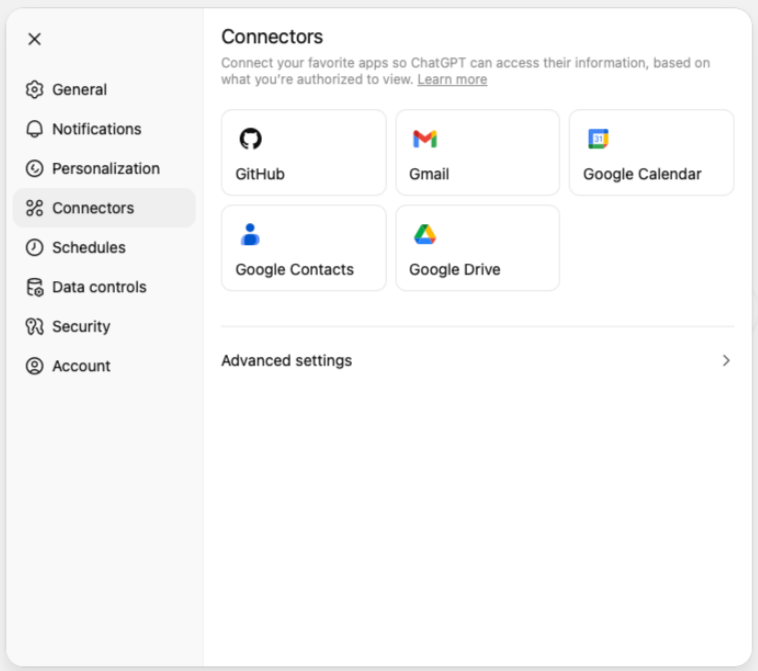
3. Click **Settings** to open the settings dialog.
4. Navigate to the **Connectors** section, then to **Advanced settings**.
5. In **Advanced settings**, enable **Developer mode**.
6. Return to **Connectors**, and click the **Create** button that is now visible.
7. In the **New Connector** dialog, name your MCP server.
8. In the **MCP Server URL** field, add the following URL:
```
https://mcp.make.com/sse
```
{% hint style="success" %}
For Streamable HTTP, use `/stream` instead of `/sse` at the end of your connection URL.
{% endhint %}
9. In the **Authentication** dropdown, select **OAuth**.
10. Select the **I trust this application** checkbox**.**
11. Click the **Create** button.
12. In the OAuth consent screen, select your organization and its granted scopes.
13. Click **Allow**.
You have now connected Make MCP server to ChatGPT. In **Connectors**, you can click on it to expand its details and select which tools ChatGPT can use.
### Enable in chat
After adding Make MCP server, you can enable it in the chat:
1. Open a new chat in ChatGPT.
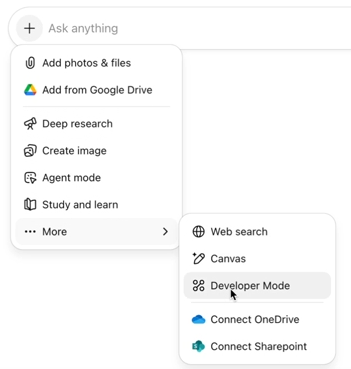
2. In the left-hand corner of the message bar, click the + sign to open a dropdown.
3. Click **More**, then **Developer Mode**.
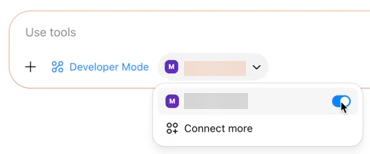
4. Click **Add sources**.
5. Enable Make MCP server.
You have now enabled Make MCP server in the chat, allowing ChatGPT to use Make tools when interacting with you.