# Basic connection

Basic connections include different authentication methods that don't need any token exchange mechanism. The most common case uses API keys where you send the key with the request to the endpoint you want to use. Types of authentication supported by basic connections include:

* API key (or similar single-token auth types)
* Basic Auth (a username and password pair encoded with `base64`),\
  for example: `"{{base64('user:pass')}}"`
* Digest Auth (a pair of credentials hashed with `md5`)

## Components

### Communication

For more information, see the [communication](https://developers.make.com/custom-apps-documentation/component-blocks/api) documentation.

* `aws` directive is not available
* Only a single request can be performed
* `pagination` directive is not available
* `response.limit` is not available
* `response.iterate` directive is not available
* `response.output` is not available
* `response` is extended with `data` , `uid` and `metadata`

#### response.data <a href="#data" id="data"></a>

The `data` directive saves data to the connection so it can be accessed later from a module through the `connection` variable. It functions similarly to the `temp` directive, except that `data` is persisted in the connection.

{% tabs %}
{% tab title="Code example" %}

```json
{
    "response": {
        "data": {
            "accessToken": "{{body.token}}"
        }
    }
}
```

{% endtab %}

{% tab title="Code example used to access later" %}

```json
{
    "url": "http://example.com",
    "headers": {
        "X-API-Key": "{{connection.accessToken}}"
    }
}
```

{% hint style="info" %}
This `accessToken` can be later accessed in any module that uses this connection.
{% endhint %}
{% endtab %}
{% endtabs %}

#### response.metadata <a href="#metadata" id="metadata"></a>

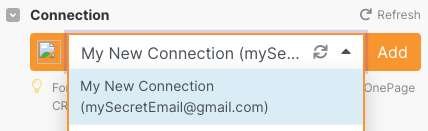
The `metadata` directive allows you to save the user’s name or username (or any other text field) so multiple connections of the same type can be easily recognized. A common practice is to save either username, email, or full name to metadata.

The metadata object has 2 properties: `value` and `type`. `value` is used to store the value and `type` is used to specify what the value is. Currently, there are only 2 types: `email` and `text`.

{% tabs %}
{% tab title="Occurrence in a scenario" %}

<div align="left"><img src="https://1562974717-files.gitbook.io/~/files/v0/b/gitbook-x-prod.appspot.com/o/spaces%2FNS0mCBwODiYtOVXjc6qf%2Fuploads%2Fgit-blob-51b4868416d4e371fb6482c45051843660be6d39%2FScreen%20Shot%202022-08-21%20at%2013.45.48.png?alt=media" alt="Example of a connection&#x27;s name" width="321"></div>
{% endtab %}

{% tab title="Code" %}

```json
...
"response": {
	"metadata": {
            "type": "email",
            "value": "{{body.data.user.email}}"
        }
	},
...
```

{% endtab %}
{% endtabs %}

#### response.uid <a href="#uid" id="uid"></a>

The `response.uid` directive allows you to save the user’s remote service ID. **This is required when using** [shared webhooks](https://developers.make.com/custom-apps-documentation/app-components/webhooks/shared)**.**

{% tabs %}
{% tab title="Code" %}

```json
{
    "response": {
        "uid": "{{body.data.id}}"
    }
}
```

{% endtab %}
{% endtabs %}

### Parameters​ <a href="#parameters" id="parameters"></a>

[Parameters](https://developers.make.com/custom-apps-documentation/block-elements/parameters) the user needs to provide when setting up a new connection.

### ​Common data​ <a href="#common-data" id="common-data"></a>

[Non-user-specific sensitive values](https://developers.make.com/custom-apps-documentation/app-components/connections) like secrets.

## Available IML variables

These IML variables are available for you to use everywhere in this module:

<table><thead><tr><th width="193.7037353515625" valign="top">Varible</th><th valign="top">Description</th></tr></thead><tbody><tr><td valign="top"><code>now</code></td><td valign="top">Current date and time</td></tr><tr><td valign="top"><code>environment</code></td><td valign="top">TBD</td></tr><tr><td valign="top"><code>temp</code></td><td valign="top">Contains custom variables created via <code>temp</code> directive.</td></tr><tr><td valign="top"><code>parameters</code></td><td valign="top">Contains the connection’s input parameters.</td></tr><tr><td valign="top"><code>common</code></td><td valign="top">Contains the connection’s common data collection.</td></tr><tr><td valign="top"><code>data</code></td><td valign="top">Contains the connection's data collection.</td></tr></tbody></table>

## API key-based connection example

{% tabs %}
{% tab title="Parameters" %}

```json
[
    {
        "name": "apiKey",
        "type": "password",
        "label": "API key",
        "advanced": true,
        "editable": true
    }
]
```

{% endtab %}

{% tab title="Communication" %}

```json
{
	"url": "https://example.com/api/v1/info",
	"method": "GET",
	"headers": {
		"X-API-Key": "{{parameters.apiKey}}"
	},
	"response": {
        "valid": "{{!body.error && statusCode === 200}}",
		"error": {
			"message": "[{{statusCode}}] {{body.error}}"
		},
        "metadata": {
            "type": "email",
            "value": "{{body.user.email}}"
        }
	},
	"log": {
		"sanitize": ["request.headers.`X-API-Key`"]
	}
}
```

{% endtab %}
{% endtabs %}

## Basic Auth connection example

{% tabs %}
{% tab title="Parameters" %}

```json
[
    {
        "name": "username",
        "type": "text",
        "label": "Username",
        "advanced": true,
        "editable": true
    },
    {
        "name": "password",
        "type": "password",
        "label": "Password",
        "advanced": true,
        "editable": true
    }
]
```

{% endtab %}

{% tab title="Communication" %}

```json
{
	"url": "https://example.com/api/v1/info",
	"method": "GET",
	"headers": {
		"authorization": "Basic {{base64(parameters.username + ':' + parameters.password)}}"
	},
	"response": {
        "valid": "{{!body.error && statusCode === 200}}",
		"error": {
			"message": "[{{statusCode}}] {{body.error}}"
		},
        "metadata": {
            "type": "email",
            "value": "{{body.user.email}}"
        }
	},
	"log": {
		"sanitize": ["request.headers.authorization"]
	}
}
```

{% endtab %}
{% endtabs %}
