# Epoch

## Specification

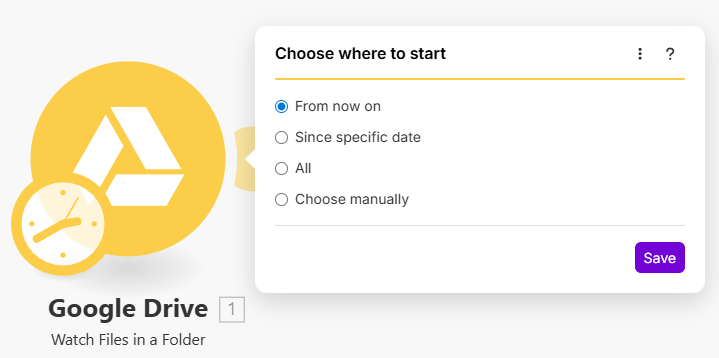
If the `Epoch configuration` is defined, there is at least one item available in the Epoch panel: `Choose where to start` that allows the user to select an item the user wants to start with. Other items depend on the trigger type. The underlying data is retrieved via the [Epoch RPC](#retrieving-data-for-the-epoch-panel).

If the trigger type is `id`, then there is one more option available: `All`, which allows the user to process all the items from the beginning. But, if the `Epoch configuration` is not specified, then the Epoch panel will not be available to the user.

If the trigger type is `date`, then three additional options are available for the user: `All`, `Since specific date` and `From now on`. `Since specific date` allows the user to start processing items from a specific day forward and `From now on` is similar, except the date is automatically set to the current date and time.

<div align="left"><figure><img src="https://1562974717-files.gitbook.io/~/files/v0/b/gitbook-x-prod.appspot.com/o/spaces%2FNS0mCBwODiYtOVXjc6qf%2Fuploads%2Fgit-blob-b33101fa5f4753685ca9242f5906d0ac379850b6%2Fepoch.png?alt=media" alt="" width="539"><figcaption></figcaption></figure></div>

## Retrieving data for the Epoch panel

You can customize how the data for the Epoch panel is retrieved by providing specific request overrides in the `Epoch` section. These overrides are then merged with trigger configuration to retrieve the data.

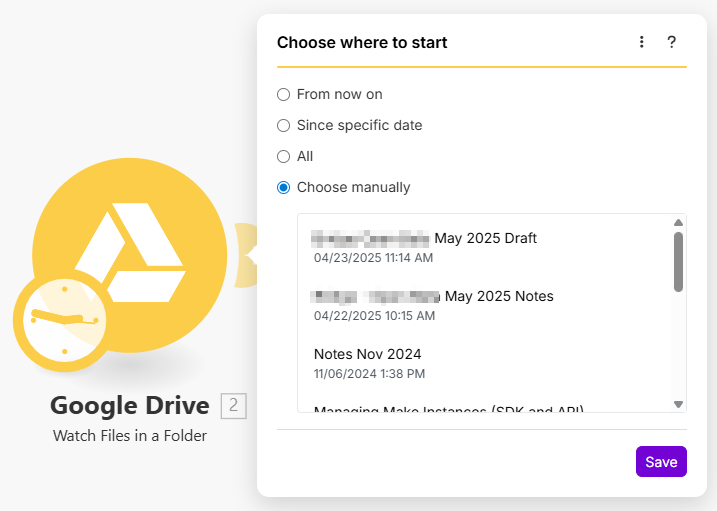
You also have to provide the labels and dates for the returned items. You can do that with the `response.output` directive. Dates are not required, but it is best to provide them for a better user experience.

To correctly return Epoch panel items from your Epoch RPC, the `output` section of `response` should contain only two items: `label` and `date`. The limit is used to limit the number of items displayed to the user when using the Epoch panel. `Label` is what the user sees when selecting items from the select box and `date` is when this item was created (updated), which the user will see in gray.

All other directives are inherited from the trigger's communication and can be overridden by specifying them inside the Epoch RPC.

{% tabs %}
{% tab title="Occurrence in a module" %}

<div align="left"><img src="https://1562974717-files.gitbook.io/~/files/v0/b/gitbook-x-prod.appspot.com/o/spaces%2FNS0mCBwODiYtOVXjc6qf%2Fuploads%2Fgit-blob-615a989fbcc7022a715fc022b38759cd34461078%2Fepoch_choosemanually.png?alt=media" alt="" width="538"></div>
{% endtab %}

{% tab title="Source" %}

```json
{
    "response": {
        "limit": 300,
        "output": {
            "label": "{{item.name}}",
            "date": "{{item.created_time}}"
        }
    }
}
```

{% hint style="info" %}
All other directives (like URL, pagination, method, iterate) are inherited from the trigger's communication and can be overridden by specifying them inside the Epoch RPC.
{% endhint %}
{% endtab %}
{% endtabs %}

## Output best practices

<table><thead><tr><th width="173.33333333333331" valign="top">Name</th><th width="234" valign="top">Recommended limit of ...</th><th valign="top">Value</th></tr></thead><tbody><tr><td valign="top"><strong>Request Count</strong></td><td valign="top">... calls performed by RPC</td><td valign="top">3</td></tr><tr><td valign="top"><strong>Record Count</strong></td><td valign="top">... paginated records</td><td valign="top">300 or 3 * number of objects per page</td></tr></tbody></table>

## Available IML variables <a href="#available-iml-variables" id="available-iml-variables"></a>

These IML variables are available for you to use everywhere in this module:

<table><thead><tr><th width="220.66668701171875" valign="top">Variable</th><th valign="top">Description</th></tr></thead><tbody><tr><td valign="top"><code>now</code></td><td valign="top">Current date and time</td></tr><tr><td valign="top"><code>environment</code></td><td valign="top">TBD</td></tr><tr><td valign="top"><code>temp</code></td><td valign="top">Contains custom variables created via the <code>temp</code> directive.</td></tr><tr><td valign="top"><code>parameters</code></td><td valign="top">Contains the module’s input parameters.</td></tr><tr><td valign="top"><code>connection</code></td><td valign="top">Contains the connection’s data collection.</td></tr><tr><td valign="top"><code>common</code></td><td valign="top">Contains the app’s common data collection.</td></tr><tr><td valign="top"><code>data</code></td><td valign="top">Contains the module’s data collection.</td></tr><tr><td valign="top"><code>scenario</code></td><td valign="top">TBD</td></tr><tr><td valign="top"><code>metadata.expect</code></td><td valign="top">Contains the module’s raw parameters array in the way you have specified it in the configuration.</td></tr><tr><td valign="top"><code>metadata.interface</code></td><td valign="top">Contains module’s raw interface array in the way you have specified it in the configuration.</td></tr></tbody></table>

Additional variables available for the response object:

<table><thead><tr><th width="203.16656494140625" valign="top">Variable</th><th valign="top">Description</th></tr></thead><tbody><tr><td valign="top"><code>output</code></td><td valign="top">When using the <code>wrapper</code> directive, the <code>output</code> variable represents the result of the <code>output</code>directive.</td></tr></tbody></table>

Additional variables available after using the `iterate` directive, i.e. in `wrapper` or `pagination` directives:

<table><thead><tr><th width="225.66668701171875" valign="top">Variable</th><th valign="top">Description</th></tr></thead><tbody><tr><td valign="top"><code>iterate.container.first</code></td><td valign="top">Represents the first item of the array you iterated.</td></tr><tr><td valign="top"><code>iterate.container.last</code></td><td valign="top">Represents the last item of the array you iterated.</td></tr></tbody></table>

Additional variables available for pagination and response objects:

<table><thead><tr><th width="206.50006103515625" valign="top">Variable</th><th valign="top">Description</th></tr></thead><tbody><tr><td valign="top"><code>body</code></td><td valign="top">Contains the body that was retrieved from the last request.</td></tr><tr><td valign="top"><code>headers</code></td><td valign="top">Contains the response headers that were retrieved from the last request.</td></tr><tr><td valign="top"><code>items</code></td><td valign="top">When iterating this variable represents the current item that is being iterated.</td></tr></tbody></table>

All variables available in polling trigger communication are also available in Epoch.
