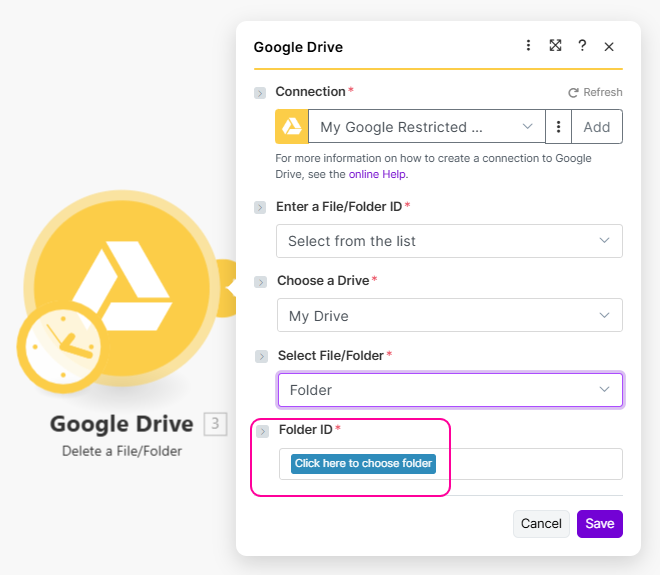
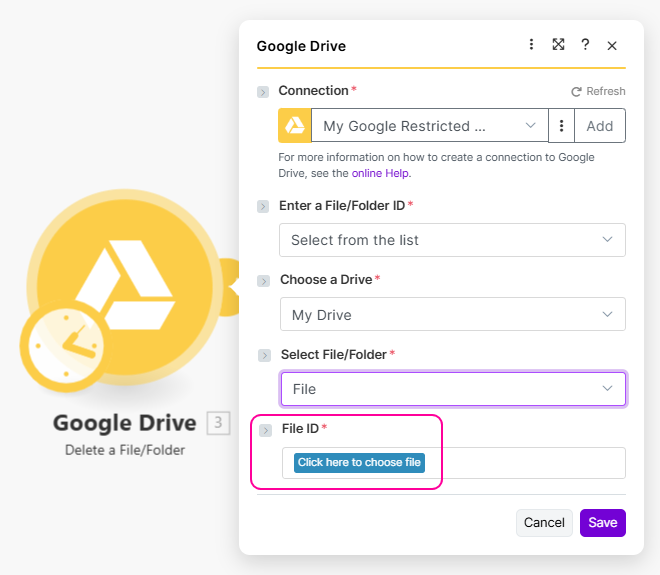
# Folder, File

To choose a file instead of a folder, the desired option has to contain `"file": true`. When the field type is `file`, the file is required and only the folder is passed, the validation will fail.

## Specification

### options

Available **types**:

<table><thead><tr><th width="145" valign="top">Type</th><th valign="top">Specification</th></tr></thead><tbody><tr><td valign="top"><strong>string</strong></td><td valign="top">The URL of an RPC returning the list of folders or files.</td></tr><tr><td valign="top"><strong>object</strong></td><td valign="top">A detailed configuration of the folder/file list.</td></tr></tbody></table>

Available **parameters**:

<table><thead><tr><th width="148" valign="top">Parameter</th><th width="120" valign="top">Type</th><th valign="top">Specification</th></tr></thead><tbody><tr><td valign="top"><strong>store</strong></td><td valign="top">string</td><td valign="top">The URL of an RPC returning the list of folders or files.</td></tr><tr><td valign="top"><strong>ids</strong></td><td valign="top">Boolean</td><td valign="top">If set to <code>true</code> , you can work with folder IDs. The GUI loads previously selected folders and their labels after reopening the form without having to call the RPC again.</td></tr><tr><td valign="top"><strong>showRoot</strong></td><td valign="top">Boolean</td><td valign="top">Default: <code>true</code>. If set to <code>false</code> , top-level folders aren't prefixed with <code>/</code> and there's no option to choose the root <code>/</code>. When the type is <code>file</code> , the root selection is blocked automatically.</td></tr><tr><td valign="top"><strong>singleLevel</strong></td><td valign="top">Boolean</td><td valign="top">Default: <code>false</code>. If set to <code>true</code> , only a single level of folders is available.</td></tr></tbody></table>

## Examples

### Result of RPC

To display the folder/file selector properly, the output from your RPC should contain only objects matching the following samples.

#### option

Available parameters:

<table><thead><tr><th width="139">Parameter</th><th width="115">Type</th><th>Specification</th></tr></thead><tbody><tr><td><strong>label</strong></td><td>string</td><td>The label to be displayed.</td></tr><tr><td><strong>value</strong></td><td>string</td><td>The value of an option that will be used in code.</td></tr><tr><td><strong>file</strong></td><td>Boolean</td><td>Boolean to determine if the option is a file or a folder.</td></tr></tbody></table>

{% tabs %}
{% tab title="Folder" %}

```javascript
{
    "label": "Documents and Settings",
    "value": "documentandsettings"
}
```

{% endtab %}

{% tab title="File" %}

```javascript
{
    "label": "Document",
    "value": "document.txt",
    "file": true
}
```

{% endtab %}
{% endtabs %}

### Folder selection

To make your folder selection work properly, you need to create a remote procedure that will return the corresponding folders. Each time a folder is selected, the RPC is called and the parameter `path` containing the whole path in the string is passed. You need to filter the folders inside this RPC.

{% tabs %}
{% tab title="Appearance" %}

<div align="left"><img src="/files/rkfBUbrKZ8CqZf9X7A6c" alt="" width="495"></div>
{% endtab %}

{% tab title="Source" %}

```json
[
	{
		"name": "home",
		"label": "Choose your home directory",
		"type": "folder",
		"options": {
			"store": "rpc://getFolders"
		}
	}
]
```

{% endtab %}

{% tab title="RPC: get folders" %}

```json
{
	"url": "/api/folders",
	"method": "GET",
	"qs": {
		"path": "{{encodeURL(parameters.home)}}"
	},
	"response": {
		"iterate": "{{body.data}}",
		"output": {
			"label": "{{item.name}}",
			"value": "{{item.name}}"
		}
	}
}
```

{% hint style="info" %}
As you can see, this RPC will be called **repeatedly** each time the next item is chosen. The passed parameter (`parameters.home` in our case) will contain the **full path, not only the last item.** If you want to get only the last item, you should consider using a `split` IML function.

Because the folder path could contain slashes (`/`) which are also part of the URL, you may need to escape it using `escapeURL` IML function before sending the path in query string.

If the endpoint returns files too, you need to create a `container` and set `condition` in `iterate` directive. See the `iterate` collection below.
{% endhint %}

```javascript
{
	"url": "/api/file,
	"method": "GET",
	"qs": {
		"path": "{{encodeURL(parameters.home)}}"
	},
	"response": {
		"iterate": {
			"container": "{{body.data}}",
			"condition": "{{item.type === 'folder'}}		
			},
		"output": {
			"label": "{{item.name}}"			
			"value": "{{item.name}}"
		}
	}
}

```

{% endtab %}

{% tab title="Sample RPC results" %}
**First call (no folders chosen yet)**

```json
[
    {
        "value": "usr",
        "label": "usr"
    },
    {
        "value": "srv",
        "label": "srv"
    },
    {
        "value": "home",
        "label": "home"
    }
]
```

**Second call (passed path: /home)**

```json
[
    {
        "value": "make",
        "label": "make"
    },
    {
        "value": "guest",
        "label": "guest"
    }
]
```

{% endtab %}

{% tab title="Output" %}

```javascript
"/home/make"
```

{% endtab %}
{% endtabs %}

### File selection

The file selection is very similar to the folder selection, but files in your RPC result have to contain the `"file": true` property. Each time a file is selected, the RPC is called and the parameter `path` containing the whole path in the string is passed. You need to filter the folders and files inside this RPC.

{% tabs %}
{% tab title="Appearance" %}

<div align="left"><img src="/files/bBJus2y1eXWy2qNvxv6c" alt="" width="495"></div>
{% endtab %}

{% tab title="Source" %}

```json
[
	{
		"name": "path",
		"label": "Pick a file to download",
		"type": "file",
		"options": {
			"store": "rpc://getFiles"
		}
	}
]
```

{% endtab %}

{% tab title="RPC: get files" %}

```json
{
	"url": "/api/files/tree",
	"method": "GET",
	"temp": {
		"crumbs": "{{split(parameters.path, '/')}}"
	},
	"qs": {
		"directory": "{{get(temp.crumbs,length(temp.crumbs))}}"
	},
	"response": {
		"iterate": "{{body.data}}",
		"output": {
			"label": "{{item.name}}",
			"value": "{{item.name}}",
			"file": "{{if(item.type === 'file', true, false)}}"
		}
	}
}
```

{% hint style="info" %}
The implementation of this RPC is quite similar to the `getFolders` RPC above. This RPC is called repeatedly each time the next item is chosen until the type of item is `file`.

Don't forget to check whether the item is file or folder and to set the `file` property correctly inside the `iterate` directive.

Here you can see how to get the last item from the `path`. Some APIs may require the last directory as an input for getting a list of contents of that directory.
{% endhint %}
{% endtab %}

{% tab title="Sample RPC results" %}
**First call**

```json
[
    {
        "value": "Documents",
        "label": "Documents"
    },
    {
        "value": "myPaint.png",
        "label": "myPaint.png",
        "file": true
    },
    {
        "value": "contacts.csv",
        "label": "contacts.csv",
        "file": true
    }
]
```

**Second call**

```json
[
    {
        "value": "secret.txt",
        "label": "secret.txt",
        "file": true
    },
    {
        "value": "plain.txt",
        "label": "plain.txt",
        "file": true
    }
]
```

{% endtab %}

{% tab title="Output" %}

```javascript
"/documents/plain.txt"
```

{% endtab %}
{% endtabs %}


---

# Agent Instructions: Querying This Documentation

If you need additional information that is not directly available in this page, you can query the documentation dynamically by asking a question.

Perform an HTTP GET request on the current page URL with the `ask` query parameter:

```
GET https://developers.make.com/custom-apps-documentation/block-elements/parameters/folder-file.md?ask=<question>
```

The question should be specific, self-contained, and written in natural language.
The response will contain a direct answer to the question and relevant excerpts and sources from the documentation.

Use this mechanism when the answer is not explicitly present in the current page, you need clarification or additional context, or you want to retrieve related documentation sections.