# Date

Dates in the API world can come in different formats:

* One of the ISO-8601 date formats such as `2021-20-01T16:30:20.123Z`
* `Timestamp`, such as `1637988627`
* A simple text, such as `2021-01-13 16:30`

No matter what format an API has, Make users should be able to work with a user-friendly format on input and output.

Make stores the inserted dates as a timestamp with milliseconds in a text format and passes them to requests as ISO with milliseconds and universal a time zone `YYYY-MM-DDThh:mm:ss.sssZ`.

## Specification

### time

* Type: `Boolean`
* Default: `true`
* If `false` , the GUI will only display the date selection.

Even if `"time": false`, the date value will still have the time midnight 0:00 and the time zone of the user, which is then converted to UTC. If the user enters 17. 09. 2025 in the Prague time zone, it will be `2025-09-17T00:00.000+2:00` which is converted to `2025-09-16T22:00:00.000Z`.

### nested

Available types:

<table><thead><tr><th width="118.629638671875">Type</th><th>Specification</th></tr></thead><tbody><tr><td><strong>array</strong></td><td>Provides an array of nested parameters that are shown when the value of the parameter is set (value is not empty).</td></tr><tr><td><strong>string</strong></td><td>Provides the URL address of an RPC to load a list of nested parameters.</td></tr><tr><td><strong>object</strong></td><td>Provides a detailed specification of nested parameters.</td></tr></tbody></table>

{% tabs %}
{% tab title="Use of nested fields" %}

```json
{
    "name": "myDate",
    "type": "date",
    "label": "My Date",
    "nested": "rpc://getNestedFields"
}
```

{% endtab %}
{% endtabs %}

## Input parameters

Mappable parameters, which require a date in any format, should allow users to enter a date in a user-friendly manner and their own time zone (e.g. `1. 12. 2021 16:30`) and also use our keyword `now`, `timestamp`, or any built-in date functions.

This means that any date formatting/parsing should happen inside the module in the Communication tab, either directly or via an IML function.

## Example

### Date and time input

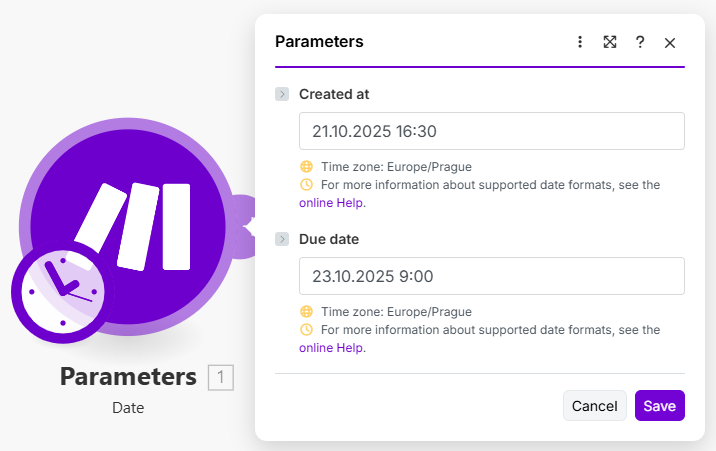
The following example requires two types of dates: `createdAt` as `timestamp`, and `dueDate` as `YYYY-MM-DDThh:mm:ss.sssZ` (GMT timezone).

By default, the field accepts date and time.

{% tabs %}
{% tab title="Appearance" %}

<div align="left"><figure><img src="https://1562974717-files.gitbook.io/~/files/v0/b/gitbook-x-prod.appspot.com/o/spaces%2FNS0mCBwODiYtOVXjc6qf%2Fuploads%2Fgit-blob-be903ed33f8d0d7e11783c7c20c0b97cca6537a9%2Fdate1.png?alt=media" alt="" width="537"><figcaption></figcaption></figure></div>
{% endtab %}

{% tab title="Communication" %}

```json
...
    "body": {
        "createdAt": "{{formatDate(parameters.createdAt, 'X')}}",
        "dueDate": "{{parameters.dueDate}}"
     },
...
```

{% endtab %}

{% tab title="Mappable parameters" %}

```json
[
		{
		"name": "createdAt",
		"type": "date",
		"label": "Created at"
	},
		{
		"name": "dueDate",
		"type": "date",
		"label": "Due date"
	}
]
```

{% endtab %}

{% tab title="Output" %}

```json
{
    "dueDate": "2021-10-23T07:00:00.000Z",
    "createdAt": "1634826600"
}
```

{% hint style="warning" %}
Notice that the time was entered in Europe/Prague time zone and was parsed to the universal (GMT) time zone.
{% endhint %}
{% endtab %}
{% endtabs %}

### Output parameters

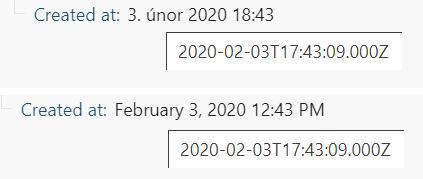
The dates returned by the API should be shown to the users in a user-friendly way, using their time zone and localization settings.

<div align="center"><img src="https://1562974717-files.gitbook.io/~/files/v0/b/gitbook-x-prod.appspot.com/o/spaces%2FNS0mCBwODiYtOVXjc6qf%2Fuploads%2Fgit-blob-ea37d52ae694948f5f9a282a23a21ea814294839%2Foutput_dates.png?alt=media" alt="The same date displayed to users in 
Prague (Czech localization)
and New York (EN-US localization)." width="317"></div>

### Dates with time

Dates with time have to be formatted/parsed to our ISO 8601 format, so it is shown in the output of the module correctly. Make uses ISO 8601 format: `YYYY-MM-DDTHH:mm:ss.sssZ`.

Any other format won't be shown correctly in the output and needs to be parsed in the Communication tab, either directly or using an IML function.

### Dates without time

Dates without time should have the same format as the API response and be `"type":"text"` in the Interface because in some cases adding the time (0:00) and the time zone can be counterproductive and change the date due to time zone conversion.

### Direct formatting

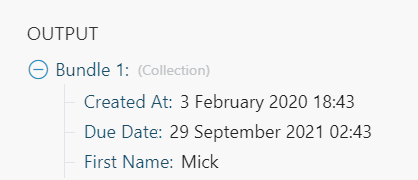
In the following example, the API returns two types of dates: `createdAt` as `timestamp`, and `dueDate` as `2020-02-03T17:43:09+0000`.

{% tabs %}
{% tab title="First Tab" %}

```json
...  
  "response": {
    "output": { 
      "{{...}}": "{{body}}", 
  // converts timestamp
      "createdAt": "{{parseDate(body.createdAt, X)}}",  
  // converts 2020-02-03T17:43:09+0000
      "dueDate": "{{parseDate(body.dueDate, YYYY.MM.DD hh:mm:ss)}}"  
    }
  }
}
```

{% endtab %}

{% tab title="Interface" %}

```json
[
    {
        "name": "createdAt",
        "type": "date",
        "label": "Created At"
    },
    {
        "name": "dueDate",
        "type": "date",
        "label": "Due Date"
    },
...
```

{% endtab %}

{% tab title="Result" %}

<div align="left"><img src="https://1562974717-files.gitbook.io/~/files/v0/b/gitbook-x-prod.appspot.com/o/spaces%2FNS0mCBwODiYtOVXjc6qf%2Fuploads%2Fgit-blob-49399d7d5e0c22003c4f63198f49d5d7a4cb38f6%2Foutput_dates_example.png?alt=media" alt="" width="314"></div>
{% endtab %}
{% endtabs %}

#### IML Function

* [Processing of input parameters: Date parameters](https://developers.make.com/custom-apps-documentation/best-practices/input-parameters/processing-of-input-parameters)
* [Processing of output parameters: Parse dates](https://developers.make.com/custom-apps-documentation/best-practices/output-parameters/processing-of-output-parameters#parse-dates)