# Parameter hints

Hints play a very important role in the overall usability of an app and well-written hints can have a significant positive impact on the user experience.

When providing hints, take into consideration the following:

* All fields that are not self-explanatory should contain a hint
* Extra attention should be paid to Connection fields
* All essential information should be included
* The information should be clear and concise
* The terminology used should be non-technical and easy to understand
* Avoid using symbols

## Information to include <a href="#information-to-include" id="information-to-include"></a>

There are six categories of information that hints can include. Each hint can contain at least one of the information types. If multiple information types are included, they should be organized in the order listed below.

1. Expected input
2. Result
3. Example
4. Additional information
5. What if left empty
6. Link

<table><thead><tr><th valign="top">Information type</th><th valign="top">Description</th><th valign="top">Example</th></tr></thead><tbody><tr><td valign="top"><ol><li>Expected input</li></ol></td><td valign="top"><p>Include a clear description of what to enter/select.<br><br>This will often be the description included in the API documentation.<br></p><p>If the description is not clear or is too technical, update it to be more user-friendly.</p></td><td valign="top"><p><strong>Response format</strong></p><p>Format of the generated audio file.</p></td></tr><tr><td valign="top"><ol start="2"><li>Result</li></ol></td><td valign="top">Include a clear description of the outcome, especially if there are various possible outcomes.<br><br>Include this information if it is useful to describe what will happen when users enter a specific value.</td><td valign="top"><p><strong>Temperature</strong></p><p>Higher values generate a more random response. For example, 0.8. Lower values generate a more focused response. For example, 0.2.</p></td></tr><tr><td valign="top"><ol start="3"><li>Example</li></ol></td><td valign="top">Include an example to provide more clarity, if specific formatting is used, or if it is valuable for users.<br><br>Use the format ‘For example, code formatting’.</td><td valign="top"><p><strong>Image URL</strong></p><p>URL address to a public resource of the image. For example, https://getmyimage.com/myimage.png.</p></td></tr><tr><td valign="top"><ol start="4"><li>Additional information</li></ol></td><td valign="top">Include extra information the user must know to successfully use the field.</td><td valign="top"><p><strong>Output file name</strong></p><p>Name of the generated audio file. Do not include the file extension.</p></td></tr><tr><td valign="top"><ol start="5"><li>What if left empty</li></ol></td><td valign="top">Describe the impact of not entering a value.</td><td valign="top"><p><strong>Format</strong></p><p>If left empty, default formatting is used.</p></td></tr><tr><td valign="top"><ol start="6"><li>Link</li></ol></td><td valign="top">When linking to Make's Help Center, use ‘our Help Center’.<br><br>When linking to third-party documentation, include the name of the app/service and the name of the page/documentation.</td><td valign="top"><p><strong>Account</strong></p><p>Name of the primary user’s account. For details, see our <a href="https://app.gitbook.com/u/Ed1NFjtpnQYJmUwUq9EhMltqRlx2">Help Center</a>.<br><br><strong>Voice</strong></p><p>Voice to use in the audio. For voice samples, see the <a href="https://platform.openai.com/docs/guides/text-to-speech/voice-options">OpenAI Voice options guide</a>.</p></td></tr></tbody></table>

## Connection field hints <a href="#connection-hints" id="connection-hints"></a>

### API key / API token / Access token <a href="#api-key-api-token-access-token-etc" id="api-key-api-token-access-token-etc"></a>

The name of the field should always match what the user sees in the 3rd party UI.

<table data-full-width="false"><thead><tr><th valign="top">Where to direct users</th><th valign="top">Format</th><th valign="top">Example</th></tr></thead><tbody><tr><td valign="top">Our Help Center</td><td valign="top">For details on how to obtain your [name of value], see our Help Center.</td><td valign="top">For details on how to obtain your API key, see our <a href="https://apps.make.com/instantly#connect-instantly-to-make">Help Center</a>.<br>Link to <code>apps.make.com/[your-app-slug]</code></td></tr><tr><td valign="top"><p>Third-party resource:</p><p>API docs</p></td><td valign="top">For details on how to obtain your [name of value], see the [app name] API documentation.</td><td valign="top">For details on how to obtain your API key, see the <a href="https://developer.instantly.ai/introduction">Instantly API documentation</a>.</td></tr><tr><td valign="top"><p>Third-party resources:</p><p>other than API docs</p></td><td valign="top">For details on how to obtain your [name of value], see the [app name] [page name].</td><td valign="top">For details on how to obtain your access token, see the <a href="https://www.shopify.com/partners/blog/17056443-how-to-generate-a-shopify-api-token">Shopify App Development blog</a>.</td></tr><tr><td valign="top"><p>Third-party account:</p><p>with link</p></td><td valign="top"><p>You can obtain your [name of value] on the [page name] in your [app name] account.<br></p><p>You can obtain your [name of value] on the [app name] [page name].</p></td><td valign="top"><p>You can obtain your refresh token on the <a href="https://id.atlassian.com/manage-profile/security">Security page</a> in your Atlassian account.<br></p><p>You can obtain your API key on the <a href="https://console.anthropic.com/settings/keys">Anthropic Console API keys page</a>.</p></td></tr><tr><td valign="top"><p>Third-party account:</p><p>with instructions<br>*not preferred due to length</p></td><td valign="top">You can obtain your [name of value] by going to [item]→ [item] → [item] in your [app name] account</td><td valign="top">You can obtain your refresh token by going to Account → Profile → API in your Atlassian account.</td></tr></tbody></table>

### Required client ID and client secret <a href="#required-client-id-and-client-secret" id="required-client-id-and-client-secret"></a>

The process to obtain these values should be documented in our Help Center if the fields are required.

<table><thead><tr><th valign="top">Where to direct users</th><th valign="top">Format</th><th valign="top">Example</th></tr></thead><tbody><tr><td valign="top">Our Help Center</td><td valign="top">For details on how to obtain your [client ID or client secret], see our Help Center.</td><td valign="top">For details on how to obtain your client secret, see our <a href="https://apps.make.com/google-cloud-speech#IIckK">Help Center</a>.<br><br>Link to <code>apps.make.com/[your-app-slug]</code></td></tr></tbody></table>

### Optional client ID and client secret in advanced settings <a href="#optional-client-id-and-client-secret-in-advanced-settings" id="optional-client-id-and-client-secret-in-advanced-settings"></a>

The process to obtain these values do not need to be documented in our Help Center as the fields are not required.

<table><thead><tr><th valign="top">Where to direct users</th><th valign="top">Format</th><th valign="top">Example</th></tr></thead><tbody><tr><td valign="top"><p>Third-party resource:</p><p>API docs</p></td><td valign="top">For details on how to obtain your [client ID or client secret], see the [app name] API documentation.</td><td valign="top">For details on how to obtain your client secret, see the <a href="https://developers.hotmart.com/docs/en/start/app-auth/">Hotmart API documentation</a>.</td></tr><tr><td valign="top"><p>Third-party resource:</p><p>other than API docs</p></td><td valign="top">For details on how to obtain your [client ID or secret], see the [app name] [page name].</td><td valign="top">For details on how to obtain your client ID, see the <a href="https://docs.oracle.com/en/cloud/paas/api-platform-cloud/apfad/find-your-client-id-and-client-secret.html">Oracle Help Center</a>.</td></tr></tbody></table>

## Limit field hints <a href="#limit-field" id="limit-field"></a>

<table><thead><tr><th valign="top">Location</th><th valign="top">Field</th><th valign="top">Format</th><th valign="top">Link</th></tr></thead><tbody><tr><td valign="top">Polling trigger</td><td valign="top">Limit</td><td valign="top">Maximum number of results to return. For information about setting limits, see our <a href="https://www.make.com/en/help/modules/types-of-modules#module-limits">Help Center</a>.</td><td valign="top"><code>https://help.make.com/types-of-modules#b3ZEQ</code></td></tr><tr><td valign="top">Search and List modules</td><td valign="top">Limit</td><td valign="top">Maximum number of results to return and work with during one execution cycle. For information about setting limits, see our <a href="https://help.make.com/types-of-modules#b3ZEQ">Help Center</a>.</td><td valign="top"><code>https://help.make.com/types-of-modules#b3ZEQ</code></td></tr></tbody></table>

{% hint style="info" %}
The **Limit** field should also be the last standard field in the module. It should not be in the advanced settings.
{% endhint %}

## **Make an API call: URL field hints** <a href="#make-an-api-call-url-field" id="make-an-api-call-url-field"></a>

If a hint includes a URL, the URL should contain the prefix path and an example of the URL. Additionally, the URL field hint should include an example endpoint that works without performing any additional steps (for example, where no {body} is required).

Use `GET` methods as the example endpoints. Do not use endpoints that create or delete records.

Do not hard code API versions in the prefix path. This ensures a user can work with any API version. Even if there is currently only one version, future compatibility should be considered.

<table><thead><tr><th valign="top">Field</th><th valign="top">Format</th><th valign="top">Example</th></tr></thead><tbody><tr><td valign="top">URL</td><td valign="top">Enter the part of the URL that comes after <code>[prefix path]}</code>. For example, <code>[postfix]</code>.</td><td valign="top">Enter the part of the URL that comes after <code>https://api.openai.com</code>. For example, <code>/v1/models</code>.</td></tr></tbody></table>

## Special formatting <a href="#special-formatting" id="special-formatting"></a>

Two types of special formatting are used in hints: **bold** and code.

{% tabs %}
{% tab title="Bold" %}
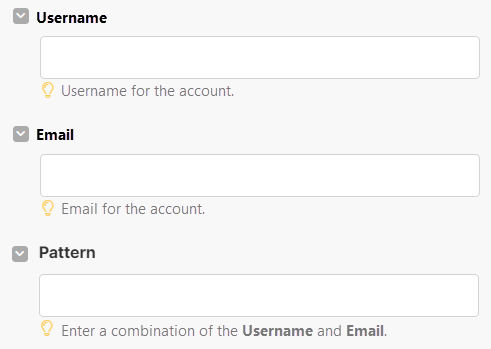
If a hint references another input field in the module, make sure to copy the input field’s name exactly and format it in **bold**.

<div align="left"><figure><img src="https://1562974717-files.gitbook.io/~/files/v0/b/gitbook-x-prod.appspot.com/o/spaces%2FNS0mCBwODiYtOVXjc6qf%2Fuploads%2Fgit-blob-2fa38c32c4f5d5f598f4b2503c4651578dd2d806%2Fbestpractices_boldhint.png?alt=media" alt="" width="368"><figcaption></figcaption></figure></div>
{% endtab %}

{% tab title="Code" %}
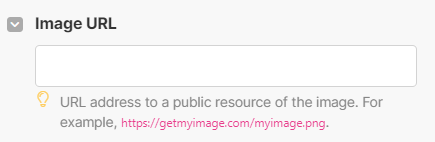
If you include examples, default values, versions, or specific formats, make sure to use the red code formatting. This can include API versions, color codes, dates, time, and country codes.

<div align="left"><figure><img src="https://1562974717-files.gitbook.io/~/files/v0/b/gitbook-x-prod.appspot.com/o/spaces%2FNS0mCBwODiYtOVXjc6qf%2Fuploads%2Fgit-blob-e26a0e085c577473c573b85d7fe7e4df382c8e36%2Fbestpractices_redhint.png?alt=media" alt="" width="326"><figcaption></figcaption></figure></div>
{% endtab %}
{% endtabs %}