# Components

## Communication

For more information, see the [communication documentation](/custom-apps-documentation/component-blocks/api.md).

* The communication `response` is extended with the `wrapper` object.
* `limit` is not available in `response` as the result of the action should always be only one bundle
* Communication can be [request-less](/custom-apps-documentation/component-blocks/api/request-less-communication.md).

### Static parameters

You can use [static parameters](/custom-apps-documentation/component-blocks/parameters.md) inside the action module without any restrictions.

### Mappable parameters

You can use [mappable parameters](/custom-apps-documentation/component-blocks/mappable-parameters.md) inside the action module without any restrictions.

### Interface

The action module should always [output only one bundle](/custom-apps-documentation/component-blocks/interface.md).

### Samples

To help the users with setting up your module, you can provide [samples](/custom-apps-documentation/component-blocks/samples.md).

### Scope

When using an OAuth type of connection, use the [scope](/custom-apps-documentation/component-blocks/scope.md) to define scopes required by this action.

### Available IML variables <a href="#available-iml-variables" id="available-iml-variables"></a>

These IML variables are available for you to use everywhere in this module:

<table><thead><tr><th width="220.66668701171875" valign="top">Variable</th><th valign="top">Description</th></tr></thead><tbody><tr><td valign="top"><code>now</code></td><td valign="top">Current date and time</td></tr><tr><td valign="top"><code>environment</code></td><td valign="top">TBD</td></tr><tr><td valign="top"><code>temp</code></td><td valign="top">Contains custom variables created via the <code>temp</code> directive.</td></tr><tr><td valign="top"><code>parameters</code></td><td valign="top">Contains the module’s input parameters.</td></tr><tr><td valign="top"><code>connection</code></td><td valign="top">Contains the connection’s data collection.</td></tr><tr><td valign="top"><code>common</code></td><td valign="top">Contains the app’s common data collection.</td></tr><tr><td valign="top"><code>data</code></td><td valign="top">Contains the module’s data collection.</td></tr><tr><td valign="top"><code>scenario</code></td><td valign="top">TBD</td></tr><tr><td valign="top"><code>metadata.expect</code></td><td valign="top">Contains the module’s raw parameters array in the way you have specified it in the configuration.</td></tr><tr><td valign="top"><code>metadata.interface</code></td><td valign="top">Contains module’s raw interface array in the way you have specified it in the configuration.</td></tr></tbody></table>

Additional variables available for the response object:

<table><thead><tr><th width="130.573974609375" valign="top">Variable</th><th valign="top">Description</th></tr></thead><tbody><tr><td valign="top"><code>output</code></td><td valign="top">When using the <code>wrapper</code> directive, the <code>output</code> variable represents the result of the <code>output</code>directive.</td></tr></tbody></table>

Additional variables available after using the `iterate` directive, i.e. in `wrapper` or `pagination` directives:

<table><thead><tr><th width="225.66668701171875" valign="top">Variable</th><th valign="top">Description</th></tr></thead><tbody><tr><td valign="top"><code>iterate.container.first</code></td><td valign="top">Represents the first item of the array you iterated.</td></tr><tr><td valign="top"><code>iterate.container.last</code></td><td valign="top">Represents the last item of the array you iterated.</td></tr></tbody></table>

Additional variables available for pagination and response objects:

<table><thead><tr><th width="153.907470703125" valign="top">Variable</th><th valign="top">Description</th></tr></thead><tbody><tr><td valign="top"><code>body</code></td><td valign="top">Contains the body that was retrieved from the last request.</td></tr><tr><td valign="top"><code>headers</code></td><td valign="top">Contains the response headers that were retrieved from the last request.</td></tr><tr><td valign="top"><code>items</code></td><td valign="top">When iterating this variable represents the current item that is being iterated.</td></tr></tbody></table>

## Action module example

{% tabs %}
{% tab title="Appearance" %}

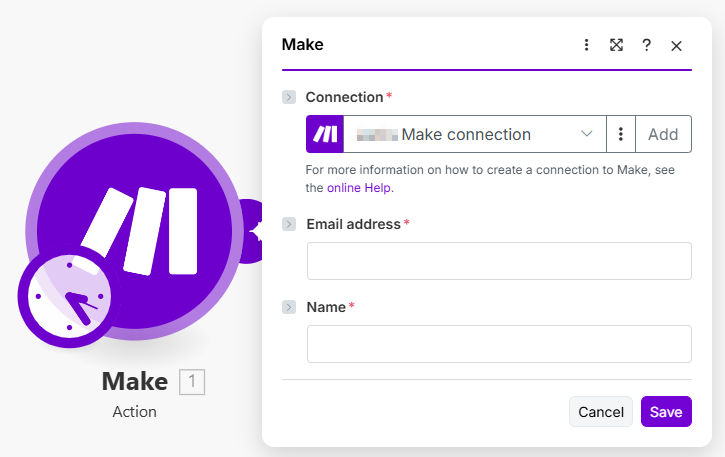
<div align="left"><img src="/files/WAYd1RzEsUDiRLgLHt7M" alt="" width="544"></div>
{% endtab %}

{% tab title="Communication" %}

```json
{
	"url": "/api/users/create",
	"body": {
		"name": "{{parameters.name}}",
		"email": "{{lower(parameters.email)}}"
	},
	"method": "POST",
	"response": {
		"output": {
			"id": "{{body.id}}"
		}
	}
}
```

{% endtab %}

{% tab title="Static parameters" %}

```json
[]
```

{% endtab %}

{% tab title="Mappable parameters" %}

```json
[
	{
		"name": "email",
		"type": "email",
		"label": "Email address",
		"required": true
	},
	{
		"name": "name",
		"type": "text",
		"label": "Name",
		"required": true
	}
]
```

{% endtab %}

{% tab title="Interface" %}

```json
[
	{
		"name": "id",
		"type": "uinteger",
		"label": "User ID"
	}
]
```

{% endtab %}

{% tab title="Samples" %}

```json
{
	"id": 1
}
```

{% endtab %}
{% endtabs %}


---

# Agent Instructions: Querying This Documentation

If you need additional information that is not directly available in this page, you can query the documentation dynamically by asking a question.

Perform an HTTP GET request on the current page URL with the `ask` query parameter:

```
GET https://developers.make.com/custom-apps-documentation/app-components/modules/action/components.md?ask=<question>
```

The question should be specific, self-contained, and written in natural language.
The response will contain a direct answer to the question and relevant excerpts and sources from the documentation.

Use this mechanism when the answer is not explicitly present in the current page, you need clarification or additional context, or you want to retrieve related documentation sections.
