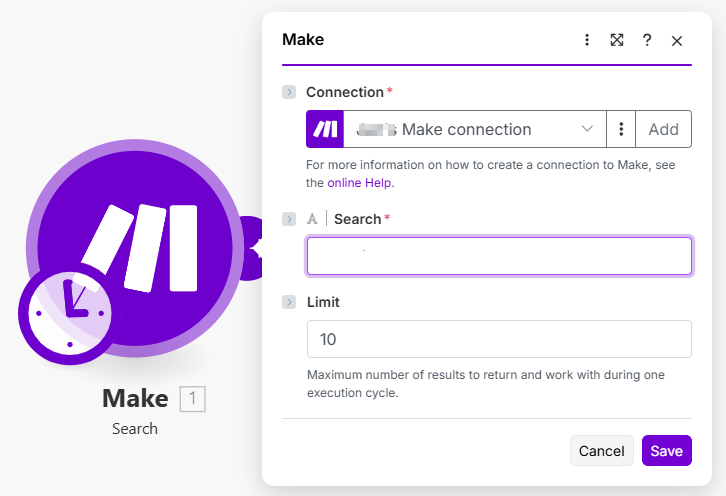
# Search

Use this module when you need to allow the user to search for items or simply return multiple items.

## Components

### Communication

For additional information, see our [communication](https://developers.make.com/custom-apps-documentation/component-blocks/api) documentation.

#### Pagination

If API supports pagination, you can implement it by using the [pagination directive](https://developers.make.com/custom-apps-documentation/component-blocks/api/pagination).

### Static Parameters

You can use [static parameters](https://developers.make.com/custom-apps-documentation/component-blocks/parameters) inside the search module without any restrictions.

### Mappable Parameters

You can use [mappable parameters](https://developers.make.com/custom-apps-documentation/component-blocks/mappable-parameters) inside the search module without any restrictions.

### Interface

Unlike the action module, the search module can [return multiple bundles at once](https://developers.make.com/custom-apps-documentation/component-blocks/interface).

### Samples

To help the users with setting up your module, provide [samples](https://developers.make.com/custom-apps-documentation/component-blocks/samples).

### ​Scope​

When using an OAuth type of connection, use the [scope](https://developers.make.com/custom-apps-documentation/component-blocks/scope) to define scopes required by this module.

### Available IML variables <a href="#available-iml-variables" id="available-iml-variables"></a>

These IML variables are available for you to use everywhere in this module:

<table><thead><tr><th width="209.5555419921875" valign="top">Variable</th><th valign="top">Description</th></tr></thead><tbody><tr><td valign="top"><code>now</code></td><td valign="top">Current date and time</td></tr><tr><td valign="top"><code>environment</code></td><td valign="top">TBD</td></tr><tr><td valign="top"><code>temp</code></td><td valign="top">Contains custom variables created via the <code>temp</code> directive.</td></tr><tr><td valign="top"><code>parameters</code></td><td valign="top">Contains the module’s input parameters.</td></tr><tr><td valign="top"><code>connection</code></td><td valign="top">Contains the connection’s data collection.</td></tr><tr><td valign="top"><code>common</code></td><td valign="top">Contains the app’s common data collection.</td></tr><tr><td valign="top"><code>data</code></td><td valign="top">Contains the module’s data collection.</td></tr><tr><td valign="top"><code>scenario</code></td><td valign="top">TBD</td></tr><tr><td valign="top"><code>metadata.expect</code></td><td valign="top">Contains the module’s raw parameters array in the way you have specified it in the configuration.</td></tr><tr><td valign="top"><code>metadata.interface</code></td><td valign="top">Contains module’s raw interface array in the way you have specified it in the configuration.</td></tr></tbody></table>

Additional variables available for the response object:

<table><thead><tr><th width="140.20355224609375" valign="top">Variable</th><th valign="top">Description</th></tr></thead><tbody><tr><td valign="top"><code>output</code></td><td valign="top">When using the <code>wrapper</code> directive, the <code>output</code> variable represents the result of the <code>output</code>directive.</td></tr><tr><td valign="top"><code>limit</code></td><td valign="top">When using a limit, the process of retrieving items will stop once the requested number of items has been obtained or if a page doesn't contain any items. Additionally, the module will return only the exact number of items that was specified.</td></tr><tr><td valign="top"><code>iterate</code></td><td valign="top">Iterates the array in the response into items.</td></tr></tbody></table>

Additional variables available after using the `iterate` directive, i.e. in `wrapper` or `pagination` directives:

<table><thead><tr><th width="225.66668701171875" valign="top">Variable</th><th valign="top">Description</th></tr></thead><tbody><tr><td valign="top"><code>iterate.container.first</code></td><td valign="top">Represents the first item of the array you iterated.</td></tr><tr><td valign="top"><code>iterate.container.last</code></td><td valign="top">Represents the last item of the array you iterated.</td></tr></tbody></table>

Additional variables available for pagination and response objects:

<table><thead><tr><th width="149.46307373046875" valign="top">Variable</th><th valign="top">Description</th></tr></thead><tbody><tr><td valign="top"><code>body</code></td><td valign="top">Contains the body that was retrieved from the last request.</td></tr><tr><td valign="top"><code>headers</code></td><td valign="top">Contains the response headers that were retrieved from the last request.</td></tr><tr><td valign="top"><code>items</code></td><td valign="top">When iterating this variable represents the current item that is being iterated.</td></tr></tbody></table>

## Example

{% tabs %}
{% tab title="Appearance" %}

<div align="left"><figure><img src="https://1562974717-files.gitbook.io/~/files/v0/b/gitbook-x-prod.appspot.com/o/spaces%2FNS0mCBwODiYtOVXjc6qf%2Fuploads%2Fgit-blob-d6e605f62db3860c88a1106a1e30ef6cbe4a9af7%2Fsearch_module.png?alt=media" alt="" width="545"><figcaption></figcaption></figure></div>
{% endtab %}

{% tab title="Communication" %}

```json
{

	"url": "/api/users",
	"qs": {
		"search": "{{parameters.search}}"
		},
	"method": "GET",
	"response": {
		"output": "{{item}}",
		"iterate": "{{body.users}}",
		"limit": "{{parameters.limit}}"
	}
}
```

{% endtab %}

{% tab title="Static parameters" %}

```json
[]
```

{% endtab %}

{% tab title="Mappable parameters" %}

```json
[
	{
		"name": "search",
		"type": "text",
		"label": "Search",
		"required": true
	},
	{
		"name": "limit",
		"type": "uinteger",
		"label": "Limit",
		"help": "Maximum number of results to return and work with during one execution cycle.",
		"default": 10
	}
]
```

{% endtab %}

{% tab title="Interface" %}

```json
[
	{
		"name": "id",
		"type": "uinteger",
		"label": "User ID"
	},
	{
		"name": "email",
		"type": "email",
		"label": "Email address"
	},
	{
		"name": "name",
		"type": "text",
		"label": "Name"
	},
	{
		"name": "created",
		"type": "date",
		"label": "Date created"
	}
]
```

{% endtab %}

{% tab title="Samples" %}

```json
{
	"id": 1,
	"email": "johndoe@email.com",
	"name": "John Doe",
	"created": "2018-01-01T12:00:00.000Z"
}
```

{% endtab %}
{% endtabs %}
