# Batch actions

A batch action is an operation that lets a user complete more than one action in a module.

We advise that you do **not** use batch actions as the Make platform does not support the partial success of a call.

{% hint style="info" %}
If your module involves two API calls, it's possible that one will succeed and the other will fail. The module will show an error message for this partial success.
{% endhint %}

Instead, we suggest using a separate module for each API call:

* to avoid receiving misleading or incorrect error messages and,
* to allow users to set up error handling for individual modules.

## Exceptions

The following are exceptions when you may want to use a batch action:

* [PUT vs PATCH behavior in update modules](#put-vs-patch-behavior-in-update-modules)
* [Get a record after update](#get-a-record-after-update)
* [Upload a file](#upload-a-file)
* [Download a file](#download-a-file)
* [Asynchronous process](#asynchronous-process)\\

### PUT vs PATCH behavior in update modules

Generally, PUT does not support partial updates, meaning you need to provide a full request to avoid losing the rest of the record. PATCH supports partial updates.

However, in practice, many APIs with PUT methods support partial updates.

Make expects empty fields to be ignored, not erased.

Chain of actions: Read > Write

1. Get record by ID
2. PUT the record patched by user’s input

#### Example <a href="#example.1" id="example.1"></a>

* GoHighLevel > Update a Contact

If a partial update is **not** supported, you must execute an extra call to retrieve the current data and combine the data using an IML function.

{% tabs %}
{% tab title="Source" %}

```json
{
    {
    "url": "/webservice.php", 
    "method": "GET",
    "qs": {
        "id": : "{{parameters.object}}",
        "operation": retrieve"
        },
         "response": {
             "temp": {
                 "fields": "{{body.results[]}}"
             }
         }
    },
     {
         "url": "/webservice.php",
         "method":"POST",
         "type": "urlencoded", 
         "body": {
             "operation": "revise",
             "elementType": "{{parameters.elementType}}", 
             "element": "{{stringifyFields(parameters, 'revise', temp.fields)}}
     },
     "response": {
         "output": "{{objectResponse(body.result)}}"
     }
 }
 }
         
```

{% endtab %}
{% endtabs %}

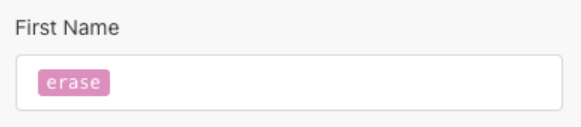
If a value needs to be deleted, use the `erase` pill (available only in update modules).

{% tabs %}
{% tab title="Pill" %}

<div align="left"><figure><img src="https://1562974717-files.gitbook.io/~/files/v0/b/gitbook-x-prod.appspot.com/o/spaces%2FNS0mCBwODiYtOVXjc6qf%2Fuploads%2Fgit-blob-11bd39a3d177858ee755bdab72cb972e1cf2d6ee%2Fbatchaction_erasepill.png?alt=media" alt="" width="291"><figcaption></figcaption></figure></div>
{% endtab %}

{% tab title="Code" %}

```json
{
    "last_name": "Smith",
    "contact_id" : "12345",
    "first_name" : null,
    "company_name" : "Acme Company"
}
```

{% endtab %}
{% endtabs %}

### Get a record after update

Some services only return an ID after a record update.

Chain of actions: Write > Read

1. Update the record
2. Get the record by ID

#### Example <a href="#example.2" id="example.2"></a>

* Workday Financial Management > Update a Supplier Invoice

### Upload a file

#### Upload in chunks <a href="#upload-in-chunks" id="upload-in-chunks"></a>

Chain of actions: Write > Write > … > Write

{% hint style="info" %}
This is an exception to the rule that combines multiple **Write** actions. These requests are designed to be used in sequence.
{% endhint %}

1. Create an upload session
2. Keep sending chunks
3. Finalize the upload

#### Example <a href="#example.3" id="example.3"></a>

* Dropbox > Upload a File

### Download a file

#### Download by media ID <a href="#download-by-media-id" id="download-by-media-id"></a>

Chain of actions: Read > Read

1. Get the media ID
2. Download file by media ID

#### Example <a href="#example.4" id="example.4"></a>

* WhatsApp Business Cloud > Download a Media
* Telegram Bot > Download a File

### Asynchronous process

Requests involving processes running asynchronously on 3rd party service.

Chain of actions: Write > Read > Read > … > Read

1. Start the task
2. Keep polling for task status
3. Get the result when done

#### Example <a href="#example.5" id="example.5"></a>

* Microsoft Power Automate: Trigger a Desktop Flow

#### Responsiveness approaches

Keep in mind that there are two approaches to responsiveness in a service:

* **Synchronous** - Upon an action request, the service returns a result that can then be processed in the following modules in a scenario.
* **Asynchronous** - The service doesn't return anything at all, or doesn't return useful output, e.g. a processed file.

#### Comparison of synchronous and asynchronous approaches

<table><thead><tr><th width="179.8333740234375" valign="top">Attribute/ Approach</th><th valign="top">Synchronous</th><th valign="top">Asynchronous</th></tr></thead><tbody><tr><td valign="top"><strong>Advantage</strong></td><td valign="top">The result is returned right away. The result can be processed in the following modules.</td><td valign="top">Helpful when you need to process a large amount of data, like a file conversion.</td></tr><tr><td valign="top"><strong>Disadvantage</strong></td><td valign="top">The job may take too long. This might cause a timeout (default 40 sec). For example, in a file conversion. The default timeout can be prolonged depending on the valid cases.</td><td valign="top">You need to create at least two scenarios - one for triggering the job, and another one for processing the result from the first scenario. The second scenario, if possible, should start with an instant trigger that triggers once the job finishes.</td></tr><tr><td valign="top"><strong>Module example</strong></td><td valign="top"><a href="https://eu1.make.com/apps/cloudconvert/2/modules/ConvertFile/communication">CloudConvert > Convert a File</a></td><td valign="top"><a href="https://eu1.make.com/apps/cloudconvert/2/modules/CreateJob/communication">CloudConvert > Create a Job (advanced)</a></td></tr><tr><td valign="top"><strong>Example scenario</strong>s</td><td valign="top"><p><a href="https://www.make.com/en/templates/3064-convert-files-from-google-drive-in-cloudconvert-and-upload-the-output-to-google-drive">Convert files from Google Drive in CloudConvert</a><br></p><p>The scenario contains <a href="https://eu1.make.com/apps/cloudconvert/2/modules/ConvertFile/communication">Convert a File</a> module, which has the synchronous logic implemented on app's side.</p></td><td valign="top"><p><a href="https://www.make.com/en/templates/3074-advanced-create-a-job-in-cloudconvert-archive-export-per-1-file">Create an archive job in CloudConvert</a></p><p><br><a href="https://www.make.com/en/templates/3062-advanced-create-a-new-job-for-export-url-tasks-download-files-from-export-url-tasks-in-cloudconvert">Download files from the job in CloudConvert</a><br></p><p>The first scenario contains <a href="https://eu1.make.com/apps/cloudconvert/2/modules/CreateJob/communication">Create a Job (advanced)</a> module which has asynchronous approach by default. The only result is the job's ID.</p></td></tr></tbody></table>

#### Handling of asynchronous approach

When a web service doesn't support a synchronous approach and the common use case of the module requires support, it should be added on the app's side. There should be two (or more calls) executed instead of only one:

1. Create a call
2. Check the status of the call
3. Request the result of the call

#### Example

After importing a JSON file to a web service, it requires a certain period of time to process the file. In this case, continue to check if the status of the entity changed from `processing` to `completed`. When the status is `completed`, the result is already part of the response.

{% tabs %}
{% tab title="Source" %}

```json
[
	{
		"url": "/v3/activities/contacts_json_import",
		"method": "POST",
		"body": "{{encodeParameters(parameters)}}",
		"response": {
			"temp": "{{parseResponse(body)}}"
		}
	},
	{
		"url": "{{temp._links.self.href}}",
		"method": "GET",
		"repeat": {
			"condition": "{{body.state != 'completed'}}",
			"delay": 1000,
			"limit": 300
		},
		"response": {
			"temp": "{{body}}"
		}
	},
	{
		"response": {
			"valid": "{{length(temp.activity_errors) = 0}}",
			"error": {
				"message": "{{join(temp.activity_errors, '\n')}}"
			},
			"output": "{{parseResponse(temp)}}"
		}
	}
]
```

{% hint style="info" %}
When the [repeat directive](https://developers.make.com/custom-apps-documentation/component-blocks/api/making-requests#repeat) is used, the condition and limit should always be provided to prevent infinite loops.
{% endhint %}
{% endtab %}
{% endtabs %}
