> For the complete documentation index, see [llms.txt](https://developers.make.com/llms.txt). Markdown versions of documentation pages are available by appending `.md` to page URLs; this page is available as [Markdown](https://developers.make.com/custom-apps-documentation/app-components/rpcs/dynamic-options-rpc.md).
# Dynamic options RPC
You can use the dynamic options RPC to display dynamic options for a specific select field or use a search button to help the users find a specific item and map it to the field.
## Syntax of RPC output
The output of the RPC must be an array of objects, each with a `label` and a `value`.
The `label` is what the user sees when selecting items from the select dropdown/search button, while the `value` is what is sent to the API once the module is executed.
You must define a [limit](/custom-apps-documentation/component-blocks/api/handling-responses/limit.md) to the output if the API endpoint returns a large number of items (>500)
You can optionally use `"default": true` to automatically pre-select the first item from the RPC response. This works for select parameters, but should not be used for search buttons.
{% tabs %}
{% tab title="Response RPC" %}
```json
"response": {
"limit": 500,
"iterate": "{{body.users}}",
"output": {
"label": "{{item.name}}",
"value": "{{item.id}}",
"default": true
}
}
```
{% endtab %}
{% tab title="Module communication" %}
```json
"response": {
"iterate": "{{body.users}}",
"output": "{{item}}"
}
```
{% endtab %}
{% endtabs %}
## Select parameter
### **Select** parameter with dynamic options
You can customize labels and values by combining multiple properties together. For example:
* `"label": "{{item.name}}"` or
* `"label": "{{item.firstname + ' ' + item.lastname}}"`
Both are accepted.
{% tabs %}
{% tab title="User view" %}
{% hint style="info" %}
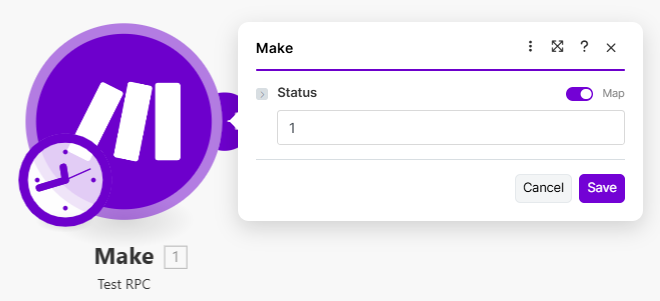
When the mode is switched to mapping, labels aren't accessible. Values are used instead.
{% endhint %}
{% endtab %}
{% tab title="Mappable parameters" %}
```json
[
{
"name": "status",
"type": "select",
"options": "rpc://NameOfMyRemoteProcedure",
"label": "Status"
}
]
```
{% endtab %}
{% tab title="RPC" %}
```json
{
"url": "/status",
"method": "GET",
"response": {
"iterate": "{{body.data}}",
"output": {
"label": "{{item.optionName}}",
"value": "{{item.optionID}}"
}
}
}
```
{% endtab %}
{% endtabs %}
### Filtering options in an RPC
If your RPC returns unwanted items, you can filter them out by using the `iterate` directive together with the `container` and `condition` objects.
This approach is only recommended when the filtering of unwanted items is not supported on the API side.
{% tabs %}
{% tab title="RPC" %}
```json
...
"response": {
"iterate":{
"container": "{{body.data}}",
"condition": "{{item.type = 'contact'}}"
},
"output": {
"label": "{{item.name}}",
"value": "{{item.id}}"
}
...
```
{% hint style="info" %}
Notice the `iterate` directive uses the `container` and the `condition` objects. The container defines what should be iterated while the condition defines the criteria each item must satisfy to be included in the list.
{% endhint %}
{% endtab %}
{% endtabs %}
### Select parameter with nested RPCs
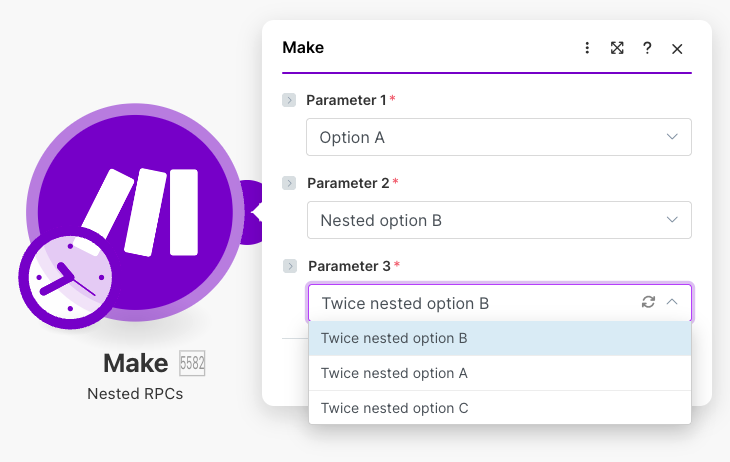
Sometimes, you may have a value that depends on another, for example, selecting a file inside a folder in an account. In this case, you'd have three API calls, and so three RPCs, each depending on the selected value from the previous one:
1. List accounts
2. List folders in the selected account
3. List files inside the selected folder
It is possible to nest RPCs under each other in Make. Here is an example of how it would look inside a module's mappable parameters and an RPC's communication.
{% tabs %}
{% tab title="User view" %}
{% endtab %}
{% tab title="Mappable parameters" %}
```json
[
{
"name": "parameter_1",
"type": "select",
"label": "Parameter 1",
"required": true,
"mappable": false,
"options": {
"store": "rpc://exampleRpc1", //proper usage of options in this case
"nested": [
{
"name": "parameter_2",
"type": "select",
"label": "Parameter 2",
"required": true,
"mappable": false,
"options": {
"store": "rpc://exampleRpc2", //don't forget to store your options
"nested": [
{
"name": "parameter_3",
"type": "select",
"label": "Parameter 3",
"required": true,
"mappable": false,
"options": "rpc://exampleRpc3"
//you are not using "nested" after it
//-> there's no need to "store" options
}
]
}
}
]
}
}
]
```
{% hint style="info" %}
Put all of your options to **`store`** property inside **`options`**. Without it, **`nested`** will not work.
{% endhint %}
{% endtab %}
{% tab title="RPC 1" %}
```json
{
"url": "/example1",
"type": "GET",
"response": {
"output": {
"value": "{{item.value}}",
"label": "{{item.label}}"
},
"iterate": "{{body.examples}}"
}
}
```
{% endtab %}
{% tab title="RPC 2" %}
{% hint style="info" %}
Notice, that `{{parameters.parameter_1}}` is inherited from the 1st RPC and passed as query to the 2nd RPC call.
{% endhint %}
{% endtab %}
{% tab title="RPC 3" %}
```json
{
"url": "/example3",
"type": "GET",
"qs": {
"needed_parameter": "{{parameters.parameter_2}}"
},
"response": {
"output": {
"value": "{{item.value}}",
"label": "{{item.label}}"
},
"iterate": "{{body.examples}}"
}
}
```
{% hint style="info" %}
Notice, that `{{parameters.parameter_2}}` is inherited from the 2nd RPC and passed as query to the 3rd RPC call.
{% endhint %}
{% endtab %}
{% endtabs %}
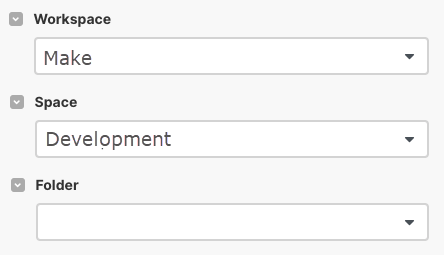
You're not restricted from using inherited parameters in `qs` only. In this example, the nested RPCs obtain a value from the parent's RPC and it is passed to the nested RPC in the URL.
{% tabs %}
{% tab title="User view" %}
{% endtab %}
{% tab title="Mappable parameters" %}
```json
[
{
"name": "workspace_id",
"label": "Workspace",
"type": "select",
"required": true,
"mappable": false,
"options": {
"store": "rpc://getWorkspaces",
"nested": [
{
"name": "space_id",
"type": "select",
"label": "Space",
"mappable": false,
"required": true,
"options": {
"store": "rpc://getSpaces",
"nested": [
{
"name": "folder_id",
"label": "Folder",
"type": "select",
"options": "rpc://getfolders",
"required": true
}
]
}
}
]
}
}
]
```
{% endtab %}
{% tab title="RPC 1 " %}
```json
{
"url": "/workspace",
"method": "GET",
"response": {
"iterate": "{{body.workspaces}}",
"output": {
"label": "{{item.name}}",
"value": "{{item.id}}"
}
}
}
```
{% endtab %}
{% tab title="RPC 2" %}
```json
{
"url": "/workspace/{{parameters.workspace_id}}/space",
"method": "GET",
"response": {
"iterate": "{{body.spaces}}",
"output": {
"label": "{{item.name}}",
"value": "{{item.id}}"
}
}
}
```
{% hint style="info" %}
The `{{parameters.team_id}}` parameter is inherited from the first RPC.
{% endhint %}
{% endtab %}
{% tab title="RPC 3" %}
```json
{
"url": "workspace/{{parameters.workspace_id}}/space/{{parameters.space_id}}/folder",
"method": "GET",
"response": {
"output": {
"label": "{{item.name}}",
"value": "{{item.id}}"
}
}
}
```
{% hint style="info" %}
The `{{parameters.team_id}}` and `{{parameters.space_id}}` parameters are inherited from the first and second RPC.
{% endhint %}
{% endtab %}
{% endtabs %}
## Search button
Sometimes, a select parameter may not be the best option. If you're dealing with a lot of items and the API allows you to filter/search results, a search button may provide a better user experience than a select, which may not have all values listed.
However, there's an important UI difference between these two:
* When using a select parameter, the user will always see a `label` even though the `value` is mapped. This makes it easier to identify the mapped values.
* When using the search button, the user sees the `label` when choosing which item to map. But once an item is selected, the `value` is shown in the field.
### Search button for a query
{% tabs %}
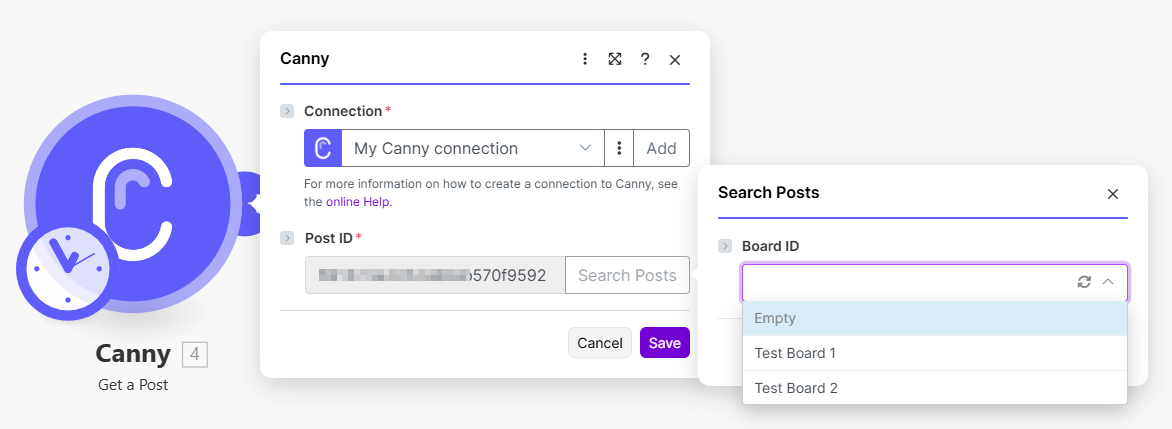
{% tab title="User view" %}
{% hint style="info" %}
Instead of going through a list of available post IDs, the user is prompted to use a search button to first find the board associated with the posts.
{% endhint %}
{% endtab %}
{% tab title="Mappable parameters" %}
```json
{
"name": "authorID",
"type": "text",
"rpc": {
"label": "Search Author",
"url": "rpc://getUser",
"parameters": [
{
"name": "email",
"label": "Author Email",
"help": "Enter author's email on whose behalf the comment should be created. E.g. yours.",
"type": "text"
}
]
},
"label": "Author ID",
"required": true
}
]
```
{% endtab %}
{% tab title="RPC" %}
```json
{
"url": "/users/retrieve",
"method": "GET",
"qs": {
"email": "{{parameters.email}}"
},
"response": {
"output": {
"label": "{{body.name}}",
"value": "{{body.id}}"
}
}
}
```
{% hint style="info" %}
The RPC executes a call to an endpoint that returns the author's ID for an email.
{% endhint %}
{% endtab %}
{% endtabs %}
### Search button with nested RPCs
{% tabs %}
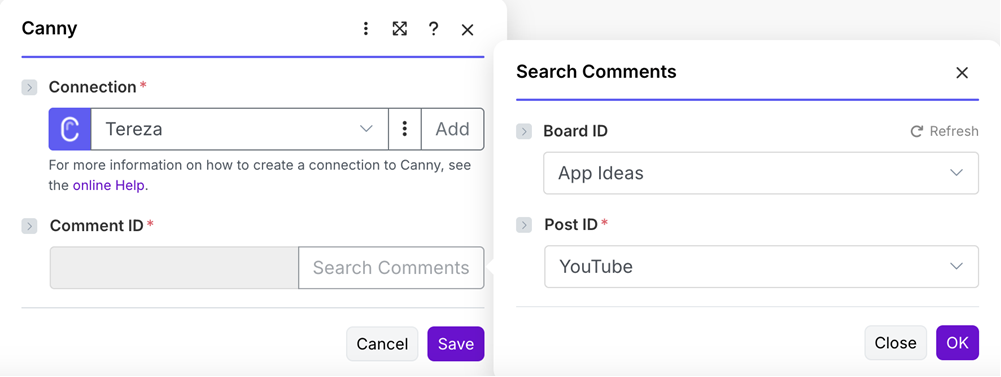
{% tab title="User view" %}
Search dialog with nested RPCs
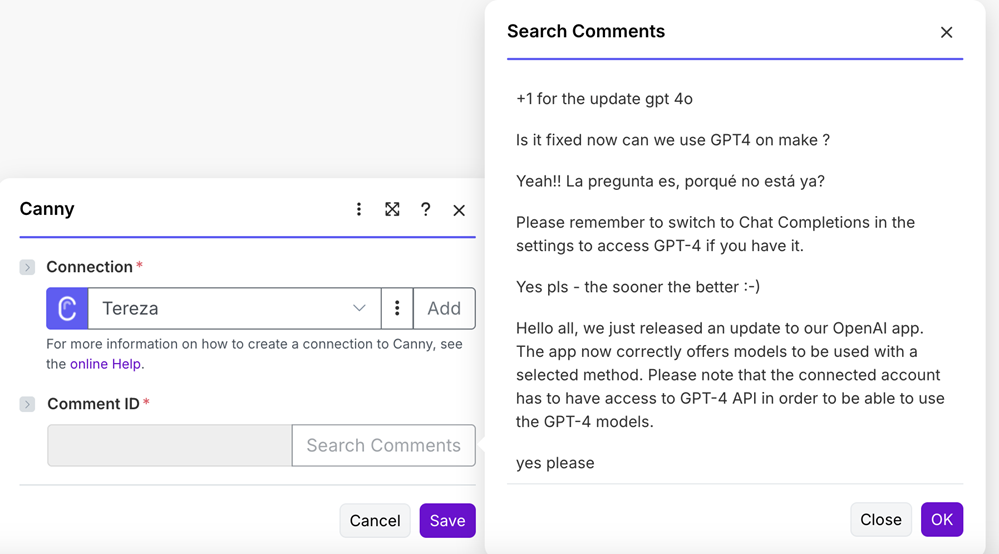
Result of the RPC
{% endtab %}
{% tab title="Mappable parameters" %}
```json
[
{
"label": "Comment ID",
"name": "id",
"type": "text",
"required": true,
"rpc": {
"label": "Search Comments",
"url": "rpc://getComments",
"parameters": [
{
"name": "id",
"label": "Board ID",
"type": "select",
"mode": "edit",
"options": {
"store": "rpc://listBoards"
},
"nested": [
{
"name": "postId",
"label": "Post ID",
"type": "select",
"options": {
"store": "rpc://listPostsbyBoard"
},
"required": true
}
]
}
]
}
}
]
```
{% endtab %}
{% endtabs %}
### Advanced search button
Some services have a lot of records, like mailboxes, task-tracking platforms, and CRMs. In these cases, it may be worth implementing a more advanced search, as long as the API supports that.
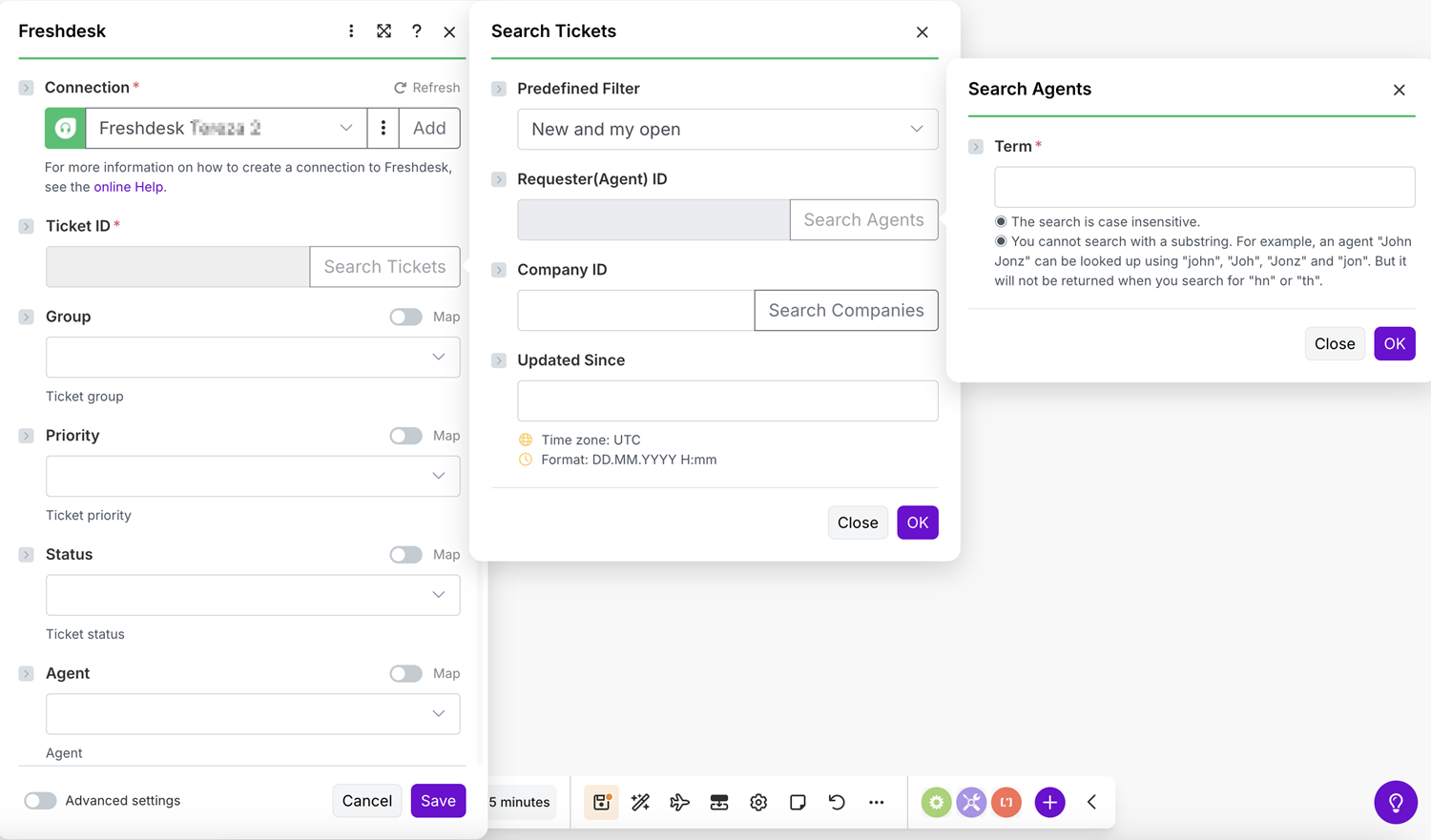
You may even want to nest one or more search buttons inside your first search button popup.
In this example for Freshdesk, users can filter results to find exactly what they're looking for.
{% tabs %}
{% tab title="User view" %}
Example of advanced implementation of a search box
{% endtab %}
{% tab title="Mappable parameters" %}
```json
{
"name": "ticket",
"label": "Ticket ID",
"type": "text",
"required": true,
"rpc": {
"url": "rpc://listTickets",
"label": "Search Tickets",
"parameters": [
{
"name": "filter",
"type": "select",
"label": "Predefined Filter",
"options": [
{
"label": "New and my open",
"value": "new_and_my_open"
},
{
"label": "Watching",
"value": "watching"
},
{
"label": "Spam",
"value": "spam"
},
{
"label": "Deleted",
"value": "deleted"
}
]
},
{
"name": "requester_id",
"type": "text",
"label": "Requester(Agent) ID",
"rpc": {
"label": "Search Agents",
"url": "rpc://listAgents",
"parameters": [
{
"name": "term",
"label": "Term",
"type": "text",
"required": true,
"help": "◉ The search is case insensitive.\n◉ You cannot search with a substring. For example, an agent \"John Jonz\" can be looked up using \"john\", \"Joh\", \"Jonz\" and \"jon\". But it will not be returned when you search for \"hn\" or \"th\"."
}
]
}
},
{
"name": "company_id",
"type": "text",
"label": "Company ID",
"rpc": {
"label": "Search Companies",
"parameters": [
{
"name": "term",
"label": "Keyword Name",
"type": "text",
"help": "◉ It is case insensitive.\n◉ You cannot search with a substring. For example, a company \"Acme Corporation\" can be looked up using \"acme\", \"Ac\", \"Corporation\" and \"Co\". But it will not be returned when you search for \"cme\" or \"orporation\"."
}
],
"url": "rpc://listCompanies"
}
},
{
"name": "updated_since",
"type": "date",
"label": "Updated Since"
}
]
}
},
...
]
```
{% endtab %}
{% tab title="RPC" %}
```json
{
"url": "/tickets",
"method": "GET",
"qs": {
"per_page": 100,
"order_by": "updated_at",
"order_type": "desc",
"company_id": "{{ifempty(parameters.company_id, undefined)}}",
"requester_id": "{{ifempty(parameters.requester_id, undefined)}}",
"updated_since": "{{ifempty(parameters.updated_since, undefined)}}",
"filter": "{{ifempty(parameters.filter, undefined)}}"
},
"response": {
"output": {
"label": "{{item.subject}}",
"value": "{{item.id}}"
},
"iterate": "{{body}}",
"limit": 500
},
"pagination": {
"qs": {
"page": "{{pagination.page}}"
},
"condition": "{{headers.link}}"
}
}
```
{% endtab %}
{% endtabs %}
## Reusable options in a select
Sometimes it is better to keep the list of available options outside of mappable parameters code, to keep the code cleaner or to reuse the same piece of code in multiple places.
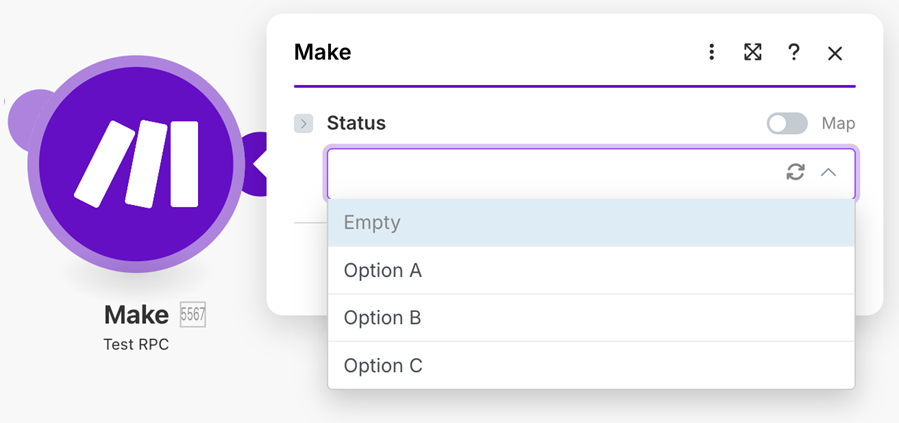
In this case, we can create a request-less RPC, where we manually define the list of available options that will be returned in the RPC's output.
{% tabs %}
{% tab title="User view" %}
Example of a select parameter with hardcoded options inside an RPC
{% endtab %}
{% tab title="Mappable parameters" %}
```json
[
{
"label": "Status",
"name": "status",
"type": "select",
"options": "rpc://reusableOptions"
}
]
```
{% endtab %}
{% tab title="RPC" %}
```json
{
"response": {
"output": [
{
"label": "Option A",
"value": "a"
},
{
"label": "Option B",
"value": "b"
},
{
"label": "Option C",
"value": "c"
}
]
}
}
```
{% endtab %}
{% endtabs %}
## Send query to RPC
You might create an RPC and realize that some other module needs an RPC that does almost the same thing.
Instead of creating a new RPC with small differences, in some cases you can modify the first RPC and use a query string parameter with different values depending on the module.
For example, you have one general search endpoint that requires you to specify the items for which to search: `companies` or `contacts`.
Instead of creating `rpc://searchCompanies` and `rpc://searchContacts`, use `rpc://search?type=companies&active=true`
{% tabs %}
{% tab title="Module: mappable parameters" %}
{% hint style="info" %}
Both `type` and `active` are passed to the RPC as parameters.
{% endhint %}
{% endtab %}
{% tab title="RPC" %}
```json
{
"url": "/search/{{parameters.type}}",
"qs": {
"active": "{{parameters.active}}"
},
"response": {
"output": {
"label": "{{item.name}}",
"value": "{{item.id}}"
}
}
}
```
{% hint style="info" %}
The values sent to the RPC as a query are inherited and accessed in the RPC by `"{{parameters.active}}"` and `"{{parameters.type}}"`
{% endhint %}
{% endtab %}
{% endtabs %}
### Send array to RPC
You can send an array to an RPC.
{% tabs %}
{% tab title="Module: mappable parameters" %}
```json
[
{
"name": "options",
"type": "select",
"label": "Options",
"options": "rpc://passArrayToRPC?buttonTypes=a&buttonTypes=b&buttonTypes=c",
"required": true
}
]
```
{% endtab %}
{% tab title="RPC" %}
```json
[
{
"name": "buttonTypes",
"type": "array",
"label": "Button Types",
"spec": {
"type": "text"
}
}
]
```
{% endtab %}
{% endtabs %}
---
# Agent Instructions
This documentation is published with GitBook. GitBook is the documentation platform designed so that both humans and AI agents can read, navigate, and reason over technical content effectively. Learn more at gitbook.com.
## Querying This Documentation
If you need additional information that is not directly available in this page, you can query the documentation dynamically by asking a question.
Perform an HTTP GET request on the current page URL with the `ask` query parameter, and the optional `goal` query parameter:
```
GET https://developers.make.com/custom-apps-documentation/app-components/rpcs/dynamic-options-rpc.md?ask=&goal=
```
`ask` is the immediate question: it should be specific, self-contained, and written in natural language.
`goal` is optional and describes the broader end goal you are ultimately trying to accomplish on behalf of the user. GitBook uses it to tailor the answer towards what is most useful for that goal.
The response will contain a direct answer to the question and relevant excerpts and sources from the documentation.
Use this mechanism when the answer is not explicitly present in the current page, you need clarification or additional context, or you want to retrieve related documentation sections.