> For the complete documentation index, see [llms.txt](https://developers.make.com/llms.txt). Markdown versions of documentation pages are available by appending `.md` to page URLs; this page is available as [Markdown](https://developers.make.com/custom-apps-documentation/app-review/prerequisites.md).
# Prerequisites
When you want to make your custom app public and share it with all Make users, your app has to conform to Make standards. Following Make app development standards is a prerequisite to get an app review. Make app standards encompass:
* [Custom app functionality](#custom-app-functionality)
* [Custom app code best practices](#custom-app-code)
* [Testing your custom app with test scenarios](#testing-your-custom-app)
Review the following sections to learn more about each prerequisite.
## Custom app functionality
In Make, we develop apps to provide value to our users. Your custom app should use a service that Make doesn't integrate yet. All apps in Make require from the user only credentials that are necessary to create a connection to the service API. If you want to make your custom app public, your app functionality has to follow the same principles:
* Your custom app uses a web service that is not already available in Make.
* Your custom app and its modules have to connect to a web service API. Avoid duplicating the same functionality as iterators, aggregators, or other tools in Make.
* Avoid using APIs that have strong dependencies on other APIs, or APIs that function as redirects to other APIs.
* Avoid using APIs that don't have their own domain, or have their domain associated with service platforms like Heroku or AWS.
* Your custom app has to use only credentials that the service requires to create a connection. Don't request any additional credentials from the user.
* If your custom app is a scraper app, it can't include the name of a third-party service in your app or module names.
## Custom app code
When developing a custom app in Make, you should first go through our [Best Practices guide](/custom-apps-documentation/best-practices/overview.md) and apply them to your code. By following our best practices, you will ensure that the review and publication process of your app is as smooth as possible.
Before sending an app for review, check that:
* The base and connection have [sanitization](/custom-apps-documentation/app-components/base/sanitization.md) of sensitive data, e. g. API key or token.
* The base and connection have [error handling](/custom-apps-documentation/app-components/base/error-handling.md).
* The [base](/custom-apps-documentation/app-components/base.md) and connection use an endpoint in the app's API.
* The connection is [using a correct URL](/custom-apps-documentation/best-practices/connections.md). If the user uses incorrect credentials, they get an error.
* Modules have correct [labels](/custom-apps-documentation/best-practices/naming-conventions/modules/module-labels.md) and [descriptions](/custom-apps-documentation/best-practices/naming-conventions/modules/module-descriptions.md).
* The app has a [universal module](/custom-apps-documentation/app-components/modules/universal-module.md).
* All modules have the [correct interface](/custom-apps-documentation/best-practices/output-parameters/interface.md) depending on the output from the module.
* All dates are formatted or parsed in the [mappable parameters](/custom-apps-documentation/best-practices/modules/search-modules.md) and [interface](/custom-apps-documentation/best-practices/output-parameters/interface.md).
* Search modules, trigger modules, and [RPCs](/custom-apps-documentation/best-practices/remote-procedure-calls.md#pagination-and-limits) have a `limit` [parameter](/custom-apps-documentation/best-practices/modules/search-modules.md).
* Search modules, trigger modules, and RPCs have [pagination](/custom-apps-documentation/component-blocks/api/pagination.md) if it's supported in the service API.
{% hint style="warning" %}
The items above are mandatory for each app.
{% endhint %}
## Testing your custom app
After you check the code of your custom app, you must create test scenarios to show that the custom app works. Use each module of the custom app in at least one test scenario.
{% hint style="warning" %}
Make sure that the testing scenarios and their execution logs don't contain personal or sensitive data.
{% endhint %}
### Best practices for test scenarios
* Do not use scenarios with another app's webhook.
* Try to put all of the app's modules in one scenario and run the scenario without errors. Connect the app modules based on the object the modules work with or the action the modules perform.\
For example, **Create a Task** > **Create a Subtask** (in order to create a subtask, the task has to be created first).
Example of a test scenario
* Put the search and list modules at the end of separate scenario routes to avoid multiple runs of the subsequent modules.
* Run your search and list modules to have logs with pagination. If you don't know how to test pagination, [follow the steps here](/custom-apps-documentation/debug-your-app/debugging-of-pagination-in-list-search-modules.md).
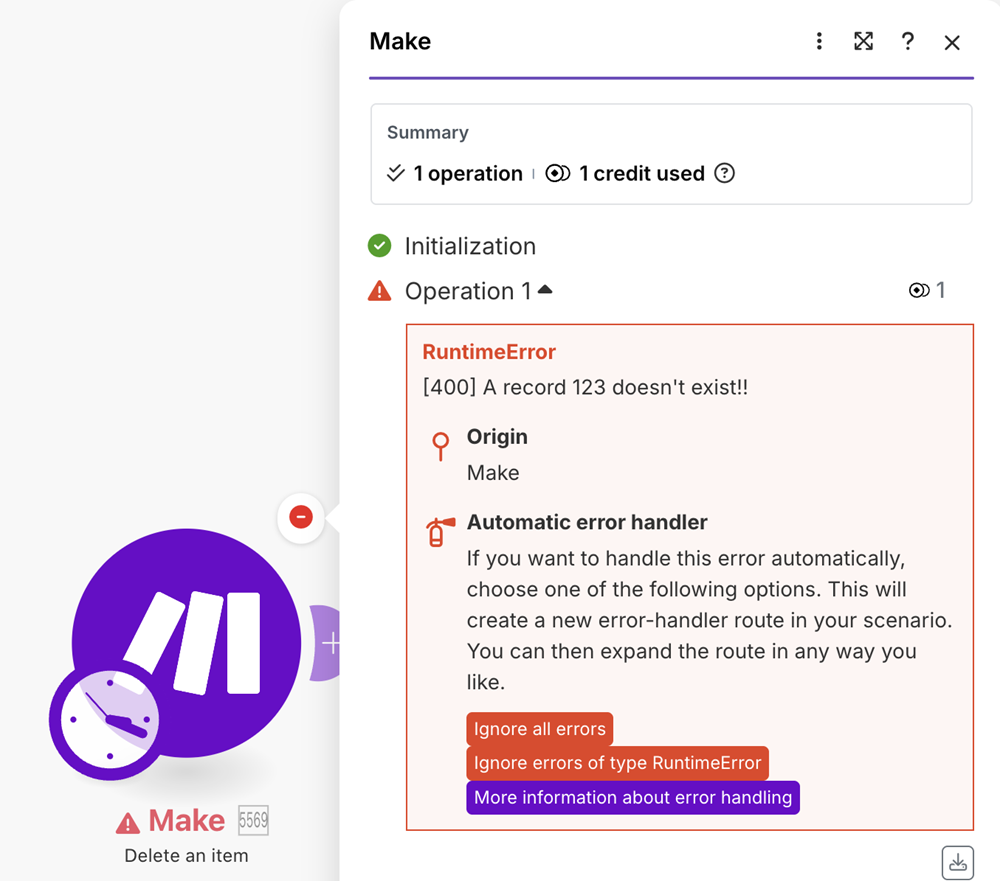
* Create a separate scenario that produces an error message. Run the scenario to get an error:
Example of an error
Run the test scenarios right before you request the custom app review and every time you fix issues. The scenario execution logs have a data retention limit and the reviewer won't be able to access old logs.
---
# Agent Instructions
This documentation is published with GitBook. GitBook is the documentation platform designed so that both humans and AI agents can read, navigate, and reason over technical content effectively. Learn more at gitbook.com.
## Querying This Documentation
If you need additional information that is not directly available in this page, you can query the documentation dynamically by asking a question.
Perform an HTTP GET request on the current page URL with the `ask` query parameter, and the optional `goal` query parameter:
```
GET https://developers.make.com/custom-apps-documentation/app-review/prerequisites.md?ask=&goal=
```
`ask` is the immediate question: it should be specific, self-contained, and written in natural language.
`goal` is optional and describes the broader end goal you are ultimately trying to accomplish on behalf of the user. GitBook uses it to tailor the answer towards what is most useful for that goal.
The response will contain a direct answer to the question and relevant excerpts and sources from the documentation.
Use this mechanism when the answer is not explicitly present in the current page, you need clarification or additional context, or you want to retrieve related documentation sections.