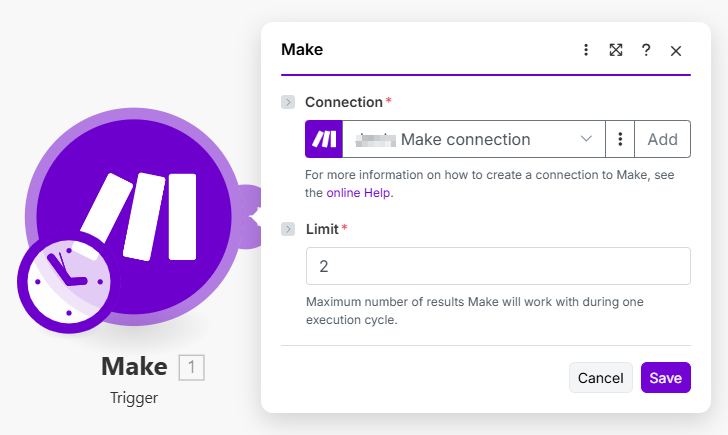
# Trigger (polling)

You can configure the trigger module to:

* process all available items and wait for new ones, without repeated processing of the old item.
* process items starting from a specific date and time.
* process items starting with a specific item.

Use this module when you need to process items sequentially in the order they were created or updated.

## Components

### Communication

The [communication](https://developers.make.com/custom-apps-documentation/component-blocks/api) response is extended with the trigger object.

#### response.trigger

The trigger collection specifies directives that control how the trigger works and how your data is processed.

<table><thead><tr><th width="120.33333333333331">Key</th><th width="151">Type</th><th>Description</th></tr></thead><tbody><tr><td><code>type</code></td><td>Date or ID</td><td>Specifies how the trigger will behave and sort items</td></tr><tr><td><code>order</code></td><td>Asc or desc</td><td>Specifies in what order the remote API returns items</td></tr><tr><td><code>id</code></td><td>IML string</td><td>Must return the current item’s Id</td></tr><tr><td><code>date</code></td><td>IML string</td><td>When used, must return the current item’s date</td></tr></tbody></table>

#### response.trigger.type

**Required**: yes\
**Values**: `id` or `date`

This directive specifies how the trigger will sort and iterate through items.

If the processed item has a create/update date, then `date` should be used as a value and a correct method should be specified in the `trigger.date` directive. The trigger sorts all items by their date and id fields and returns only unprocessed items.

If the processed item does not have a create/update date, but only an id, then `id` should be used as a value, and a correct method should be specified in the `trigger.id` directive.

#### response.trigger.order <a href="#trigger-order" id="trigger-order"></a>

**Required**: yes\
**Values**: `asc`, `desc` or `unordered`

This directive specifies in what order the remote API is returning items - descending, ascending, or unordered. This information is needed to correctly determine if there are more pages to be fetched or not. It is also needed to correctly sort the incoming items and display them to the user in ascending order.

If the API returns items in ascending order (low to high), then `asc` should be used. If the API returns items in descending order (high to low), then `desc` should be used. If the API returns items in no specific order, then `unordered` should be used.

{% hint style="info" %}
When specifying the trigger's communication, sort the results in **descending** order.

Make's limit is a return of 3200 records.

If you sort results in ascending order and the user has more than 3200 records, the trigger won't be able to fetch the latest records. We do not recommending using ascending order for polling triggers.
{% endhint %}

#### response.trigger.id <a href="#trigger-id" id="trigger-id"></a>

**Required**: yes

This directive specifies the item’s id. It must always be present.

For example, if the item looks like this:

{% tabs %}
{% tab title="Source" %}

```json
{
    "id": 24,
    "name": "Fred",
    "friend_count": 5
}
```

{% endtab %}
{% endtabs %}

then specify the `trigger.id` directive like this: `{{item.id}}:`

{% tabs %}
{% tab title="Source" %}

```json
{
    "response": {
        "trigger": {
            "id": "{{item.id}}"
        }
    }
}
```

{% endtab %}
{% endtabs %}

#### response.trigger.date <a href="#trigger-date" id="trigger-date"></a>

**Required**: yes, if the trigger type is `date`

This directive specifies the item’s date. It must be specified when the `trigger.type` is set to `date`. Note that `trigger.id` must always be specified.

For example, if the item looks like this:

{% tabs %}
{% tab title="Source" %}

```json
{
    "id": 24,
    "name": "Fred",
    "friend_count": 5,
    "created_date": "2017-07-05T13:05"
}
```

{% endtab %}
{% endtabs %}

Then specify the `trigger.date` directive like this: `{{item.created_date}}`, and the trigger collection might look something like this:

{% tabs %}
{% tab title="Source" %}

```json
{
    "response": {
        "trigger": {
            "id": "{{item.id}}",
            "date": "{{item.created_date}}"
        }
    }
}
```

{% endtab %}
{% endtabs %}

### Epoch

The [Epoch panel](https://developers.make.com/custom-apps-documentation/component-blocks/epoch) is a specific component of the trigger allowing a user to choose the starting item.

### Static Parameters

The trigger module can only have [static parameters](https://developers.make.com/custom-apps-documentation/component-blocks/parameters). There's no reason to have anything mappable in the trigger as this module is always the first module in the scenario.

### Interface

The trigger module can return [multiple bundles at once](https://developers.make.com/custom-apps-documentation/component-blocks/interface).

### Samples

To help the users with setting up your module, provide [samples](https://developers.make.com/custom-apps-documentation/component-blocks/samples).

### Scope​

When using an OAuth type of connection, use the [scope](https://developers.make.com/custom-apps-documentation/component-blocks/scope) to define scopes required by this trigger.

### Available IML variables <a href="#available-iml-variables" id="available-iml-variables"></a>

These IML variables are available for you to use everywhere in this module:

<table><thead><tr><th width="220.66668701171875" valign="top">Variable</th><th valign="top">Description</th></tr></thead><tbody><tr><td valign="top"><code>now</code></td><td valign="top">Current date and time</td></tr><tr><td valign="top"><code>environment</code></td><td valign="top">TBD</td></tr><tr><td valign="top"><code>temp</code></td><td valign="top">Contains custom variables created via the <code>temp</code> directive.</td></tr><tr><td valign="top"><code>parameters</code></td><td valign="top">Contains the module’s input parameters.</td></tr><tr><td valign="top"><code>connection</code></td><td valign="top">Contains the connection’s data collection.</td></tr><tr><td valign="top"><code>common</code></td><td valign="top">Contains the app’s common data collection.</td></tr><tr><td valign="top"><code>data</code></td><td valign="top">Contains the module’s data collection.</td></tr><tr><td valign="top"><code>data.lastDate</code></td><td valign="top">Returns the date from the last retrieved item in a previous execution.</td></tr><tr><td valign="top"><code>data.lastID</code></td><td valign="top">Returns the ID of the last retrieved item in a previous execution.</td></tr><tr><td valign="top"><code>scenario</code></td><td valign="top">TBD</td></tr><tr><td valign="top"><code>metadata.expect</code></td><td valign="top">Contains the module’s raw parameters array in the way you have specified it in the configuration.</td></tr><tr><td valign="top"><code>metadata.interface</code></td><td valign="top">Contains module’s raw interface array in the way you have specified it in the configuration.</td></tr></tbody></table>

Additional variables available for the response object:

<table><thead><tr><th width="142.42584228515625" valign="top">Variable</th><th valign="top">Description</th></tr></thead><tbody><tr><td valign="top"><code>output</code></td><td valign="top">When using the <code>wrapper</code> directive, the <code>output</code> variable represents the result of the <code>output</code>directive.</td></tr></tbody></table>

Additional variables available after using the `iterate` directive, i.e. in `wrapper` or `pagination` directives:

<table><thead><tr><th width="225.66668701171875" valign="top">Variable</th><th valign="top">Description</th></tr></thead><tbody><tr><td valign="top"><code>iterate.container.first</code></td><td valign="top">Represents the first item of the array you iterated.</td></tr><tr><td valign="top"><code>iterate.container.last</code></td><td valign="top">Represents the last item of the array you iterated.</td></tr></tbody></table>

{% hint style="info" %}
In the Trigger module, the `iterate.container.last` can be used for handling the pagination of the new items correctly/

```json
"response": {
    "limit": "{{parameters.limit}}",
    "output": "{{parseItem(item.data)}}",
    "iterate": "{{body.data.children}}",
    "trigger": {
        "id": "{{item.data.name}}",
        "date": "{{parseDate(item.data.created_utc, 'X')}}",
        "type": "date",
        "order": "desc"
    }
},
"pagination": {
    "qs": {
        "after": "{{iterate.container.last.data.name}}"
    }
}
```

{% endhint %}

Additional variables available for pagination and response objects:

<table><thead><tr><th width="139.0926513671875" valign="top">Variable</th><th valign="top">Description</th></tr></thead><tbody><tr><td valign="top"><code>body</code></td><td valign="top">Contains the body that was retrieved from the last request.</td></tr><tr><td valign="top"><code>headers</code></td><td valign="top">Contains the response headers that were retrieved from the last request.</td></tr><tr><td valign="top"><code>items</code></td><td valign="top">When iterating this variable represents the current item that is being iterated.</td></tr></tbody></table>

## Example

{% tabs %}
{% tab title="Appearance" %}

<div align="left"><img src="https://1562974717-files.gitbook.io/~/files/v0/b/gitbook-x-prod.appspot.com/o/spaces%2FNS0mCBwODiYtOVXjc6qf%2Fuploads%2Fgit-blob-876c32638da860684491242ef30074bd6d135fa4%2Ftrigger_polling.png?alt=media" alt="" width="546"></div>
{% endtab %}

{% tab title="Communication" %}

```json
{
	"qs": {},
	"url": "/api/users",
	"body": {},
	"method": "GET",
	"headers": {},
	"response": {
		"limit": "{{parameters.limit}}",
		"output": {
			"id": "{{item.id}}",
			"name": "{{item.name}}",
			"email": "{{item.email}}",
			"created": "{{item.created}}"
		},
		"iterate": "{{body.users}}",
		"trigger": {
			"id": "{{item.id}}",
			"date": "{{item.created}}",
			"type": "date",
			"order": "desc"
		}
	}
}
```

{% endtab %}

{% tab title="Epoch" %}

```json
{
	"response": {
		"limit": 500,
		"output": {
			"date": "{{item.created}}",
			"label": "{{item.name}}"
		}
	}
}
```

{% endtab %}

{% tab title="Static parameters" %}

```json
[
	{
		"help": "Maximum number of results Integromat will work with during one execution cycle.",
		"name": "limit",
		"type": "uinteger",
		"label": "Limit",
		"default": 2,
		"required": true
	}
]
```

{% endtab %}

{% tab title="Interface" %}

```json
[
	{
		"name": "id",
		"type": "uinteger",
		"label": "User ID"
	},
	{
		"name": "email",
		"type": "email",
		"label": "Email address"
	},
	{
		"name": "name",
		"type": "text",
		"label": "Name"
	},
	{
		"name": "created",
		"type": "date",
		"label": "Date created"
	}
]
```

{% endtab %}

{% tab title="Samples" %}

```json
{
	"id": 1,
	"email": "johndoe@email.com",
	"name": "John Doe",
	"created": "2018-01-01T12:00:00.000Z"
}
```

{% endtab %}
{% endtabs %}
