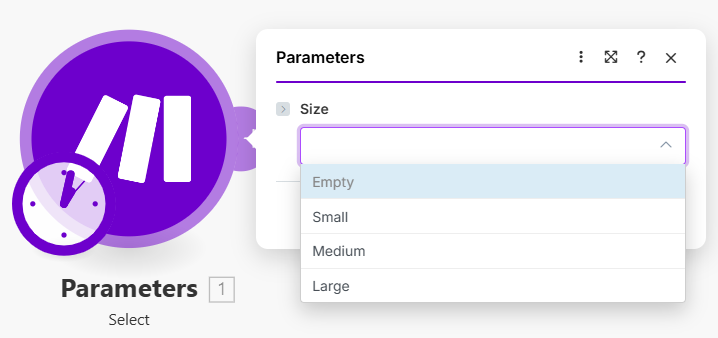
# Select

## Specification

### multiple

* Type: `Boolean`
* Default: `false`
* If `true`, multiple selections are allowed.

### sort

* Type: `String`
* Allowed values: `text` or `number`
* Items are unsorted by default. However, you can sort them using this option.

### grouped

* Type: `Boolean`
* If `true`, options can be grouped by using *grouped options syntax.*

{% tabs %}
{% tab title="Example" %}

```json
[
    {
        label: "Group",
        options: [
            {
                label: "Option",
                value: 1
            }
        ]
    }
]
```

{% endtab %}
{% endtabs %}

### options

Available types:

<table><thead><tr><th width="141.66668701171875" valign="top">Type</th><th valign="top">Specification</th></tr></thead><tbody><tr><td valign="top"><strong>array</strong></td><td valign="top"><p>An array of options for this select field. Example:</p><pre class="language-json"><code class="lang-json">[
    {
        label: "Option",
        value: 1
    }
]
</code></pre></td></tr><tr><td valign="top"><strong>string</strong></td><td valign="top">Specifies an options RPC URL that retrieves dynamic options for this selection.</td></tr><tr><td valign="top"><strong>object</strong></td><td valign="top">Allows specifying the detailed configuration of options and nested parameters for this select field.</td></tr></tbody></table>

Available **parameters**:

<table><thead><tr><th width="145" valign="top">Parameter</th><th width="82" valign="top">Type</th><th valign="top">Specification</th></tr></thead><tbody><tr><td valign="top"><strong>store</strong></td><td valign="top">array</td><td valign="top">Specifies options for the select field.</td></tr><tr><td valign="top"><strong>store</strong></td><td valign="top">string</td><td valign="top">Specifies an options RPC URL that retrieves dynamic options for the select.</td></tr><tr><td valign="top"><strong>label</strong></td><td valign="top">string</td><td valign="top">Specifies the name of a property as the label of an option.</td></tr><tr><td valign="top"><strong>value</strong></td><td valign="top">string</td><td valign="top">Specifies the name of a property as the value of an option. Value cannot be <code>null</code>.</td></tr><tr><td valign="top"><strong>placeholder</strong></td><td valign="top">string</td><td valign="top"><p>Specifies the label shown when no option is selected. Available parameters:</p><ul><li><code>label</code> (<code>string</code>) - Specifies the label shown when no option is selected.</li><li><code>nested</code> (<code>array</code>) - Specifies an array of nested parameters shown when no option is selected.</li></ul></td></tr><tr><td valign="top"><strong>placeholder</strong></td><td valign="top">object</td><td valign="top"><p>Specifies a detailed configuration of a placeholder. Available parameters:</p><ul><li><code>label</code> (<code>string</code>) - Specifies the label shown when no option is selected.</li><li><code>nested</code> (<code>array</code>) - Specifies an array of nested parameters shown when no option is selected.</li></ul></td></tr><tr><td valign="top"><strong>nested</strong></td><td valign="top">array</td><td valign="top"><p>Specifies an array of nested parameters shown when an option is selected.</p><p>When the <strong>select</strong> is <code>multiple</code>, the nested parameters are generated and displayed for the selected options.</p></td></tr><tr><td valign="top"><strong>nested</strong></td><td valign="top">string</td><td valign="top">Specifies an RPC URL that retrieves dynamic nested options.</td></tr></tbody></table>

### mode

* Type: `String`.
* Accepted values: `edit` or `choose`.

### validate

* Type: `Object` or `Boolean`.
* Specifies parameter validation.

When set to `false`, the validation against the provided options gets disabled for manual input.

Available parameters:

<table><thead><tr><th width="138" valign="top">Parameter</th><th width="98" valign="top">Type</th><th valign="top">Specification</th></tr></thead><tbody><tr><td valign="top"><strong>maxItems</strong></td><td valign="top">number</td><td valign="top">Specifies the maximum number of selected items when <code>multiple</code> is <code>true</code>.</td></tr><tr><td valign="top"><strong>minItems</strong></td><td valign="top">number</td><td valign="top">Specifies the minimum number of selected items when <code>multiple</code> is <code>true</code>.</td></tr></tbody></table>

### spec

* Type: `Object`.

Available parameters:

<table><thead><tr><th width="141" valign="top">Parameter</th><th width="80" valign="top">Type</th><th valign="top">Specification</th></tr></thead><tbody><tr><td valign="top"><strong>type</strong></td><td valign="top">string</td><td valign="top"><p>Specifies a data type of value from the select that is validated.</p><p><br>Useful when your API returns numerical IDs in strings but you want them to be typed as numbers in the output of your module.</p></td></tr></tbody></table>

### dynamic

* Type: `Boolean`
* Default: `false`

Defines whether a mapped value in the **select** should be validated against the option values.

If `true`, the value is treated as dynamic and validation is disabled. The value is set to true automatically if select options are generated using an RPC.

### mappable

* Type: `Boolean or Object`
  * Set to `false` to make field non-mappable.
  * If `Object`, it specifies the detailed configuration of the mapping toggle.

Available parameters:

<table><thead><tr><th width="127" valign="top">Parameter</th><th width="100" valign="top">Type</th><th valign="top">Specification</th></tr></thead><tbody><tr><td valign="top"><strong>help</strong></td><td valign="top">string</td><td valign="top">Alternative help text is shown only when the mappable toggle is turned on.</td></tr></tbody></table>

## Examples

### Basic select

A basic select with few options that can't be changed manually.

{% tabs %}
{% tab title="Appearance" %}

<div align="left"><figure><img src="https://1562974717-files.gitbook.io/~/files/v0/b/gitbook-x-prod.appspot.com/o/spaces%2FNS0mCBwODiYtOVXjc6qf%2Fuploads%2Fgit-blob-981923e53c4c1066cf524261d9c692abc79ccc69%2Fselect1a.png?alt=media" alt="" width="539"><figcaption></figcaption></figure></div>
{% endtab %}

{% tab title="Source" %}

```json
[
	{
		"name": "select",
		"label": "Size",
		"type": "select",
		"options": [
			{
				"label": "Small",
				"value": "s"
			},
			{
				"label": "Medium",
				"value": "m"
			},
			{
				"label": "Large",
				"value": "l"
			}
		]
	}
]
```

{% endtab %}
{% endtabs %}

### Select with grouped options

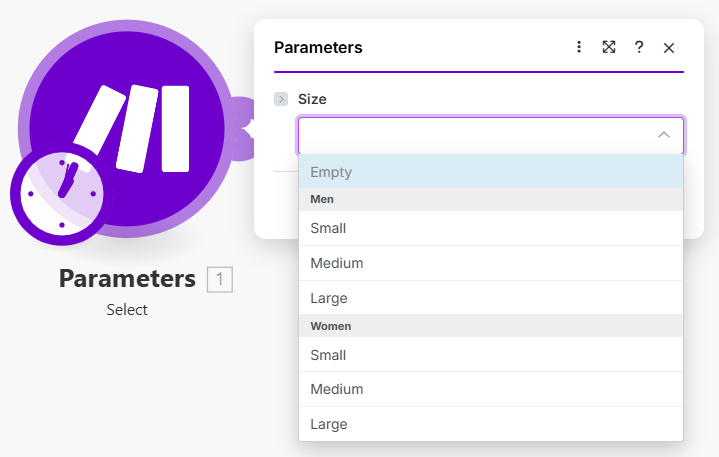
Sort options into groups by enabling `grouped` options.

{% tabs %}
{% tab title="Appearance" %}

<div align="left"><figure><img src="https://1562974717-files.gitbook.io/~/files/v0/b/gitbook-x-prod.appspot.com/o/spaces%2FNS0mCBwODiYtOVXjc6qf%2Fuploads%2Fgit-blob-6754b95e7dc7898ef680068cc3de3eae7a2573e4%2Fselect2a.png?alt=media" alt="" width="539"><figcaption></figcaption></figure></div>
{% endtab %}

{% tab title="Source" %}

```json
[
	{
		"name": "select",
		"label": "Size",
		"type": "select",
		"grouped": true,
		"options": [
			{
				"label": "Men",
				"options": [
					{
						"label": "Small",
						"value": "ms"
					},
					{
						"label": "Medium",
						"value": "mm"
					},
					{
						"label": "Large",
						"value": "ml"
					}
				]
			},
			{
				"label": "Women",
				"options": [
					{
						"label": "Small",
						"value": "ws"
					},
					{
						"label": "Medium",
						"value": "wm"
					},
					{
						"label": "Large",
						"value": "wl"
					}
				]
			}
		]
	}
]
```

{% endtab %}
{% endtabs %}

### Multiple choice

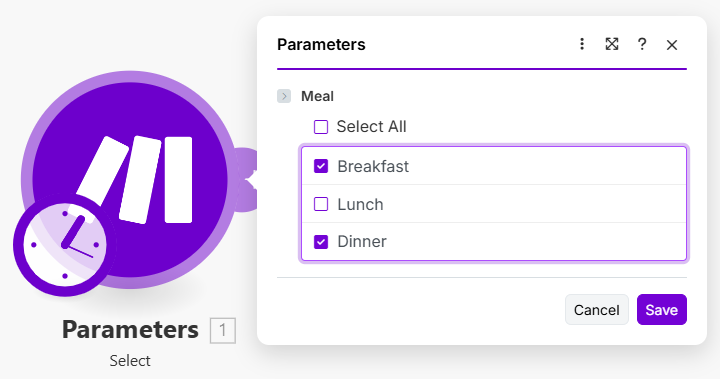
Turn on multiple choice by setting `multiple` to `true`.

{% tabs %}
{% tab title="Appearance" %}

<div align="left"><figure><img src="https://1562974717-files.gitbook.io/~/files/v0/b/gitbook-x-prod.appspot.com/o/spaces%2FNS0mCBwODiYtOVXjc6qf%2Fuploads%2Fgit-blob-ce0e1aeb7256daae87e21b207d4463bb6a06db09%2Fselect3a.png?alt=media" alt="" width="540"><figcaption></figcaption></figure></div>
{% endtab %}

{% tab title="Source" %}

```json
[
	{
		"name": "select",
		"label": "Meal",
		"type": "select",
		"options": [
			{
				"label": "Breakfast",
				"value": "breakfast"
			},
			{
				"label": "Lunch",
				"value": "lunch"
			},
			{
				"label": "Dinner",
				"value": "dinner"
			}
		],
		"multiple": true
	}
]
```

{% endtab %}

{% tab title="Output" %}

```json
["breakfast","dinner"]
```

{% endtab %}
{% endtabs %}

### Multiple choice with validation

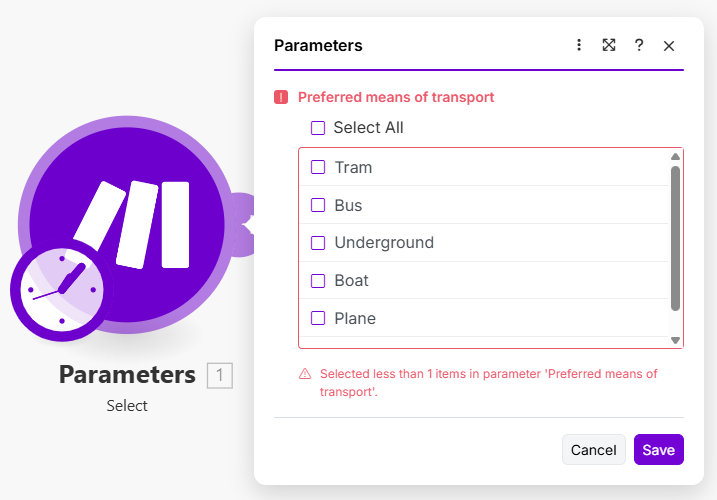
You can validate the number of selected options by using `validate` object.

{% tabs %}
{% tab title="Appearance" %}

<div align="left"><figure><img src="https://1562974717-files.gitbook.io/~/files/v0/b/gitbook-x-prod.appspot.com/o/spaces%2FNS0mCBwODiYtOVXjc6qf%2Fuploads%2Fgit-blob-ce786b07fae16fee0a67b08aad15ae2f16a0de0b%2Fselect4a.png?alt=media" alt="" width="538"><figcaption></figcaption></figure></div>
{% endtab %}

{% tab title="Source" %}

```json
[
	{
		"name": "select",
		"label": "Preferred means of transport",
		"type": "select",
		"options": [
			{
				"label": "Tram",
				"value": "tram"
			},
			{
				"label": "Bus",
				"value": "bus"
			},
			{
				"label": "Underground",
				"value": "underground"
			},
			{
				"label": "Boat",
				"value": "boat"
			},
			{
				"label": "Plane",
				"value": "plane"
			},
			{
				"label": "Train",
				"value": "train"
			}
		],
		"multiple": true,
		"validate": {
			"minItems": 1,
			"maxItems": 3
		}
	}
]
```

{% endtab %}
{% endtabs %}

### Mappable select with help

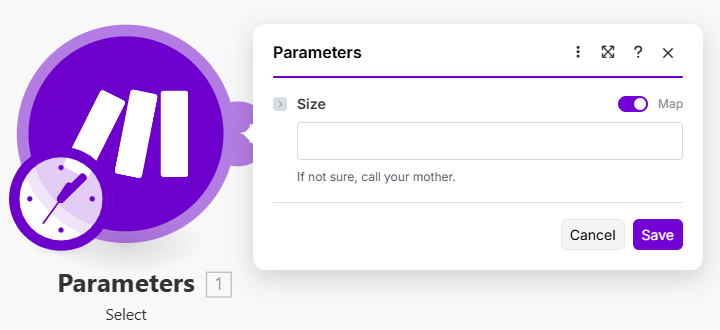
You can display a custom help message when the mappable toggle is turned on.

{% tabs %}
{% tab title="Appearance" %}

<div align="left"><figure><img src="https://1562974717-files.gitbook.io/~/files/v0/b/gitbook-x-prod.appspot.com/o/spaces%2FNS0mCBwODiYtOVXjc6qf%2Fuploads%2Fgit-blob-2cdb55b3edbd696f8ac5f98a2bdbe5d368e5cb89%2Fselect5a.png?alt=media" alt="" width="540"><figcaption></figcaption></figure></div>
{% endtab %}

{% tab title="Source" %}

```json
[
	{
		"name": "select",
		"type": "select",
		"label": "Size",
		"options": [
			{
				"label": "Small",
				"value": "s"
			},
			{
				"label": "Medium",
				"value": "m"
			},
			{
				"label": "Large",
				"value": "l"
			}
		],
		"mappable": {
			"help": "If not sure, call your mother."
		}
	}
]
```

{% endtab %}
{% endtabs %}

### Preselected value

Set a preselected value by setting a `default`. The value of desired option and default has to match.

{% tabs %}
{% tab title="Appearance" %}

<div align="left"><figure><img src="https://1562974717-files.gitbook.io/~/files/v0/b/gitbook-x-prod.appspot.com/o/spaces%2FNS0mCBwODiYtOVXjc6qf%2Fuploads%2Fgit-blob-507da478c16c681a6b1e1d898b025605391be562%2Fselect6a.png?alt=media" alt="" width="547"><figcaption></figcaption></figure></div>
{% endtab %}

{% tab title="Source" %}

```json
[
	{
		"name": "select",
		"type": "select",
		"label": "Size",
		"options": [
			{
				"label": "Small",
				"value": "s"
			},
			{
				"label": "Medium",
				"value": "m"
			},
			{
				"label": "Large",
				"value": "l"
			}
		],
		"default": "m"
	}
]
```

{% endtab %}
{% endtabs %}

### Placeholder

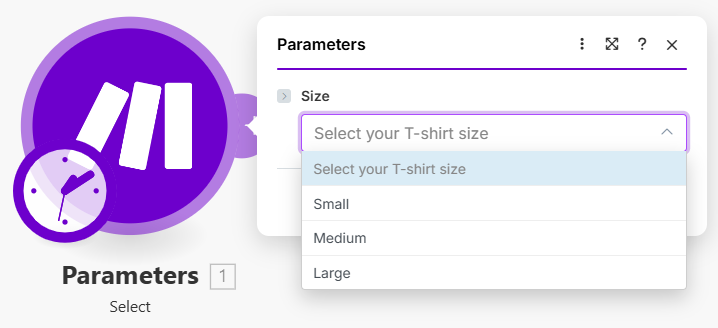
Choose what to display when no option is selected by specifying a placeholder. You need to put options inside the `store` array to make this work.

{% tabs %}
{% tab title="Appearance" %}

<div align="left"><figure><img src="https://1562974717-files.gitbook.io/~/files/v0/b/gitbook-x-prod.appspot.com/o/spaces%2FNS0mCBwODiYtOVXjc6qf%2Fuploads%2Fgit-blob-541b69a71b84107dd24c09e5653b3cf624d52cfd%2Fselect7.png?alt=media" alt="" width="539"><figcaption></figcaption></figure></div>
{% endtab %}

{% tab title="Source" %}

```json
[
	{
		"name": "select",
		"type": "select",
		"label": "Size",
		"options": {
			"store": [
				{
					"label": "Small",
					"value": "s"
				},
				{
					"label": "Medium",
					"value": "m"
				},
				{
					"label": "Large",
					"value": "l"
				}
			],
			"placeholder": "Select your T-shirt size"
		}
	}
]
```

{% endtab %}
{% endtabs %}

### Nested options

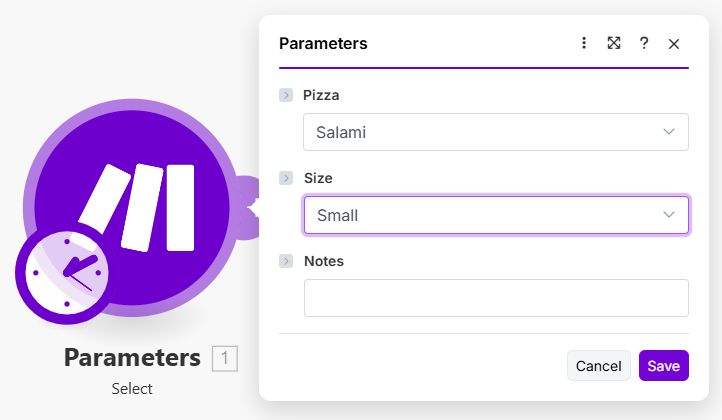
Use nested options to display a set of fields when an option is selected.

{% tabs %}
{% tab title="Appearance" %}

<div align="left"><figure><img src="https://1562974717-files.gitbook.io/~/files/v0/b/gitbook-x-prod.appspot.com/o/spaces%2FNS0mCBwODiYtOVXjc6qf%2Fuploads%2Fgit-blob-c8e0ab22073ae9e364cb3692741d5018823cbafa%2Fselect8.png?alt=media" alt="" width="542"><figcaption></figcaption></figure></div>
{% endtab %}

{% tab title="Source" %}

```json
[
	{
		"name": "pizza",
		"type": "select",
		"label": "Pizza",
		"options": {
			"store": [
				{
					"label": "Salami",
					"value": "salami"
				},
				{
					"label": "Margheritta",
					"value": "margheritta"
				},
				{
					"label": "Mexico",
					"value": "mexico"
				}
			],
			"nested": [
				{
					"name": "size",
					"type": "select",
					"label": "Size",
					"options": [
						{
							"label": "Small",
							"value": 32
						},
						{
							"label": "Large",
							"value": 45
						}
					]
				},
				{
					"name": "notes",
					"type": "text",
					"label": "Notes"
				}
			]
		}
	}
]
```

{% endtab %}
{% endtabs %}

### Nested fields for specific options

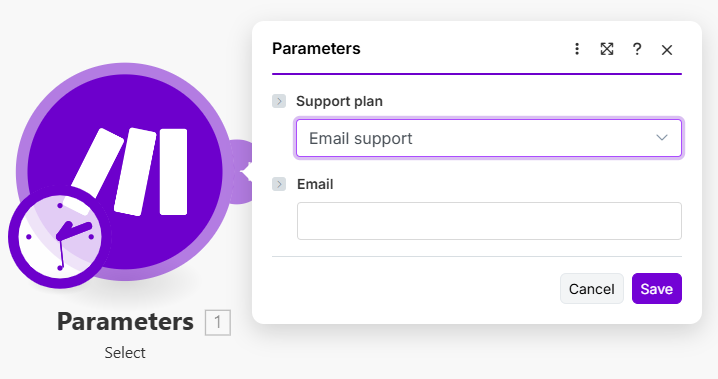
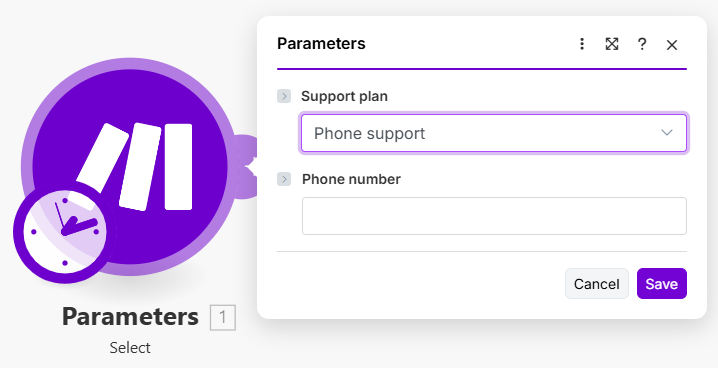
Display certain fields only when a specific option is selected. In this case, you can nest fields under a specific option.

{% tabs %}
{% tab title="Appearance" %}

<div align="left"><figure><img src="https://1562974717-files.gitbook.io/~/files/v0/b/gitbook-x-prod.appspot.com/o/spaces%2FNS0mCBwODiYtOVXjc6qf%2Fuploads%2Fgit-blob-421a674899a3d913b1036b10e82e684a3d91ddb8%2Fselect9a1.png?alt=media" alt="" width="539"><figcaption></figcaption></figure></div>

<div align="left"><figure><img src="https://1562974717-files.gitbook.io/~/files/v0/b/gitbook-x-prod.appspot.com/o/spaces%2FNS0mCBwODiYtOVXjc6qf%2Fuploads%2Fgit-blob-fc63526af292e443615c7d73aaecb5a5267da11b%2Fselect9a2.png?alt=media" alt="" width="539"><figcaption></figcaption></figure></div>
{% endtab %}

{% tab title="Source" %}

```json
[
	{
		"name": "plan",
		"type": "select",
		"label": "Support plan",
		"options": [
			{
				"label": "Email support",
				"value": "email",
				"nested": [
					{
						"type": "email",
						"label": "Email",
						"name": "email"
					}
				]
			},
			{
				"label": "Phone support",
				"value": "phone",
				"nested": [
					{
						"type": "text",
						"label": "Phone number",
						"name": "phone"
					}
				]
			}
		]
	}
]
```

{% endtab %}
{% endtabs %}

### Select under select

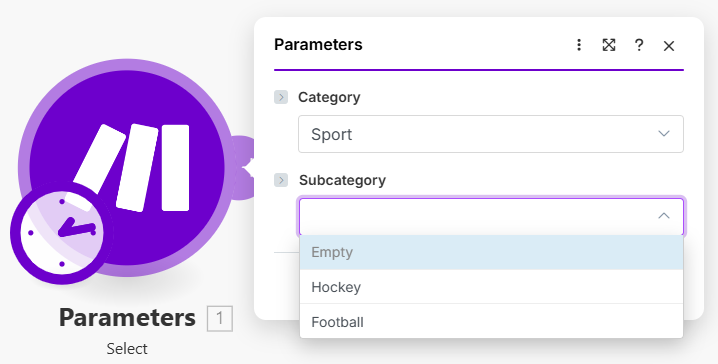
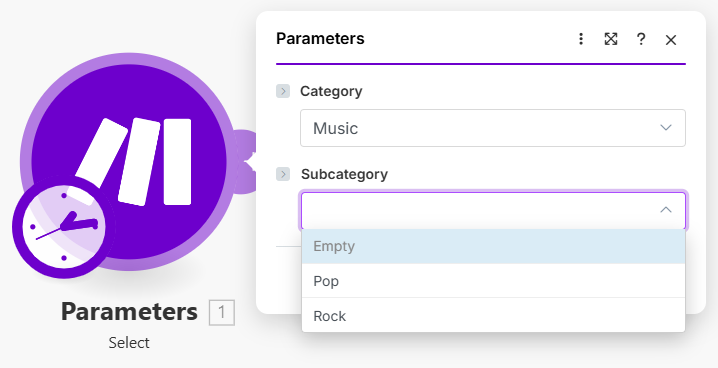
This is a special case of nested options that is used to specify a category and its subcategory.

{% tabs %}
{% tab title="Appearance" %}

<div align="left"><figure><img src="https://1562974717-files.gitbook.io/~/files/v0/b/gitbook-x-prod.appspot.com/o/spaces%2FNS0mCBwODiYtOVXjc6qf%2Fuploads%2Fgit-blob-b2a78abc3312edb55c8ae8011b3e2fbe7bffc2bf%2Fselect10a.png?alt=media" alt="" width="539"><figcaption></figcaption></figure></div>

<div align="left"><figure><img src="https://1562974717-files.gitbook.io/~/files/v0/b/gitbook-x-prod.appspot.com/o/spaces%2FNS0mCBwODiYtOVXjc6qf%2Fuploads%2Fgit-blob-ee193d22581d76f411ac745cc36de59ec44c7710%2Fselect10b.png?alt=media" alt="" width="539"><figcaption></figcaption></figure></div>
{% endtab %}

{% tab title="Source" %}

```json
[
	{
		"name": "category",
		"type": "select",
		"label": "Category",
		"options": {
			"store": [
				{
					"label": "Sport",
					"value": "sport",
					"nested": [
						{
							"type": "select",
							"label": "Subcategory",
							"name": "subcategory",
							"options": [
								{
									"label": "Hockey",
									"value": "hockey"
								},
								{
									"label": "Football",
									"value": "football"
								}
							]
						}
					]
				},
				{
					"label": "Music",
					"value": "music",
					"nested": [
						{
							"type": "select",
							"label": "Subcategory",
							"name": "subcategory",
							"options": [
								{
									"label": "Pop",
									"value": "pop"
								},
								{
									"label": "Rock",
									"value": "rock"
								}
							]
						}
					]
				}
			]
		}
	}
]
```

{% endtab %}
{% endtabs %}

### Mode edit as default

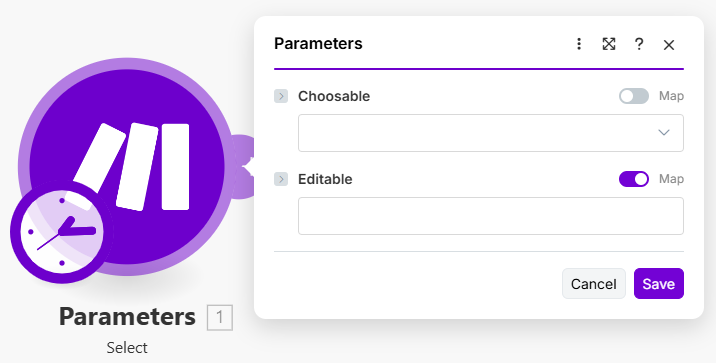
When your select is editable, you can set the default mode `edit`.

{% tabs %}
{% tab title="Appearance" %}

<div align="left"><figure><img src="https://1562974717-files.gitbook.io/~/files/v0/b/gitbook-x-prod.appspot.com/o/spaces%2FNS0mCBwODiYtOVXjc6qf%2Fuploads%2Fgit-blob-4b1082bbc9bbbb6e3b3bb361a22007807a7de63e%2Fselect11.png?alt=media" alt="" width="537"><figcaption></figcaption></figure></div>
{% endtab %}

{% tab title="Source" %}

```json
[
	{
		"name": "choosable",
		"type": "select",
		"label": "Choosable",
		"editable": true,
		"options": [
			{
				"label": "Option A",
				"value": "a"
			},
			{
				"label": "Option B",
				"value": "b"
			}
		]
	},
	{
		"name": "editable",
		"type": "select",
		"label": "Editable",
		"editable": true,
		"mode": "edit",
		"options": [
			{
				"label": "Option A",
				"value": "a"
			},
			{
				"label": "Option B",
				"value": "b"
			}
		]
	}
]
```

{% endtab %}
{% endtabs %}

### Nested RPCs

Nest RPCs when retrieving nested fields dynamically. The nested RPC receives the `id` parameter automatically.

{% tabs %}
{% tab title="Source" %}

```json
[
   {
       "name": "id",
       "type": "select",
       "mode": "edit",
       "options": {
           "store": "rpc://listBoards",
           "nested": [
               {
                   "name": "member_id",
                   "type": "select",
                   "label": "Member",
                   "options": "rpc://getMemberIdBoard",
                   "required": true
               }
           ]
       },
       "label": "Board ID",
       "required": true
   }
]
```

{% endtab %}
{% endtabs %}