> For the complete documentation index, see [llms.txt](https://developers.make.com/llms.txt). Markdown versions of documentation pages are available by appending `.md` to page URLs; this page is available as [Markdown](https://developers.make.com/custom-apps-documentation/app-components/webhooks/dedicated/not-attached.md).
# Not attached
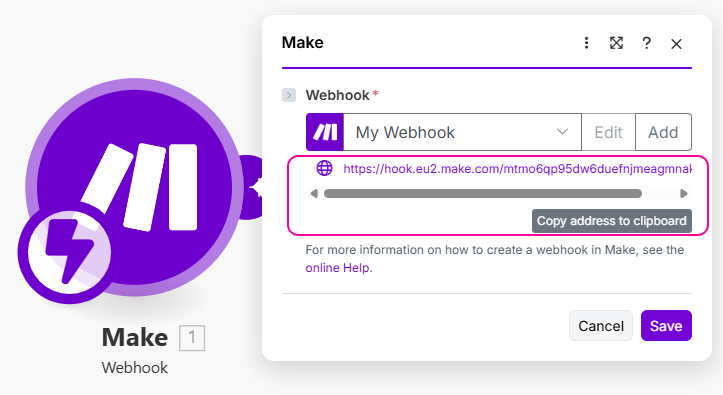
The new URL address for the webhook, created when a user opens the instant trigger and creates a new webhook, has to be registered manually by the user. The user needs to copy the URL address and paste it to the webhook configuration in the settings of the external platform.\
\
The main advantages of webhooks that are not attached when compared to the custom webhook module are:
* Improved UX
* Mapping is easier when you define an [interface](/custom-apps-documentation/component-blocks/interface.md).
* Ability to modify the output if needed, such as parsing dates in non-standard forms, or un-nesting parameters.
* Improved discoverability
* Easier for most users to notice as a viable option for their integrations.
If your intend to have your app approved by Make, you must provide instructions on how to connect the webhook. We recommend creating an [information banner](https://github.com/integromat/make-apps-sdk-docs/tree/master/best-practices/input-parameters/mappable-parameters/README.md#information-blue) in the [instant trigger's static parameters](https://github.com/integromat/make-apps-sdk-docs/tree/master/app-components/modules/instant-trigger/README.md):
{% tabs %}
{% tab title="Static parameters" %}
```json
[
{
"type": "banner",
"title": "How to connect this webhook",
"text": "Replace this text with instructions on how to paste the generated webhook URL into your service's webhook settings.",
"theme": "info"
}
]
```
{% endtab %}
{% endtabs %}
Most webhooks that can't be attached automatically should not have a connection linked to them. However, there are a few notable exceptions where you might still need it:
* One or more [RPCs](/custom-apps-documentation/app-components/rpcs.md) are used in the parameters of the webhook.
* One or more [RPCs](/custom-apps-documentation/app-components/rpcs.md) are used in the instant trigger module.
* One or more additional requests are defined in the instant trigger communication (for example, a webhook that sends only a resource ID with a request to retrieve the actual data for that resource).
---
# Agent Instructions
This documentation is published with GitBook. GitBook is the documentation platform designed so that both humans and AI agents can read, navigate, and reason over technical content effectively. Learn more at gitbook.com.
## Querying This Documentation
If you need additional information that is not directly available in this page, you can query the documentation dynamically by asking a question.
Perform an HTTP GET request on the current page URL with the `ask` query parameter, and the optional `goal` query parameter:
```
GET https://developers.make.com/custom-apps-documentation/app-components/webhooks/dedicated/not-attached.md?ask=&goal=
```
`ask` is the immediate question: it should be specific, self-contained, and written in natural language.
`goal` is optional and describes the broader end goal you are ultimately trying to accomplish on behalf of the user. GitBook uses it to tailor the answer towards what is most useful for that goal.
The response will contain a direct answer to the question and relevant excerpts and sources from the documentation.
Use this mechanism when the answer is not explicitly present in the current page, you need clarification or additional context, or you want to retrieve related documentation sections.