> For the complete documentation index, see [llms.txt](https://developers.make.com/llms.txt). Markdown versions of documentation pages are available by appending `.md` to page URLs; this page is available as [Markdown](https://developers.make.com/custom-apps-documentation/app-components/iml-functions/dynamic-mappable-parameters.md).

# Dynamic mappable parameters

Some APIs rely heavily on custom objects, with fields defined by the user. These can vary from one project/workspace/user to another, so in these cases you might need to define the mappable parameters dynamically, using metadata endpoints that define the objects the API expects. In some cases, these fields may also have different types than the ones supported in Make.

Some API examples are Monday, Asana, Jira, NocoDB, Notion, among many others.

In these cases, you must define the mappable parameters with the help of an RPC, and if the types differ from Make types, you also need to implement a custom IML function that will act as a sort of conversion table. This conversion table has a list of API formats and their equivalents in Make.

For example, when the API returns a field of type `single_line_text`, it is in Make as `text`. You can also use additional parameters available from the metadata request, such as whether the parameter is mandatory or optional, what are available options in selects, etc.

{% tabs %}
{% tab title="Fields in API example" %}
{% code overflow="wrap" %}

```json
{
  "data": {
    "fields": [
      {
        "id": "1",
        "name": "Birthday",
        "type": "anniversary",
        "position": 0,
        "mandatory": false,
        "reminder_days": 0
      },
      {
        "id": "2",
        "name": "CF Single Line Text",
        "type": "single_line_text",
        "position": 1,
        "mandatory": false
      },
      {
        "id": "3",
        "name": "CF Multi Line Text",
        "type": "multi_line_text",
        "position": 2,
        "mandatory": false
      },
      {
        "id": "4",
        "name": "CF Number",
        "type": "number",
        "position": 3,
        "mandatory": false
      },
      {
        "id": "5",
        "name": "CF Dropdown",
        "type": "select_box",
        "position": 4,
        "mandatory": false,
        "choices": [
          "a",
          "b",
          "c"
        ]
      },
      {
        "id": "6",
        "name": "CF Date",
        "type": "date",
        "position": 5,
        "mandatory": false
      },
      {
        "id": "7",
        "name": "CF Checkbox",
        "type": "multiple_choice",
        "position": 6,
        "mandatory": false,
        "choices": [
          "1",
          "2",
          "3"
        ]
      }
    ]
  }
}
```

{% endcode %}
{% endtab %}

{% tab title="Communication" %}

```json
{
    "url": "/contacts",
    "method": "POST",
    "body": "{{parameters}}",
    "response": {
        "output": "{{body}}"
    }
}
```

{% endtab %}

{% tab title="Mappable parameters" %}

<pre class="language-json"><code class="lang-json"><strong>[
</strong><strong>    "rpc://getFields"
</strong><strong>]
</strong></code></pre>

{% endtab %}

{% tab title="RPC" %}

```json
{
    "url": "/fields",
    "method": "GET",
    "qs": {
        "per_page": 100  
    },
    "response": {
        "output": "{{dynamicFields(body.data.fields)}}"
    }
}
```

{% endtab %}
{% endtabs %}

{% tabs %}
{% tab title="IML function example" %}

```javascript
function dynamicFields(fields) {

    let arr = [];

    if(!fields) return;

    fields.forEach(item => {
        let obj = {};
        let key = item.custom_field;
        obj.name = key.id;
        obj.label = key.name;

        obj.required = key.mandatory;

        switch (key.type) {
            case "anniversary":
            case "date":
                obj.type = 'date';
                break;
            case "multi_line_text": //multi line text
                obj.multiline = true;
            case "single_line_text": //single line text
                obj.type = 'text';
                break;
            case "number":
                obj.type = 'number';
                break;
            case "multiple_choice": //multiple choice
                obj.multiple = true;
            case "select_box": //single choice
                obj.type = 'select';
                obj.options = key.choices.map(option => {
                    let obj = {};
                    obj.label = option;
                    obj.value = option;
                    return obj;
                });
                break;
           
            default:
                return;
        }
        arr.push(obj);
    });

    return {
        name: "data",
        label: "Data",
        type: "collection",
        spec: arr
    };

}
```

{% endtab %}
{% endtabs %}

{% tabs %}
{% tab title="Occurrence in a module" %}

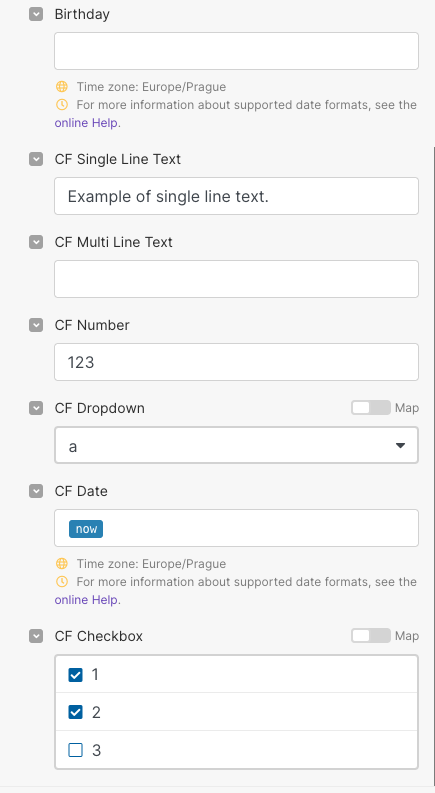
<div align="left"><figure><img src="/files/EwflE69Hc3TRgcUblknz" alt="" width="326"><figcaption><p>Example of dynamic mappable parameters</p></figcaption></figure></div>
{% endtab %}

{% tab title="Request" %}

```json
{
    "2": "Example of single line text.",
    "4": 123,
    "5": "a",
    "6": "2022-09-20T17:42:31.792Z",
    "7": [
        "1",
        "2"
    ]
}
```

{% endtab %}
{% endtabs %}


---

# Agent Instructions
This documentation is published with GitBook. GitBook is the documentation platform designed so that both humans and AI agents can read, navigate, and reason over technical content effectively. Learn more at gitbook.com.

## Querying This Documentation
If you need additional information that is not directly available in this page, you can query the documentation dynamically by asking a question.

Perform an HTTP GET request on the current page URL with the `ask` query parameter, and the optional `goal` query parameter:

```
GET https://developers.make.com/custom-apps-documentation/app-components/iml-functions/dynamic-mappable-parameters.md?ask=<question>&goal=<endgoal>
```

`ask` is the immediate question: it should be specific, self-contained, and written in natural language.
`goal` is optional and describes the broader end goal you are ultimately trying to accomplish on behalf of the user. GitBook uses it to tailor the answer towards what is most useful for that goal.

The response will contain a direct answer to the question and relevant excerpts and sources from the documentation.

Use this mechanism when the answer is not explicitly present in the current page, you need clarification or additional context, or you want to retrieve related documentation sections.
