# Parameter labels

Static and mappable parameter labels should be clear and easy for users to understand. Consider the following when creating labels:

* Give a short description (1–3 words) of the requested input.
* Match the terminology that users see in the third-party’s UI, not the API documentation.
* Be descriptive, not instructional. If the selection needs more explanation, include information in the help text below the field.
* Use [sentence case capitalization](https://apastyle.apa.org/style-grammar-guidelines/capitalization/sentence-case). The following should be capitalized:
  * The first word of the label
  * Proper nouns and trademarks. For example, names of people, companies, products, or other proper nouns
  * Official or trademarked terms
  * Acronyms. For example, Content ID, File URL
* Avoid punctuation and articles (the, an, a).
* Use plain terms rather than API formats.

## Parameter label examples <a href="#capitalization" id="capitalization"></a>

<table><thead><tr><th width="152.4444580078125" valign="top">Correct</th><th width="198.3333740234375" valign="top">Incorrect</th><th valign="top">Note</th></tr></thead><tbody><tr><td valign="top">Custom data parameters</td><td valign="top">The Custom Data Parameters</td><td valign="top"><p>First word capitalized, the rest in lowercase.</p><p>Do not use the article ‘the’.</p></td></tr><tr><td valign="top">Submit form</td><td valign="top">Submit Form</td><td valign="top">First word capitalized, the rest in lowercase.</td></tr><tr><td valign="top">New Instagram account name</td><td valign="top">New instagram account name</td><td valign="top">Instagram is a proper noun, remains capitalized.</td></tr><tr><td valign="top">Google Drive folder</td><td valign="top">Google drive folder</td><td valign="top">Google Drive is a proper noun, remains capitalized.</td></tr><tr><td valign="top">Content ID</td><td valign="top">Content id</td><td valign="top">ID is an acronym and remains capitalized.</td></tr><tr><td valign="top">Product API key</td><td valign="top">Product API Key</td><td valign="top">API is an acronym and remains capitalized. Key is lowercase.</td></tr><tr><td valign="top">Website URL</td><td valign="top">Website url</td><td valign="top">URL is an acronym and remains capitalized.</td></tr><tr><td valign="top">ID finder</td><td valign="top">ID Finder</td><td valign="top">ID is an acronym and the first word in the label.</td></tr><tr><td valign="top">User ID</td><td valign="top">userID or user_id</td><td valign="top">userID or user_ID are in an API format.</td></tr></tbody></table>

{% hint style="info" %}
Mappable parameter labels should match the [output labels](https://developers.make.com/custom-apps-documentation/best-practices/naming-conventions/output-labels) for consistency and clarity so it is easy for users to understand their data and confidently map values between different modules. Output labels and mappable parameters should be listed in the same order in both locations.
{% endhint %}

## Parameter label for fields with a Map toggle

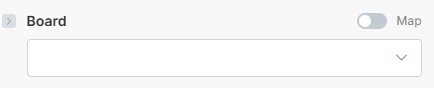
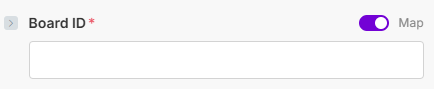
For select fields, the label of the field should be dependent on whether the Map toggle is ON or OFF by default.

If the **Map toggle is ON** by default, the field label **should contain "ID"**.

<div align="left"><figure><img src="https://1562974717-files.gitbook.io/~/files/v0/b/gitbook-x-prod.appspot.com/o/spaces%2FNS0mCBwODiYtOVXjc6qf%2Fuploads%2Fgit-blob-b46e58bedeff81b7c3c5e88ceb4e19e3f4bd24ff%2Fparameterlabels_mapped.png?alt=media" alt="" width="326"><figcaption></figcaption></figure></div>

If the **Map toggle is OFF** by default, the field label **should NOT contain "ID"**.

<div align="left"><figure><img src="https://1562974717-files.gitbook.io/~/files/v0/b/gitbook-x-prod.appspot.com/o/spaces%2FNS0mCBwODiYtOVXjc6qf%2Fuploads%2Fgit-blob-63b99254ee4819abc21a0bc3a8c0720e9edc0e7a%2Fparameterlabels_notmapped.png?alt=media" alt="" width="326"><figcaption></figcaption></figure></div>