# Write IML tests

You can write tests for your custom IML functions. Use the `it` function and `asserts`.

{% tabs %}
{% tab title="Example function" %}

```javascript
function formatUsername(user) {
    if (!user || !user.firstName || !user.lastName) {
        return null;
    }
    return `${user.firstName} ${user.lastName}`;
}
```

{% endtab %}

{% tab title="Test for the function, two blocks" %}

```javascript
it("should format full name correctly", () => {
    const user = { firstName: "Jane", lastName: "Doe" };
    const result = formatUsername(user);
    assert.strictEqual(result, "Jane Doe");
});

it("should return null if last name missing", () => {
    const user = { firstName: "Jane" };
    const result = formatUsername(user);
    assert.strictEqual(result, null);
});
```

{% hint style="info" %}
The `it` function accepts exactly two parameters, the name of the test and the code to run. In this code, we can verify expected outputs using `assert.ok()` function.
{% endhint %}
{% endtab %}
{% endtabs %}

{% hint style="info" %}
When using IML functions that work with date and time, remember to set the correct `timezone` in extension settings. The accepted format is the [international time zone format](https://en.wikipedia.org/wiki/List_of_tz_database_time_zones).

*For example "Europe/Prague"*
{% endhint %}

### Common asserts functions

<table><thead><tr><th width="388.4444580078125" valign="top">Function</th><th valign="top">Description</th></tr></thead><tbody><tr><td valign="top"><code>assert.ok(value)</code></td><td valign="top">Passes if value is truthy.</td></tr><tr><td valign="top"><code>assert.strictEqual(actual, expected)</code></td><td valign="top">Passes if actual === expected.</td></tr><tr><td valign="top"><code>assert.deepStrictEqual(actual, expected)</code></td><td valign="top">Passes if objects or arrays are deeply equal.</td></tr><tr><td valign="top"><code>assert.notStrictEqual(actual, expected)</code></td><td valign="top">Passes if values are not strictly equal.</td></tr><tr><td valign="top"><code>assert.throws(fn, [error])</code></td><td valign="top">Passes if the function throws an error.</td></tr><tr><td valign="top"><code>assert.doesNotThrow(fn)</code></td><td valign="top">Passes if the function does not throw an error.</td></tr><tr><td valign="top"><code>assert.match(string, regex)</code></td><td valign="top">Passes if the string matches the regex.</td></tr><tr><td valign="top"><code>assert.doesNotMatch(string, regex)</code></td><td valign="top">Passes if the string does not match the regex.</td></tr></tbody></table>

## Run a test

To run a test on a specific function, right-click the function name in the tree and select **Run IML test.**

<div align="left"><img src="/files/kSk7khFcNk4lLTjBrUGy" alt="Run IML test option" width="563"></div>

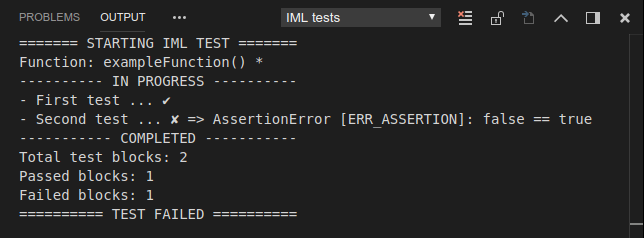
The test starts and the output is in the **IML tests** output channel.

<div align="left"><img src="/files/RpXvUeGBWiS4dg3Qq7LW" alt="" width="563"></div>


---

# Agent Instructions: Querying This Documentation

If you need additional information that is not directly available in this page, you can query the documentation dynamically by asking a question.

Perform an HTTP GET request on the current page URL with the `ask` query parameter:

```
GET https://developers.make.com/custom-apps-documentation/get-started/make-apps-editor/apps-sdk/iml-tests.md?ask=<question>
```

The question should be specific, self-contained, and written in natural language.
The response will contain a direct answer to the question and relevant excerpts and sources from the documentation.

Use this mechanism when the answer is not explicitly present in the current page, you need clarification or additional context, or you want to retrieve related documentation sections.